
VENTIDRIVE
24 CHANNEL LED DIMMER
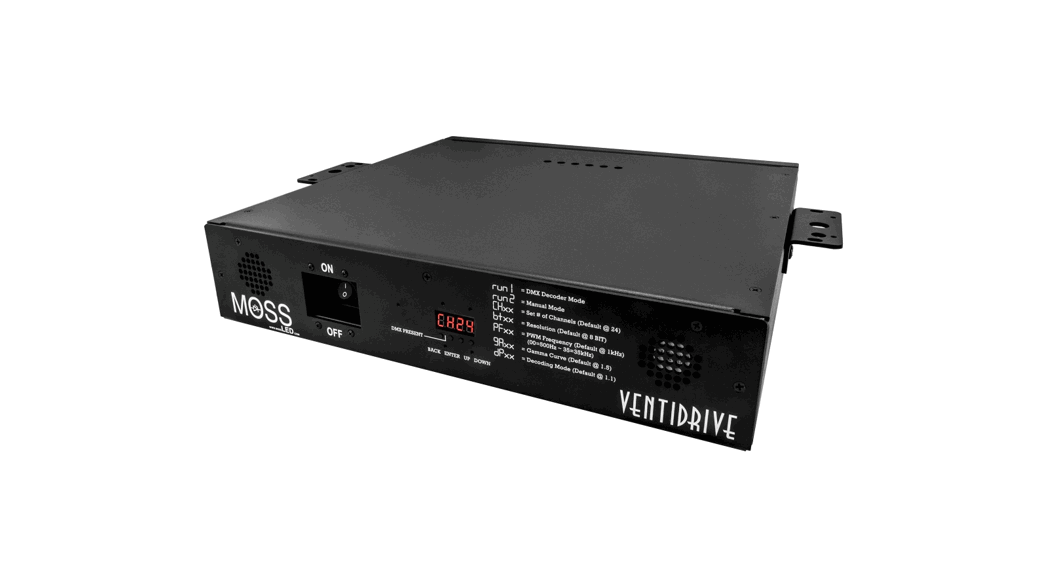
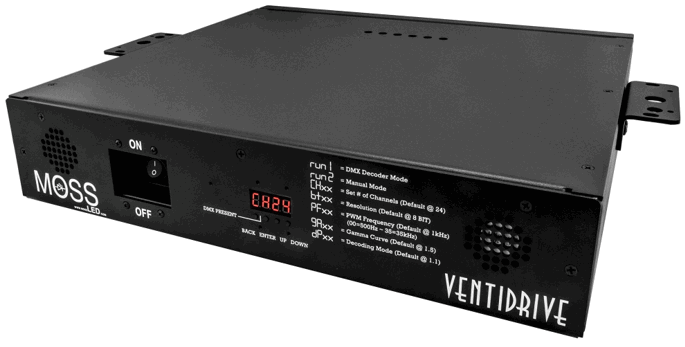
The VentiDrive is a 24 channel LED dimmer with 1200 watts of output capacity.
Its design allows for fast Plug’n’Play connectivity and allows you to be up and running in no time. It features precision dimming from 0 – 100%, 8-bit or 16-bit modes, PWM frequency adjustment from 500Hz to 35kHz, full manual control, and dimming curve adjustments.
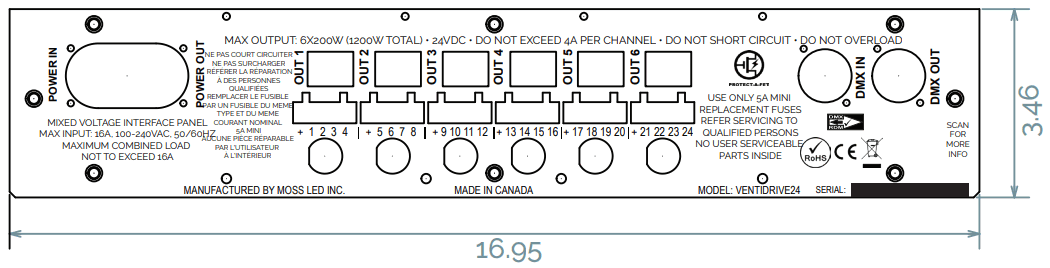
1. Brought back Terminal Block DMX I/O 2. PWM Frequency adjustable via RDM Each channel has a maximum power output of 4A (96 watts @ 24VDC or 48 Watts @ 12VDC) to a maximum of 8.3A (200 watts @24VDC or 16A @ 12VDC). The VentiDrive is available in either 12VDC or 24VDC models. Its rugged chassis is capable of being hung via clamps, mounted in a rack, stacked on top of each other, or screwed into a wall. This allows it to be placed in almost any location. Industry-standard 5-position terminal plugs allow for universal connectivity to as many LED products as possible. TRUE1 connectors & auto-switching internal power supplies allow for power input from 90 – 250VAC. Whisper-quiet 16dB fans keep the unit cool in any location and to top it all off the VentiDrive can be remotely addressed via RDM. Delivering 50A @ 24VDC or 100A @ 12VDC this is the most powerful LED dimmer on the market!
 | Input 14A 115VAC /7A 230VAC 90-305VAC-50-60Hz |  | Output 24 x 24V DC @ 4A/Channel (50A max) 24 X 12VDC @ 4A/Channel (80A max) |
 | Over Current Protection |  | Over Temperature Protection |
 | Over Voltage Protection |  | Dimensions L 433 mm 16.95” W 381 mm 15.75” H 88.1 mm 3.46’’ |
 | Rack Mount or Wall Mount Movable Rack Ears: Front & Top | 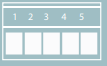 | DC OUTPUT – 5 POSITION TERMINAL BLOCK 1 COMMON 2 CHANNEL 1 3 CHANNEL 2 4 CHANNEL 3 5 CHANNEL 4 |
 | Plug n’ Play Locking True |  | Protect-A-FET |
 | Weight 10.98 kg 24.2 Lb |  | Stackable & Hangable Rubber feet on the bottom for stacking Holes on rack ears allow for clamps & safety chain locations |
 | AC OUTPUT – TRUE1 NEUTRIK CONNECTOR 1 Neutral 2 Live 3 Ground |  | PWM Frequency Adjustable between 500Hz – 35kHz |
 | Overload |  | Fuse Protection |
 | Short Circuit Protection |  | Certified |
 | Temperature Range – 40°C to +90°C |

DO NOT install with power applied to the device.
DO NOT expose the device to excessive moisture.
Indoor use only.
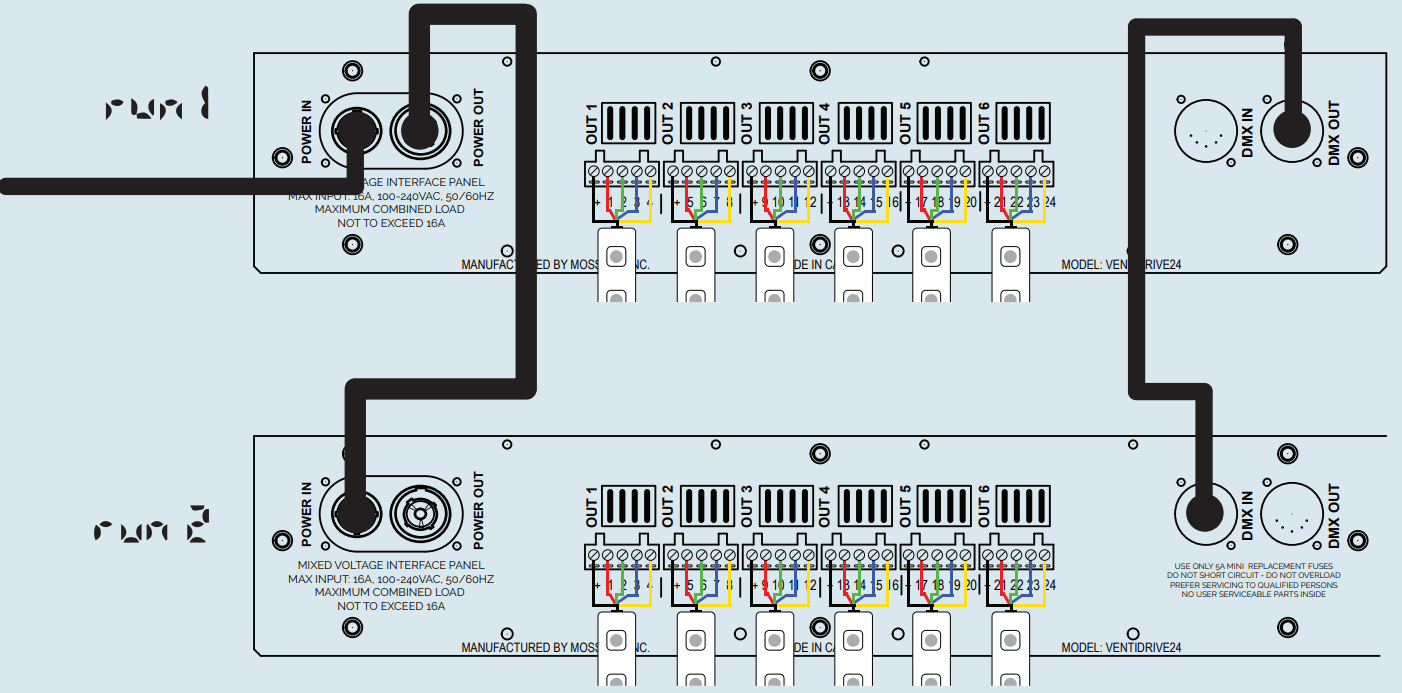
WIRING DIAGRAM
Master Mode
Decoder Mode
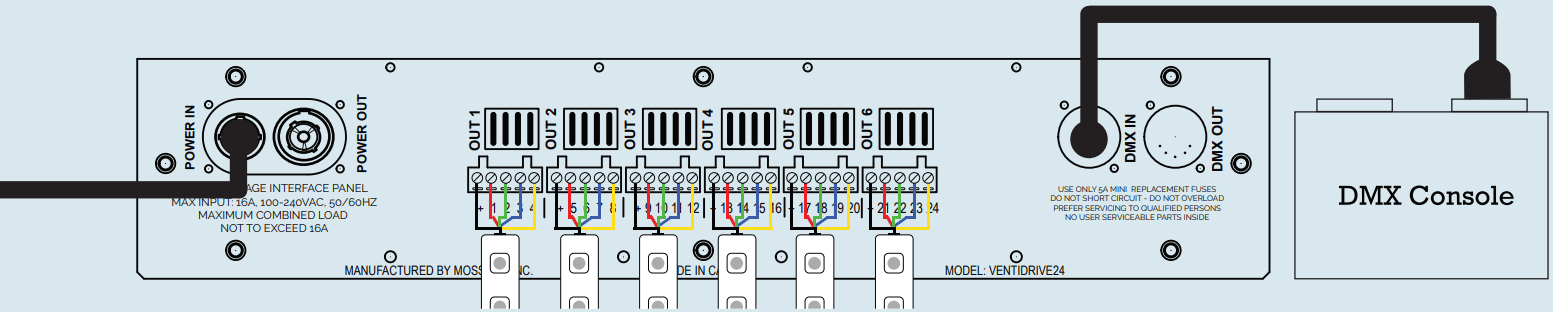
Prior to adjusting any values please decide if you would like to operate in DMX mode or Manual mode. DMX mode is run 1 and Manual mode is run 2. DMX mode operates in conjunction with a device that outputs DMX. Please connect the device via the XLR ports. In Manual mode, the unit can be controlled via the onboard LCD read-out. Any settings manually selected will also output DMX values downstream to other connected devices. To switch between run1 and run2 mode you must select the mode and then you will see the new set of menu options. Older firmware versions require the unit be powered off and turned back on again in order to switch between run1 and run2 modes
DMX Mode (Decoder Mode) 
Using the “Up/DOWN” buttons you can cycle through the following menus.
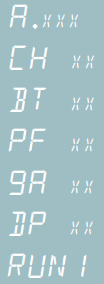 DMX address 1 to 507, default set to 001. The decimal after the “A” indicates receiving a DMX signal.
DMX channel quantity, a default set to CH24
Bit resolution 8bit/16bit, default set to 16bit
PWM frequency 500Hz to 35KHz, default set to 10kHz. For most camera settings please set it to 10kHz.
Dimming gamma curve value, a default set to1.5
Decoding mode, a default set to dP1.1
Switch between DMX Mode and Manual Mode. Power cycle the unit to complete the mode change.
Manual Mode (Master Mode) 
To enter Manual Mode use the “UP/DOWN” and set to “ ” press “ENTER” then with the “UP” button set to “  ”. Press “BACK” to confirm.
The following menu will appear.
 Chasing effects. 4 effets to choose from.
 Program speed 1 to 9
 Manual control over channels 1 to 24 from 00 to FL Switch between DMX Mode and Manual Mode. Power cycle the unit to complete the mode change. Newer firmware versions do not require a power cycle.
- Set DMX Address (Can be adjusted remotely via RDM)
To set the DMX address select menu , press “ENTER” the display will flash.
Press “UP/DOWN” to set the DMX address. Press “BACK” to confirm. - Set Channel Quantity (DMX Footprint)
Select menu CH xx, press “ENTER” the display will flash. Press “UP/DOWN” and set the DMX channel quantity. Press “BACK” to confirm.
Example: DMX address is set to 001.
CH01 : Footprint DMX = 1 (One DMX address for all the output channels)
CH04 : Footprint DMX = 4 (Four DMX addresses 001, 002, 003, 004, etc. grouped together)
CH24 : Footprint DMX = 24 (24 DMX addresses. Factory Default. Output 1-24 is address 001-024 respectively.) - Resolution
Select menu , press “ENTER” the display will flash. Press “UP/DOWN” to choose 8bit or 16bit. Press “BACK” to confirm.
 - PWM Frequency (Can be adjusted remotely via RDM – Firmware V1.1)
Select menu , press “ENTER” the display will flash. Press “UP/DOWN” to choose from 00 to 35. Press “BACK” to confirm. The default mode is 10 kHz. Please set it to 10kHz for flicker free use.
00 = 500Hz
01 = 1KHz
02 = 2KHz03 = 3KHz
04 = 4KHz
05 = 5KHz06 = 6KHz
07 = 7KHz
08 = 8KHz09 = 9KHz
10 = 10KHz
12 = 12kHz14 = 14KHz
16 = 16KHz
18 = 18KHz20 = 20KHz
25 = 25KHz
30 = 30KHz35 = 35KHz - Gamma Curve Value
Select menu , press “ENTER” the display will flash.
Press “UP/DOWN” to choose 0.1 to 9.9. Press “BACK” to confirm. *Gamma adjusts the dimming curve of the unit so you can have an extremely high-resolution low end or an extremely high-resolution high end.
 - RDM Functions
The data definitions for strobe channel are as follows:
{0, 7}, //undefined
{8, 65},//slow strobe ->fast strobe
{66, 71},//undefined
{72, 127},//slow push fast close
{128, 133},//undefined
{134, 189},//slow close fast push
{190, 195},//undefined
{196, 250},//random strobe
{251, 255},//undefined
The supported RDM PIDs are as follows:DISC_UNIQUE_BRANCH
DISC_MUTE
DISC_UN_MUTE
DEVICE_INFO
DMX_START_ADDRESS
IDENTIFY_DEVICE
SOFTWARE_VERSION_LABEL
DMX_PERSONALITY
DMX_PERSONALITY_DESCRIPTION
SLOT_INFOSLOT_DESCRIPTION
MANUFACTURER_LABEL
SUPPORTED_PPARAMETERS
CURVE 0x0343
CURVE_DESCRIPTION 0x0344
MODULATION_FREQUENCY 0x0347
MODULATION_FREQUENCY 0x0348 - Factory Default Settings
Restore to Factory Default Settings
Press and hold down both “Menu” & “Enter” keys until the digital display turns off, then release the keys.
The system will reset and the digital display will turn on again. All settings will be restored to factory default.
Factory default settings are:
DMX Address Code: A001
DMX Address Quantity: SW1=0: ch24, SW1=1: ch01
PWM Resolution Mode: BT 16
PWM Frequency: PF 10
Gamma: GA 1.5
Decoding Mode: DP 1.1 - Decoding Mode
Select menu , press “ENTER” the display will flash. Press “UP/DOWN” to choose the decoding mode.
Press “BACK” to confirm. The default mode is 1.1. Please refer to the chart on the back page for more details.
dp 1.1 = DMX Channel 1 = Output 1. DMX footprint is 24 channels.
dp 2.1 = True 16 bit dimming mode. DMX footprint is 48 channels.
dp 3.2 = Combines two Outputs on DMX channels 1, 4, 7, 10, 13, 16, 19, 22, 25, 28, 31, 34. DMX footprint is 36 channels.
dp 3.4 = Combines 4 Outputs on DMX channels 1, 4, 7, 10, 13, 16. DMX footprint is 18 channels.
dp 4.3 = Combines 3 Outputs on DMX channels 1, 5, 9, 13, 17, 21, 25, 29. DMX footprint is 32 channels.
dp 5.3 = Multiple Combinations of Outputs & strobe functions. DMX footprint is 40 channels.
dp 5.4 = Combines 4 Outputs on DMX channels 1, 6, 11, 16, 21, 26. DMX footprint is 30 channels.
dp 6.4 = Multiple Combinations of Outputs & strobe functions. DMX footprint is 36 channels.
dp 8.6 = Multiple Combinations of Outputs & strobe functions. DMX footprint is 32 channels.
dp 9.6 = Multiple Combinations of Outputs & strobe functions. DMX footprint is 36 channels.
 , press “ENTER” the display will flash.
 , press “ENTER” the display will flash. Press “UP/DOWN” to choose 8bit or 16bit. Press “BACK” to confirm.
 , press “ENTER” the display will flash. Press “UP/DOWN” to choose from 00 to 35. Press “BACK” to confirm. The default mode is 10 kHz. Please set it to 10kHz for flicker free use.
 , press “ENTER” the display will flash.
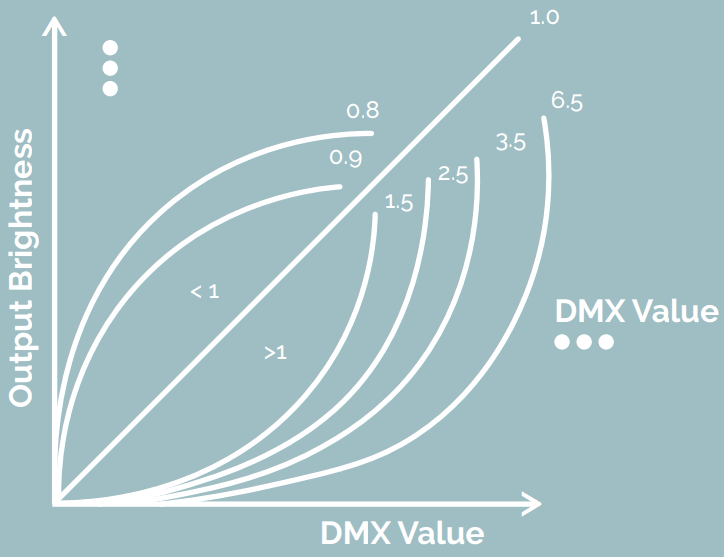 *Gamma adjusts the dimming curve of the unit so you can have an extremely high-resolution low end or an extremely high-resolution high end.
 , press “ENTER” the display will flash. Press “UP/DOWN” to choose the decoding mode.
DECODING PROGRAM MODE
DMX CHANNEL | FACTORY DEFAULT STANDARD 8-BIT | TRUE 16-BIT | 24 CHANNEL OUTPUT MODE. DECODING MODE VARIATIONS | |||||||
| dp 1.1 | dp 2.1 | dp 3.2 | dp 3.4 | dp 4.3 | dp 5.3 | dp 5.4 | dp 6.4 | dp 8.6 | dp 9.6 | |
| 01 | Output 1 dim | Output 1 dim | Output 1, 2 dim | Output1.2. 3, 4 dim | Output s. 2 .3 dim | Output 1, 2, 3 dim | Output1, 2, 3, 4 dim | Output1, 2, 3, 4 dim | Output1, 2, 3, 4 dim | Output1, 2, 3, 4 dim. |
| 02 | Output 2 dim | output 1 fine dim | Output 1 dim | Output 1.3 dim | Output 1 dim | Output 1 dim | Output 1 dim | Output 1 dim | Output 1 dim | Output 1 dim |
| 03 | Output 3 dim | Output 2 dim | Output 2 dim | Output 2.4 dim | Output 2 dim | Output 2 dim | Output 2 dim | Output 2 dim | Output 2 dim | Output 2 dim |
| 04 | Output 4 dim | Output 2 fine dim | Output 3, 4 dim | Output 5, 6, 7, 8 dim | Output 3 dim | Output 3 dim | Output 3 dim | Output 3 dim | Output 3 dim | Output 3 dim |
| 05 | Output 5 dim | Output 3 dim | Output 3 dim | Output 5, 7 dim | Output 4, 5, 6 dim | Output 1, 2, , 3 strobe | Output 4 dir. | Output 4 dim | Output 4 dim | Output 4 dim |
| 06 | Output 6 dim | Output 3 fine dim | Output 4 dim | Output 6.8 dim | Output 4 dim | Output 4, 5, 6 dim | Output 5, 6, 7, 8 dim | Output 1, 2, 3, 4 dim | Output 5, 6 dim | Output 5, 6 dim |
| 07 | Output 7 dim | Output 4 dim | Output 5, 6 dim | Output 9, 10, 11, 12 dim | Output 5 dim | Output 4 dim | Output 5 dim | Output 5, 6, 7, 8 dim | Output 5 dim | Output 5 dim |
| 08 | Output 8 dim | Output 4 fine dim | Output 5 dim | Output 9, n dim | Output 6 dim | Output 5 dim | Output 6 dim | Output 5 dim | Output 6 dim | Output 6 dim |
| 09 | Output 9 dim | Output 5 dim | Output 6 dim | Output 10, 12 dim | Output 7, 8 ,9 dim 8 .9 dim | Output 6 dim | Output 7 dim | Output 6 dim | Output 7, 8, 9, 10 dim | Output 1, 2, 3. 4, 5, 6 strobe |
| 10 | Output to dim | output 5 fine dim | Output 7, 8 dim | Output 13, 14, 15, 16 dim | Output 7 dim | output 4. 5 .6 strobe | Output 8 dim | Output 7 dim | Output 7 dim | Output 7, 8 9, 10 dim |
| 11 | Output n dim | Output 6 dim | Output 7 dim | Output 13.16 dim | Output 8 dim | Output 7.8 .9 dim | Output 9, 10 11, 12 dim | Output 8 dim | Output 8 dim | Output 7 dim |
| 12 | Output 12 dim | output 6 fine dim | Output 8 dim | Output 14, 16 dim | Output 9 dim | Output 7 dim | Output g dim | Output 5, 6 7, 8 strobe | Output 9 dim | Output 8 dim |
| 13 | Output 13 dim | Output 7 dim | Output 9, 10 dim | Output 17, 18, 19, 20 dim | Output 10 11, 12 dim | Output 8 dim | Output 10 dim | Output 9, 10 11, 12 dim | Output 10 dim | Output 9 dim |
| 14 | Output 14 dim | Output 6 fine dim | Output 9 dim | Output 17, 19 dim | Output 10 dim | Output 9 dim | Output 11 dim | Output 9 dim | Output 10, 11 dim | Output 10 dim |
| 15 | Output 15 dim | Output 8 dim | Output 10 dim | Output 18, 20 dim | Output 11 dim | Output 7, 8, 9 strobe | Output 12 dim | Output 10 dim | Output 11 dim | Output 11, 12 dim |
| 16 | Output 16 dim | Output 8 fine dim | Output 11, 22 dim | Output 21, 22, 23, 24 dim | Output 12 dim | Output 10, 11, 12 dim | Output 13, 14, 15, 16 dim | Output 11 dim | Output 12 dim | Output 11 dim |
| 17 | Output 17 dim | Output 9 dim | Output 11 dim | Output 21, 23 dim | Output 13, 14, 15 dim | Output 10 dim | Output 13 dim | Output 12 dim | Output 13, 14, 15, 16 dim. | Output 12 dim |
| 18 | Output 18 dim | Output 9 fine dim | Output 12 dim | Output 22, 24 dim | Output 13 dim | Output 11 dim | Output 14 dim | Output 9, 10, 11, 12 strobe | Output 13 dim | Output 7, 8, 9, 10, 11, 12 strobe |
| 19 | Output 19 dim | Output 10 dim | Output 13, 14 dim | Output 14 dim | Output 12 dim | Output 15 dim | Output 13.14 15, 16 dim | Output 14 dim | Output 13, 14, 15, 16 dim | |
| 20 | Output 20 dim | Output 10 fine dim | Output 13 dim | Output 15 dim | Output 10 11, 12 strobe | Output 16 dim | Output 13 dim | Output 15 dim | Output 13 dim | |
| 21 | Output 21 dim | Output 11 dim | Output 14 dim | Output 16, 17, 18 strobe | Output 13, 14, 15 dim | Output 17, 18, 19, 20 strobe | Output 14 dim | Output 16 dim | Output 14 dim | |
| 22 | Output 22 dim | Output 11 fine dim | Output 15, 16 dim | Output 16 dim | Output 13 dim | Output 17 dim | Output 15 dim | Output 17, 18 dim | Output 15 dim | |
| 23 | Output 23 dim | Output 12 dim | Output 15 dim | Output 17 dim | Output 14 dim | Output 18 dim | Output 16 dim | Output 17 dim | Output 16 dim | |
| 24 | Output 24 dim | Output 12 fine dim | Output 16 dim | –, | Output 18 dim | Output 15 dim | Output 19 dim | Output 13, 14, 15, 16 dim | Output 18 dim | Output 17, 18 dim |
| 25 | Output 13 dim | Output 17, 18 dim | Output 19, 20, 21 dim | Output 13, 14, 15 strobe | Output 20 dim | Output 17, 18, 19, 20 dim | Output 19, 20, 21 , 22 dim | Output 17 dim | ||
| 26 | Output 13 fine dim | Output 17 dim | Output 20 dim | Output 16, 17, 18 | Output 21, 22, 23, 24 dim | Output 17 dim | Output 19 dim | Output 18 dim | ||
| 27 | Output 14 dim | Output 18 dim | Output 21 dim | Output 16 dim | Output 21 dim | Output 18 dim | Output 20 dim | Output 13, 14, 15, 16, 17, 18 strobe | ||
| 28 | Output 14 fine dim | Output 19, 20 dim | Output 22 dim | Output 17 dim | Output 22 dim | Output 19 dim | Output 21 dim | Output 19, 20, 21, 22 dim | ||
| 29 | Output 15 dim | Output 19 dim | Output 22, 23, 24 dim | Output 18 dim | Output 23 dim | Output 20 dim | Output 22 dim | Output 19 dim | ||
| 30 | Output 15 fine dim | Output 20 dim | Output 22 dim | Output 16, 17, 18 strobe | Output 24 dim | Output 17, 18, 19, 20 strobe | Output 23, 24 dim | Output 20 dim | ||
| 31 | Output 16 dim | Output 21, 22 dim | Output 23 dim | Output 19, 20, 21 dim | Output 21, 22, 23, 24 dim | Output 23 dim | Output 21 dim | |||
| 32 | Output 16 fine dim | Output 21 dim | Output 24 dim | Output 19 dim | Output 21 dim | Output 24 dim | Output 22 dim | |||
| 33 | Output 17 dim | Output 22 dim | Output 20 dim | Output 22 dim | Output 23, 24 dim | |||||
| 34 | Output 17 fine dim | Output 23, 24 dim | Output 21 dim | Output 23 dim | Output 23 dim | |||||
| 35 | Output 18 dim | Output 23 dim | Output 19, 20, 21 strobe | Output 24 0 | Output 24 dim | |||||
| 36 | Output 18 fine dim | Output 24 dim | Output 22, 23, 24 dimming | Output 21, 22, 23, 24 strobe | Output 19, 20, 21, 22, 23, 24 strobe | |||||
| 37 | Output 19 dim | Output 22 dim | ||||||||
| 38 | Output 19 fine dim | Output 23 dim | ||||||||
| 39 | Output 20 dim | Output 24 dim | ||||||||
| 40 | Output 20 fine dim | Output 22, 23, 24 strobe | ||||||||
| 41 | Output 21 dim | |||||||||
| 42 | Output 21 fine dim | |||||||||
| 43 | Output 22 dim | |||||||||
| 44 | Output 22 fine dim | |||||||||
| 45 | Output 23 dim | |||||||||
| 46 | Output 23 fine dim | |||||||||
| 47 | Output 24dim | |||||||||
| 48 | Output 24 fine dim | |||||||||
www.mosled.com
1.800.924.1585 -416.463.6677
[email protected]

 Shenzhen Moslighting Technology Corporation