 WIRELESS WISDOM
High-End Headset Guide for RTX725x
Installation & Configuration
Network Deployment
Operation & Management
Trademarks
RTX and the combinations of its logo thereof are trademarks of RTX A/S, Denmark.
Other product names used in this publication are for identification purposes and maybe the trademarks of their respective companies.
Disclaimer
The contents of this document are provided about RTX products. RTX makes no representations with respect to completeness or accuracy of the contents of this publication and reserves the right to make changes to product descriptions, usage, etc., at any time without notice. No license, whether express, implied, to any intellectual property rights are granted by this publication
Confidentiality
This document should be regarded as confidential, unauthorized copying is not allowed
© Apr-2020 RTX A/S, Denmark, All rights reserved http://www.rtx.dk
About This Document
This document describes the configuration, management, operation, and maintenance of the RTX725x headset series which are part of the range of the DECT system. For customer-specific modes, please refer to specific customer agreements.
Audience
This guide is intended for everyday users. Furthermore, network administrators, IT support, and anyone who wishes to gain knowledge on the fundamental features of the RTX725x headset series can also benefit from this material.
When Should I Read This Guide
Read this guide before you install the devices and before setting up the DECT connection.
This manual will enable you to set up components in your network to communicate with each other and deploy a fully functional system.
What’s Inside This Guide
We summarize the contents of this document in the table below:
| WHERE IS IT? | CONTENT | PURPOSE |
| CHAPTER 2 | Package overview | Presents the package content and handling |
| CHAPTER 3 | System design | Gives an overview of how RTX725x communicates in the system |
| CHAPTER 4 | About the device | Provides information on the device specifications and hardware |
| CHAPTER 5 | Features overview | Introduces the supported features on the headset |
| CHAPTER 6 | Regulatory compliances | Presents the adherence to the laws and regulations |
| CHAPTER 7 (APPENDIX) | DECT cradle registration | Illustrates the steps behind the process |
What’s Not in This guide
Since the RTX725x series covers 3 different headsets, one of them (RTX7251) will not be covered in detail in this document. However, in general, it follows the same specification as the RTX7252. More details about the different headsets can be seen at the beginning of the document.
Furthermore, the paper is not intended as a comprehensive reference to details and specific steps on how to configure other vendor-specific components/devices. For such a reference to vendor-specific devices, please contact the respective vendor for documentation.
Abbreviations
For this document, the following abbreviations hold:
DECT: Digital Enhanced Cordless Telecommunications
MWI: Message Waiting Indicator
PCBA: PCB Assembled
MFB: Multi-Function Button
BT: Bluetooth
PC tool
Base guide
Document History
| REVISION | AUTHOR | ISSUE DATE | COMMENTS |
| 1 | DKO | 07.05.2020 | First release |
What is new
What new features have been added?
| VERSION | FEATURE |
| V1.0 | First release |
Documentation Feedback
We always strive to produce the best and we also value your comments and suggestions about our documentation. If you have any comments about this guide, please enter them through the Feedback link on the RTX website. We will use your feedback to improve the documentation.
Package overview
Prior to opening, examine the shipping package for evidence of physical damage. If there is proof of mishandling prior to opening, you must report it to the relevant support center of the regional representative or operator.
Content
Make sure all relevant components are available in the package before proceeding to the next step. In principle, every shipped headset unit package/box contains the following items:
- 1x headset
- 1x base station (charger)
- 1x PSU fixed
- 1x USB C cable
- 1x 600mAH Li-polymer battery
- 1x 1-page A5 double side B/W print
Customer-specific changes may occur.
Damage inspection
The following steps are recommended to be followed for damage inspection:
- Examine all relevant components for damage
- Make a “defective on arrival – DOA” report or RMA to the operator. Do not move the shipping carton until it has been examined by the operator. The operator/regional representative will initiate the necessary procedure to process this RMA. They will guide the network administrator on how to return the damaged package if necessary.
- If no damage is found, then unwrap all the components and dispose of empty package/carton(s) in accordance with country-specific environmental regulations.
System design
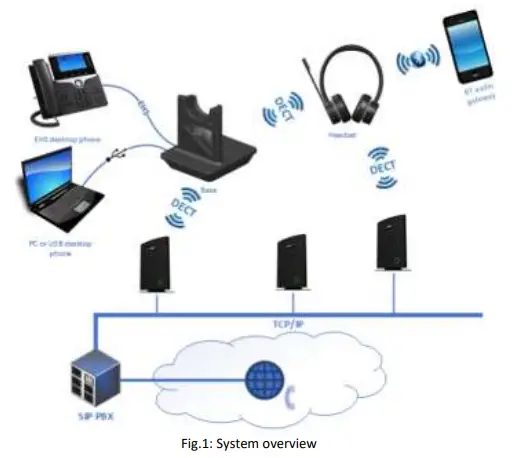
The high-end headsets support the DECT and BT technology to establish connections with other devices. They are used with the RTX7451 DECT base and Desk Phone / PC / Laptop/ mobile phones. The selected microphone is balanced together with the headset filters to reduce the background noise to provide an ultimate understandable and clear speech. On the other hand, the receivers are balanced to the receiver housing and cushion, so the headset will provide the user with an excellent stereo experience.
The figure below (Fig.1) illustrates the high-level description of the system. It provides a basic understanding of the environment in which the device needs to interact. Both communication possibilities of the RTX725x are presented in the drawing below.
DECT Registration
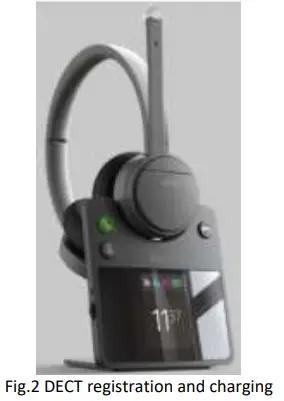
The headset is registered to the base (RTX7451) by mounting the headset in the cradle (Fig.2). The registration status can be seen on the base display and a voice prompt can be activated via the PC tool to inform the end-user. The headset can also register to the RTX374x DECT dongle by placing both headset and dongle in registration mode. On the headset, this is done by holding the DECT button for 2 seconds. For further details on the registration process, please refer to Appendix.
Handover to VoIP multicell systems
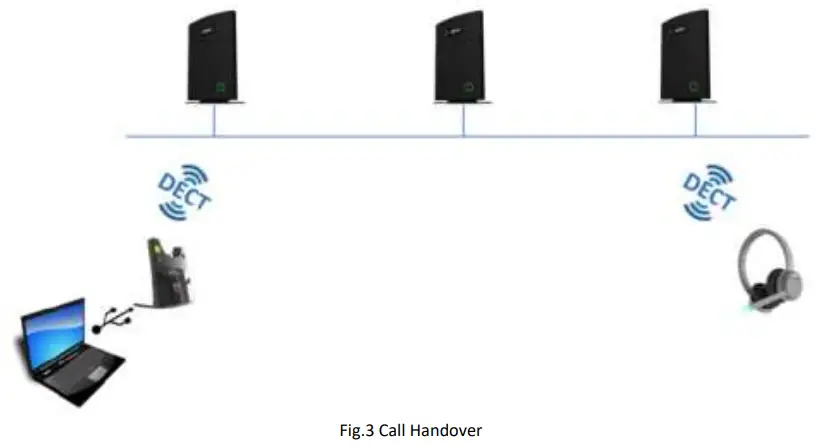
The RTX725x headset and RTX7451 base together can integrate into VoIP multicell and dual cell systems. The headset base will register on behalf of itself and the headset. The two registrations are independent but will be linked logically as one unit on the VoIP system. The purpose of this integration is to hand over the user’s calls to the VoIP system for the user to be flexible in terms of location.
Bluetooth registration
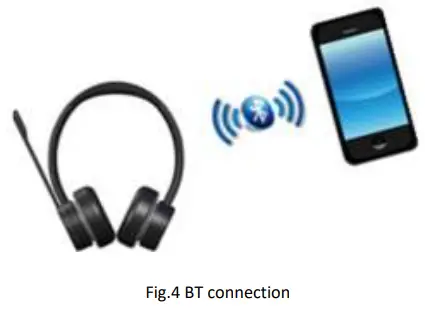
The headset is registered to a Bluetooth device by holding the BT button for 2 seconds. This will enable pairing mode for the headset which then allows it to be discovered by other Bluetooth devices. The RTX725x can store up to 4 paired BT devices’ information and remain connected to 2 of them at the same time. In case of reaching the limit and pairing a new device after the 4 existing ones, the oldest device information will be overwritten by the new agent.
Major mobile platforms are supported, such as iOS and Android.
About the device
The RTX725x series are wireless DECT+BT headsets. As mentioned before, the headset connects to the DECT base, which acts as a charger for the headset, via the DECT wireless technology. It can also connect via Bluetooth to supported devices such as mobile phones and Bluetooth-compatible desk phones.
A Busy-light indicator on the headband is used to indicate that the user is busy. The headset also features Environmental Noise Cancellation (ENC) to suppress unwanted environmental noise for the microphone input and Active Noise Cancellation (ANC) to suppress the noise toward the user. The headset offers DSP-assisted echo canceling. The length of the headband is adjustable to suit the head shape of different users and the tilting angle of the boom can be adjusted to fit the position of the mouth of different people.
The DECT base/charger connects to the PC/laptop. It can access Skype for Business and a defined range of soft call clients from external vendors, as well as a defined range of desk phones via the EHS interface. Call control can be managed via the base, attached desk phones, soft call clients on the PC, or via the buttons on the left earcup of the headset. A conferencing feature allows up to 4 headsets to connect to the same base – users may be added/removed from the conferencing call on the fly.
The primary application of the RTX725x is within call centers and office environments allowing the user to access the internet/VoIP calls and music playback via the PC/BT.
Type of RTX725x headsets
The headset auto-configures the DECT setup when connecting to the base, thus no country-specific variants exist. As mentioned earlier, the RTX725x series covers 3 different headsets:
| Model | Product | Country Variant |
| RTX7251 | DECT Mono high-end Headset | World wide (Taiwan, EMEA, Brazil & Uruguay, LATAM, Argentina, Chile, USA, Canada) |
| RTX7252 | DECT Stereo High-end Headset | World wide (Taiwan, EMEA, Brazil & Uruguay, LATAM, Argentina, Chile, USA, Canada) |
| RTX7254 | DECT Stereo High-end Headset ANC | World wide (Taiwan, EMEA, Brazil & Uruguay, LATAM, Argentina, Chile, USA, Canada) |
Features of the RTX725x series
The features of the above-mentioned headsets are summarized and listed in the table below:
| Main headset features | RTX7251 Mono | RTX7252 Stereo | RTX7254 Stereo ANC |
| Fold-flat design | Yes, 2-way | ||
| Earcup | |||
| Earpads material | Fabric and PU Leather | ||
| Earpads attachment | Detachable | ||
| Over the ear | No | Yes | Yes |
| On-ear | Yes | Yes | Yes |
| Earcup movement | 2-axis | ||
| Flexible boom | Bendable | ||
| Boom movement | 270° rotation | ||
| Headband material | Plastic and silicone | ||
| Headband rachet | 30mm±2mm | ||
| Ratchet marking indication (on the head side) | No | ||
| Busy light | Integrated on boom arm multi-color LED | ||
| Proximity sensor (Auto Hook off) | Yes | ||
| Noise cancellation | |||
| ENC | Yes – DSP assisted | ||
| ANC | No | No | Yes – DSP assisted |
| Echo Cancelling | Yes – DSP assisted | ||
| No. of microphones | 2 | 2 | 6 |
| No. of receivers | 1 | 2 | 2 |
| No. of buttons | 5 | 6 | 6 |
| Scroll wheel for volume control | Yes | ||
| Support for Voice Prompts | Yes | ||
| Voice prompt language | Configurable via PC Tool | ||
| English | Included | ||
| Call control | |||
| Vol+ | Scroll wheel up | ||
| Vol- | Scroll wheel down | ||
| MFB | Answer/end call, etc | ||
| DECT | Yes | ||
| Conference calls (supervisor) | 4 users | ||
| Bluetooth | Yes, BT4.2 | ||
| Adaptive Power Control (DECT) | Yes | ||
| Handover to VoIP multicell systems | Yes | ||
| Firmware update support | Via PC Tool | ||
| Call status LED | Integrated on boom arm multi-color LED | ||
| Narrowband Audio | G726, BV16 | ||
| Wideband Audio | CELT, G.722, BV32 | ||
| Super wideband | Yes | ||
| Acoustic shock protection | Yes | ||
| UCB C Connector | Yes | ||
Headsets overview
The following section aims to give an overview of the headsets and the available buttons. The following drawings illustrate the dimensions of the RTX725x series headsets.
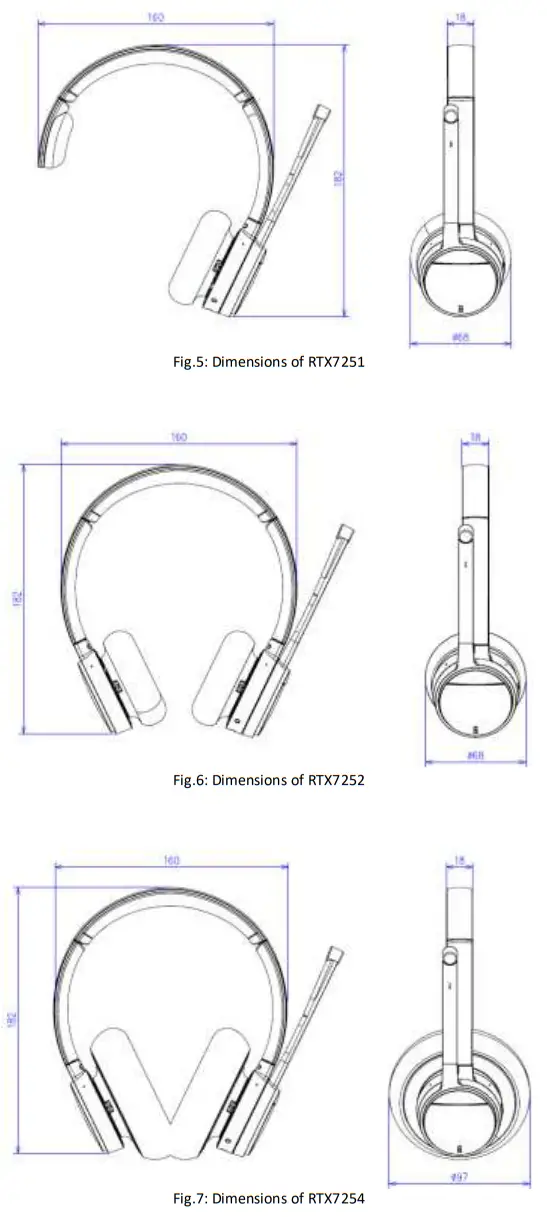
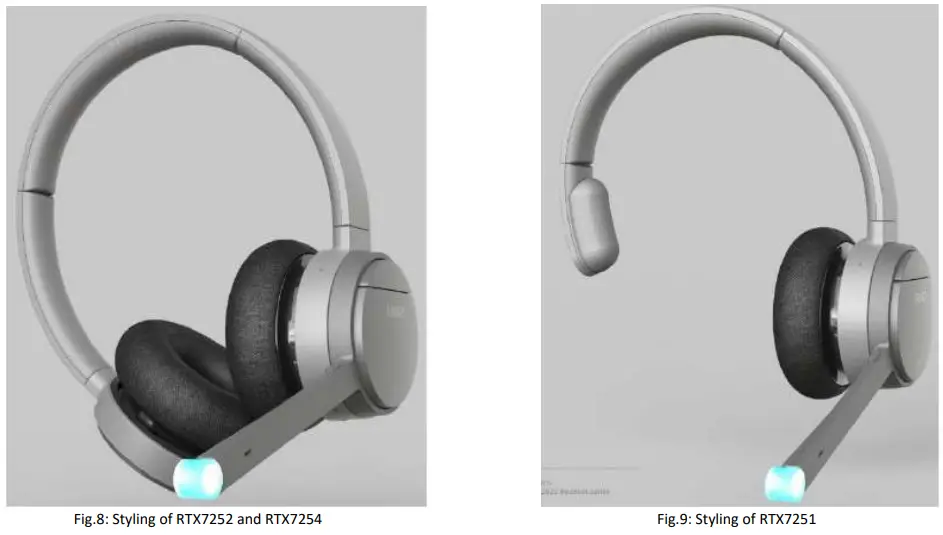
The images below represent the styling of all 3 headsets from the RTX725x series. By default, the color is grey, and the devices have removable ear cushions.
Ear cushions
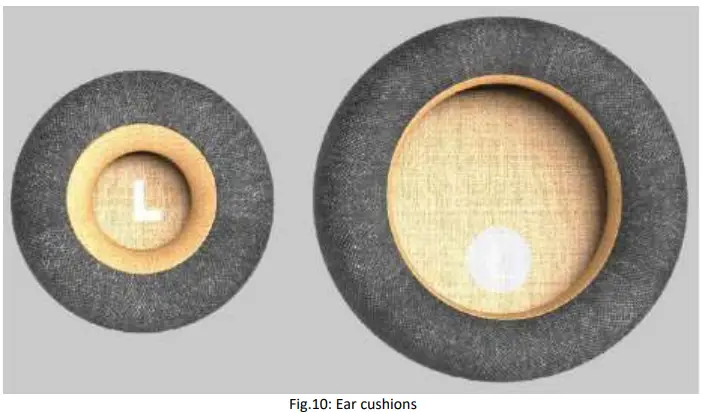
The cushions of the headsets are removable and replaceable. There are two types of ear cushions – on-ear and over-the-ear (Fig.7 Ear cushions).
The only headset that supports the two types is the RTX7254.
A sensor in the headset detects which type of cushion is used and adapts the audio tuning accordingly in order to get the optimal noise reduction. The other two devices (RTX7251 and RTX7252) only support the on-ear cushion solution.
Physical buttons
The headset is operated using the buttons on the earcup with the boom arm. The ANC button is located on the opposite earcup as ANC is not available for Mono headsets.
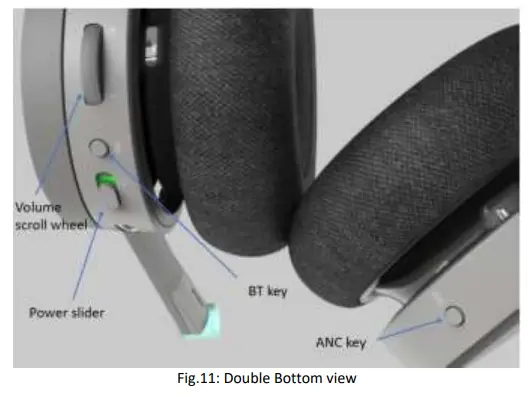
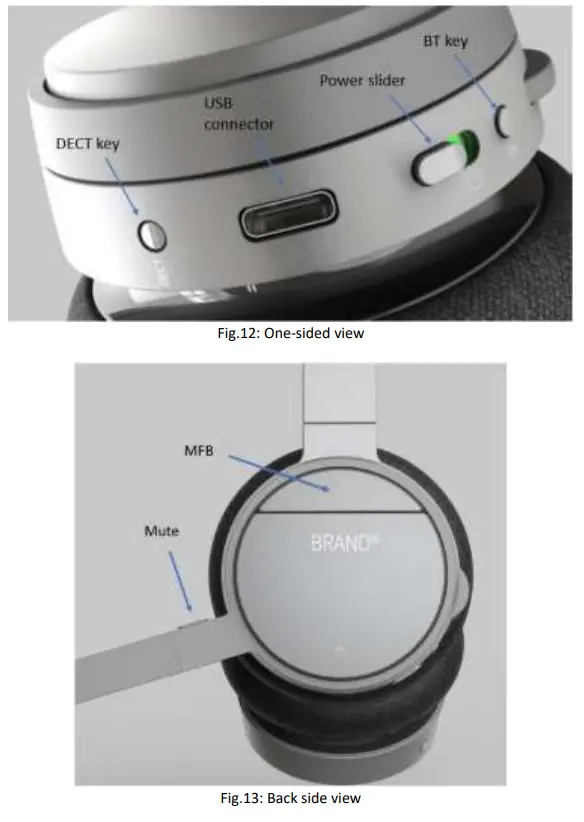
The following table represents the functions of the buttons seen in the figures above
| Input | Functions |
| Power slider | Power the headset on and off |
| Scroll wheel with an integrated key | Increase volume Decrease volume Play/Pause music Skip to the next track |
| Multi-Function Button | Answer call End call Reject call Trigger AI voice assistant Toggle busy |
| Mute key | Toggle mute Announce battery level |
| DECT key | Enter DECT pairing mode Reset settings |
| BT key | Toggle Bluetooth Enter Bluetooth pairing mode |
| ANC key | Toggle ANC |
LED overview
The headset has a single tricolor LED on the tip of the boom arm, which is a combination of 3 LEDs – red, green, and blue. All visual indications are disabled if “eco mode” is enabled.
LED patterns
The LED supports 3 different kinds of patterns. The definitions of each pattern can be seen in the table below:
| LED pattern | Definition |
| Blink | ON-OFF |
| Breathing | One color that slowly becomes brighter until it reaches full brightness and then dimmers until fully dimmed. It is a repeated cycle. |
| Alternating | Alternating between two colors |
LED indication
The table below presents the LED indication depending on the status of the headset.
| Function | Status | LED color | Pattern |
| System | Reset setting started | Purple | Blink 3 times |
| Bluetooth registration | Registration, In progress | Blue, red | Alternating |
| Registration, Success | Green | Blink 3 times | |
| Registration, Failed | Red | Blink 3 times | |
| DECT registration | Registration, In progress | Blue, red | Alternating |
| DECT registration | Registration, Success | Green | Blink 3 times |
| Registration, Failed | Red | Blink 3 times | |
| Battery status | No battery | Cyan | Blink |
| Fully charged | Green | ON | |
| Charging | Green | Breathing | |
| Low | Red | Breathing | |
| Busy mode | Busy enabled or call active | Red | ON |
Battery
The headsets use a 600mAH Li-polymer battery, which is easily replaceable after removing the battery lid, as illustrated in the image below.
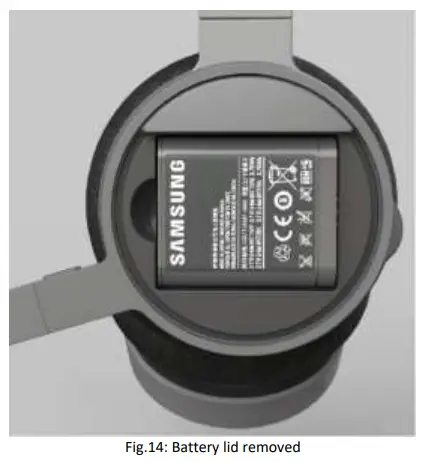
The RTX725x can be charged in 2 ways. One of the options is placing the headset in the cradle of the base, which displays the charging status. Another way to charge the device can be with the use of a USB cable, where the status will be shown on the boom-arm LED. For more details about the battery LED indications, please refer to the previous
section 4.4.2 LED indication. The battery performance can be seen in the summary table of features in section 5.5.
Summary.
Features overview
This section aims to introduce you to the available features of the headset series RTX725x. Some of the features will be briefly described in the sections below, whereas the main highlights will be presented via a table with function descriptions.
Eco-mode
RTX725x headsets support ECO mode which increases the talk time to 12 hours. This is done by limiting some of the features, such as power consumption of the LED indication and audio codec selection. This means that the BV16 narrowband codec is used during ECO mode and the LED is dimmed or turned off to save power.
Auto answer/mute
The RTX725x series uses a proximity sensor to detect when the user is wearing or removing the headset. This means that the sensor is used to trigger two events:
- The auto-answer of an incoming call when the user places the headset on the head
- Auto mute/unmute a call when the user removes/places back the headset on the head
These two settings can be managed in the “Device settings” of the PC setup tool software. The user should bear in mind that even if these settings are enabled, the user’s actions will dominate. This means, for example, if the user enables the auto-mute feature and then mutes the call while the headset is on their head, the call will remain muted
even if the user removes and places back the headset on the head.
BT/DECT call control
The following table illustrates the headset key functionalities and the related call control events when pressed.
| Key button | Press | Double Press | Long Press |
| Multi-Function | Accept/End call | Reject call | Hold/Resume call |
| Volume Roll-Up | Increase the volume | – | – |
| Volume Roll Down | Decrease the volume | – | – |
| Mute | Mute/Un-mute | – | – |
| BT | Toggle BT on/off | – | BT pairing mode |
The RTX725x supports 2 active calls, meaning that the 3 rd incoming call will be rejected or ignored. If during a call the user receives an incoming call, the call can be rejected by double-pressing the Multi-Function key or accepted by long-pressing the same key. The long press will answer the incoming call and put on hold the current one.
Headset Music control
The user can control the music features by pressing the available keys on the headset. Volume control is supported in smartphones with operating systems older than 6.0 for Android and 5.0 for iOS. The volume levels will be synchronized between the headsets and the audio device. The keys will trigger the following events presented in the table below:
| Key button | Press | Double Press | Long Press |
| Mute | Play/Pause music | Skip to the next track | – |
| Volume Roll-Up | Increase the volume | – | – |
| Volume Roll Down | Decrease the volume | – | – |
| BT | Toggle BT on/off | – | BT pairing mode |
Summary
The table below presents a summary of the features available in the headsets.
| Input | Functions |
| DECT frequency bands: | 1880 – 1895 MHz (Taiwan) 1880 – 1900 MHz (EMEA) 1910 – 1920 MHz (Brazil & Uruguay) 1910 – 1930 MHz (LATAM, Argentina, Chile) 1920 – 1930 MHz (USA, Canada) |
| Narrowband Audio: | G.726, BV16 |
| Wideband Audio (HD): | G.722, BV32 |
| Music | 128 kbit/s CELT |
| LED Indicator | |
| Status LED | Tricolor |
| Visibility | Mic boom tip |
| Hardware Features | |
| Battery type | Lithium Polymer, replaceable |
| Battery capacity | 600 mAh |
| Microphones | 2 for talk (ENC) and 4 for ANC |
| Headset interface | USB to connect to the RTX7451 base |
| Charging terminals | Using USB |
| Operating conditions | -0 ⁰C to 45⁰C |
| Battery Performance | |
| Talk time DECT | Up to 20 hours |
| Talk time BT | Up to 10 hours |
| Standby time DECT only: | Up to 100 hours |
| Standby time DECT+BT: | Up to TBD hours |
| Charge time (0% – 90%) | 3 hours |
| Quick charge | 25% in 30 minutes |
| Charge stop temperature | Low temperature stop charge: 5⁰C High temperature stop charger: 40⁰C |
| Audio Features | |
| Earpiece volume | See volume table |
| Coverage warning | On/Off |
| Language | |
| Supported: | English (Voice prompts) |
| Call features | |
| Call waiting | Yes |
| Hold / Retrieve | Yes |
| No. of simultaneous calls | 2, only one on hold |
| Call Conference | Yes |
| Call Swap | Yes |
| DECT | |
| Output Power | 250 mW 140 mW (Uruguay, Canada, US, Malaysia, Jordan) 22 dBm (Chile, Australia) |
| Sensitivity | -92 dBm |
| Antenna | 2 for fast antenna diversity |
| Range (max) | 200m outdoor |
| Security | Class C |
| Standard DECT interface | Yes |
| Handover to VoIP multicell systems | Yes |
| Software Update | |
| Downloadable | Yes |
| Air-interface | Yes |
| Bluetooth | |
| No. of pairings | 4 |
| BT Version | 4.2 Classic |
| Frequency | 2401 MHz – 2480 MHz |
| Sensitivity | Better than -92 dBm @ DH1, measured at antenna |
| Output power | Class 2, 2,5mW (4dBm) |
| Range | 10 meters in free line of sight measured outsight |
| Antenna | The antenna performance should be designed to have a return loss of < -5dB in the relevant frequency band |
| Simultaneous connections | 2 |
| Profiles | |
| A2DP | 1.2 Advanced Audio Distribution Profile |
| Help | 1.2 Headset Profile |
| HFP | 1.6 Handsfree Profile |
| DIP | 1.3 Device ID Profile |
| AVRCP | 1.4 Audio/Video Remote Control Profile |
| Codec | |
| SBC | For stereo streaming of music |
| NBC | For wideband audio |
| CVSD | For narrowband audio |
| Audio Codec | BV16 G.726 BV32 G.722 CELT48 |
| Class of device | 0x200404 Headset device 0x200418 Headphones |
| Bluetooth device address | The address is stored in non-volatile memory |
| Bluetooth device name | The product shall use the name “XXXXXXXX” * |
| Encryption | Default 128-bit encryption |
| Pairing mode | Discoverable only by user request and limited time 1 minute |
| Automatic connect | An already paired Bluetooth device will automatically connect to the headset. |
| Others | |
| HAC compliant | Yes |
Regulatory compliances
Safety & Type approvals
The regulatory compliance and measurements reports required are:
| Approval | Standard |
| GENERAL SAFETY | |
| Safety | CB IEC62368, EN62368, IEC60950, EN60950 Including the country deviation to US/CA, AU/NZ and EU |
| Safety | UL62368, and NRTL for US and CA |
| Safety | CB Scheme Certificate |
| US | |
| FCC | FCC Part 15B |
| FCC | FCC Part 15D |
| FCC | FCC Part 15.247 |
| FCC | FCC SAR evaluation |
| FCC | FCC ID |
| CANADA | |
| IC | ICES-003 Issue 6, 2016 |
| IC | IC RSS-213 Issue 3,March 2015 |
| IC | IC RSS-102 issue 5 SAR evaluation |
| IC | IC RSS-247 |
| IC | IC REL Cert and registration |
| IC | ISED ID |
| EUROPEAN | |
| CE | EN55032:2015 EMC-EMI&EMS EN55024:2010 EN55035 |
| CE | EN62479:2010 |
| CE | EN301489-1 V2.2.0 (2017-03) EN301489-6 V2.2.0 (2017-03) EN301489-17 V3.2.0 (2017-03) |
| CE | IEC61000-4-2 Level 3 EN61000- 4-3 Level 3 |
| CE | EN301406V2.2.2(2016-09) EN300328V2.1.1(2016-11) |
| CE | SAR-EN62209-1:2006/EN62209-2:2010 ; EN50360 :2001+A1:2012 EN 50566:2013/AC:2014 |
| CE | AOC certificate |
| AUSTRALIA/NZ | |
| RCM | AS/NZS CISPR 32:2015 |
| RCM | EMC-AS/NZS CISPR 22:2009+A1:2010 |
| RCM | RF-AS/NZS 4268:2017 |
| RCM | SAR-AS/NZS 2772.1; AS/NZS 2772.2:2011 |
| RCM | Acoustic AS/CA S004 |
| RCM | HAC AS/ACIF S040 |
Environmental compliances
RoHS
Per Directive 2011/65/EU on the Restriction of the use of certain Hazardous Substances in Electrical and Electronic
Equipment
REACH
Per Directive 1907/2006 on Registration, Evaluation, and Authorization of Chemicals
WEEK
Per Directive 2012/19/EU on Waste Electrical and Electronic Equipment (RTX will add waste bin information on product labels).
Packaging: EU Directive 97/129/EC establishes the identification system for packaging materials pursuant to European Parliament and Council Directive 94/62/EC on packaging and packaging waste
APPENDIX
DECT cradle registration
The following steps serve as a guideline for the process of registering the RTX725x headsets to the RTX745x base.
Registration mode is enabled by inserting the headset into the base cradle. The headset can be registered as both primary and secondary. When the headset is locked as secondary on another RTX745x base or on an RTX374x FP dongle, the user may return the headset to use its primary state by inserting the headset into the cradle of the primary base.
Step 1 Insert the headset into the base cradle
Step 2 The headset identifies itself as the base
Step 3 The base decides if the headset can register
a. If the headset is allowed to register it plays back the “Registering” voice prompt once
i. The headset starts the “Registration, in progress” LED pattern
ii. The base displays a visible notification that cradle registration is initiated
iii. The headset plays back the “Registration succeeded” voice prompt once
iv. The headset displays the “Registration, success” LED pattern
v. The base displays a visible notification that cradle registration succeeded
b. If the headset is not allowed to register it plays back the “Registration failed” voice prompt once
i. The headset displays the “Registration, failure” LED pattern
ii. The base displays a visible notification that cradle registration failed
Declaration of compliance
FCC warning
This equipment has been tested and found to comply with the limits for a Class B digital device, pursuant to part 15 of the FCC Rules. These limits are designed to provide reasonable protection against harmful interference in a residential installation. This equipment generates, uses and can radiate radio frequency energy and, if not installed and used in accordance with the instructions, may cause harmful interference to radio communications. However, there is no guarantee that interference will not occur in a particular installation. If this equipment does cause harmful interference to radio or television reception, which can be determined by turning the equipment off and on, the user is encouraged to try to correct the interference by one or more of the following measures:
—Reorient or relocate the receiving antenna.
—Increase the separation between the equipment and receiver.
—Connect the equipment into an outlet on a circuit different from that to which the receiver is connected.
—Consult the dealer or an experienced radio/TV technician for help.
Changes or modifications to this equipment not expressly approved by the party responsible for compliance could void the user’s authority to operate the equipment.
This device complies with part 15 of the FCC Rules. Operation is subject to the following two conditions: (1) This device may not cause harmful interference, and (2) this device must accept any interference received, including interference that may cause undesired operation.
For Handset
SAR tests are conducted using standard operating positions accepted by the FCC with the device transmitting at its highest certified power level in all tested frequency bands, although the SAR is determined at the highest certified power level, the actual SAR level of the device while operating can be well below the maximum value. Before a new model device is available for sale to the public, it must be tested and certified to the FCC that it does not exceed the exposure limit established by the FCC, tests for each device are performed in positions and locations as required by the FCC. For body-worn operation, this model device has been tested and meets the FCC RF exposure guidelines when used with an accessory designated for this product or when used with an accessory that contains no metal.
For Base
This equipment complies with FCC radiation exposure limits set forth for an uncontrolled environment. This equipment should be installed and operated with a minimum distance of 20cm between the radiator& your body. This the transmitter must not be co-located or operating in conjunction with any other antenna or transmitter located or
operating in conjunction with any other antenna or transmitter.
ISEDC Warning
This device contains license-exempt transmitter(s)/receiver(s) that comply with Innovation, Science, and Economic Development Canada’s license-exempt RSS(s). Operation is subject to the following two conditions:
- This device may not cause interference.
- This device must accept any interference, including interference that may cause undesired operation of the device.
For Handset
SAR tests are conducted using standard operating positions accepted by the ISEDC with the device transmitting at its highest certified power level in all tested frequency bands, although the SAR is determined at the highest certified power level, the actual SAR level of the device while operating can be well below the maximum value. Before a new
model device is available for sale to the public, it must be tested and certified to the ISEDC that it does not exceed the exposure limit established by the ISEDC, tests for each device are performed in positions and locations as required by the ISEDC. For body-worn operation, this model device has been tested and meets the ISEDC RF exposure
guidelines when used with an accessory designated for this product or when used with an accessory that contains no metal
For Base
This equipment complies with ISEDC radiation exposure limits set forth for an uncontrolled environment. This equipment should be installed and operated with a minimum distance of 20cm between the radiator& your body. This transmitter must not be co-located or operating in conjunction with any other antenna or transmitter located or
operating in conjunction with any other antenna or transmitter.
This Class B digital apparatus complies with Canadian ICES-003.
RTX725x GUIDE 1.0
Proprietary and Confidential
Technical Reference Document
Version 1.0
© Apr-2020 RTX A/S, Denmark
 Wireless solutions - RTX