 RTX745x High-End Headset Base
User Guide
Trademarks
RTX and the combinations of its logo thereof are trademarks of RTX A/S, Denmark.
Other product names used in this publication are for identification purposes and maybe the trademarks of their respective companies.
Disclaimer
The contents of this document are provided about RTX products. RTX makes no representations with respect to completeness or accuracy of the contents of this publication and reserves the right to make changes to product descriptions, usage, etc., at any time without notice. No license, whether express, implied, to any intellectual property rights is granted by this publication
Confidentiality
This document should be regarded as confidential, unauthorized copying is not allowed
© Apr-2020 RTX A/S, Denmark, All rights reserved
http://www.rtx.dk
About This Document
This document describes the configuration, management, operation, and maintenance of the RTX745x headset base which is part of the range of the DECT system. For customer-specific modes, please refer to specific customer agreements.
Audience
This guide is intended for everyday users. Furthermore, network administrators, IT support, and anyone who wishes to gain knowledge on the fundamental features of the RTX745x base can also benefit from this material.
When Should I Read This Guide
Read this guide before you install the devices and before setting up the DECT connection.
This manual will enable you to set up components in your network to communicate with each other and deploy a fully functional system.
What’s Inside This Guide
We summarize the contents of this document in the table below:
| WHERE IS IT? | CONTENT | PURPOSE |
| CHAPTER 2 | Package overview | Presents the package content and handling |
| CHAPTER 3 | About the device | Provides information on the device specifications and hardware |
| CHAPTER 4 | User interface | Gives an overview of the available icons on the user interface |
| CHAPTER 5 | Call activity on the base | Introduces the different types of call scenarios |
| CHAPTER 6 | Features overview | Introduces the supported features on the base |
| CHAPTER 7 | Regulatory compliances | Presents the adherence to the laws and regulations |
What’s Not in This guide
The guide is not intended to be a comprehensive reference to details and specific steps on how to configure other vendor-specific components/devices. For such a reference to vendor-specific devices, please contact the respective vendor for documentation.
Abbreviations
For this document, the following abbreviations hold:
| DECT: | Digital Enhanced Cordless Telecommunications |
| MWI: | Message Waiting Indicator |
| PCBA: | PCB Assembled |
| MFB: | Multi-Function Button |
| BT: | Bluetooth |
Pc tool
Headsets guide
RTX745x GUIDE 1.0
Proprietary and Confidential
Document History
| REVISION | AUTHOR | ISSUE DATE | COMMENTS |
| 1 | DKO | 15.05.2020 | First release |
What is new
What new features have been added?
| VERSION | FEATURE |
| V1.0 | First release |
Documentation Feedback
We always strive to produce the best and we also value your comments and suggestions about our documentation. If you have any comments about this guide, please enter them through the Feedback link on the RTX website. We will use your feedback to improve the documentation.
Package overview
Prior to opening, examine the shipping package for evidence of physical damage. If there is proof of mishandling prior to opening, you must report it to the relevant support center of the regional representative or operator.
Content
Make sure all relevant components are available in the package before proceeding to the next step. In principle, every shipped headset unit package/box contains the following items:
- 1x headset
- 1x base station (charger)
- 1x PSU fixed
- 1x USB C cable
- 1x 600mAH Li-polymer battery
- 1x 1-page A5 double side B/W print
Customer-specific changes may occur.
Damage inspection
The following steps are recommended to be followed for damage inspection:
- Examine all relevant components for damage
- Make a “defective on arrival – DOA” report or RMA to the operator. Do not move the shipping carton until it has been examined by the operator. The operator/regional representative will initiate the necessary procedure to process this RMA. They will guide the network administrator on how to return the damaged package if necessary.
- If no damage is found, then unwrap all the components and dispose of empty package/carton(s) in accordance with country-specific environmental regulations.
About the device
The RTX745x device is an EHS/USB wireless base station that provides USB connectivity to PC/laptop/desktop phones and DECT connectivity to RTX725x headsets/DECT speakerphones. It is designed as a Plug & Play solution, meaning that no additional driver installations are needed.
The figure below (Fig.1) illustrates the high-level description of the communication possibilities of the device. The RTX745x base is connected to a host (PC or desktop phone) with a USB interface. It acts as a DECT base station for RTX725x headset and DECT speakerphone.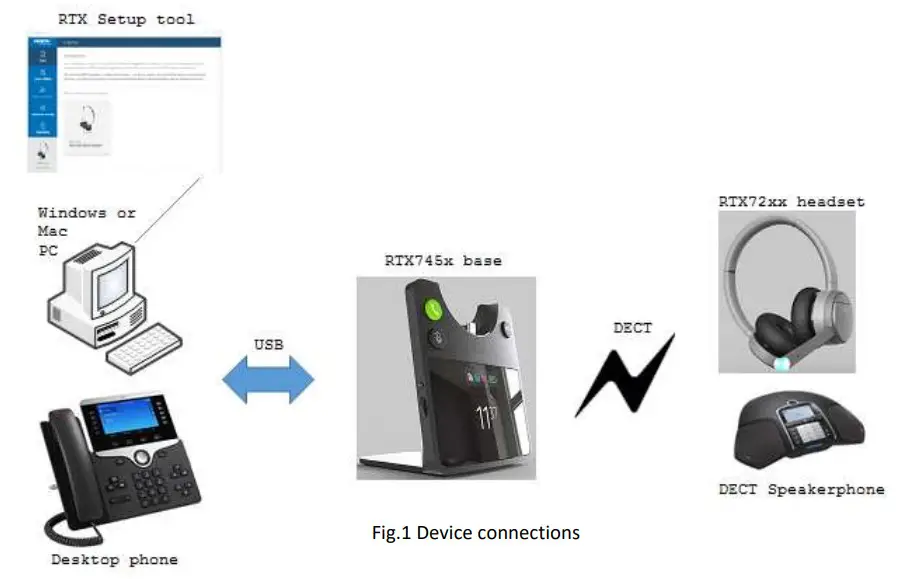
The RTX745x serves as a base and charger for the RTX725x series headsets. The primary application is within call centers and office environments allowing the user access to internet/VoIP calls, music playback via the PC/mobile phone, and desk phone connectivity.
Device overview
The drawings below illustrate the dimensions of the device (Fig. 2).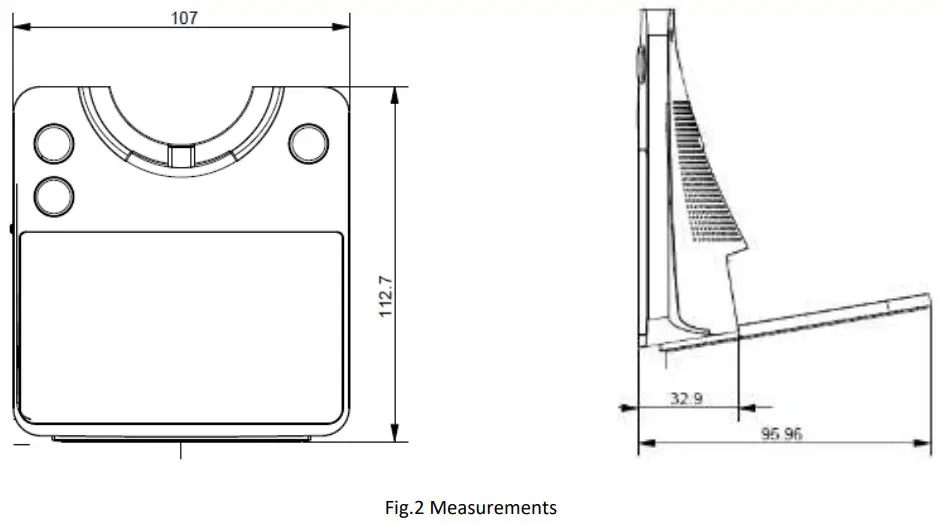
The base includes a 2.4-inch 240×320 TFT display for status and configuration. Furthermore, it has 3 keys for call control handling (hook off, hook on and mute), a clickable scroll wheel, and a key for easy menu navigation (Fig.3).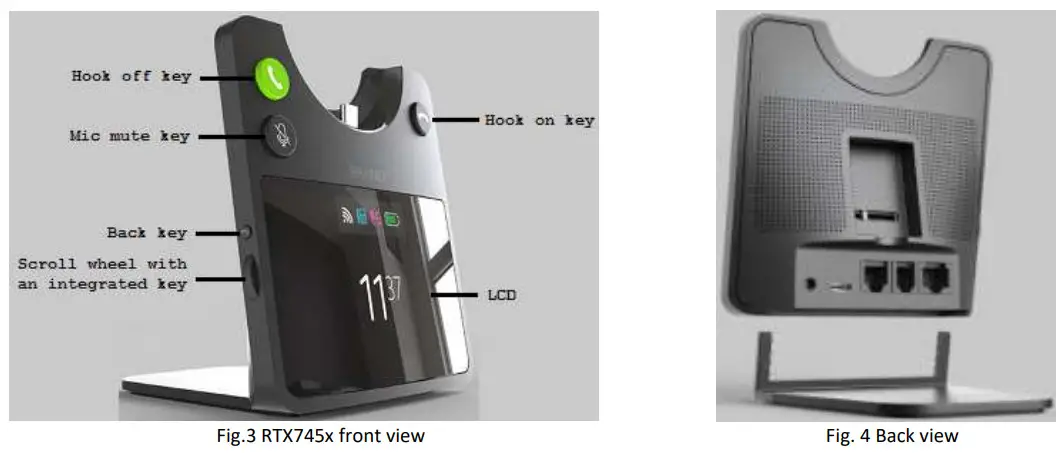
Further details on the functionality of the keys can be seen on the table below:
| Input | Functionality |
| Hook off | Answer call (short press) Swap between calls (short press) Swap between lines (double press) Hold/Retrieve call (short press) Hold active calls and accept the incoming call (long press) |
| Hook on | End call Reject call |
| Mute | Toggle mute |
| Back key | Return to the parent menu of the current submenu Leave the settings menu |
| Scroll wheel | Open the settings menu Select an item in the settings menu Scroll to the next item in the settings menu Scroll to the previous item in the settings menu Adjust earphone volume |
Spare battery charging
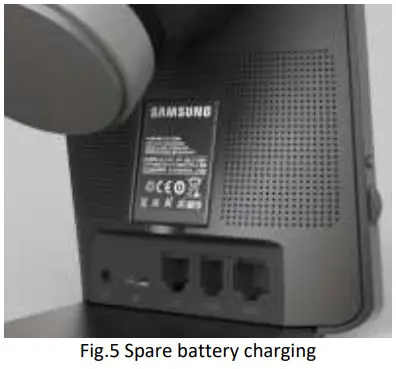
The base also includes a separate charger for a spare battery. The battery is placed on the back of the base, as shown below (Fig.5).
Ringer configuration
The RTX745x has a built-in ringer for audible alerts for the user. The audio settings of the ringer can be configured via the PC Setup tool or the base menu. The ringer may be muted by selecting “Silent mode” in the PC Setup Tool.
Connect to VoIP multicell systems
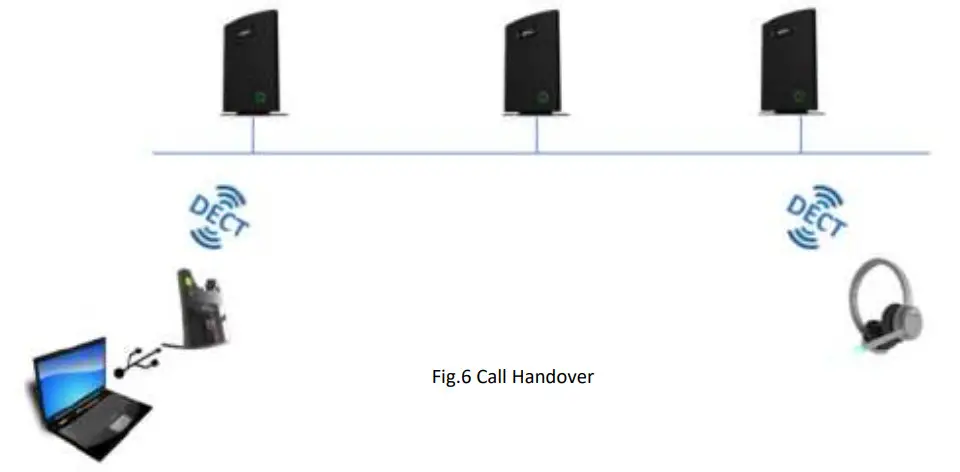
The RTX725x headset and RTX7451 base together can integrate into VoIP multicell and dual cell systems. The base will register on behalf of itself and the headset. The two registrations are independent but will be linked logically as one unit on the VoIP system. The purpose of this integration is to hand over the user’s calls to the VoIP system for the user to be flexible in terms of location.
Configuration tool (PC tool)
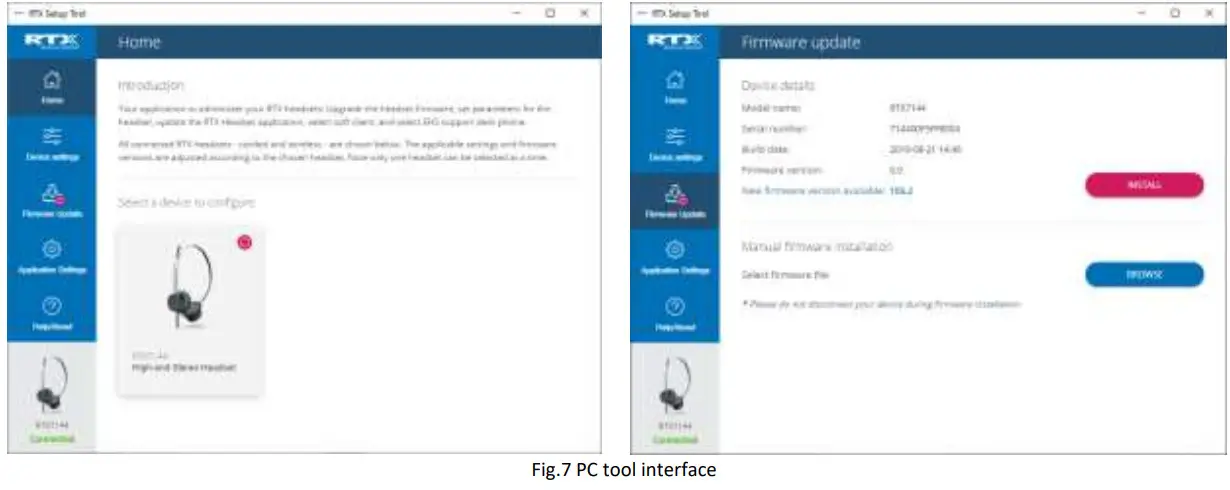
The RTX745x and RTX725x parameters can be configured via an external PC configuration tool (PC tool). Moreover, the tool is used to firmware upgrade both devices and do upgrades of the tool itself. The PC tool is available for Windows and macOS. The screenshots below display an example of the GUI interface of the tool. Logos and colors can be adapted to customer needs. For more information about the tool, please refer to 1.6 References/Related Documentation.
User interface
As mentioned above, the RTX745x base supports a 2.4-inch 240×320 TFT display which has a user-friendly interface (UI). The UI is designed to be operated at an arm’s distance, meaning that the status bar is large and visible (Fig.8). However, the icons shrink in size when navigating through the device’s menu, yet still, allow the user to see the status (Fig.9).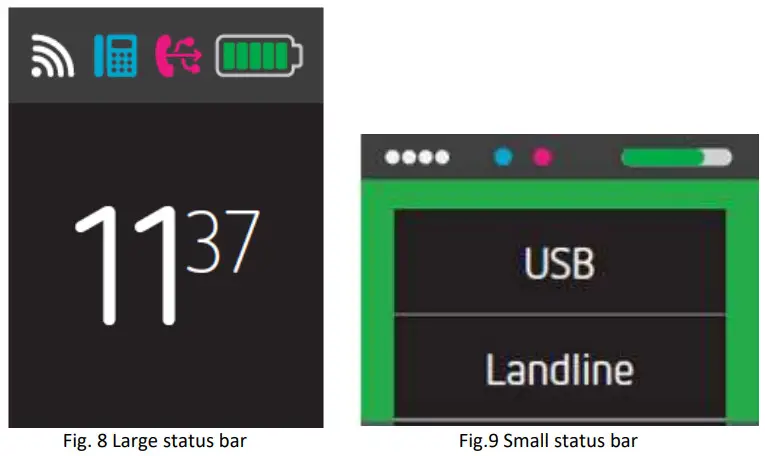
The following table aims to introduce you to the available icons on the UI of the device.
| Icon | Description | Function |
  | Signal strength (Default) Signal strength (Collapsed) | informs the user of how good the signal is |
  | Desktop phone connection (Default) Desktop phone connection (Collapsed) | indicates that RTX745x is connected to a Desktop phone |
  | PC-USB connection (Default) PC-USB connection (Collapsed) | indicates that RTX745x is connected to the PC |
  | Battery status (Default) Battery status (Collapsed) | Battery full |
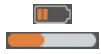 | Battery status (Default) Battery status (Collapsed) | Battery running low |
 | Battery status (Default) Battery status (Collapsed) | Battery critical |
 | Battery status (Default) Battery status (Collapsed) | No battery, please charge the device |
 | Call icon | animation indicating an incoming call |
 | Microphone mute | indicates that the microphone state has been changed to mute |
 | Hold | indicates a call on hold |
 | Eco-mode | indicates enabling/disabling Eco mode for the headsets |
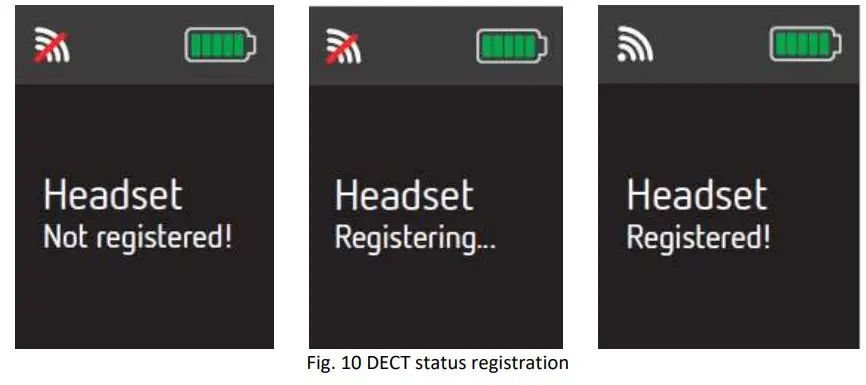
DECT registration status interface
The following screenshots represent the interface during a DECT registration (Fig.10).
Call activity on the base
To have call activity on the base, a master headset must be registered and locked to the base. If the master headset loses connection during call activity, all the calls will be terminated.
Incoming call
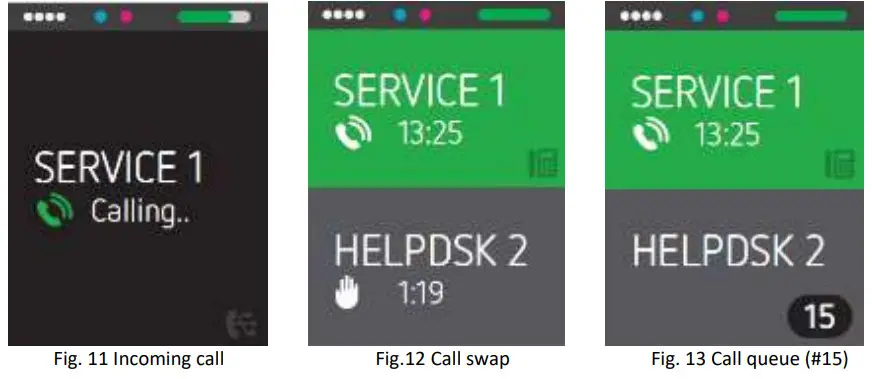
The base will notify the user with visible and audible indications whether an incoming call is from EHS or USB line. If both lines are in an idle state and an incoming call is received to one of the lines, the base rings and displays the call (Fig.11). However, if there are two simultaneous incoming calls from two different lines, the active control is made by the first incoming call (the first that came is served first). The second incoming call cannot be accepted by the base until the first incoming call has been answered or ended, or the line is swapped manually by the user (Fig. 12). In case of having one of the lines is occupied (inactive call), the new incoming call will be displayed as waiting in a queue (Fig.13).
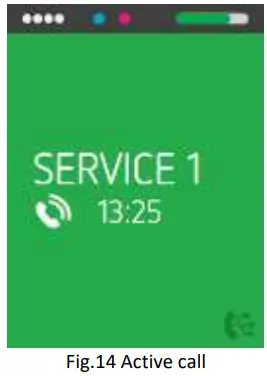
Active call
When a call is active, the base displays the active call and the audio path is connected between the far-end party and RTX725x headset. It is not possible to have more than one active call on a single line at the same time.
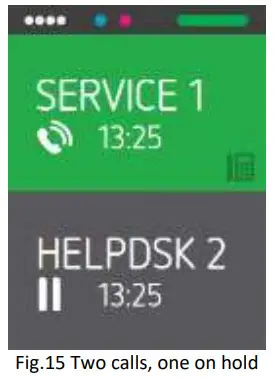
On-hold call
When a call is put on hold, the base displays a hold call status, and the audio path is disconnected between the far-end party and the RTX725x headset (Fig.15 Two calls, one on hold). It is not possible to set EHS’s active call on hold by the base.
Multiple calls
There is more than one call existing in a single line. EHS line does not support multiple call.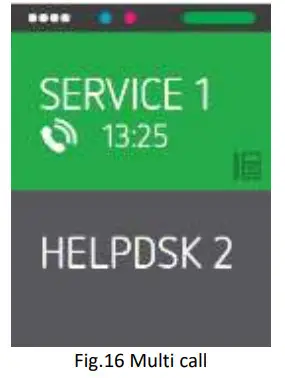
Multiple line
There is more than one call existing in different lines.
Active & Inactive line
When a line is active, the base displays the active line and the audio path is connected via the line. It is not possible to have more than one active line at the same time.
When a line is inactive, the base displays an inactive line and the audio path is disconnected via the line. It is not possible to have manual call control of the base when the line is inactive.
Call termination
All calls will be terminated when the master headset loses link or is placed on the cradle.
Line swapping
In this case, two calls are established in two different lines, one of them is being the active call in the active line. To make the line swapping simpler, the active line is swapped automatically depending on-call activities change. It can be one of the following scenarios:
- User makes an outgoing call by softphone or desktop phone.
- User retrieves USB held call by softphone.
- User swaps USB call by softphone.
- The user accepts an incoming call.
- The call from the first active line is ended and another call exists in the second inactive line.
The user can also swap the line from the base manually. When a line is swapped successfully, between two different lines, a visible indication is shown on base.
RTX745x GUIDE 1.0
Proprietary and Confidential
Microphone muting
Microphone muting control is separated into two muting statuses. Each line has its own microphone muting control.
When the line is switched, the related microphone muting control will also be switched.
Volume control
Similar to the microphone, the volume control is also divided into two sets of volume. This means that each line has its own volume control. When the line is switched, the related volume control will be also switched.
Features overview
This section aims to introduce you to the available features on the RTX745x base. Some of the features will be briefly described through the sections below, whereas the main highlights will be presented via a table with function descriptions.
Soft client support
The base, combined with one of the RTX725x headsets, supports the audio and USB API of the following applications:
- Skype for Business
- Microsoft Teams
- Customer client support implemented in the PC tool
The RTX745x base can be used with both PC Windows and macOS.
EHS interface
The RTX7451 supports EHS phones. The base is prepared to be compatible with various EHS standards. This is done by having a slider switch that enables 6 separate HW configurations for the audio routing. The PC Setup tool is used to configure the optimal settings for the SW configuration.
The RTX725x supports 2 active calls, meaning that the 3rd incoming call will be rejected or ignored. If during a call the user receives an incoming call, the call can be rejected by double-pressing the Multi-Function key or accepted by long-pressing the same key. The long press will answer the incoming call and put on hold the current one.
Table summary of the features
General features
| Requirements | Descriptions |
| DECT frequency bands: | 1880 – 1895 MHz (Taiwan) 1880 – 1900 MHz (EMEA) 1910 – 1920 MHz (Brazil & Uruguay) 1910 – 1930 MHz (LATAM, Argentina, Chile) 1920 – 1930 MHz (USA, Canada) |
| Narrowband Audio: | G.726, BV16 |
| Wideband Audio (HD): | G.722, BV32 |
| Music | CELT 128 kbit/s |
| DECT Registration | Possible to store 4 subscriptions, one primary and three secondary |
Base features
| Requirements | Descriptions |
| Display | |
| Size | 2.4” 240×320 TFT |
| Buttons | Scroll wheel (with an embedded key) Four keys |
| Hardware features | |
| Speaker | Yes |
| Headset interface | USB C |
| Charging terminals | USB C |
| Operating conditions | 0 o C to 45 o C |
| Spare battery charger | Yes |
| Call features | |
| Call waiting | Yes |
| Hold / Retrieve | Yes |
| No. of simultaneous calls | 2, only one on hold |
| Call Conference | Yes |
| Call Swap | Yes |
| DECT | |
| Output Power | 250 mW 140 mW (Uruguay, Canada, US, Malaysia, Jordan) 22 dBm (Chile, Australia) |
| Sensitivity | -92 dBm |
| Antenna | 2 for fast antenna diversity |
| Range | 200m outdoor |
| Security | Class C |
| Software update | |
| Downloadable | Yes |
| Air-interface | Yes |
| Update support | PC Setup tool |
Regulatory compliances
Safety & Type approvals
The regulatory compliance and measurements reports required are:
| Approval | Standard |
| GENERAL SAFETY | |
| Safety | CB Test Report IEC62368, EN62368, IEC60950, EN60950 with the national difference |
| Safety | UL62368, and cUL 62368 |
| Safety | CB Scheme Certificate |
| US | |
| FCC | FCC Part 15B |
| FCC | FCC Part 15D |
| FCC | FCC SAR evaluation |
| FCC | FCC ID |
| CANADA | |
| IC | ICES-003 Issue 6, 2016 |
| IC | IC RSS-213 Issue 3,March 2015 |
| IC | IC RSS-102 issue 5 SAR evaluation |
| IC | IC REL Cert and registration |
| IC | ISED ID |
| EUROPEAN | |
| CE | EN55032:2015 EMC-EMI&EMS EN55024:2010 EN55035 |
| CE | EN62479:2010 |
| CE | EN301489-1 V2.2.0 (2017-03) EN301489-6 V2.2.0 (2017-03) |
| CE | IEC61000-4-2 Level 3 criteria B (Contact+/-8KV,Air +/-15K EN61000- 4-3 Level 3 criteria A |
| CE | EN301406V2.2.2(2016-09) |
| CE | SAR-EN62209-1:2006/EN62209-2:2010 ; EN50360 :2001+A1:2012 EN 50566:2013/AC:2014 |
| CE | AOC certificate |
| AUSTRALIA/NZ | |
| RCM | AS/NZS CISPR 32:2015 |
| RCM | EMC-AS/NZS CISPR 22:2009+A1:2010 |
| RCM | RF-AS/NZS 4268:2017 |
| RCM | SAR-AS/NZS 2772.1; AS/NZS 2772.2:2011 |
| RCM | Acoustic AS/CA S004 |
| RCM | HAC AS/ACIF S040 |
Environmental compliances
RoHS
Per Directive 2011/65/EU on the Restriction of the use of certain Hazardous Substances in Electrical and Electronic Equipment
REACH
Per Directive 1907/2006 on Registration, Evaluation, and Authorization of Chemicals
WEEK
Per Directive 2012/19/EU on Waste Electrical and Electronic Equipment (RTX will add waste bin information on product labels).
Packaging: EU Directive 97/129/EC establishes the identification system for packaging materials pursuant to European Parliament and Council Directive 94/62/EC on packaging and packaging waste
Declaration of compliance
FCC warning
This equipment has been tested and found to comply with the limits for a Class B digital device, pursuant to part 15 of the FCC Rules. These limits are designed to provide reasonable protection against harmful interference in a residential installation. This equipment generates, uses and can radiate radio frequency energy and, if not installed and used in accordance with the instructions, may cause harmful interference to radio communications. However, there is no guarantee that interference will not occur in a particular installation. If this equipment does cause harmful interference to radio or television reception, which can be determined by turning the equipment off and on, the user is encouraged to try to correct the interference by one or more of the following measures:
- Reorient or relocate the receiving antenna.
- Increase the separation between the equipment and receiver.
- Connect the equipment into an outlet on a circuit different from that to which the receiver is connected.
- Consult the dealer or an experienced radio/TV technician for help.
Changes or modifications to this equipment not expressly approved by the party responsible for compliance could void the user’s authority to operate the equipment.
This device complies with part 15 of the FCC Rules. Operation is subject to the following two conditions: (1) This device may not cause harmful interference, and (2) this device must accept any interference received, including interference that may cause undesired operation.
For Headset
SAR tests are conducted using standard operating positions accepted by the FCC with the device transmitting at its highest certified power level in all tested frequency bands, although the SAR is determined at the highest certified power level, the actual SAR level of the device while operating can be well below the maximum value. Before a new model device is available for sale to the public, it must be tested and certified to the FCC that it does not exceed the exposure limit established by the FCC, tests for each device are performed in positions and locations as required by the FCC. For body-worn operation, this model device has been tested and meets the FCC RF exposure guidelines when used with an accessory designated for this product or when used with an accessory that contains no metal.
For Base
This equipment complies with FCC radiation exposure limits set forth for an uncontrolled environment. This equipment should be installed and operated with a minimum distance of 20cm between the radiator& your body. This transmitter must not be co-located or operating in conjunction with any other antenna or transmitter located or operating in conjunction with any other antenna or transmitter.
ISEDC Warning
This device contains license-exempt transmitter(s)/receiver(s) that comply with Innovation, Science, and Economic Development Canada’s license-exempt RSS(s). Operation is subject to the following two conditions:
- This device may not cause interference.
- This device must accept any interference, including interference that may cause undesired operation of the device.
For Headset
SAR tests are conducted using standard operating positions accepted by the ISEDC with the device transmitting at its highest certified power level in all tested frequency bands, although the SAR is determined at the highest certified power level, the actual SAR level of the device while operating can be well below the maximum value. Before a new model device is available for sale to the public, it must be tested and certified to the ISEDC that it does not exceed the exposure limit established by the ISEDC, tests for each device are performed in positions and locations as required by the ISEDC. For body-worn operation, this model device has been tested and meets the ISEDC RF exposure guidelines when used with an accessory designated for this product or when used with an accessory that contains no metal
For Base
This equipment complies with ISEDC radiation exposure limits set forth for an uncontrolled environment. This equipment should be installed and operated with a minimum distance of 20cm between the radiator& your body. This transmitter must not be co-located or operating in conjunction with any other antenna or transmitter located or operating in conjunction with any other antenna or transmitter.
This Class B digital apparatus complies with Canadian ICES-003.
RTX745x GUIDE 1.0
Proprietary and Confidential
Technical Reference Document
Version 1.0
© May-2020 RTX A/S, Denmark
 Wireless solutions - RTX