NXP TWR-MCF51JG Tower Module
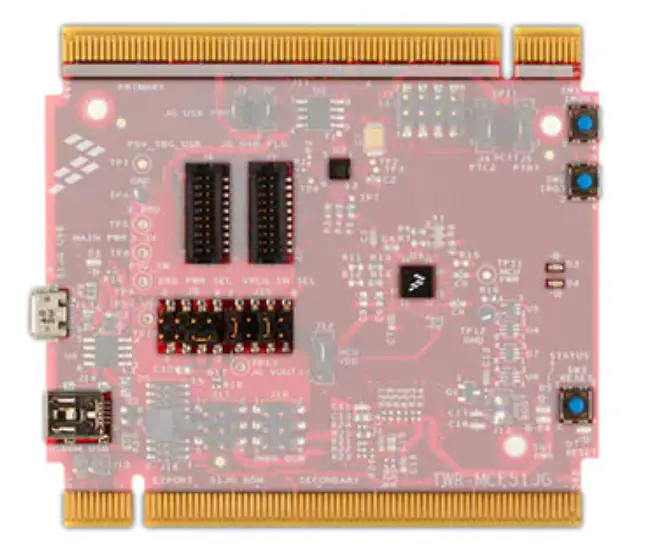
TWR-MCF51JG and TWR-MCF51JG-KIT Overview
The TWR-MCF51JG is a Tower Controller Module compatible with the Freescale Tower System. It can function as a stand-alone, low-cost platform for the evaluation of the ColdFire+ MCF51JG microcontroller (MCU) devices. The TWR-MCF51JG features the MCF51JG, a ColdFire+ 32-bit microcontroller built on the Version 1 (V1) ColdFire® core and enabled by innovative 90nm thin film storage (TFS) flash process technology with FlexMemory. The MCF51Jx families offer a rich combination of additive peripherals including USB, hardware encryption, and more.
The TWR-MCF51JG is available as a stand-alone product or as a kit (TWR-MCF51JG-KIT) with the Tower Elevator Modules (TWR-ELEV) and the Tower Prototyping Module (TWR-PROTO). The TWR-MCF51JG can also be combined with other Freescale Tower peripheral modules to create development platforms for a wide variety of applications. Figure 1 provides an overview of the Freescale Tower System.
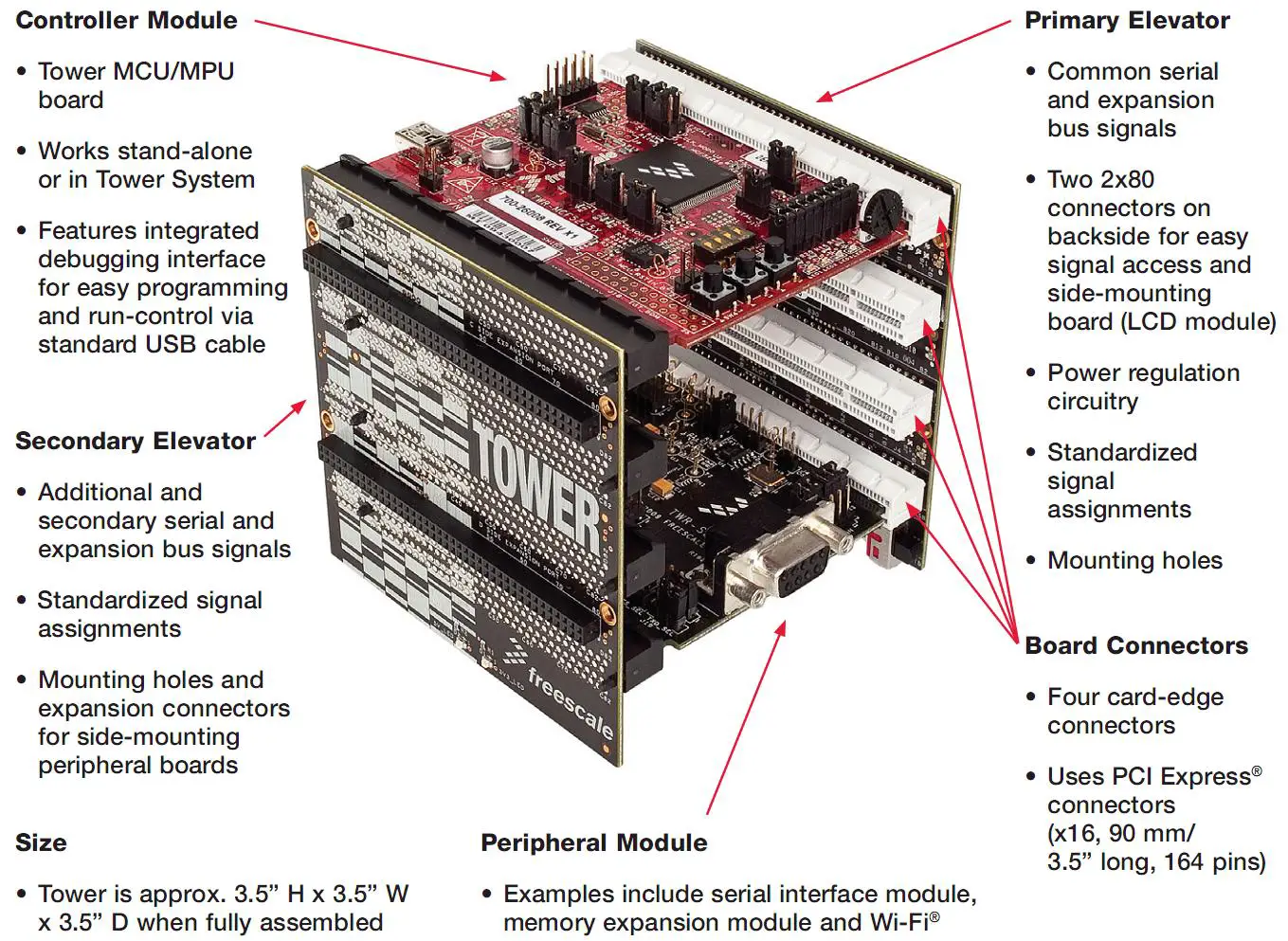 Figure 1. Freescale Tower System Overview
Contents
The TWR-MCF51JG contents include:
- TWR-MCF51JG board assembly
- 3ft A to mini-B USB cable for debug interface and power
- 3ft A to micro-B USB cable for MCF51JG USB interface
- Micro-A to A adapter for MCF51JG USB Host applications
- Quick Start Guide
The TWR-MCF51JG-KIT contains:
- TWR-MCF51JG MCU module
- TWR-ELEV – Primary and Secondary Elevator Modules
- TWR-PROTO – Prototyping module
Features
Figure 2 shows the TWR-MCF51JG with some of the key features called out. The following list summarizes the features of the TWR-MCF51JG Tower MCU Module:
- Tower compatible microcontroller module
- MCF51JG256: MCF51JG with 256 Kbytes of flash in a 44-pin MAPLGA package
- Dual role USB interface with Micro-AB USB connector
- General purpose Tower Plug-in (TWRPI) socket
- On-board debug circuit (OSBDM) with virtual serial port
- Three axis accelerometer (MMA8451Q)
- Two (2) user-controllable LEDs
- Two (2) user pushbutton switches & One (1) reset pushbutton switch
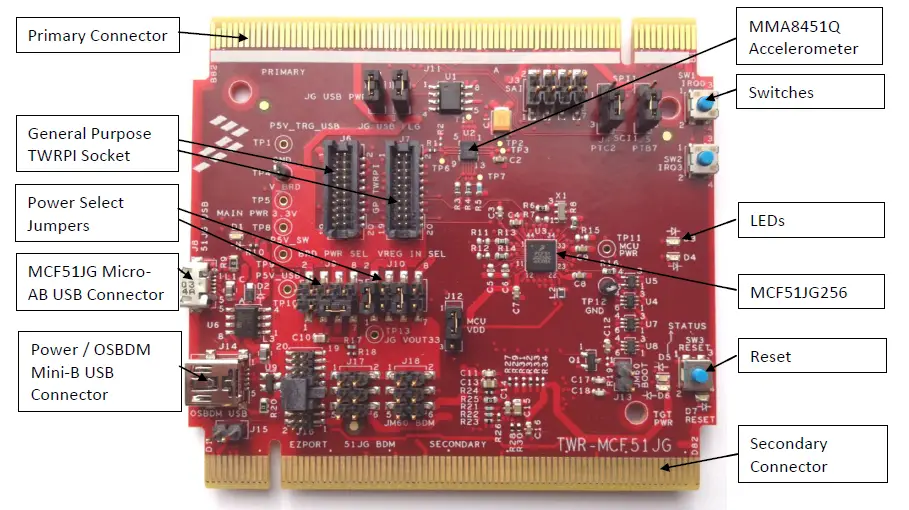 Figure 2. Callouts on front side of the TWR-MCF51JG
Getting Started
Follow the Quick Start Guide found printed in the TWR-MCF51JG box or the interactive DVD for the list of recommended steps for getting started. Check for new or revised documentation on the tool support page for the TWR-MCF51JG: http://www.freescale.com/TWR-MCF51JG.
Reference Documents
The documents listed below should be referenced for more information on the ColdFire+ devices, Freescale Tower System, and the TWR-MCF51JG Controller Module. These can be found in the documentation section of freescale.com/TWR-MCF51JG or freescale.com/coldfire+.
- TWR-MCF51JG-QSG: Quick Start Guide
- TWR-MCF51JG-SCH: Schematics
- TWR-MCF51JG-PWA: Design Package
- ColdFire+ Portfolio Product Brief
- MCF51JG256 Reference Manual
- Tower Configuration Tool
- Tower Mechanical Drawing
Hardware Description
The TWR-MCF51JG is a Tower Controller Module featuring the MCF51JG256—a ColdFire+ based microcontroller with USB 2.0 full-speed OTG controllers in a 44 MAPLGA package. It is intended for use in the Freescale Tower System but can operate stand-alone. An on-board debug circuit, OSBDM, provides a BDM interface and a power supply input through a single USB mini B connector. Figure 3 shows a block diagram of the TWR-MCF51JG. The following sections describe the hardware in more detail.
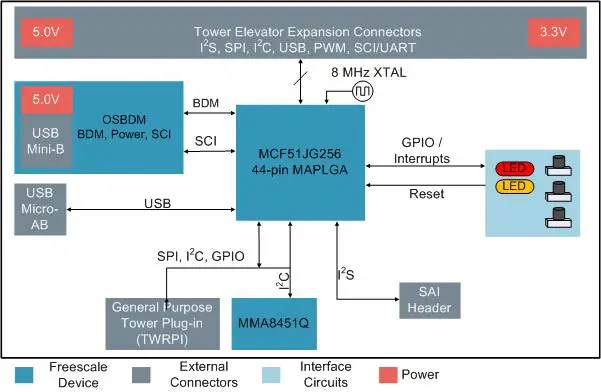 Figure 3. TWR-MCF51JG Block Diagram
MCF51JG Microcontroller
The TWR-MCF51JG module features the MCF51JG256CFT. The key features of the microcontroller are:
- 32-bit ColdFire+ core with FlexMemory, EMAC, and DIV hardware acceleration
- 50 MHz maximum core operating frequency
- 44-pin MAPLGA, 5mm x 5mm
- 1.85V – 3.6V operating voltage input range
- 256 Kbytes of program flash, 64 Kbytes of static RAM
- FlexMemory consisting of 32 Kbytes of FlexMemory that can be used as additional non-volatile flash or up to 2KB of enhanced EEPROM.
- 10 flexible low power modes, ideal for extending battery life
- Cryptographic Acceleration Unit (CAU) and Random Number Generator (RNGA) for secure communications
- Integrated USB 2.0 Full-Speed Device/Host/OTG Controller supporting connection via USB and battery charging
- Serial audio interface (SAI) providing a direct interface to codecs and to Inter-IC Sound (I2S) audio devices
- Real-time debug support, with six hardware breakpoints that can be configured to halt the processor or generate debug interrupt
- Multi-purpose clock generator with PLL and FLL operation modes; multiple input oscillator or resonator frequency ranges; two internal trimmable references
- SPI, I2C, UART (SCI)
- GPIO with pin interrupt support, DMA request capability, digital glitch filtering
Clocking
The ColdFire+ MCUs start up from an internal digitally controlled oscillator (DCO). Software can enable the main external oscillator (EXTAL/XTAL) if desired. The external oscillator/resonator for the Multipurpose Clock Generator (MCG) module can range from 32.768 KHz up to a 32 MHz.
The TWR-MCF51JG provides an 8 MHz ceramic resonator as shown in Figure 4 below and sheet 4 of the schematics. This oscillator can be used as a clock source for the phase locked loop (PLL) inside the MCG.
Notes
- When R7 is not populated (default), configure the crystal oscillator for low-power operation (MCG_C2[HGO] = 0).
- The resonator used here has internal load capacitors. Therefore no external or internal load capacitance within the MCU is required.
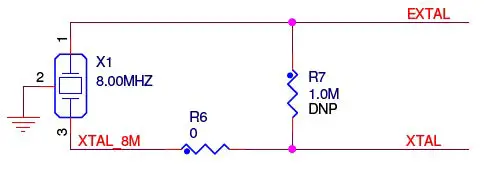 Figure 4. Main Oscillator Input
Additionally, the TWR-MCF51JG provides a 32.768 KHz oscillator for an accurate real time clock source.
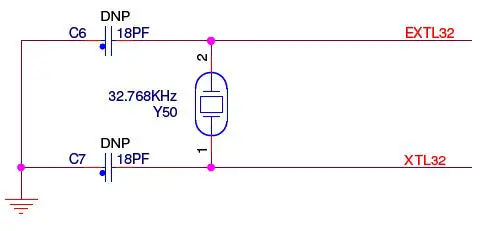 Figure 5. 32 KHz Oscillator Input
System Power
When installed into a Tower System, the TWR-MCF51JG can be powered from either an on-board source or from another source in the assembled Tower System.
In stand-alone operation, the main power source for the TWR-MCF51JG module is derived from the 5.0V input from either the OSBDM USB mini-B connector (J14), the MCF51JG USB micro-AB connector (J8), or the EzPort header (J16) when a shunt is placed on jumper J15. Two low-dropout regulators provide 3.3V and 2.0V supplies from the 5.0V input voltage. Additionally, the 3.3V regulator built into the MCF51JG can be selected. All the user selectable options can be configured using two headers, J9 and J10.
The J10 header is used to select the power source that is supplied to one of the three possible voltage regulators. The J11 header is used to select the regulated board power source. Refer to Table 1 and Table 2 for details.
Table 1. J10, Regulator Power Source Selection
| J10 Shunt Setting | Description | ||
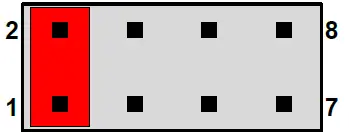 | 1-2 | Power from the OSBDM interface (J14) supplied to the on- board voltage regulators. This is a default setting. | |
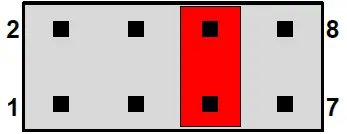 | 5-6 | Power from the MCF51JG USB device interface (J8) supplied to the MCF51JG on-chip regulator. This is a default setting. | |
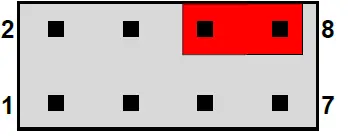 | 6-8 | Power from the Tower Primary Connector USB device interface supplied to the MCF51JG on-chip regulator. | |
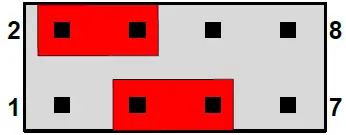 | 3-5 | Power from the MCF51JG USB device interface (J8) supplied | |
| 2-4 | to the on-board voltage regulators. | ||
Table 2. J9, Board Power Source Selection
| J9 Shunt Setting | Description | |||
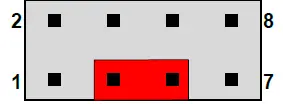 | 3-5 | Board power is supplied by the 3.3V on-board (external) regulator. This is the default setting. | ||
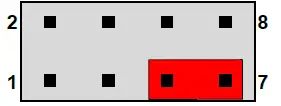 | 5-7 | Board power is supplied by the 2.0V on-board (external) regulator. | ||
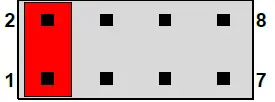 | 1-2 | Board power is supplied by the 3.3V MCF51JG on-chip (internal) regulator. | ||
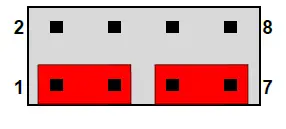 |
1-3 5-7 | Power from the 3.3V MCF51JG on-chip (internal) regulator is supplied to the 3.3V on-board (external) regulator. Board power is supplied by the 2.0V on-board (external) regulator. Note: Take care not to install a shunt on J10 pins 1-2 when J9 is in this configuration. It is recommended to remove the shunt from J10 1-2 and use it on J9 for this setting. | ||
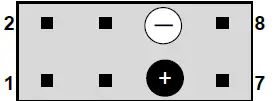 | ― | An external battery or other alternate source can be connected to pins 5 (positive) and 6 (negative, ground). | ||
The 3.3V or 2.0V power supplied to the MCU is routed through a jumper, J12. The jumper shunt can be removed to allow for either (1) selecting the source of the MCU supply voltage or (2) the measurement of power consumed by the MCU.
Table 3. J12, Board Power Source Selection
| J12 Shunt Setting | Description | |
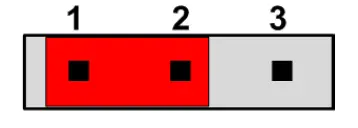 | 3-5 | MCU power is supplied by the board power source selection jumper (J9). This is the default setting. |
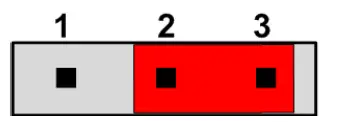 | 5-7 | MCU power is supplied by the 3.3V MCF51JG on-chip (internal) regulator. Use this jumper setting if it is desired to power only the MCU with the on-chip (internal) regulator and not the rest of the board. |
Debug Interface
There are two debug interface options provided: the on-board OSBDM circuit and an external Background Debug Mode (BDM) connector. The BDM connector is a standard 6-pin connector providing an external debugger cable with access to the BDM interface of the MCF51JG256. Alternatively, the on-board OSBDM debug interface can be used to access the debug interface of the MCF51JG256.
Note: When using an external debug pod to connect to the MCF51JG, be sure to connect the BDM cable to J17 (JG BDM). Avoid connecting to J18 (JM60 BDM) which is directly next to J17. J18 provides a debug connection to the OSBDM MCU (MC9S08JM60).
OSBDM
An on-board MC9S08JM60 based Open Source BDM (OSBDM) circuit provides a BDM debug interface to the MCF51JG. A standard USB A male to mini-B male cable (provided) can be used for debugging via the USB connector, J14. The OSBDM interface also provides a USB to serial bridge. Drivers for the OSBDM interface are provided in the P&E Micro OSBDM/OSJTAG Tower Toolkit (available on the MCF51JG product website). These drivers and more utilities can be found online at: http://www.pemicro.com/osbdm.
Accelerometer
An MMA8451Q digital accelerometer is connected to the MCF51JG MCU through an I2C interface (I2C0: PTB2 and PTB3) and two GPIO/IRQ signals (PTC4 and PTC5).
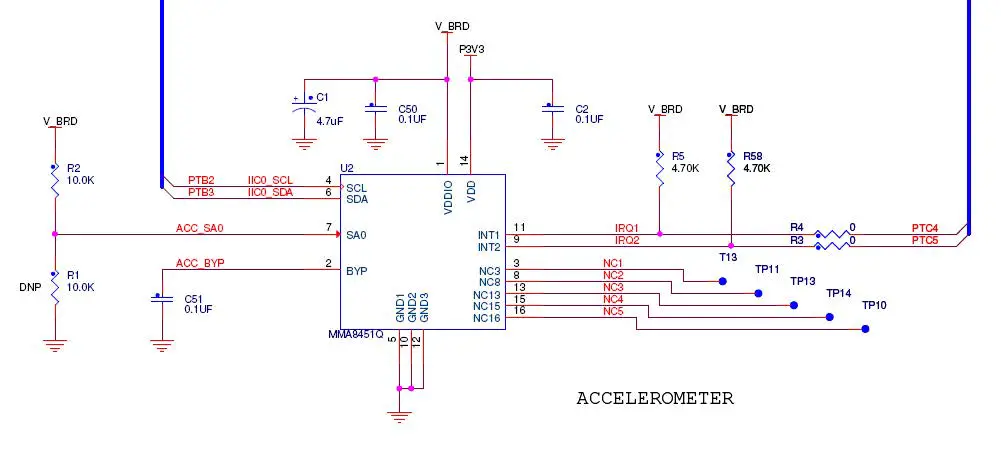 Figure 6. Accelerometer Circuit
Pushbuttons, LEDs
The TWR-MCF51JG features, two pushbutton switches (SW1 & SW2) connected to IRQ signals IRQ0 (PTB1) and IRQ3 (PTC1), a pushbutton switch (SW3) connected to the master reset signal, and two user-controllable LEDs connected to GPIO signals (PTB6 and PTC0).
Refer to Table 6 “I/O Connectors and Pin Usage Table” for more information.
General Purpose Tower Plug-in (TWRPI) Socket
The TWR-MCF51JG features a socket that can accept a variety of different Tower Plug-in modules featuring sensors, RF transceivers, and more. The General Purpose TWRPI socket provides access to I2C, SPI, IRQs, GPIOs, timers, analog conversion signals, TWRPI ID signals, reset, and voltage supplies. The pinout for the TWRPI Socket is defined in Table 4.
Refer to Table 6 “I/O Connectors and Pin Usage Table” for the specific MCF51JG pin connections to the General Purpose TWRPI socket.
Table 4. General Purpose TWRPI socket pinout
Left-side 2×10 Connector
| Pin | Description |
| 1 | 5V VCC |
| 2 | 3.3 V VCC |
| 3 | GND |
| 4 | 3.3V VDDA |
| 5 | VSS (Analog GND) |
| 6 | VSS (Analog GND) |
| 7 | VSS (Analog GND) |
| 8 | ADC: Analog 0 |
| 9 | ADC: Analog 1 |
| 10 | VSS (Analog GND) |
| 11 | VSS (Analog GND) |
| 12 | ADC: Analog 2 |
| 13 | VSS (Analog GND) |
| 14 | VSS (Analog GND) |
| 15 | GND |
| 16 | GND |
| 17 | ADC: TWRPI ID 0 |
| 18 | ADC: TWRPI ID 1 |
| 19 | GND |
| 20 | Reset |
Right-side 2×10 Connector
| Pin | Description |
| 1 | GND |
| 2 | GND |
| 3 | I2C: SCL |
| 4 | I2C: SDA |
| 5 | GND |
| 6 | GND |
| 7 | GND |
| 8 | GND |
| 9 | SPI: MISO |
| 10 | SPI: MOSI |
| 11 | SPI: SS |
| 12 | SPI: CLK |
| 13 | GND |
| 14 | GND |
| 15 | GPIO: GPIO0/IRQ |
| 16 | GPIO: GPIO1/IRQ |
| 17 | GPIO: GPIO2 |
| 18 | GPIO: GPIO3 |
| 19 | GPIO: GPIO4/Timer |
| 20 | GPIO: GPIO5/Timer |
USB
The MCF51JG features a USB full-speed/low-speed OTG/Host/Device controller with built-in transceiver. The TWR-MCF51JG routes the USB D+ and D- signals from the MCF51JG MCU to either the on-board USB connector (J8) or the Tower Primary Connector (allowing the connection to external USB connectors or additional circuitry on a Tower peripheral module) depending on the value of four optional resistors: R11/R12 and R13/R14. By default, R11 and R12 are not populated and R13 and R14 are. This connects the MCF51JG USB signals to the on-board USB circuit.
A power supply switch with an enable input signal and over-current flag output signal is used to supply power to the USB connector when the MCF51JG is operating in host mode. Port pin PTA2 is connected to the flag output signal and port pin PTA1 is used to drive the enable signal. Both port pins can be isolated with jumpers if needed.
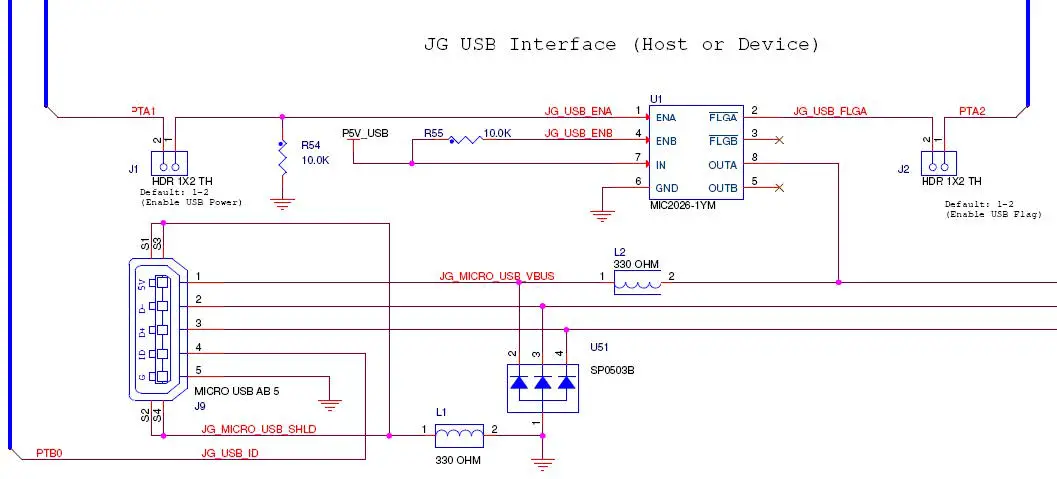 Figure 7. USB dual-role interface
Jumper Table
There are several jumpers on the TWR-MCF51JG that provide configuration selection and signal isolation. Refer to the following table for details. The default installed jumper settings are shown in bold with asterisks.
Table 5. TWR-MCF51JG Jumper Table
| Jumper | Option | Setting | Description |
| J1 | USB Power Switch Enable Input Connection | *ON* | Connect PTA1 to USB power switch enable input |
| OFF | Disconnect PTA1 from USB power switch enable | ||
| J2 | USB Power Switch Flag Output Connection | *ON* | Connect PTA2 to USB power switch over-current flag output |
| OFF | Disconnect PTA2 from USB power switch over- current flag output | ||
| J4 | SCI1/SPI1 Connection Selection | *1-2* | Connect SCI1_RX/SPI1_MISO to SPI1_MISO on Primary Edge |
| 2-3 | Connect SCI1_RX/SPI1_MISO to SCI1_RX (RXD1) on Primary Edge | ||
| J5 | SCI1/SPI1 Connection Selection | *1-2* | Connect SCI1_TX/SPI1_MOSI to SPI1_MOSI on Primary Edge |
| 2-3 | Connect SCI1_TX/SPI1_MOSI to SCI1_TX (TXD1) on Primary Edge | ||
| J9 | Board Power Source Selection | *3-5* | Refer to Table 2 |
| J10 | Regulator Power Source Selection | *1-2* *5-6* | Refer to Table 1 |
| J12 | MCU Voltage Selector | *1-2* | Power MCU from board power source selection jumper (J9). |
| 2-3 | Power MCU with output of on-chip voltage regulator (VOUT33). | ||
| J13 | OSBDM Mode Selection | ON | OSBDM bootloader mode (OSBDM firmware reprogramming) |
| *OFF* | Debugger mode | ||
| J15 | EzPort Power Connection | ON | Connect on-board 5V supply to EzPort header (supports powering board from external EzPort probe) |
| *OFF* | Disconnect on-board 5V supply from EzPort header |
Input/Output Connectors and Pin Usage Table
The following table provides details on which MCF51JG pins are using to communicate with the LEDs, switches, and other I/O interfaces onboard the TWR-MCF51JG.
Note: Some port pins are used in multiple interfaces on-board and many are potentially connected to off-board resources via the Tower Primary Connector. Take care to avoid attempted simultaneous usage of mutually exclusive features.
Table 6. I/O Connectors and Pin Usage Table
| Feature | Connection | Port Pin | Pin Function | Shared With |
| OSBDM/USB Bridge | UART Receive | PTB5 | SCI2_RX | SPI2_MISO |
| UART Transmit | PTB4 | SCI2_TX | SPI2_MOSI | |
| USB OTG | Data Negative | USB0_DN | Differential Data | |
| Data Positive | USB0_DP | Differential Data | ||
| EZPORT | EZPort Clock | PTB0 | EZP_CLK | TWRPI, USB OTG |
| EZPort Data Out | PTA6 | EZP_DO | TWRPI, SAI | |
| EZPort Data In | PTA7 | EZP_DI | TWRPI | |
| EZPort Chip Select | PTB1 | EXP_CS_B | IRQ0/SW1 | |
| Reset | RESET_B | JG_RESET_B | ||
| Switches | SW1 | PTB1 | IRQ0 | EZP_CS_B |
| SW2 | PTC1 | IRQ3 | FTM1_CH5 | |
| SW3 | RESET_B | Reset | ||
| SAI | SAI Receive FS | PTA6 | SAI0_RX_FS | EZPORT, TWRPI |
| Feature | Connection | Port Pin | Pin Function | Shared With |
| SAI Transmit FS | PTD0 | SAI0_RX_FS | SPI | |
| SAI Transmit Data | PTD1 | SAI0_TXD | SPI | |
| SAI Receive Data | PTA5 | SAI0_RXD | FTM1_CH4 | |
| SAI Receive Clock | PTA3 | SAI0_RX_BCLK | FTM1_CH2, CLKOUT | |
| SAI Transmit Clock | PTD2 | SAI0_TX_BCLK | SPI | |
| SAI Input Clock | PTD3 | SAI0_CLKIN/MCLK | SPI | |
| Accelerometer | I2C Clock I2C Data IRQ1 IRQ2 | PTB2 PTB3 PTC4 PTC5 | IIC0_SCL IIC0_SDA IRQ1 IRQ2 |
SCI1_RTS SCI1_CTS |
| TWRPI | TWRPI I2C SCL (J7 Pin 3) | PTB2 | IIC0_SCL | Accelerometer |
| TWRPI I2C SDA (J7 Pin 4) | PTB3 | IIC0_SDA | Accelerometer | |
| TWRPI SPI MISO (J7 Pin 9) | PTC2 | SPI1_MISO | SCI1_RX | |
| TWRPI SPI MOSI (J7 Pin 10) | PTB7 | SPI1_MOSI | SCI1_TX | |
| TWRPI SPI SS (J7 Pin 11) | PTC7 | SPI1_SS | ||
| TWRPI SPI CLK (J7 Pin 12) | PTC3 | SPI1_SCLK | ||
| TWRPI GPIO0 (J7 Pin 15) | PTA6 | GPIO0 | SAI0, EZPORT | |
| TWRPI GPIO1 (J7 Pin 16) | PTB0 | GPIO1 | USB OTG, EZPORT | |
| TWRPI GPIO2 (J7 Pin 17) | PTA7 | GPIO2 | EZPORT | |
| TWRPI GPIO3 (J7 Pin 18) | PTA1 | GPIO3 | FTM1_CH0, IIC1_SCL | |
| TWRPI GPIO4 (J7 Pin 19) | PTA2 | GPIO4 | FTM1_CH1, IIC1_SDA | |
| LEDs | Yellow LED (D5) Orange LED (D4) | PTB6 PTC0 | LED1 LED2 |
Tower Elevator Connections
The TWR-MCF51JG features two expansion card-edge connectors that interface to the Primary and Secondary Elevator boards in a Tower system. The Primary Connector (comprised of sides A and B) is utilized by the TWR-MCF51JG while the Secondary Connector (comprised of sides C and D) only makes connections to the GND pins. Table 7 provides the pinout for the Primary Connector. (NC = No Connection)
Table 7. TWR-MCF51JG Primary Connector Pinout
| Pin # | Side B | Pin # | Side A | ||
| Name | Usage | Name | Usage | ||
| 1 | 5V | P5V_ELEV | 1 | 5V | P5V_ELEV |
| 2 | GND | GND | 2 | GND | GND |
| 3 | 3.3V | P3V3 | 3 | 3.3V | P3V3 |
| 4 | ELE_PS_SENSE_1 | ELE_PS_SENSE | 4 | 3.3V | P3V3 |
| 5 | GND | GND | 5 | GND | GND |
| 6 | GND | GND | 6 | GND | GND |
| 7 | SDHC_CLK / SPI1_CLK | PTC3 | 7 | IIC0_SCL | PTB2 |
| 8 | NC | 8 | IIC0_SDA | PTB3 | |
| 9 | SDHC_D3 / SPI1_CS0_b | PTC7 | 9 | GPIO9/UART1_CTS | PTC5 |
| 10 | SDHC_CMD / SPI1_MOSI | SPI1_MOSI | 10 | NC | |
| 11 | SDHC_D0 / SPI1_MISO | SPI1_MISO | 11 | NC | |
| 12 | NC | 12 | NC | ||
| 13 | NC | 13 | NC | ||
| 14 | NC | 14 | NC | ||
| 15 | NC | 15 | NC | ||
| 16 | NC | 16 | NC | ||
| 17 | NC | 17 | NC | ||
| 18 | NC | 18 | NC | ||
| 19 | NC | 19 | NC | ||
| 20 | NC | 20 | NC | ||
| 21 | GPIO1/UART1_RTS | PTC4 | 21 | I2S0_MCLK | PTD3 |
| 22 | NC | 22 | I2S0_DOUT_SCK | PTD2 | |
| 23 | NC | 23 | I2S0_DOUT_WS | PTD0 | |
| 24 | NC | 24 | I2S0_DIN0 | PTA5 | |
| 25 | NC | 25 | I2S0_DOUT0 | PTD1 | |
| 26 | GND | GND | 26 | GND | GND |
| 27 | NC | 27 | NC | ||
| 28 | NC | 28 | NC | ||
| 29 | NC | 29 | NC | ||
| 30 | NC | 30 | NC | ||
| 31 | GND | GND | 31 | GND | GND |
| 32 | NC | 32 | NC | ||
| 33 | NC | 33 | NC | ||
| 34 | NC | 34 | NC | ||
| 35 | GPIO4 | PTB6 | 35 | NC | |
| 36 | 3.3V | P3V3 | 36 | 3.3V | P3V3 |
| 37 | NC | 37 | NC | ||
| 38 | NC | 38 | PWM2 | PTA3 | |
| 39 | PWM5 | PTC1 | 39 | PWM1 | PTA2 |
| 40 | PWM4 | PTA6 | 40 | PWM0 | PTA1 |
| 41 | NC | 41 | UART0_RX | PTB5 | |
| 42 | NC | 42 | UART0_TX | PTB4 | |
| 43 | NC | 43 | UART1_RX | SCI1_RX | |
| 44 | SPI0_MISO | PTD2 | 44 | UART1_TX | SCI1_TX |
| 45 | SPI0_MOSI | PTD1 | 45 | NC | |
| 46 | SPI0_CS0_b | PTD0 | 46 | NC | |
| 47 | NC | 47 | NC | ||
| 48 | SPI0_CLK | PTD3 | 48 | NC | |
| 49 | GND | GND | 49 | NC | |
| 50 | I2C1_SCL | PTA1 | 50 | NC | |
| 51 | I2C1_SDA | PTA2 | 51 | NC | |
| 52 | GPIO5 | PTC0 | 52 | NC | |
| 53 | NC | 53 | NC | ||
| 54 | NC | 54 | USB0_DN | JG_ELEV_USB0_DN | |
| 55 | IRQ_H | PTB1 | 55 | USB0_DP | JG_ELEV_USB0_DP |
| 56 | IRQ_G | PTB1 | 56 | NC | |
| 57 | NC | 57 | USB0_VBUS | USB0_VBUS | |
| 58 | NC | 58 | NC | ||
| 59 | NC | 59 | NC | ||
| 60 | NC | 60 | NC | ||
| 61 | IRQ_B | PTC1 | 61 | NC | |
| 62 | IRQ_A | PTC1 | 62 | RSTIN_B | JG_RESET_B |
| 63 | NC | 63 | RSTOUT_B | JG_RESET_B | |
| 64 | NC | 64 | CLKOUT0 | PTA3 | |
| 65 | GND | GND | 65 | GND | GND |
| 66 | NC | 66 | NC | ||
| 67 | NC | 67 | NC | ||
| 68 | NC | 68 | NC | ||
| 69 | NC | 69 | NC | ||
| 70 | NC | 70 | NC | ||
| 71 | NC | 71 | NC | ||
| 72 | NC | 72 | NC | ||
| 73 | NC | 73 | NC | ||
| 74 | NC | 74 | NC | ||
| 75 | NC | 75 | NC | ||
| 75 | NC | 75 | NC | ||
| 77 | NC | 77 | NC | ||
| 78 | NC | 78 | NC | ||
| 79 | NC | 79 | NC | ||
| 80 | NC | 80 | NC | ||
| 81 | GND | GND | 81 | GND | GND |
| 82 | 3.3V | P3V3 | 82 | 3.3V | P3V3 |
TWR-MCF51JG Tower Module User’s Manual
 NXP® Semiconductors Official Site | NXP Semiconductors
 ColdFire+ MCF51JX Tower System Module | NXP Semiconductors
 PEmicro | Experts in Embedded tools for Flash Programming and Development

![Nzxt Compact Mid-tower Atx Case [h510, H510i] User Manual](https://static-data1.manualsee.com/1/img/78/17013/2020/12/Nzxt-Compact-Mid-Tower-ATX-Case-H510-H510i.jpg?ezimgfmt=ng%3Awebp%2Fngcb1%2Frs%3Adevice%2Frscb1-1 "Nzxt Compact Mid-tower Atx Case [h510, H510i] User Manual")