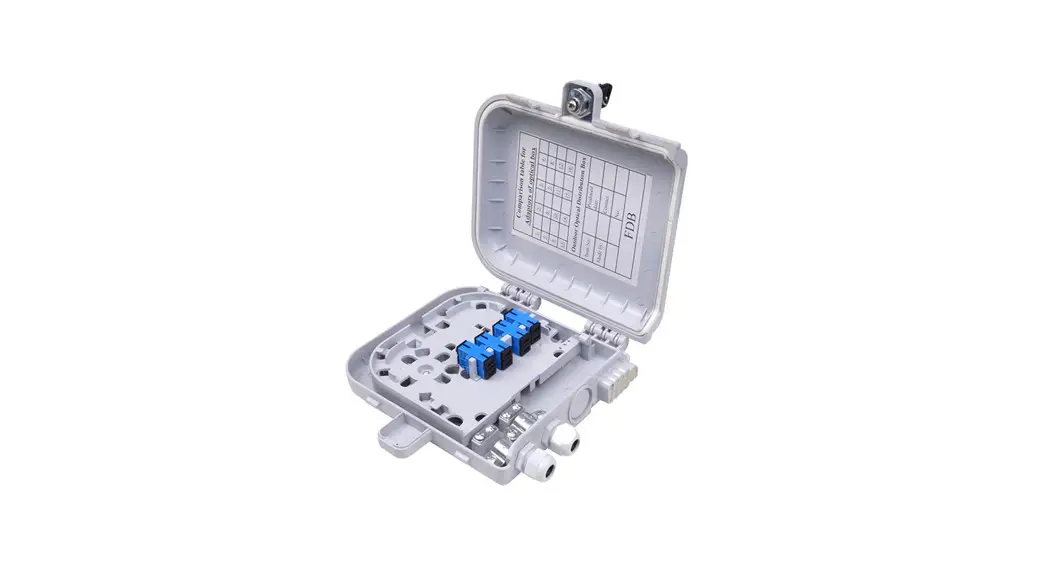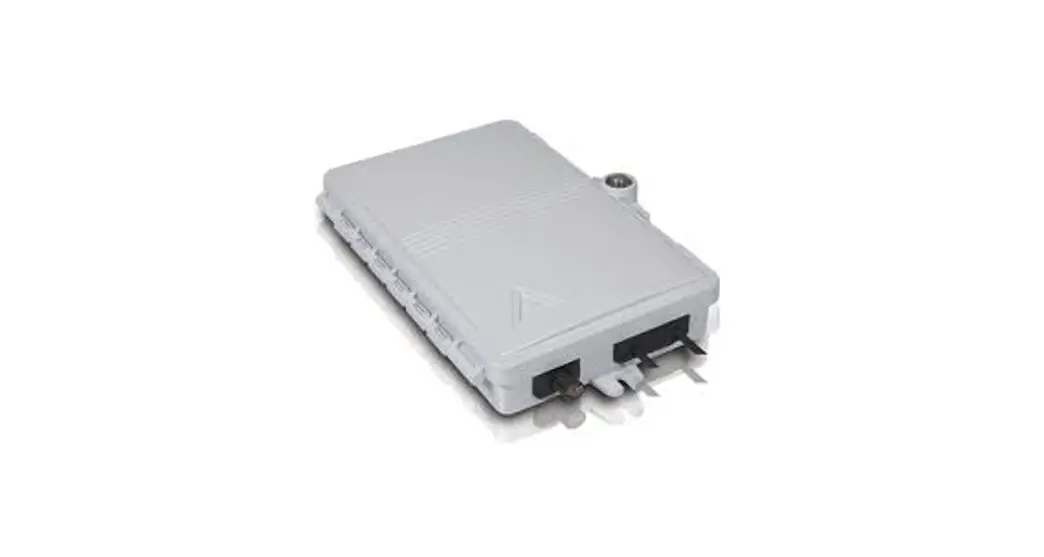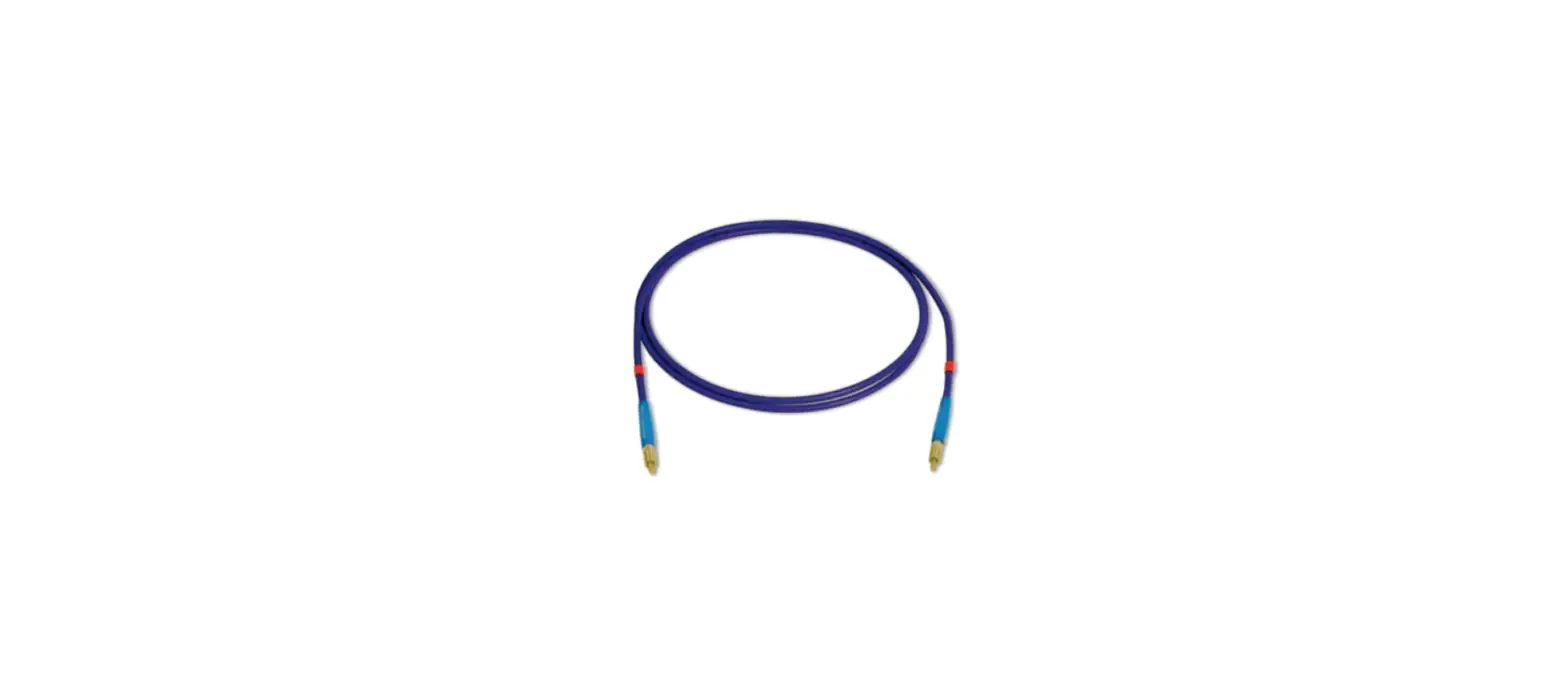
 D2300CPS Multi Mode 850nm Fiber Optic Interface
Instruction Manual
INTRODUCTION
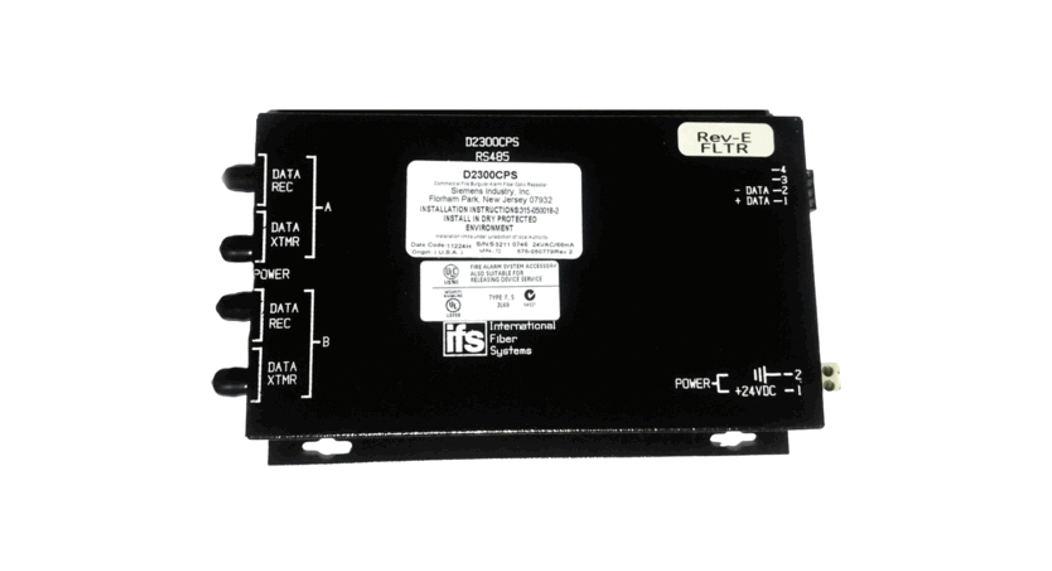
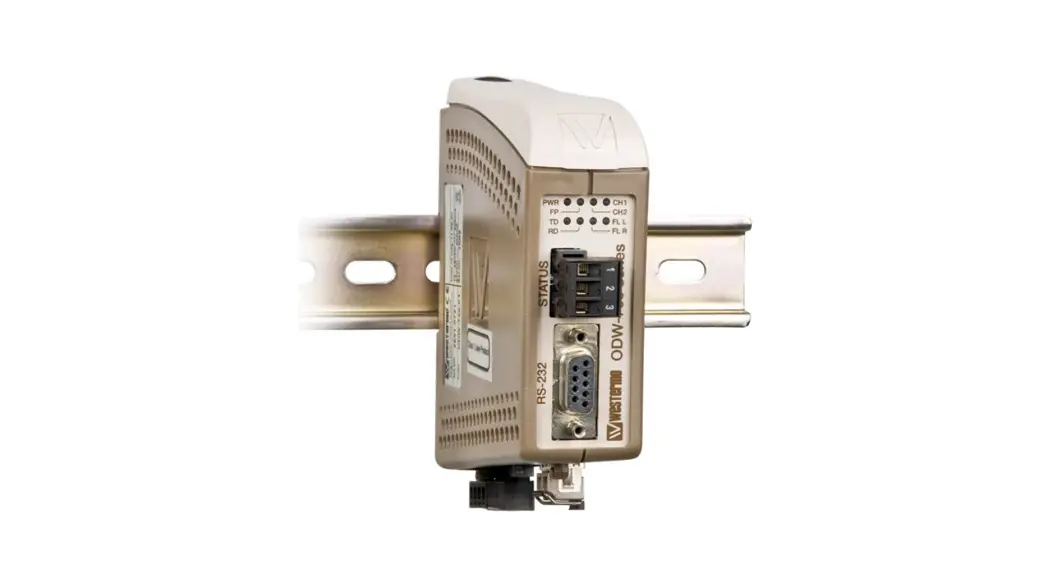
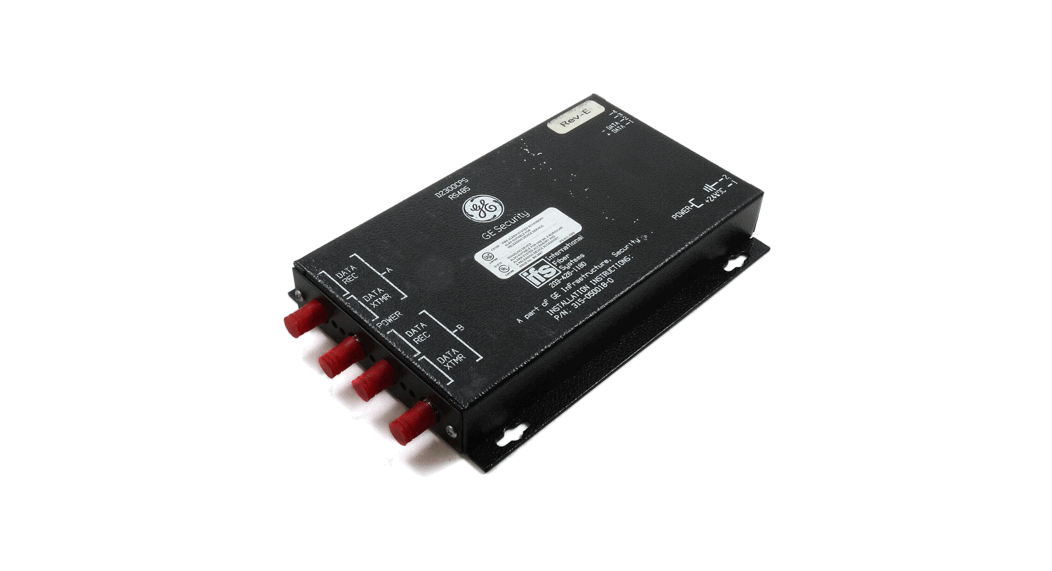
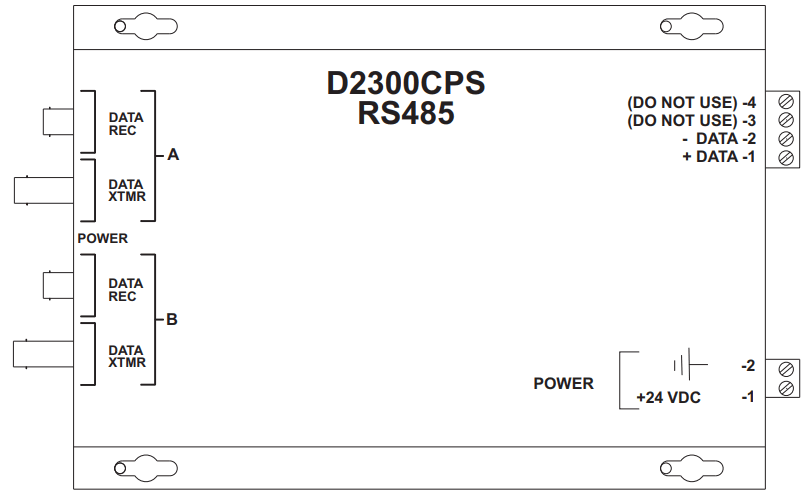
The Model D2300CPS from Siemens Industry, Inc. (See Figure 1) is a Fiber Optic interface for the MXL’s RS-485 network (MNET or XNET), FireFinder XLS/Desigo Fire Safety Modular/Cerberus PRO Modular network (HNET or XNET) or HUB-4 FSI. It uses a two-fiber (duplex) pair between each device. The D2300CPS can function as either a repeater or an end point unit.
WARNING: This module is NOT backwards compatible with the original 5V D2300CP. This unit uses +24VDC. Make sure to read the front of the module and connect to the correct voltage.
Otherwise, serious damage to the unit will result.
Figure 1 D2300CPS Module
The D2300CPS can operate in either a daisy chain (See Figure 2) or star configuration (See Figure 3). This allows for network configurations that are not possible with the RS-485 network alone.
WARNING:
The D2300CPS module is not listed for use by Factory Mutual. Applications requiring fiber connectivity of voice modules/systems are therefore not Factory Mutual listed.
WARNING:
Do not use the D2300CPS with CXL Systems.
MOUNTING
The D2300CPS has four keyhole slots for #6 screws.
Mount the device in the locations listed below using the four #6 screws provided.
A bracket (P/N 500-692880) is available for mounting the D2300CPS in any MXL enclosure that will accept a MOM-4 (See Figure 4). This bracket has the same footprint as the MOM-4 and accommodates two D2300CPS modules. An assembly kit is included with the bracket that contains four nuts and eight screws.
Mount the bracket in the enclosure with the four nuts at the positions labeled X (See Figure 4). Start four of the 6-32 screws and slip the keyhole slots in the D2300CPS over them. Tighten the four screws.
System 3 style rails that mount on an MBR-2 or MME-3 backbox (P/N MSR-1) are also available and can be used for mounting the D2300CPS with the System 3 MPFO Bracket. Up to three brackets can be installed on a single rail.
A bracket, Model D2300-MP, is available for mounting two D2300CPS modules in any Forefingers XLS/Demigod Fire Safety Modular/Cerberus PRO Modular CAB enclosure. The D2300-MP fits in the same footprint as a CC-5 and mounts to the CAB-MP. A hardware kit is provided for attaching the D2300-MP to the CAB-MP and mounting two D2300CPS modules onto the D2300-MP. Mount the D2300CPS modules prior to installing the D2300-MP onto the CAB-MP.
Note that when using two D2300CPS modules, the center two mounting holes on each D2300CPS share the two center studs on the D2300-MP (See Figure 5).
ELECTRICAL CONNECTIONS
POWER INPUT
The D2300CPS uses filtered or unfiltered 24 VDC.
The D2300CPS can only be powered from the sources listed in Table 1 on page 6.
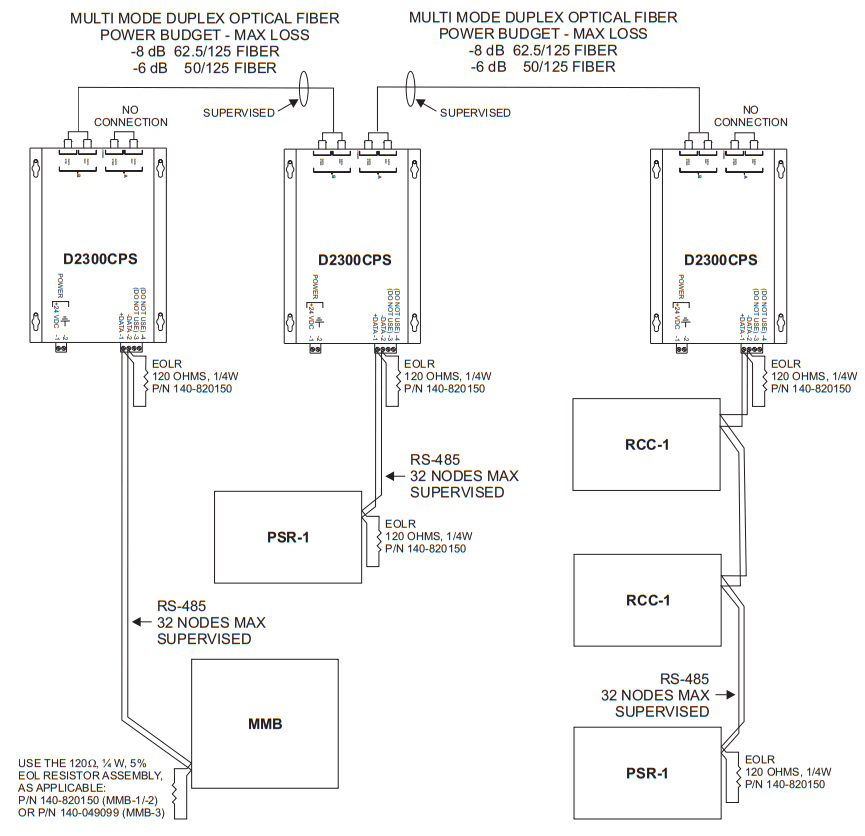
Figure 2 Daisy Chain Configuration (MNET Shown)
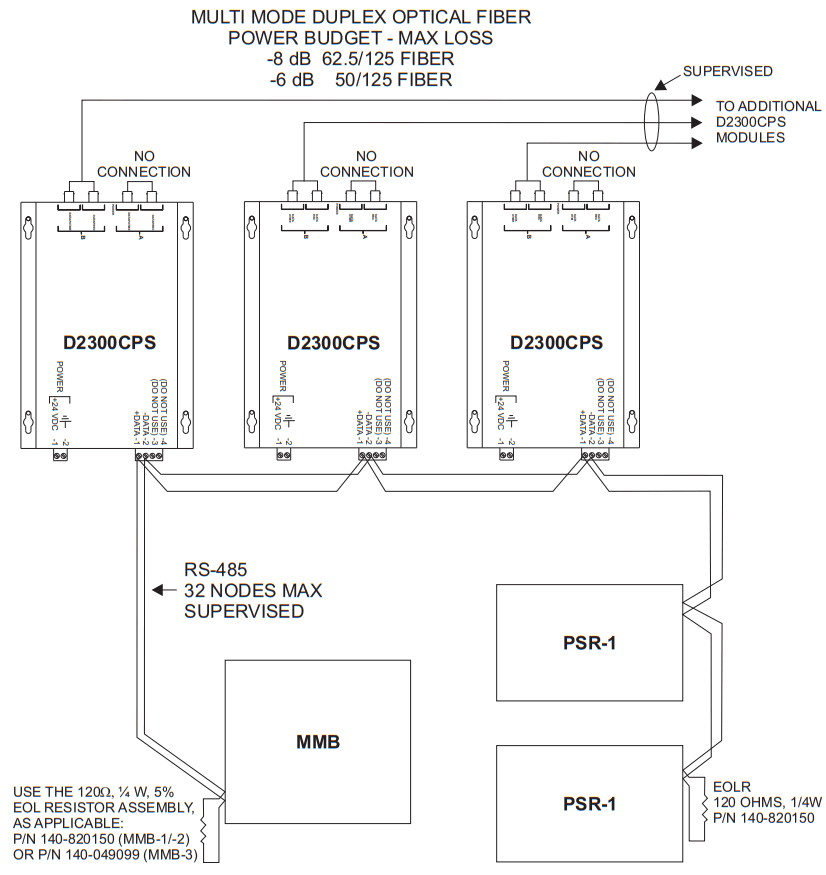
Figure 3 Star Configuration (MNET Shown)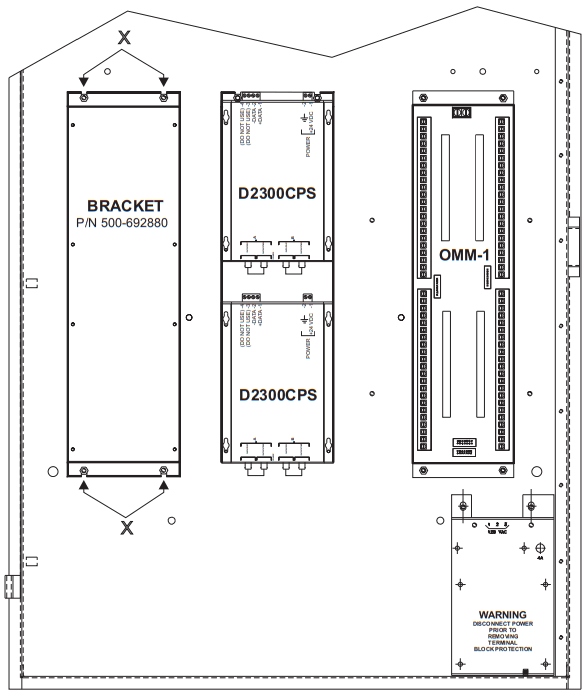
Figure 4 Mounting the D2300CPS in an MBR-2 or MME-3 Backbox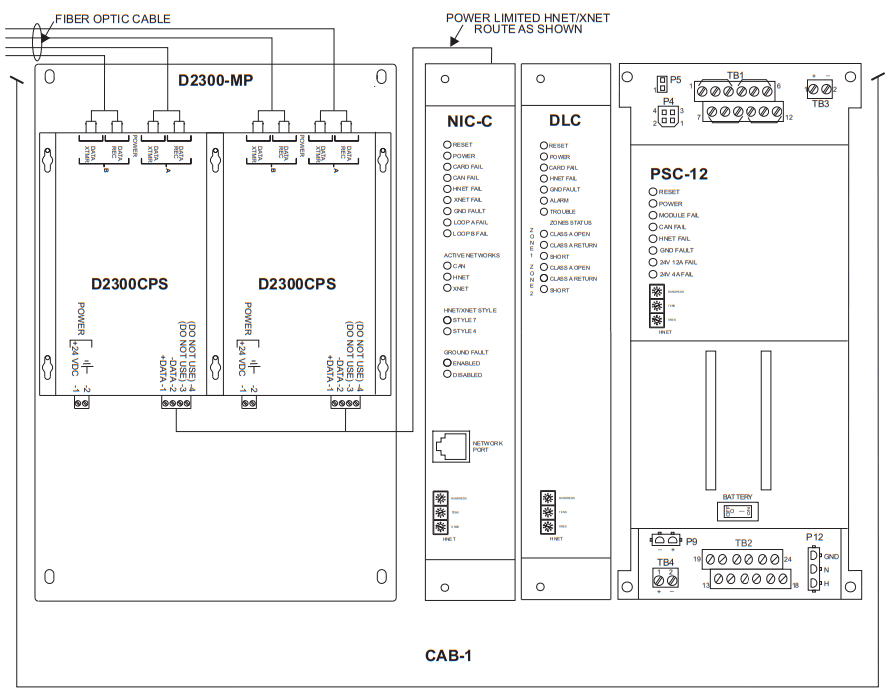
Figure 5 Mounting the D2300CPS in a CAB-1 Backbox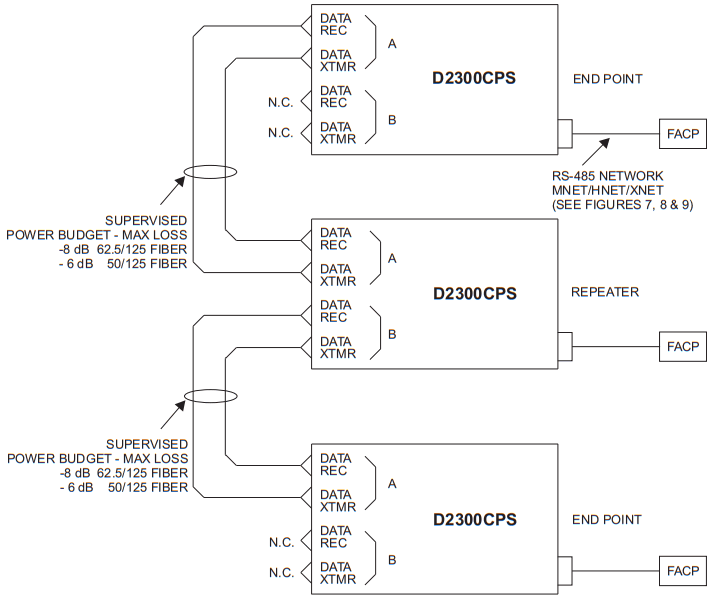
Figure 6 Wiring the D2300CPS as both a Repeater and End Point Unit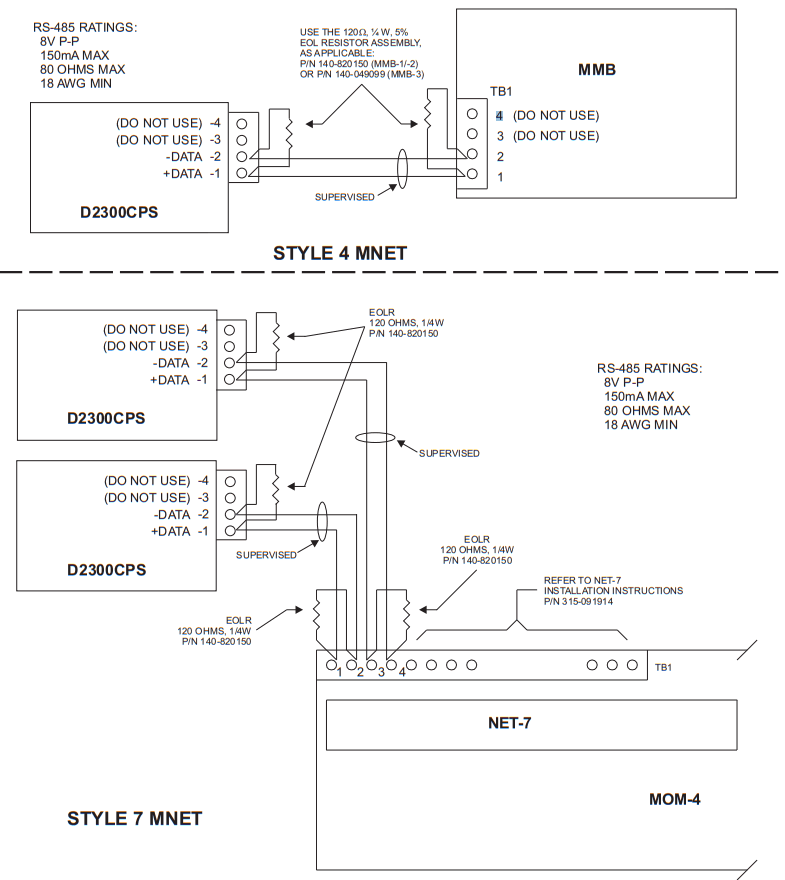
Figure 7 Wiring the RS-485 MNET Network in Style 4 and Style 7
Telba 1
| SYSTEM | POWER SOURCE |
| MXL | MMB-2: TB1 4-5; TB5 9-12 MMB-3: TB9 +,-; TB5 9-12 PSR-1: TB3 1-2; 3-6 |
| Forefinger XLS/Design Fire Safety Modular/Cerberus PRO Modular | PSC-12: TB4 +,- PSX-12: TB4 +,- |
POWER SOURCE
| PAD-3/PAD-4 | AUX +,- |
| PS-35 | TB1 5-6 |
For non-power limited wiring, the PLM-35 (Installation Instructions P/N 315-093495) must be used to comply with NFPA 70 per NEC 760. All wiring must be in accordance with Article 760 of NEC or local building codes.
For additional information on the MXL/MXLV System, refer to the MXL/MXLV Manual, P/N 315-092036.
24 VDC CURRENT CALCULATION (MXL ONLY)
The 24 VDC output ratings for the MMB/SMB and PSR-1 are:
MMB-2/-3 6A at 24 VDC (MPS-6); 12A at 24 VDC (MPS-12)
SMB-2 6A at 24 VDC (MPS-6); 12A at 24 VDC (MPS-12)
PSR-1 6A at 24 VDC (MPS-6); 12A at 24 VDC (MPS-12)
The following modules all draw current from the 24 VDC supply. Add the value for each module that is installed in the enclosure where the D2300CPS is to be installed. Be sure to include the D2300CPS in this calculation.
| MODULE | ACTIVE 24 VDC MODULE CURRENT | QUANTITY | TOTAL |
| ACM-1 | 85mA | ||
| ASC-1 | 41mA | ||
| ASC-2 | 61mA | ||
| CMI-300 | Lorna | ||
| CRM-4 | 75mA | ||
| CSM-4 | 34mA + 1.5A max per circuit | ||
| CZM-4 | 720mA 4 zones in alarm | ||
| D2300CPS | 66mA | ||
| MKB-2/-4 | Lorna | ||
| NET-4 | Lorna | ||
| NET-7 | OrnA | ||
| NET-7M | OrnA | ||
| M01-7 | 120mA | ||
| MOD-16 | 850mA max | ||
| MID-16 | 32mA max | ||
| PIM-1 | OrnA | ||
| BTC-1 | 44rnA | ||
| RCM-1 | 130mA | ||
| ZAC-30 | 3A at 30W | ||
| OCC-1 | 17mA | ||
| ZC1-8B | 170mA | ||
| ZC2-8B | 342mA | ||
| ZC2-4AB | 167mA | ||
| ZC3-4AB | 168mA | ||
| ZCT-8B | 78mA |
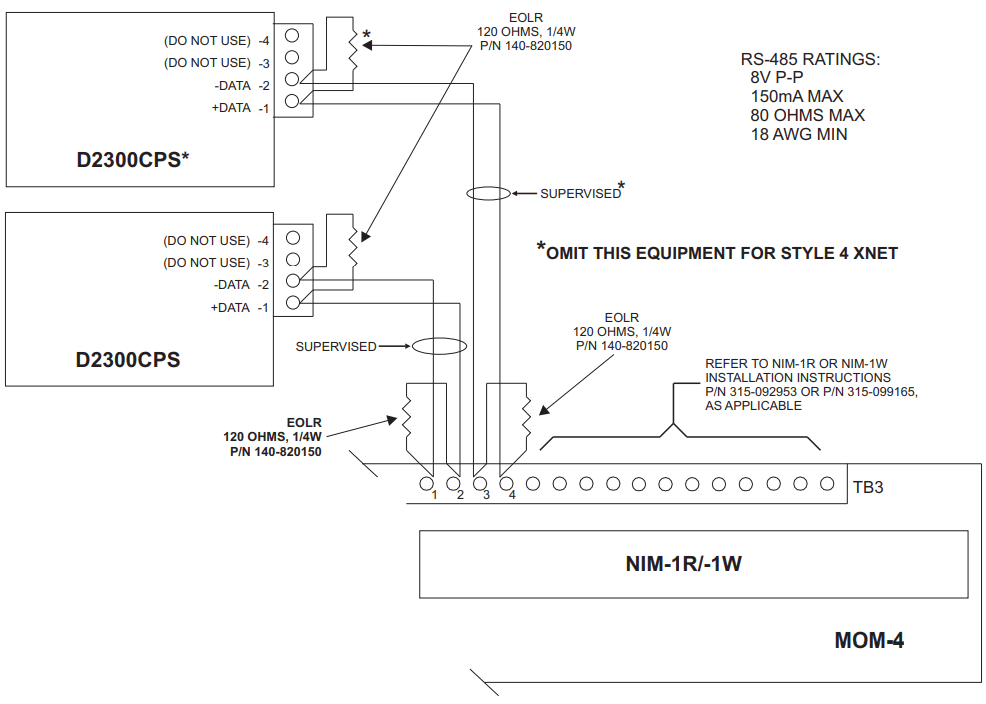
Figure 8 Wiring the RS-485 XNET Network in Style 4 and Style 7 (MXL)
RS-485 NETWORK
The RS-485 MNET, XNET and HNET networks connect to the D2300CPS on the terminal block with the markings +DATA (1) and -DATA(2). Terminals 3 and 4 are not used. For Style 4 networks one D2300CPS is needed at each Fiber Optic drop. For Style 7 networks two D2300CPS modules are needed at each drop. End of line devices are required on each RS-485 pair in the system. Install them at the extreme ends of each pair. Refer to Figures 7 and 8 (MXL) Figure 9 (Fire Finder XLS/Design Fire Safety Modular/Cerberus PRO Modular) and Figure 10 (HUB-4 FSI) for wiring instructions and ratings for both Style 4 and Style 7. NOTE: Positive and negative ground fault detected when terminals shorted to earth.
FIBER CONNECTIONS
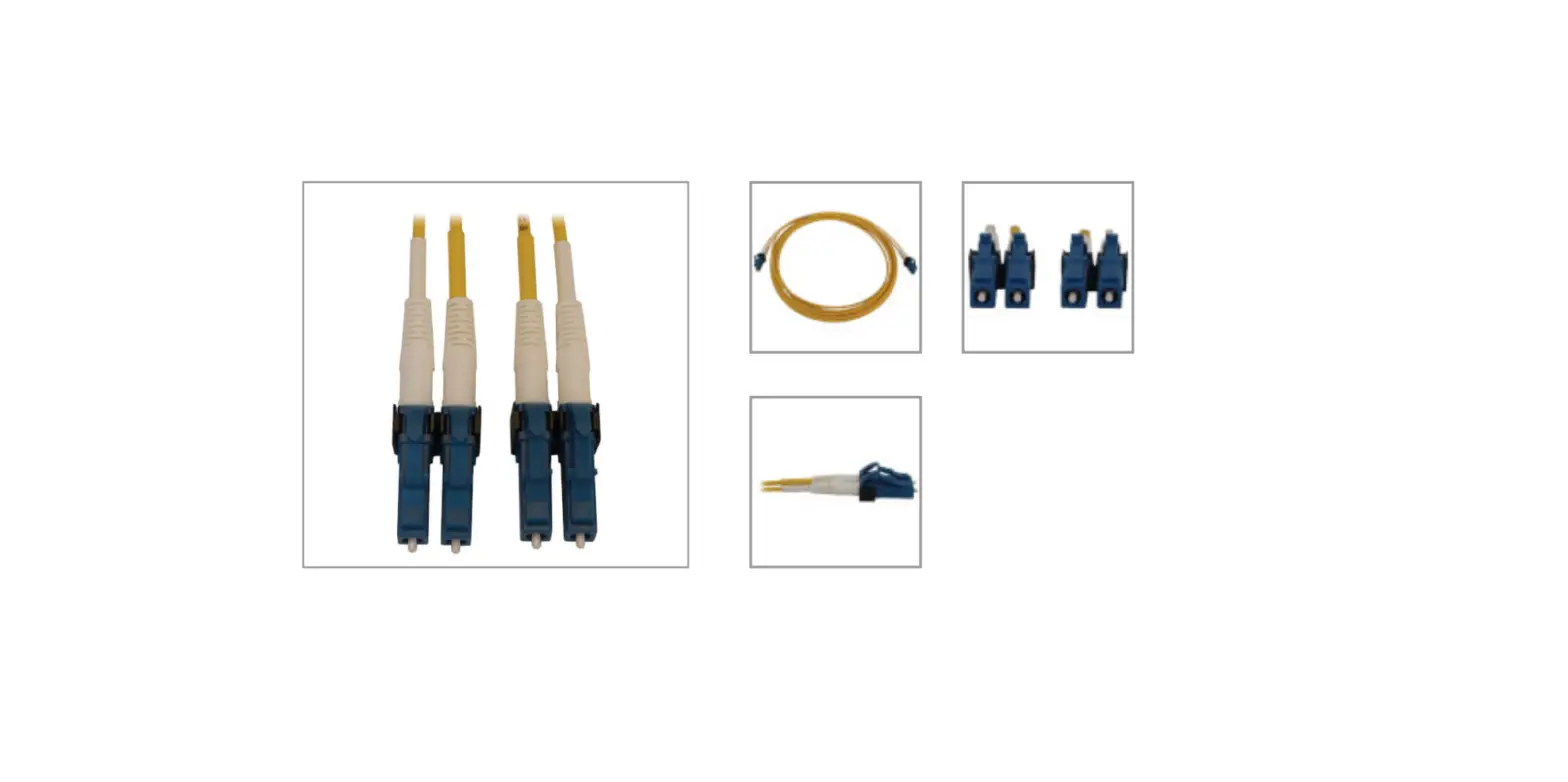
The D2300CPS can function as both a repeater and an end point unit. When used as an end point, connect to the fiber connectors labeled A. Make no connection to the B connectors. In the repeater mode, use both pairs of connectors, A and B. Two Fiber Optic cables are required between each pair of D2300CPS modules. Use a high quality duplex Fiber Optic cable containing either 50/125 or 62.5/125 fiber. Duplex fiber optic cable has two cables in a single shield similar to electrical zip cord. Use ST style fiber connectors. Please contact the fiber manufacturer regarding instructions for terminating the fiber.
When installing the fiber pairs, each fiber must connect between the transmit data (DATA XTMR) on one D2300CPS and the receive data line (DATA REC) on the other D2300CPS.
The D2300CPS fiber connection is classified as Style DCLB and Style DCLA per ULC-527.
INDICATORS
The D2300CPS has five LED indicators for Power and Status.
The LEDs are located on the side of the module with the Fiber Optic connectors. The Power LED is green and lights whenever there is 24 VDC. Both channels A and B have a yellow and green LED. The green LED indicates that the D2300CPS is transmitting data on that channel. The yellow LED lights when data is received.
ELECTRICAL RATINGS
| Active 24VDC Module Current | 66mA |
| Standby 24VDC Module Current | 66mA |
| Input Power | 18-31 VDC, 66mA max |
| Battery Power | 24 VDC, 66mA max |
| RS-485 | 8V (P-P), 150mA max |
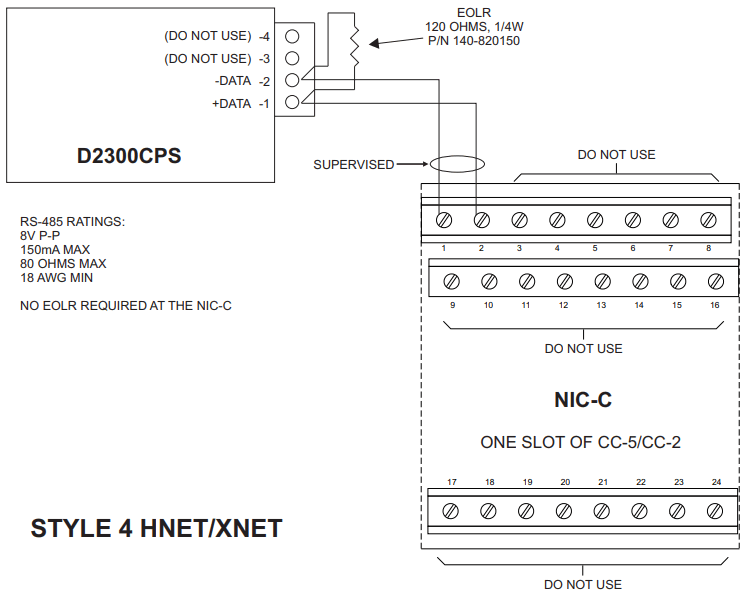
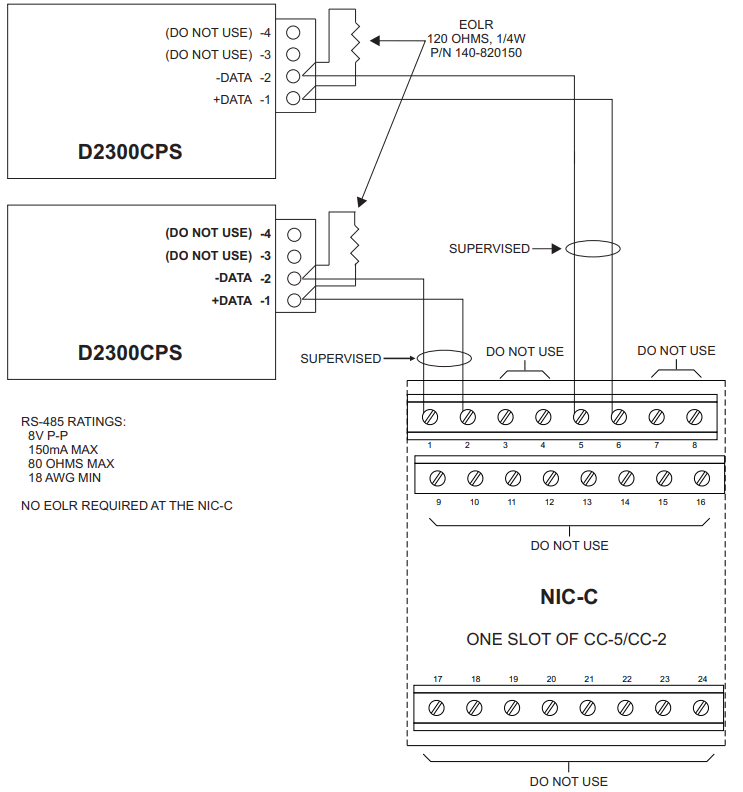
Figure 9
Wiring the RS-485 HNET or XNET Network in Style 4 and Style 7 (FireFinder XLS/Desigo Fire Safety Modular/Cerberus PRO Modular)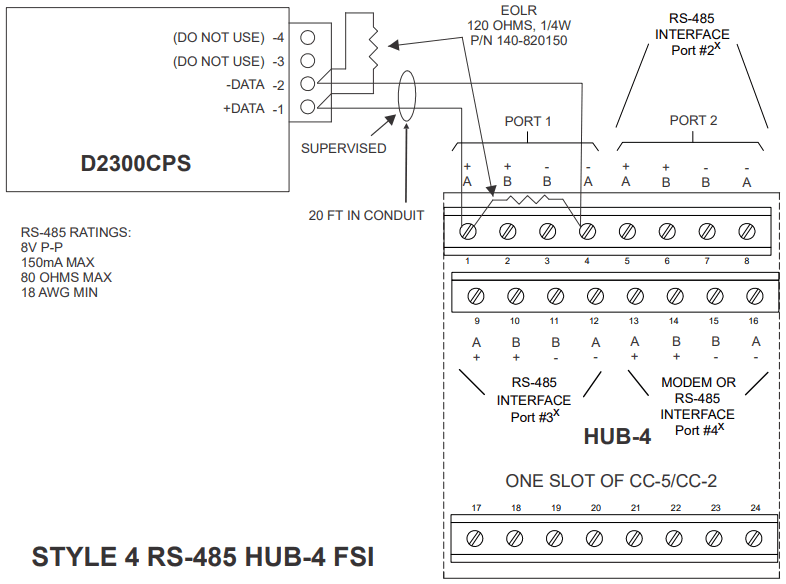
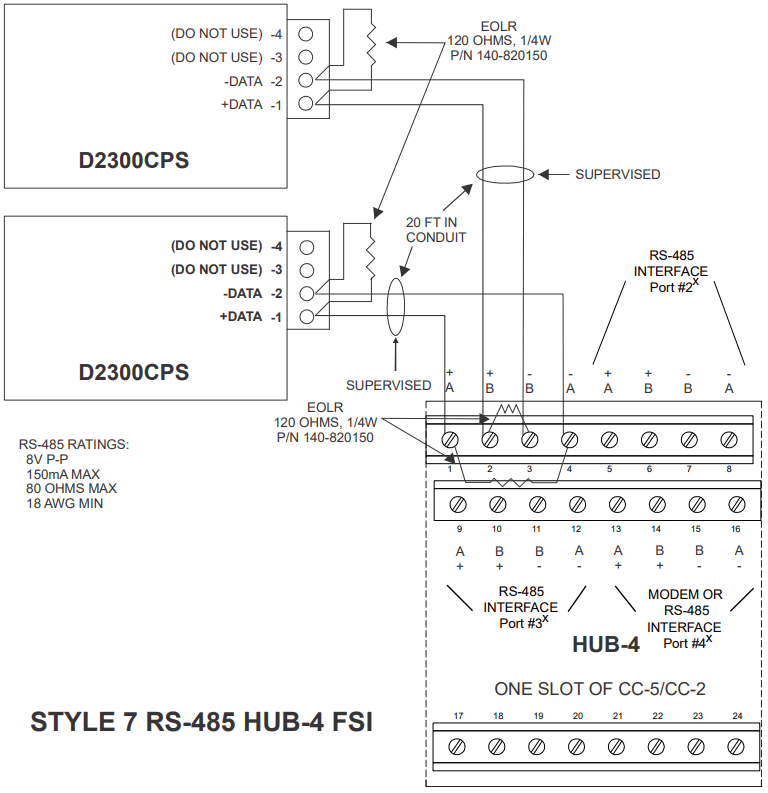
Figure 10
Wiring the RS-485 HNET or XNET Network in Style 4 and Style 7 (Fire Finder-XLS/Design Fire Safety Modular/Cerberus PRO Modular)
Cyber security disclaimer
Siemens products and solutions provide security functions to ensure the secure operation of building comfort, fire safety, security management and physical security systems. The security functions on these products and solutions are important components of a comprehensive security concept.
It is, however, necessary to implement and maintain a comprehensive, state-of-the-art security concept that is customized to individual security needs. Such a security concept may result in additional site-specific preventive action to ensure that the building comfort, fire safety, security management or physical security system for your site are operated in a secure manner. These measures may include, but are not limited to, separating networks, physically protecting system components, user awareness programs, defense in depth, etc.
For additional information on building technology security and our offerings, contact your Siemens sales or project department. We strongly recommend customers to follow our security advisories, which provide information on the latest security threats, patches and other mitigation measures.
http://www.siemens.com/cert/en/cert-security-advisories.htm
Siemens Industry, Inc.
Building Technologies Division
Florham Park, NJ
P/N 315-050018-6
Siemens Canada, Ltd.
1577 North Service Road East
Oakville, Ontario
L6H 0H6 Canada
firealarmresources.com
 Home - Fire Alarm Resources - Free fire alarm PDF manuals, documents, installation instructions, and technical specifications
 CERT Services | Services | Siemens Global