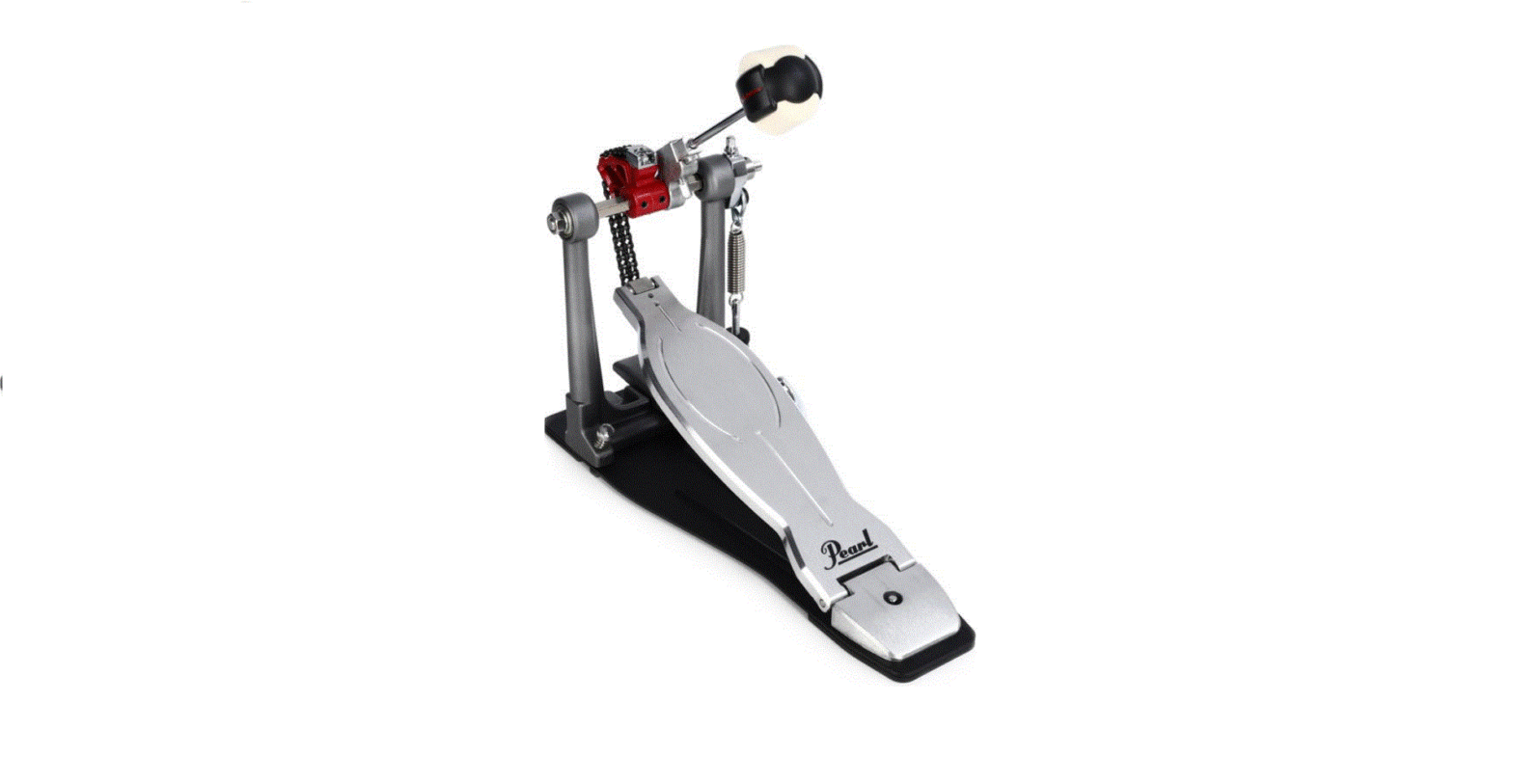
P-3500D Demon XR Single Pedal
Pearl Drum Pedal
Congratulations on your purchase of Pearl Drum Pedal! For
optimum performance, please read this Instruction Manual before
playing.
Product Information:
- Extreme Impact Beater
- Key Bolt (for Beater Position Adjustment)
- Direct Link
- Beater Setting Stopper Beater Holder Link
- Uni-Lock Beater Angle Cam
- Multi-Function Drum Key
- Footboard
- Hinge
- Bottom Plate
- Hoop Clamp Adjustment Knob
- Upper Nut Lower Nut
- Hoop Clamp
- Click Lock
- Wing Bolt (for Hoop Clamp Adjustment)
- Included Items: TM Oil Velcro (x3), Hexagonal Wrench
(3mm2.5mm), Key Bolt (x1), Spring (x1)
Product Usage Instructions:
Extreme Impact Beater Setting:
- Insert the Beater into the Beater Holder Link until it stops
against the Beater Setting Stopper. - Tighten the Key Bolt with the provided Multi Function Drum
Key. - Make sure that the Beater Setting Stopper is flush against the
Beater Holder Link with the flat face square against the
Notch.
Beater / Footboard Angle Adjustment:
The Beater and Footboard Angle are interconnected with all
adjustments in tandem. Moving the Beater closer to the drum head
simultaneously lowers the Footboard and vice-versa.
- Loosen the Key Bolt of the Uni-Lock Beater Angle Cam.
- Move the Beater and Footboard to your desired position.
- Tighten the Key Bolt to secure.
- Use the guide marks located on the Accelerator Sleeve and
Uni-Lock Beater Angle Cam to reference the change made. - To return to the factory default setting, set the
centerline/mark of the Uni-Lock Beater Cam to the line/mark of the
Accelerator Sleeve.
Beater Head:
To change to a higher or shorter beater height:
- Loosen the Allen Screw on the Beater Setting Stopper with the
provided Multi-Function Drum Key or Allen wrench (3mm). - Loosen the Key Bolt on the Beater Holder Link.
- Set the beater to the desired height and re-tighten the Key
Bolt. - Reset the Beater Setting Stopper flush against the Beater
Holder Link per the instructions above.
Spring Tension Adjustment:
For optimum results, once the Beater/Footboard angle is set,
always check and adjust the Spring tension as needed.
- Remove the Click Lock from the Upper Nut Lower Nut.
- Remove the Upper Nut Lower Nut and Spring from the
Footboard. - Replace with either Standard or Extreme Spring as per your
requirement. - Re-install the Spring and Upper Nut Lower Nut.
- Secure the Upper Nut Lower Nut with the Click Lock.
Tip: The Beater Setting Stopper preserves the height setting if
the beater is removed when transporting the pedal.
PEARL DRUM PEDAL
1%
Instruction Manual
Congratulations on your purchase! For optimum performance, please read this Instruction Manual before playing.
Extreme Impact Beater
Key Bolt (for Beater Position Adjustment)
Direct Link
Beater Setting Stopper Beater Holder Link
Uni-Lock Beater Angle Cam
Multi Function Drum Key
Footboard
Hinge
Bottom Plate
Hoop Clamp Adjustment Knob
Upper Nut Lower Nut
Hoop Clamp
Click Lock
Wing Bolt (for Hoop Clamp Adjustment)
Included Items
TM Oil Velcro (x3) Hexagonal Wrench (3mm2.5mm)
Key Bolt (x1)
Spring (x1)
Extreme Impact Beater Setting
Insert the Beater into the Beater Holder Link until it stops against the Beater Setting Stopper, and tighten the Key Bolt with the provided Multi Function Drum Key (Fig.1-A). Make sure that the Beater Setting Stopper is flush against the Beater Holder Link with the flat face square against the Notch (Fig.1-B).
Extreme Impact Beater
Beater / Footboard Angle Adjustment
The Beater and Footboard Angle are interconnected with all adjustments in tandem. Moving the Beater closer to the drum head simultaneously lowers the Footboard and vice-versa. To adjust this setting, loosen the Key Bolt of the Unilock Beater Angle Cam, move the Beater and Footboard to your desired position and tighten the Key Bolt to secure. Use the guide marks located on the Accelerator Sleeve and Unilock Beater Angle Cam to reference the change made (Fig.4).
Beater Head
Fig.1-B
Beater Setting Stopper
Index Mark
Key Bolt
Beater Holder Link
Multi Function Drum Key
Tip: In the initial factory setting, the Index Mark is centered in the Window as shown (Fig.2)
Fig.1-A
Beater Shaft
Beater Setting Stopper
Index Mark Beater Holder Link
Fig.2
To change to a higher or shorter beater height, loosen the
Allen Screw on the Beater Setting Stopper with the
provided Multi-Function Drum Key or Allen wench (3mm)
then loosen the Key Bolt on the Beater Holder Link (Fig.3).
Set the beater to the desired height and re-tighten the Key
Bolt. Reset the Beater Setting Stopper flush against the
Beater Holder
Link per the
instructions above.
Allen Screw Multi Function Drum Key
Multi Function Drum Key
Key Bolt Unilock Beater
Angle Cam Guide
Tip: The Accelerator Sleeve and Unilock Beater Angle Cam feature guide marks to reference all changes made. To return to the factory default setting, set the centerline/mark of the Unilock Beater Cam to the line/mark of the Accelerator Sleeve (Fig.5). For optimum results, once the Beater/Footboard angle is set, always check and adjust the Spring tension as needed. (see Spring Tension Adjustment)
Fig.4 Initial setting
Fig.5
Beater Setting Stopper Key Bolt
Multi Function Drum Key
Beater Holder Link
Fig.3
Tip The Beater Setting Stopper preserves the height setting if the beater is removed when transporting the pedal.
Spring Tension Adjustment
The P-3500D Demon Pedal features our patented Click Lock spring tension retention system. To increase the spring tension, disable the Click Lock by lifting the lever upward, loosen the Upper Nut and tighten the Lower Nut until the desired tension is achieved (Fig.6-A). To decrease spring tension, disable the Click Lock by lifting the lever upward, loosen the Upper Nut and loosen the Lower Nut until the desired tension is achieved. Once the setting is firm, tighten the Upper Nut to keep the spring tension from loosening, then press the Click Lock lever down to engage the grooves around the Lower Nut until you feel the lever “Click” (Fig.6-B). Before playing, make sure that both Upper and Lower Nuts are tight, and the Click Lock lever is in a vertical position with both sides of the lever engaged in the grooves around the Lower Nut.
Spring
Upper Nut Lower Nut
Click Lock Fig.6-A
Fig.6-B
Standard and Extreme Spring Removal and Installation
The P-3500D Demon Pedal includes a Standard spring for general applications and an Extreme spring for a faster rebound. The Extreme spring is factory installed as the default choice. These are easily interchanged for optimum feel.
Spring Removal First disable the Click Lock by lifting the lever upward, loosen the Upper Nut and remove the Lower Nut from the Adjustment Bolt. Next, remove the Adjustment Bolt from the Pedal Post and disconnect the Spring from the Unilock Beater Angle Cam by gently twisting and pulling the Open Spring End over the Floating Spring Pendulum to separate. Using the included Multi Function Drum Key, loosen the 3mm Bolt to remove the Spring and Spring Collar from the Adjustment Bolt Fork. (Fig.10).
Spring Installation First locate the Flat Side of the Adjustment bolt and position it to the right while placing the Adjustment Bolt on a table. If installing the Extreme spring using either end of the Spring, place the Spring Collar into the center of the Open Spring End and place it into the Fork Top of the Adjustment Bolt with the Gap of the Open Spring End facing upward. If installing the Standard Spring, place the Spring Collar into the center of the large Open Spring End and place it into the Fork Top of the Adjustment Bolt with the Closed-End the Open Spring End facing upward. This will position the Gap of the Spring top to the left and the 3mm Bolt receptacle to the right as shown in (Fig.7). Install the 3mm Bolt and hand tighten; then, secure it tightly into place using the Multi Function Drum Key. To install the Spring on the Floating Spring Pendulum, place the Pedal on its side on a sturdy flat surface with the Pendulum facing up. Next, gently push and twist the Open Spring End downward onto the Floating Spring Pendulum, so the Gap of the Open Spring End is facing the Pedal Post. Insert the Adjustment Bolt into the Pedal Post with the Flat Side facing outward. Install the Lower Nut and adjust the Spring tension. (Refer to Spring Tension Adjustment)
Unilock Beater Angle Cam Open Spring End (A)
Spring
Open Spring End (B) Spring Collar Fork Top of Adjustment Bolt
3mm Bolt Upper Nut (show this on Adjustment Bolt) Adjustment Bolt with Flat Side Lower Nut.
Click Lock
Fig.7
Tip:
If using two pedals for double bass setups, always use matching springs for best results.
To identify each Spring, check the shape of the Spring Coil End. The Standard Spring is tapered, and the Extreme Spring is not (Fig.8).
Extreme Spring
Standard Spring
Fig.8
Caution:
Do NOT overtighten the the 3mm Bolt.
When placing the Pedal on its side, use care not to scratch tabletop or floor surfaces. It is strongly recommended to always place the Pedal on padded or carpet surfaces.
Check to ensure all adjustment points are tight and secure before use.
Always store the Spring not in use in a safe, secure place.
Hoop Clamp System
The P-3500D Hoop Clamp System is designed with Spherical Rubber Grips, allowing the bass drum’s front to be raised while keeping the pedal flush on the floor. Insert the bass drum hoop into the clamp, and turn the Wing Bolt to secure. The clamp comes preset from the factory to accommodate most bass drum hoops, but it can be adjusted to fit thicker or thinner hoops if necessary. To adjust the hoop fit, loosen the Allen Screw on the Adjustment Knob with the provided Allen wrench (2.5mm) and tighten or loosen the Adjustment Knob until the proper fit is achieved, then re-tighten the Allen Screw. If the heel plate of the pedal lifts while playing, try loosening the Adjustment Knob to change the angle of the Hoop Clamp until the pedal remains flat (Fig.9).
Oil (OL-300)
The P-3500D Pedal features precision NiNjA bearings for incredible speed and smoothness. To keep them function-ing at their maximum speed and performance it’s recommended that you apply genuine NiNjA Oil at regular intervals. NiNjA Oil is also ideal for use on Footboard and Direct Link bearing to maintain “like-new” performance (Fig.11).
Oil
Wing Bolt
Adjustment Knob Allen Screw Hoop Clamp
Fig.9
Tip: The clamp system features a Wing bolt installed from the factory. To avoid interference in multi-pedal configurations, exchange these with the included Key Bolts. Please stow the extra Key/Wing Bolt currently not in use inside the storage pocket of the pedal case. Be sure not to lose it.
Velcro Strips for Slip Prevention
Velcro Strips are provided with P-3500D Pedal to help prevent slipping when used on carpeted floors. To apply, peel off the backing on the Velcro Strips and apply them in the locations shown. Clean the surfaces thoroughly with alcohol and dry completely for best adhesion (Fig.10).
Velcro Strips
Fig.11
Fig.10
CAUTION
Periodically check the Hoop Clamp Adjustment Knob, Key Bolts, and Allen Screws to ensure they are tight and secure. A drum key and hexagonal wrench are included for this purpose. Failure to do so may result in personal injury or property damage.
Periodically apply lube for optimal speed and extended life of your pedal.
Only use
Oil on
bearings.
https: //www.pearldrum.com Products and specifications are subject to change without notice.
Printed in China -Nov 2021-
 Pearl Drums -Official site-