
Cowon M2 HD Media Player
General
- COWON is a registered trademark of COWON SYSTEMS, Inc.
- COWON SYSTEMS, Inc. owns the copyright to this manual, and any unauthorized distribution of its contents, whether in part or in its entirety, is strictly prohibited.
- COWON SYSTEMS, Inc. complies with laws and regulations related to records, disks, videos and games. Users are also encouraged to comply with the relevant laws and regulations.
- As soon as you purchase the product, visit the website (http://www.COWON.com), and become a registered member. You will benefit from various member services.
- This manual is based on product specifications, and various exemplary texts, illustrations, pictures, detailed functions and H/W and S/W specifications contained herein can be altered without any prior notice by the copyright owner.
BBE information
- BBE Sound, Inc. owns the license to the BBE name and information as applied to this product, in compliance with USP4638258, 5510752 and 5736897.
- BBE and the BBE symbol are registered trademarks of BBE Sound Inc.
Precaution
- As these precautions are provided for the correct use of the product as well as user safety, be sure to familiarize yourself with them. The company will not be held responsible for any accident that may occur due to the failure to heed these precautions. The following information applies commonly to all products manufactured and produced by COWON SYSTEMS, Inc.
- + Do not use this product for other purposes than those described in this manual.
- + Handle the manual, product packaging materials, accessories, etc. with care to prevent cuts and injuries to your body.
- + For your safety, do not view videos, pictures and texts stored on your player while driving a vehicle. Operating other features of the player is also dangerous and may cause fatal accidents while driving.
- + Wearing of earphones while operating a vehicle, exercising, or walking may impair driving, mask or prevent recognition of emergency signals, alarms, announcements, the approach of vehicles and human speech. Doing so may also be unlawful depending on the region.
- + Listening at high volume (85 dB and above) for an extended period of time may harm your hearing.
- + For your protection, use the player in a well lit area where the LCD screen will not cause strain to your eyes.
- + Do not attempt to disassemble the player. Disassembly will void the warranty and the unit will be permanently disqualified from any warranty services.
- + Be sure to use only the USB power adaptor and USB cable approved by COWON SYSTEMS, Inc.
- + When connecting to a PC, use only USB ports on the mother board or a USB Host card. Using an external USB hub may not guarantee proper operation (e.g. USB ports on a keyboard or an external USB hub).
Package Components
Names of Parts and Functions
Buttons
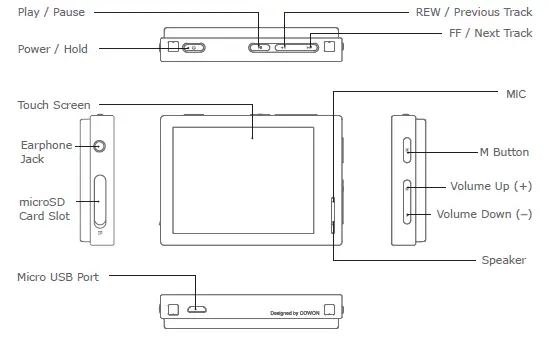
- Power On/Off : Press and hold to turn the device on or off.
- Hold On/Off : Press briefly to activate or deactivate Hold mode.
- The touchscreen and buttons do not respond while in Hold mode to prevent malfunction due to unintentional operation.
- SETTINGS ▶ System ▶ Hold Mode can be modified for Hold All or Hold
- Touchscreen Only in the System menu.
- Play/Pause : Press the button to play the track. While playing, press the button to pause the track.
- Previous Track/Next Track : Press briefly to select the previous or next track.
- Rewind/Fast Forward : Press and hold to rewind or fast forward.
- M Button: Returns to the menu screen.
- Volume (+/-): Raises or lowers the volume.
- Smart RESET: If a button or the touchscreen is not working correctly, simultaneously press and hold both + and – buttons for approximately 5 seconds to reset the device.
- This reset only shuts off power in case of a device malfunction and does not affect the device’s performance.
- The M2’s default Power Off setting is Sleep mode, which consumes very little power
Charging
Connect between PC and USB port using USB cable. COWON M2 can also be charged with an authentic Micro USB DC adapter for smart phones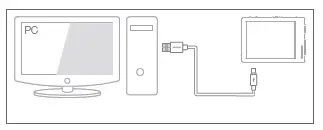
Connecting and Disconnecting the PC
- Use the USB cable to connect COWON M2 to the PC.
- COWON M2 displays the USB connected image if properly connected to the PC.
- Also make sure to check My Computer or Windows Explorer to see if COWON M2 is properly connected to the PC.
- Copy desired video, music, or other files to COWON M2.
- When done, click the icon on the system tray to safely remove COWON M2 from the PC.
- Click the popup message.
- Safely remove the hardware and disconnect the USB cable.
Firmware Upgrade
Firmware is software that is embedded within the hardware. Upgrading it can enhance system stability and provide additional features. Please be advised that Beta (unofficial) firmware versions may cause system malfunction.
How to upgrade the firmware
- Download the latest firmware from the SUPPORT section of the website (http://www.COWON.com).
- Use the USB cable to connect COWON M2 to the PC.
- Unzip the downloaded firmware and copy it to the root folder of COWON M2.
- Perform “Safely Remove Hardware” function on your PC and disconnect the USB cable.
- When you turn on the product, the firmware upgrade process will start.
- The current firmware version can be checked in Settings – System – Information
Main Screen (Daily Life UI)
Six different Daily Life UIs (Daily Life User Interfaces) are displayed throughout the 24 hours of a day, changing automatically according to the time of day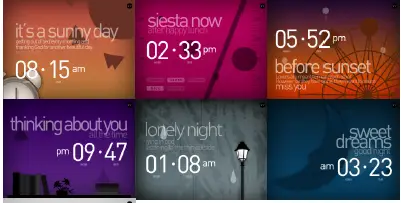
Touch
Touch the arrow on the top right of the main screen to select from one of the six UIs, or choose the simple Clock screen instead.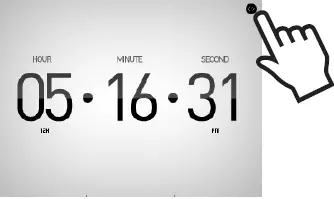
If the user-defined icon in the Options is set to ○ on the Menu screen, then the last Daily Life UI selected before powering off the device remains set as the main screen If the user-defined icon is set to ×, then the Daily Life UI changes automatically depending on the time of day, regardless of the user’s last choice.

Menu Screen I (Daily Life UI)
Drag the main screen upwards to display four menus. Smart Return : Drag the screen upwards while on the last menu to return to the first menu.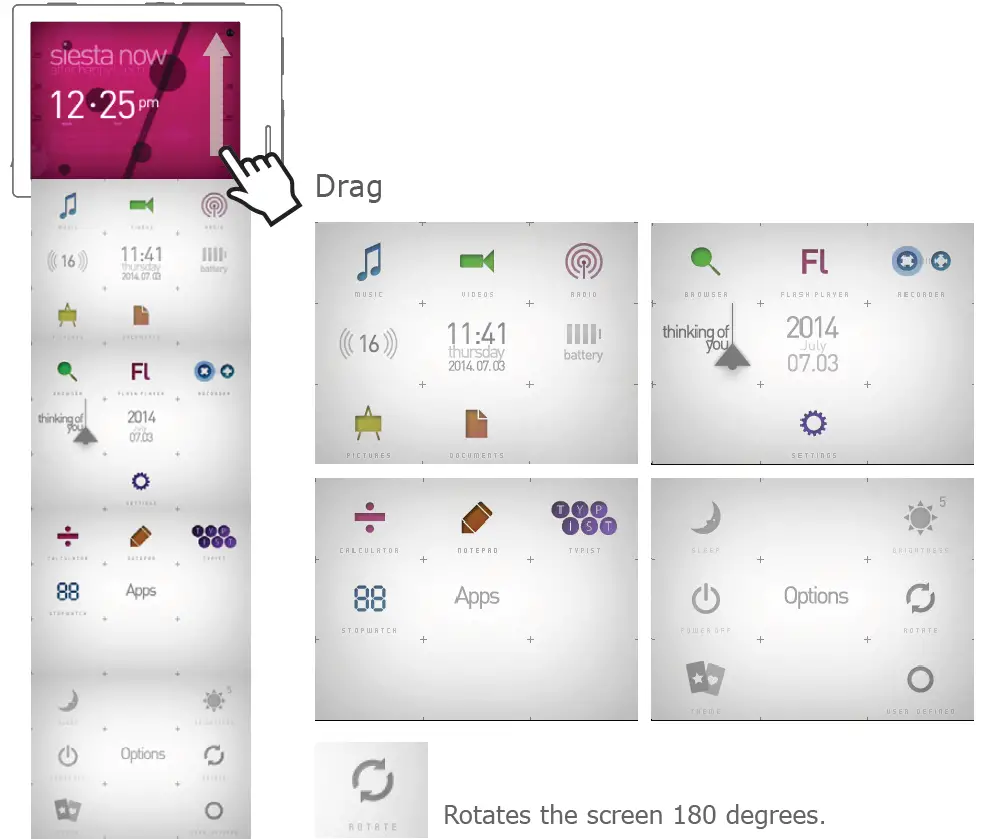
Menu Screen II (Visible Layered UI)
Press the Theme icon in the Options menu to change to the Visible Layered UI.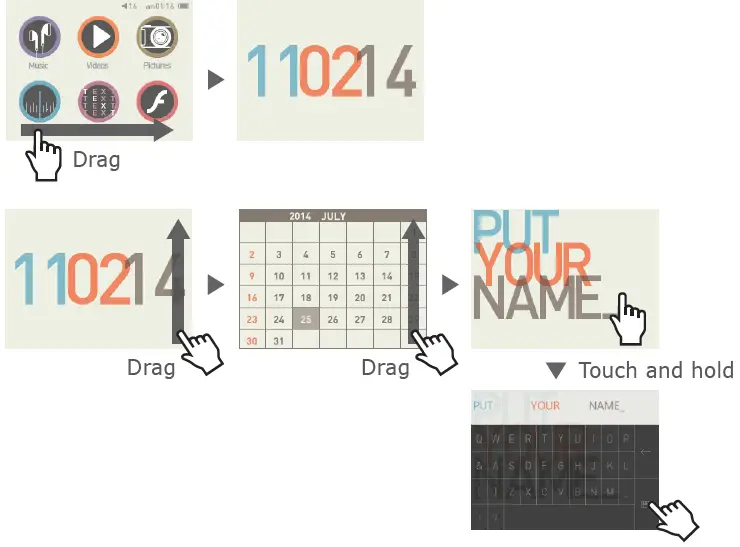
Clock Screen (Visible Layered UI)
- Drag the Visible Layered UI to the right to display the Clock screen. Drag the Clock screen upwards to display the Calendar and User Name screens
- Touch and hold the Put Your Name screen to display a panel to enter the user’s name. Press the keyboard-shaped icon to return to the previous screen.

The Most Recent Screen (Visible Layered UI)
Drag the Visible Layered UI to the left to display the Most Recent screen. This screen shows the most recently accessed functions, up to a maximum of 13 screens.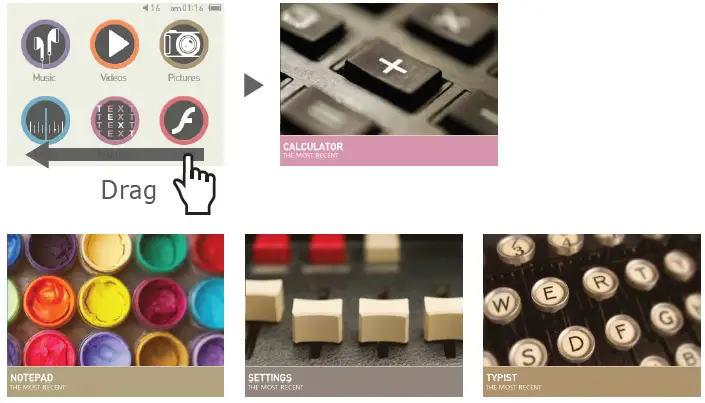
The 13 Most Recent Items
Music / Videos / Pictures / Radio / Documents / Flash / Recorder / Browser / NCalculator / Settings / Notepad / Typist / Stopwatch
Basic Menu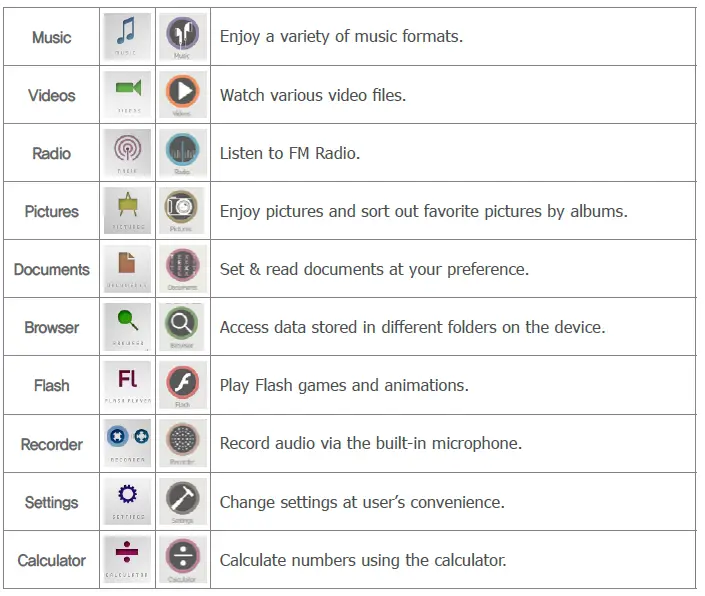
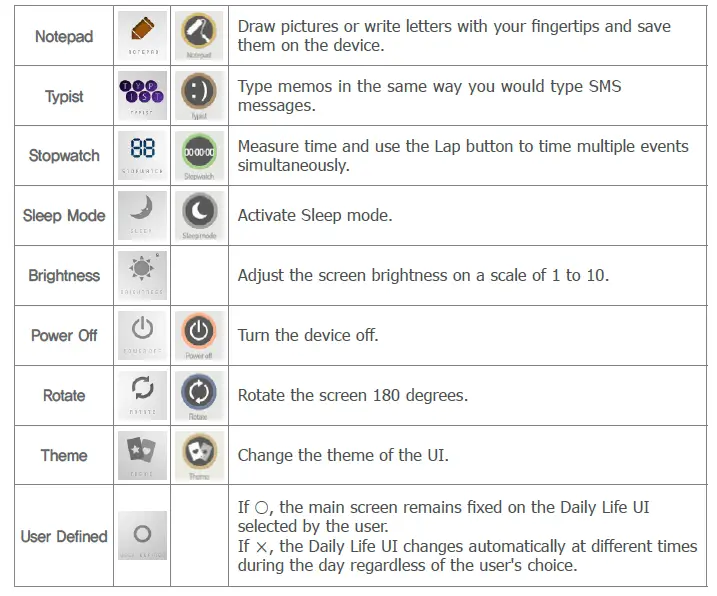
Settings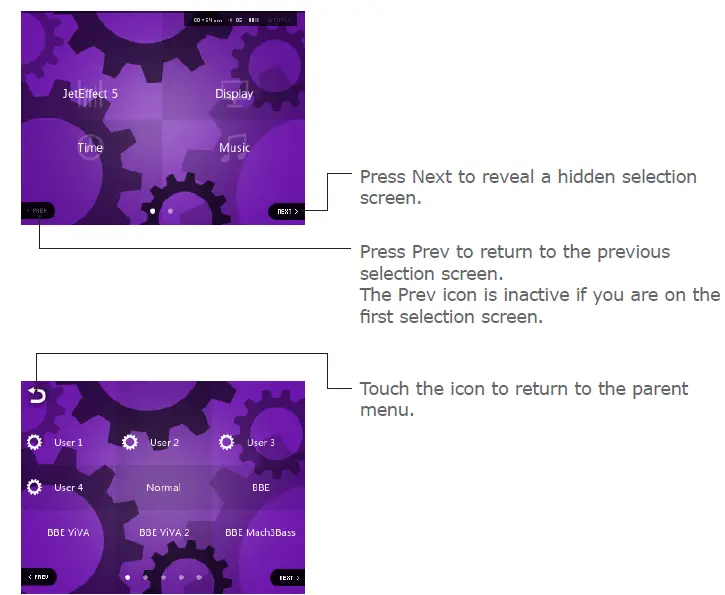
| JetEffect 5 | Select your sound effect from 48 JetEffect Presets. * Customize a preset by touching the cogwheel icon next to each user and adjusting the sound effects. |
| Display | Use to apply detailed settings for the COWON M2’s display, such as Language, Font, Time display, Auto display off, Brightness, and Screen rotation. |
| Time | Use to set the time, alarms, and power timers. * If an alarm is set, the device automatically enters Sleep mode when you turn it off. |
| Music | Use to apply detailed settings for audio, such as the Skip interval, Seek interval, Reume, Play speed, Pitch correction, Fade in, Lyrics, and Audible Navigation. |
| Video | Use to apply detailed settings for video, such as the Skip interval, Resume, Play speed, Pitch Correction, Subtitle, and Subtitle language. |
| Recording | Use to apply settings for recording, such as, Mic quality, FM radio quality, Mic volume. |
| System | Use to apply settings for Hold mode, Sleep mode, Beep, Audio L / R, speaker, USB mode, Database update, Load defaults, Touch calibration, and view the firmware version and capacity of the device. |
|
Select your sound effect from 48 JetEffect presets. | Normal / BBE / BBE ViVA / BBE ViVA 2 / BBE Mach3Bass / BBE MP / BBE Headphone / BBE Headphone 2 / BBE Headphone 3 / Rock / Jazz / Classic / Balad / Pop / Club / Funk / Hip Hop / Techno / Blues / Metal / Dance / Rap / Wide / X-Bass / Hall / Vocal / Maestro / Feel the Wind / Mild Shore / Crystal Clear / Reverb Room / Reverb Club / Reverb Stage / Reverb Hall / Reverb Stadium / Reverb Chamber / Reverb Room 2 / Reverb Club 2 / Reverb Hall 2 / Reverb Auditorium / Reverb Cathedral / Reverb Stadium 2 / Reverb Canyon / Reverb Long / User 1 / User 2 / User 3 / User 4 | |
| 4 user-defined presets with equalizer, BBE+, Stereo Enhance, Reverb, etc. | User 1 / User 2 / User 3 / User 4 | |
| JetEffect 5 & BBE+ is the most sophisticated and powerful sound technology available for MP3 and PMP devices. Optimized for headphone playback of compressed audio material, BBE+ brings listeners closer to the natural presence and impact of a “live performance” than ever before. | EQ Filter | Each band of the equalizer can be adjusted in detail. |
| BBE | Sound effect that refines the sound quality | |
| Mach3Bass | Provide deeper, tighter, and more musically accurate bass frequency. | |
| 3D Surround | Provide the three-dimensional surround sound effect. | |
| MP Enhance | Restore and enhances the harmonics lost through compression. | |
| Stereo Enhance | Enriche the stereo sound. | |
| Reverb(9 Modes) | Maximize the natural and live presence of the sound. | |
Product Specification
| Product Capacity | 16GB / 32GB (Flash memory, FAT32 file system) 1) | |
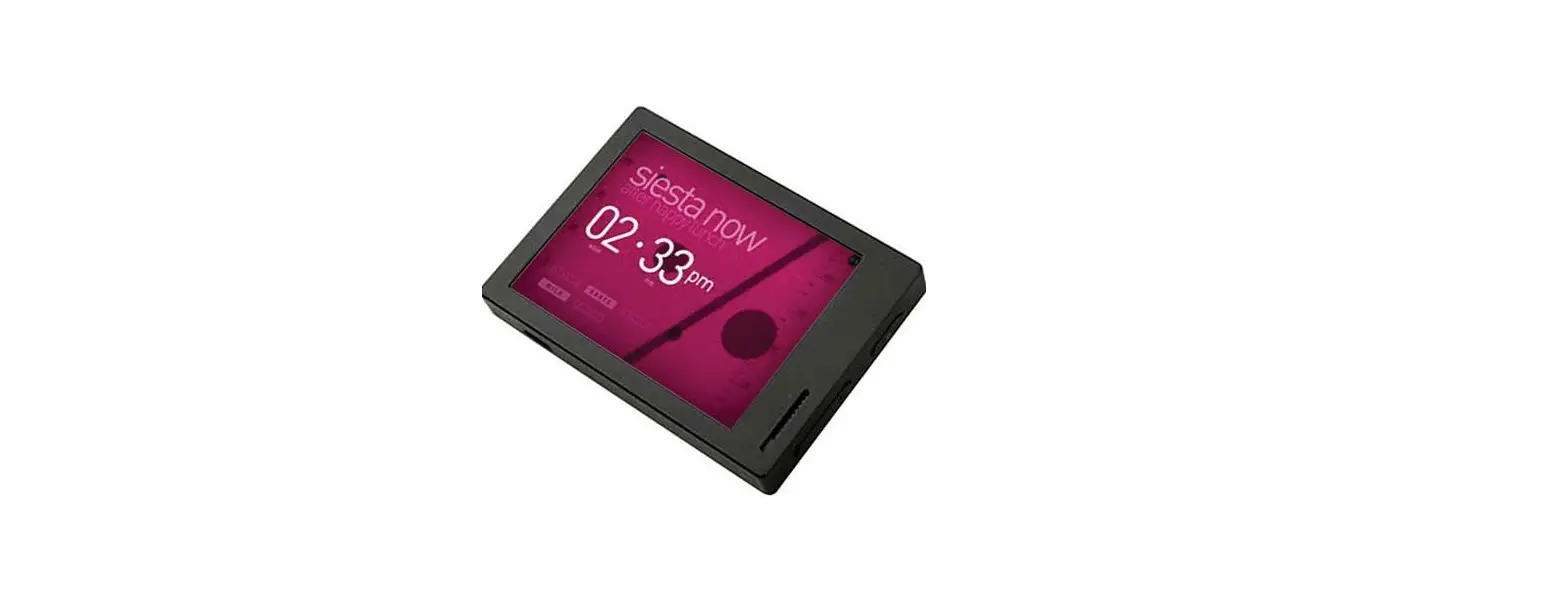
| Display | 2.8 in. 16M Color LCD (320X240), Touchscreen | |
| Dimensions & Weight | 74.3mm(W) x 53.1mm(H) x 13.8mm(D) / 75g | |
| Buttons | Power / Hold, Play, REW/FF, M, Vol +, Vol – | |
| Color | Black/ Dark Silver | |
| Battery & Power | Battery | Built-in rechargeable lithium polymer battery. |
| Playback Time | Music : Max. 90 hours 2) | |
| Battery Charging | USB : 5.5 hours (5V / 500mA) | |
| System Requirement | CPU | Pentium lll 500MHz or higher |
| OS | Windows 8 / Windows 7 / Vista / XP / 2000 / ME: All functions supported MAC OS 10.x / Linux v2.4 or higher: File transfer supported | |
| USB Port | 2.0 High Speed (recommended) | |
| ETC | Built-in Speaker, Microphone, microSD Card Slot | |
|
Audio | Frequency Range | 20Hz~20,000Hz |
| S/N Ratio | 95 dB | |
| File Formats | MP3/2, WMA, OGG, FLAC, APE, WAV | |
|
Audio Codecs | MP3 : MPEG 1/2/2.5 Layer 3, 320Kbps, 48KHz, Mono / Stereo WMA : 320Kbps, 48KHz, Mono/Stereo OGG : Q10, 44.1KHz, Mono/Stereo FLAC : Compression Level 0 – 8, 44.1KHz, Mono / Stereo APE : Fast compression, Normal, High compression 16Bit, ver. 3.97~3.99 WAV : 48KHz, 16bit, Mono / Stereo | |
| Meta Tag | ID3 V1, ID3 V2.2 / V2.3, Vorbis comments | |
|
Audio |
JetEffect 5 | 48 Presets (44 Presets + 4 User Presets) | |
| EQ | 5-band equalizer (EQ Filter) | ||
| BBE+ | BBE, Mach3Bass, 3D Surround, MP Enhance | ||
| Special Effect | Stereo Enhance, Reverb | ||
| Lyrics | LDB 1.0, 2.0, LRC | ||
|
Video | File Formats | AVI, WMV, ASF | |
| Video Codecs | Xvid SP/ASP, WMV 7/8/9 (screen resolution, frame rate, bit rate, and other options may affect the playback of some clips) | ||
| Video Resolution | 320X240, 30fps (recommended) | ||
| Audio Codecs | MPEG 1/2/2.5 Layer 3, WMA | ||
| Subtitle | SMI | ||
| Photo | Supports JPG, no limit (progressive format : up to 1M pixels) | ||
| Document | Supports TXT, no limit (exception UTF-8 Unicode (big endian)) | ||
| FM Radio | Frequency Range | 87.5-108 MHz (KR, US, EU), 76-108 MHz (JP) | |
| Recording | Mic / FM Radio | ||
Troubleshooting
I am still confused even after reading the manual.
COWON website (www.COWON.com) provides support for users of COWON products with FAQ (Frequently Asked Questions) Users are strongly encouraged to check out the website for further information regarding product usages and firmware upgrades. For individual inquiries, please contact us on-line as we will try to help you as best as we can.
I would like to set the device as factory default.
To reset all settings to factory default, go to SETTINGS ▶ System ▶ Load Defaults.
The player does not turn on.
Check if the battery is recharged or the device is connected to a power source. If the battery is fully discharged, use a genuine adapter to recharge the battery before turning on the device. If the device does not respond, simultaneously press and hold both – and + volume buttons for approximately 4 seconds to force the device to reset.
The touch pad and buttons do not work properly.
The device does not respond to touch when the touch screen is on Hold. Press the Power / Hold button briefly to inactivate Hold mode
I can’t hear any sound.
Check if the volume is set to “0”. Check if there is any file available in the player. If there is no file in the player, you will not hear any sound. Please note that corrupted files will result in a noise or discontinued playback. Make sure the earphones are connected properly. Impurities in the earphone jack can cause a noise.
Files that I have stored do not appear in the list.
Each mode shows you a list of playable files only. To view all files that you have stored, select the Browser mode. Please note that System folder will not appear in the Browser.
Album image is not displayed in Music Mode.
To display an album image, the music file must have an image stored in its ID3 tag. Please save an image in the file using a program for editing ID3 tags. COWON M2 supports Album Art 2.0 and you can store up to 6 album images.
Video won’t play.
Make sure that your files are in a format that COWON M2 supports (check the codecs/resolution/options). If you’re unsure of a video’s compatibility,use a video conversion program (e.g. JetAudio) and then play the converted version.
FM Radio does not work.
The product’s earphones work as the FM Radio antenna. Straightening the earphone cable will result in better radio reception. FM Radio reception may be poor at locations where FM Radio transmissions are shielded. If FM Radio does not work where reception should be possible, please contact our service center.
There is too much noise in my recordings.
The product uses ultra-small internal microphone, so it may be more susceptible to noise during recordings. The microphone should not be covered with anything during recording.
Characters on the display are corrupted.
Set your preferred language again in Settings ▶ Display ▶ Language. If the problem persists, set the current font to the system font. COWON products are developed based on the Korean Windows OS, and this may cause corruption of some special fonts or languages on the display.
+ Computer cannot recognize the player when connected.
If you cannot turn on the device or the device is not recognized by the PC after connecting the device, unplug the device from the PC and reset it by simultaneously holding both the – and + volume buttons for approximately 4 seconds. If the connection is unstable and the device is repeatedly disconnected, plug the device into a USB port connected directly to the motherboard of the PC. If the PC does not recognize COWON M2 because it is out of battery power, either recharge it or connect it to a power source before reconnecting to the PC.
+ Memory capacity of the player is different or smaller than specified.
The memory capacity indicated by Windows may be different from that indicated by the memory manufacturer. The actual capacity will be reduced from the original size because some space of the memory should be used as the system area for normal operation.
+ The player does not play properly when memory is full.
For the player to function properly, it requires at least 10 MB of space for saving settings and other system files.
+ <For MAC OS users>
‘EJECT’ procedure must be performed before removing the device from the PC. The device can malfunction with MAC OS 10.5 Leopard version or later. If the device shows a problem, format it as FAT and install the latest firmware.
Battery Replacement
The rechargeable batteries have limited number of charge cycles, and it will require a replacement as capacity to hold power will eventually diminish. The rechargeable batteries in COWON products should be replaced only by official COWON service centers. Please contact batteryreplace@cowon. com for more information on official COWON service centers
Product Disposal
COWON products contain built-in rechargeable batteries, and must be separately disposed from household waste. Disposing of the products with regular waste may cause pollution to the environment due to the waste batteries inside. Contact your local authorities for specified locations/guidance of E-waste and waste batteries, and dispose them in compliance with local regulation/guidance
FAQS
Does this resume at the exact point of the last place in a song?
Yes it do, if you have configured it.
Can the player connect and play videos on analog/digital lcd/tvs ?
Sorry, I’m not sure. You might want to check out the Cowon fan site iAudiophile.net for an answer. Good luck
Can this mp3 player support a 128gb micro sd?
People have been able to use re-formatted (FAT32) 128GB cards on the M2.
what is the on board memory
32 GB on board memory
What is a good audioobook player?
Highly recommend Agptek. Cheap, good book marking (very impt), holds four books.
can you control playback speed as you can on the X9?
playback speed from 50% to 150% in the settings menu. When you tap the screen in the bottom right corner the word “next” appears.
Does this handle podcasts well? Buying for my wife and she listens to music but also tons of podcasts while at work.
YES! I use mine for podcasts all the time. It’s good for audio-books too. And of course for music. The bookmark feature is great.
Can you create a temporary playlist and add tracks/modify the list while it is being played?
While the interface is not the most friendly possible, you eventually get used to it. It is possible to create only one playlist using the favorites function and you can modify it at any time with immediate effect.
Will it sync with media monkey and can you sync playlists to it?
The volume control is on the right hand side of the machine with screen facing toward you. It’s a long bar…top to increase…bottom to lower volume.
does it play mkv video files?
The manual says it supports AVI, WMV AND ASF file formats.
Is there a volume control. The volume is lower than on the same player I already had.?
The volume control is on the right hand side of the machine with screen facing toward you. It’s a long bar…top to increase…bottom to lower volume.
How do you turn on random play, for both M2 and M2 ext?
There’s a menu accessed from the now-playing screen that lets you toggle shuffle on and off.
Does it has blue tooth ?
No, it doesn’t have a Bluetooth chip.
Does this device have an option for MTP as well as mass storage?
Yes, I think it does MTP as well as mass storage
When you take the earphones out, will the player start playing loud through the speaker (as with smartphone)?
M2 will play through the speaker, if you use this option in the system setup, but the speaker is not as loud as smartphone speaker.