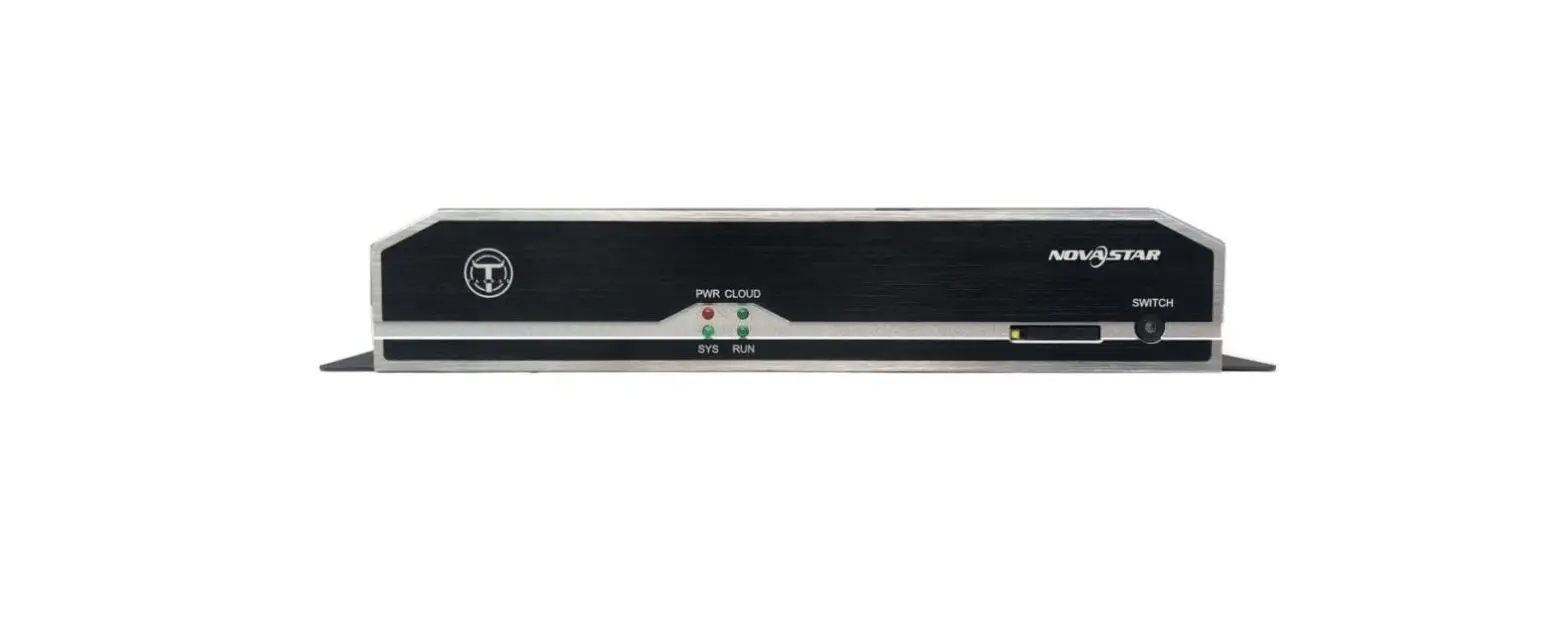
TB50 Taurus Series Multimedia Player
Product Information
Taurus Series Multimedia Player – TB50 Specifications
The TB50 is a new generation multimedia player created by
NovaStar for full-color LED displays. It integrates playback and
sending capabilities, allowing users to publish content and control
LED displays with a computer, mobile phone, or tablet. The TB50 is
designed for commercial LED displays and smart city applications
such as fixed displays, lamp-post displays, chain store displays,
advertisement players, mirror displays, retail store displays, door
head displays, shelf displays, and more.
Certifications
The TB50 has obtained the following certifications:
- NBTC
- IMDA
- PSB
- FAC DoC
- ENACOM
- ICASA
- SRRC
- EAC DoC
- EAC RoHS
- RCM
- UL Smark
- CQC
- FCC
- UL
- IC
- KC
- CE
- UKCA
- CB
- MIC
- PSE
- NOM
If the product does not have the relevant certifications
required by the countries or regions where it is to be sold, please
contact NovaStar to confirm or address the problem. Otherwise, the
customer shall be responsible for the legal risks caused, or
NovaStar has the right to claim compensation.
Features
- Loading capacity up to 1,300,000 pixels
- Maximum width: 4096 pixels
- Maximum height: 4096 pixels
- 2x Gigabit Ethernet ports (primary and backup)
- 1x Stereo audio connector (fixed at 48 kHz for internal source,
supports 32 kHz, 44.1 kHz, or 48 kHz for external source) - 1x HDMI 1.4 connector (maximum output: 1080p@60Hz, supports
HDMI loop) - 1x USB 3.0 (Type A) port (for USB playback and firmware
upgrade)
Product Usage Instructions
Connecting the TB50 Multimedia Player
To connect the TB50 multimedia player, follow these steps:
- Connect the primary Gigabit Ethernet port of the TB50 to the
LED display. - Optionally, connect the backup Gigabit Ethernet port of the
TB50 to the LED display. - Connect the stereo audio connector to the audio output
device. - Connect the HDMI 1.4 connector to the HDMI input of the display
or video source. - Connect any brightness sensors or temperature and humidity
sensors to the sensor connectors. - For USB playback or firmware upgrade, connect a USB device to
the USB 3.0 (Type A) port.
Using the TB50 Multimedia Player
To use the TB50 multimedia player, follow these steps:
- Power on the TB50 by connecting it to a power source.
- Access the TB50’s control interface using a computer, mobile
phone, or tablet connected to the same network. - Publish and manage content for the LED display using NovaStar’s
cloud-based publishing and monitoring platforms. - In synchronous mode, input video sources from the HDMI 1.4
connector can be scaled automatically to fit the entire
screen. - For USB playback, insert a USB device with the desired content
into the USB 3.0 (Type A) port.
For more detailed instructions and advanced settings, please
refer to the complete user manual.
Taurus Series Multimedia Player
TB50 Specifications
Taurus Series Multimedia Player TB50 Specifications
Change History
Document Version Release Date
V1.0.6
2023-06-14
V1.0.5
2022-11-18
V1.0.4
2022-06-10
V1.0.2 V1.0.1 V1.0.0
2021-12-17 2021-09-30 2021-07-30
Description
Updated the connector descriptions.
Updated the certification information.
Added a description of RF synchronization. Added notes and cautions. Updated the certification information. Updated the indicator descriptions. Updated the accessory descriptions.
Updated the descriptions of the USB (Type B) port and Gigabit Ethernet port.
Added the gross weight of the product. Added a note for the power consumption.
Added certification information. Updated the description of the playback performance. Updated net weight.
First release
Introduction
The TB50 is a new generation of multimedia player created by NovaStar for full-color LED displays. This multimedia player integrates playback and sending capabilities, allowing users to publish content and control LED displays with a computer, mobile phone, or tablet. Working with our superior cloud-based publishing and monitoring platforms, the TB50 enables users to manage LED displays from an Internet-connected device anywhere, anytime.
Support for multi-screen synchronous playback and synchronous and asynchronous modes makes this multimedia player a perfect fit for a wide range of applications.
Thanks to its reliability, ease of use, and intelligent control, the TB50 becomes a winning choice for commercial LED displays and smart city applications such as fixed displays, lamp-post displays, chain store displays, advertisement players, mirror displays, retail store displays, door head displays, shelf displays, and much more.
Certifications
NBTC, IMDA, PSB, FAC DoC, ENACOM, ICASA, SRRC, EAC DoC, EAC RoHS, RCM, UL Smark, CQC, FCC, UL, IC, KC, CE, UKCA, CB, MIC, PSE, NOM If the product does not have the relevant certifications required by the countries or regions where it is to be sold, please contact NovaStar to confirm or address the problem. Otherwise, the customer shall be responsible for the legal risks caused or NovaStar has the right to claim compensation.
Features
Output
Loading capacity up to 1,300,000 pixels Maximum width: 4096 pixels Maximum height: 4096 pixels
2x Gigabit Ethernet ports These two ports serve as primary by default. Users can also set one as primary and the other as backup.
1x Stereo audio connector
The audio sample rate of the internal source is fixed at 48 kHz. The audio sample rate of the external source supports 32 kHz, 44.1 kHz, or 48 kHz. If NovaStar’s multifunction card is used for audio output, audio with a sample rate of 48 kHz is required.
1x HDMI 1.4 connector
www.novastar.tech
1
Maximum output: 1080p@60Hz, support for HDMI loop
Input
1x HDMI 1.4 connector In synchronous mode, video sources input from this connector can be scaled to fit the entire screen automatically.
2x sensor connectors Connect to brightness sensors or temperature and humidity sensors.
Control
1x USB 3.0 (Type A) port Allows for USB playback and firmware upgrade over USB.
1x USB (Type B) port Connects to the control computer for content publishing and screen control.
1x Gigabit Ethernet port Connects to the control computer, a LAN or public network for content publishing and screen control.
Performance
Powerful processing capacity – Quad-core ARM A55 processor @1.8 GHz – Support for H.264/H.265 4K@60Hz video decoding – 1 GB of onboard RAM – 16 GB of internal storage
Flawless playback 2x 4K, 6x 1080p, 10x 720p, or 20x 360p video playback
Functionality
All-round control plans
Appearance
Front Panel
Taurus Series Multimedia Player TB50 Specifications
– Enables users to publish content and control screens from a computer, mobile phone, or tablet.
– Allows users to publish content and control screens from anywhere, anytime.
– Allows users to monitor screens from anywhere, anytime.
Switching between Wi-Fi AP and Wi-Fi STA
– In Wi-Fi AP mode, the user terminal connects to the built-in Wi-Fi hotspot of the TB50. The default SSID is “AP+Last 8 digits of SN” and the default password is “12345678”.
– In Wi-Fi STA mode, the user terminal and the TB50 are connected to the Wi-Fi hotspot of a router.
Synchronous and asynchronous modes
– In asynchronous mode, the internal video source works.
– In synchronous mode, the video source input from the HDMI connector works.
Synchronous playback across multiple screens
– NTP time synchronization
– GPS time synchronization (The specified 4G module must be installed.)
– RF time synchronization (The specified RF module must be installed.)
Support for 4G modules
The TB50 ships without a 4G module. Users have to purchase 4G modules separately if needed.
Network connection priority: Wired network > WiFi network > 4G network
When multiple types of networks are available, the TB50 will choose a signal automatically according to the priority.
Name
SWITCH
Description
Switches between synchronous and asynchronous modes Staying on: Synchronous mode
www.novastar.tech
2
Name
SIM CARD RESET USB LED OUT
Rear Panel
Taurus Series Multimedia Player TB50 Specifications
Description
Off: Asynchronous mode SIM card slot Capable of preventing users from inserting a SIM card in the wrong orientation Factory reset button Press and hold this button for 5 seconds to reset the product to its factory settings. USB (Type B) port Connects to the control computer for content publishing and screen control. Gigabit Ethernet outputs
Name
SENSOR
HDMI
WiFi ETHERNET COM 2 USB 3.0
COM 1 AUDIO OUT www.novastar.tech
Description
Sensor connectors Connect to brightness sensors or temperature and humidity sensors.
RF antenna connector
HDMI 1.4 connectors OUT: Output connector, support for HDMI loop IN: Input connector, HDMI video input in synchronous mode In synchronous mode, users can enable full-screen scaling to adjust the image to fit the screen automatically. Requirements for full-screen scaling in synchronous mode: 64 pixels video source width 2048 pixels Images can only be scaled down and cannot be scaled up. Wi-Fi antenna connector Support for switching between Wi-Fi AP and Wi-Fi Sta
Gigabit Ethernet port Connects to the control computer, a LAN or public network for content publishing and screen control.
GPS antenna connector
USB 3.0 (Type A) port Allows for USB playback and firmware upgrade over USB. The Ext4 and FAT32 file systems are supported. The exFAT and FAT16 file systems are not supported.
4G antenna connector
Audio output connector
3
Taurus Series Multimedia Player TB50 Specifications
Name
Description
100-240V~, 50/60Hz, 0.6A Power input connector
ON/OFF
Power switch
Indicators
Name
PWR SYS
Color
Red Green
CLOUD Green
RUN
Green
Status
Staying on Flashing once every 2s
Description
The power supply is working properly. The operating system is functioning normally.
Staying on/off
The operating system is malfunctioning.
Staying on
The TB50 is connected to the Internet and the connection is available.
Flashing once every 2s
The TB50 is connected to VNNOX and the connection is available.
Flashing once every second The TB50 is upgrading the operating system.
Flashing once every 0.5s
The TB50 is copying the upgrade package.
Flashing once every second The FPGA has no video source.
Flashing once every 0.5s
The FPGA is functioning normally.
Staying on/off
The FPGA loading is abnormal.
www.novastar.tech
4
Dimensions
Taurus Series Multimedia Player TB50 Specifications
Tolerance: ±0.3 Unit: mm
Specifications
Electrical Parameters Input power
100-240V~, 50/60Hz, 0.6A
Maximum power consumption 18 W
Storage Capacity
RAM
1 GB
Internal storage
Operating Environment Temperature
16 GB 20ºC to +60ºC
Storage Environment
Humidity Temperature
0% RH to 80% RH, non-condensing 40°C to +80°C
Humidity
Physical Specifications Dimensions
0% RH to 80% RH, non-condensing 274.3 mm × 139.0 mm × 40.0 mm
Net weight
1234.0 g
Gross weight
Packing Information
Dimensions Accessories
1653.6 g Note: It is the total weight of the product, accessories and packing materials packed according to the packing specifications.
385.0 mm × 280.0 mm × 75.0 mm
1x Wi-Fi omnidirectional antenna
www.novastar.tech
5
Taurus Series Multimedia Player TB50 Specifications
1x AC power cord 1x Quick Start Guide 1x Packing list
IP Rating
IP20 Please prevent the product from water intrusion and do not wet or wash the product.
System Software
Android 11.0 operating system software Android terminal application software FPGA program Note: Third-party applications are not supported.
The amount of power consumption may vary depending on various factors such as product settings, usage, and environment.
Media Decoding Specifications
Image
Category Codec
Supported Image Size
Container Remarks
JPEG
JFIF file
96×32 pixels to 817×8176 pixels JPG,
format 1.02
JPEG
No support for non-interlaced scan Support for SRGB JPEG Support for Adobe RGB JPEG
BMP
BMP
No Restriction
BMP
N/A
GIF
GIF
No Restriction
GIF
N/A
PNG
PNG
No Restriction
PNG
N/A
WEBP
WEBP
No Restriction
WEBP
N/A
Video
Category Codec Resolution
Maximum Frame Rate
Maximum Bit File
Rate
Format
(Ideal Case)
Remarks
MPEG-1/2
MPEG- 48×48 pixels to
30fps
1/2
1920×1088 pixels
80Mbps
DAT, MPG, Support for field
VOB, TS
coding
MPEG-4
MPEG4 48×48 pixels to
30fps
1920×1088 pixels
38.4Mbps
AVI, MKV, No support for
MP4, MOV, MS MPEG4
3GP
v1/v2/v3, GMC
H.264/AVC
H.264
48×48 pixels to
2304p@60fps 80Mbps
4096×2304 pixels
AVI, MKV, MP4, MOV, 3GP, TS, FLV
Support for field coding and MBAFF
MVC
H.264 MVC
48×48 pixels to
2304P@60fps 100Mbps
4096×2304 pixels
MKV, TS
Support for Stereo High Profile only
H.265/HEVC H.265/ 64×64 pixels to
2304P@60fps 100Mbps
HEVC 4096×2304 pixels
MKV, MP4, MOV, TS
Support for Main Profile, Tile & Slice
VP8
48×48 pixels to
30fps
38.4Mbps
WEBM,
N/A
www.novastar.tech
6
Taurus Series Multimedia Player TB50 Specifications
Category
VP8 GOOGLE VP9 H.263
VC-1
MOTION JPEG
Codec
Resolution
1920×1088 pixels
Maximum Frame Rate
Maximum Bit Rate
(Ideal Case)
File Format
MKV
Remarks
VP9
64×64 pixels to
60fps
4096×2304 pixels
80Mbps
WEBM,
N/A
MKV
H.263
SQCIF (128×96) QCIF (176×144) CIF (352×288) 4CIF (704×576)
30fps
38.4Mbps
3GP, MOV, No support for
MP4
H.263+
VC-1
48×48 pixels to
30fps
1920×1088 pixels
45Mbps
WMV, ASF, N/A TS, MKV, AVI
MJPEG 48×48 pixels to
60fps
1920×1088 pixels
60Mbps
AVI
N/A
Notes and cautions
FCC Caution
Changes or modifications not expressly approved by the party responsible for compliance could void the user’s authority to operate the equipment.
This device complies with part 15 of the FCC rules. Operation is subject to the following two conditions: (1) this device may not cause harmful interference, and (2) this device must accept any interference received, including interference that may cause undesired operation.
NOTE: This equipment has been tested and found to comply with the limits for a Class B digital device, pursuant to part 15 of the FCC Rules. These limits are designed to provide reasonable protection against harmful interference in a residential installation. This equipment generates uses and can radiate radio frequency energy and, if not installed and used in accordance with the instructions, may cause harmful interference to radio communications. However, there is no guarantee that interference will not occur in a particular installation. If this equipment does cause harmful interference to radio or television reception, which can be determined by turning the equipment off and on, the user is encouraged to try to correct the interference by one or more of the following measures: Reorient or relocate the receiving antenna. Increase the separation between the equipment and receiver. Connect the equipment into an outlet on a circuit different from that to which the receiver is connected. Consult the dealer or an experienced radio/TV technician for help.
Radiation Exposure Statement This equipment complies with FCC radiation exposure limits set forth for an uncontrolled environment. This equipment should be installed and operated with minimum distance 20cm between the radiator and your body. This transmitter must not be co-located or operating in conjunction with any other antenna or transmitter.
IC Caution
This device contains license-exempt transmitter(s)/receiver(s) that comply with Innovation, Science and Economic Development Canada’s license-exempt RSS(s). Operation is subject to the following two conditions: (1) This device may not cause interference. (2) This device must accept any interference, including interference that may cause undesired operation of the device. L’émetteur/récepteur exempt de licence contenu dans le présent appareil est conforme aux CNR d’Innovation, Sciences et Développement économique Canada applicables aux appareils radio exempts de licence. L’exploitation est autorisée aux deux conditions suivantes: 1) L’appareil ne doit pas produire de brouillage; 2) L’appareil doit
www.novastar.tech
7
Taurus Series Multimedia Player TB50 Specifications
accepter tout brouillage radioélectrique subi, même si le brouillage est susceptible d’en compromettre le fonctionnement. This equipment complies with Industry Canada radiation exposure limits set forth for an uncontrolled environment. Cet équipement est conforme à l’exposition aux rayonnements Industry Canada limites établies pour un environnement non contrôlé.
Radiation Exposure Statement This equipment complies with Canada radiation exposure limits set forth for an uncontrolled environment. This equipment should be installed and operated with minimum distance 20cm between the radiator & your body. Cetéquipementestconforme Canada limitesd’exposition aux radiations dans un environnement non contrôlé. Cetéquipementdoitêtreinstallé et utilisé à distance minimum de 20cm entre le radiateur et votre corps.
Others
This is Class A product. In a domestic environment, this product may cause radio interference in which case the user may be required to take adequate measures.
www.novastar.tech
8