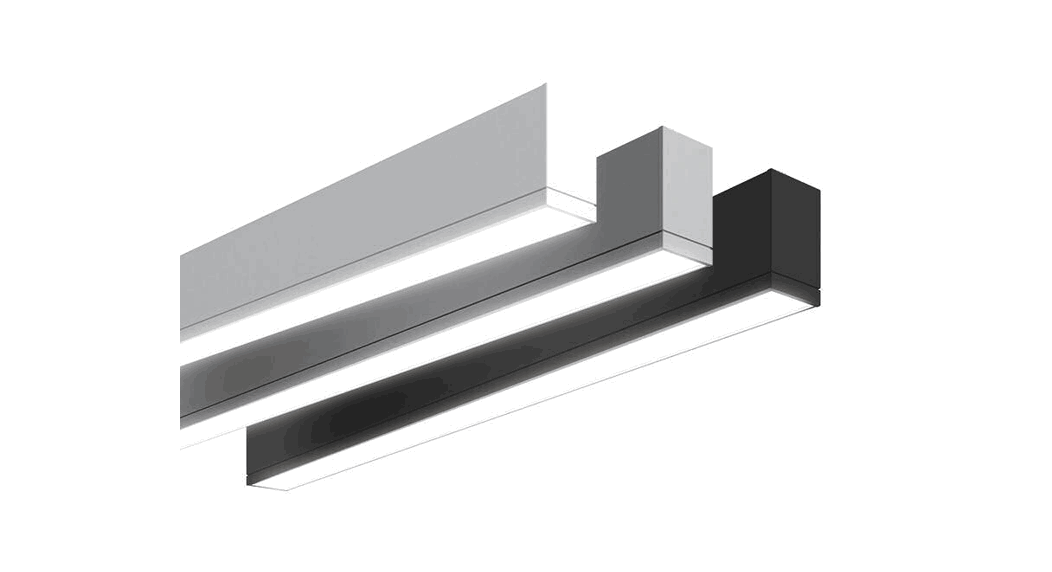
 ID-23 TruGroove Drywall Trimless Linear Light
Instruction Manual
System Overview
These instructions review how to install drywall trimless versions of TruGroove recessed micro fixtures for power over ethernet application. Please refer to layout drawings supplied by Philips Ledalite in conjunction with these installation instructions. The graphic below shows the components required to install a run of TruGroove recessed micro fixtures in drywall ceilings.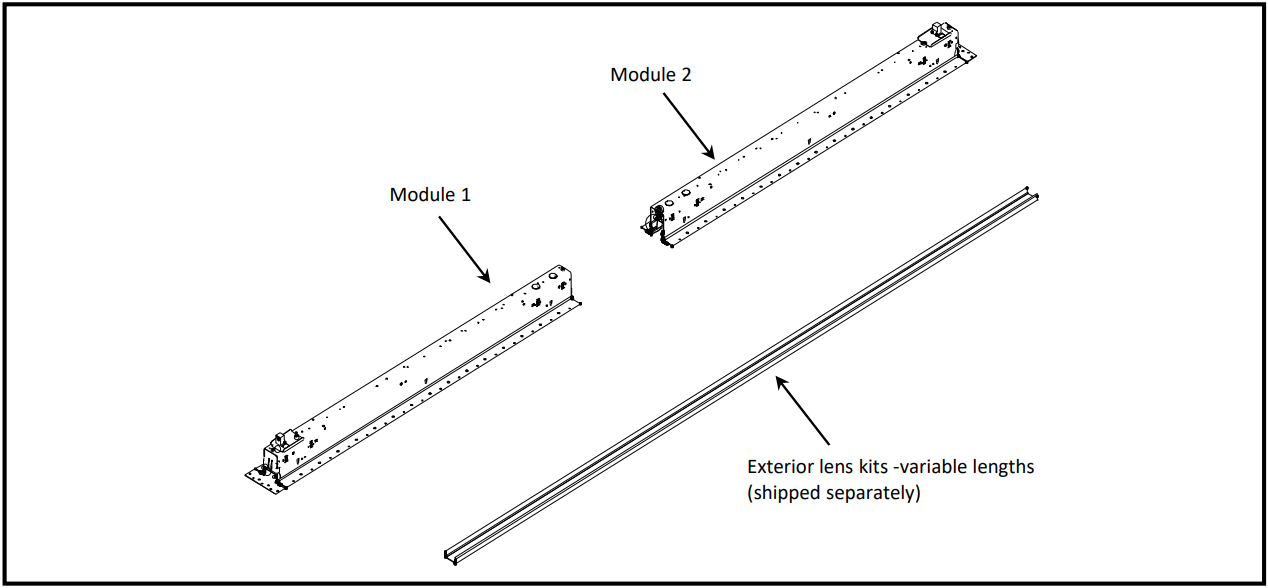
Mounting Kit 390ZA01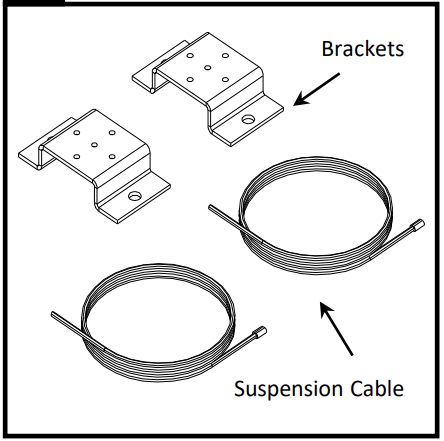
Joint Kit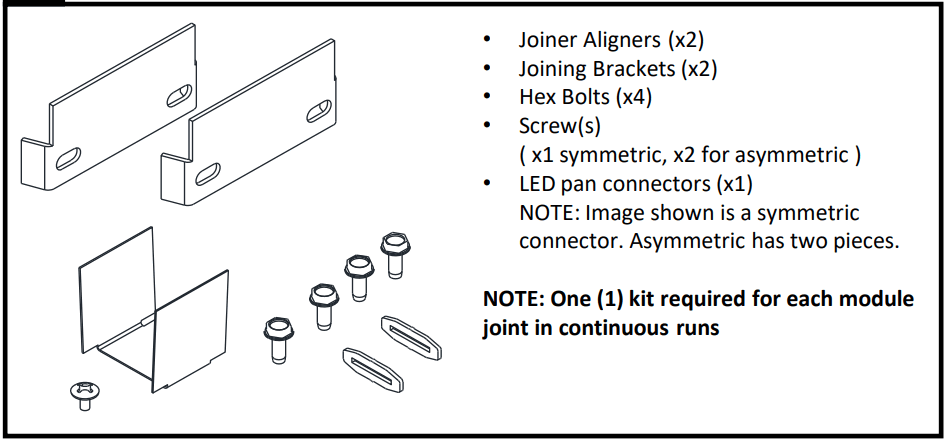
Tools: Phillips screwdriver, 5/16” Nut Driver
ATTENTION: Install in accordance with local and national building and electric codes.
This equipment has been tested and found to comply with the limits for a Class A digital device, pursuant to part 15 of the FCC Rules. These limits are designed to provide reasonable protection against harmful interreference when the equipment is operated in a commercial environment. This equipment generates, uses, and can radiate radio frequency energy and, if not installed and used in accordance with the instruction manual, may cause harmful interference to radio communications. Operation of this equipment in a residential area is likely to cause harmful interference in which case the user will be required to correct the interference at his own expense.
 Important Notes
- ‘C’ Channels (or equivalent) must be properly braced to ensure accuracy of cut-out in drywall.
- Use appropriate tools to outline specified dimensions of ceiling cutout to ensure straightness of cutting.
- Lens will not insert properly if fixture trim has mud or paint buildup.
 Warning, Shock Hazard
Fixture must be connected to building ground via the provided ground wire before connecting to mains power supply.
Disconnect or turn off power before attempting any installation, service or maintenance.
 Avoid
Avoid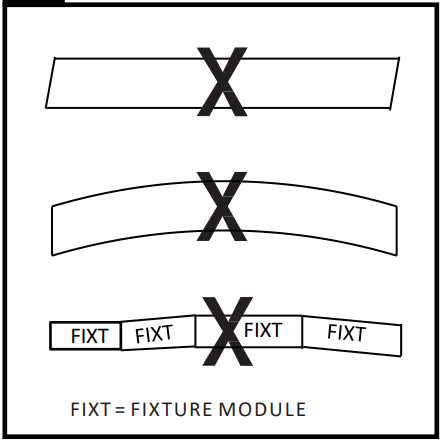
The straightness and accuracy of the cut-out in the drywall is crucial in ensuring proper fit for the fixture.
NOTE: TruGroove recessed micro modules are designed for installation after ceiling construction.
Prepare Ceiling: Standalone Units
Determine Locations
- Determine fixture location and fixture type. Refer to figure A for cut-out length and mount locations. Install mount brackets and suspension cables as shown on page 3.
- Determine power feed location(s) refer to figure A. Install power feeds as required and drop below installed ceiling height.
- Build ceiling frame around fixture cutout to 2-5/8″ to 2-3/4″ width as shown in figure A.
Ceiling Cut-out Details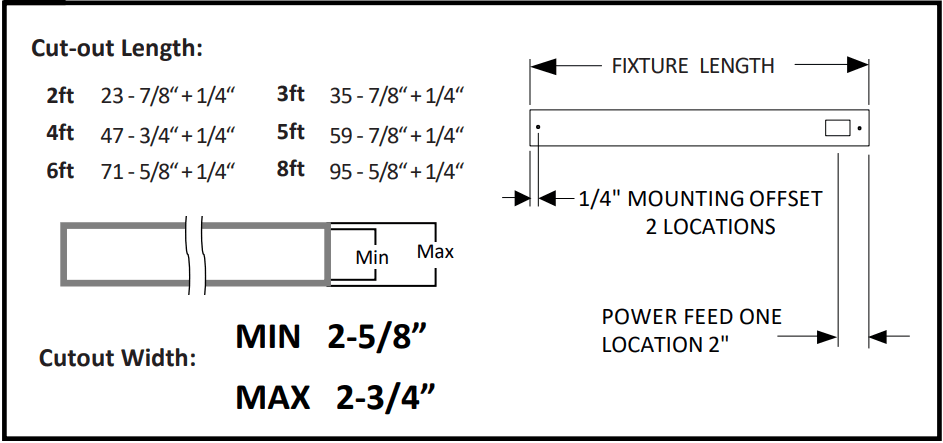
Important: The cut-out MUST fall within the specified tolerances.
Important: For 2ft standalone fixtures, end framing members must be installed 1” beyond ceiling cut-out.
ATTENTION: Install in accordance with local and national building and electric codes.
Prepare Ceiling: Continuous Runs
Determine Locations
- Determine fixture location and fixture type. Refer to figure B for mount locations and cut-out length. Install mount brackets and suspension cables as shown below.
- Determine power feed location(s) refer to layout drawings. Install power feeds as required and drop below installed ceiling height.
- Build ceiling frame around fixture cut-out to 2-5/8″ to 2-3/4″ width as shown in figure B. Refer to layout drawings for ceiling frame length.
Ceiling Cut-out Details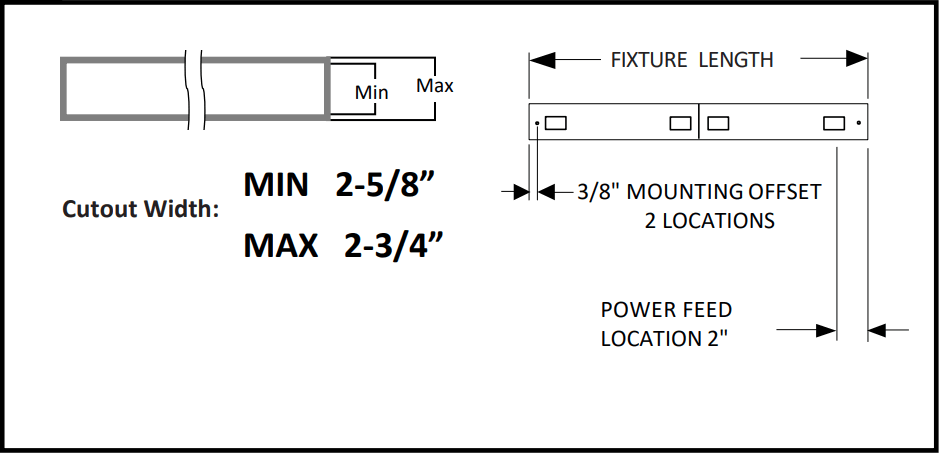
For continuous run fixtures, the cut-out in the drywall ceiling should be the same size as the overall fixture run length indicated on the layout drawings +1/4 “.
Installation Preparation
Mount Kit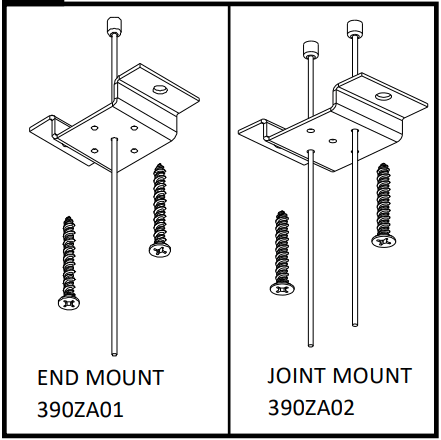
Install mounting brackets, suspension cables and power feed(s) at required locations.
Mounting hardware (screws/ fasteners) are supplied by others.
Maximum screw size # 10 (.190”).
Install Mounts and CAT6 Cables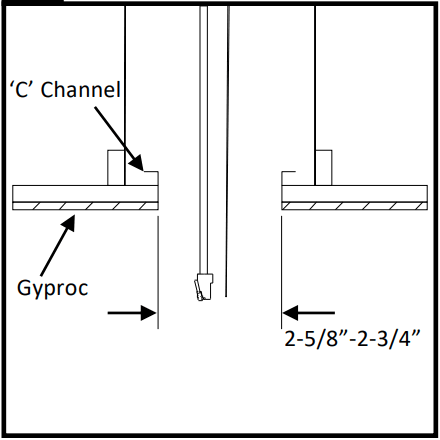
Install a ‘C’ channel perimeter around the ceiling cutout.
Important: See ceiling cut-out details on page 2 & 3.
Install Drywall Ceiling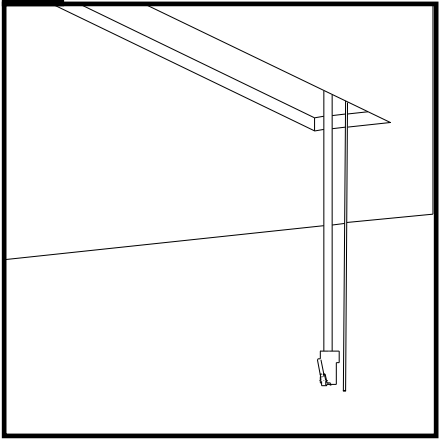
Install drywall ceiling and cut required opening as shown in figure A on page 2 or figure B on page 3.
Install fixtures
Prepare Fixtures
Arrange boxed fixtures on floor in specified mounting locations, based on supplied layout drawings.
Match up each fixture based on the spec tag and ID number labelled on each fixture box for the specified run.
Insert Aircraft Cable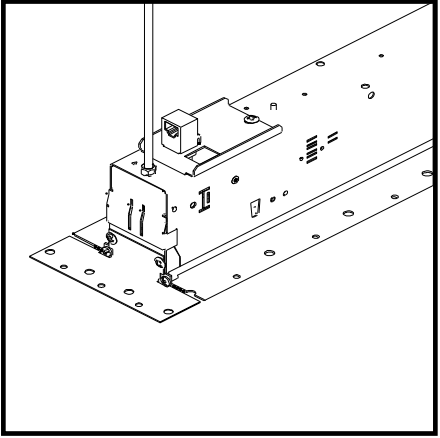
Suspend each module by inserting the aircraft cables through the grippers on top of the housing.
Raise Fixture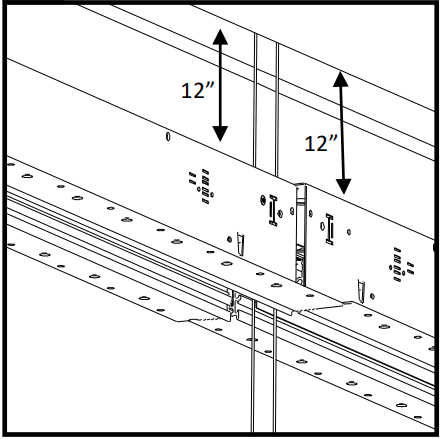
Gradually lift each module to approximately 12 inches below the ceiling.
Install CAT6 Cable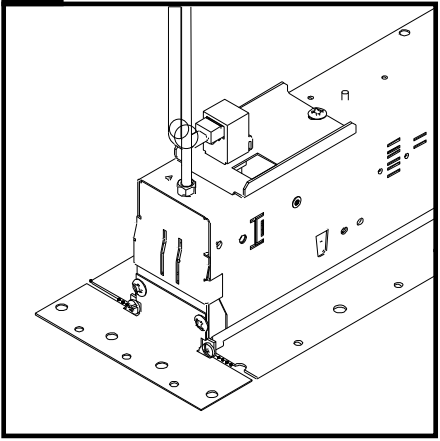
Insert CAT6 Cable at desired location.
Raise and Level Fixtures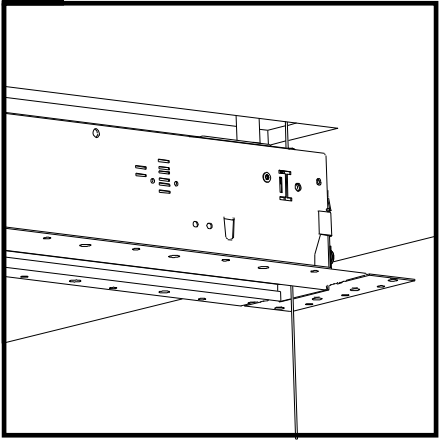
Once the power connections are complete, pull the aircraft cable to raise all modules to just below the ceiling.
Important: Modules must be level relative to each other if joining of sections is required
Install Joiner Aligners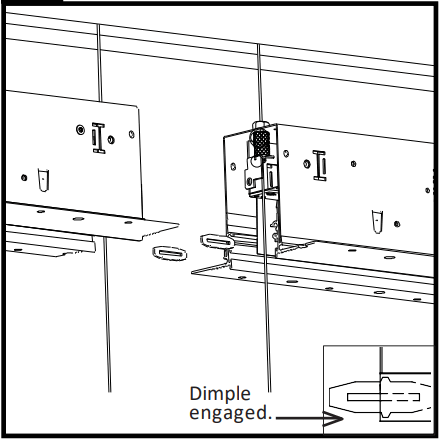
At joint location(s), gently tap provided joiner aligners inside one module only. Two joiner aligners are required for each joint.
Important: To insert aligners, tap gently with a hammer until half is inserted into the joiner channel. Be sure to engage the dimple.
NOTE: For Standalone fixtures skip to step 15
Join Individual Modules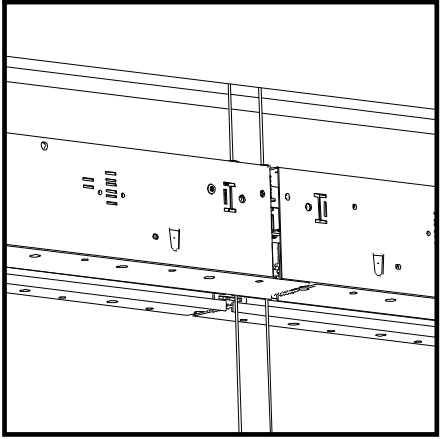
Gently slide housing modules together, ensuring joiner aligners are engaged insidethe trim in the adjacent module. Important: Joiner aligners must be fully inserted to provide proper section alignment.
Open Slots for Joiner Bracket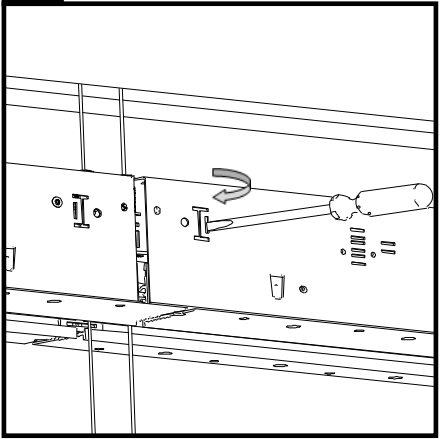
Snap off the safety cover on joiner bracket slots with a flat head screwdriver.
This only needs to be done on ends that require joining.
Install Joiner Brackets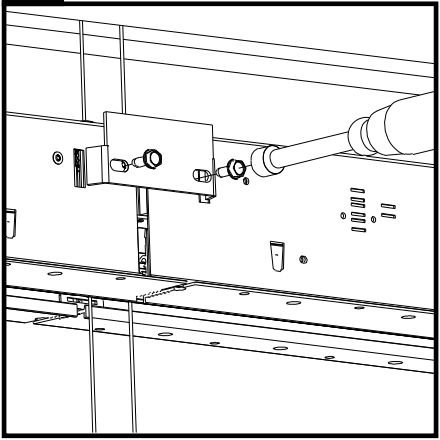
Install joiner brackets on each side of the housing using supplied hardware.
Important: Hand tighten bracket screws while supporting the housing on the opposite side. Gradually alternate sides while tightening.
Do not over tighten.
Raise Fixture(s) into Ceiling Cut-out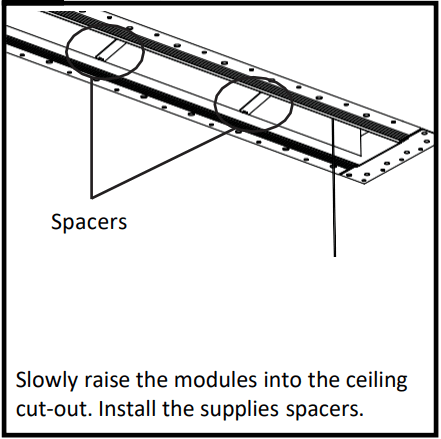
Important: For continuous row modules, start at one end and gradually raise each module up one inch at a time. Repeat process until housing is fully recessed and housing trim touches drywall ceiling. Do not stress the joint connection by tilting the module, as damage can occur.
Secure Fixture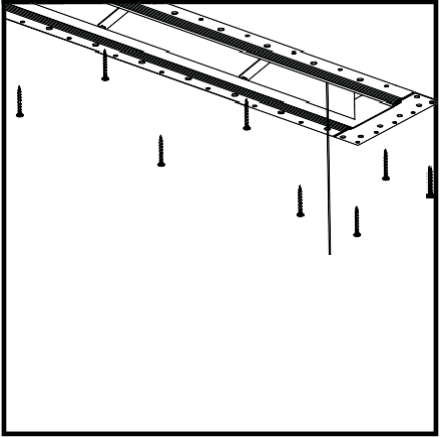
Secure the fixture to the gyproc and ‘C’ channel with #6 drywall screws (supplied by others).
Ensure screws are driven “Straight” and not in anyway to alter the width of the opening.
Trim Excess Cable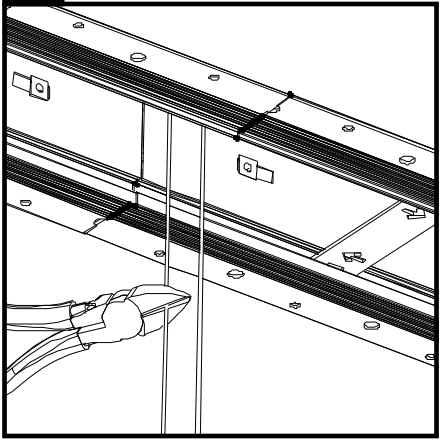
Trim suspension cable approximately 8 inches below the ceiling level. Tuck all excess cable inside the upper wiring cavity.
Led Pan Joiner – Symmetric
Mount the LED pan connector with the supplied screw in the joiner kit.
Led Pan Joiner – Asymmetric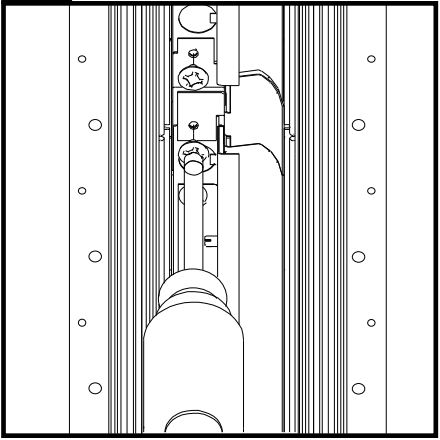
Mount the LED pan connector with the supplied screw in the joiner kit.
There are two pieces for the asymmetric fixture.
Remove Spacers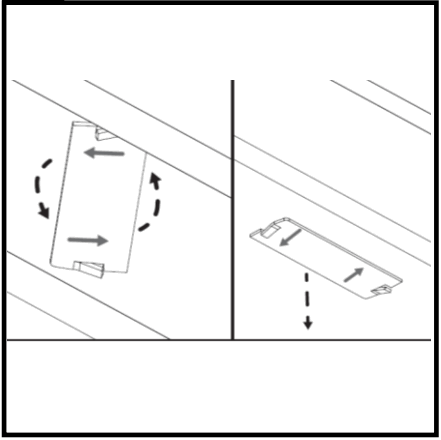
Rotate spacers in direction of arrows and remove.
Make sure these spacers are “Not” used for any other purpose.
20 Insert Mud Guard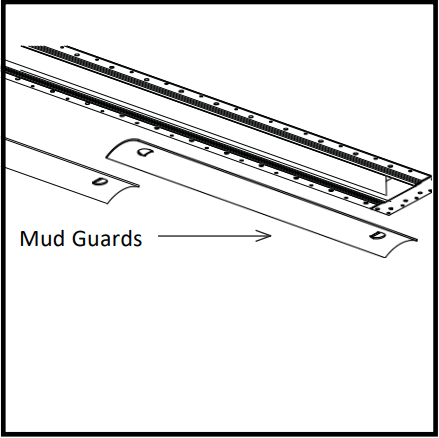
Before beginning ceiling mudding, insert the supplied mud guards into each fixture to protect fixture opening from mud and paint.
Note: Mud guards are supplied in a separate box. Please insert mud guards throughout the entire row.
Apply Mud Over Fixture Flange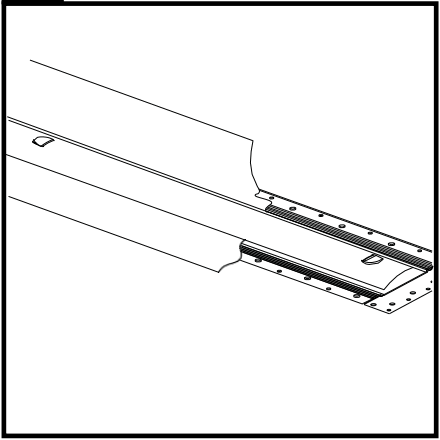
Mud over the fixture flange. When finished, use a utility knife to cut out the mud guard.
Note: Use of a taping compound is highly recommended.
Clean Fixture Trim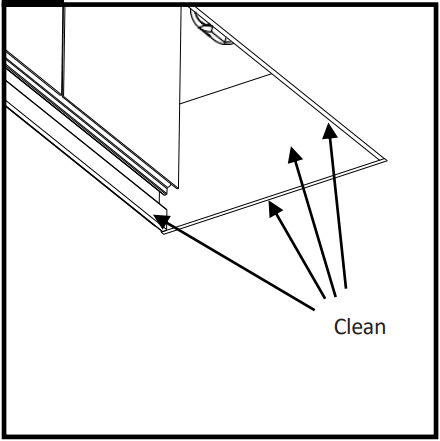
Eliminate any paint or drywall compound on inside fixture trim to ensure lens will properly insert.
Flush Lens Installation and Removal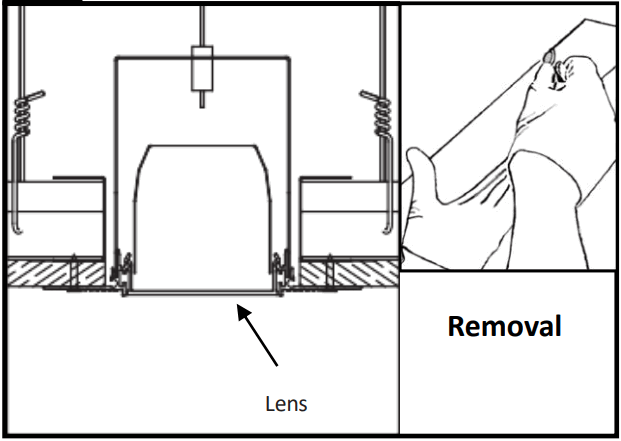
Flush Lens: Snap in lens to insert into fixture.
Lens Removal for maintenance:
To remove snap-in lens for maintenance purposes, insert a flat, smooth edged object between lens and housing. Twist to release pressure and remove lens.
Sensors in Rows
Single Sensor Controlling Whole Row
- Purple & brown (or purple & grey/pink) control wires MUST be connected between fixtures.
Note:
A maximum of 8 drivers can be wired to one sensor; confirm fixture driver count with factory. Multiple Sensors Controlling Separate Zones in a Row
 - Purple & brown (or purple & grey/pink) control wires MUST NOT be connected between zones.
Notes:
A maximum of 8 drivers can be wired to one sensor; confirm fixture driver count with factory.
Only one sensor is allowed on a wired zone. (Sensors can be paired together wirelessly via a mobile app).
 Multiple Sensors Controlling Separate Zones in a Row
Sensor Spacing
- For correct operation, sensors should be placed a minimum distance of 8ft apart.
- Wireless sensors should be placed no further than 40ft apart for good wireless signal connection.

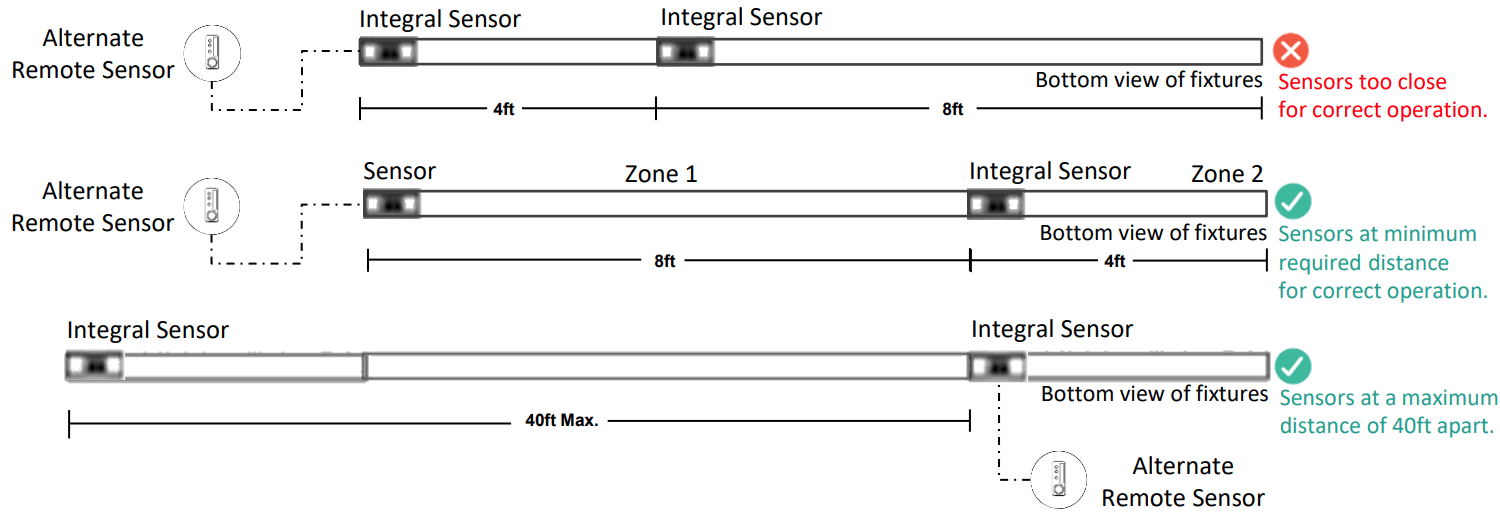
Important Consideration When Using Sensors in a Row
- For fixtures with wireless sensors (CS, SB or RA options):
DO NOT connect fixture purple & brown (or purple & grey/pink) control wires to an external dimming switch.
Fixture mains wiring should not be connected to a circuit with an external on/off switch. - For best aesthetic condition, place sensors at ends of row only so as not to break the continuous lens.
- For better occupancy coverage in longer rows, sensors may be placed mid run, but keep in mind this will break the continuous lens into discrete sections. Alternatively, remote sensor may be used, note the same wiring rules will apply.
Occupancy Sensor Coverage:
Note: Longer dimension of detection area (Y1, Y2) is parallel to longer dimension of the luminaire.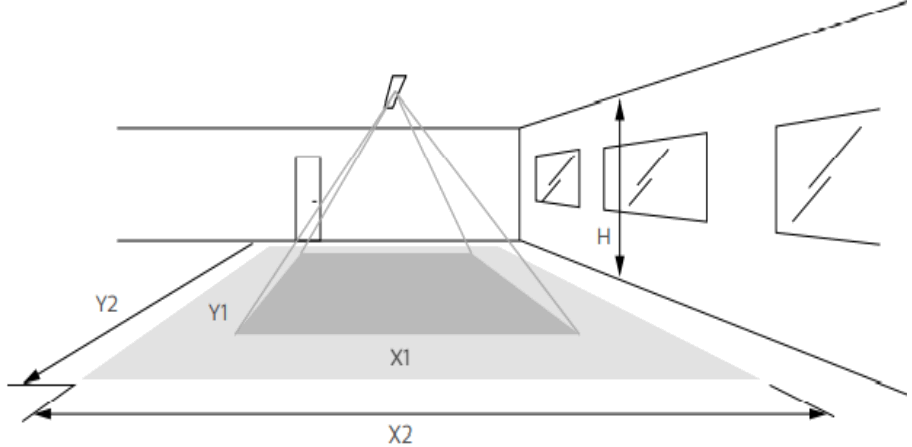
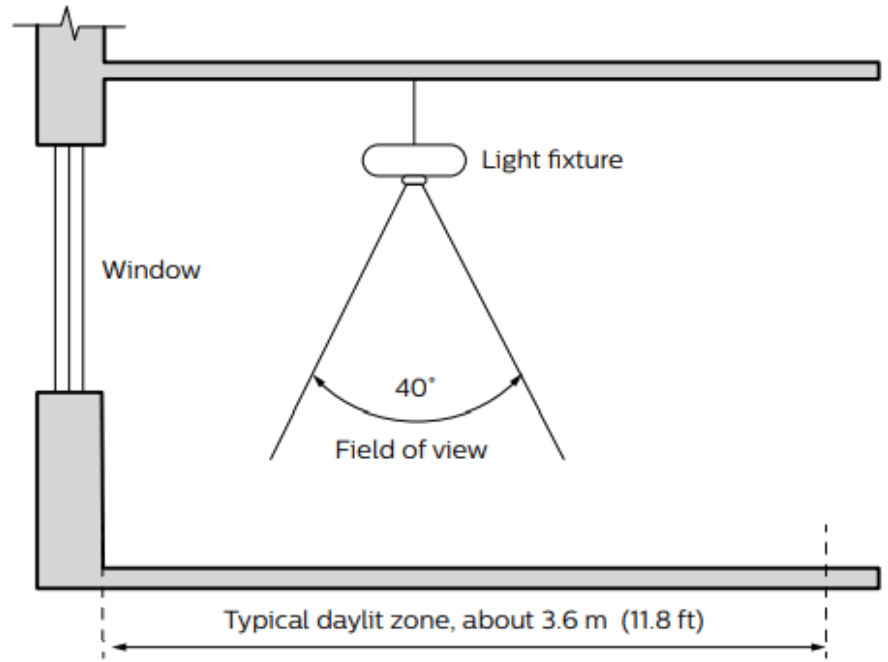
Daylight sensor
The light sensor measures the total amount of light in a circular field of approximately 80% of the PIR detection area. The following aspects should be observed during installation:
- Minimum distance from the window ≥2ft (0.6m).
- Prevent light reflections from outside entering the sensor (for example sunlight reflection on a car hood) as this will lead to incorrect light regulation.
As a guideline the formula 0.72 x H can be used to calculate the minimum distance between the window and sensor whereby H is the height from the bottom of the window to the sensor.
 |  | |||
| Height | Minor movement | Major movement | ||
| h | X1 | 111 | X2 | Y2 |
| 2.4 m (7.9 ft) | 1.9 m (6.2 ft) | 2.9 m (9.5 ft) | 2.9 m (9.5 ft) | 4.3 m (14.1 ft) |
| 3 m (9.8 ft) | 2.4 m (7.9 ft) | 3.6 m (11.8 ft) | 3.6 m (11.8 ft) | 5.4 m (17.7 ft) |
The detection area for the movement sensor can be roughly divided into two parts:
- Minor movement (person moving ≤3ft/s or 0.9m/s).
- Major movement (person moving ≥3ft/s or 0.9m/s).
Photosensor spatial response
© 2021 Signify Holding. All rights reserved. The information provided herein is subject to change, without notice. Signify does not give any representation or warranty as to the accuracy or completeness of the information included herein and shall not be liable for any action in reliance thereon. The information presented in this document is not intended as any commercial offer and does not form part of any quotation or contract, unless otherwise agreed by Signify.
Signify North America Corporation
400 Crossing Blvd, Suite 600
Bridgewater, NJ 08807
Telephone: 855-486-2216 I
Signify Canada Ltd. I
281 Hillmount Road,
Markham, ON, Canada L6C 2S3
Telephone: 800-668-9008
All trademarks are owned by Signify Holding or their respective owners.
www.ledalite.com
www.signify.com
 Ledalite | Signify
 Home | Signify