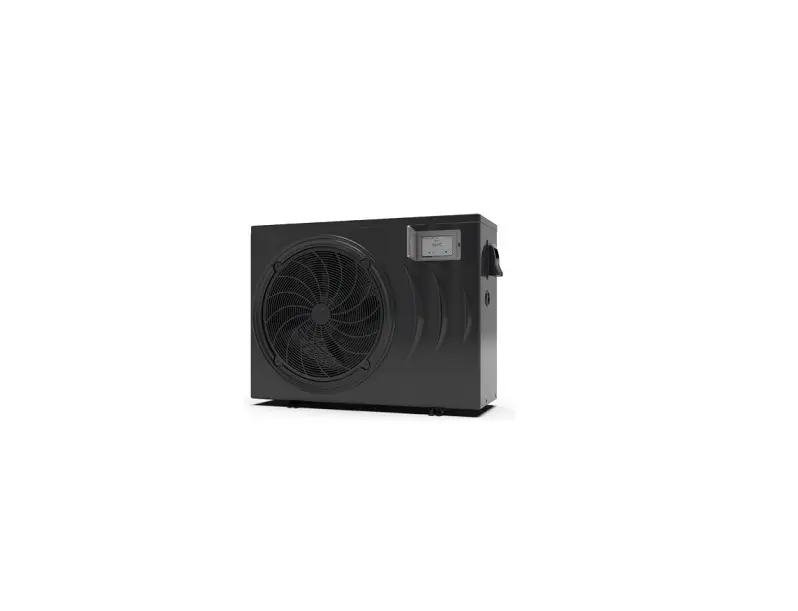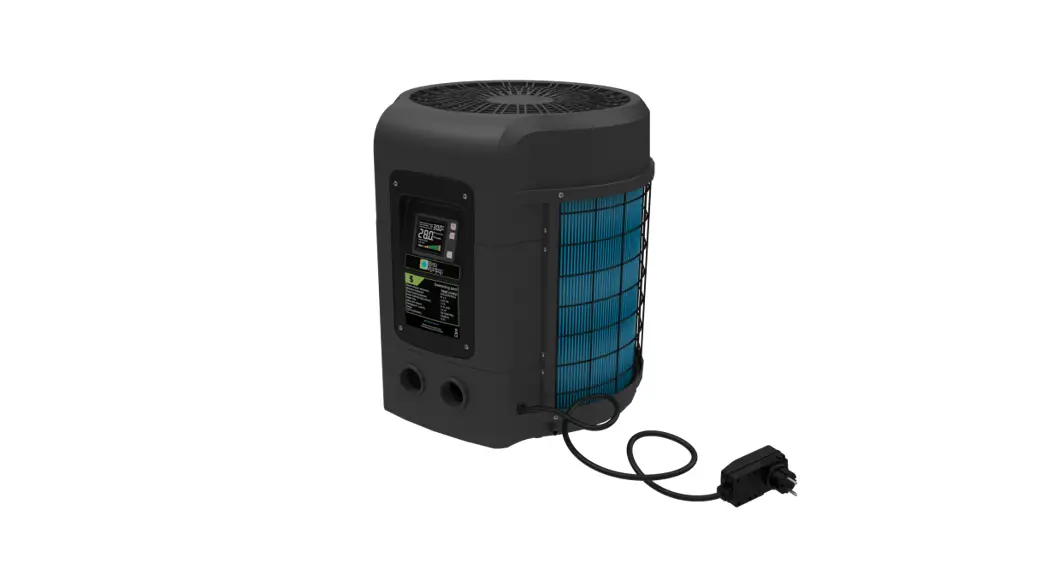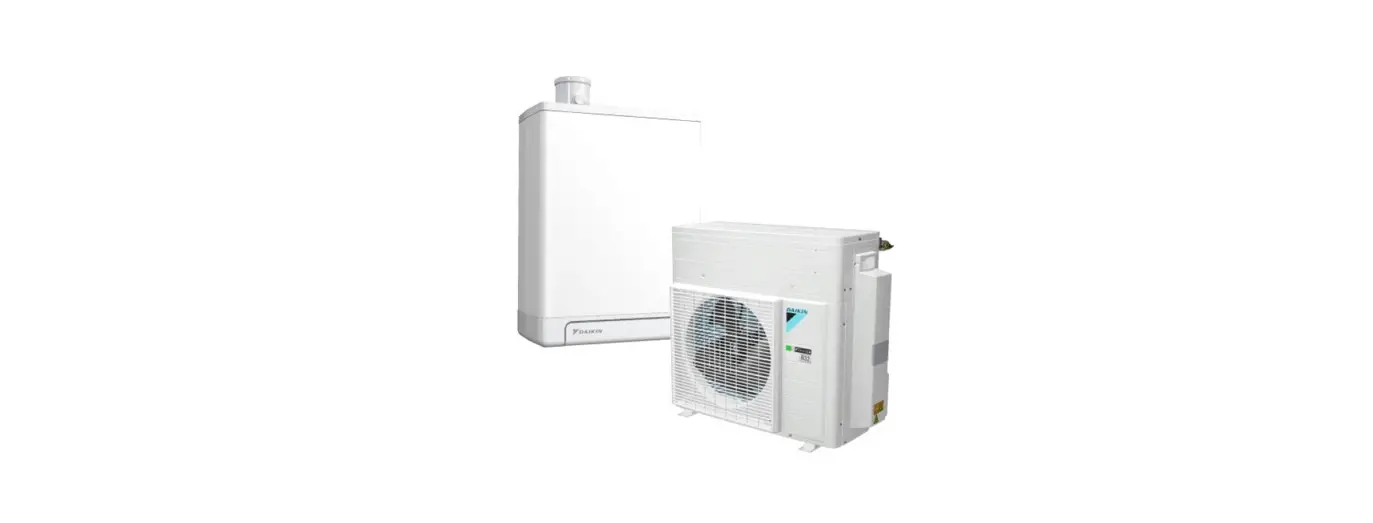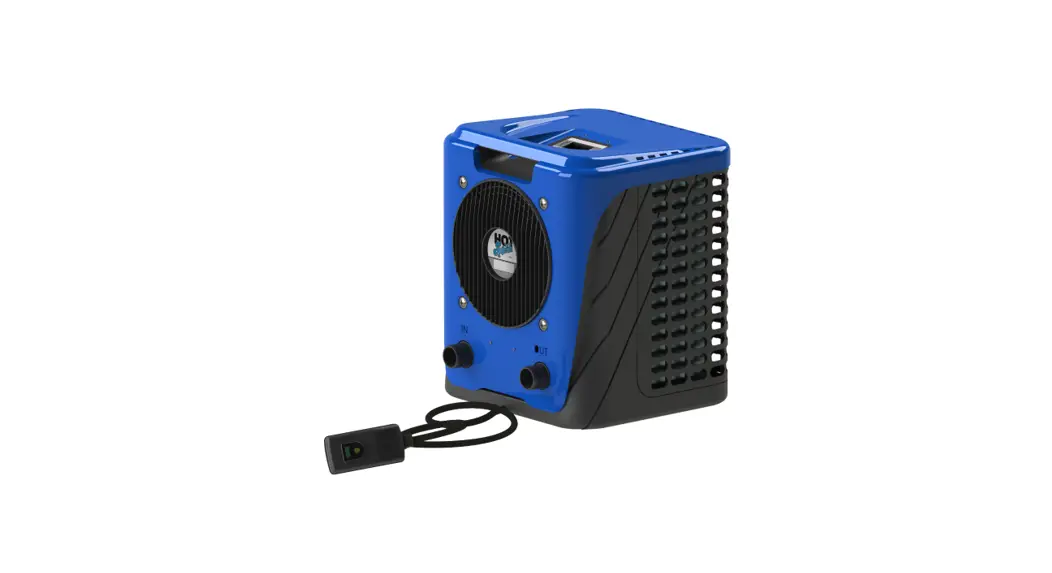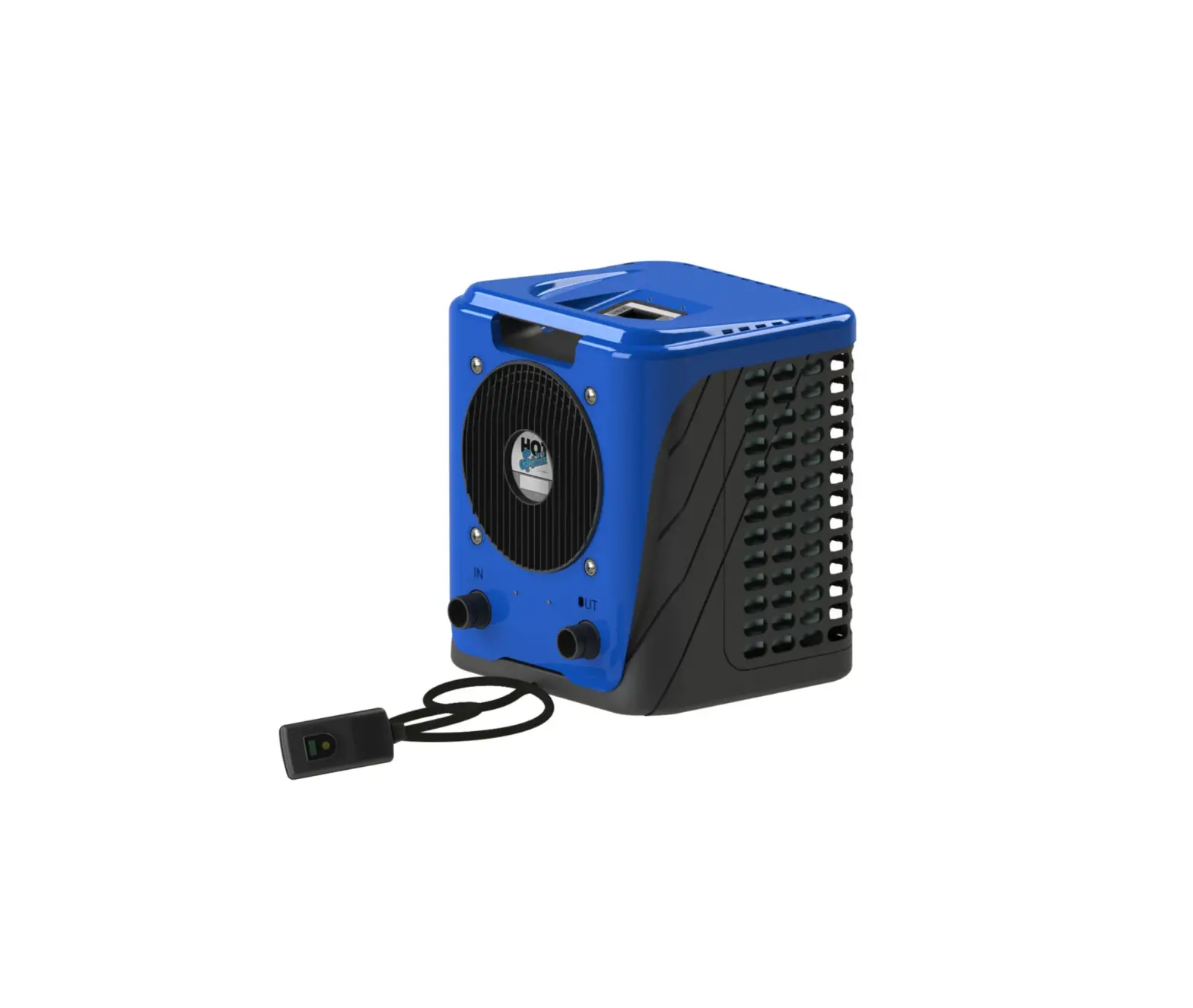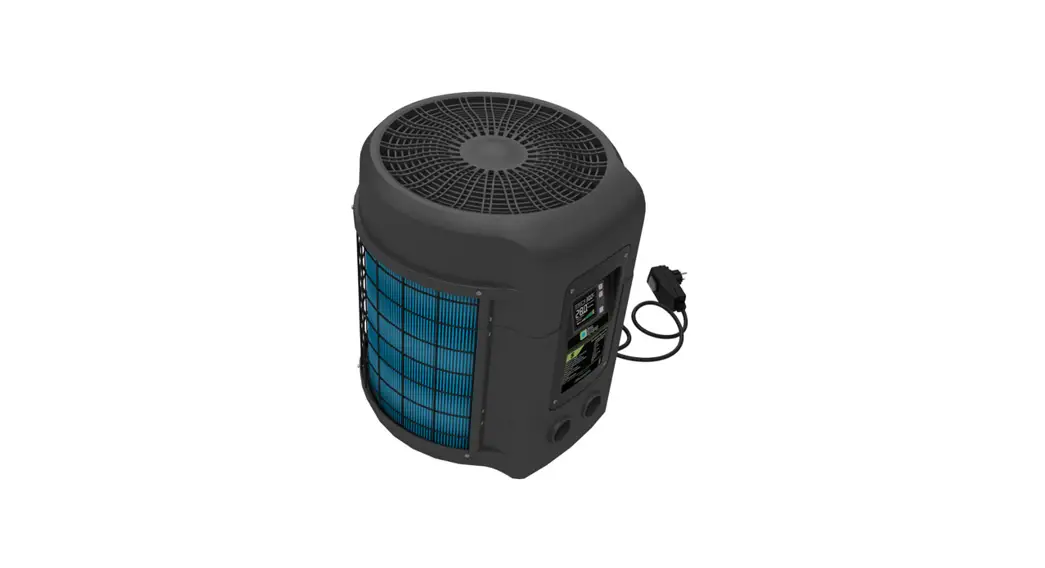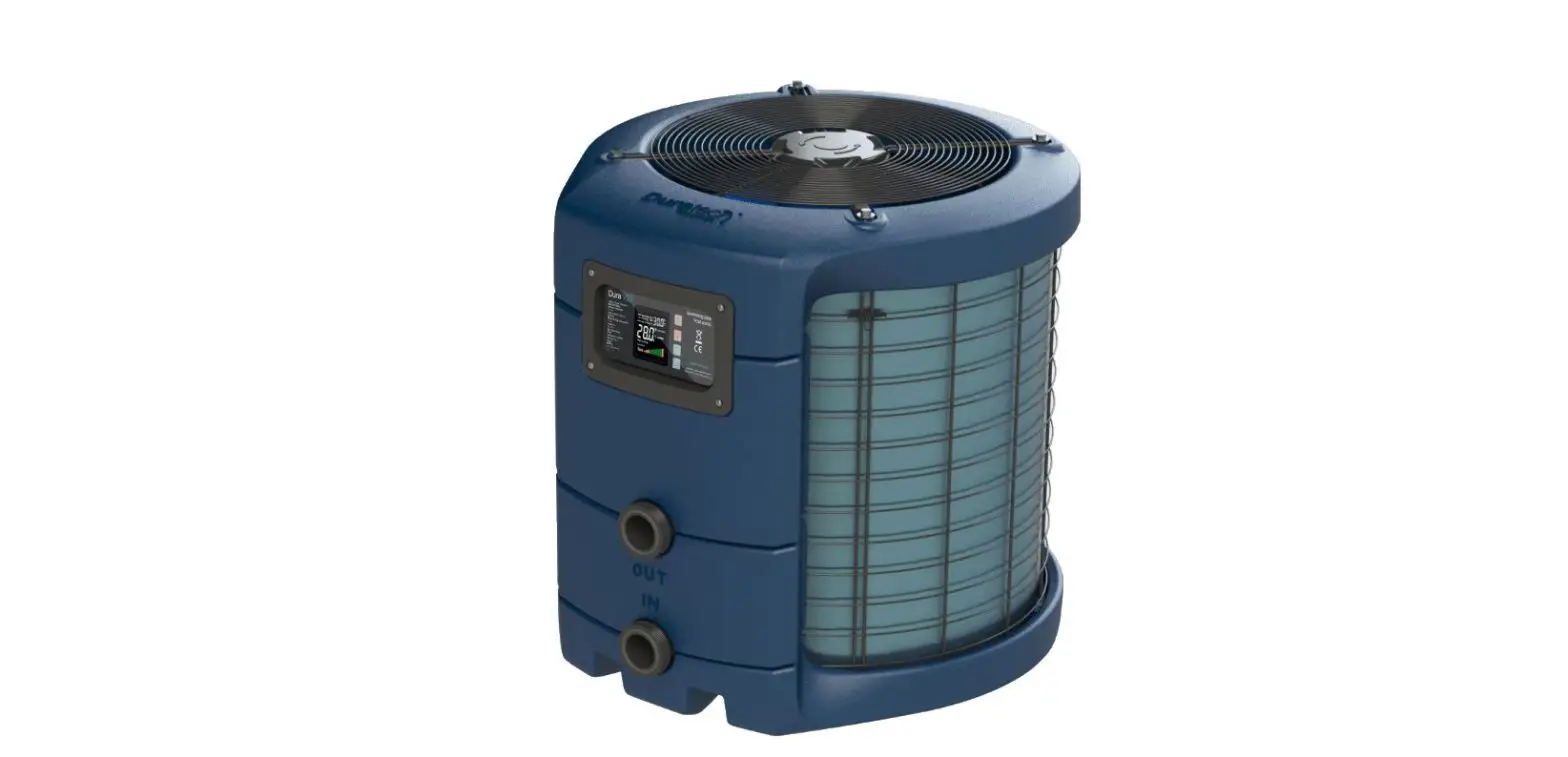

 DURAPRO-12 Dura Pro Heat Pump
User Manual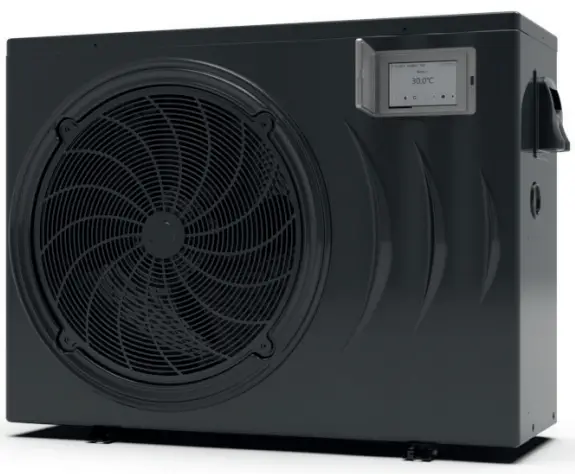 Manual
DURAPRO-12 ,DURAPRO-17 ,DURAPRO-21
DURAPRO-25S ,DURAPRO-28TS
Preface
In order to provide our customers with quality, reliability and versatility, this product has been made to strict production standards. This manual includes all the necessary information about installation, debugging, discharging and maintenance. Please read this manual carefully before you open or maintain the unit. The manufacturer of this product will not be held responsible if someone is injured or the unit is damaged, as a result of improper installation, debugging, or unnecessary maintenance. It is vital that the instructions within this manual are adhered to at all times. The unit must be installed by qualified personnel.
The unit can only be repaired by qualified personnel or an authorized dealer.
Maintenance and operation must be carried out according to the recommended time and frequency, as stated in this manual.
Use genuine standard spare parts only.
Failure to comply with these recommendations will invalidate the warranty.
This swimming Pool Heat Pump Unit heats the swimming pool water and keeps the temperature constant.
The heat pump has following characteristics:
- Durable
The heat exchanger is made of PVC & Titanium tube which can withstand prolonged exposure to swimming pool water. - Installation flexibility
The unit can be installed outdoors. - Quiet operation
The unit comprises an efficient rotary/ scroll compressor and a low-noise fan motor, which guarantees its quiet operation. - Advanced controlling
The unit includes micro-computer controlling, allowing all operation parameters to be set. Operation status can be displayed on the LCD wire controller. Remote controller can be chosen as future option.
Specifications
2.1 Performance data

| UNIT | DURAPRO-12 | DURAPRO-17 | DURAPRO-21 | |
| Max Pool volume* | m3 | 30 – 60 | 40 – 75 | 50-95 |
| Advised Pool volume | m3 | 40 | 50 | 65 |
| Operating air temperature | °C | -15 ~ 43 | ||
| Air 27°C / Water 26°C / Humidity 80% | ||||
| Heating Capacity | kW | 2,85 – 12 | 3,77 – 17 | 4,6 – 19,5 |
| Btu | 9690 – 40800 | 12818 – 57800 | 15640 – 66300 | |
| Consumed power | kW | 0,21 – 2,12 | 0,3 – 3,02 | 0,37 – 3,94 |
| COP | 13,57 – 5,66 | 12,57 – 5,63 | 12,43 – 4,95 | |
| Air 15°C / Water 26°C / Humidity 70% | ||||
| Heating Capacity | kW | 2,25 – 9,7 | 2,92 – 12,4 | 3,84 – 15,4 |
| Btu | 7650 – 32980 | 9928 – 42160 | 13056 – 52360 | |
| Consumed power | kW | 0,32 – 2,08 | 0,44 – 2,86 | 0,6 – 3,81 |
| COP | 7,03 – 4,66 | 6,64 – 4,34 | 6,4 – 4,04 | |
| Air 10°C / Water 26°C / Humidity 64% | ||||
| Heating Capacity | kW | 1,88 – 8 | 2,5 – 10,7 | 3,38 – 14,4 |
| Btu | 6329 – 27200 | 8500 – 36380 | 11492 – 48960 | |
| Consumed power | kW | 0,33 – 1,95 | 0,45 – 2,64 | 0,62 – 3,62 |
| COP | 5,7 – 4,1 | 5,56 – 4,05 | 5,45 – 3,98 | |
| Power supply | 230V / 50Hz | |||
| Current range | A | 0,9 – 9,2 | 1,3 – 13,1 | 1,6 – 17,1 |
| Compressor quantity | 1 | 1 | 1 | |
| Compressor type | Rotary | |||
| Refrigerant | R32 (HFK-32) | |||
| Refrigerant weight | kg | 0,48 | 0,60 | 0,67 |
| GWP | 675 | |||
| CO2 equivalent | ton | 0,324 | 0,405 | 0,452 |
| Fan quantity | 1 | 1 | 1 | |
| Fan power input | W | 75 | 120 | 120 |
| Fan rotary speed | RPM | 400 – 800 | 600 – 750 | 600 – 750 |
| Fan direction | Horizontal | Horizontal | Horizontal | |
| Noise at 10m | dB(A) | 25 – 32 | 27 – 34 | 28 – 35 |
| Water connection | mm | 50 | 50 | 50 |
| Nominal water flow | m3/h | 4,2 | 5,3 | 6,6 |
| Water pressure drop (max) | kPa | 4,5 | 5 | 6 |
| Unit net dimensions (L*W*H) | mm | 1003x396x767 | 1046x435x768 | 1161x470x863 |
| Unit shipping dimensions (L*W*H) | mm | 1130x460x790 | 1120x460x780 | 1200x510x880 |
| Net weight | kg | 59 | 77 | 82 |
| Shipping weight | kg | 69 | 89 | 95 |
Additional information:
This product contains a fluorinated greenhouse gas.
The refrigerant in the product is hermetically sealed.
* Advised pool volume for an entirely insulated pool, with cover, free from wind and exposed to the sun
In case the pool volume is close to the maximum value, the inverter heatpump will nearly always run at full power
** Advised pool volume for efficient heating
UNIT | DURAPRO-25S | DURAPRO-28TS | |
| Max Pool volume* | m3 | 65 – 120 | 90 – 169 |
| Advised Pool volume | m3 | 75 | 105 |
| Operating air temperature | °C | -15 ~ 43 | |
| Air 27°C / Water 26°C / Humidity 80% | |||
| Heating Capacity | kW | 4,7 – 24,0 | 7,7 – 28,0 |
| Btu | 16036 – 81888 | 26272 – 95536 | |
| Consumed power | kW | 0,36 – 4,0 | 0,59 – 4,7 |
| COP | 13,0 – 6,0 | 13,0 – 6,0 | |
| Air 15°C / Water 26°C / Humidity 70% | |||
| Heating Capacity | kW | 4,4 – 18,5 | 6,4 – 21,8 |
| Btu | 15012 – 63122 | 21837 – 74382 | |
| Consumed power | kW | 0,61 – 4,02 | 0,88 – 4,74 |
| COP | 7,20 – 4,60 | 7,30 – 4,60 | |
| Air 10°C / Water 26°C / Humidity 64% | |||
| Heating Capacity | kW | 5,0 – 15,6 | 5,7 – 17,8 |
| Btu | 17060 – 53227 | 19448 – 60733 | |
| Consumed power | kW | 0,82 – 3,91 | 0,90 – 4,13 |
| COP | 6,1 – 4,0 | 6,3 – 4,3 | |
| Power supply | 230V / 50Hz | 380-400V (3Phase) | |
| current range | A | 3,2 – 20,5 | 1,4 – 8,8 |
| Compressor quantity | 1 | 1 | |
| Compressor type | Rotary | ||
| Refrigerant | R32 (HFK-32) | ||
| Refrigerant weight | kg | 1,15 | 1,35 |
| GWP | 675 | ||
| CO2 equivalent | ton | 0,776 | 0,911 |
| Fan quantity | 1 | 1 | |
| Fan power input | W | 150 | 150 |
| Fan rotary speed | RPM | 400 – 800 | 400 – 800 |
| Fan direction | Horizontal | Horizontal | |
| Noise at 10m | dB(A) | 26 – 37 | 28 – 38 |
| Water connection | mm | 50 | 50 |
| Nominal water flow | m3/h | 10 | 12 |
| Water pressure drop (max) | kPa | 14 | 17 |
| Unit net dimensions (L*W*H) | mm | 1160x490x862 | 1160x490x862 |
| Unit shipping dimensions (L*W*H) | mm | 1210x510x880 | 1210x510x880 |
| Net weight | kg | 92 | 96 |
| Shipping weight | kg | 105 | 109 |
Additional information:
This product contains a fluorinated greenhouse gas.
The refrigerant in the product is hermetically sealed.
* Advised pool volume for an entirely insulated pool, with cover, free from wind and exposed to the sun
In case the pool volume is close to the maximum value, the inverter heatpump will nearly always run at full power
** Advised pool volume for efficient heating
2.2 Dimensions
DURAPRO-12/ 17/ 21 / 25S / 28TS 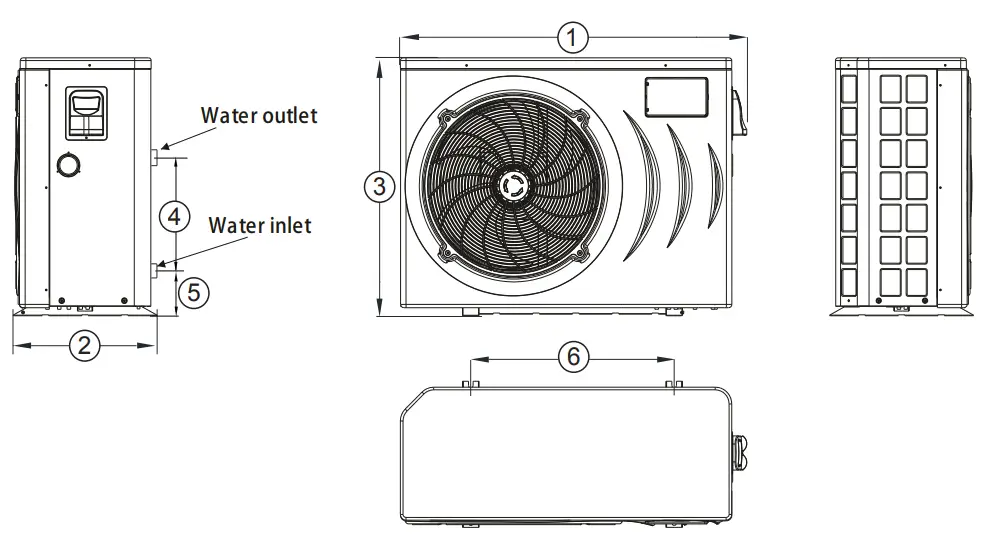
| UNIT | 1 | 2 | 3 | 4 | 5 | 6 | Water outlet | Water inlet |
| DURAPRO-12 | 1003 | 396 | 767 | 350 | 97 | 545 | 50 | 50 |
| DURAPRO-17 | 1046 | 435 | 768 | 350 | 100 | 615 | 50 | 50 |
| DURAPRO-21 | 1161 | 470 | 863 | 465 | 97 | 790 | 50 | 50 |
| DURAPRO-25S | 1160 | 490 | 862 | 465 | 97 | 790 | 50 | 50 |
| DURAPRO-28TS | 1160 | 490 | 862 | 465 | 97 | 790 | 50 | 50 |
* All dimensions in mm
Installation and Connection
3.1 Heat Pump Location
The unit will perform well in any outdoor location provided that the following three factors are presented:
1. Fresh Air – 2. Electricity – 3. Pool filter piping
The unit may be installed virtually anywhere outdoors. For indoor pools please consult the supplier. Unlike a gas heater, it has no draft or pilot light problem in a windy area.
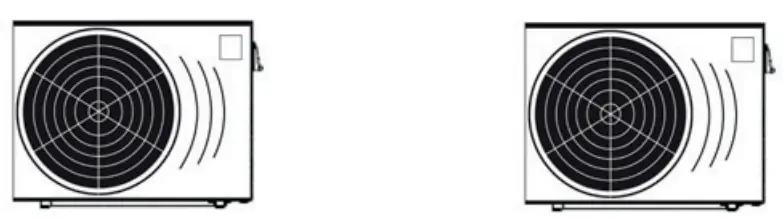
DO NOT place the unit in an enclosed area with a limited air volume, where the units discharge air will be re-circulated.
DO NOT place the unit next to shrubs which can block air inlet. These locations deny the unit of a continuous source of fresh air which reduces its efficiency and may prevent adequate heat delivery.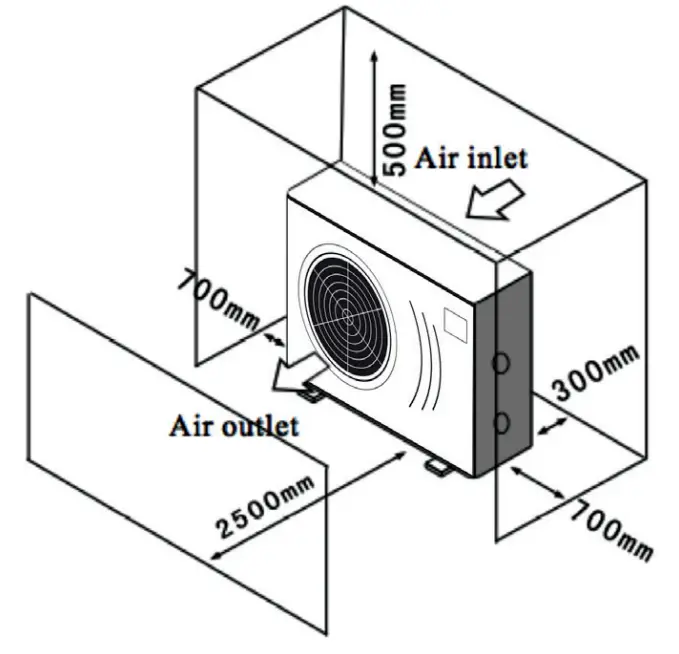 3.2 How Close To Your Pool?
Normally, the pool heat pump is installed within 7.5 meters of the pool. The longer the distance from the pool, the greater the heat loss from the piping. For the most part ,the piping is buried. Therefore, the heat loss is minimal for runs of up to15 meters(15 meters to and from the pump = 30 meters total), unless the ground is wet or the water table is high. A very rough estimate of heat loss per 30 meters is 0.6 kW-hour,(2000BTU) for every 5°C difference in temperature between the pool water and the ground surrounding the pipe, which translates to about 3% to 5% increase in run time.
3.3 Installation illustration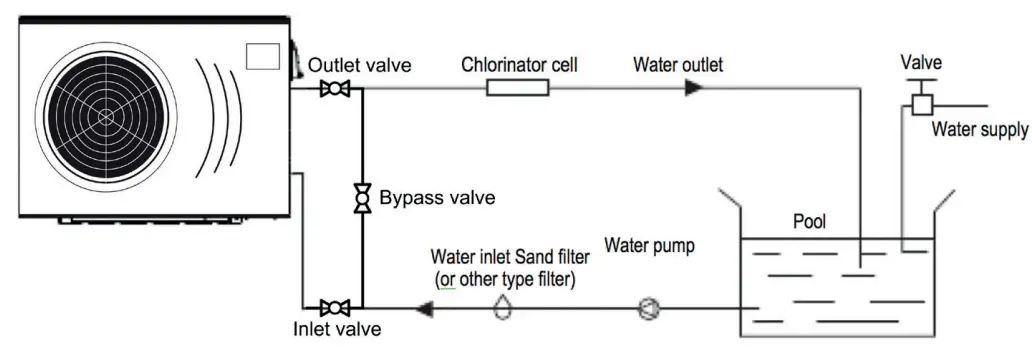
Remarks:
The factory only provides the heat pump. Other parts, including a contingent by-pass are to be provided by the user or installer.
Attention:
Please take the following steps when installing the heat pump:
- Each addition of chemicals has to be performed through the conduits located AFTER the heat pump.
- Install a by-pass for easy maintenance
- Always place the heat pump on a solid base and use the supplied silent blocks in order to avoid vibrations and noise.
- Always keep the heat pump in upright position. If the unit has been tilted, you should wait for at least 24 hours before turning it on.
3.4 Installation of a check valve
When using automatic chlorine and pH dosage systems, it is of uttermost importance to protect the heat pump from high concentrations of these chemicals that could corrode the heat exchanger
Therefore, such systems should add the chemicals in the conduits located DOWNSTREAM of the heat pump and it is recommended to install a check-valve in order to prevent backflow when there is no water circulation.
Damage to the heat pump caused by disregarding any of these recommendations will invalidate the warranty.
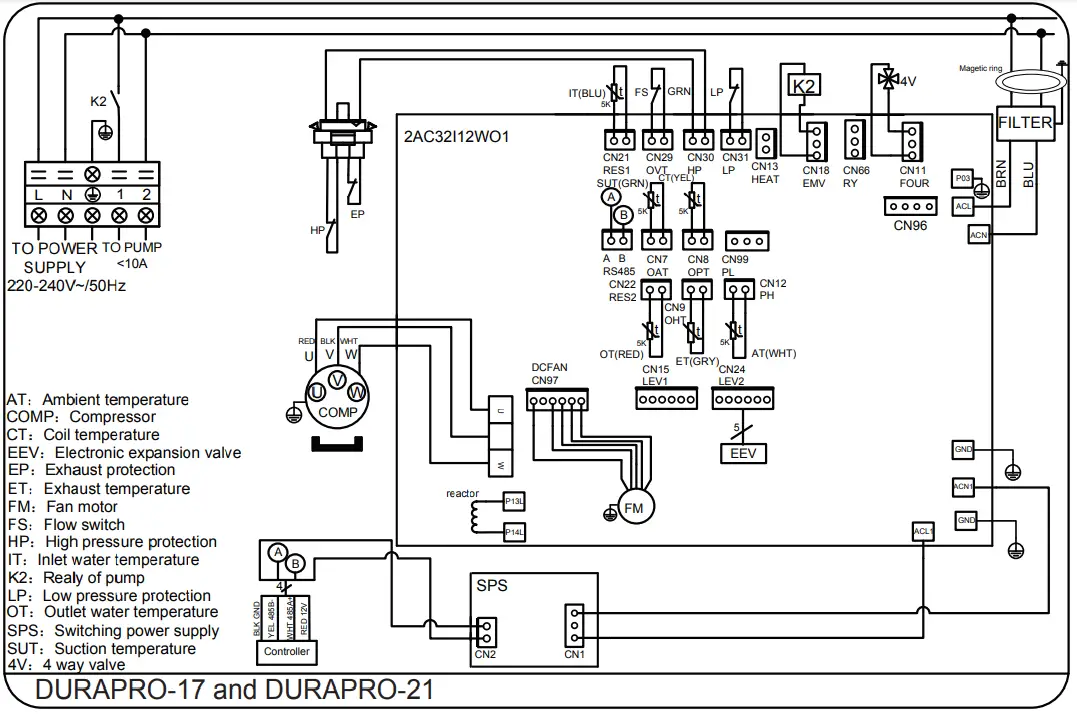
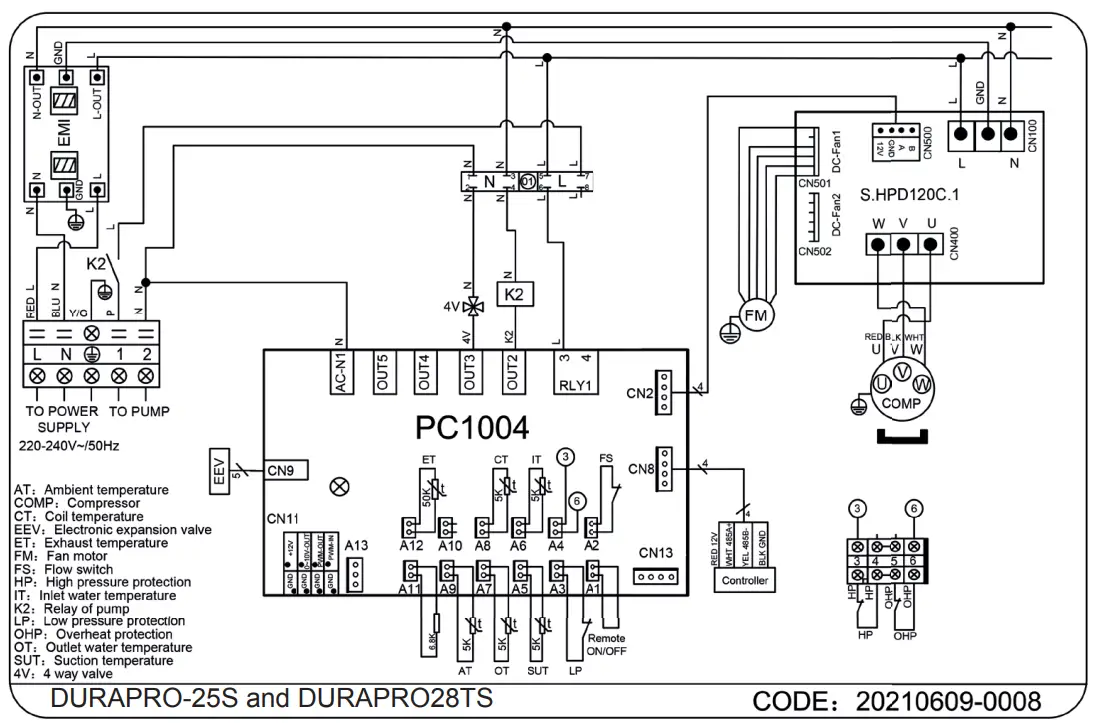
3.5 Electrical Wiring
Important – Although the heat pump is electrically isolated from the rest of the unit, this only prevents the passage of electricity to or from the pool water. Grounding the unit is still required to protect yourself from short circuits inside the unit. Make for adequate ground connection.
Check if the electrical mains voltage corresponds with the operating voltage of the heat pump prior to hooking up the unit.
It is recommended to use a separate fuse (C-curve) as well as adequate wiring (see table below). Connect the electrical wires with the terminal block labelled ‘TO POWER SUPPLY’. Next to this connection, there is a second terminal block labelled ‘TO PUMP’, to which the filter pump (max. 5A/240V) or an electrical relay for a filtration pump can be connected. This connection makes it possible to control filter pump operation with the heat pump.
| Model | Voltage (V) | Fuse (C-curve) | Max current (A) | Cable section |
| DURAPRO-12 | 220-240V | 20 | 13 | 2,5mm2 |
| DURAPRO-17 | 220-240V | 20 | 13,96 | 2,5mm2 |
| DURAPRO-21 | 220-240V | 25 | 21,17 | 4mm2 |
| DURAPRO-25S | 220-240V | 25 | 24,09 | 4mm2 |
| DURAPRO-28TS | 3 x 400V | 20 (3 Phase) | 11,2 | 2,5mm2 |
3.6 Initial startup of the Unit
NOTE- In order for the unit to heat the pool or spa, the filter pump must be running to circulate water through the heat exchanger.
Start up Procedure – After installation is completed, you should follow these steps:
- Turn on your filter pump. Check for water leaks and verify flow to and from the pool.
- Turn on the electrical power supply to the heatpump, then press the key ON/OFF on the LCD, It should start in several seconds.
- After running a few minutes make sure the air leaving the fan opening of the unit is cooler (between 5-10°C)
- With the unit operating turn the filter pump off. The unit should also turn off automatically,
- Allow the unit and pool pump to run 24 hours per day until desired pool water temperature is reached. When the desired pool water temperature reaches the setting, the unit just shuts off.
The unit will now automatically restart (as long as your filter pump is running) when the pool temperature drops more than 2°C below set temperature.
Time Delay- The unit is equipped with a 3 minute built-in solid state restart delay included to protect control circuit components and to eliminate restart cycling and contactor chatter. This time delay will automatically restart the unit approximately 3 minutes after each control circuit interruption. Even a brief power interruption will activate the solid state 3 minute restart delay and prevent the unit from starting until the 5 minute countdown is completed. Power interruptions during the delay period will have no effect on the 3 minute countdown.
3.7 Condensation
Since the Heat pump cools down the air about 5°C, water may condense on the fins of the evaporator. If the relative humidity is very high, this could be as much as several liters an hour. The water will run down the fins into the base pan and drain out through the barbed plastic condensation drain fitting on the side of the base pan.
This fitting is designed to accept 20mm clear vinyl tubing which can be pushed on by hand and run to a suitable drain. It is easy to mistake the condensation for a water leak inside the unit.
TIP: A quick way to verify that the water is condensation is to shut off the unit and keep the pool pump running. If the water stops running out of the base pan, it is condensation. AN EVEN QUICKER WAY IS TO TEST THE DRAIN WATER FOR CHLORINE – if there is no chlorine present, then it’s condensation.
Do not use means to accelerate the defrosting process or to clean, other than those recommended by the manufacturer.
The appliance shall be stored in a room without continuously operating ignition sources (for example:open fl ames, an operating gas appliance or an operating electric
heater.) Do not pierce or burn the unit.
Be aware that refrigerants may not contain an odour.
NOTE The manufacturer may provide other suitable examples or may provide additional information about the refrigerant odour.
Operation and Use
4.1 Display interface introduction
1. Main interface 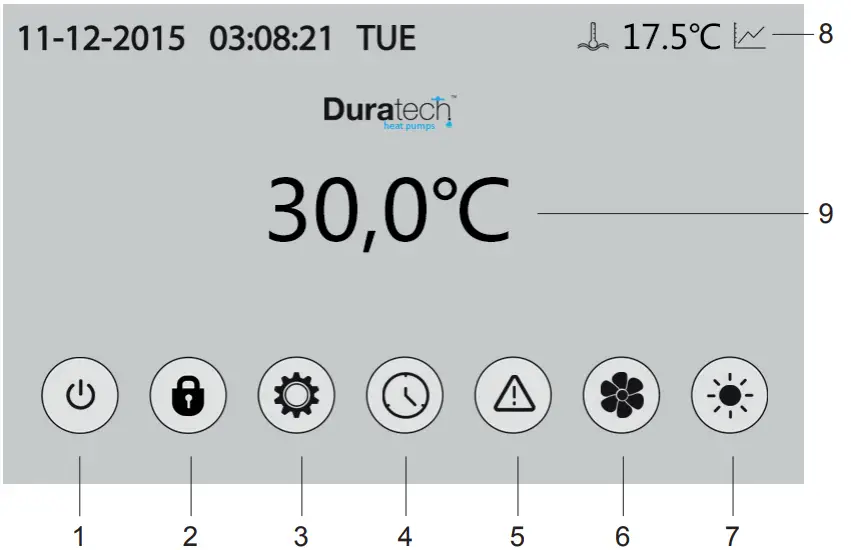 2. Button description
NO. | Name | button function |
| 1 | ON/OFF | Start/Stop the unit |
| 2 | Lock screen | Locks the screen |
| 3 | Parameters | Acces to parameters |
| 4 | Clock settings | – Set the date & time – Activate timers |
| 5 | Error codes | View error code history |
| 6 | Silent settings | – Press to activate silent function – Set timing Low speed function |
| 7 | Mode | Mode switch interface |
| 8 | Statistics | View temperature and power curve |
| 9 | Water temperature | Mode settings and target temp setting interface |
4.1 Button functions
- ON/OFF
With the ON/OFF button, the heatpump is turned ON or OFF (stand-by status) - LOCK SCREEN
Press this button to lock the screen
To unlock: press the lock button and enter the code “22” - PARAMETERS
N/A - CLOCK SETTINGS
In the main interface, tap on the clock Settings button 3, interface displays as follows:
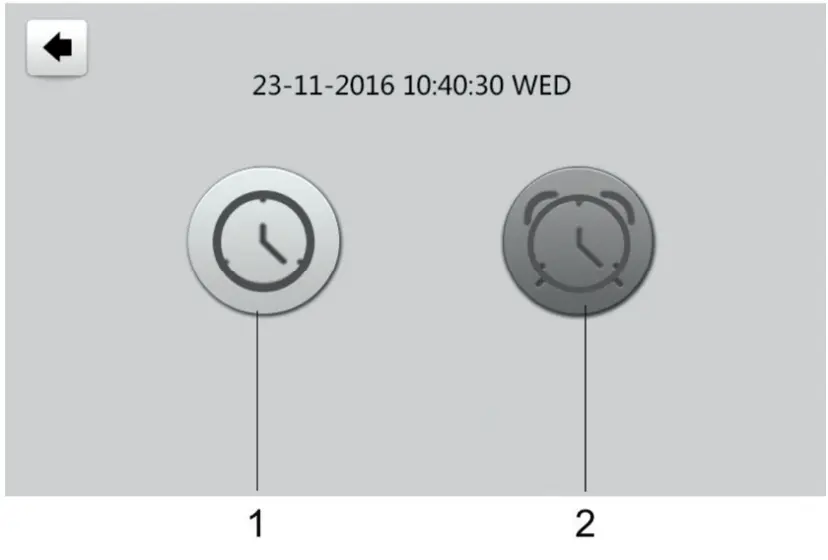
Setting the time
tap on the Time Settings button (1), then the following menu pops up: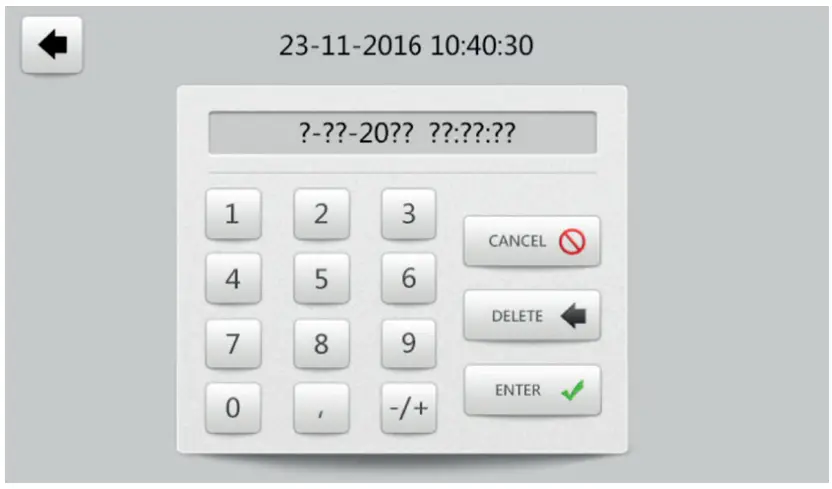 Tap the value to set time directly, the tap the Enter button to save the Settings.
For example: setup time: the 02-25-2016 15:00:00, input 15 00 00 02 25 16
Note: if the input format is not correct, the setting can not be saved by tapping Enter.
Setting/activating the Timers
Tap the TIMER set button (2), to enter the timer menu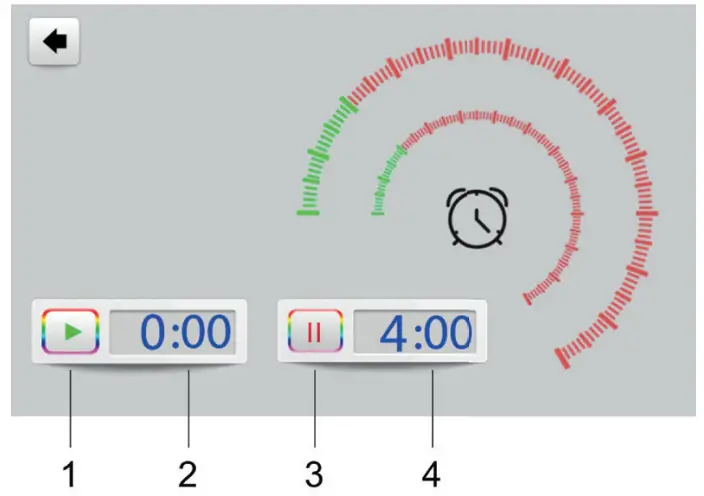
NO | Name | Button color | Button function |
| 1 | TIMER START | Activated: Green Not activated: Grey | Tap this button to activate/deactivatethe START timer |
| 2 | Start time | Set Start time | |
| 3 | TIMER END | Activated: Red Not activated: Grey | Tap this button to activate/deactivate the END timer |
| 4 | End time | Set End time |
For example above: without action, 00:00 o ‘clock and 04:00 o ‘clock will be the on and off time of timing settings.
5. ERROR CODES
See section 4.3
6. SILENT SETTINGS
In the main screen, tap the silent settings button
A pop-up appears with 2 icons: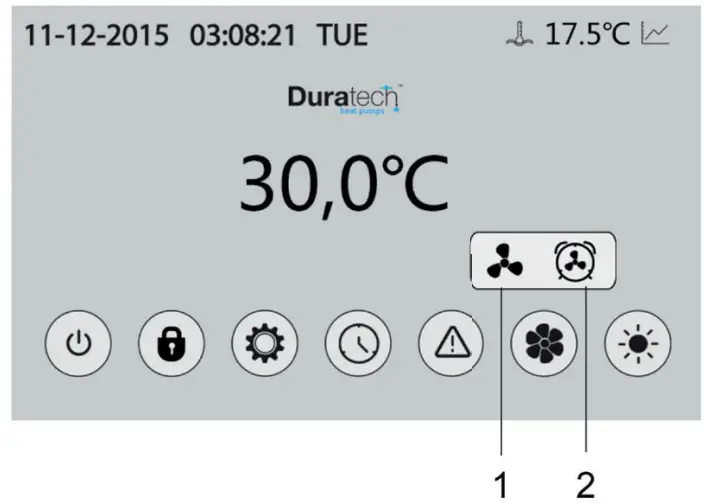 Direct silent mode
Tap the Direct silent button (1), the unit will enter silent mode directly.
The displays shows a fan icon with 3 blades to indicate that the silent mode is active
Tap the silent button again, to exit the silent mode. 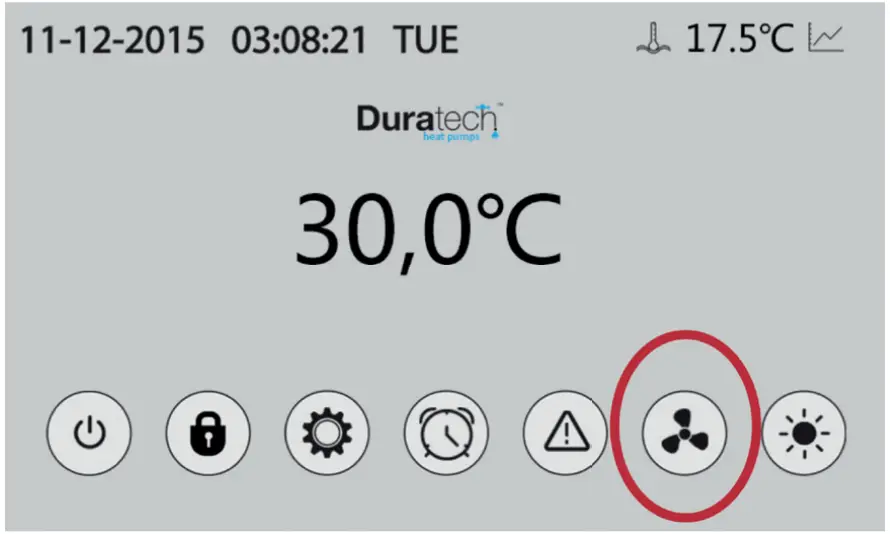 Timed silent mode
Tap the Timed silent button (2)
The displays shows a menu with timer settings to activate/deactivate the silent mode 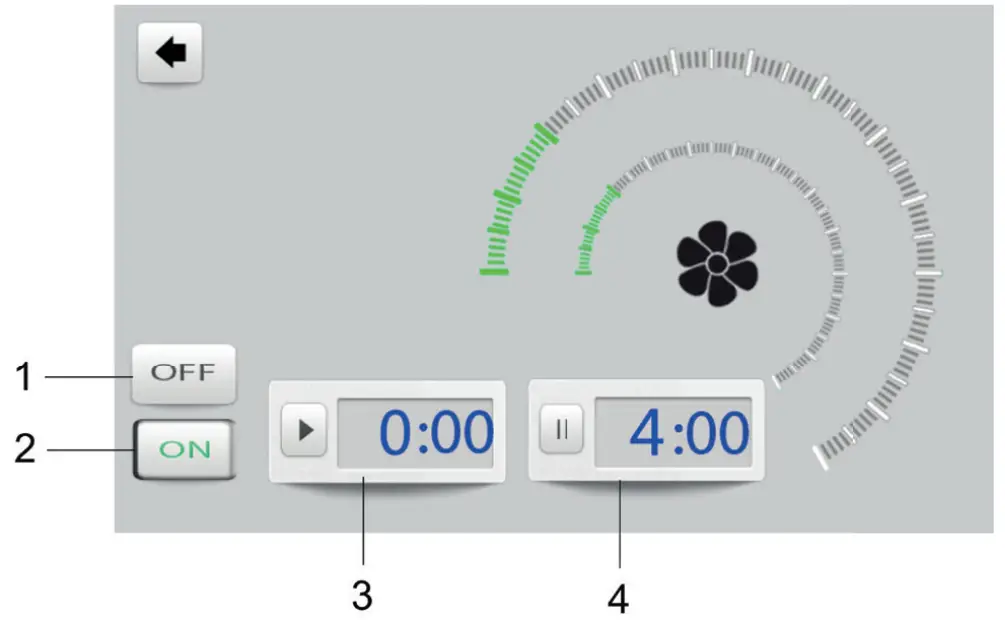
NO | Name | Button color | Button function |
| 1 | Timer SILENT OFF | Activated: Red Not activated: Grey | Tap to activate/deactivate the END timer |
| 2 | Timer SILENT ON | Activated: Green Not activated: Grey | Tap to activate/deactivate the START timer |
| 3 | Start time | Set start time | |
| 4 | End time | Set end time |
For example above, Tap “ON” to use the Timed silent mode
the unit will start the silent mode at 00:00h and end at 04:00h
Note: If the unit is running in silent mode, and the OFF button (1) is tapped, then the unit will exit silent mode immediately
7. MODE
In the main screen, tap the Mode button.
A new menu will pop up: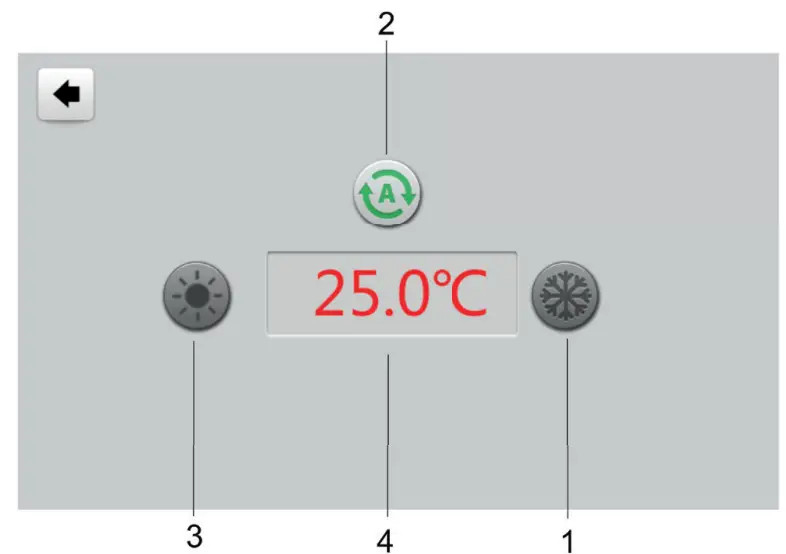
- Cooling mode
- Automatic heating/cooling mode
- Heating mode
- Set desired swimming pool temperature
8. STATISTICS
In the main screen, tap the Statistics button.
A new menu will pop up. 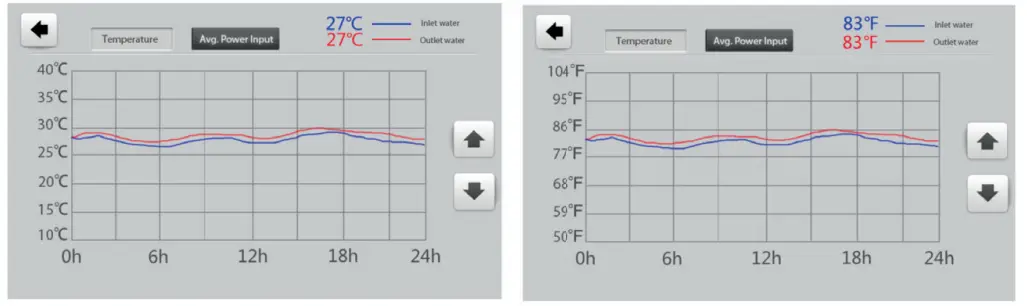
The temperature curve automatically updates every hour, and the curve record can be
stored for 60 days
9. WATER TEMPERATURE
Set the desired swimming pool water temperature
4.3 Error codes
In the main screen, tap the Error codes button.
A new menu will pop up: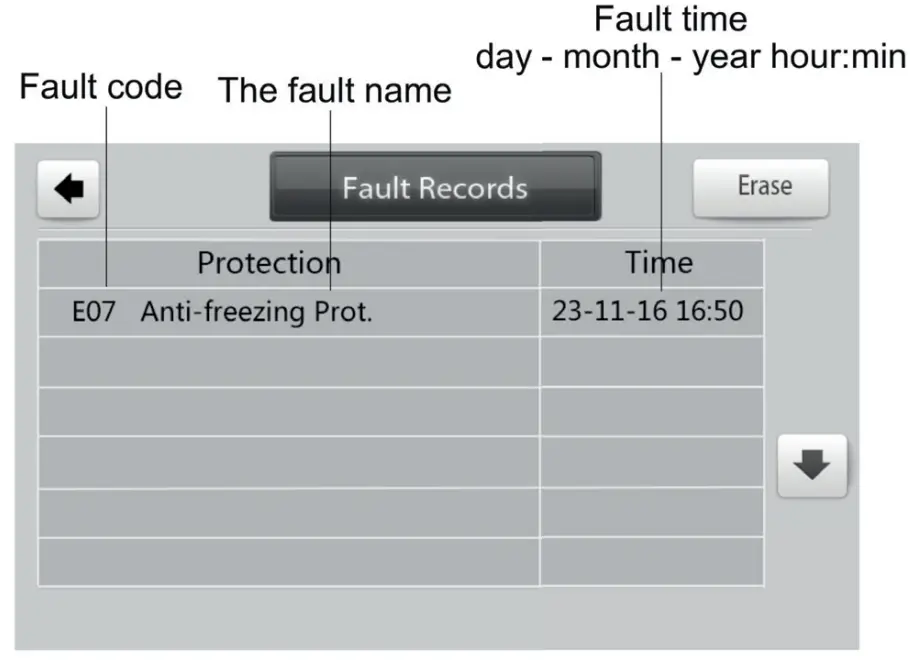 If there are no error codes present, the main display will show a grey triangle logo:
When an error occurs, the error icon will fl ash orange/grey:
the system will record the time, code and name of the error.
When an error occurs, and you don’t check the Error code history menu, the main interface will display a static “
When an error occurs, and you don’t check the Error code history menu, the main interface will “ icon after a while.
If you do check Error code history menu, the main interface will display a static “ “ icon.
The Error code history menu shows all the error codes in reverse order, with the most recent code on top. If you tap the “Clean” key, you can erase all the codes.
4.4 Error code list
Protect/fault | Fault display | Reason | Elimination methods |
| Standby | non | ||
| Normal boot | non | ||
| Inlet temp. Sensor failure | P01 | The temp. Sensor is broken or short circuit | Check or change the temp. Sensor |
| Outlet temp. Sensor failure | P02 | The temp. Sensor is broken or short circuit | Check or change the temp. Sensor |
| Coil temp. Sensor failure | P04 | The temp. Sensor is broken or short circuit | Check or change the temp. Sensor |
| Ambient temp. sensor failure | P05 | The temp. Sensor is broken or short circuit | Check or change the temp. Sensor |
| Suction temp. sensor failure | P07 | The temp. Sensor is broken or short circuit | Check or change the temp. Sensor |
| Exhaust temp. sensor failure | P081 | The temp. Sensor is broken or short circuit | Check or change the temp. Sensor |
| High pressure protection | E01 | The high-presesure switch is broken | Check the pressure switch and cold circuit |
| Low pressure protection | E02 | Low pressure1 protection | Check the pressure switch and cold circuit |
| Flow failures | E03 | No water/little water in water system | Check the pipe water flow and water pump |
| System anti freezing protection | E07 | Water flow is not enough | Check the pipe water flow and whether the water system is jammed or not |
| The primary anti-freezing protection | E19 | The ambient temp. Is low | |
| The secondary anti-freezing Protection | E29 | The ambient temp. Is low | |
| Water-inlet and outlet temp | E06 | Water flow is not enough and low differential pressure | Check the pipe water flow and whether the water system is jammed or not |
| Low temperature protection | non | The environment temp. is low | |
| Compressor too much electricity protection | E051 | The compressor is overload | Check whether the system of the compressor is running normally |
| Exhaust Temp. Of system is too high | P082 | The compressor is overload | Check whether the system of the compressor is running normally |
| Communication failure | E08 | Communication failure between wire controller and main board | Check the wire connection between remote wire controller and main board |
| Protection/fault | Fault display | Reason | Elimination methods |
| MOP drive alarm | F01 | MOP drive alarm | Recovery after the 150s |
| Frequency conversion board offline | F02 | Frequency conversion board and main board communication failure | Check the communication connection |
| IPM modular protection | F03 | IPM modular protection | Recovery after the 150s |
| Compressor start-up failure | F04 | Lack of phase, step or drive hardware damage | Check the measuring voltage check frequency conversion board hardware |
| Dc fan fault | F05 | Motor current feedback open circuit or short circuit | Check whether current return wires connected motor, |
| IPM Input current is large protection | F06 | IPM Input current is large | Check and adjust the current measurement |
| Dc voltage is large | F07 | DC bus voltage>Dc bus over-voltage protection value | Check the input voltage measurement |
| Dc voltage is not enough | F08 | DC bus voltage<Dc bus over-voltage protection value | Check the input voltage measurement |
| Input voltage is not enough | F09 | The input voltage is low, causing the input current is high | Check the input voltage measurement |
| Input voltage is large | F10 | The input voltage is too high, more than outage protection current RMS | Check the input voltage measurement |
| Voltage sampling fault | F11 | The input voltage sampling fault | Check and adjust the current measurement |
| DSP and PFC connect fault | F12 | DSP and PFC connect fault | Check the communication connection |
| DSO and SPPB connect fault | F13 | DSO and SPPB connect fault | Check the communication connection |
| DSP and MCU connect fault | F14 | DSP and MCU connect fault | Check the communication connection |
| IPM overheating protection | F15 | The IPM module is overheat | Check and adjust the current measurement |
| Weak magnetic field protection | F16 | Compressor magnetic force is not enough | |
| The input voltage lost phase | F17 | The input voltage lost phase | Check and measure the voltage adjustment |
| IPM sampling electricity | F18 | IPM sampling electricity is fault | Check and adjust the urrent measurement |
| Radiator temperature sensor fault | F19 | Sensor is short circuit or open circuit | Inspect and replace the sensor |
| Transducer overheating protection | F20 | The transducer is overheat | Check and adjust the urrent measurement |
| Transducer overheating alarm | F22 | Transducer temperature is too high | Check and adjust the current measurement |
| Compressor electricity large protection | F23 | Compressor electricity is large | The compressor over-current protection |
| Input current too large alarm | F24 | Input current is too large | Check and adjust the current measurement |
| EEPROM error alarm | F25 | MCU error | Check whether the chip is damaged Replace the chip |
Wiring diagrams
5.1 Wire control interface diagram and definition 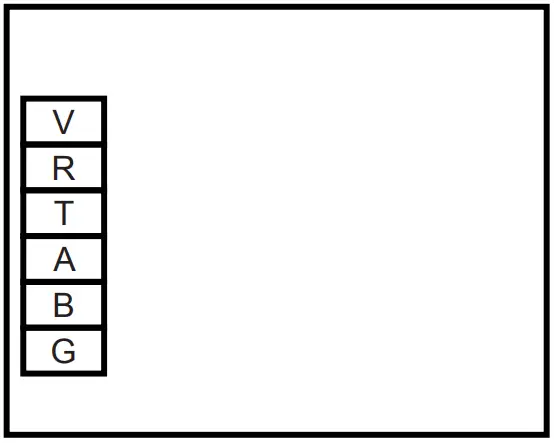
| Terminal | Function |
| V | 12V power + |
| R | Not used |
| T | Not used |
| A | 485A |
| B | 485B |
| G | GND (power -) |
5.2 Controller interface diagram and definition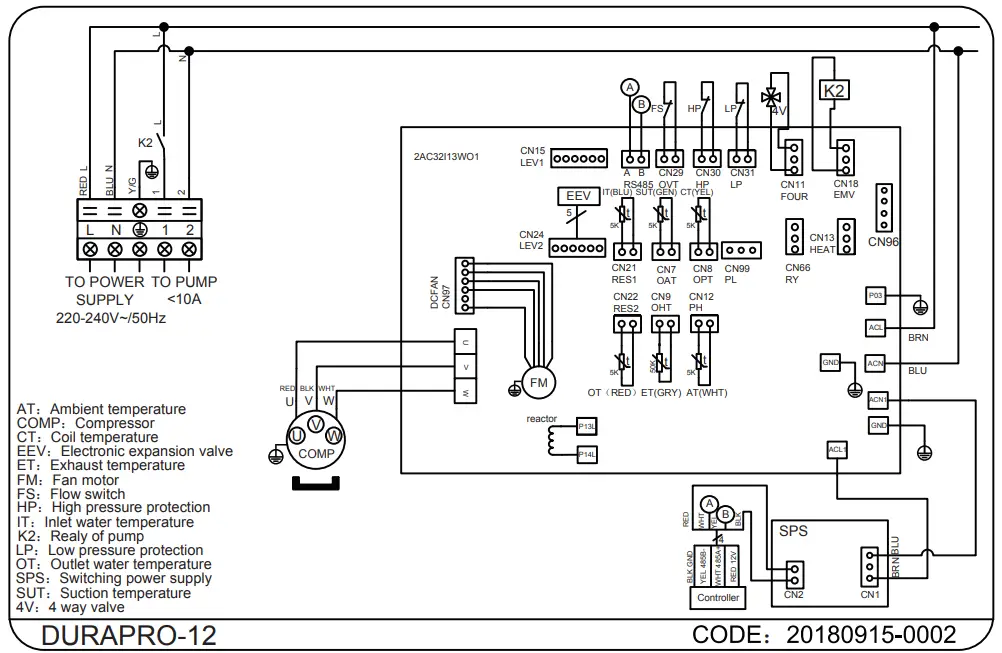
Maintenance and Inspection
Check the water inlet and drainage often. The water and air infl ow into the system should be suffi cient so that its performance and reliability does not get compromised. You should clean the pool fi lter regularly to avoid damage to the unit caused by clogging of the filter.
- The area around the unit should be spacious and well ventilated. Clean the sides of the heat pump regularly to maintain good heat exchange and to save energy.
- Check if all processes in the unit are operational and pay special attention to the operating pressure of the refrigerant system.
- Check the power supply and cable connections regularly. Should the unit begin to function abnormally or should you notice a smell from an electrical component, arrange for timely repair or replacement.
- Winterizing : make sure to purge all the water from the heat pump and other systems in order to prevent frost damage.
- You should also purge the water if the unit will not work for an extended period of time. You should check all parts of the unit thoroughly and completely fi ll the system with water before turning it on again afterwards.
Appendix
7.1 Caution & Warning
- The unit can only be repaired by qualifi ed installer centre personnel or an authorised dealer. (for Europe market)
- This appliance is not intended for use by persons (including children) with reduced physical sensory or mental capabilities, or lack of experience and knowledge, unless they have been given supervision or instruction concerning use of the appliance by a person responsible for their safety. (for Europe market) Children should be supervised to ensure that they do not play with the appliance.
- Please make sure that the unit and power connection have good earthing, otherwise may cause electrical shock.
- If the supply cord is damaged, it must be replaced by the manufacturer or our service agent or similarly qualifi ed person in order to avoid a hazard.
- The unit CANNOT be installed near a fl ammable source. Once there is any leakage of the gas, fire can occur.
- Make sure that there is a circuit breaker for the unit, lack of a circuit breaker can lead to electrical shock or fire.
- The heat pump located inside the unit is equipped with an over-load protection system. It does not allow for the unit to start for at least 3 minutes from a previous stoppage.
- The unit can only be repaired by the qualifi ed personnel of an installer center or an authorized dealer.
- USE SUPPLY WIRES SUITABLE FOR 75°C.
- Caution: Single wall heat exchanger, not suitable for potable water connection.
7.2 Supply cable specifications
Single phase unit
| Nameplate maximum current | Phase line | Earth line | MCB | RCD | Signal line |
| No more than 10A | 2 X 1.5mm2 | 1.5mm 2 | 20A | 30mA less than 0.1 sec | 4 X 0.5mm2 |
| 10-16A | 2 X 2.5mm2 | 2.5mm 2 | 32A | 30mA less than 0.1 sec | |
| 16-25A | 2 x4mm2 | 4mm 2 | 40A | 30mA less than 0.1 sec | |
| 25-32A | 2 x6mm2 | 6mm2 | 40A | 30mA less than 0.1 sec | |
| 32-40A | 2 xiomm2 | 10mm2 | 63A | 30mA less than 0.1 sec | |
| 40 -63A | 2 x 16mm2 | 16mm2 | 80A | 30mA less than 0.1 sec | |
| 63-75A | 2 x 25mm 2 | 25 mm2 | 100A | 30mA less than 0.1 sec | |
| 75-101A | 2 x 25mm2 | 25 mm2 | 125A | 30mA less than 0.1 sec | |
| 101-123A | 2 X 35mm2 | 35mm2 | 160A | 30mA less than 0.1 sec | |
| 123-148A | 2 X 50mm2 | 50mm2 | 225A | 30mA less than 0.1 sec | |
| 148-156A | 2 X 70mm2 | 70mm2 | 250A | 30mA less than 0.1 sec | |
| 186-224A | 2 x 95mm2 | 95mm2 | 280A | 30mA less than 0.1 sec |
2. Three phase unit
| Nameplate maximum current | Phase line | Earth line | MCB | RCD | Signal line |
| No more than 10A | 3x 1.5mm2 | 1.5mm2 | 20A | 30mA less than 0.1 sec | 4 X 0.5mm2 |
| 10-16A | 3 X 2.5mm2 | 2.5mm 2 | 32A | 30mA less than 0.1 sec | |
| 16-25A | 3 X4mm2 | 4mm 2 | 40A | 30mA less than 0.1 sec | |
| 25-32A | 3 X6mm2 | 6mm2 | 40A | 30mA less than 0.1 sec | |
| 32-40A | 3 X 10mm2 | 10mm2 | 63A | 30mA less than 0.1 sec | |
| 40 -63A | 3 X 16mm2 | 16mm2 | 80A | 30mA less than 0.1 sec | |
| 63-75A | 3 X 25mm2 | 25 mm2 | 100A | 30mA less than 0.1 sec | |
| 75-101A | 3 X 25mm2 | 25 mm2 | 125A | 30mA less than 0.1 sec | |
| 101-123A | 3 X 35mm2 | 35mm2 | 160A | 30mA less than 0.1 sec | |
| 123-148A | 3x 50mm2 | 50mm 2 | 225A | 30mA less than 0.1 sec | |
| 148-186A | 3 X 70mm2 | 70mm 2 | 250A | 30mA less than 0.1 sec | |
| 186-224A | 3x 95mm2 | 95mm 2 | 280A | 30mA less than 0.1 sec |
7.3 Warranty
LIMITED WARRANTY
Thank you for purchasing our heat pump.
We warrant all parts to be free from manufacturing defects in materials and workmanship for a period of THREE years from the date of retail purchase.
This warranty is limited to the first retail purchaser, is not transferable, and does not apply to products that have been moved from their original installation sites. The liability of the Manufacturer shall not exceed the repair or replacement of defective parts and does not include any costs for labour to remove and reinstall the defective part, transportation to or from the factory, and any other materials required to make the repair.
This warranty does not cover failures or malfunctionsresulting from the following:
- Failure to properly install, operate or maintain the product in accordance with our published “Installation & Instruction Manual” provided with the product.
- The workmanship of any installer of the product.
- Not maintaining a proper chemical balance in your pool [pH level between 7,0 and 7,8.
Total Alkalinity (TA) between 80 to 150 ppm. Free Chlorine between 0,5 – 1,2mg/l.
Total Dissolved Solids (TDS) less than 1200 ppm. Salt maximum 8g/l] - Abuse, alteration, accident, fire, flood, lightning, rodents, insects, negligence or acts of Gods.
- Scaling, freezing or other conditions causing inadequate water circulation.
- Operating the product at water flow rates outside the published minimum and maximum specifications.
- Use of non-factory authorized parts or accessories in conjunction with the product.
- Chemical contamination of combustion air or improper use of sanitizing chemicals, such as introducing sanitizing chemicals upstream of the heater and cleaner hose or through the skimmer.
- Overheating, incorrect wire runs, improper electrical supply, collateral damage caused by failure of O-rings, DE grids or cartridge elements, or damage caused by running the pump with insufficient quantities of water.
LIMITATION OF LIABILITY
This is the only warranty given by Manufacturer. No one is authorized to make any other warranties on our behalf.
THIS WARRANTY IS IN LIEU OF ALL OTHER WARRANTIES, EXPRESSED OR IMPLIED, INCLUDING BUT NOT LIMITED TO ANY IMPLIED WARRANTY OF FITNESS FOR A PARTICULAR PURPOSE AND MERCHANTABILITY. WE EXPRESSLY DISCLAIM AND EXCLUDE ANY LIABILITY FOR CONSEQUENTIAL, INCIDENTAL, INDIRECT OR PUNITIVE DAMAGES FOR BREACH OF ANY EXPRESSED OR IMPLIED WARRANTY.
This warranty gives you specific legal rights, which may vary, by country.
WARRANTY CLAIMS
For prompt warranty consideration, contact your dealer and provide the following information: proof of purchase, model number, serial number and date of installation. The installer will contact the factory for instructions regarding the claim and to determine the location of the nearest service center.
All returned parts must have a Return Material Authorization number to be evaluated under the terms of this warranty.
7.4 Comparison table of refrigerant saturation temperature
| PRESSURE | R410A | R32 |
| [MPA] | [°C] | [°C] |
| 0,0 | -55,3 | -52,5 |
| 0,3 | -20,0 | -20,0 |
| 0,5 | -9,0 | -9,0 |
| 0,8 | 4,0 | 3,5 |
| 1,0 | 11,0 | 10,0 |
| 1,3 | 19,0 | 18,0 |
| 1,5 | 24,0 | 23,0 |
| 1,8 | 31,0 | 29,5 |
| 2,0 | 35,0 | 33,3 |
| 2,3 | 39,0 | 38,7 |
| 2,5 | 43,0 | 42,0 |
| 2,8 | 47,0 | 46,5 |
| 3,0 | 51,0 | 49,5 |
| 3,3 | 55,0 | 53,5 |
| 3,5 | 57,0 | 56,0 |
| 3,8 | 61,0 | 60,0 |
| 4,0 | 64,0 | 62,0 |
| 4,5 | 70,0 | 67,5 |
| 5,0 | 74,0 | 72,5 |
| 5,5 | 80,0 | 77,4 |
Declaraction of Conformity
Declarations of conformity covering this product are available for download from the House of Duratech website: www.duratech.be
Contact details
 http://www.propulsionsystems.be
 We reserve the rights to change all or part of the contents of this document without prior notice
 Duratech | Home