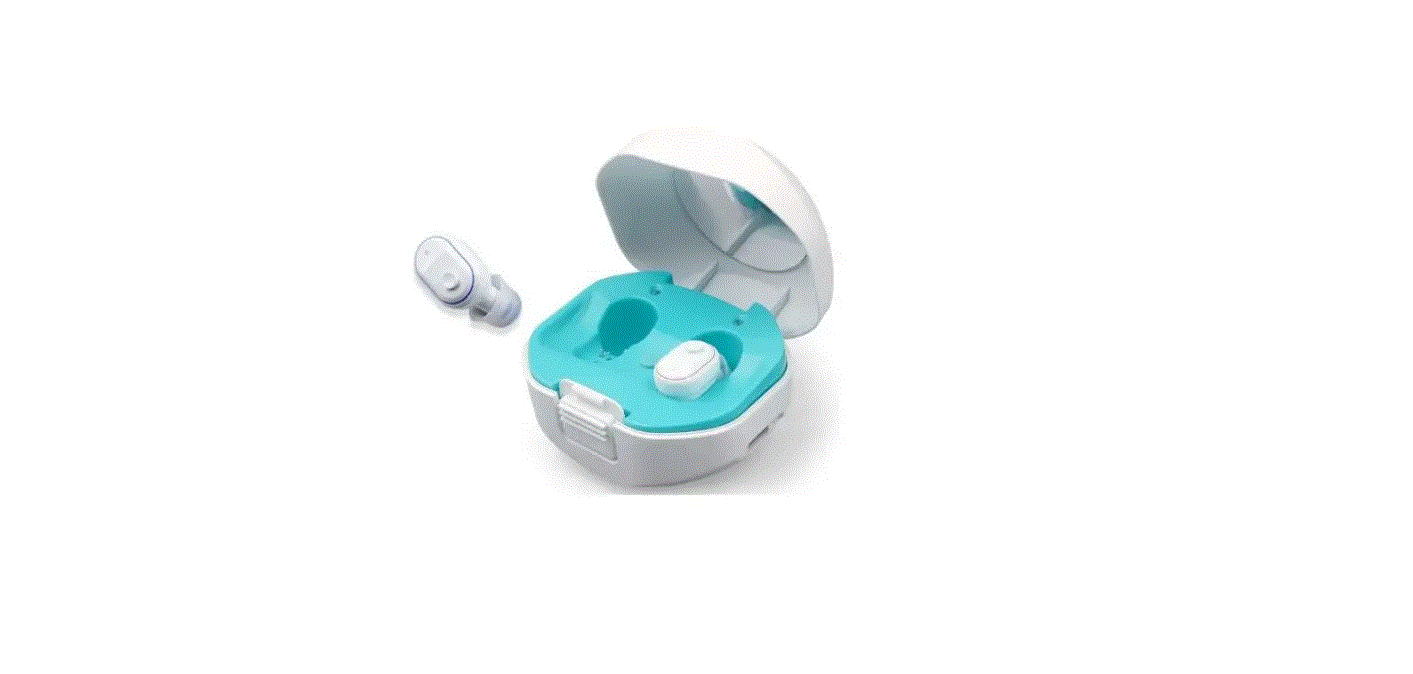

wenatone FC-BLE-RIC Sound Stereo Amplifier
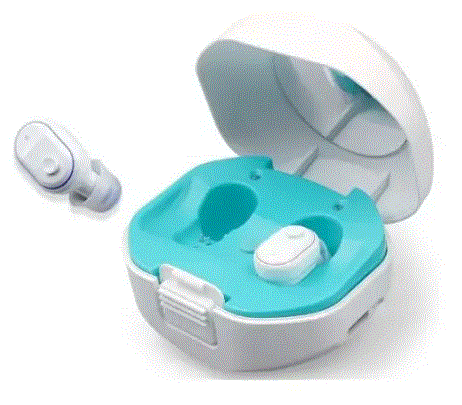
Product Information
Product Name: FC-BLE-RIC
Version: 102022
Please read this user manual thoroughly and completely before using the product.
Please download and install HA-Fit APP first.
Product Usage Instructions
How to Use Your Device
How to Use Hearing Aid: Refer to section 1 on page 6 of the user manual for instructions on how to use the hearing aid.
- Quick Guide: Refer to section 2 on page 6 of the user manual for a quick guide on using the device.
- HA-Fit APP: Refer to section 3 on page 10 of the user manual for instructions on downloading and using the HA-Fit APP.
- Bluetooth Connection: Refer to section 4 on page 13 of the user manual for instructions on how to establish a Bluetooth connection.
- Charging: Refer to section 5 on page 16 of the user manual for instructions on how to charge the device.
Replacement Accessories
- Change Earbuds: Refer to section 1 on page 18 of the user manual for instructions on how to change earbuds.
- Wax Guard Replacement Guide: Refer to section 2 on page 19 of the user manual for instructions on how to replace the wax guard.
Maintenance and Cleaning
- Daily Maintenance: Refer to section 1 on page20 of the user manual for instructions on daily maintenance of the device.
- Care and Maintenance: Refer to section 2 on page 21 of the user manual for instructions on caring for and maintaining the device.
- Cleaning: Refer to section 3 on page 21 of the user manual for instructions on how to clean the device.
Hearing Aids Care
Refer to section on page 22 of the user manual for information on how to care for your hearing aids.
Troubleshooting Guide
Refer to section on page 23 of the user manual for troubleshooting tips and solutions.
Technical Specification
Refer to section on page 26 of the user manual for technical specifications of the product.
Do Not Use If Any of the Following Apply to You:
Refer to section on page 27 of the user manual for a list of contraindications and situations where the device should not be used.
Matters Needing Attention, Warning and Tips
Refer to section on page 28 of the user manual for important information, warnings, and tips regarding the use of the product.
FCC Warning Statement
Refer to section on page 28 of the user manual for the FCC warning statement regarding the product.
Please read this user manual thoroughly and completely before using the product.
IMPORTANT SAFETY INSTRUCTIONS
Read all the information in this instruction manual and any other literature included in the box before using the device.
CONTRAINDICATION
The device should not be used in the following situations:
- Patients with chronic suppurative otitis media (CSOM),congenital ear atresia, or any type of ear discharge
WARNINGS Warning
– Keep small parts (hearing instrument, ear domes, battery or other detachable parts) that can be swallowed out of children’s reach. Dropping, immersing in liquid, exposure to strong electromagnetic fields or excessive heat will damage the hearing aids. Remove devices prior to any type of X-ray, MRI, or CT scan. If parts become stuck in the ear canal, seek medical assistance – do not attempt to remove by yourself.
Notice Warning
- Do not use at high volume for extended periods of time-ear injury can result.
- If you experience any pain or strong discomfort using the devices, remove and consult a doctor.
- Routine maintenance to keep the device clean is required. Ensure that ear domes are free of debris and moisture at all times.
- Avoid shocks or dropping the product.
- Do not store or use the product in environments of high humidity or temperature (such as sauna room), to avoid damage.
- Batteries should be properly recycled and not disposed in the trash.
- Keep the devices away from small children. Injury or damage may result.
- Do not set volume levels too high. Listening with high-output devices for extended periods at high volume levels can cause further hearing damage.
- Do not share your hearing aids with others. Using a hearing aid configured for someone else can result in hearing damage or injury.
- Monitor for any unusual skin reaction. If you notice any allergic reaction (itchiness, swelling, or rash), stop wearing the hearing aids and consult a medical specialist.
- Do not touch the hearing aids to any type magnet or magnetized object. Your hearing aids are delicate electronic instruments and may be damaged by contact with strong magnetic fields.
- Do not attempt to open or repair the devices yourself. Damage can result and will void the warranty.
- Do not store your devices in hot/humid locations. You should never leave your hearing aids near heating appllances or in direct sunlight.
- Do not leave your hearing aids in the car as InsiIde temperatures can reach dangerous levels which could damage the devices.
HOW TO USE YOUR DEVICE
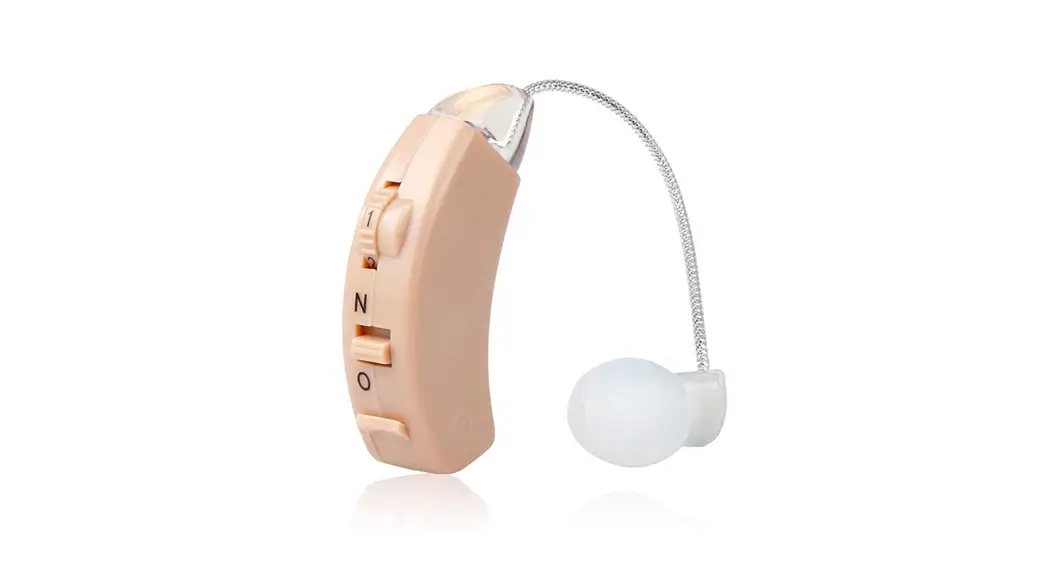
HOW TO USE HEARING AID
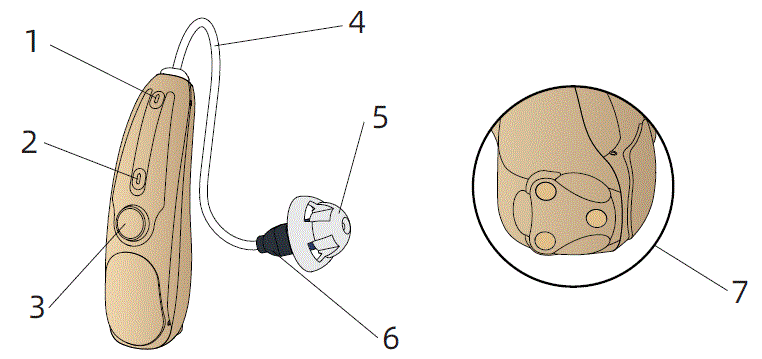
- Front-end microphone
- Back-end microphone
- multi-function button
- Sound tube
- Earplugs
- Receiver
- Charging contact point
QUICK GUIDE
ON/OFF
- Long press for about 3 seconds to turn on.
- Long press for about 6 seconds to turn off the power.
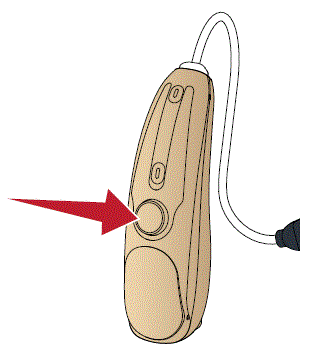
The hearing aids enter into hearing aid mode automatically after being turned on.
Volume Adjustment
Click the hearing aid button once: increase the volume one level. There are 10 volume levels, and when you hear two beeps, this is the highest volume level.
Memory function: Restart the hearing aid and it will automatically restore to the volume level and the scene mode set last time.
Hearing Mode Change
You can cycle through the 3 Hearing Mode by : long press button
| Hearing Mode Change | Sound you will hear when activated | Hearing Mode |
| 1 | 1 beep (“beep”) | General Hearing Mode |
| 2 | 2 beeps (“beep beep”) | Noise Reduction Hearing Mode |
| 3 | 3 beeps (“beep beep beep”) | Outdoor Hearing Mode |
How To Wear It
Step 1:
Choose a suitable size ear dome, install in receiver tail.
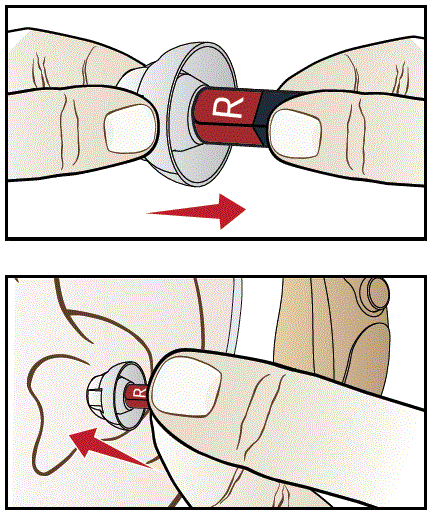
Step 2:
Gently insert the earplug into the ear canal.
Step 3:
Place the hearing aid behind the ear.
The curve of the sound tube should fit comfortably on top of your ear.
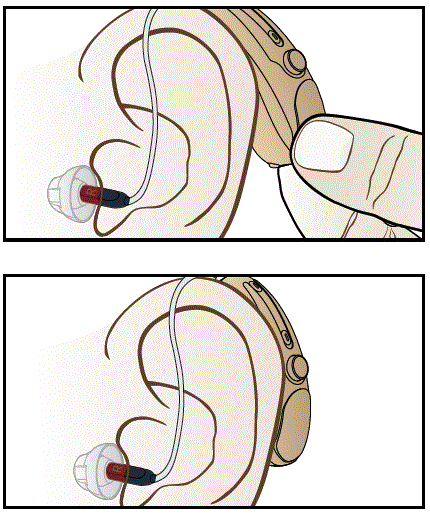
Step 4:
If the earplug isn’t suitable, there will be gaps, which will cause whistling.
Please again choose the suitable earplugs that fit your ear canal.
HA-Fit APP
Please download and install “HA-Fit” APP first.
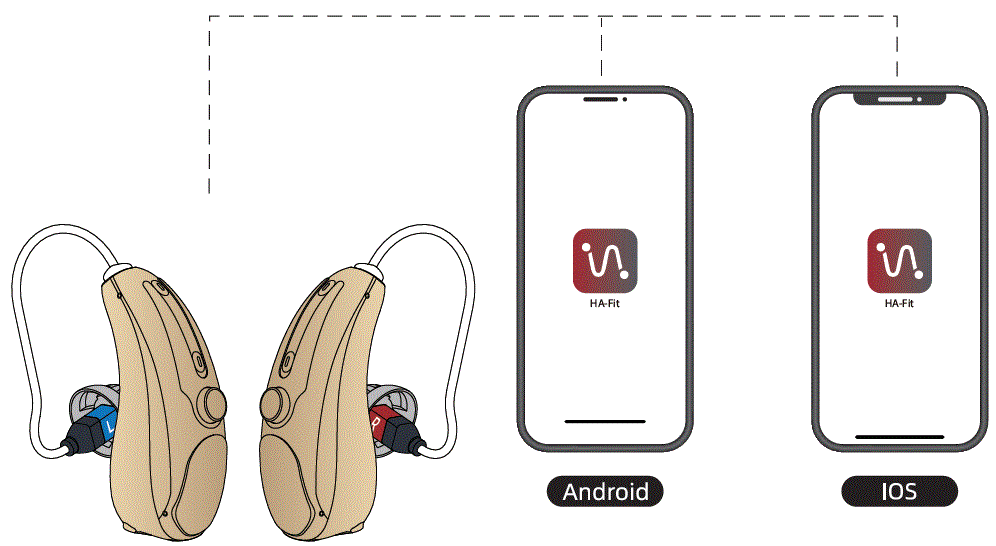
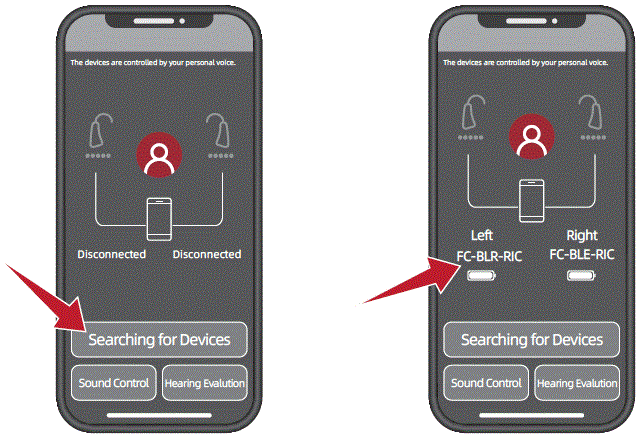
HA-Fit app connects to hearing aids
Step 1:
Please turn on the hearing aid.
Step 2:
Be sure Bluetooth is enabied on your phone.
Step 3:
Open the “HA-Fit” APP.
Step 4:
Click the “Searching for Devices” button.
After “searching for devices”, the HA-Fit APP will automatically connect to the hearing aid, and the successful connection status is shown in the figure.(Connected “FC-BLE-RIC…”)
Hearing Evalution
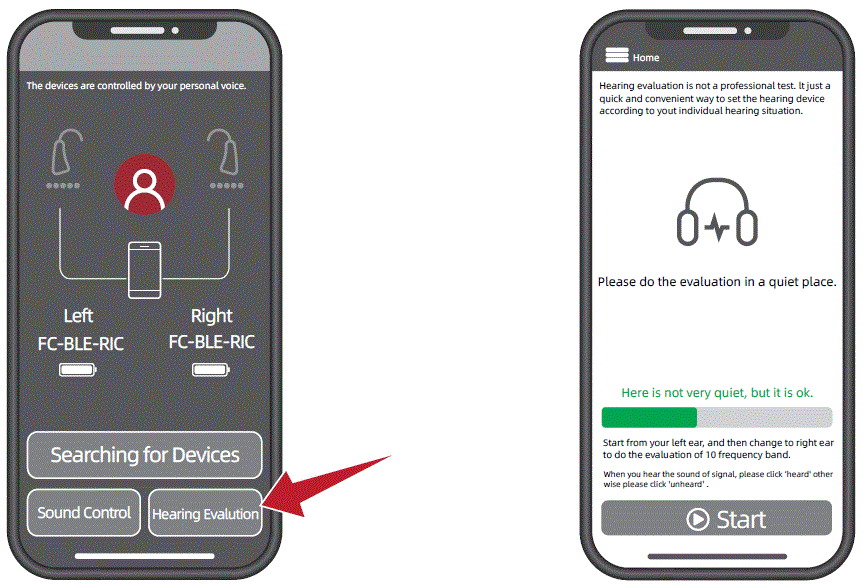
With the Hearing Hearing Evalution module, you can quickly set up your hearing aids according to your hearing characteristics.
Step 1:
Please put on your hearing aids and turn them on.
Step 2:
Please do the evalution in a quiet place.
Step 3:
Click the “Hearing Evalution” button.
Step 4:
Follow all prompt steps to complete your personal hearing evaluation.
Step 5:
After completing your hearing evalution, click the Auto-Optimize button and your hearing aids will be optimized based on your hearing score.
Sound Control
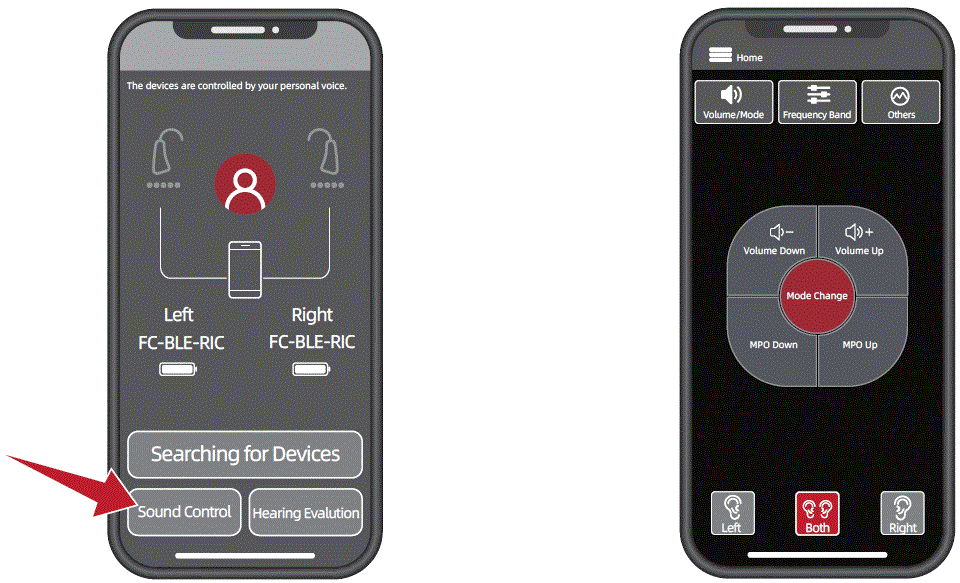
The HA-Fit app is designed to allow you to conveniently control your hearing aids remotely from your Android or Apple device at hand. HA-Fit app covers key features like changing programs
Step 1:
Step 1: Click the “Sound Control” button.
Step 2:
Enter the sound control interface, you can easily control the hearing aids, you can adjust various parameters, volume, program, frequency band, noise reduction…
| Volume state | Sound you will hear when activated | |
| Start-up level | Hearing mode beep sound (For single beep represent mode 1,For dual beeps represent mode 2 and etc) | Beep |
| Minimum / maximum volume | 2 beep (“beep beep”) | |
| Volume up / down | Short press ” +”or “-“button | Beep |
BLUETOOTH CONNECTION
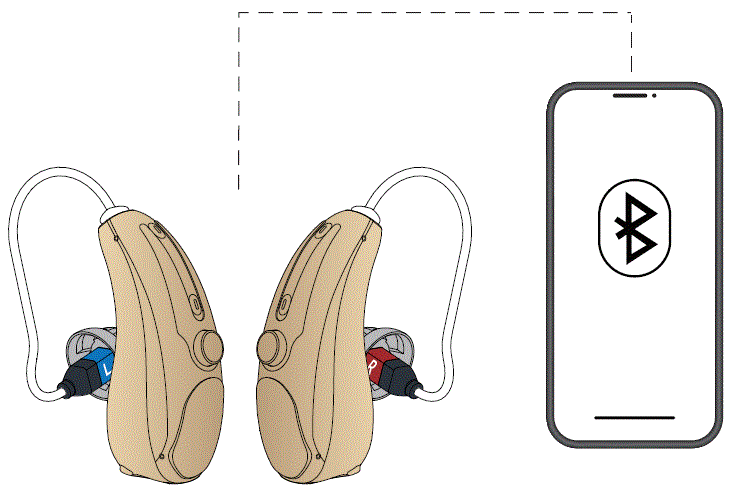
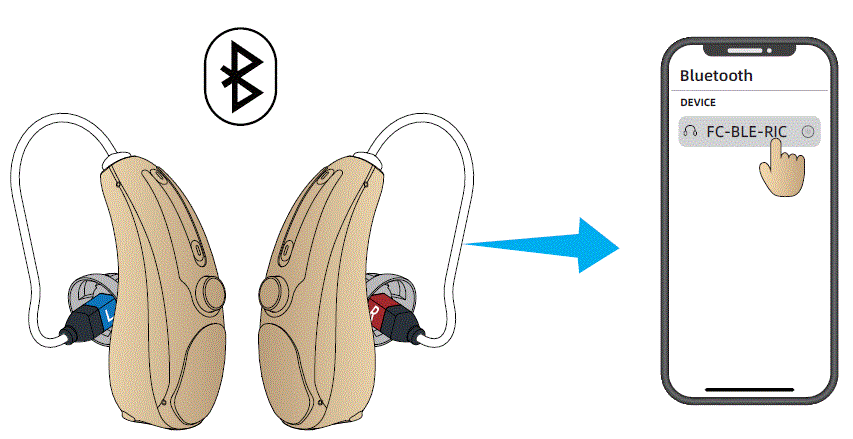
To connect via Bluetooth (first-time pairing):
- Remove BOTH Left and Right devices (both must be charged)- from the Charging Base.
- Please put on your hearing aids and turn them on.
- Be sure Bluetooth is enabied on your phone. Go to the Bluetooth setting on your phone and select “Pair New Device” (wording on your particular phone may be slightly varied)
- Search for the Bluetooth identifier of your device (“FC-BLE…”)and select it to pair (connect)- this may take up to 2 minutes.
- Be sure to Accept any promots aiven reaardina connecting the device to your phone.
- There will be a prompt: connected, when they connect successfully.
- Note: the apove paimg onmy neeas o De done one time with your phone. After that, as Iong as your pnone is nearby and
Bluetooth is enabled, the hearing aid will automatically reconnect when turn on.
Note: If the bluetooth on your device is not connected to the phone for a long time, it will automatically turn off. Please restart your hearing aid and re-pair with your phone.
Please keep the distance of your phone and hearing aids within 10 meters when they are connected.Beyond this distance, the sound quality may deteriorate and the connection may be lost.
Bluetooth Mode Button Operation
- Single click: Play/Pause the song;
Answer a phone call;End the call;
- Quick double click(L): Skip forward to next song
- Quick double click(R): Skip forward to previous song
Note: Bluetooth/Hearing aid functionality switching is automatic. - The devices will switch to Bluetooth mode automatically when you are on a phone call or listening to music or watching a video.
- lf you pauselstop the music or end a call, the devices will automatically enter into hearing aid functionality
- When disconnected from the phone (Bluetooth OFF), the device will automatically enter into hearing aid functionality.
Bluetooth Disconnect:
There are 2 ways to disconnect Bluetooth
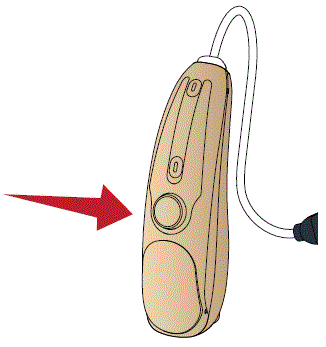
- Turn OFF the hearing aid.
Long press the button on the devices for 3 seconds(You will hear “Power Off” in your hearing aid) - Turn OFF Bluetooth on your phone. This will immediately
disconnect your hearing aids from the phone. (You will hear “Disconnected” in your hearing aid) In this case, to reconnect,simply turnBluetooth back on in the phone
CHARGING
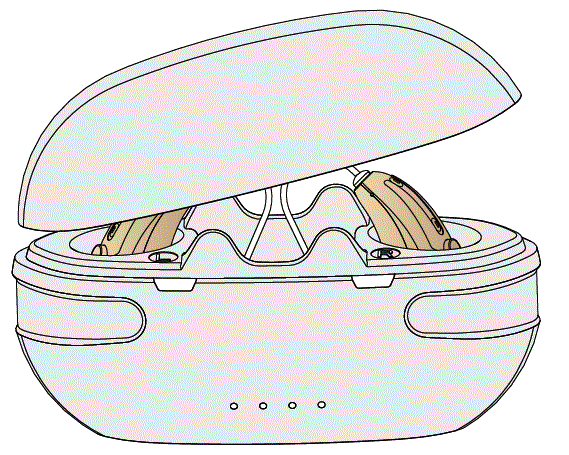
CHARGING BASE
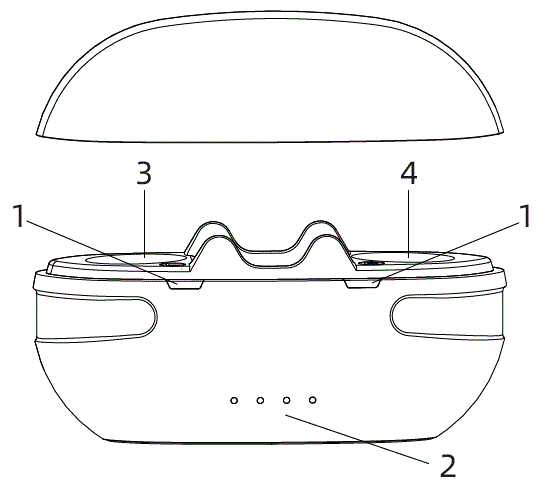
- Hearing aid charging indicator
- Charging base charging indicator
- Left charging inner slot
- Right charging inner slot
How to charge
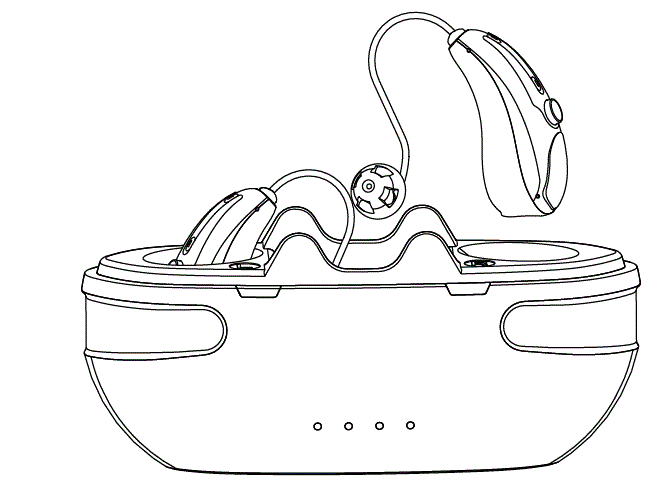
- The charging box has a power storage function, andthe hearing aid can be charged after being inserted; When the charging box is out of power, a charger needs to be connected to charge the charging box and the hearing aid.
- Put the hearing aid in the charging cradle to start charging automatically.
| Hearing Aid | Charging Box | |
| Charging Time | ≤2h | ≤2h |
| Rated Working Time | ≥18h | 4Times for Single Unit 2 Times for Two Units |
| Charging box battery indicator | |
| The hearing aid is charging | White light |
| Hearing aid is fully charged | Lights off |
| Charging box battery indicator | |||
 |  |  |  |
| 100% | 75% | 50% | 25% |
| When the charge of the charging case is at 25%, please fully charge the charging case in time. | |||
Note:
- When the hearing aid battery power is low , the low battery warning signal will sound once every 1 minute until the battery power is exhausted. Therefore, please charge your hearing aid when you hear the buzzer.
- When the hearing aid and base is not functioning properly, please check the “troubleshooting table”. If none of the solutions work, please contact our after-sales service team.
REPLACEMENT ACCESSORIES
Change earbuds
If the earplugs cannot fit your ear canal, there will be beep. So please choose the suitable earplugs that fit your ear cannal.
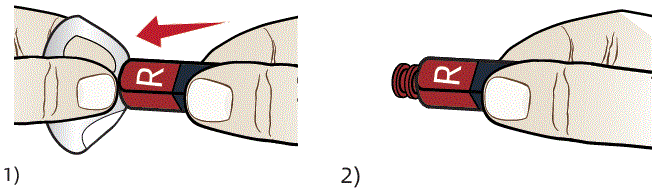
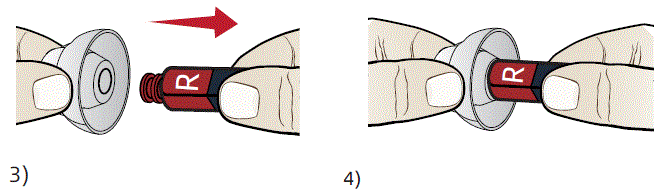
- Turn the edge parts over. Hold the base part and pull it off.
- Hold the receiver with your hand.
- Insert the earplug straight and insert it gently..
- And then try to pull the earplug lightly to make sure that it will not come off.
Wax guard Replacement Guide
The wax guard filter net is located in the sound hole of the hearing aid which can effectively prevent the cerumen from entering into the hearing aid to cause damge to the hearing aid. Replace the earwax filter every 3 months.Do not reuse the used filter.
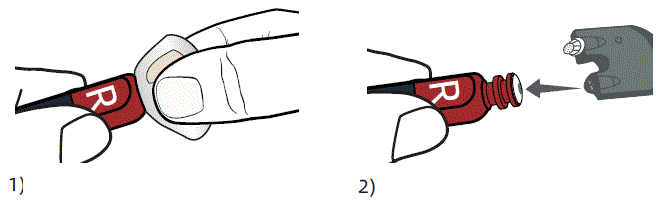
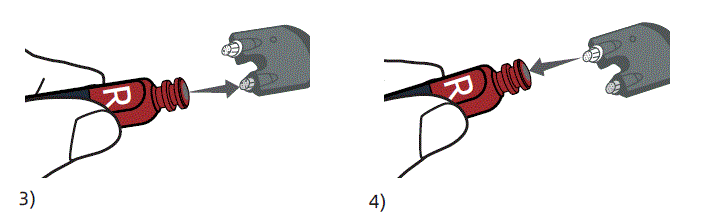
- Remove the earplug first.
Refer to “Change earbuds”. - Align the removed end of the wax guard filter with the sound hole of the hearing aid and insert.
- Pull out the old wax guard filter.
- Insert the new wax guard filter net into the sound hole of the hearing aid.
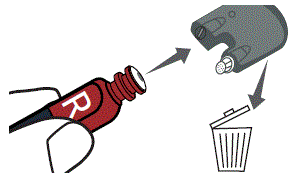
- Pull out the wax guard filter straight out to accomplish the replacement.
Discard the old wax guard filter.
MAINTENANCE AND CLEANING
Daily maintenance
It is important to keep your devices clean and dry. On a daily basis, wipe them clean using a soft cloth or tissue. To avoid potential damage from excess humidity or perspiration,the use of a drying kit is also recommended.
Care and maintenance
When not in use, store in a secure area away from small children and pets.
- Do not place hearing aids or charging base near high-temperature areas such as stoves or direct sunlight.
- Do not leave the devices in a humid place for a long time,such as bathroom.
- Take care not to poke the microphone holes with any sharp objects to avoid damage.
- Do not disassemble or attempt any repairs by yourself. Doing sowill void your warranty.
Cleaning
- Cleaning the ear tips
Remove any earwax buildup using the enclosed tool. Wipe clean with a tissue or soft cloth. - Cleaning Tool
Use a soft cloth or tissue to wipe any moisture, perspiration, or debris from the surface of the tool.
Note: Do not use alcohol or other cleaning solvents to clean the hook as this could damage the protective covering.
TROUBLESHOOTING GUIDE
| SYMPTOM | POSSIBLE CAUSES | SOLUTIONS |
|
No Sound | Volume too low | lncrease volume if volume control available |
| Device is not charged | Place charging the hearing aid until the in dicator is lighted in blue color. | |
| Microphones are clogged | Clean out any debris from the mic holes | |
| Ear Domes clogged | Clean out any debris from the ear domes | |
| Voices are low, very weak, or unclear | Low battery | Place the aids into the charging base to charge |
| Ear Domes are too loose | Choose a suitable size ear dome, wear it correctly. | |
| Earwax in ear dome | Clean out any debris from the ear domes and receiver area with the cleaning brush | |
| Hearing has changed | Contact your physician to report any sudden drop in hearing | |
| Bluetooth connection | Hearing aid cannot connect to your phone, or take a long time to connect | 1) Make sure that your headphones are not connected to other devices, and that your device is not connected to other Bluetooth devices. |
| 2) Long press the button on the devices for 3 seconds to turn them off. Turn it on again. | ||
| Your hearing aid are connected to other phone | Turn off Bluetooth on other phone. It will immediately disconnect your hearing aid from the phone.To reconnect yourphone again. | |
| Bluetooth connection is not stable and causes some interruptions | Try shortening the distance between your hearing aid and device. Avoid solid barriers in between. | |
|
Hearing aids whistling in the charger | Incorrect orientation | Ensure the USB cable is connected to the Charging base plugged into power. The base power status lights will blue to indicate charging. |
| Charger battery depleted | Reposition your hearing aids in their slots, ensuring the contact points are touching the charge points in the base. | |
| After the hearing aid is connected, the hearing aid indicator is not lit | Poor contact between hearing aid and charging base | Reinsert the hearing aid into the charging base |
| Hearing aid reverse | Check to see if the hearing aid is reversed |
Hearing aid failure self-checking table
| [Fault self-check] project | Possible Causes | Solution |
| Hearing aid has no sound | The button time is too short to start | Long press the button for 3 seconds, restart |
| Battery fully discharged | Connect the hearing aid to the charging base for charging | |
| The voice is very weak and unclear | ILow battery | Connect the hearing aid to the charging base for charging |
| Volume is set too low | Increase volume if volume control available | |
| Ear Domes are too loose | Hearing aid not inserted correctly into ear,wear it correctly | |
| Hearing aid plays notification sound | Indication for low battery | Charge hearing aid |
| Indicator light on hearing aid does not light up when hearing aid placed in charging inserts | Hearing aid not inserted correctly into charger | Insert hearing aid correctly into charger |
| Charger not connected to power source | Connect charger to external power supply | |
| Battery fully discharged | Wait three hours after placing hearing aid in charger, regardless of LED behavior |
Charging base fault self-checking table
| [Fault self-check] project | Possible Causes | Solution |
| After the hearing aid is connected, the hearing aid charging indicator is not lit | Poor contact between hearing aid and charging base | Reinsert the hearing aid into the charging base |
| Hearing aid reverse | Check to see if the hearing aid is reversed | |
| Hearing aid indicator lights are dark or dim | Dirty charging contacts | Clean the contacts of the hearing aid and the charger |
| Charging does not start | Hearing aid not inserted correctly into charger | Insert hearing aid correctly into charger |
TECHNICAL SPECIFICATION
| Max.OSPL90 | ≤120dB |
| HF Avg.OSPL90 | 109±4dB |
| Max gain | ≤48dB |
| HFA Gain | 33±5dB |
| Noise Level | ≤32dB |
| Frequency Range | F1≤200Hz F2≤4000Hz |
| Battery Current | NA |
| Total Distort | ≤3% |
DO NOT USE IF ANY OF THE FOLLOWING APPLY TO YOU:
- Congenital atresia of external ear or deformity of any part of the ear canal
- Deafness is unstable, and the degree of hearing loss often fluctuates
- Persistent headaches, dizziness, earaches, tinnitus or other symptoms that are not suitable for adaptation
- Sudden onset of hearing loss within the past 3 months; rapid progressive deafness; unilateral hearing loss or other acute ear disease;
- Effusion (secretions/discharge) in the ear and/or frequent purulence (pus)
- Central deafness (central nervous system) or non-organic deafness
- Patients with acute otitis externa and tympanitis
- Patients with acute and chronic suppurative otitis media (in the period of purulent infection)
- Patients who are allergic to the materials of this product
MATTERS NEEDING ATTENTION, WARNING AND TIPS
- Do not immerse the hearing aid in any liquid. Remove the hearing aid before swimming or bathing. After swimming or washing, wait for the ear canal to dry before wearing the hearing aid.
- After removing the hearing aid at night, it should be placed in a case with a desiccant if possible, protected from light, high temperature and high humidity environment.
- The external surfaces of the hearing aid should be kept clean, and earwax in the ear domes should be cleaned out daily
- When you do not use hearing aids, please charge the product regularly to avoid battery damage; the recommended charging time interval of hearing aids is ≤28 days
FCC Statement
This equipment has been tested and found to comply with the limits for a Class B digital device, pursuant to Part 15 of the FCC Rules. These limits are designed to provide reasonable protection against harmful interference in a residential installation. This equipment generates uses and can radiate radio frequency energy and, if not installed and used in accordance with the instructions, may cause harmful interference to radio communications. However, there is no guarantee that interference will not occur in a particular installation. If this equipment does cause harmful interference to radio or television reception, which can be determined by turning the equipment off and on, the user is encouraged to try to correct the interference by one or more of the following measures:
- Reorient or relocate the receiving antenna.
- Increase the separation between the equipment and receiver.
- Connect the equipment into an outlet on a circuit different from that to which the receiver is connected.
- Consult the dealer or an experienced radio/TV technician for help.
This device complies with part 15 of the FCC Rules. Operation is subject to the following two conditions:
- This device may not cause harmful interference, and
- this device must accept any interference received, including interference that may cause undesired operation.
Changes or modifications not expressly approved by the party responsible for compliance could void the user’s authority to operate the equipment
FCC ID:2A7JZ-002
Please download and install “HA-Fit” APP first.