
Density Meter Excellence
D4/D5/D6
User Manual
Introduction
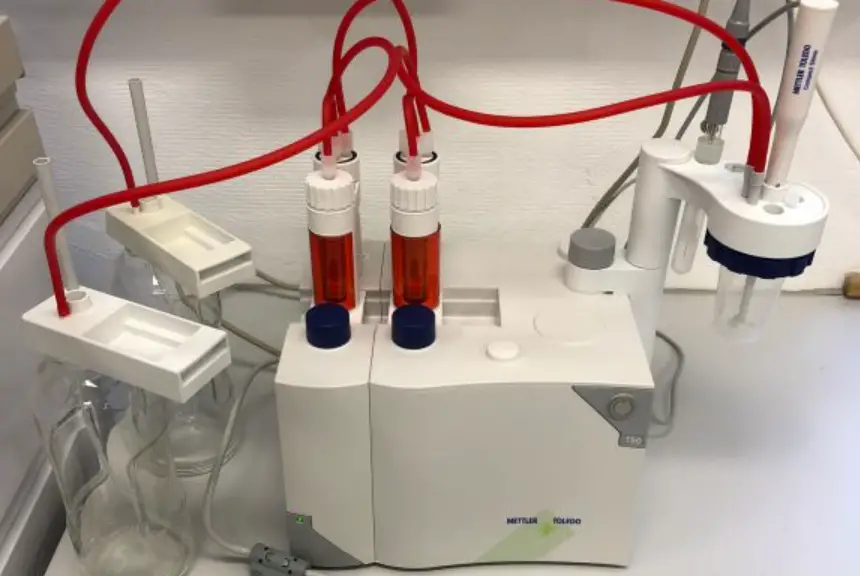
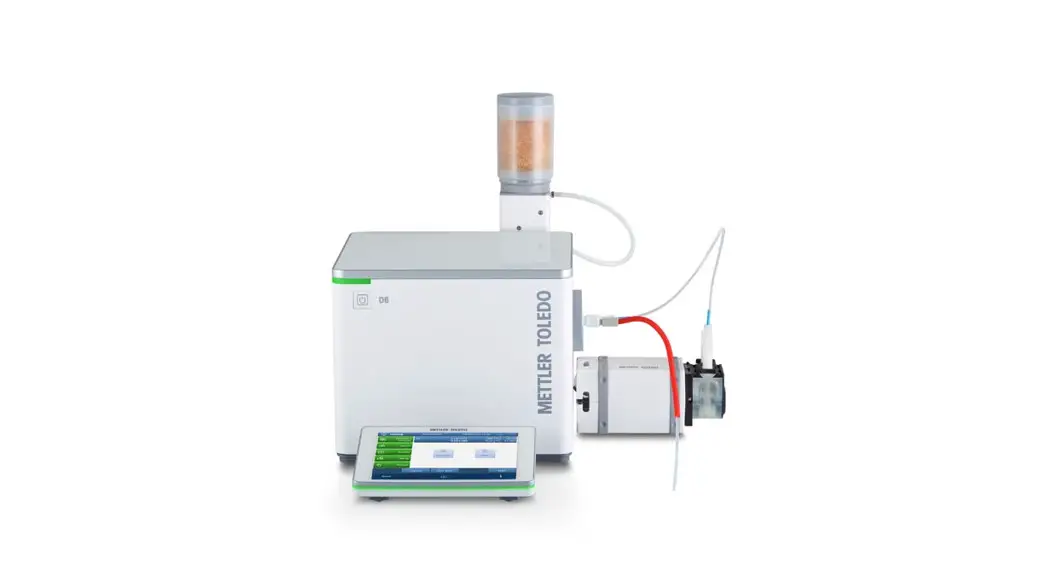
Thank you for choosing a METTLER TOLEDO density meter. The density meters D4, D5, and D6 are easy-to-operate, high-performance instruments for measuring the density of liquid samples.
About this document
This document provides you with the information you need to get started with your METTLER TOLEDO density meter.
The instructions in this document refer to density meters D4, D5, and D6 running firmware version 1.0 or higher. For a full description of the density meter and its functions, refer to the Reference Manual supplied online.
www.mt.com/library
If you have any additional questions, contact your authorized METTLER TOLEDO dealer or service representative.
www.mt.com/contact
Conventions and symbols Refers to an external document.
Elements of instructions
Prerequisites
- Steps
- …
⇒ Intermediate results
⇒ Results
Safety information
Two documents named “User Manual” and “Reference Manual” are available for this instrument.
• The User Manual is printed and delivered with the instrument.
• The electronic Reference Manual contains a full description of the instrument and its use.
• Keep both documents for future reference.
• Include both documents if you transfer the instrument to other parties.
Only use the instrument according to the User Manual and the Reference Manual. If you do not use the instrument according to these documents or if the instrument is modified, the safety of the instrument may be impaired and Mettler-Toledo GmbH assumes no liability. User Manual and Reference Manual are available online.
www.mt.com/library
2.1 Definitions of signal words and warning symbols
Safety notes contain important information on safety issues. Ignoring the safety notes may lead to personal injury, damage to the instrument, malfunctions, and false results. Safety notes are marked with the following signal words and warning symbols:
Signal words
WARNING A hazardous situation with medium risk, possibly resulting in death or severe injury if not avoided.
NOTICE
A hazardous situation with low risk, resulting in damage to the instrument, other material damage, malfunctions and erroneous results, or loss of data.
Warning symbols Electrical shock
2.2 Product-specific safety notes
Intended use
The density meters D4, D5, and D6 are designed to be used by trained staff. The density meters are intended for measuring the density of liquid samples that are compatible with the materials with which they come into contact.
Any other type of use and operation beyond the limits of use stated by Mettler-Toledo GmbH without consent from Mettler-Toledo GmbH is considered as not intended.
Responsibilities of the instrument owner
The instrument owner is the person holding the legal title to the instrument and who uses the instrument or authorizes any person to use it, or the person who is deemed by law to be the operator of the instrument. The instrument owner is responsible for the safety of all users of the instrument and third parties.
METTLER TOLEDO assumes that the instrument owner trains users to safely use the instrument in their workplace and deal with potential hazards. METTLER TOLEDO assumes that the instrument owner provides the necessary protective gear.
Safety notes

The danger of death or serious injury due to electric shock!Contact with parts that carry a live current can lead to death or injury.
- Only use the METTLER TOLEDO power supply cable and AC adapter designed for your instrument.
- Connect the power cable to a grounded power outlet.
- Keep all electrical cables and connections away from liquids and moisture.
- Check the cables and the power plug for damage and replace damaged cables and power plugs.
NOTICE Risk of damage to the instrument due to the use of unsuitable parts!
Using unsuitable parts with the instrument can damage the instrument or cause it to malfunction.
− Only use parts from METTLER TOLEDO that are intended to be used with your instrument.
FCC Rules
This equipment has been tested and found to comply with the limits for a Class A digital device, pursuant to Part 15 of the FCC rules. These limits are designed to provide reasonable protection against harmful interference when the equipment is operated in a commercial environment. This equipment generates, uses, and can radiate radio frequency energy and, if not installed and used in accordance with the instruction manual, may cause harmful interference to radio communications. Operation of this equipment in a residential area is likely to cause harmful interference in which case the user will be required to correct the interference at his own expense.
Design and function
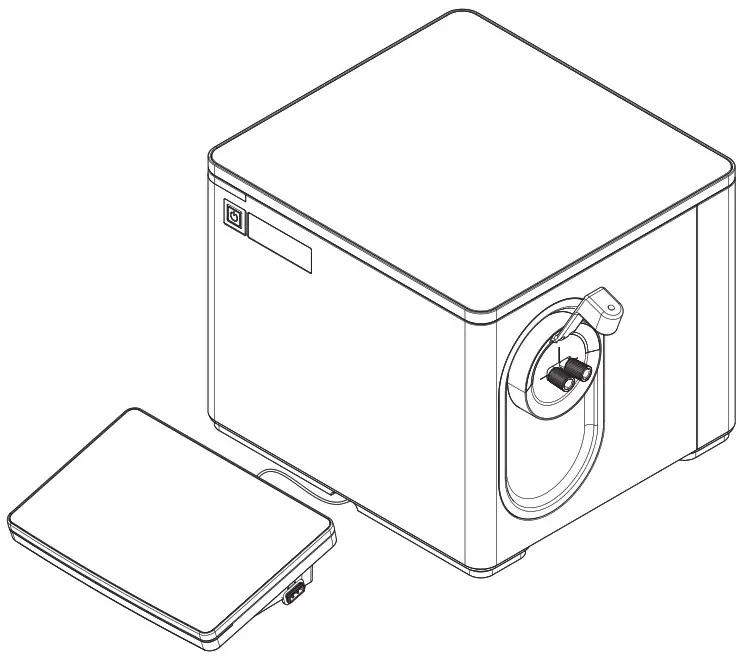
3.1 Overview density meter
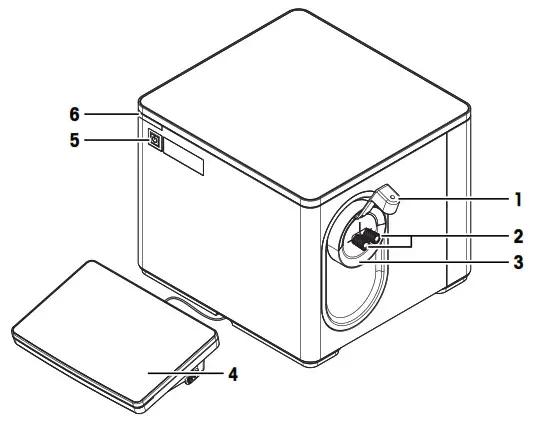
| No. | Name | Function |
| 1 | Syringe holder1) | Prevents disturbance of the measuring cell when the user injects a sample |
| 2 | Cell adapters | Used to fill, drain and dry the measuring cell |
| 3 | Protective sleeve | Prevents liquid from entering through the opening around the cell adapters |
| 4 | Terminal | Displays information and is used to enter information |
| 5 | Power button | Starts up and shuts down the density meter |
| 6 | Instrument status light (StatusLight™) | Provides information about the status of the density meter |
- Only included in the scope of delivery of D6
Status light
| StatusLight | Density meter status |
| Steady, green light | The density meter is ready for operation. |
| Blinking, green light | The density meter is performing a task. |
| Steady, orange light | The density meter waits for the user to perform an action. |
| Blinking, orange light | A task has been interrupted, for example, because a value lies outside of its limits. |
| Steady, red light | An error has occurred during task execution. |
3.2 Rear panel
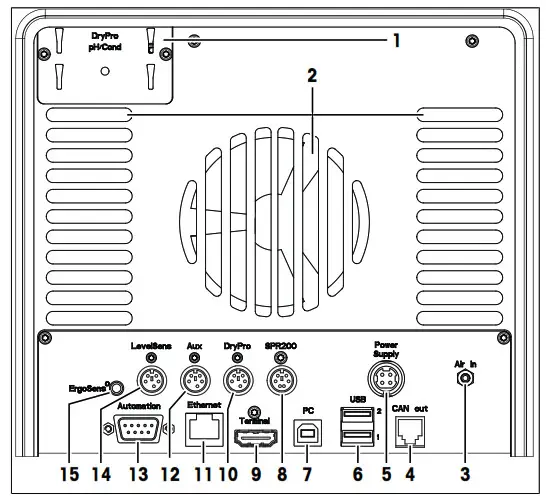
No. | Name | Function |
| 1 | DryPro / pH/Cond | Mounting plate to attach a DryPro, or an external flow cell to measure pH or conductivity |
| 2 | Fan and ventilation openings | Move air over the heat sink of the Peltier element |
| 3 | Air In | Gas inlet to connect a source of dry air and prevent condensation outside of measuring cell |
| 4 | CAN out | RJ12 socket to connect a LevelSens box |
| 5 | Power Supply | DC Socket to connect the AC adapter |
| 6 | USB 1 / USB 2 | USB-A socket to connect USB devices, for example, printers, barcode readers, or an InMotion™ Autosampler |
| 7 | PC | USB-B socket to connect a computer |
| 8 | SPR200 | 6-pin Mini-DIN socket to connect the filling pump SPR200 |
| 9 | Terminal | 19-pin Mettler-HDMI socket with non-standard pin assignment, reserved to connect the terminal and no other display device |
| 10 | DryPro | 5-pin Mini-DIN socket to connect the drying pump DryPro |
| 11 | Ethernet | RJ45 socket to connect a network |
| 12 | Aux | 5-pin Mini-DIN socket to connect an auxiliary instrument |
| 13 | Automation | 9-pin male D-sub socket to connect a sample delivery and cleaning unit |
| 14 | LevelSens | 5-pin Mini-DIN socket to connect the fluid-level sensor LevelSens |
| 15 | ErgoSens | 3.5 mm jack socket to connect the infrared motion-sensor ErgoSens |
3.3 Terminal
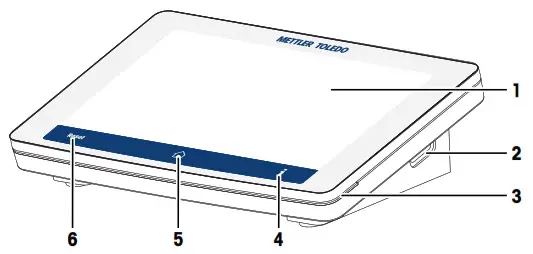
No. | Name | Function |
| 1 | Touch screen | Displays information and can be used to enter information |
| 2 | USB-A socket | Is used to transfer data to and from a USB flash drive |
| 3 | Terminal status light (StatusLight™) | Provides information about the status of the density meter |
| 4 |  | Opens a window with general information about the density meter |
| 5 |  | Opens the home screen |
| 6 |  | Ends all running tasks |
Installation and commissioning
4.1 Scope of delivery
Part | Order number | D4 | D5 | D6 | |
 | Density meter | – | • | • | • |
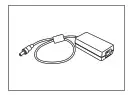 | Extern. Power Supply 120W | 30298362 | • | • | • |
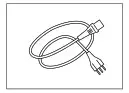 | Power cable (country-specific) | – | • | • | • |
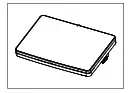 | Terminal WVGA 7 inch AnaChem • Terminal • HDMI cable | – | • | • | • |
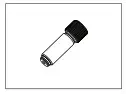 | Syringe adapter (1 pc) | 51337154 | • | • | • |
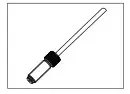 | Waste tube 600 mm, M8 connector | 51337223 | • | • | • |
| Part | Order number | D4 | D5 | D6 | |
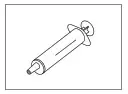 | Disposable syringe (3 pcs) 10 mL | – | • | • | • |
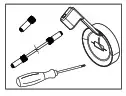 | Syringe Holder Dx • Protective sleeve for syringe holder • Syringe holder and 2 screws • Syringe adapter • Tube with 2 M8 connectors, length 280 mm • Torx screwdriver 10 | 30474897 | – | – | • |
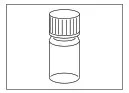 | Combined water standard 9 mL, density/refractive index | 51338010 | • | • | • |
 | User Manual | – | • | • | • |
 | Declaration of conformity | – | • | • | • |
| Test report | – | • | • | • |
4.2 Download the Reference Manual
- Go to the website www.mt.com/library.
- Select the Technical Documentation tab.
- Enter the product type in the search field and start the search.
- Select the Reference Manual from the result list.
- Select the link.
→ The Reference Manual is either opened or downloaded depending on the browser settings. - Check which firmware version is installed on your density meter.
- If the Reference Manual is not written for the installed firmware version, contact your authorized METTLER
TOLEDO dealer or service representative.
See also Introduction
  Page 3View the firmware version Page 31
4.3 Unpack the density meter
- Remove the density meter from the protective packaging.
- Store the packing material for later transport over long distances.
- Check if you received all parts listed in the scope of delivery.
- Inspect the parts visually for flaws or damage.
- If parts are missing or damaged, report it to your authorized METTLER TOLEDO dealer or service representative.
See alsoScope of delivery Page 7
4.4 Position the density meter
The density meter has been developed for indoor operation in a room with a stable temperature.
The following site requirements apply:
- Dew point below measurement temperature
- Ventilation as needed by the chemicals that are used
- Ambient conditions within the limits specified in the technical data
- No powerful vibrations
- No direct sunlight
- No corrosive gas atmosphere
- No explosive atmosphere
- No powerful electric or magnetic fields
Procedure
- Place the density meter on a level surface.
- Make sure that there is at least 15 cm clearance behind the density meter.
- Make sure that nothing blocks the ventilation openings in the rear panel of the density meter.
See also Technical data Page 32
4.5 Connect the density meter to the power supply
The AC adapter is suitable for all supply line voltages ranging from 100…240 V AC and 50/60 Hz.

The danger of death or serious injury due to electric shock!
Contact with parts that carry a live current can lead to death or injury.
- Only use the METTLER TOLEDO power supply cable and AC adapter designed for your instrument.
- Connect the power cable to a grounded power outlet.
- Keep all electrical cables and connections away from liquids and moisture.
- Check the cables and the power plug for damage and replace damaged cables and power plugs.
NOTICEThe danger of damage to the AC adapter due to overheating!
If the AC adapter is covered or in a container, it is not sufficiently cooled and overheats.
1 Do not cover the AC adapter.
2 Do not put the AC adapter in a container.
- Install the cables in such a way that they cannot be damaged or interfere with operation.
- Insert the plug of the power cable in the socket of the AC adapter.
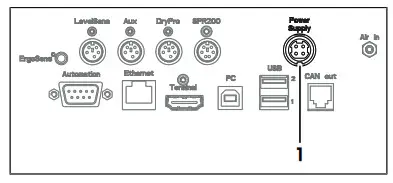
- Insert the plug of the AC adapter in the Power Supply (1) socket on the rear panel.
- Insert the plug of the power cable in a grounded power outlet that is easily accessible.
4.6 Disconnect the density meter from the power supply
• The density meter is shut down.
1 Pull the plug of the power cable out of the power outlet.
2 Pull the plug of the AC adapter out of the Power Supply socket on the rear panel.
4.7 Connect, adjust, and disconnect the terminal
4.7.1 Connect the terminal
• The density meter is shut down.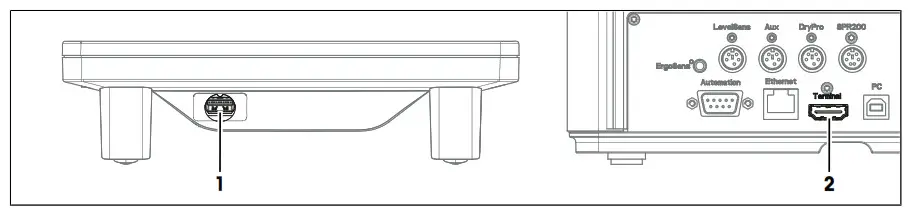
- Insert one of the plugs of the supplied terminal cable in the socket (1) on the back of the terminal.
- Insert the other plug of the terminal cable into the Terminal socket (2) on the rear panel.
- Startup the density meter.
→ The density meter automatically detects the terminal and activates it.
See also Startup the density meter Page 13
4.7.2 Adjust the angle of the terminal
The angle of the terminal has two positions.
Procedure
• No task is running.
− To increase the angle of the terminal, fold out the two feet (1) at the underside of the terminal.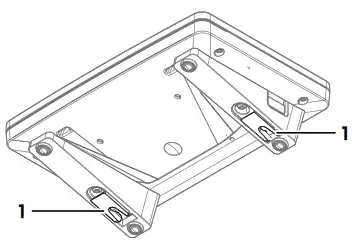
4.7.3 Disconnect the terminal
• The density meter is shut down.
- Pull the plug of the terminal cable out of the socket on the back of the terminal.
- Pull the plug of the terminal cable out of the Terminal socket on the rear panel.
See also Shut down the density meter Page 13
4.8 Install the syringe adapter
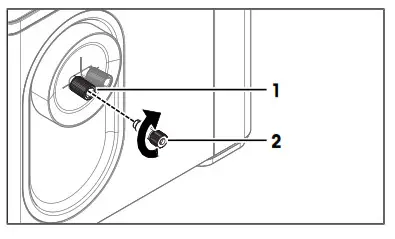
- Screw the syringe adapter (2) into the front cell adapter (1).
- Make sure that the connection is tight.
4.9 Install the waste tube
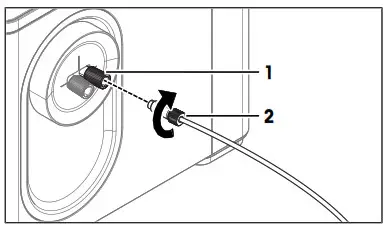
- Screw the connector of the waste tube (2) into the rear cell adapter (1).
- Make sure that the connection is tight.

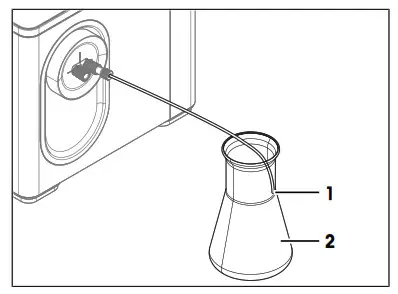
- Place the end of the waste tube (1) into the waste container (2).
- Shorten the waste tube so that the end of the waste tube (1) is above the level of the waste.

4.10 Install accessories The installation of additional accessories is described in the Reference Manuals.
4.10.1 Install and connect the syringe holder
4.10.1.1 Install the syringe holder
- Remove the protective sleeve. See [Remove the protective sleeve Page 31].
- Install the protective sleeve supplied with the Syringe Holder Dx.See [Install the protective sleeve } Page 31].
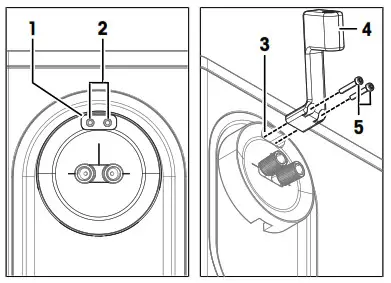
- Make sure that the opening for the syringe holder (1) is over the two mounting holes for the syringe holder (2).
- Insert the syringe holder (4) in the opening for the syringe holder (3).
- Insert the two screws (5) in the two openings in the syringe holder and the mounting holes.
- Screw in the screws and tighten them.
4.10.1.2 Connect the syringe holder
• The syringe holder is installed.
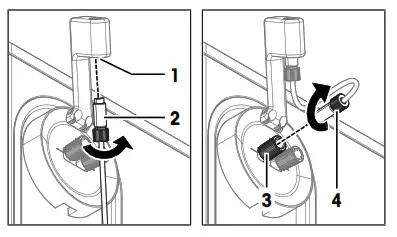
- Screw one of the M8 connectors (2) of the syringe-holder tube from below about halfway into the opening (1).
- Screw the other M8 connector (4) of the syringe holder tube into the front cell adapter (3) and tighten it.

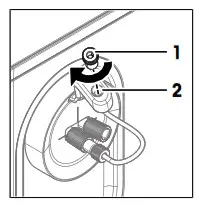
- Screw the syringe adapter (1) from above into the opening (2) and tighten it.
4.10.2 Set up the drying pump
4.10.2.1 Install the DryPro
• The DryPro is assembled as described in its User Manual.
• The density meter is shut down.
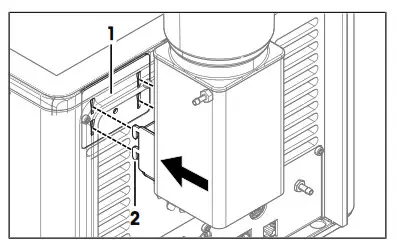
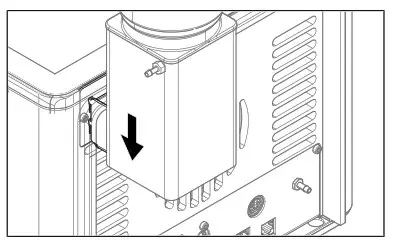
- Align the hooks (2) of the DryPro with the openings of the mounting plate (1).
- Insert the hooks into the openings.

- Move the DryPro downward until it clicks in place.
4.10.2.2 Connect the DryPro
• The DryPro is installed.
• The density meter is running.
• The home screen is open.
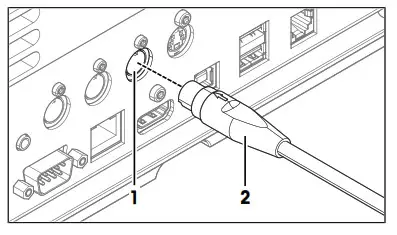
- Insert the plug (2) of the DryPro in the DryPro socket (1) on the rear panel.
→ The density meter detects and configures the DryPro.
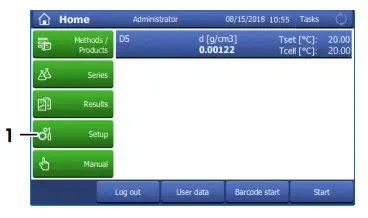
- Go to Setup (1) > Hardware > Automation.
- Check that the DryPro has the Status Installed.
See also Startup the density meter Page 13
Operation
5.1 Start up the density meter
− Press the power button (2).
→ The status light (1) turns green.
→ The density meter starts up and detects connected devices.
→ The welcome screen on the terminal opens.
→ The density meter is ready for use when the StatusLight of the terminal turns green.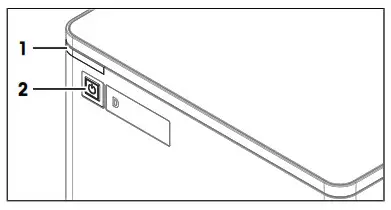
5.2 Shut down the density meter
Because the volume of the measuring cell adapts slowly to temperature changes, METTLER TOLEDO recommends to only shut down the density meter if it is not used for several days.
Shut down the density meter using the power button
• No task is running.
• The measuring cell is clean and dry.
− Press the power button (2).
→ METTLER TOLEDO is displayed and the status light (1) starts blinking.
→ When the status light and the screen are dark, the density meter is shut down.
→ The control circuit for the power button is energized. The rest of the density meter is no longer energized.
Shut down the density meter in emergency situations
− Pull the plug of the power cable out of the power outlet.
5.3 Typical phases of density determinations
Density determinations usually include three phases.
• Fill the measuring cell and measure the density.
• Rinse the measuring cell to remove residue of the sample.
• Dry the measuring cell.
5.3.1 Fill the measuring cell
This chapter describes how to fill the measuring cell using a syringe. How to work with automation is described in the Reference Manual.
There are two methods to fill the measuring cell using a syringe.
- Push samples into the measuring cell; suitable for viscous samples and degassing samples
- Pull samples into the measuring cell; suitable for non-viscous samples and non-degassing samples
Push samples into the measuring cell
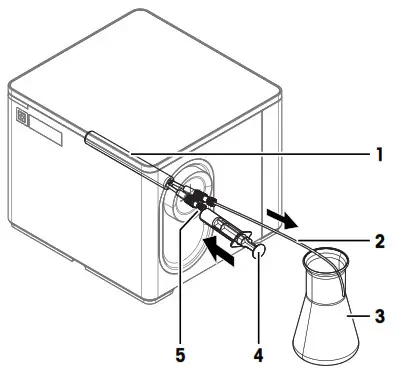
- The sample is in the syringe (4). Users push the sample into the measuring cell (1), through the waste tube (2), and in the waste container (3).
- A clean syringe is needed for each sample.
- If some of the samples stick to the opening for the syringe (5), the next sample is contaminated.
Pull samples into the measuring cell
- The sample is in the sample container (3). Users pull the sample through the waste tube (2), into the measuring cell (1), and then into the syringe (4).
- The sample is already analyzed when it passes through the opening with the syringe (5) that can be contaminated.
- If the waste tube (2) is not clean and dry, the sample can be contaminated.
5.3.2 Rinse the measuring cell
At the end of this phase, the residue in the measuring cell must have the following properties.
- Evaporate without leaving incrustations.
- Evaporate easily.
To clean the measuring cell, it has to be rinsed with one or two different cleaning solutions. - Purpose of the cleaning solution 1: Dissolve the sample, so that no sample is left in the measuring cell. If cleaning solution 1 does not easily evaporate, a second cleaning solution must be used.
- Purpose of cleaning solution 2: Dissolves cleaning solution 1 and evaporates easily without leaving any residue.
METTLER TOLEDO recommends the following cleaning solutions.
Sample | Cleaning solution 1 | Cleaning solution 2 |
| Water, water-based | Deionized water | Acetone, ethanol (100%) |
| Acids (concentrated) | Water (flush the measuring cell with plenty of water to remove the heat from the reaction of water and acid) | Acetone, ethanol (100%) |
| Alkaline solutions (concentrated) | 0.3…0.5 % deco next solution | Acetone, ethanol (100%) |
| Samples with fats or oily components | 0.3…0.5 % deco next solution | Acetone, ethanol (100%) |
| Petrochemical samples, edible oils, and fats | Toluene, xylene, or petrol ether mixtures | Room temperature: low-boiling petrol ether mixture or acetone Temperature > 30 °C: hexane or similar organic solvents |
5.3.3 Dry the measuring cell
At the end of this phase, the measuring cell contains no residue and is ready for new analysis or storage.
METTLER TOLEDO recommends drying the ambient air that is pumped through the measuring cell using a bed of desiccant (e.g. silica gel). The desiccant keeps dust and moisture back and reduces the risk that a hardly visible layer of condensation forms on the walls of the measuring cell. The risk that moisture from the ambient air condenses in the measuring cell depends on the relative humidity of the air and the difference between the room temperature and the temperature of the measuring cell.
• The higher the relative humidity of the air, the higher the risk
• The farther the temperature of the measuring cell lies below room temperature, the higher the risk
To check if the measuring cell is dry, users can measure the density of air or perform a cell test. If the measured value is within the tolerance range of the known value at the measuring temperature, the measuring cell is clean and dry.
5.4 Example: density determination using DryProThe following chapters show you how to configure a measurement method and determine the density of tap water at 20 °C. A DryPro is used to dry the measuring cell.
You can find more information about the configuration of methods and work with other types of samples in the Reference Manual.
5.4.1 Create the measurement method
• The DryPro is installed and connected.
• The home screen is open.
- Go to Methods / Products (1) > Methods.
→ The Methods window opens.
- Select the method M8101 Density w. syringe & DryPro (1).

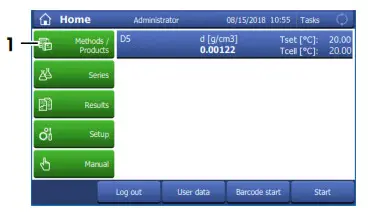
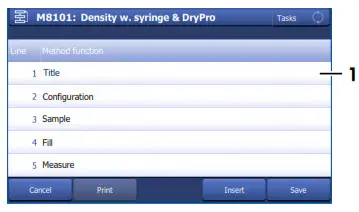
→ The method window with the list of the method functions opens.
5.4.2 Configure the measurement method
- Select the Title (1) method function.
- Change Method ID (1) as needed. The following format is reserved for METTLER TOLEDO predefined methods: “M” followed by a number.
- Change Title (2) as needed and tap OK (3).
→The method window with the list of the method functions opens.
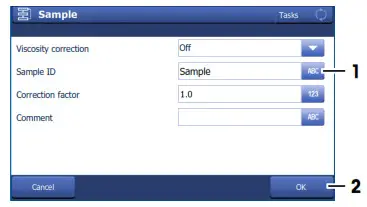
- Select the Sample method function.
- Enter for Sample ID (1) the default value for the sample identification and tap OK (2).
→The default value is used in the Start analysis window.
→ The method window with the list of the method functions opens. - Move your finger upward on the touch screen to scroll down.
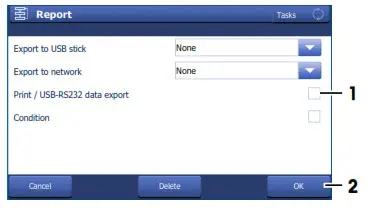
- Select the Report method function.
- Deactivate Print / USB-RS232 data export (1) and tap OK (2).


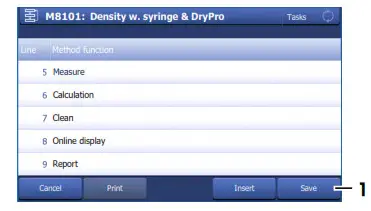
- Tap Save (1).
→The method is listed with Method ID and Title in the Methods window.

5.4.3 Create a shortcut on the home screen
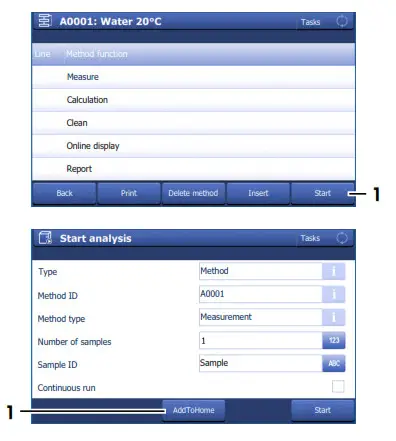
- Tap Start (1).

- Tap AddToHome (1).
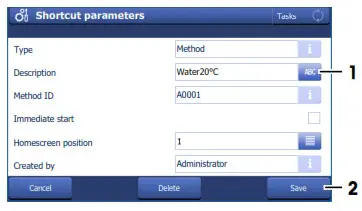
- For Description (1), enter a name to identify the shortcut on the home screen and tap Save (2).
 → The home screen with the shortcut (1) opens.
 → The home screen with the shortcut (1) opens.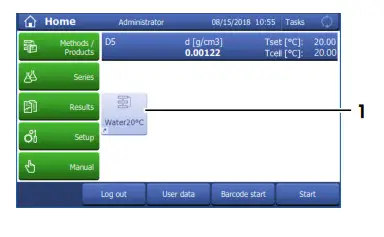
5.4.4 Determine the density
Material
- Tap water
- Deionized water
- Acetone
- 3-component syringes with O-ring
- Waste container
- Lint-free tissues
Start the method
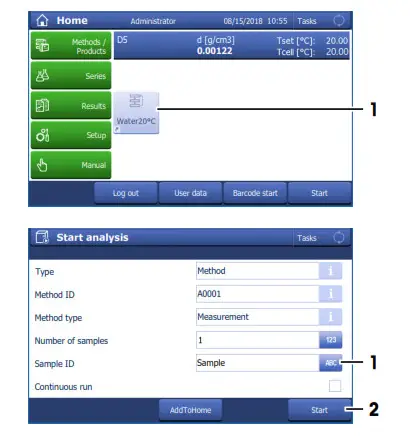
- Tap the shortcut (1) of the method you configured.

- If needed, change the entry in Sample ID (1).
- Tap Start (2).
→The temperature of the measuring cell is brought to the temperature defined in the method.
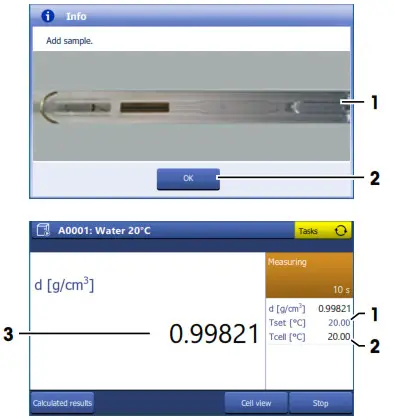
→A message prompts you to add the sample.
Fill the measuring cell
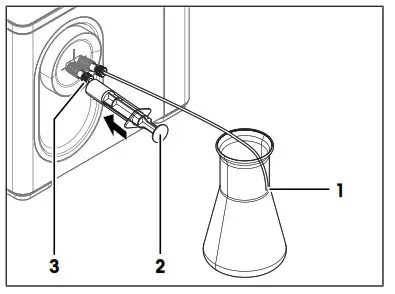
- Make sure that the end of the waste tube (1) is above the level of the waste.
- Fill a clean 10 mL syringe with 2…5 mL of the sample.
- Make sure that there are no bubbles in the syringe.
- Insert the syringe into the syringe adapter (3).

- Press the plunger (2) slowly (5…10 cm/s) and continue into the syringe.
→The sample flows with a laminar flow into the measuring cell. - Push the sample into the measuring cell until the measuring cell and 15…20 cm of the waste tube are filled with the sample.
- Leave the syringe in the syringe adapter.
- Check that the measuring cell (1) is free of air bubbles.
- Tap OK (2).

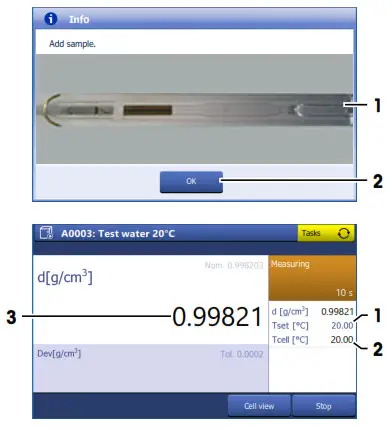
→The temperature of the measuring cell (2) is brought to the temperature defined in method (1).
→The currently measured value is displayed (3).
→The measured value is saved as a result when the criteria for measurement reliability are met.
→A message prompts you to drain the measuring cell.
Drain the measuring cell
- Make sure that the end of the waste tube (1) is above the level of the waste.
- Pull the plunger (2) continuously out of the syringe.
→The sample is removed from the measuring cell.
→The measuring cell is filled with air.
- Pull air into the measuring cell until the measuring cell is filled with air and the syringe contains at least 1 ml of air.
- Remove the syringe from the syringe adapter and empty the content into a suitable waste container.
- Tap OK.
→A message prompts you to rinse the measuring cell with deionized water.
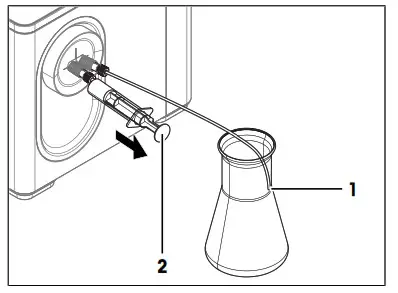
Rinse the measuring cell with deionized water
- Make sure that the end of the waste tube (1) is above the level of the waste.
- Fill a clean syringe with deionized water.
- Insert the syringe into the syringe adapter (3).
- Press the plunger (2) continuously into the syringe.
→The deionized water flows through the measuring cell and flushes out the sample. - Remove the syringe from the syringe adapter.
→Deionized water flows out of the measuring cell into the waste container. - Repeat the steps above two or three times.
- Tap OK.
→A message prompts you to rinse the measuring cell with acetone.
Rinse the measuring cell with acetone
• Wear protective gear as required by the safety data sheet of acetone and the safety rules of your workplace.
- Make sure that the end of the waste tube (1) is above the level of the waste.
- Fill a clean syringe with acetone.
- Insert the syringe into the syringe adapter (3).
- Press the plunger (2) continuously into the syringe.
→ The acetone flows through the measuring cell and flushes out the deionized water. - Remove the syringe from the syringe adapter.
→ Acetone flows out of the measuring cell into the waste container. - Repeat the steps above two or three times.
- Tap OK.
- Dispose of the waste as required by the safety data sheet of acetone and the rules of your workplace.
→ A message prompts you to connect DryPro to the measuring cell.
Dry the measuring cell
- Check the desiccant in the DryPro and replace it if needed.
- Make sure that the end of the waste tube (1) is above the level of the waste.
- Tap OK.
→ The DryPro starts pumping air through the DryPro tube. - Slowly insert the connector (2) of the DryPro tube in the syringe adapter (3).
→ Any remaining liquid is pushed out of the measuring cell without splashing.
→ The DryPro pumps dry air through the measuring cell for the duration defined in the method and then stops.
→ The home screen opens. - Pull the connector of the DryPro tube out of the syringe adapter and wipe it with a clean and lint-free tissue.
→ The measuring cell is clean and dry.
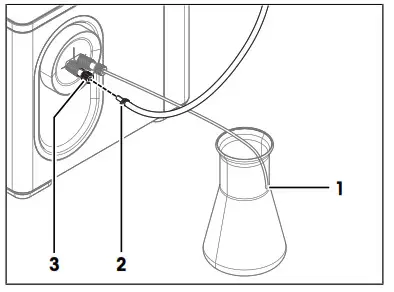
Maintenance
In this chapter, you find descriptions of the maintenance tasks you should perform on your density meter. Any other maintenance tasks need to be performed by a service technician that has been qualified by METTLER TOLEDO.
If you experience problems with your density meter, contact your authorized METTLER TOLEDO dealer or service representative.
METTLER TOLEDO recommends that a preventive maintenance and calibration certification is done at least once a year through your authorized METTLER TOLEDO dealer or service representative. www.mt.com/contact
6.1 Maintenance schedule
If the standard operating procedures of your company require other maintenance intervals, use the intervals listed in the standard operating procedures.
| Frequency | Task | Link |
| Daily | Clean the measuring cell at the end of the workday. | [Clean the measuring cell Page 21] |
| Perform a test with deionized water. | [Check the measurement accuracy Page 25] |
6.2 Clean the density meter
NOTICE
The danger of damage to the density meter due to inappropriate cleaning methods
Inappropriate cleaning agents can damage the housing or other parts of the density meter. If liquids enter the housing they can damage the density meter.
- Make sure the cleaning agent is compatible with the material of the part you want to clean.
- Make sure that no liquid enters the interior of the density meter.
If you have questions about the compatibility of cleaning agents, contact your authorized METTLER TOLEDO dealer or service representative.
See also
Technical data Page 32
6.2.1 Clean the housing
METTLER TOLEDO recommends the following cleaning agents:
• Water
• Water with a mild detergent
Procedure
The density meter is shut down.
− Wipe the housing with a cloth moistened with the cleaning agent.
6.3 Clean the measuring cell
6.3.1 Typical phases of cleaning the measuring cell
Cleaning the measuring cell usually includes two phases:
- Rinse the measuring cell to remove residue from the sample.
- Dry the measuring cell.
6.3.2 Example: clean using the drying pump
The following chapters show you how to configure a cleaning method and clean the measuring cell with deionized water and acetone. A DryPro is used to dry the measuring cell.You can find more information about the configuration of methods and work with other types of samples in the Reference Manual.
6.3.2.1 Create the cleaning method
• The DryPro is installed and connected.
• The home screen is open.
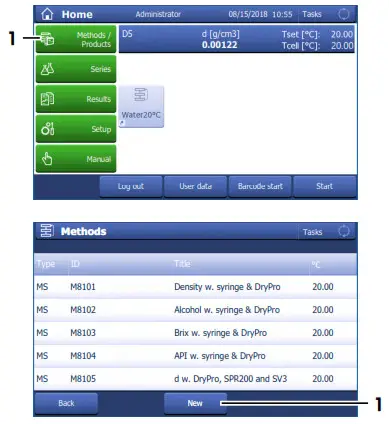
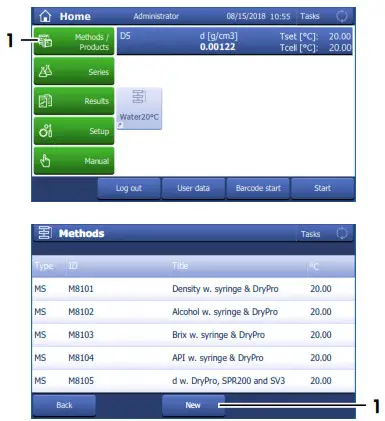
- Go to Methods / Products (1) > Methods.
→ The Methods window opens.
- Tap New (1).
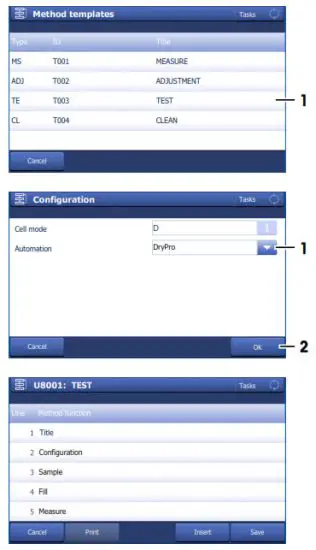
- Select the template CLEAN (1).
- For Automation select DryPro (1) and tap OK (2).
→The method window with the list of the method functions opens.
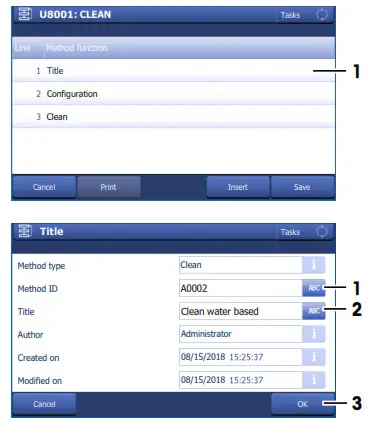
6.3.2.2 Configure the cleaning method
- Select the Title (1) method function.
- Change Method ID (1) as needed. The following format is reserved for METTLER TOLEDO predefined methods: “M” followed by a number.
- Change Title (2) as needed and tap OK (3).
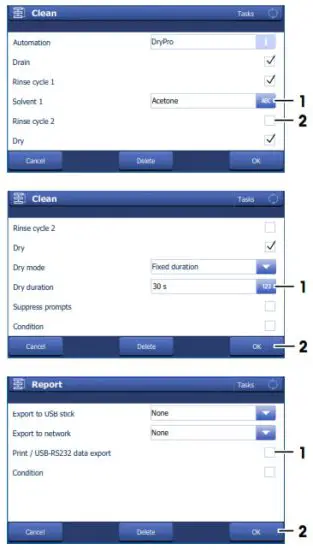
→ The method window with the list of the method functions opens. - Select the Clean method function.
- Deactivate Drain (1).
- Enter for Solvent 1 (2) “Deionized water”.
- Scroll down.

- Set Dry duration (1) to “30 s” and tap OK (2).
- Tap Save (1).
→The method is listed with Method ID and Title in the Methods window.
6.3.2.3 Clean using deionized water and acetone
Material
- Deionized water
- Acetone
- 3-component syringes with O-ring
- Waste container
- Lint-free tissues
Start the method
• The home screen is open.
• The measuring cell is drained.
- Go to Methods / Products (1) > Methods.
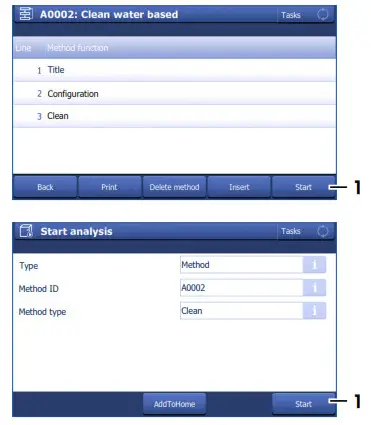
→ The Methods window opens. - Select the cleaning method that you configured (1).

- Tap Start (1).
- Tap Start (1).
→ A message prompts you to rinse the measuring cell with deionized water.
Rinse the measuring cell with deionized water
- Make sure that the end of the waste tube (1) is above the level of the waste.
- Fill a clean syringe with deionized water.
- Insert the syringe into the syringe adapter (3).
- Press the plunger (2) continuously into the syringe.
→ The deionized water flows through the measuring cell and flushes out the sample. - Remove the syringe from the syringe adapter.
→ Deionized water flows out of the measuring cell into the waste container. - Repeat the steps above two or three times.
- Tap OK.
→ A message prompts you to rinse the measuring cell with acetone.
Rinse the measuring cell with acetone
• Wear protective gear as required by the safety data sheet of acetone and the safety rules of your workplace.
- Make sure that the end of the waste tube (1) is above the level of the waste.
- Fill a clean syringe with acetone.
- Insert the syringe into the syringe adapter (3).
- Press the plunger (2) continuously into the syringe.
→ The acetone flows through the measuring cell and flushes out the deionized water. - Remove the syringe from the syringe adapter.
→ Acetone flows out of the measuring cell into the waste container. - Repeat the steps above two or three times.
- Tap OK.
- Dispose of the waste as required by the safety data sheet of acetone and the rules of your workplace.
→ A message prompts you to connect DryPro to the measuring cell.
Dry the measuring cell
- Check the desiccant in the DryPro and replace it if needed.
- Make sure that the end of the waste tube (1) is above the level of the waste.
- Tap OK.
→ The DryPro starts pumping air through the DryPro tube. - Slowly insert the connector (2) of the DryPro tube in the syringe adapter (3).
→ Any remaining liquid is pushed out of the measuring cell without splashing.
→ The DryPro pumps dry air through the measuring cell for the duration defined in the method and then stops.
→ The home screen opens. - Pull the connector of the DryPro tube out of the syringe adapter and wipe it with a clean and lint-free tissue.
→ The measuring cell is clean and dry.
6.4 Check the measurement accuracy
6.4.1 Typical phases of checking the measurement accuracy
Checking the measurement accuracy usually includes three phases:
- Fill the measuring cell and measure the density.
- Rinse the measuring cell to remove residue of the sample.
- Dry the measuring cell.
See also Fill the measuring cell } Page 14 Rinse the measuring cell } Page 15 Dry the measuring cell } Page 15
6.4.2 Example: test with a water standard
The following chapters show you how to configure and perform a density determination for a water standard at 20 °C. A DryPro is used to dry the measuring cell.
You can find more information about the configuration of methods and work with other types of samples in the Reference Manual.
6.4.2.1 Create the test method
• The DryPro is installed and connected.
• The home screen is open.
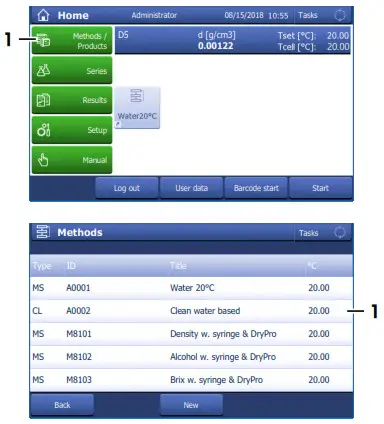
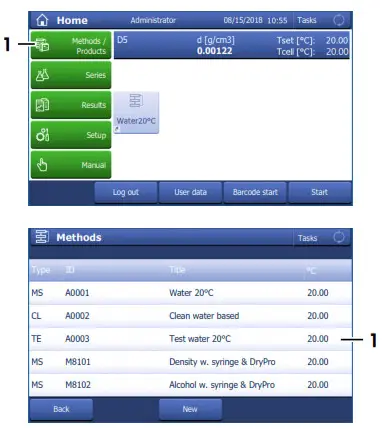
- Go to Methods / Products (1) > Methods.
→ The Methods window opens.
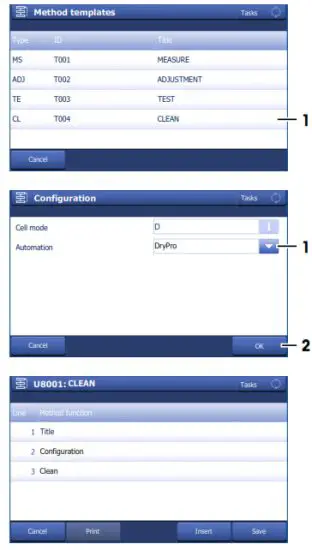
- Tap New (1).
- Select the template TEST (1).
- For Automation select DryPro (1) and tap OK (2).
→ The method window with the list of the method functions opens.
6.4.2.2 Configure the test method
• A test set for water at 20°C is configured.
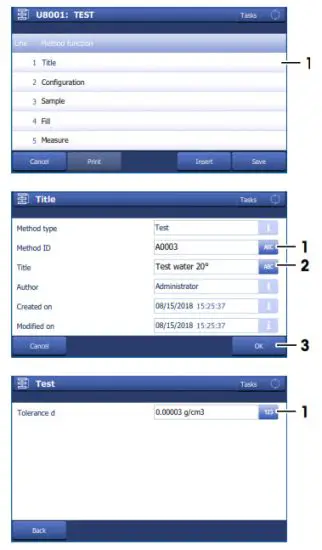
- Select the Title (1) method function.

- Change Method ID (1) as needed. The following format is reserved for METTLER TOLEDO predefined methods: “M” followed by a number.
- Change Title (2) as needed and tap OK (3).
→ The method window with the list of the method functions opens. - Move your finger upward on the touch screen to scroll down.
- Select the Test method function.
- Set Tolerance d to the value listed for your instrument type.
– D4: 0.0002 g/cm3
– D5: 0.00003 g/cm3
– D6: 0.000003 g/cm3
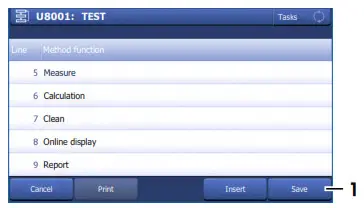
- Select the Clean method function.
- Enter for Solvent 1 (1) “Acetone”.
- Deactivate Rinse cycle 2 (2).
- Scroll down.
- Set Dry duration (1) to “30 s” and tap OK (2).
- Select the Report method function.
- Deactivate Print / USB-RS232 data export (1) and tap OK (2).
- Tap Save (1).

6.4.2.3 Perform the test
Material
- METTLER TOLEDO water standard
- Acetone
- 3-component syringes with O-ring
- Waste container
- Lint-free tissues
Start the method and configure the standard
- The home screen is open.
- The measuring cell is clean and dry.
- Go to Methods / Products (1) > Methods.
→ The Methods window opens.
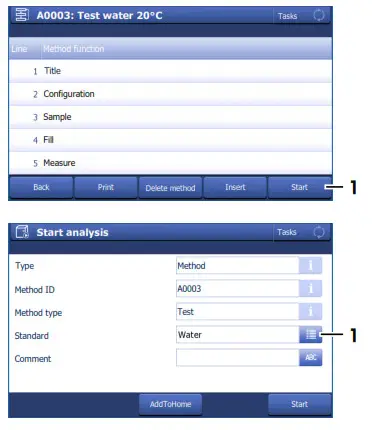
- Select the test method that you configured (1).
- Tap Start (1).
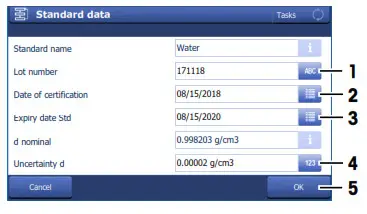
- Tap Standard (1).

- Enter the information for Lot number, Date of certification, Expiry date Std, and Uncertainty d as printed on the certificate and tap OK (5).
- Tap Start (2).
→ The temperature of the measuring cell is brought to the temperature defined in the method.
→ A message prompts you to add the sample.
Fill the measuring cell
• The measuring cell and the waste tube are clean.
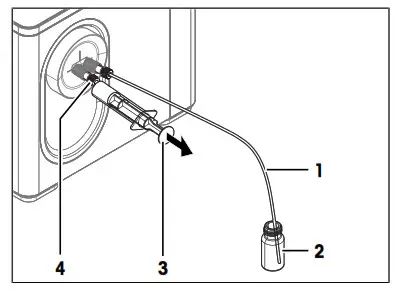
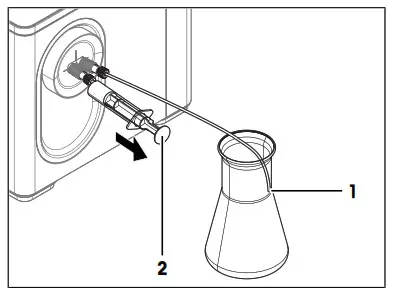
- Clean the outside of the waste tube (1) with lint-free tissue.
- Open the standard bottle.
- Place the end of the waste tube in the standard bottle (2) until it touches the bottom.
- Insert a syringe in the syringe adapter (4).

- Pull the plunger (3) slowly (5…10 cm/s) and continuously out of the syringe.
→ The sample flows with a laminar flow into the measuring cell. - Pull the plunger out until you see on the video that all bubbles have left the measuring cell.
- Leave the syringe in the syringe adapter.
- Tap OK (2).
→ The temperature of the measuring cell (2) is brought to the temperature defined in method (1).
→ The currently measured value is displayed (3).
→ The measured value is saved as a result when the criteria for measurement reliability are met.
→ A message prompts you to drain the measuring cell.
Drain the measuring cell
- Remove the waste tube from the standard bottle and place it in the waste container.
- Make sure that the end of the waste tube (1) is above the level of the waste.
- Pull the plunger (2) continuously out of the syringe.
→ The sample is removed from the measuring cell.
→ The measuring cell is filled with air. - Pull air into the measuring cell until the measuring cell is filled with air and the syringe contains at least 1 ml of air.
- Remove the syringe from the syringe adapter and empty the content into a suitable waste container.
- Tap OK.
→ A message prompts you to rinse the measuring cell with acetone.
Rinse the measuring cell with acetone
• Wear protective gear as required by the safety data sheet of acetone and the safety rules of your workplace.
- Make sure that the end of the waste tube (1) is above the level of the waste.
- Fill a clean syringe with acetone.
- Insert the syringe into the syringe adapter (3).
- Press the plunger (2) continuously into the syringe.
→ The acetone flows through the measuring cell and flushes out the deionized water. - Remove the syringe from the syringe adapter.
→ Acetone flows out of the measuring cell into the waste container. - Repeat the steps above two or three times.
- Tap OK.
- Dispose of the waste as required by the safety data sheet of acetone and the rules of your workplace.
→ A message prompts you to connect DryPro to the measuring cell.
Dry the measuring cell
- Check the desiccant in the DryPro and replace it if needed.
- Make sure that the end of the waste tube (1) is above the level of the waste.
- Tap OK.
→ The DryPro starts pumping air through the DryPro tube. - Slowly insert the connector (2) of the DryPro tube in the syringe adapter (3).
→ Any remaining liquid is pushed out of the measuring cell without splashing.
→ The DryPro pumps dry air through the measuring cell for the duration defined in the method and then stops.
→ The home screen opens. - Pull the connector of the DryPro tube out of the syringe adapter and wipe it with a clean and lint-free tissue.
→ The measuring cell is clean and dry.
6.5 Replace the waste tube
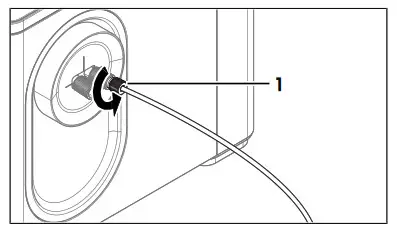
- Unscrew the M8 connector of the waste tube (1) and remove the waste tube.
- Install the new waste tube.
See also Install the waste tube } Page 11
6.6 Replace the protective sleeve
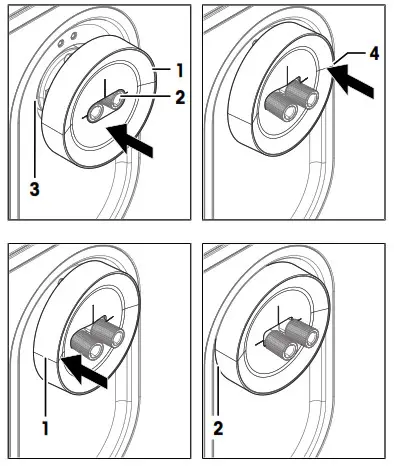
6.6.1 Remove the protective sleeve
• The density meter is shut down.
• No syringe holder is installed.
• No syringes or tubes are connected to the cell adapters.
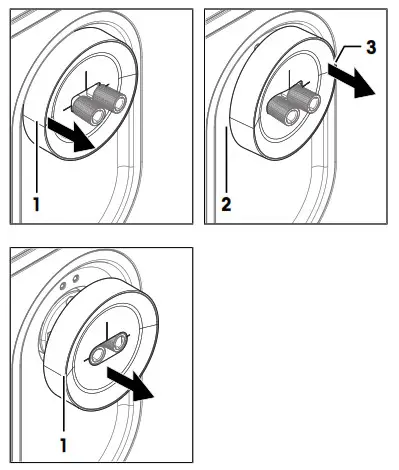
- Hold the protective sleeve (1) with two fingers.
- Pull with one finger until part of the protective sleeve slides partially out of the opening around the cell adapters (2).
- Pull with the other finger until the other side of the protective sleeve slides partially out of the opening.
- Repeat the previous two steps until you can pull the protective sleeve completely out of the opening.

- Slide the protective cover (1) of the cell adapters.
6.6.2 Install the protective sleeve
• The density meter is shut down.
• No syringes or tubes are connected to the cell adapters.
- Slide the protective sleeve (1) on the cell adapters (2) until it touches the housing.
- Push one side of the protective sleeve (4) partially into the opening around the cell adapters (3).

- Push the other side of the protective sleeve (1) partially into the opening.
- Repeat the previous two steps until the wider upper part of the protective sleeve (2) touches the housing.
6.7 View the firmware version
- Press the Info key.
- The firmware version and other system information is displayed.
6.8 Prepare the density meter for storage
- Clean the measuring cell.
- Shut down the density meter.
- Disconnect the density meter from the power supply.
- Disconnect and remove any accessories from the density meter.
- Disconnect the terminal.
- Clean the density meter.
- Protect the density meter from dust.
- Store the density meter and the terminal in a dry and clean place.
6.9 Transport the density meter
If you have questions about transporting your density meter, contact your authorized METTLER TOLEDO dealer or
service representative. www.mt.com/contact
- Clean the measuring cell.
- Shut down the density meter.
- Disconnect the density meter from the power supply.
- Disconnect and remove any accessories from the density meter.
- Disconnect the terminal.
- Clean the density meter.
- If you transport the density meter and the terminal over long distances, use the original packaging.
- Move the density meter and the terminal to the new location.
6.10 Dispose of the density meter
In conformance with the European Directive 2012/19/EU on Waste Electrical and Electronic Equipment (WEEE), this device may not be disposed of in domestic waste. This also applies to countries outside the EU, per their specific requirements.
Please dispose of this product in accordance with local regulations at the collecting point specified for electrical and electronic equipment. If you have any questions, please contact the responsible authority or the distributor from which you purchased this device. Should this device be passed on to other parties, the content of this regulation must also be related.
Technical data
Additional technical data are listed in the Reference Manuals.
7.1 Density meter
| Characteristic | Value | |
| Power rating instrument | Input values | 24 V DC, 5 A |
| Socket | 4-pin, power Mini-DIN female | |
| Power rating AC adapter | Input values | 100…240 V AC ±10%, 1.8 A |
| Input frequency | 50 – 60 Hz | |
| Output values | 24 V DC, 5 A | |
| Dimensions | Width (without cell adapters) | 267 mm |
| Depth | 256 mm | |
| Height | 226 mm | |
| Weight | 17.5 kg | |
| Characteristic | Value | |
| Materials | Housing | Edistir RK451G, Floatglas, X5CrNi18-10(1.4301), EPDM, EN AW-AlMg1 (EN AW-5005A), Makrolon 2805 |
| Cell adapters | PTFE (polytetrafluorethylene) | |
| Measuring cell | Borosilicate glass | |
| Syringe holder | PP (polypropylene) | |
| Protective sleeve | EPDM (ethylene propylene diene monomer (M-class) rubber) | |
| Ambient conditions | Ambient temperature | +5 °C…+40 °C |
| Relative humidity | 20…80 % (non condensing) | |
| Altitude | ≤5000 m above sea level | |
| Pressure range | Atmospheric pressure | |
| Use | In interior spaces | |
| Overvoltage category | II | |
| Pollution degree | 2 | |
| Storage | Temperature range | -20…70 °C |
| Relative humidity | 10…90 % |
Directives, standards, and REACH regulation
The instrument complies with the directives and standards that are listed on the declaration of conformity.
SVHC candidate substances according to REACH (Article 33)
| Material | CAS No. |
| PZT (Lead Zirconate Titanate) | 12626-81-2 |
7.2 Terminal
| Characteristic | Value | |
| Dimensions | Width | 194 mm |
| Depth | 129.5 mm | |
| Height | 56.7 mm | |
| Weight | 638.4 g | |
| Ambient conditions | Top housing | EN ZL-ZnAl4Cu1 (EN Zl-0410) |
| Lower housing | Cristin SO653 | |
| Cover glass | Gorilla glass |
7.3 Measurement
| Characteristic | D4 | D5 | D6 | |
| Density | Measuring range | 0…3 g/cm3 | 0…3 g/cm | 0…3 g/cm3 |
| Accuracy | ±0.0001 g/cm3 | ±0.00005 g/cm3 | ±0.000005 g/cm31) | |
| Repeatability | ±0.00005 g/cm3 | ±0.000005 g/cm3 | ±0.000001 g/cm3 | |
| Resolution | 0.0001 g/cm3 | 0.00001 g/cm3 | 0.000001 g/cm3 |
| Characteristic | D4 | D5 | D6 | |
| Measuring temperature | Range 2) | 0…95 °C | 0…95 °C | 0…95 °C |
| Accuracy | ±0.03 °C | ±0.02 °C | ±0.01 °C | |
| Repeatability | ±0.01 °C | ±0.01 °C | 3) | |
| Resolution | 0.01 °C | 0.01 °C | ±0.001 °C |
1) Under ideal conditions
2) Minimal temperature not more than 25 °C below ambient temperature
3) For 23 °C ± 5 °C and 50 % relative humidity, noncondensing
International standards and norms
International standards and norms complied with are listed on the internet.
To protect your product’s future:
METTLER TOLEDO Service assures the quality, measuring accuracy, and preservation of the value of this product for years to come.
Please request full details about our attractive terms of service.
For more information
www.mt.com/Density-Excellence
Mettler-Toledo GmbH
I’m Langacher 44
8606 Greifensee, Switzerland
www.mt.com/contact
Subject to technical changes.
© Mettler-Toledo GmbH 06/2018
30471941A
References
 METTLER TOLEDO USA | Contact Us | ✉ Sales & Customer Service
-
Standards and Norms for Density Meters and Refractometers
-
METTLER TOLEDO USA | Contact Us | ✉ Sales & Customer Service
-
Densimeter - The all-rounder benchtop digital densimeter
-
Standards and Norms for Density Meters and Refractometers
-
Expertise Library - METTLER TOLEDO
-
Expertise Library - METTLER TOLEDO
 METTLER TOLEDO USA | Contact Us | ✉ Sales & Customer Service
 METTLER TOLEDO USA | Contact Us | ✉ Sales & Customer Service
![Morningstar Tristar Digital Meters [ts-m-2, Ts-rm-2] User Manual](https://static-data1.manualsee.com/1/img/485/16483/2020/12/Morningstar-TriStar-Digital-Meters-TS-M-2-TS-RM-2.jpg "Morningstar Tristar Digital Meters [ts-m-2, Ts-rm-2] User Manual")