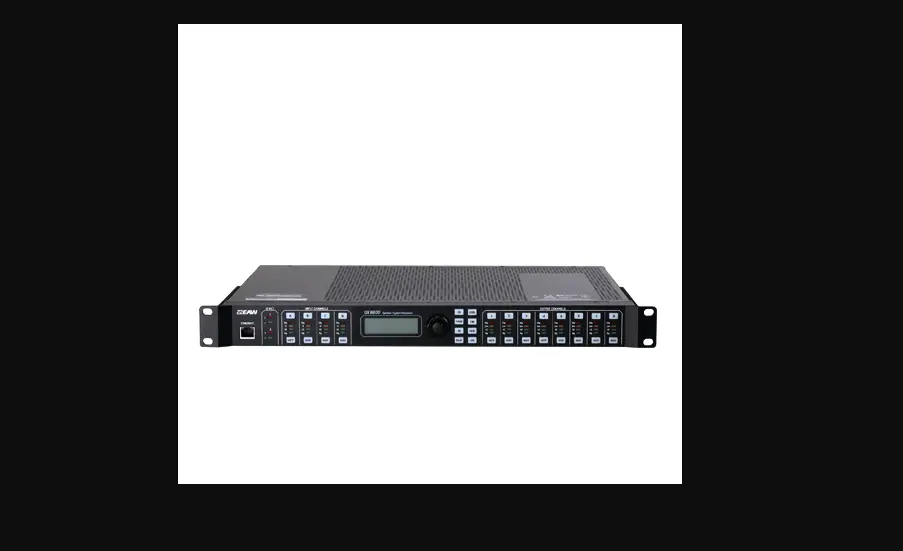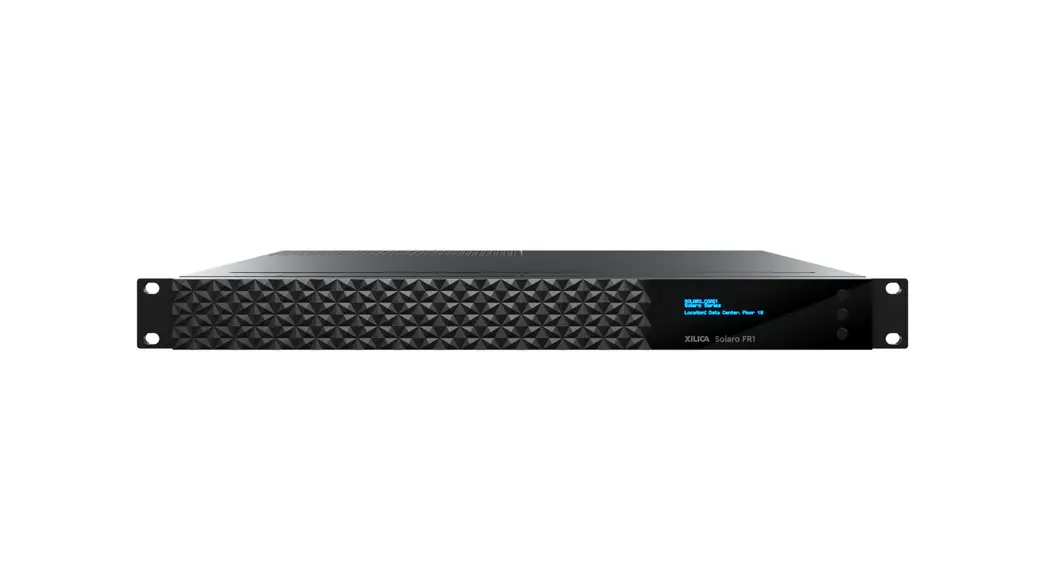
 FR1-D Solaro Series Digital Signal Processor
User Manual
Introduction
This third-party control protocol applies to the Solara Series.
Overview
For Ethernet connection, the user should send out messages using TCP port #10007. The server will Response to the message using the same TCP connection. A keep-alive message must be sent over this TCP connection every 60 seconds, otherwise, the server end will disconnect the TCP connection and all subscriptions associated with the connection will end.
Users also have the choice of using UDP port #10008 to listen to Subscription messages from the device. The user can select whether a particular parameter send out its change via TCP Unicast or UDP Broadcast when issuing a subscription command. If left unspecified, by default a parameter will notify via TCP Unicast. A separate TCP connection is mandatory for status update, and a keep-alive message must continuously be sent over this TCP connection even if the user choose to use UDP Broadcast for all their interested parameters. If at any instance the TCP connection is dropped, all subscriptions and groups settings in the device must be reconfigured again.
Syntax
The third-party controller string is composed with human readable ASCII characters. Each field in separated by one single white space, using more than one white space in between fields will result in command parsing error. A carriage-return (<CR>) is sent to mark the end of the message. Fields enclosed in square brackets are dependent on the command. Refer to the Commands List section for a list of all commands, their detail usage and examples.
| COMMAND | 1 white space | [CONTROL OBJECT/GROUP] | 1 white space | [DATA] | <CR> |
The CONTROL OBJECT is a string of up to 32 characters assigned by the user in software for individual parameters.
It can contain any readable ASCII characters except double quotes. However, the first character cannot be a dollarsign ($) because a preceding ‘$’ is used to distinguish between a CONTROL OBJECT with a CONTROL GROUP.
A CONTROL GROUP is a string of up to 32 characters created using the CREATE command for use as a group name. It can also contain any readable ASCII characters except double quotes. The first character of the CONTROL GROUP will always begin with a ‘$’ to denote it as a group name.
For CONTROL OBJECT/GROUP, if any white spaces are used as part of the string, then it must be encapsulated by double quotes. In addition, note that both COMMAND and CONTROL OBJECT/GROUP are case-sensitive.
DATA can be either:
- a number (positive, negative, floating point, integer represented in ASCII)
- a string (must always be inside double quotes, case-sensitive)
- a Boolean (TRUE or FALSE, case-sensitive)
Refer to the Commands List section for details on the data type accepted by each command.
Responses
The device end will response to a third-party control command regardless it is correct or not. If no response is received, it is likely an indication of a connection problem. All
response messages from the device will end with a carriage-return (<CR>).
If an invalid command is sent, the last encountered Error Code will be returned as:
ERROR=<ERROR CODE><CR>
For GET or GETRAW command, the response will be:
<CONTROL OBJECT>=<DATA><CR>
For REFRESH command, the response will be:
<CONTROL OBJECT>=<DATA><CONTROL OBJECT>=<DATA> … <CR>
For KEEPALIVE command, there is no response from device end.
For REBOOT command, the behavior in Neutrino system is different from Solaro system. in Neutrino system, it will reply “OK<CR>” in Solaro system, there is no response and device will be rebooted For all other commands, the device will return: OK<CR>
Subscriptions
The external controller can subscribe to control objects to get a notification for any data changes on the subscribed objects.
To subscribe/unsubscribe to a control object, simply send the command: SUBSCRIBE <CONTROL OBJECT> [“TCP”/”UDP”] <CR>
UNSUBSCRIBE <CONTROL OBJECT> <CR>
The notification will then be automatically sent to the external control system via TCP Unicast or UDP Broadcast as specified in the command. The notification string received by the external controller will be: #<CONTROL OBJECT>=<DATA><CR>
The string is similar to a GET command, with a # character added in front to distinguish between an explicit read or a notification.
The interval in which the device sent out notifications is global for all subscribed control objects, it can be configured by: INTERVAL <TIME in milliseconds> <CR>
Control Groups
Control groups allow a user to control multiple parameters at once using a single command. The user must first create a group by:
CREATE <CONTROL GROUP> <CR>
After a group is created, individual control objects can join or leave the group by: JOIN <CONTROL GROUP> <CONTROL OBJECT> <CR> LEAVE <CONTROL GROUP> <CONTROL OBJECT> <CR>
Cautious must be used when adding parameters to a group to ensure that the parameters are all of the same type and support the same commands.
When a group is longer used, resource can be free up by:
REMOVE <CONTROL GROUP> <CR>
Similar to subscription, Control Groups are persistent for the duration of the active connection only. When a connection is lost, the groups must be recreated again.
Password Protection
If a device is protected with a password, then the user must unlock the device first before sending any commands. The authentication persists only for the duration of the connection, so if a TCP disconnection occurs, the user have to unlock the device again.
To unlock the device, send the following command:
LOGIN <PASSWORD> <CR> The password used in the command is the same password setup in software.
Verbose/Simple Mode
<Future Implementation – mainly used to configure the amount of details for Responses. This will help some external controller parsing the response more easily>
Control Objects Setup
To setup the control object strings, you need to use Xilica Designer to setup the control object name for the DSP parameters you want to control.
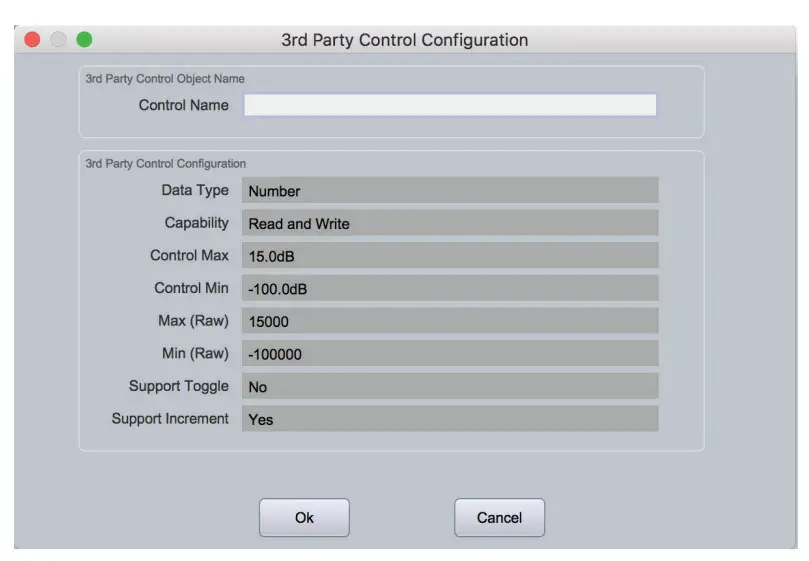
In Xilica Designer under Project Design Mode, you can select the DSP module which you want to create third-party control objects. Double click on the module to bring up the module control panel. In the panel, you can select the parameter you want to control by holding down the Ctrl key and select the control object. Once selected the control object will be highlighted.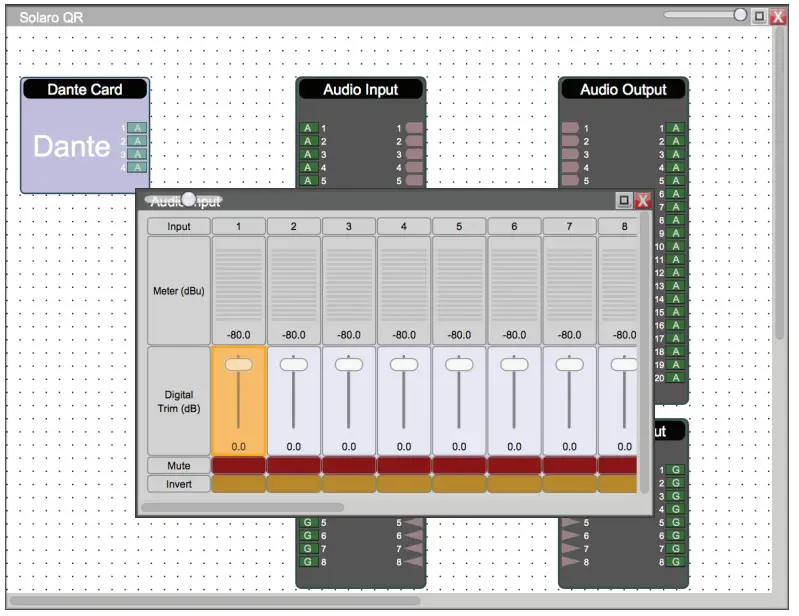 Right mouse click on the highlighted object and select “Create third party control object name” in the popup menu. A dialog will be displayed. You can enter a unique (Unique within the device) control object name. This name will be used in your third-party control protocol.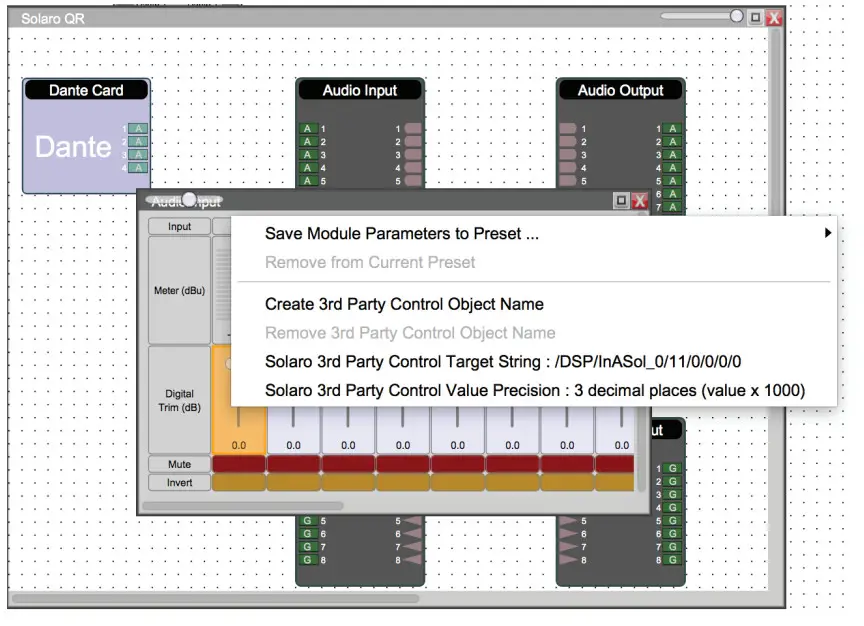
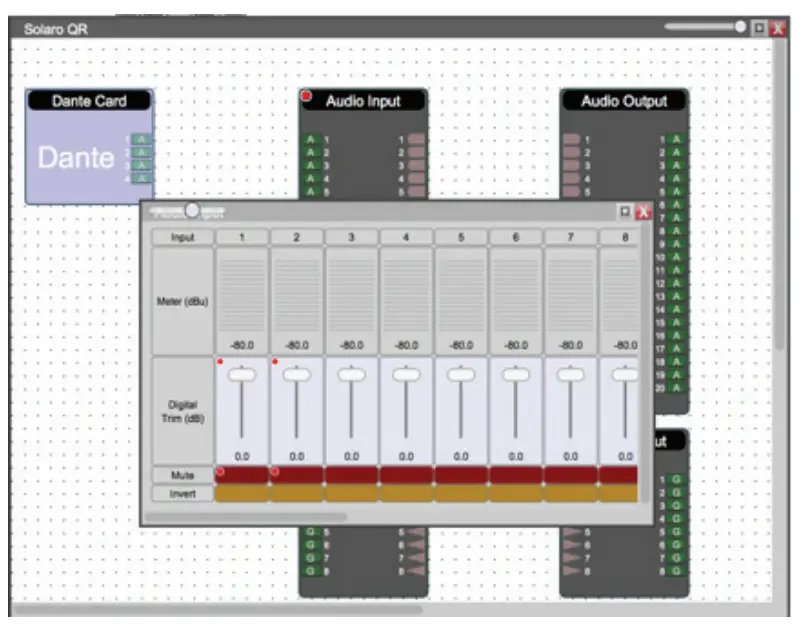
 Once a third-party control object name has been defined, on the top left corner a small red indicator will be displayed to indicate that this object can be controlled through third-party control. You can also notice that the top left corner of the module will also have indicator to indicate that some of its parameters has third-party control object name defined.
 To query a list of all third-party control object name defined in your project, you can select “Project” -> “Device third party control elements” from the top menu bar to display a list of all control object names. You can also export this list to Excel as reference for your third-party control programming.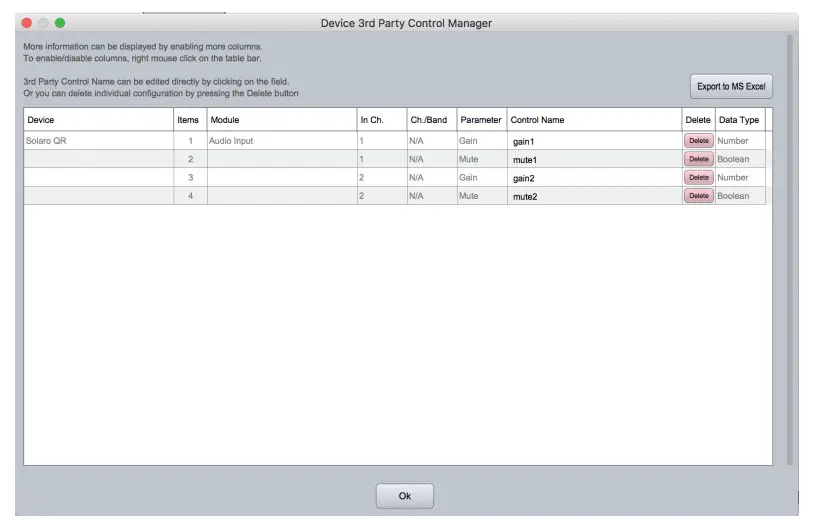
Commands List
SET <CONTROL OBJECT/GROUP> <DATA – number/string/Boolean>
| Examples | SET gain1 -3.2 | Set “gain1” to -3.2 dB |
| SET polarity1 TRUE | Set “polarity1” to ON position | |
| SET filter1 “Butterworth” | Set “filter1” to Butterworth Filter | |
| SET $group1 -15.7 | Set all parameters in group1 to -15.7dB |
SETRAW <CONTROL OBJECT/GROUP> <DATA – number >
| Examples | SETRAW gain1 -3200 | Set “gain1” to -3.2 dB |
| SETRAW polarity1 1 | Set “polarity1” to ON position | |
| SETRAW filter1 1 | Set “filter1” to Butterworth Filter | |
| SETRAW $group1 1000 | Set all parameters in group1 to +1.0dB |
GETRAW <CONTROL OBJECT/GROUP>
| Examples | GETRAW EQslope | Get “EQslope” raw value |
| GETRAW $group1 | Get raw value for all parameters in group1 |
INC <CONTROL OBJECT/GROUP> <DATA – number>
| Examples | INC fader3 0.5 | Increase “fader3” by 0.5 dB |
| INC $group1 1 | Increase all parameters in group1 by 1dB |
INCRAW <CONTROL OBJECT/GROUP> <DATA – number>
| Examples | INCRAW fader3 500 | Increase “fader3” by 0.5 dB |
| INCRAW $group1 1000 | Increase all parameters in group1 by 1dB |
DEC <CONTROL OBJECT/GROUP> <DATA – number>
| Examples | DEC fader3 0.5 | Decrease “fader3” by 0.5 dB |
| DEC $group1 1 | Decrease all parameters in group1 by 1dB |
DECRAW <CONTROL OBJECT/GROUP> <DATA – number>
| Examples | DECRAW fader3 500 | Decrease “fader3” by 0.5 dB |
| DECRAW $group1 1000 | Decrease all parameters in group1 by 1dB |
TOGGLE <CONTROL OBJECT/GROUP>
| Examples | TOGGLE mute1 | Toggle “mute1” state |
| TOGGLE $group2 | Toggle all parameters in group2 |
PRESET <DATA – number/string>
| Examples | PRESET 4 | Recall preset #4 |
| PRESET “preset name” | Recall preset with name “preset name” |
SUBSCRIBE <CONTROL OBJECT/GROUP> <DATA – string>*
| Examples | SUBSCRIBE meter6 | Subscribe to “meter6” via TCP Unicast |
| SUBSCRIBE meter6 “TCP” | Subscribe to “meter6” via TCP Unicast | |
| SUBSCRIBE meter6 “UDP” | Subscribe to “meter6” via UDP Broadcast |
* <DATA – string> is optional, TCP Unicast will be used by default
UNSUBSCRIBE <CONTROL OBJECT/GROUP>
| Example | UNSUBSCRIBE meter6 | Unsubscribe “meter6” |
KEEPALIVE
| Examples | KEEPALIVE | No operation. Can be used by external controller to keep the TCP connection alive. |
INTERVAL <DATA – number>
| Example | INTERVAL 100 | Set subscription interval to minimum 100ms. * Subscription data could be delayed longer than the specify interval due to CPU usage, but it is guarantee to wait for the configured interval time before attempting to sent out subscription data. * The minimum value is 100 ms. |
Note
In Neutrino Series processor, Interval command applies to individual TCP connection. That mean you can have different Interval for different connection. However, in Solaro Series processor, this Internal command applies globally. All connections interval will be changed when you set this Interval command.
LOGIN <DATA – string>
| Example | LOGIN “password” | Login for external control with “password” |
REBOOT
| Example | REBOOT | Remotely reboot device |
REFRESH
| Example | REFRESH | Get formatted data value for all control objects |
CREATE <CONTROL GROUP>
| Example | CREATE group1 | Create a group with the name “group1” This is the only exception where CONTROL GROUP does not require a ‘$’ sign in the syntax because he ‘$’ sign will be automatically added when the group is created. |
REMOVE <CONTROL GROUP>
| Example | REMOVE $group1 | Remove the group with name “group1” |
JOIN <CONTROL GROUP> <DATA – string>
| Example | JOIN $group1 “gain1” | “gain1” will join group1 |
LEAVE <CONTROL GROUP> <DATA – string>
| Example | LEAVE $group2 “mute2” | “mute2” will leave group2 |
Data String
| String | Values |
| Filter Type | Butterworth, LR, Bessel |
| Filter Slope | 6db/Oct, 12db/Oct, 18db/Oct, 24db/Oct, 30db/Oct, 36db/Oct, 42db/Oct, 48db/Oct |
| AFS Sensitivity | Very Low, Low, Medium, High, Very High |
| AFS Type | Dynamic, Fixed |
| Control Ramp Type | Linear, Log, Audio |
Error Codes
| Error Code | Description |
| 101 | Invalid Command |
| 102 | Bad Arguments |
| 103 | Invalid Data Format |
| 104 | Control Object Not Found |
| 105 | Parameter Not Found |
| 106 | Data Value Not Found |
| 107 | Max Subscription Reached |
| 108 | Password Error |
| 109 | Not Yet Login |
| 110 | Command Not Supported for Control Object |
| 111 | Invalid Group Name |
| 112 | Max Control Group Reached |
| 113 | Max Control Object in Group Reached |
| 114 | Object Already in Group |
| 115 | Object Not in Group |
| 116 | Conflicting With Other Objects in Group |
| 117 | Invalid Preset # |
| 118 | Invalid Preset Name |
THIS DOCUMENT CONTAINS THE PROPRIETARY INTELLECTUAL PROPERTY OF XILICA. WHILE XILICA AIMS TO ENSURE ALL COPYRIGHT (2022) XILICA CORPORATION
DOCUMENTATION IS CORRECT PRIOR TO ISSUE, IT CAN ACCEPT NO LIABILITY FOR ERRORS, OMISSIONS OR OTHERWISE THAT MAY IMPACT YOUR ABILITY TO USE THE PRODUCT(S) AND SERVICE(S). TRADEMARKS AND/OR REGISTERED TRADEMARKS MENTIONED HEREIN ARE THE PROPERTY OF THEIR RESPECTIVE OWNERS. ALL RIGHTS RESERVED.