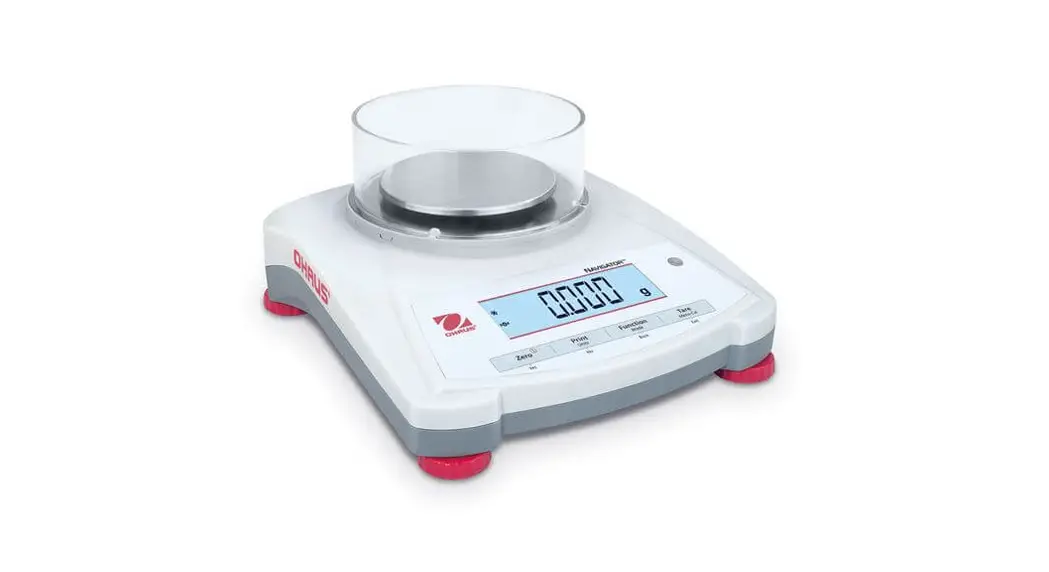
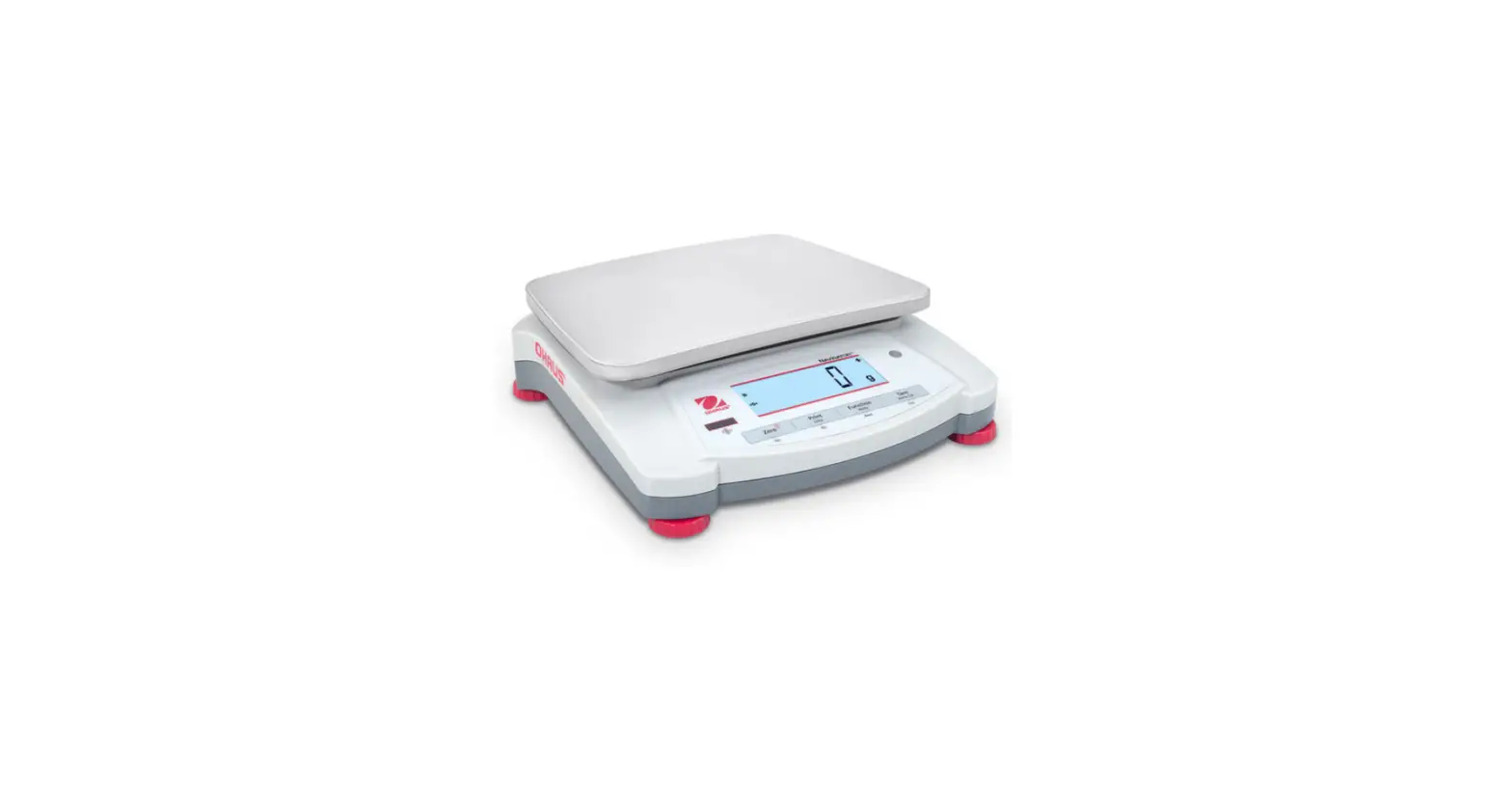
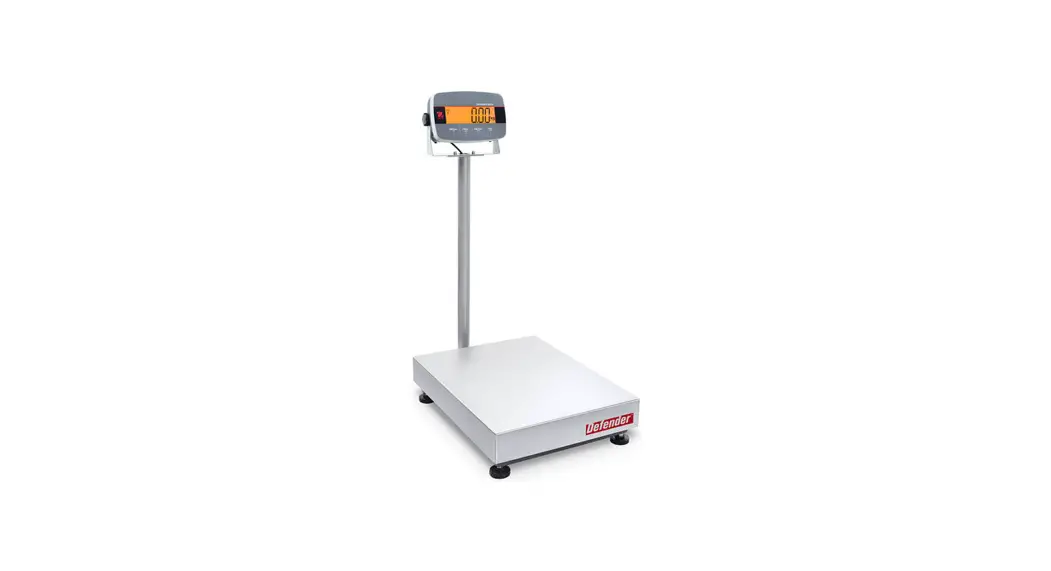
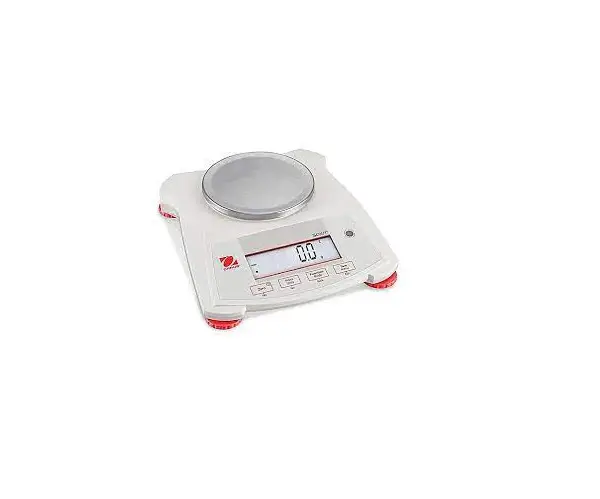
OHAUS Navigator Series Balances Instruction Manual
INTRODUCTION
This manual contains installation, operation and maintenance instructions for the NavigatorTM Series.
Please read the manual completely before using the balance.
Definition of Signal Warnings and Symbols
WARNING: For a hazardous situation with medium risk, possibly resulting in injuries or death if not avoided.
CAUTION: For a hazardous situation with low risk, resulting in damage to the device or the property or in loss of data, or injuries if not avoided.
Attention: For important information about the product
Note: For useful information about the product General hazard
 Electrical shock hazard
Safety Precautions
CAUTION: Read all safety warnings before installing, making connections, or servicing this equipment. Failure to comply with these warnings could result in personal injury and/or property damage. Retain all instructions for future reference.
- Verify that the AC adapter’s input voltage range and plug type are compatible with the local AC mains power supply.
- Position the instrument such that the AC adapter can be easily disconnected from the wall socket.
- Position the power cord so that it does not pose a potential obstacle or tripping hazard.
- Operate the equipment only under ambient conditions specified in these instructions.
- The equipment is for indoor use only.
- Do not operate the equipment in hazardous or explosive environments.
- Only use the equipment in dry locations.
- Only use approved accessories and peripherals.
- Disconnect the equipment from the power supply when cleaning.
- Service should only be performed by authorized personnel.
Intended Use
Use the instrument exclusively for weighing as described in the operating instructions. Any other type of use and operation beyond the limits of technical specifications without written consent from OHAUS, is considered as not intended. This instrument complies with current industry standards and the recognized safety regulations; however, it can constitute a hazard in use. If the instrument is not used according to these operating instructions, the intended protection of the instrument may be compromised and OHAUS assumes no liability.
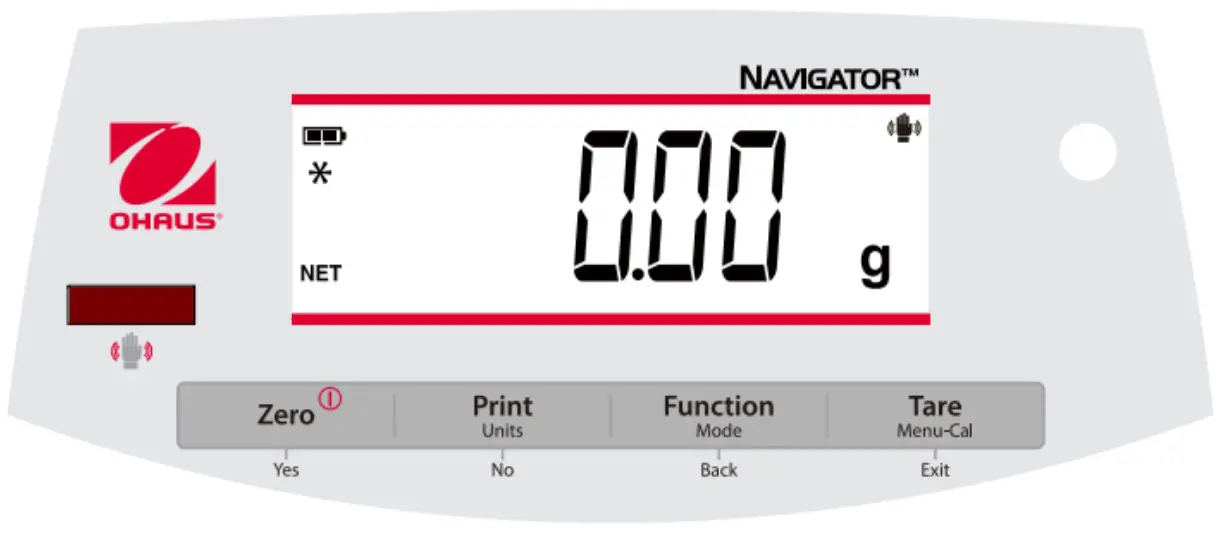
Controls
| Button | Functions |
Zero Yes | Short Press (when on): Sets display to zero (when off): Turns balance on Long Press (when on): Turns the balance off Short Press (in Menu): Selects/accepts displayed setting |
| Print Units No | Short Press: See Interface Manual for operation description. Long Press: Toggles through active units Short Press (in Menu): Toggles through available settings |
| Function Mode Back | Short Press: Selects function setting Long Press: Selects active Mode Short Press (in Menu): returns to previous settings |
| Tare Menu-Cal Exit | Short Press: Enter / clear a Tare value Long Press: Enters User Menu Short Press (in Menu): Quickly exit User Menu |
| IR Sensor * | IR Sensors can be programmed to act as a “touchless” button. See the User Menu section 4.3 for the available settings. |
The IR Sensors can be activated by a hand or other object that is placed about 12mm (½ inch) above the sensor location. The sensor activation distance will vary based on the reflective nature of the object. If unwanted activations occur due to unique situations the sensor can be turned off.
*Availability of IR Sensor is dependent on model and region.
INSTALLATION
Transportation Lock
The Transportation Lock is located under the balance. Rotate the pointer to the unlocked position.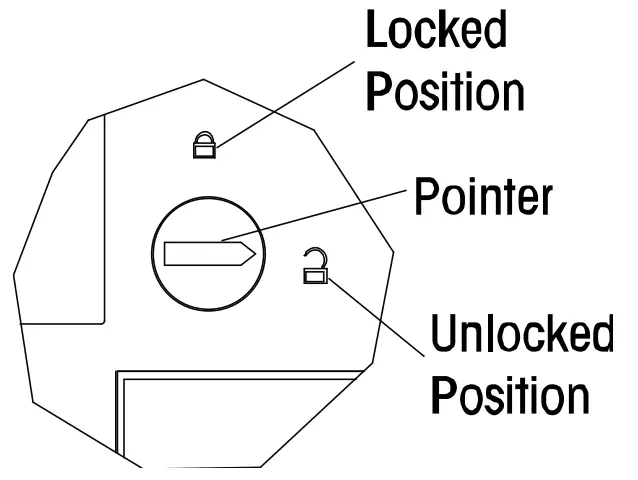
Location
Use the balance on a firm, steady surface. Avoid locations with excessive air current, vibrations, heat sources, or rapid temperature changes.
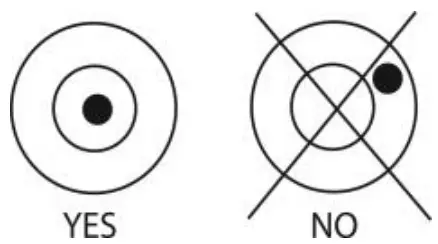
Adjust the leveling feet so the bubble is centered in the circle.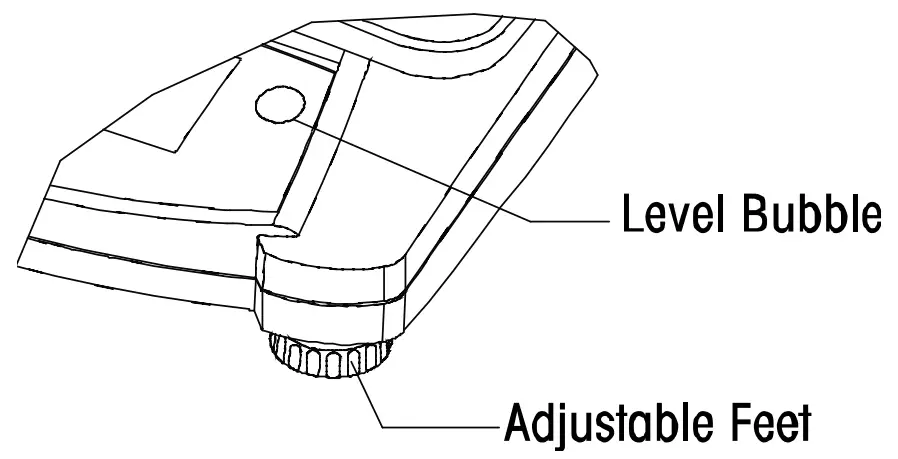
Power
The AC Adapter is used to power the balance when battery power is not needed.
Connect the AC Adapter plug to the input jack.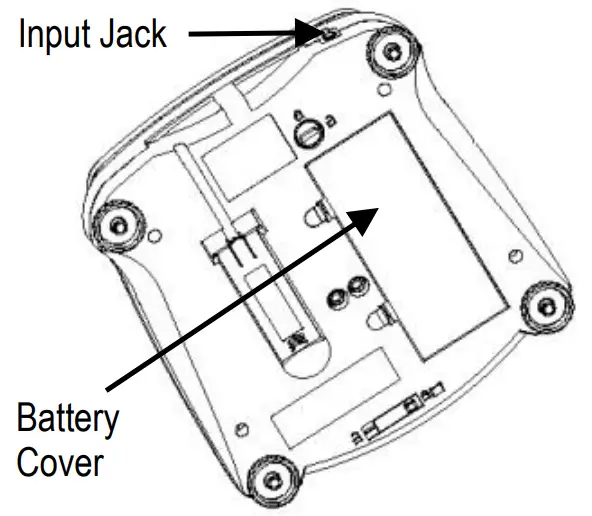
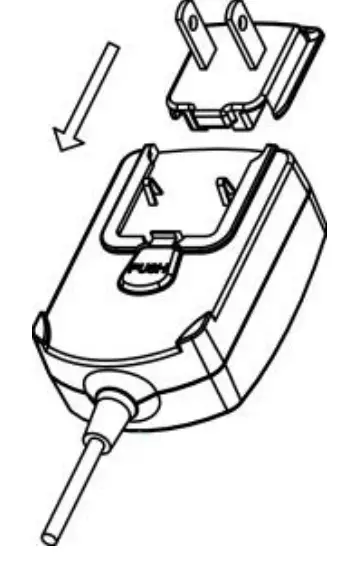
Connect AC Adapter to the proper AC supply.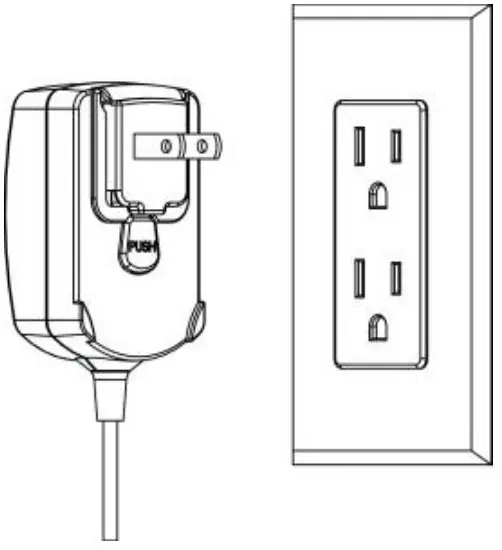
Battery installation (without optional internal battery):
Remove battery cover and install 4 batteries using the polarity indications as shown in the compartment.
Optional rechargeable battery*
Balances with the optional rechargeable battery will need to be charged for 12 hours before the balance can be operated on battery power for the first time. The battery is protected from overcharging so the balance can remain connected to the AC power. When the battery is fully charged the battery indicator on the display will stop blinking.
To remove the rechargeable battery option and install C cell batteries, reference the Recharging
Battery Option instruction manual for step by step instructions as well as disposal instructions.
CAUTION: Risk of explosion can occur if the rechargeable battery is replaced with the wrong type or if it is not properly connected.
Note:
After power on, it is recommended to warm up the balance for at least 5 minutes before using it.
*Availability of IR Sensor is dependent on model and region.
Initial Calibration
When the balance is first installed it should be calibrated to ensure accurate results.
Press and hold Menu-Cal until [mMeNU] (Menu) is displayed. When the button is released, the display will display [.C.A.L.]. Press Yes to accept, [SpaN] will then be shown. Press Yes again to begin the span calibration. [–C–] blinks while zero reading is stored. Next, the display shows the calibration weight value. Place the specified calibration mass on the pan. [–C–] blinks while the reading is stored. The balance returns to the previous application mode and is ready for use.
OPERATION
All modes except for weighing must be activated in the User Menu before they are available, see Section 4.
Weigh Mode
- Press and hold Mode until [wJeIGH] (Weigh) is displayed.
- If required, place an empty container on the pan and press Tare.
- Add material to the container. The display shows the weight of the material.
Parts Counting Mode
This mode counts large numbers of items based on the weight of a reference count.
- Place an empty container on the pan and press Tare.
- Press and hold Mode until [Count] (Count) is displayed. [CLr.APU] (Clear Average Piece Weight) will then display.
- Press No to use the stored APW. Proceed to step 6.
- Press Yes to establish an APW. The balance will then display the stored sample size, i.e. [Put 10]. Press No or Back to toggle the choices (5, 10, 20, 50 or 100).
- Put the indicated number of pieces on the pan then press Yes to calculate the APW. The display shows the piece count. Note: Press Function to view the current APW.
- Add additional pieces until the desired count is reached.
- To clear the stored APW press and hold Mode until [Count] is displayed. Press Yes when [Clr.APU] is displayed.
Percent Mode
This mode measures the weight of a sample as a percentage of a reference weight.
- Place an empty container on the pan and press Tare.
- Press and hold Mode until [Percnt] is displayed. [Clr.ref] (clear reference) will then display.
- Press No to use the stored reference weight and proceed to step 6.
- Press Yes to establish a new reference. Balance will now display [Put.ref].
- Add the desired reference material to the container. Press Yes to store the reference weight.
The display shows 100%.
Note: Press Function to view the current reference weight. - Replace the reference material with the sample material. The display shows the percentage of the sample compared to reference weight.
- To clear the stored reference press and hold Mode until [Percnt] is displayed. Press Yes when [Clr.ref] is displayed.
Checkweigh Mode
This mode sets low and high weight limits for portion control processes.
- Press and hold Mode until [CHeCk] (Check) is displayed. [CLr.ref] (clear references) will then display.
- Press No to use the stored reference weight limits and proceed to step 5.
Note: Press Function to view the low and high reference weight limits. - Press Yes to establish new reference values. The balance will then display [Set. Lo]. Press Yes to view the “Low” limit value. Press Yes to accept or No to edit the “Low” limit value. The stored value then displays with the first digit highlighted [000.000 kg]. Repeatedly press No until the desired number appears. Press Yes to accept and highlight the next digit. Repeat until all the digits are correct. Press Yes to accept the “low” limit value, [Set. Hi] will be displayed.
- Repeat the same procedure to accept or edit the “high” value.
- Place sample material on the Pan. The “Accept” indicator will now show that the sample weight is within the acceptable range.
- To clear the stored reference values press and hold Mode until [CHeCk] is displayed. Press Yes when [Clr.ref] is displayed.
SETTINGS
The User Menu allows the customizing of balance settings.
Note: Additional Sub-Menus may be available if Interface Options are installed. See Interface User Manual for the additional setting information.
Menu Navigation
User Menu:
| Sub-Menus: | .C.a.l. | .S.e.t.u.p.* | .M.o.d.e. | .U.n.i.t.* | .E.n.d. |
| Menu Items: | Span Lin End | b.light A-OFF IR** Filter AZT Stab Stab.C End | Count Percnt Check End | g kg … End |
* Note: Available settings vary by models and regions
**Availability of IR Sensor is dependent on model and region.
Press and hold Menu until [mMeNU] (Menu) is displayed. When released the first sub-menu [.C.a.l.] (Cal) will be shown.
Press Yes to enter the displayed sub-menu or press No to advance to the next.
Selecting a sub-menu will display the first menu item. Press Yes to view the menu item setting or press No to move to the next menu item. When viewing the setting, press Yes to accept the setting, or press No to change the setting. When [End] is displayed, press Yes to return to the sub-menu selections or No to return to the first item in the current menu.
Cal Sub-Menu
- Span [SpaN] (yes, no) – Initiates a span calibration procedure (zero and span). A span calibration is important when initially setting up the balance.
- Lin [Lin] (yes, no) – Initiates a linearity calibration procedure (zero, mid-point and span).
Setup Sub-Menu
- Back Light [b.light] (on,off,Auto)-When Back light is set to “on” the balance will always “on”.
When Back light is set to “Auto” the balance will turn on when a button is pressed or the display weight changes. - Auto Off [A-Off] (on, off) – When Auto Off is set to “on” the balance will turn off automatically after 5 minutes of inactivity. Auto off is used to save battery power.
- IR Sensor [Ir.Func] (Off, Tare, Function, Print, Zero, Display) – These settings determine the role of the IR Sensor. “Zero”, “Print”, “Function” or “Tare” allows the IR sensor to act the same as the related button. “Display” activates the display if Display-Auto is set. “Off” disables the sensor.*
- Filter [filter] (L1,L2,L3,L4 ) – set the amount of signal filtering
L1— — — — — — — — — — —>L4 Stability Less— — — — — — — > Greater Stabilization time Faster— — — >Slower - Auto Zero Tracking[AZt] (OFF,0.5d,1d,3d,5d,8d,10d) – Set the automatic zero tracking functionality. The display will maintain zero until a change of “0.5d,1d,3d,5d,8d,10d” divisions per second has been exceeded.
- Stable [Stab] (0.5d,1d,2d,5d) – Set the amount of the reading can vary while the stability symbol remains on.
- Stable Compensation [Stab.C] (on, off) – Set the automatic stable tracking functionality. Set it “off” for dosing or filling application.
Note: Bold always represents factory default Value
*Availability of IR Sensor is dependent on model and region.
Mode Menu
This sub-menu activates modes so they will be available for use with the Mode button. Weigh mode is always active.
- Parts Count [Count] (on, off) – Set on for the mode to be active.
- Percent [Percnt] (on, off) – Set on for the mode to be active.
- Check Weigh [CHECk] (on, off) – Set on for the mode to be active.
Units Menu
This sub-menu activates units so they will be accessible with the Units button. The units in the menu must be turned “on” to be active.
Note: Available units and modes vary by model and local regulations.
Sealing access to balance settings
You can use the Menu Lock switch to limit changes to the user menu. The switch in type approved models may set some balance settings as required by the approval agency. The switch may be secured using paper seals, wire seals or plastic ties.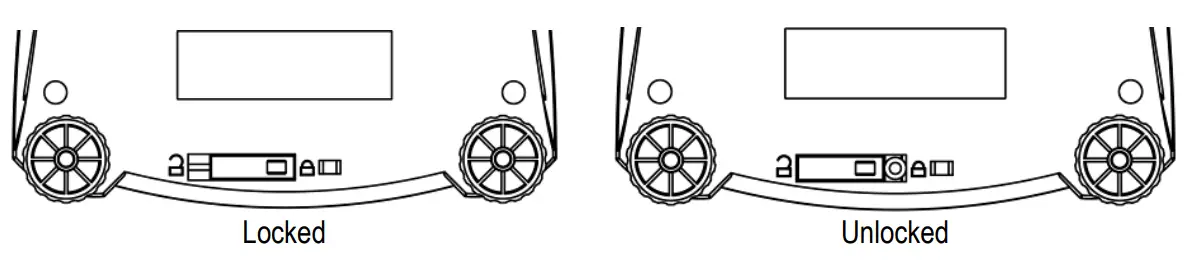
MAINTENANCE
Cleaning
WARNING: Electric Shock Hazard. Disconnect the equipment from the power supply before cleaning.
Make sure that no liquid enters the interior of the instrument.
Attention: Do not use solvents, harsh chemicals, ammonia or abrasive cleaning agents.
The exterior surfaces of the instrument may be cleaned with a cloth dampened with water and a mild detergent.
Troubleshooting
The following table lists common problems and possible causes and remedies.
If the problem persists, contact OHAUS or your authorized dealer.
| Symptom | Possible Cause | Remedy |
| Cannot turn on | No power to balance | Verify connections and voltage |
| Poor accuracy | Improper calibration Unstable environment | Perform calibrationMove balance to suitable location |
| Cannot calibrate | Unstable environment Incorrect calibration weight | Move the balance to suitable location Use correct calibration weight |
| Cannot access mode | Mode not enabled | Enter menu and enable mode |
| Cannot access unit | Unit not enabled | Enter menu and enable unit |
| Lo ref | Reference weight is too low | Increase reference weight. |
| ref err | Parts counting– sample weight <1d. | Shows error – exits mode or goes to [Clr. U]. |
| Err 3.0 | Incorrect calibration weight | See section 2.5 for correct weights |
| Err 4.4 | RS232 buffer is full | Set Handshake on, see Interface User Manual. |
| Err 8.1 | Power on zero range exceeded | Clear pan, check Shipping Lock setting |
| Err 8.2 | Power on zero under range | Install pan, check Shipping Lock setting |
| Err 8.3 | Overload (>cap+9e) | Load exceeds balance maximum capacity |
| Err 8.4 | Under load | Reading below min. range – Re-install pan. |
| Err 8.6 | Displayed value >999999 | Result exceeds display capability. |
| Err | Internal data error. | Contact an authorized service agent |
| Err 13 | Fail to write EEPROM. | Contact an authorized service agent |
| Err 3 | Invalid checksum data | Contact an authorized service agent |
Service Information
If the troubleshooting section does not resolve or describe your problem, contact your authorized OHAUS service agent. For service assistance or technical support in the United States call toll-free 1-800-526-0659 between 8:00 AM and 5:00 PM EST. An OHAUS product service specialist will be available to provide assistance. Outside the USA, please visit our web site, www.ohaus.com to locate the OHAUS office nearest you.
TECHNICAL DATA
Equipment Ratings:
- Pollution degree 2;
- Installation category II;
- Altitude 2000m;
- Humidity: Maximum 80% for temperatures up to 31° C decreasing linearly to 50% at 40° C; noncondensing;
- Electrical supply: Rated 12VDC 500mA for use with a Certified/Listed power adapter or battery operated;
- Indoor use only;
- Temperature range: 10° C to 40° C, Approved models (M) 0° C to 40° C
- The mains supply voltage fluctuations are not to exceed ± 10 % of the nominal supply voltage.
Specifications
Non-approved Models
| Model | NV123 | NV223 | NV323 | NV222 | NV422 | NV622 | NV1202 |
| Capacity (g) | 120 | 220 | 320 | 220 | 420 | 620 | 1200 |
| Readability (g) | 0.001 | 0.001 | 0.001 | 0.01 | 0.01 | 0.01 | 0.01 |
| Repeatability (Std. Dev.) | 2d | 2d | 2d | 1d | 2d | 2d | 2d |
| Linearity | ±3d | ±5d | ±5d | ±2d | ±2d | ±2d | ±3d |
| Span Calibration Mass (Not Included) | 100 | 200 | 300 | 200 | 200 | 300 | 1000 |
| Linearity Calibration Mass | 50, 100 g | 100, 200 g | 150, 300 g | 100, 200 g | 200, 400 g | 300, 600 g | 500 g, 1 kg |
| Stabilization Time (s) | 2.5 | 1 | 1.5 | 1.5 | 2 | ||
| Construction | ABS housing & stainless steel pan | ||||||
| Draftshield | Yes | No | |||||
| Calibration | User-selectable external span or linearity calibration/Digital with external weight | ||||||
| Tare Range | Full capacity by subtraction | ||||||
| Weighing Units** | g, kg, N, oz, ozt, dwt, lb, lb:oz, ct, grain, taels (3), Tical, Tola | ||||||
| Application Modes | Weighing, Parts Counting, Percent Weighing, Checkweighing | ||||||
| Power Requirement | AC adapter (included) or 4 C batteries (not included) | ||||||
| Typical Battery Life | 200 hours | 270 hours | 200 hours | ||||
| Specified Temperature Range | 10°C (50°F) to 40°C (104°F) at 10% to 85% relative humidity, non-condensing | ||||||
| Storage Conditions | -20°C (-4°F) to 55°C (131°F) at 10% to 90% relative humidity, non-condensing | ||||||
| Communication | RS232, USB, or Ethernet (available as accessories) | ||||||
| Display Type | Liquid Crystal Display (LCD) with backlight | ||||||
| Display Size | 0.78 in / 20 mm digits | ||||||
| Pan Size (W x D) | Ø3.7 in / Ø93 mm | Ø5.7 in / Ø145 mm | 7.5 x 5.7 in / 190 x 144mm | ||||
| Balance Dimensions (W x D x H) | 204 x 230 x 107 mm with draft shield 204 x 230 x 74 mm without draft shield | 8 x 9.1 x 2.8 in / 204 x 230 x 70 mm | |||||
| Shipping Dimensions (W x D x H) | 15.2 x 13.2 x 6.7 in / 385 x 335 x 170 mm | 11.8 x 9.8 x 5.3 in / 300 x 250 x 134 mm | |||||
| Net Weight | 2.2 lb / 1.0 kg | 2.2 lb / 1.0 kg | |||||
| Shipping Weight | 3.3 lb / 1.5 kg | 3.3 lb / 1.5 kg | |||||
| Model | NV2202 | NV3202 | NV221 | NV621 | NV1201 | NV2201 | NVT2201 |
| Capacity (g) | 2200 | 3200 | 220 | 620 | 1200 | 2200 | 2200 |
| Readability (g) | 0.01 | 0.01 | 0.1 | 0.1 | 0.1 | 0.1 | 0.1 |
| Repeatability (Std. Dev.) | 2d | 2d | 1d | 1d | 1d | 1d | 1d |
| Linearity | ±5d | ±5d | ±2d | ±2d | ±2d | ±2d | ±2d |
| Span Calibration Mass (Not Included) | 2000 | 3000 | 200 | 300 | 500 | 1000 | 1000 |
| Linearity Calibration Mass | 1 kg, 2 kg | 1.5 kg, 3 kg | 100, 200 g | 300, 600 g | 500 g, 1 kg | 1 kg, 2 kg | 1 kg, 2 kg |
| Stabilization Time (s) | 2 | 2 | 1 | 1 | 1 | 1 | 1 |
| Construction | ABS housing & stainless steel pan | ||||||
| Draftshield | No | ||||||
| Calibration | User-selectable external span or linearity calibration/Digital with external weight | ||||||
| Tare Range | Full capacity by subtraction | ||||||
| Weighing Units** | g, kg, N, oz, ozt, dwt, lb, lb:oz, ct, grain, taels (3), Tical, Tola | ||||||
| Application Modes | Weighing, Parts Counting, Percent Weighing, Checkweighing | ||||||
| Power Requirement | AC adapter (included) or 4 C batteries (not included) | ||||||
| Typical Battery Life | 200 hours | 270 hours | |||||
| Specified Temperature Range | 10°C (50°F) to 40°C (104°F) at 10% to 85% relative humidity, non-condensing | ||||||
| Storage Conditions | -20°C (-4°F) to 55°C (131°F) at 10% to 90% relative humidity, non-condensing | ||||||
| Communication | RS232, USB, or Ethernet (available as accessories) | ||||||
| Display Type | Liquid Crystal Display (LCD) with backlight | ||||||
| Display Size | 0.78 in / 20 mm digits | ||||||
| Pan Size (W x D) | 7.5 x 5.7 in / 190 x 144 mm | 9.1 x 6.9 in / 230 x 174 mm | |||||
| Balance Dimensions (W x D x H) | 8 x 9.1 x 2.8 in / 204 x 230 x 70 mm | 9.5 x 9.8 x2.9 in / 240 x 250 x 74 mm | |||||
| Shipping Dimensions (W x D x H) | 11.8 x 9.8 x 5.3 in / 300 x 250 x 134 mm | 15.2 x 13.2 x6.7 in / 385 x 335 x 170 mm | |||||
| Net Weight | 2.2 lb / 1.0 kg | 3.3 lb / 1.5 kg | |||||
| Shipping Weight | 3.3 lb / 1.5 kg | 5.1 lb / 2.3 kg | |||||
| Model | NVT4201 | NVT6201 | NVT10201 | NVT2200 | NVT6200 | NVT12000 | NVT22000 |
| Capacity (g) | 4200 | 6200 | 10200 | 2200 | 6200 | 12000 | 22000 |
| Readability (g) | 0.1 | 0.1 | 0.1 | 1 | 1 | 1 | 1 |
| Repeatability (Std. Dev.) | 2d | 2d | 2d | 2d | 1d | 1d | 1d |
| Linearity | ±2d | ±2d | ±2d | ±2d | ±2d | ±2d | ±2d |
| Span Calibration Mass (Not Included) | 2000 | 5000 | 5000 | 1000 | 5000 | 5000 | 10000 |
| Linearity Calibration Mass | 2 kg, 4 kg | 3 kg, 6 kg | 5 kg, 10 kg | 1 kg, 2 kg | 3 kg, 6 kg | 5 kg, 10 kg | 10 kg, 20 kg |
| Stabilization Time (s) | 1.5 | 1.5 | 1.5 | 1 | 1 | 1 | 1 |
| Construction | ABS housing & stainless steel pan | ||||||
| Draftshield | No | ||||||
| Calibration | User-selectable external span or linearity calibration/Digital with external weight | ||||||
| Tare Range | Full capacity by subtraction | ||||||
| Weighing Units** | g, kg, N, oz, ozt, dwt, lb, lb:oz, ct, grain, taels (3), Tical, Tola | ||||||
| Application Modes | Weighing, Parts Counting, Percent Weighing, Checkweighing | ||||||
| Power Requirement | AC adapter (included) or 4 C batteries (not included) | ||||||
| Typical Battery Life | 270 hours | 200 hours | 270 hours | ||||
| Specified Temperature Range | 10°C (50°F) to 40°C (104°F) at 10% to 85% relative humidity, non-condensing | ||||||
| Storage Conditions | -20°C (-4°F) to 55°C (131°F) at 10% to 90% relative humidity, non-condensing | ||||||
| Communication | RS232, USB, or Ethernet (available as accessories) | ||||||
| Display Type | Liquid Crystal Display (LCD) with backlight | ||||||
| Display Size | 0.78 in / 20 mm digits | ||||||
| Pan Size (W x D) | 9.1 x 6.9 in / 230 x 174 mm | ||||||
| Balance Dimensions (W x D x H) | 9.5 x 9.8 x 2.9 in / 240 x 250 x 74 mm | ||||||
| Shipping Dimensions (W x D x H) | 15.2 x 13.2 x 6.7 in / 385 x 335 x 170 mm | ||||||
| Net Weight | 3.3 lb / 1.5 kg | ||||||
| Shipping Weight | 5.1 lb / 2.3 kg | ||||||
** Availability depends on model and region.
Capacity x Readability
| Model | NV123 | NV223 | NV323 | NV222 | NV422 | NV622 | NV1202 |
| Gram (g) | 120 x 0.001 | 220 x 0.001 | 320 x 0.001 | 220 x 0.01 | 420 x 0.01 | 620 x 0.01 | 1200 x 0.01 |
| Kilogram (kg) | / | / | / | / | / | / | 1.2 x 0.00001 |
| Newton (N) | 1.17679 x0.00001 | 2.15744 x0.00001 | 3.1381 x0.00001 | 2.1574 x0.0001 | 4.1188 x0.0001 | 6.0801 x0.0001 | 11.7679 x0.0001 |
| Ounce (oz) | 4.23285 x0.00005 | 7.76025 x0.00005 | 9.99995 x0.0000511.2876 x0.0001 | 7.7600 x0.0005 | 14.8150 x0.0005 | 21.8700 x0.0005 | 42.3285 x0.0005 |
| Ounce Troy (ozt) | 3.85805 x0.00005 | 7.07315 x0.00005 | 10.28820 x0.00005 | 7.0730 x0.0005 | 13.5030 x0.0005 | 19.9335 x0.0005 | 38.5805 x0.0005 |
| Pennyweight (dwt) | 77.162 x 0.001 | 141.463 x 0.001 | 205.765 x0.001 | 141.46 x 0.01 | 270.07 x 0.01 | 398.67 x 0.01 | 771.62 x 0.01 |
| Pound (lb) | / | / | / | / | / | 1.36690 x0.00005 | 2.64550 x0.00005 |
| Pound:Ounce (lb:oz) | / | / | / | / | / | 1lb:5.8700oz x 0.0005 oz | 2lb:10.328oz x 0.001oz |
| Carat (ct) | 600.000 x 0.005 | 999.995/1100.00 x 0.005/0.01 | 999.995/1600 x 0.005/0.01 | 1100 x 0.05 | 2100 x 0.05 | 3100 x 0.05 | 6000 x 0.05 |
| Grain (grn) | 1851.78 x0.02 | 3395.12 x 0.02 | 4938.26 x0.02 | 3395.0 x0.2 | 6481.6 x0.2 | 9568.0 x 0.2 | 18518.8 x 0.2 |
| Model | NV2202 | NV3202 | NV221 | NV621 | NV1201 | NV2201 | NVT2201 |
| Gram (g) | 2200 x 0.01 | 3200 x 0.01 | 220 x 0.1 | 620 x 0.1 | 1200 x 0.1 | 2200 x 0.1 | 2200 x 0.1 |
| Kilogram (kg) | 2.2 x 0.00001 | 3.2 x 0.00001 | / | / | 1.2 x 0.0001 | 2.2 x 0.0001 | 2.2 x 0.0001 |
| Newton (N) | 21.5744 x0.0001 | 31.381 x 0.0001 | 2.157 x 0.001 | 6.080 x 0.001 | 11.768 x0.001 | 21.574 x 0.001 | 21.574 x 0.001 |
| Ounce (oz) | 77.6025 x0.0005 | 99.9995/112.876 x0.005/0.001 | 7.760 x0.005 | 21.870 x0.005 | 42.330 x 0.005 | 77.600 x0.005 | 77.600 x0.005 |
| Ounce Troy (ozt) | 70.7315 x0.0005 | 99.9995/102.882 x0.005/0.001 | 7.070 x 0.005 | 19.930 x0.005 | 38.580 x 0.005 | 70.730 x0.005 | 70.730 x0.005 |
| Pennyweight (dwt) | 1414.63 x0.01 | 2057.65 x 0.01 | 141.5 x 0.1 | 398.7 x 0.1 | 771.6 x 0.1 | 1414.6 x 0.1 | 1414.6 x0.1 |
| Pound (lb) | 4.85015 x0.00005 | 7.05475 x 0.00005 | / | 1.3670 x0.0005 | 2.6455 x0.0005 | 4.8500 x0.0005 | 4.8500 x0.0005 |
| Pound:Ounce (lb:oz) | 4lb:13.604oz x 0.001oz | 7lb:00.878oz x 0.001oz | / | 1lb:5.870oz x 0.005oz | 2lb:10.330oz x 0.005oz | 4lb:13.600oz x 0.005oz | 4lb:13.600oz x 0.005oz |
| Carat (ct) | 9999.95/11000.0 x 0.05/0.1 | 9999.95/16000.0 x0.05/0.1 | 1100 x 0.5 | 3100 x 0.5 | 6000 x 0.5 | 11000 x 0.5 | 11000 x 0.5 |
| Grain (grn) | 33951.2 x 0.2 | 49383.6 x 0.2 | 3400 x 2 | 9570 x 2 | 18520 x 2 | 33950 x 2 | 33950 x 2 |
| Model | NVT4201 | NVT6201 | NVT10201 | NVT2200 | NVT6200 | NVT12000 | NVT22000 |
| Gram (g) | 4200 x 0.1 | 6200 x 0.1 | 10000 x 0.1 | 2200 x 1 | 6200 x 1 | 12000 x 1 | 22000 x 1 |
| Kilogram (kg) | 4.2 x 0.0001 | 6.2 x 0.0001 | 10 x 0.0001 | 2.2 x 0.001 | 6.2 x 0.001 | 12 x 0.001 | 22 x 0.001 |
| Newton (N) | 41.188 x 0.001 | 60.801 x 0.001 | 98.066 x 0.001 | 21.57 x 0.01 | 60.8 x 0.01 | 117.68 x 0.01 | 215.74 x 0.01 |
| Ounce (oz) | 148.15 x 0.005 | 218.700 x0.005 | 352.735 x0.005 | 77.6 x 0.05 | 218.7 x 0.05 | 423.3 x 0.05 | 776.05 x 0.05 |
| Ounce Troy (ozt) | 135.035 x 0.005 | 199.335 x 0.005 | 321.505 x 0.005 | 70.75 x 0.05 | 199.35 x 0.05 | 385.8 x 0.05 | 707.3 x 0.05 |
| Pennyweight (dwt) | 2700.7 x 0.1 | 3986.7 x 0.1 | 6430.1 x 0.1 | 1410 x 1 | 3990 x 1 | 7720 x 1 | 14150 x 1 |
| Pound (lb) | 9.2595 x0.0005 | 13.6685 x0.0005 | 22.0460 x0.0005 | 4.85 x 0.005 | 13.67 x 0.005 | 26.455 x 0.005 | 48.5 x 0.005 |
| Pound:Ounc e (lb:oz) | 9lb:4.15oz x 0.005oz | 13lb:10.700oz x 0.005oz | 9lb:15.995oz / 22lb:00.74oz x 0.005oz / 0.01oz | 4lb:13.6oz x 0.05oz | 13lb:10.7oz x 0.05oz | 26lb:7.3oz x 0.05oz | 48lb:8.05oz x 0.05oz |
| Carat (ct) | 21000 x 0.5 | 31000 x 0.5 | 50000.0 x 0.5 | 11000 x 5 | 31000 x 5 | 60000 x 5 | 110000 x 5 |
| Grain (grn) | 64820 x 2 | 95680 x 2 | 154320 x 2 | 33960.19 x20 | 95680 x 20 | 185180 x 20 | 339520 x 20 |
Approved Models
| Model | NVT1601M | NVT3200M | NVT6400M | NVT16000M |
| Capacity (g) | 1600 | 3200 | 6400 | 16000 |
| Readability (g) | 0.5 | 1 | 2 | 5 |
| Verification Interval e (g) | 0.5 | 1 | 2 | 5 |
| Span Calibration Mass (Not Included) | 1 kg | 2 kg | 5 kg | 10 kg |
| Linearity Calibration Mass | 1 kg, 1.5 kg | 2 kg, 3 kg | 3 kg, 6 kg | 10 kg, 15 kg |
| Approval Class | Ⅲ | |||
| Stabilization Time (s) | 1 s | |||
| Construction | ABS housing & stainless steel pan | |||
| Calibration | User-selectable external span or linearity calibration/Digital with external weight | |||
| Tare Range | Full capacity by subtraction | |||
| Weighing Units | g, kg, ct | |||
| Application Modes | Weighing, Percent Weighing, Parts Counting, Check Weighing | |||
| Keypad | 4 mechanical keys, plus 1 touchless sensor | |||
| Power Requirement | AC adapter (included) or 4 C batteries (not included) | |||
| Typical Battery Life | 270 hours | |||
| Specified Temperature Range | 0°C (32°F) to 40°C (104°F) at 10% to 85% relative humidity, non- condensing | |||
| Storage Conditions | -20°C (-4°F) to 55°C (131°F) at 10% to 90% relative humidity, non- condensing | |||
| Communication | RS232, USB, or Ethernet (available as accessories) | |||
| Display Type | Liquid Crystal Display (LCD) with backlight | |||
| Display Size | 20 mm digits | |||
| Pan Size (W x D) | 230 x 174 mm | |||
| Balance Dimensions (W x D x H) | 240 x 250 x 74 mm | |||
| Shipping Dimensions (W x D x H) | 385 x 335 x 170 mm | |||
| Net Weight | 1.5 kg | |||
| Shipping Weight | 2.3 kg | |||
Drawings
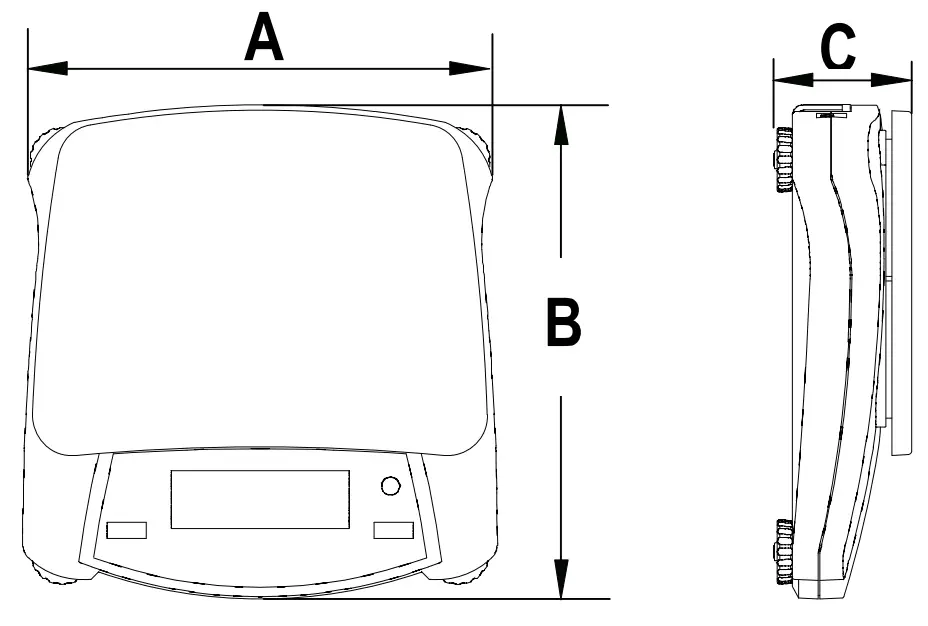
| A | B | C | |
| NV | 204 mm / 8 in. | 230 mm / 9 in. | 70 mm / 2.8 in. |
| NVT | 240 mm / 9.5 in. | 250 mm / 9.8 in. | 74 mm / 2.9 in. |
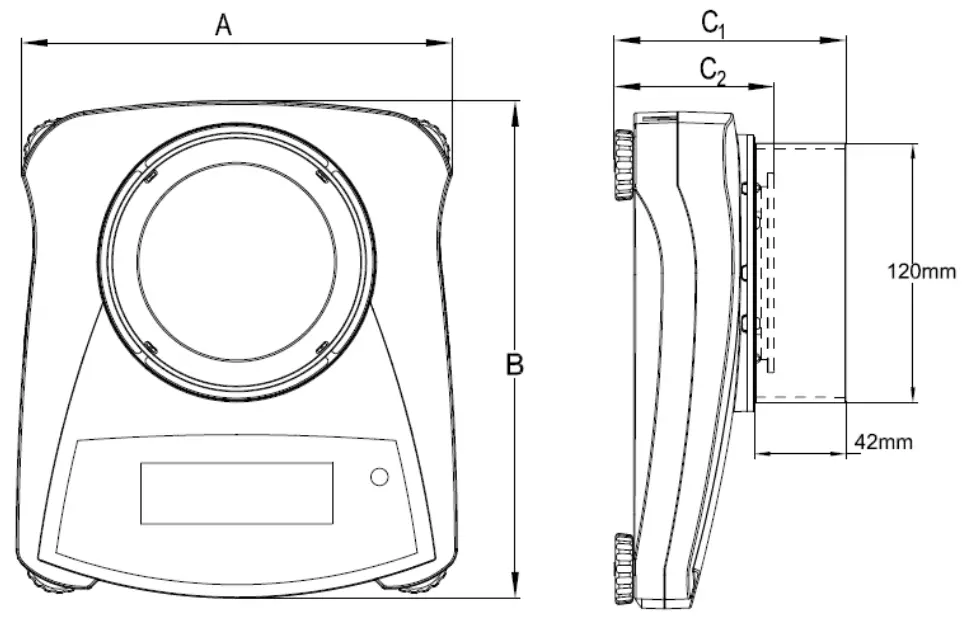
| A | B | C1 | C2 | |
| NV with draft shield | 204 mm / 8 in. | 230 mm / 9 in. | 107 mm / 4.2 in. | 74 mm / 2.9 in. |
Compliance
Compliance to the following standards is indicated by the corresponding mark on the product.
| Mark | Standard |
 | This product complies with the EU Directives 2011/65/EU (RoHS), 2014/30/EU (EMC), 2014/35/EU (LVD) and 2014/31/EU (NAWI). The EU Declaration of Conformity is available online at www.ohaus.com/ce. |
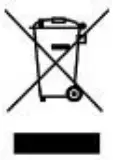 | This product complies with the EU Directive 2012/19/EU (WEEE). Please dispose of this product in accordance with local regulations at the collecting point specified for electrical and electronic equipment. For disposal instructions in Europe, refer to www.ohaus.com/weee. |
 | EN 61326-1 |
Verified weighing instruments in the EU
When the instrument is used in trade or a legally controlled application it must be set up, verified and
sealed in accordance with local weights and measures regulations. It is the responsibility of the
purchaser to ensure that all pertinent legal requirements are met.
Weighing Instruments verified at the place of manufacture bear the following supplementary metrology
marking on the descriptive plate.
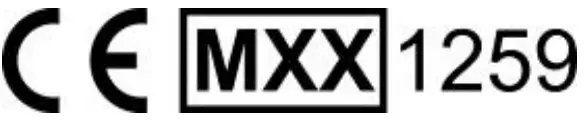
Weighing Instruments to be verified in two stages have no supplementary metrology marking on the descriptive plate. The second stage of conformity assessment must be carried out by the applicable weights and measures authorities. If national regulations limit the validity period of the verification, the user of the weighing instrument must strictly observe the re-verification period and inform the weights and measures authorities.
As verification requirements vary by jurisdiction, the purchaser should contact their local weights and measures office if they are not familiar with the requirements.
FCC Note
This equipment has been tested and found to comply with the limits for a Class B digital device, pursuant to Part 15 of the FCC Rules. These limits are designed to provide reasonable protection against harmful interference in a residential installation. This equipment generates, uses and can radiate radio frequency energy and, if not installed and used in accordance with the instructions, may cause harmful interference to radio communications. However, there is no guarantee that interference will not occur in a particular installation. If this equipment does cause harmful interference to radio or television reception, which can be determined by turning the equipment off and on, the user is encouraged to try to correct the interference by one or more of the following measures:
- Reorient or relocate the receiving antenna.
- Increase the separation between the equipment and receiver.
- Connect the equipment into an outlet on a circuit different from that to which the receiver is connected.
- Consult the dealer or an experienced radio/TV technician for help.
Changes or modifications not expressly approved by the party responsible for compliance could void the user’s authority to operate the equipment.
Industry Canada Note
This Class B digital apparatus complies with Canadian ICES-003.
ISO 9001 Registration
The management system governing the production of this product is ISO 9001 certified.
LIMITED WARRANTY
OHAUS products are warranted against defects in materials and workmanship from the date of delivery through the duration of the warranty period. During the warranty period OHAUS will repair, or, at its option, replace any component(s) that proves to be defective at no charge, provided that the product is returned, freight prepaid, to OHAUS. This warranty does not apply if the product has been damaged by accident or misuse, exposed to radioactive or corrosive materials, has foreign material penetrating to the inside of the product, or as a result of service or modification by other than OHAUS.
In lieu of a properly returned warranty registration card, the warranty period shall begin on the date of shipment to the authorized dealer. No other express or implied warranty is given by OHAUS Corporation. OHAUS Corporation shall not be liable for any consequential damages.
As warranty legislation differs from state to state and country to country, please contact OHAUS or your local OHAUS dealer for further details.
Product Registration
Protect your investment. Register your product with your local OHAUS dealer. In the US and Canada register online at www.ohaus.com.
OHAUS Corporation
7 Campus Drive
Suite 310
Parsippany, NJ 07054 USA
Tel: +1 973 377 9000
Fax: +1 973 944 7177
With offices worldwide
P/N 30467926 D © 2020 OHAUS Corporation, all rights reserved

 Home | Lawrence Wang
 Lab Balance | Industrial Scales | Lab Equipment | Lab Instruments | OHAUS