This document hosted by: www.oldwillknottscales.com

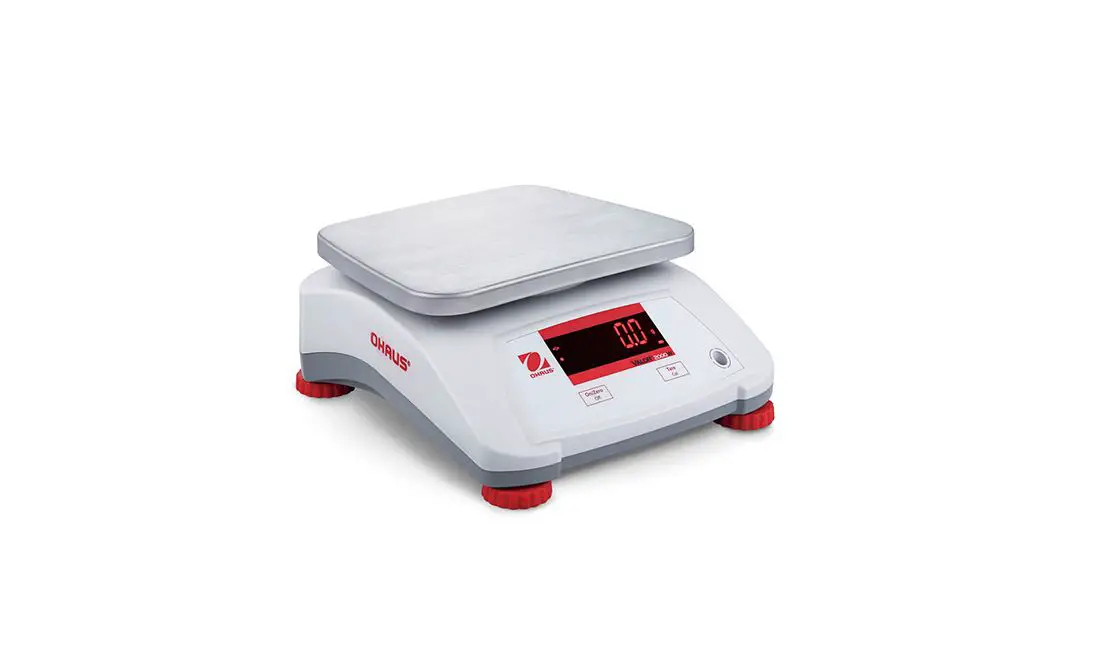
Valor™ 2000W Series
Instruction Manual
EN-1
1. INTRODUCTION
This manual contains installation, operation and maintenance instructions for the Valor™ 2000W Series. Please read the manual completely before using the scale.
1.1 Safety Precautions
Please follow these safety precautions:
- Verify that the AC Adapter input voltage matches the local AC power supply.
- Do not drop loads on the platform.
- Do not place the scale upside down on the platform.
- Disconnect the scale from power supply when cleaning.
- Operate the scale only under ambient conditions specified in these instructions.
- Service should be performed only by authorized personnel.
- Only use weights within the scale’s capacity as specified in these instructions.
- Do not operate the scale in hostile environments.
- Do not carry the scale by the pan or sub-platform. Use the handholds on the side of the scale housing.
2. INSTALLATION
2.1 Package Contents
• Scale • Power Adapter & Plug • Warranty Card
• Stainless Steel Pan • Instruction Manual
2.2 Installing Components
Place the stainless steel pan onto the weighing platform before turning the scale on.
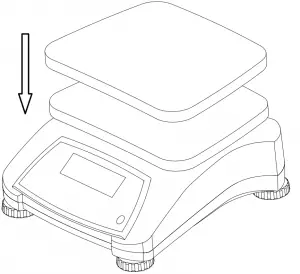
Figure 2-1. Install the stainless steel pan onto the weighing platform
EN-2
2.3 Selecting the Location
Use the scale on a clean, firm and flat surface. Avoid locations with excessive air current, vibrations, heat sources, or rapid temperature changes.
2.4 Leveling the Equipment
Adjust the leveling feet so the bubble is centered in the circle. Be sure the equipment is level each time its location is changed.
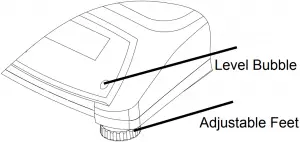
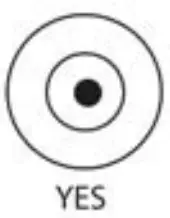
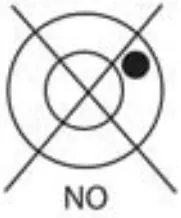
Figure 2-2. Level Indicator
2.5 Power
The AC Adapter is used to power the scale when battery power is not needed.
First connect the AC Adapter plug to the scale input jack located at the bottom of the scale according to the description below.
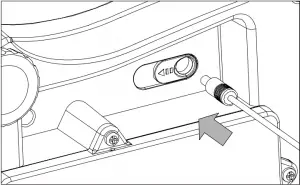
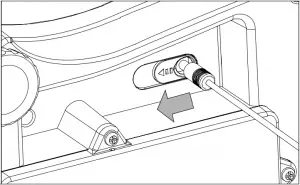
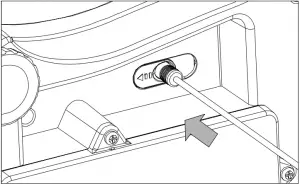
Figure 2-3. Slide to plug in
Then connect the AC adapter to the proper AC supply.
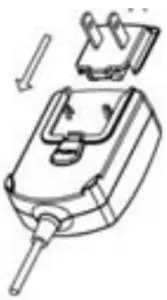
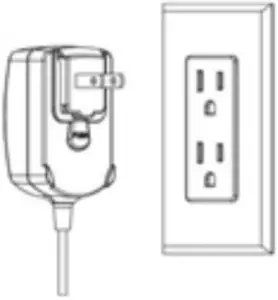
Figure 2-4. Connecting the AC adapter to AC supply
 Caution: The scale can only be used in a dry environment when powered by the AC adapter.
EN-3
2.5.1 Battery Power:
The scale can be used on AC power immediately. Allow the battery to charge for 12 hours before using the scale on battery power. The scale will automatically switch to battery operation if there is a power failure or the power cord is removed. With AC power, the scale is constantly charging, so the battery charge indicator (see item 8 in table 3-2) will remain lit. The scale can be operated during charging, and the battery is protected against overcharging. For maximum operating time, the battery should be charged at room temperature.
During battery operation, the battery symbol indicates the battery charging status. When charging, the symbol will blink slowly and when fully charged the symbol will stop blinking.
TABLE 2-1
| Symbol | Charge Level |
 | Battery in use: Symbol displayed |
Notes:
When battery symbol blinks fast, approximately 30 minutes working time is left.
When [ ] is displayed, the scale will shut off.
Charging the scale must be performed in a dry environment.
CAUTION: Battery is to be replaced only by an authorized OHAUS service dealer. Risk of explosion can occur if the rechargeable battery is replaced with the wrong type or if it is not properly connected. Dispose of the lead acid battery according to local laws and regulations.
EN-4
3. OPERATION – V22PW
3.1 Controls
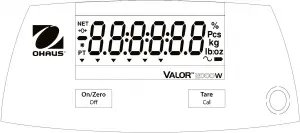
Figure 3-1. Front Control Panel Valor 2000W – V22PW
TABLE 3-1
| Button | Functions |
On/Zero | Short Press¹ (when on): Sets display to zero Short Press (when off): Turns scale on Long Press² (when on): Turns the scale off Short Press (in Menu): Selects / accepts displayed setting |
Tare | Short Press: Enter / clear a Tare value Extended Press³ : Initiates Calibration procedure Short Press (in Menu): Toggles through available settings |
Notes:
- Short Press: Press less than 2.5 seconds.
- Long Press: Press and hold for more than 2.5 seconds.
- Extended Press: Press and hold for more than 5 seconds.
Display
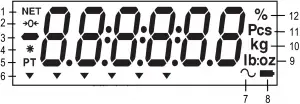
Figure 3-2. Valor 2000W Display
EN-5
TABLE 3-2 Display Symbols
| Item | Description | Item | Description |
| 1 | NET symbol | 7 | Dynamic symbol* |
| 2 | Center of Zero symbol | 8 | Battery charge symbol |
| 3 | Negative symbol | 9 | Pound, Ounce, Pound: Ounce symbol |
| 4 | Stable weight symbol | 10 | Gram, kilogram symbol |
| 5 | Preset Tare symbol* | 11 | Pieces symbol* |
| 6 | Pointer symbols* | 12 | Percent symbol* |
Note: * Not Used
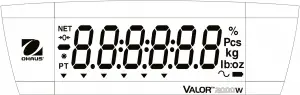
Figure 3-3. Valor 2000W – V22PW Rear display
3.2 Turning Scale On/Off
To turn the scale on, press the On/Zero Off button. The scale performs a display test, momentarily displays the software version, and then enters the active weighing mode.
To turn the scale off, press and hold the On/Zero Off button until OFF is displayed.
3.3 Calibration Menu
To enter the calibration menu, extend press Cal button for 5 seconds, [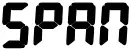 ] will then be displayed. Press Zero key to perform span calibration or press Cal key to proceed to GEO settings. Press Zero key to enter GEO settings and then press Cal key to increase the value. Press Zero key to confirm, [
 ] will be displayed. Press Zero key to exit the menu and return to weighing mode.
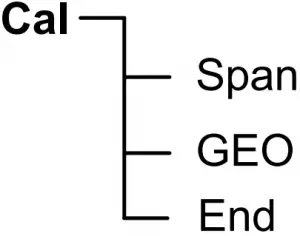
Figure 3-4. Menu structure
Span [] (yes, no)
Initiates a span calibration procedure (zero and span).
GEO [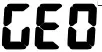 ]
]
Geographical Adjustment Factor (GEO) is used to adjust the calibration based on the current location. Settings from 0 to 31 are available with 12 being the default. Refer to table 4-2 to determine the GEO factor that corresponds to your location.
EN-6
3.4 Initial Calibration
When the scale is first installed it should be calibrated to ensure accurate results.
Before performing the calibration, be sure to have the appropriate calibration weights as listed in table 3-3.
Press and hold Cal for 5 seconds, the display will show [ ]. When the button is released, the display will show []. Press On/Zero to begin the span calibration.
[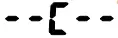 ] blinks while zero reading is stored. Next, the display shows the calibration weight value. Place the specified calibration mass on the pan and press On/Zero.
[] blinks while the reading is stored. The scale returns to the previous application mode and is ready for use.
The message [

 ] will be displayed if these calibration steps are not followed or if the wrong weight was used.
The calibration process can be aborted by turning the scale off.
TABLE 3-3
| Required Span Calibration Mass (sold separately) | |||
| Max | Mass | Max | Mass |
| 1500 g | 1 kg / 3 lb | 15000 g | 10 kg / 30 lb |
| 3000 g | 2 kg / 6 lb | 30000 g | 20 kg / 60 lb |
| 6000 g | 5 kg / 15 lb | ||
Note: If current unit is lb or oz, the scale will be calibrated by pound weight.
Follow below instructions to enter the service menu to set the displayed unit.
With the scale off and LFT off, extend press both the On/Zero and Tare keys at the same time for more than 8 seconds until [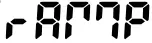 ] is displayed. Press the Tare key through the succeeding displays: []*, [
 ]*, []*, [
 ]*, [
]*, [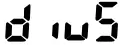 ]* until [
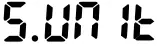 ] is displayed.
• When [] is displayed, press the On/Zero key.
• [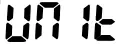 kg] will be displayed. Press the Tare key until the active (power on) unit is displayed.
• When the active unit is displayed, press the On/Zero key.
• [  xx] is displayed. Press Tare to switch to [
 xx], then press the On/Zero key**.
• The next unit [xx] is displayed. Press the Tare key until the desired unit is displayed.
• When the desired unit is displayed, press the On/Zero key.
• [xx] is displayed. Press the Tare key to switch to [xx], then press the On/Zero key.
• Press the Tare key until [] is displayed, then press the On/Zero key.
• Press the Tare key through the succeeding displays: [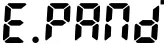 ]*, [
]*, [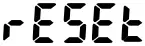 ]* until [] is displayed.
When [] is displayed, press the On/Zero key to exit to weighing mode.
Notes:
*Do not change any of these settings (by pressing the On/Zero key). This may affect the correct set up of the scale.
**The active unit must be turned off first before another unit can be turned on.
EN-7
4. OPERATION – V22XW
4.1 Controls
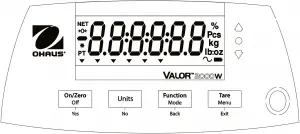
Figure 4-1. Front Control Panel Valor 2000W – V22XW
TABLE 4-1
| Button | Functions |
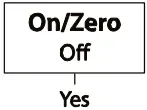 | Short Press¹(when on): Sets display to zero Short Press (when off): Turns scale on Long Press² (when on): Turns the scale off Short Press (in Menu): Selects / accepts displayed setting |
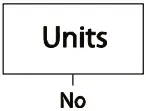 | Long Press: Toggles through active Units Short Press (in Menu): Toggles through available settings |
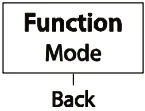 | Short Press: Initiates an application mode specific response Long Press: Selects active Mode Short Press (in Menu): returns to previous settings |
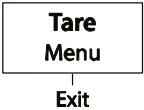 | Short Press: Enter / clear a Tare value Long Press: Enters User Menu Short Press (in Menu): Quickly exit User Menu |
Notes:
¹Short Press: Press less than 2.5 seconds.
²Long Press: Press and hold for more than 2.5 seconds.
EN-8
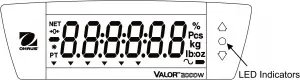
Figure 4-2. Valor 2000W – V22XW Rear display.
The colored LED indicators on the right side of the control panels are used in Checkweigh mode (section 4.5) and will light up according to the following rules:
 (Red) Loads > Upper limit
 (Green) Loads ≥ Lower limit and ≤ Upper limit
 (Yellow) Loads < Lower limit
Display
See section 3.1 for information about the display and it’s symbols.
4.2 Turning Scale On/Off
To turn the scale on, press the On/Zero Off button. The scale performs a display test, momentarily displays the software version, and then enters the active weighing mode.
To turn the scale off, press and hold the On/Zero Off button until OFF is displayed.
4.3 Initial Calibration
When the scale is first installed it should be calibrated to ensure accurate results.
Before performing the calibration, be sure to have the appropriate calibration weights as listed in table 3-3.
Press and hold Menu until [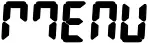 ] (Menu) is displayed. When the button is released, the display will display [
 ]. Press Yes to accept, [] will then be shown. Press Yes again to begin the span calibration. [] blinks while zero reading is stored.
Next, the display shows the calibration weight value. Place the specified calibration mass on the pan and press Yes. [] blinks while the reading is stored. The scale returns to the previous application mode and is ready for use.
The message [ ] will be displayed if these calibration steps were not followed or if the wrong weight was used.
The calibration process can be aborted by turning the scale off.
EN-9
4.4 Weigh Mode
- Press and hold Mode until [
 ] (Weigh) is displayed.
 - If required, place an empty container on the pan and press Tare.
- Add sample to the pan or container. The display shows the weight of the sample.
 ] (Weigh) is displayed.
4.5 Checkweigh Mode
This mode sets low and high weight limits for portion control processes.
1. Press and hold Mode until [ ] (Check) is displayed. [
 ] (clear references) will then display.
Notes: Press Function to view the low and high reference weight limits.
If there is no reference data stored, [ ] is displayed. Press Yes to set reference data.
2. Press No to use the stored reference weight limits and proceed to step 5.
3. Press Yes to establish new reference values. The scale will then display [ ]. Press Yes to view the “Low” limit value. Press Yes to accept or No to edit the “Low” limit value. The stored value then displays with the first digit highlighted [
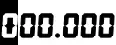 kg]. Repeatedly press No until the desired number appears. Press Yes to accept and highlight the next digit. Repeat until all the digits are correct. Press Yes to accept the “low” limit value, [
 ] will be displayed.
4. Repeat the same procedure to accept or edit the “high” value.
5. If required, place an empty container on the pan and press Tare. Place sample material on the pan or in the container. If the sample weight is under the target weight range, the yellow LED will light. If the sample is within the target weight range, the green LED will light. If the sample is over the target weight range, the red LED will light.
6. To clear the stored reference values press and hold Mode until [] is displayed. Press Yes when [] is displayed.
EN-10
The User Menu allows the customizing of scale settings.
Note: Valor 2000W – V22PW does not have these Menus.
| Menu: | C.A.L | M.O.d.E | U.n.i.t | E.n.d |
| Menu Items: | Span Lin GEO End | Reset Check End | kg g oz lb lb:oz End |
To Enter the Menu Mode
Press and hold Menu until [] (Menu) is displayed. When released the first sub-menu [] (Cal) will be shown.
Press Yes to enter the displayed sub-menu or press No to advance to the next.
Selecting a sub-menu will display the first menu item. Press Yes to view the menu item setting or press No to move to the next menu item. When viewing the setting, press Yes to accept the setting, or press No to change the setting. When [] is displayed, press Yes to return to the sub-menu selections or No to return to the first item in the current menu. Bold indicates factory default setting.
Note: The Calibration / Menu Mode indicator is displayed when in the Menu Mode.
4.6.2 Cal Menu
Enter this menu to perform calibrations.
• Span [] (yes, no)
Initiates a span calibration procedure (zero and span).
• Lin [] (yes, no)
Initiates a linearity calibration procedure (zero, mid-point and span).
• GEO []
Geographical Adjustment Factor (GEO) is used to adjust the calibration based on the current location. Settings from 0 to 31 are available with 12 being the default. Refer to table 4-2 to determine the GEO factor that corresponds to your location.
• End Cal []
Advance to the next menu or return to the top of the current menu
4.6.3 Mode Menu
Enter this menu to activate modes so they will be available for use with the Mode button. Weigh mode is always active by default.
• Reset [] (no, yes)
Reset the Mode menu to factory defaults.
• Check [] (off, on)
Set the sub-mode.
• End Mode []
Advance to the next menu or return to the top of the current menu.
EN-11
4.6.4 Unit Menu
Enter this menu to activate units so they will be accessible with the Units button.
The units in the menu must be turned “on” to be active.
Note: Available units vary by model and local regulations.
4.6.5 End Menu
Press ‘Yes’ to advance to the Calibration menu. Press ‘No’ to exit the menu and return to the current application mode.
TABLE 4-2. GEO CODES
Elevation in meters | ||||||||||||
| 0 | 325 | 650 | 975 | 1300 | 1625 | 1950 | 2275 | 2600 | 2925 | 3250 | ||
| 325 | 650 | 975 | 1300 | 1625 | 1950 | 2275 | 2600 | 2925 | 3250 | 3575 | ||
Elevation in feet | ||||||||||||
| 0 | 1060 | 2130 | 3200 | 4260 | 5330 | 6400 | 7460 | 8530 | 9600 | 10660 | ||
| 1060 | 2130 | 3200 | 4260 | 5330 | 6400 | 7460 | 8530 | 9600 | 10660 | 11730 | ||
| Latitude | GEO value | |||||||||||
| 0°00′ | 5°46′ | 5 | 4 | 4 | 3 | 3 | 2 | 2 | 1 | 1 | 0 | 0 |
| 5°46′ | 9°52′ | 5 | 5 | 4 | 4 | 3 | 3 | 2 | 2 | 1 | 1 | 0 |
| 9°52′ | 12°44′ | 6 | 5 | 5 | 4 | 4 | 3 | 3 | 2 | 2 | 1 | 1 |
| 12°44′ | 15°06′ | 6 | 6 | 5 | 5 | 4 | 4 | 3 | 3 | 2 | 2 | 1 |
| 15°06′ | 17°10′ | 7 | 6 | 6 | 5 | 5 | 4 | 4 | 3 | 3 | 2 | 2 |
| 17°10′ | 19°02′ | 7 | 7 | 6 | 6 | 5 | 5 | 4 | 4 | 3 | 3 | 2 |
| 19°02′ | 20°45′ | 8 | 7 | 7 | 6 | 6 | 5 | 5 | 4 | 4 | 3 | 3 |
| 20°45′ | 22°22′ | 8 | 8 | 7 | 7 | 6 | 6 | 5 | 5 | 4 | 4 | 3 |
| 22°22′ | 23°54′ | 9 | 8 | 8 | 7 | 7 | 6 | 6 | 5 | 5 | 4 | 4 |
| 23°54′ | 25°21′ | 9 | 9 | 8 | 8 | 7 | 7 | 6 | 6 | 5 | 5 | 4 |
| 25°21′ | 26°45′ | 10 | 9 | 9 | 8 | 8 | 7 | 7 | 6 | 6 | 5 | 5 |
| 26°45′ | 28°06′ | 10 | 10 | 9 | 9 | 8 | 8 | 7 | 7 | 6 | 6 | 5 |
| 28°06′ | 29°25′ | 11 | 10 | 10 | 9 | 9 | 8 | 8 | 7 | 7 | 6 | 6 |
| 29°25′ | 30°41′ | 11 | 11 | 10 | 10 | 9 | 9 | 8 | 8 | 7 | 7 | 6 |
| 30°41′ | 31°56′ | 12 | 11 | 11 | 10 | 10 | 9 | 9 | 8 | 8 | 7 | 7 |
| 31°56′ | 33°09′ | 12 | 12 | 11 | 11 | 10 | 10 | 9 | 9 | 8 | 8 | 7 |
| 33°09′ | 34°21′ | 13 | 12 | 12 | 11 | 11 | 10 | 10 | 9 | 9 | 8 | 8 |
| 34°21′ | 35°31′ | 13 | 13 | 12 | 12 | 11 | 11 | 10 | 10 | 9 | 9 | 8 |
| 35°31′ | 36°41′ | 14 | 13 | 13 | 12 | 12 | 11 | 11 | 10 | 10 | 9 | 9 |
| 36°41′ | 37°50′ | 14 | 14 | 13 | 13 | 12 | 12 | 11 | 11 | 10 | 10 | 9 |
| 37°50′ | 38°58′ | 15 | 14 | 14 | 13 | 13 | 12 | 12 | 11 | 11 | 10 | 10 |
| 38°58′ | 40°05′ | 15 | 15 | 14 | 14 | 13 | 13 | 12 | 12 | 11 | 11 | 10 |
| 40°05′ | 41°12′ | 16 | 15 | 15 | 14 | 14 | 13 | 13 | 12 | 12 | 11 | 11 |
| 41°12′ | 42°19′ | 16 | 16 | 15 | 15 | 14 | 14 | 13 | 13 | 12 | 12 | 11 |
| 42°19′ | 43°26′ | 17 | 16 | 16 | 15 | 15 | 14 | 14 | 13 | 13 | 12 | 12 |
| 43°26′ | 44°32′ | 17 | 17 | 16 | 16 | 15 | 15 | 14 | 14 | 13 | 13 | 12 |
| 44°32′ | 45°38′ | 18 | 17 | 17 | 16 | 16 | 15 | 15 | 14 | 14 | 13 | 13 |
| 45°38′ | 46°45′ | 18 | 18 | 17 | 17 | 16 | 16 | 15 | 15 | 14 | 14 | 13 |
| 46°45′ | 47°51′ | 19 | 18 | 18 | 17 | 17 | 16 | 16 | 15 | 15 | 14 | 14 |
| 47°51′ | 48°58′ | 19 | 19 | 18 | 18 | 17 | 17 | 16 | 16 | 15 | 15 | 14 |
| 48°58′ | 50°06′ | 20 | 19 | 19 | 18 | 18 | 17 | 17 | 16 | 16 | 15 | 15 |
| 50°06′ | 51°13′ | 20 | 20 | 19 | 19 | 18 | 18 | 17 | 17 | 16 | 16 | 15 |
| 51°13′ | 52°22′ | 21 | 20 | 20 | 19 | 19 | 18 | 18 | 17 | 17 | 16 | 16 |
| 52°22′ | 53°31′ | 21 | 21 | 20 | 20 | 19 | 19 | 18 | 18 | 17 | 17 | 16 |
| 53°31′ | 54°41′ | 22 | 21 | 21 | 20 | 20 | 19 | 19 | 18 | 18 | 17 | 17 |
| 54°41′ | 55°52′ | 22 | 22 | 21 | 21 | 20 | 20 | 19 | 19 | 18 | 18 | 17 |
| 55°52′ | 57°04′ | 23 | 22 | 22 | 21 | 21 | 20 | 20 | 19 | 19 | 18 | 18 |
| 57°04′ | 58°17′ | 23 | 23 | 22 | 22 | 21 | 21 | 20 | 20 | 19 | 19 | 18 |
| 58°17′ | 59°32′ | 24 | 23 | 23 | 22 | 22 | 21 | 21 | 20 | 20 | 19 | 19 |
| 59°32′ | 60°49′ | 24 | 24 | 23 | 23 | 22 | 22 | 21 | 21 | 20 | 20 | 19 |
| 60°49′ | 62°90′ | 25 | 24 | 24 | 23 | 23 | 22 | 22 | 21 | 21 | 20 | 20 |
| 62°90′ | 63°30′ | 25 | 25 | 24 | 24 | 23 | 23 | 22 | 22 | 21 | 21 | 20 |
| 63°30′ | 64°55′ | 26 | 25 | 25 | 24 | 24 | 23 | 23 | 22 | 22 | 21 | 21 |
| 64°55′ | 66°24′ | 26 | 26 | 25 | 25 | 24 | 24 | 23 | 23 | 22 | 22 | 21 |
| 66°24′ | 67°57′ | 27 | 26 | 26 | 25 | 25 | 24 | 24 | 23 | 23 | 22 | 22 |
| 67°57′ | 69°35′ | 27 | 27 | 26 | 26 | 25 | 25 | 24 | 24 | 23 | 23 | 22 |
| 69°35′ | 71°21′ | 28 | 27 | 27 | 26 | 26 | 25 | 25 | 24 | 24 | 23 | 23 |
| 71°21′ | 73°16′ | 28 | 28 | 27 | 27 | 26 | 26 | 25 | 25 | 24 | 24 | 23 |
| 73°16′ | 75°24′ | 29 | 28 | 28 | 27 | 27 | 26 | 26 | 25 | 25 | 24 | 24 |
| 75°24′ | 77°52′ | 29 | 29 | 28 | 28 | 27 | 27 | 26 | 26 | 25 | 25 | 24 |
| 77°52′ | 80°56′ | 30 | 29 | 29 | 28 | 28 | 27 | 27 | 26 | 26 | 25 | 25 |
| 80°56′ | 85°45′ | 30 | 30 | 29 | 29 | 28 | 28 | 27 | 27 | 26 | 26 | 25 |
| 85°45′ | 90°00′ | 31 | 30 | 30 | 29 | 29 | 28 | 28 | 27 | 27 | 26 | 26 |
EN-12
5. MAINTENANCE
5.1 Cleaning
The housing may be cleaned with a cloth dampened with a mild detergent if necessary. Do not use solvents, chemicals, alcohol, ammonia or abrasives to clean the housing or control panels.
5.2 Cleaning the Plastic Pan
5.2.1 Uninstalling and cleaning the plastic pan
Please follow the steps below to clean the plastic pan:
- Remove the stainless steel pan
- Remove the four thumb screws holding the battery cover.
- Unplug the two battery clips and remove the battery.
- Using a Phillips screwdriver, remove the two screws located at the bottom of the battery compartment.
- Remove the plastic pan.
- Clean the plastic pan.
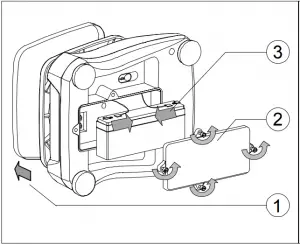
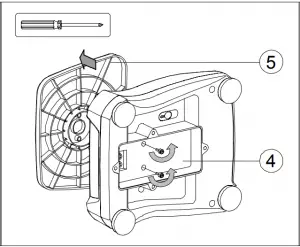
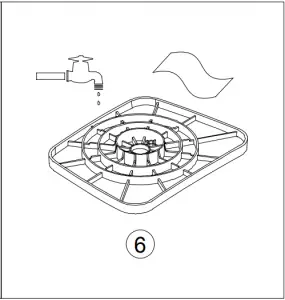
Figure 5-1. Pan cleaning
5.2.2 Reinstalling the pan after cleaning
Please follow the steps below to reinstall the plastic pan (see also the steps in figure 5-1, in reversed order):
- Using a Phillips screwdriver, attach the plastic pan to the housing with the two screws.
- Place the battery in the battery compartment and attach the two battery clips.
Attach the red wire to the positive (red) battery terminal and the black wire to the negative (black) battery terminal. - Attach the battery cover with the four thumb screws.
- Place the scale upright and install the stainless steel pan.
Caution: Risk of explosion can occur if the battery is not properly connected.
EN-13
5.3 Troubleshooting
The following table lists common problems and possible causes and remedies.
If the problem persists, contact OHAUS or your authorized dealer.
TABLE 5-1
| Symptom | Possible Cause | Remedy |
| Cannot turn on | No power to scale Battery discharged | Verify connections and power source |
| Poor accuracy | Improper calibration Unstable environment | Perform calibration Move scale to suitable location |
| Cannot calibrate | Unstable environment Incorrect calibration weight | Move the scale to suitable location Use correct calibration weight |
 | Incorrect calibration weight | See table 3-4 for correct weights |
 | Power on zero range exceeded | Clear pan |
 | Power on zero under range | Install pan |
 | Overload | Load exceeds scale maximum capacity |
 | Under load | Reading below min. range – Re-install pan. |
 | Tare out of range | Tare value exceeds maximum. |
 | Internal data error. | Contact an authorized service agent |
 | Fail to write EEPROM. | Contact an authorized service agent |
 | Invalid checksum data | Contact an authorized service agent. |
 | Battery is discharged. | Connect the power and charge the battery |
| Battery fails to charge fully | Battery is defective. | Have battery replaced by OHAUS authorized service dealer. |
5.4 Service Information
If the troubleshooting section does not resolve or describe your problem, contact your authorized OHAUS service agent. Please visit our web site, www.ohaus.com to locate the OHAUS office nearest you.
6. TECHNICAL DATA
The technical data is valid under the following ambient conditions:
Indoor use only
Operating temperature: -10°C (14°F) to 40°C (104°F)
Relative humidity: 10% to 90% relative humidity, non-condensing
Altitude: Up to 2000 m
Power: AC Adapter (supplied) – 12 VDC 0.84 A output, internal rechargeable sealed lead-acid battery
Mains supply voltage fluctuations: up to ±10% of the nominal voltage
Installation Category: II
Pollution Degree: 2
EN-14
6.1 Specifications
TABLE 6-1
| MODEL** | V22PWE1501T V22XWE1501T | V22PWE3T V22XWE3T | V22PWE6T V22XWE6T | V22PWE15T V22XWE15T | V22PWE30T V22XWE30T |
| Capacity x Readability (Max x d) | 1.5 kg x 0.0002 kg 1500 g x 0.2 g 3 lb x 0.0005 lb 48 oz x 0.01 oz | 3 kg x 0.0005 kg 3000 g x 0.5 g 6 lb x 0.001 lb 96 oz x 0.02 oz | 6 kg x 0.001 kg 6000 g x 1 g 15 lb x 0.002 lb 240 oz x 0.05 oz | 15 kg x 0.002 kg 15000 g x 2 g 30 lb x 0.005 lb 480 oz x 0.1 oz | 30 kg x 0.005 kg 30000 g x 5 g 60 lb x 0.01 lb 960 oz x 0.2 oz |
| Maximum Displayed Resolution | 7500 | 6000 | 6000 | 7500 | 6000 |
| Repeatability (at 20°C) | 0.2 g | 0.5 g | 1 g | 2 g | 5 g |
| Linearity (at 20°C) | ±0.2 g | ±0.5 g | ±1 g | ±2 g | ±5 g |
| Weighing Units | g, kg, lb, oz, lb:oz * | ||||
| Tare Range | To capacity by subtraction | ||||
| Stabilization Time | ≤ 0.5 seconds | ||||
| Safe Overload Protection | 150 % of scale capacity | ||||
| Weight Display | 2 x Red LED (front and rear) 6-digit 7-segment, 20.5 mm / 0.8 in characters | ||||
| Keyboard | V22PW: 2 buttons, V22XW: 4 buttons | ||||
| Application Modes | V22PW: Weighing, V22XW: Weighing, Checkweighing | ||||
| Battery Operating Time (at 20°C) | Typically 50 hours with 12-hour full charge | ||||
| Construction | V22PW: ABS housing with 304 stainless steel platform V22XW: ABS bottom housing with 304 stainless steel top housing and platform | ||||
| Ingress Protection | IPX8 | ||||
| Pan Dimensions | 190 x 242 mm / 7.5 x 9.5 in | ||||
| Net Weight | V22PW: 3.0 kg / 6.6 lb V22XW: 3.9 kg / 8.6 lb | ||||
| Shipping Weight | V22PW: 4.0 kg / 8.8 lb V22XW: 4.9 kg / 10.8 lb | ||||
| Shipping Dimensions | 410 x 370 x 220 mm / 16.1 x 14.6 x 8.7 in | ||||
Note: * For V22PW, see section 3.5.
**Models without “T” (e.g. V22PWE3) are single display versions. These are only available in certain countries.
6.2 Drawings and Dimensions
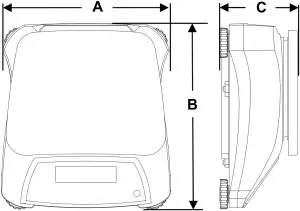
Figure 6-1. Dimensions
TABLE 6-2
| V22PW | V22XW | |
| A | 256 mm 10.1 in | 256 mm 10.1 in |
| B | 280 mm 11 in | 288 mm 11.3 in |
| C | 121 mm 4.8 in | 124 mm 4.9 in |
EN-15
6.3 Compliance
Compliance to the following standards is indicated by the corresponding mark on the product.
| Mark | Standard |
 | This product conforms to the EMC Directive 2004/108/EC, the Low Voltage Directive 2006/95/EC. The Declaration of Conformity is available online at europe.ohaus.com/europe/en/home/support/compliance.aspx. |
 | AS/NZS CISPR 11 |
 | CAN/CSA-C22.2 No. 61010-1-12 UL Std. No. 61010-1 (3rd edition) |
 | NSF/ANSI 169–2009 |
 | NSF/ANSI/3-A 14159-1-2010 |
Disposal
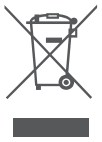
In conformance with the European Directive 2002/96/EC on Waste Electrical and Electronic Equipment (WEEE) this device may not be disposed of in domestic waste. This also applies to countries outside the EU, per their specific requirements.
The Batteries Directive 2006/66/EC introduces new requirements from September 2008 on removability of batteries from waste equipment in EU Member States. To comply with this Directive, this device has been designed for safe removal of the batteries at end-of-life by a waste treatment facility.
Please dispose of this product in accordance with local regulations at the collecting point specified for electrical and electronic equipment. If you have any questions, please contact the responsible authority or the distributor from which you purchased this device.
Should this device be passed on to other parties (for private or professional use), the content of this regulation must also be related.
Disposal instructions in Europe are available online at
europe.ohaus.com/europe/en/home/support/weee.aspx.
Thank you for your contribution to environmental protection.
EN-16
FCC Note
This equipment has been tested and found to comply with the limits for a Class B digital device, pursuant to Part 15 of the FCC Rules. These limits are designed to provide reasonable protection against harmful interference when the equipment is operated in a commercial environment. This equipment generates, uses, and can radiate radio frequency energy and, if not installed and used in accordance with the instruction manual, may cause harmful interference to radio communications.
Operation of this equipment in a residential area is likely to cause harmful interference in which case the user will be required to correct the interference at his own expense.
Industry Canada Note
This Class B digital apparatus complies with Canadian ICES-003.
ISO 9001 Registration
In 1994, OHAUS Corporation, USA, was awarded a certificate of registration to ISO 9001 by Bureau Veritus Quality International (BVQI), confirming that the OHAUS quality management system is compliant with the ISO 9001 standard’s requirements. On June 21, 2012, OHAUS Corporation, USA, was re-registered to the ISO 9001:2008 standard.
Product Registration
Protect your investment. Register your product with your local OHAUS dealer or online at www.ohaus.com.
Limited Warranty
OHAUS products are warranted against defects in materials and workmanship from the date of delivery through the duration of the warranty period. During the warranty period OHAUS will repair, or, at its option, replace any component(s) that proves to be defective at no charge, provided that the product is returned, freight prepaid, to OHAUS. This warranty does not apply if the product has been damaged by accident or misuse, exposed to radioactive or corrosive materials, has foreign material penetrating to the inside of the product, or as a result of service or modification by other than OHAUS. In lieu of a properly returned warranty registration card, the warranty period shall begin on the date of shipment to the authorized dealer. No other express or implied warranty is given by OHAUS Corporation. OHAUS Corporation shall not be liable for any consequential damages.
As warranty legislation differs from state to state and country to country, please contact OHAUS or your local OHAUS dealer for further details.
OHAUS End User Limited Warranty
OHAUS products are warranted against defects in materials and workmanship from the date of delivery through the duration of the specified warranty period. During the warranty period, OHAUS will repair or at its option, replace at no charge, components that prove to be defective, provided that the product is returned to OHAUS freight prepaid, or to a Service Center authorized by OHAUS.
No other express or implied warranty is given by OHAUS Corporation. OHAUS Corporation shall not be liable for any consequential damages. This warranty does not apply if the product has been damaged by accident or misuse, exposed to radioactive or corrosive materials ,has foreign material penetrating to the inside of the product, or as a result of service or modification by other than an authorized OHAUS Service Center.
As warranty legislation differs from state to state and country to country, please contact OHAUS or your local OHAUS dealer for further details. Please fill in the other side of this card and retain for your records
Rev. B
For American & Canada
Retain this card for your records
Protect your investment –Register your product online at www.ohaus.com
To activate the product warranty, you must register your product in the support section on www.ohaus.com within 30 days from date of purchase. No other express or implied warranty is given by OHAUS Corporation. OHAUS Corporation. OHAUS Corporation shall not be liable for any consequential damages.
Model No.: _____________ Serial No. (if applicable): ____________
Purchase Date: __________ Purchase From: ___________________
Note: ________________________________________________________________________
For Asia Pacific
Retain this card for your records
Protect your investment –Register your product online at www.ohaus.com
Please contact your local OHAUS dealer for product service and warranty support. To activate the product warranty you must register your product at www.ohaus.com. No other express or implied warranty is given by OHAUS Corporation. OHAUS Corporation shall not be liable for any consequential damages.
Model No.: ______________ Serial No. (if applicable): _____________
Purchase Date: ___________ Purchase From: ____________________
Note: ________________________________________________________________________
For Europe WARRANTY REGISTRATION
Protect your investment –Register your product online at www.ohaus.com
Please contact your local OHAUS dealer for product service and warranty support.
Retain this section for your records
Model No.
Serial No
Purchase Date
Purchased from
OHAUS Corporation
7 Campus Drive
Suite 310
Parsippany, NJ 07054 USA
Tel: +1 973 377 9000
Fax: +1 973 944 7177
With offices worldwide
P/N 30035767F © 2021 OHAUS Corporation, all rights reserved.
Printed in China
 Lab Balance | Industrial Scales | Lab Equipment | Lab Instruments | OHAUS
 Digital Scales, Weight Scales, & Balances. Shopping Made Easy.