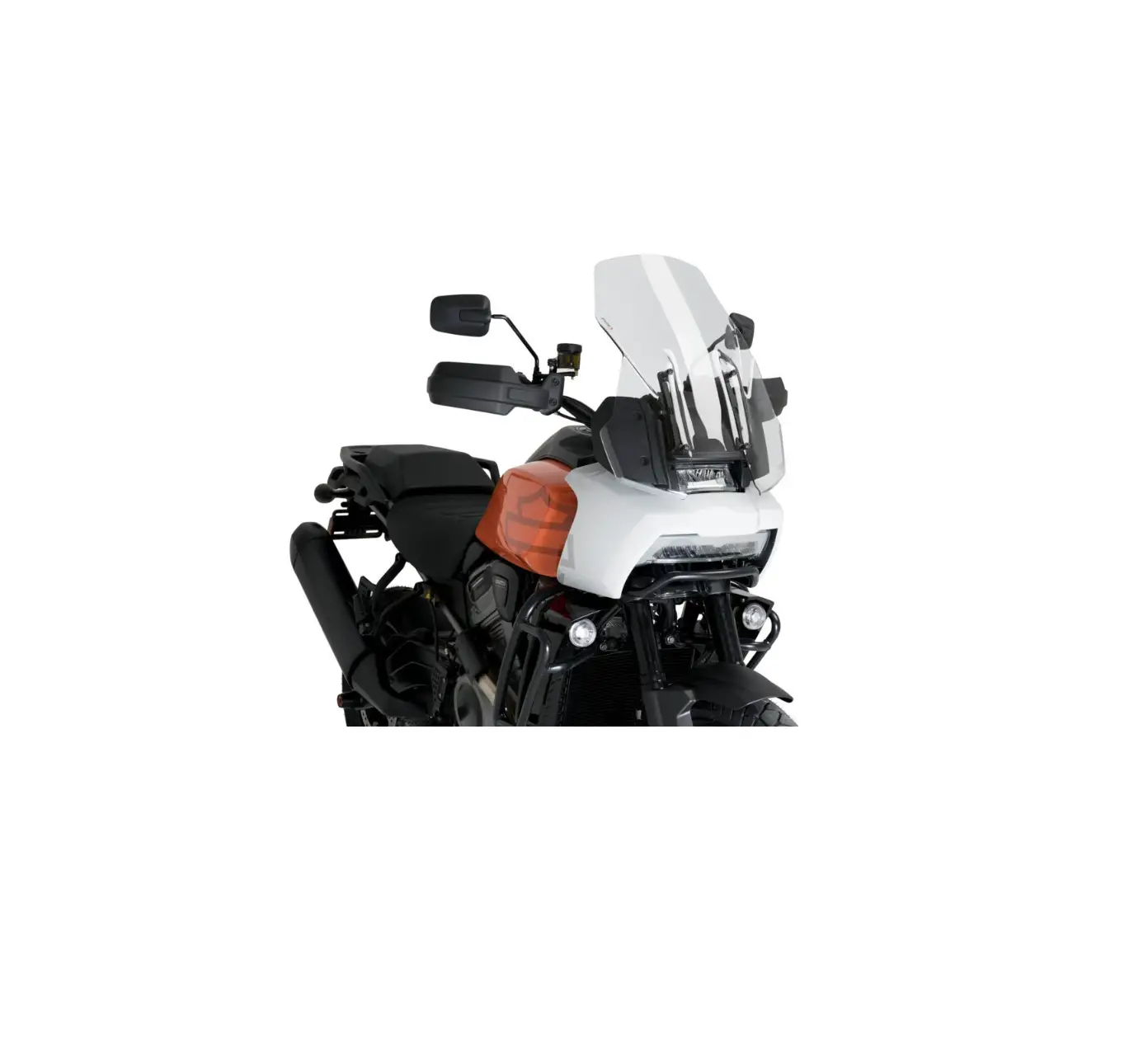
 HARLEY-DAVIDSON 94000882 Pan America Motorcycle


INSTRUMENT MODULE
Turning System ON/OFF
- With the security fob present, set the OFF/RUN switch to RUN.
- The lights and Instrument Module (IM) become operational.
- Ride mode
- Tachometer
- Speedometer
- Odometer
- Fuel gauge
- Headset connection
- Bluetooth
- Device signal
- Device battery
Select Source
- To access the menu selections on the IM press the menu button on the Left Hand Control Module (LHCM).
- A menu selection display will appear.
- Scroll and select a menu item.
Home: Press the Home button to return to the main IM display.
Menu: Press the Menu button to access the IM menu selections.
Instrument Module Navigation: Select the navigation functions (left, right, up, or down) to move between choices.
OK/Enter: Press the OK/Enter button to make a selection.
Ride Modes: The ride mode icon displays the current ride mode. Select the Mode button to change the ride mode.
NOTE: If a fault is detected, a ride mode fault icon will be shown in place of the ride mode icon.
| ICON | FUNCTION | DESCRIPTION |
| Home | Returns to the main IM display. | |
| Menu | Navigates through the menus within the IM. | |
| Navigate Up | Moves up on IM screen. | |
| Navigate Down | Moves down on IM screen. | |
| Navigate Left | Moves left on IM screen. | |
| Navigate Right | Moves right on IM screen. | |
| OK/Enter | Approves or enters a section in the IM. | |
| Settings | Displays menu of various configurable settings on the bike. | |
| Home | Returns to the main IM display. | |
| Navigation | Displays maps and directions when used with app. | |
| Audio | Displays audio functions when paired with device. | |
| Bike Status | Displays vehicle information. |
| ICON | FUNCTION | DESCRIPTION |
| Play/pause | Plays or pauses the current media file. | |
| Previous | Selects the previous media file. | |
| Next | Selects the next media file. | |
| Volume up | Increases the volume. | |
| Volume down | Decreases the volume. | |
| Traction control | Activates and deactivates the traction control. | |
| Voice recognition | Activates voice recognition features on a connected mobile device. | |
| Hazard | Activates the 4-way flashers. | |
| Mode | Changes the ride mode. | |
| Off | Stops the engine or prevents the engine from starting. | |
| Start | Starts the engine. | |
| Run | Allows the engine to start. |
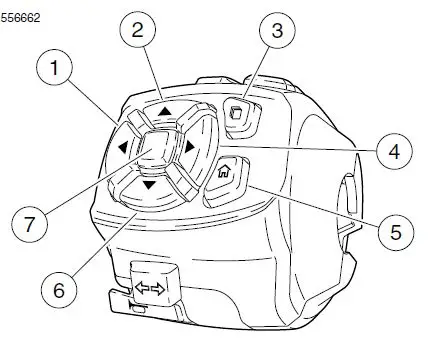
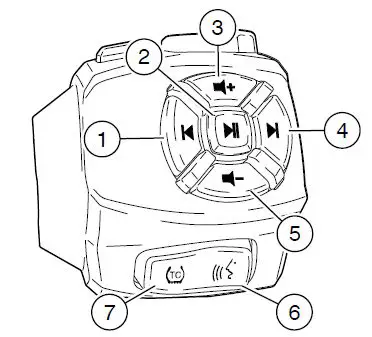
- Navigate left
- Navigate up
- Menu
- Navigate right
- Home
- Navigate down
- OK/enter
- Previous
- Play/pause
- Volume up
- Next
- Volume down
- Voice recognition
- Traction control
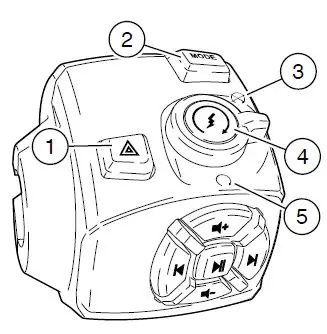
- Hazard
- Mode
- Off
- Start
- Run

Available ride modes are:
- Road
- Rain
- Sport
- Off-Road
- Off-Road Plus
- Custom Off-Road
- Custom Off-Road Plus
- Custom A
- Custom B
SETUP
Settings:
- Press the menu button.
- Select the Settings menu.
- Follow the on-screen instructions to access the different functions, for instance, General, Bluetooth, Trip reset, clock, Pin, Ride modes, etc.

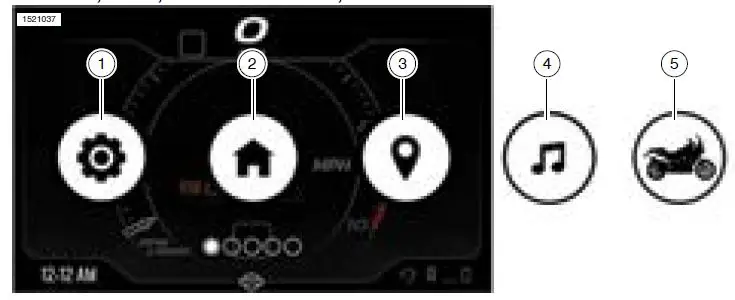
- Settings
- Home
- Navigation
- Audio
- Bike Status
Bike Status
- Press the menu button.
- Select the Bike status function.
- Selecting the bike status card (5) displays vehicle information including, TPMS data, engine coolant temperature, and battery voltage.
BLUETOOTH
Pairing a Device
- Activate Bluetooth on your device.
- Press the menu button.
- Select settings menu.
- Select Bluetooth.
- Select: Add new device. Choose phone or headset.
- Follow the screen prompts to complete pairing.
Audio
NOTE: A phone and headset must be paired to the IM before audio functions can be used.
- Press the menu button.
- Select the Audio function.
- Use Right Hand Control Module (RHCM) to control audio functions.
PHONE
NOTE: The phone must be paired prior to calling or texting notifications. A Harley-Davidson headset with a microphone is required to make and receive calls via Bluetooth.
Making a Call: Voice recognition can be used to place a call through the IM.
Receiving a Call: Following the prompts on the IM, use the LHCM to answer or decline the call.
VOICE RECOGNITION
- Press the voice recognition button on the RCHM to activate features on a connected device (if supported).
- With a headset connected, press the voice recognition button.
- When the system beeps, speak a voice command into the headset microphone.
- Press menu button.
- Select navigation.
- Follow the on-screen instructions to set route information.
NOTE: A device using the H-D Mobile App must be paired to the IM before navigation functions can be used. The navigation function is intended to assist you when traveling. In some circumstances, the information provided by the navigation function may be incomplete, incorrect or outdated. Road conditions, traffic laws and restrictions (such as no left turns, street closures, one-way streets, road construction detours, and so on) can frequently change. Before following any instruction, check that the instruction can be done safely and legally. Program and review navigation routes with the vehicle stopped. If necessary, safely park the vehicle if there is difficulty following the route guidance or to program a new route.
- Moving Maps
Setting Route
The navigation function requires information that has been entered into the connected device using the H-D Mobile App. For more information see www.harley-davidson.com.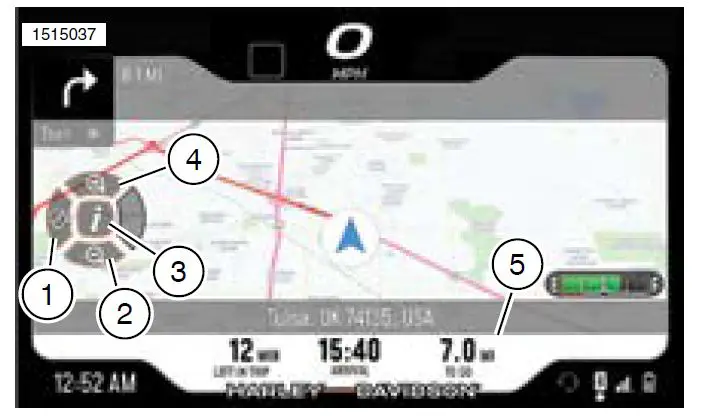
- Cancel route
- Zoom out
- Trip information toggle
- Zoom in
- Trip information
 Shop Harley-Davidson Motorcycles | Harley-Davidson USA
 Shop Harley-Davidson Motorcycles | Harley-Davidson USA