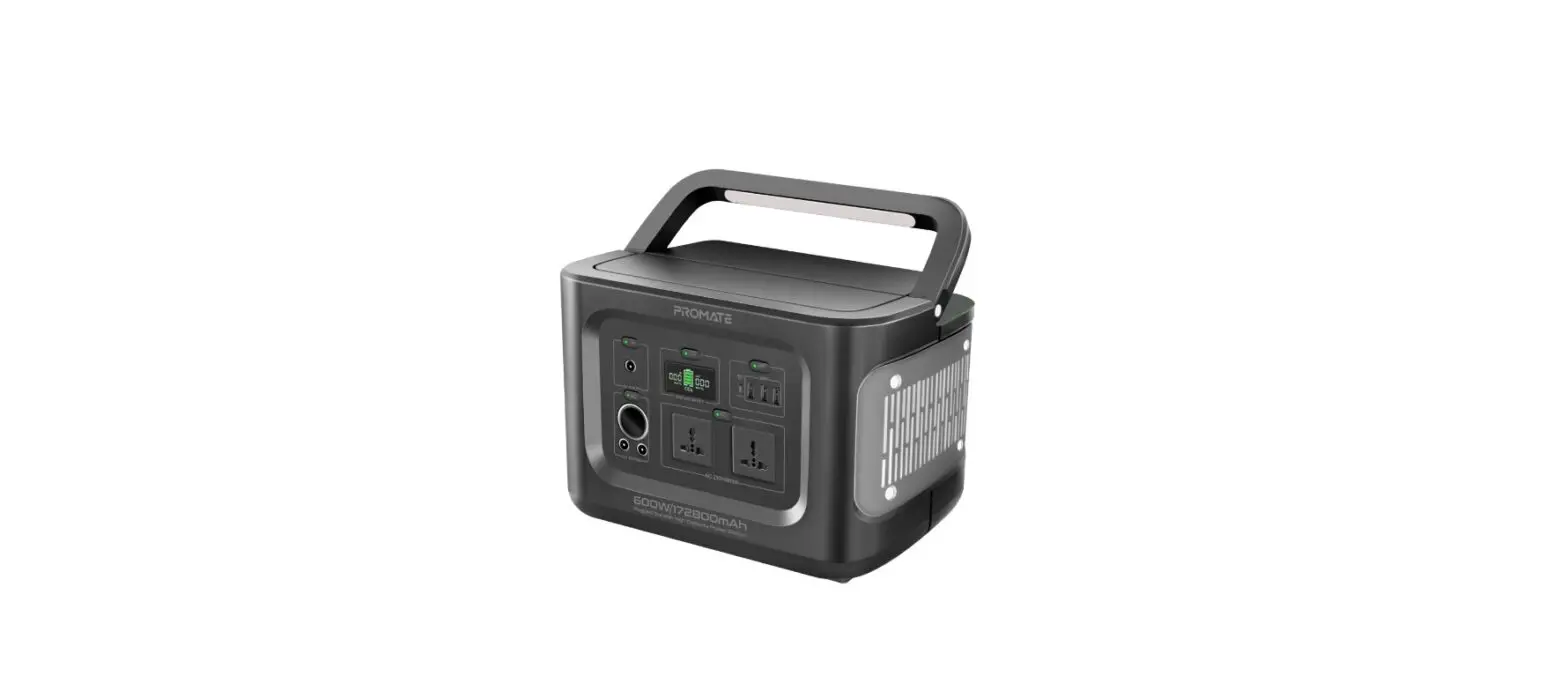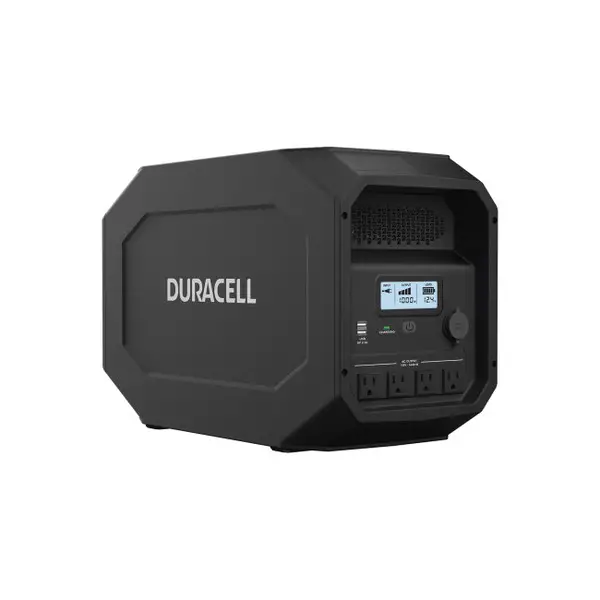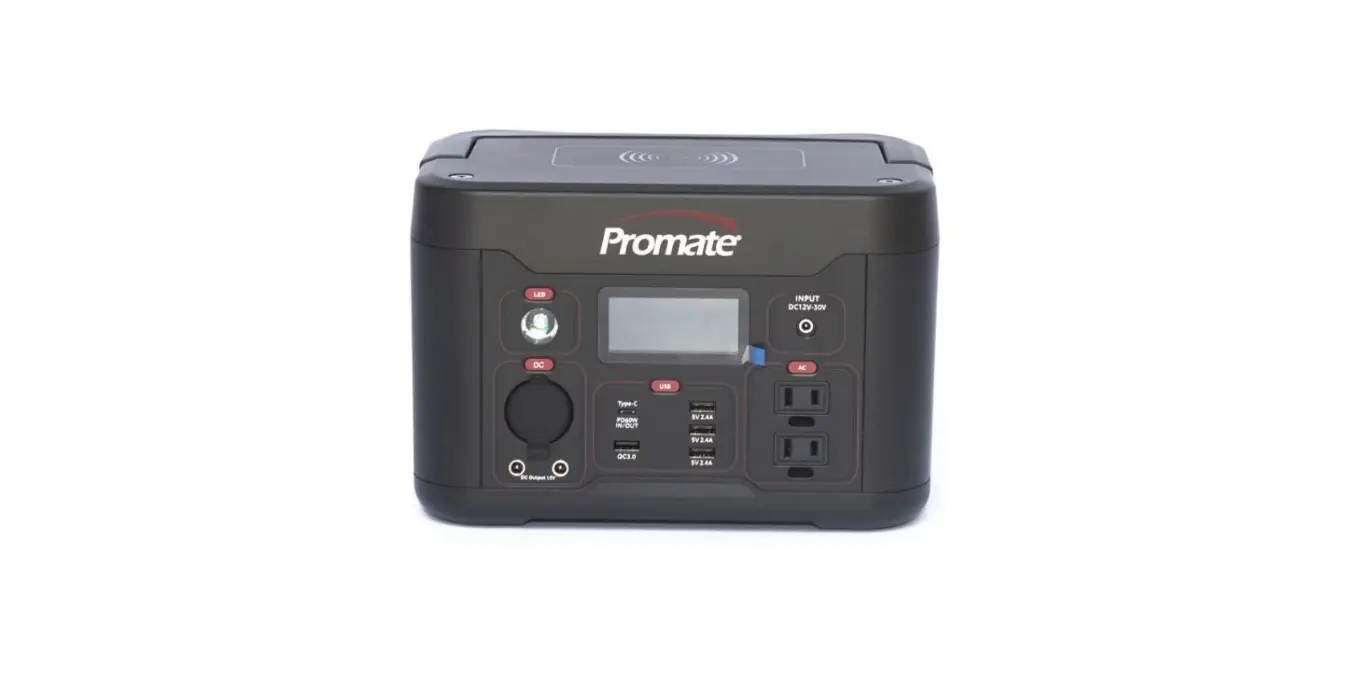

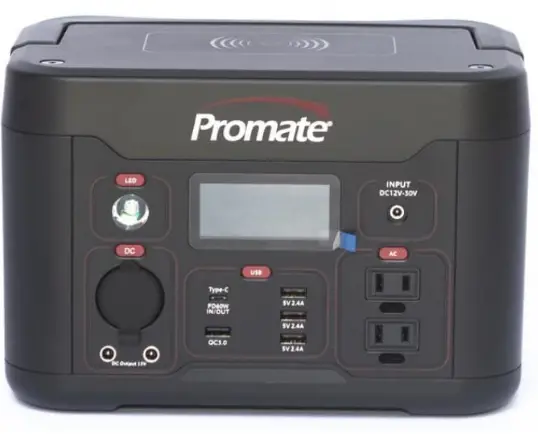
Promate 1000 Powerstation
INTRODUCTION
This product has been carefully engineered and manufactured to give you dependable operation. Please read this manual thoroughly before operating your new product as it contains the information you need to become familiar with its features and obtain the performance that will bring you continued enjoyment for many years. Please keep this manual on file for future reference.
IMPORTANT SAFETY INSTRUCTIONS
- To reduce risk of injury, charge only with the provided AC adaptor and charging cord. Other chargers may cause battery to burst causing injury and/ damage.
- Do not expose the Promate chargers to rain or moisture.
- Use of accessories not recommended or sold by the manufacturer may result in a risk of fire, electric shock, or injury to persons.
- To reduce the risk of damage to the cigarette lighter connector and cord, disconnect the cigarette lighter connector rather than the cord when disconnecting charger.
- Make sure the cord is safe from being stepped on, tripped over, or otherwise subjected to damage or stress.
- Do not operate the charger with damaged cord or cigarette lighter connector – replace it immediately.
- Do not operate the Powerstation if damaged in any way; Report it immediately to an authorized Promate service provider or dealer.
- Do not disassemble the Powerstation or its charger; ask help from a service or repair technician authorized by Promate. Incorrect reassembly may result in a risk of electric shock or fire.
- To reduce risk of electric shock, unplug charger before attempting any maintenance or cleaning.
- Always correctly orient the Powerstation in the upright position.
- Do not expose the device to direct sunlight, high temperature (>40 °C) or extreme cold (<0 °C).
- Keep it away from dust and dirt.
- Warning – Do not expose the Powerstation or battery to fire or intense heat as it may explode.
- Never smoke or allow a spark or flame in the vicinity of battery or engine.
- Do not connect to 12 Volts or 24 Volts battery system.
- Use the DC outlet socket to operate 12 Volts appliances equipped with a cigarette lighter plug.
SPECIFICATIONS
GENERAL SPECIFICATIONS:
- Dimension(cm): 34 x 23.6 x 20.6 Gross Weight: 11.2 Kgs
- Output:
- DC output car socket (Max. 10 Amps): 13V DC
- DC Jack (DC5521) x 2 (5 Amps Max. x 2): 13V DC
- USB port: 2 x 5V/2.4 Amps
- USB port: 2 x QC 3.0
- Type C port #1 (input/output): PD 100W
- Type C port #2: (output) PD 27W
- Wireless Charger: 10W
- 3 x AC outlets: 220V AC power inverter (total 1000 Watts rated), 60Hz Pure sine wave
- Charging:
Charging port DC6530 (195W max)- Support car (cigarette lighter) charging
- Support AC adaptor charging
- Support solar panel charging (12V – 30V, 195W max) Charging port Anderson (195W max)
- Support solar panel charging (12V – 30V, 195W max)
- Built-in Battery: 48Ah 21.9V 1050Wh – lithium-ion type battery.
LOCATION OF CONTROL
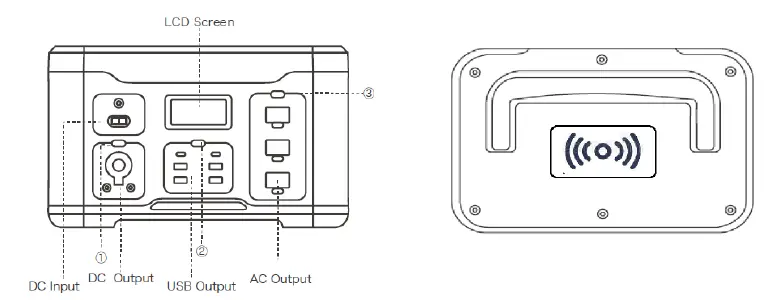
- DC output On/Off button
- USB/ Wireless charger On/Off button
- AC On/Off button
LCD Display
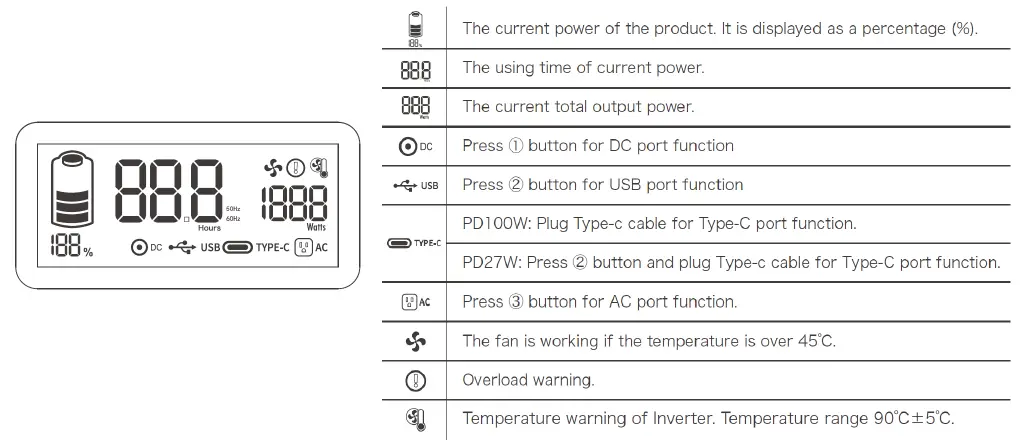
CHARGING THE POWER STATION
Before using or storing the product, charge the power station using the AC adapter charger. The LCD Screen will display the current charge. Once LCD screen show 100%, the Powerstation is full.
CHARGING WITH AC ADAPTOR
- Use AC adaptor provided with the Powerstation (120 Watts).
- Charging time 9-10 Hrs.
CHARGING WITH DC ADAPTOR
- Use car charger provided with the Powerstation.
- Make sure to keep car engine running while charging to avoid draining car battery.
CHARGING WITH SOLAR PANEL
- Select a solar panel 12V – 30V / 195W max solar panel.
- Connect solar panel in DC6530 or Anderson port.
OPERATING AS A POWER SUPPLY
The Promate 1000 is capable of supplying power for 220V AC household devices and 12V DC devices up to the rated capacity of the unit. The length of time the product will operate depends on the condition of the battery and the current draw of the appliance. Low wattage appliances can be operated for several hours while higher wattage products will operate for less time.
220V AC SOCKET
- Introduction
The Powerstation is equipped with a 1000-Watt power inverter that converts the power from the internal battery to standard 220 Volts AC household power. The Power Inverter supplies 1000 Watts of continuous power with 2000 Watts of surge power. When you turn on an appliance or a tool that operates using a motor or tubes, it requires an initial surge of power to start up. This surge of power is referred to as the “starting load” or “peak load”. Once started, the tool or appliance requires less power to continue to operate. This is referred to as the “continuous load” in terms of power requirements. You will need to determine how much power your tool or appliance requires to start up and how much power it requires for continuous running. Power consumption is rated either in wattages (Watts) or in amperes (Amps).
Multiply: Amps X 220 (AC voltage) = Watts
This formula yields a close approximation of the continuous load of your appliances.
Multiply: Watts x 2 = Surge Power
This formula yields a close approximation of the starting load of your appliances. Most often the start-up load of the appliance or power tool determines whether the inverter has the capability to power it.
CAUTION Know the wattage requirement of your appliances. Use only those appliances that do not exceed the capacity of this unit.
Operating Instructions
Before using the inverter, ensure that the battery of your Powerstation is fully charged. Place the inverter power switch (3) in the on position.
The digital display will show the AC logo: appear to confirm that the AC outlet is powered.
If the AC product you are operating has a power switch, we recommend that it be put in the “OFF” position. Plug product into the AC outlet and proceed to use according to the directions on the product.
The output power will be show on the LCD as well as the indicative running time under the current load
The unit has an overload protection. The AC will automatically turn off in case of overload and the overload warning logo will appear:
- Immediately remove the load.
- Press the AC button (3) off and on to restore the AC output.
- Check your load and plug a load appropriate with unit max output.
- Switch off the AC power button after use.
Operating with an Extension Cord
We recommend that you use an extension cord no longer that 100Ft between the AC output and AC appliance. A longer cord may result in reduced output.
- USB PORT
- Connect the USB interface into the accessory and the Portable Powerstation USB port.
- Press the USB Port button (3) On. The USB logo
 will appear.
 - The output power will be show on the LCD as well as the indicative running time under the current load.
- Press USB Port button (3) Off after use.
- TYPE C port
- Press the USB Port button (3) On. The USB logo will appear.
- Connect your cable in the type C port. (the type C logo
 will be displayed when in used).
 - The output power will be show on the LCD as well as the indicative running time under the current load.
- Press USB Port button (3) Off after use.
- Press the USB Port button (3) On. The USB logo
- WIRELESS CHARGER
NOTE: The Powerstation is equipped with 10W wireless charger. Make sure your device can be charged wireless before using it.- Press the USB Port button (2) On to activate the wireless charger The USB logo will appear.
- Put your device on top of the Powerstation.
- Press Off USB port button (2) after use.
- Press the USB Port button (2) On to activate the wireless charger The USB logo
- DC JACK (DC5521)
The Powerstation is equipped with 2 x 13V DC jacks and can be used to operate 12 V DC devices (maximum 5 Amps each).- Press DC button (1) On. The DC logo
 will appear.
 - Automatic over-current protection (at 5 ± 0.5 Amps).
- The output power will be show on the LCD as well as the indicative running time under the current load.
- Press DC button (1) Off after use.
- Press DC button (1) On. The DC logo
- DC Cigarette Lighter port
The Powerstation is equipped with a 13V DC cigarette lighter type outlet and can be used to operate most 12 Volts auto accessories and appliances (10 Amps maximum) equipped with a cigarette lighter plug.- Press DC button (1) On. The DC logo will appear.
- Automatic over-current protection (at 10.5 ± 0.5 Amps).
- The output power will be show on the LCD as well as the indicative running time under the current load.
- Press DC button (1) Off after use.
- Press DC button (1) On. The DC logo
 will appear.
 will be displayed when in used).
 will appear.
DO NOT PLUG A CIGARETTE LIGHTER INTO THE OUTLET OF THE POWERSTATION.
MAINTENANCE INSTRUCTIONS
All batteries lose charge with time. AC recharge is recommended after every use or every three months when not in regular use. Use the AC charger and recharge until full.
If the unit gets dirty, gently clean the outer surfaces with a soft cloth moistened with a mild solution of water and detergent. Do not use solvents or other chemical cleaners. Periodically check the condition of charging adapters, connectors, and wires. Replace any components that may have become worn or broken. These parts are not serviceable. Do not open or disassemble. Service for Powerstation units is confined to replaceable parts only. All other servicing should be performed by a qualified service technician only.
SERVICE INFORMATION
HOW TO ORDER REPLACEMENT PARTS
Even quality-built equipment such as the generator you have purchased will need occasional replacement parts to maintain its good condition over the years. To order replacement parts and consumable parts, please contact Promate Service (details below) and be ready with the following information:
- Model No., Serial No. and all specifications that are shown on the Model No./Serial No. plate.
- Part number or numbers as shown in the Parts List section.
- A brief description of the trouble with the generator.
LIMITED WARRANTY
Warranty Coverage: Powertech Asia Pacific Inc., (the Company) warrants to the original retail customer that it will repair or replace, free of charge, any parts found by the Company or its authorized service representative to be defective in material or workmanship. This warranty covers the cost of replacement parts and labor for defects in material or workmanship.
Not Covered:
- Shipping/Handling charges for sending the product to the Company or its authorized service representative for warranty service. Shipping/Handling repaired or replaced products back to the customer; these charges must be borne by the customer.
- If a separate operator’s manual and engine warranty from the engine manufacturer is included with this product, only that warranty will apply to the engine.
- Damage caused by abuse, accident, the effects of corrosion, erosion and normal wear and tear.
- Warranty is void if the customer fails to install, maintain and operate the product in accordance with the instructions and recommendations of the Company set forth in the owner’s manual, or if the product is used as rental equipment.
- The Company will not pay for repairs or adjustments to the product, or for any costs of labor performed without the Company’s prior authorization.
- Consumable parts such as battery, spark plugs, and air cleaner.
Warranty Period: One (1) year from the date of purchase on products used solely for consumer applications; if a product is used for business or commercial applications,
the warranty period will be limited to ninety (90) days from the date of purchase. For warranty service, the customer must provide dated proof of purchase and must notify the Company within the warranty period.
EXCLUSIONS AND LIMITATIONS: THE COMPANY MAKES NO OTHER WARRANTY OF ANY KIND, EXPRESS OR IMPLIED. IMPLIED WARRANTIES, INCLUDING WARRANTIES OF MERCHANTABILITY AND OF FITNESS FOR A PARTICULAR PURPOSE, ARE HEREBY DISCLAIMED. THE WARRANTY SERVICE DESCRIBED ABOVE IS THE EXCLUSIVE REMEDY UNDER THIS WARRANTY; LIABILITY FOR INCIDENTAL AND CONSEQUENTIAL DAMAGES IS EXCLUDED TO THE EXTENT PERMITTED BY LAW.
This warranty gives you specific legal rights, and you may also have other rights which vary from state to state. Some states do not allow a disclaimer of implied warranties or the exclusion or limitation of incidental and consequential damages, so the above disclaimers and exclusions may not apply to you.
CONTACT THE POWERTECH As ia Pacific Inc.,
PRODUCT SERVICE DEPARTME NT AT (02) 8 638 1569 | (+63) 9338373922 [email protected] www.facebook.com/PromateServicePH/
(MAIN) #420 Diamond Warehouse Compound, F L egaspi St., Maybunga Pasig City 1607 (DAVAO) Space 10 & 11 Jin-Long Complex R. Castillo St., Agdao District, Davao City 800
Powerstation Exploded View Model
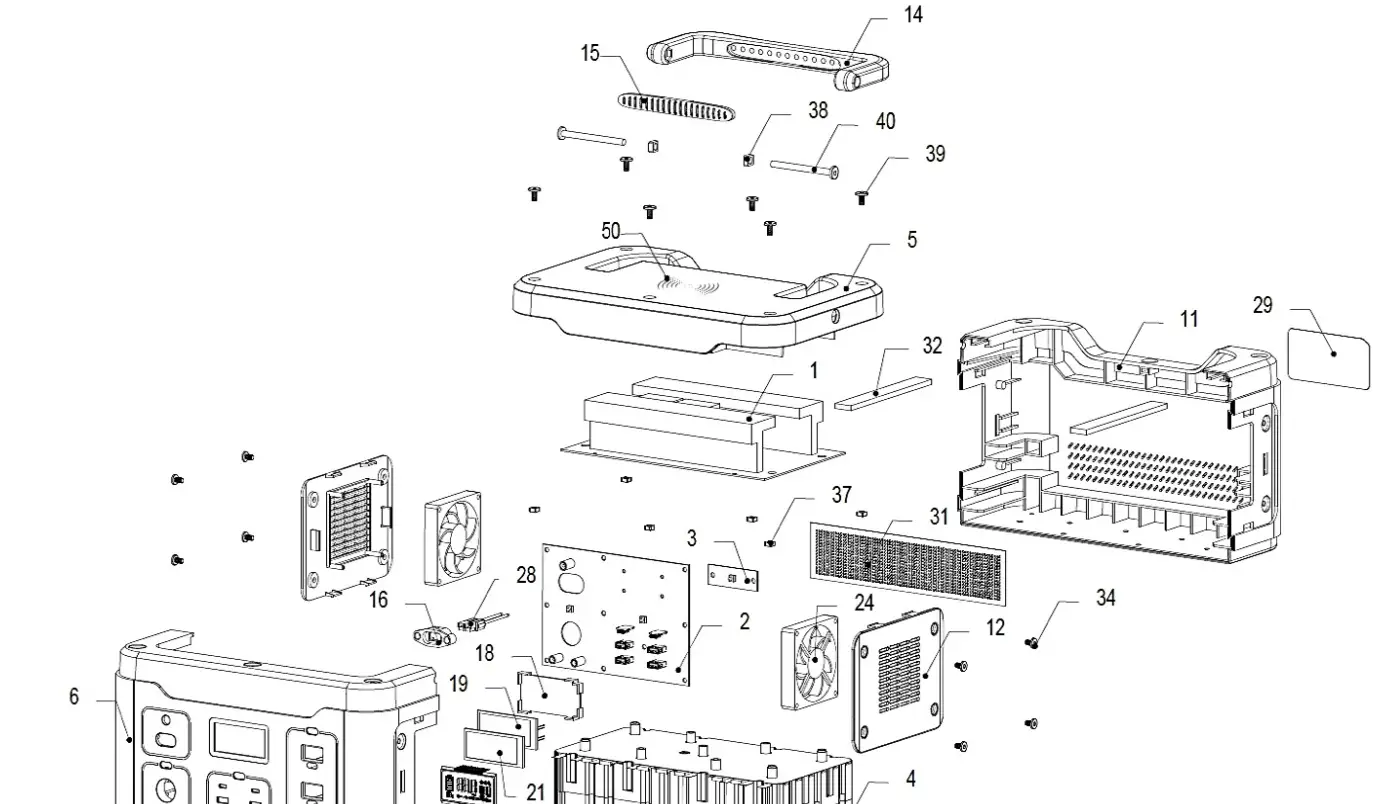
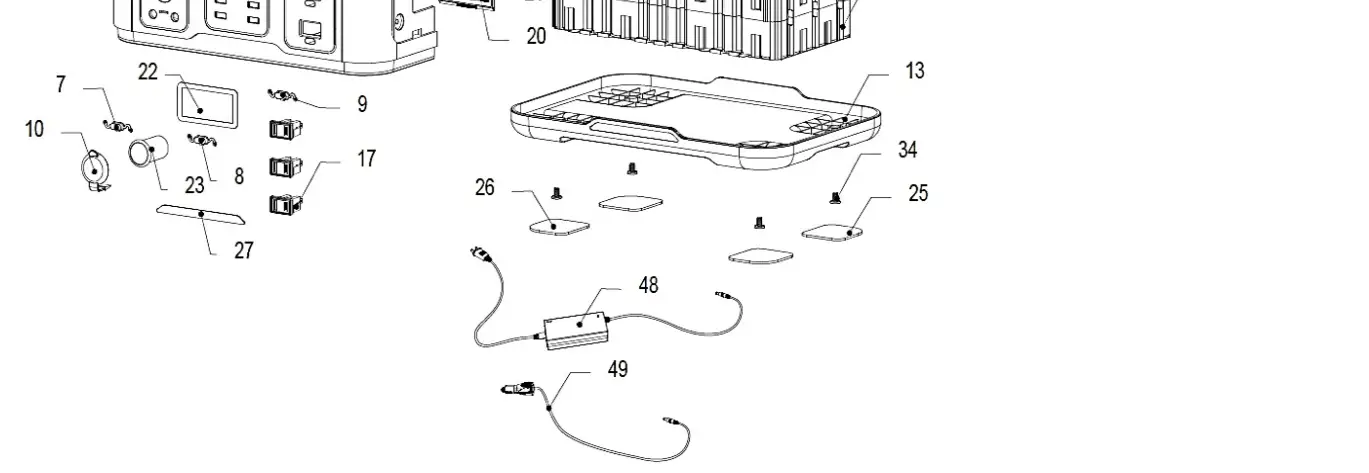
| No. | Model Name | Description | Unit | Qty |
| 1 | PCBA | 220V/60Hz Inverter Board RoHS REACH | PC | 1 |
| 2 | PCBA | Control Board RoHS REACH | PC | 1 |
| 3 | PCBA | AC Button Control Board RoHS REACH | PC | 1 |
| 4 | Battery Pack | Battery Pack (1050Wh) 21.9V / 48Ah 6S12P | PC | 1 |
| 5 | Top Shell | PC+ABS 94-V0 (refer to drawing) RoHS REACH | PC | 1 |
| 6 | Front Shell | PC+ABS 94-V0 (refer to drawing) RoHS REACH | PC | 1 |
| 7 | Button | PC+ABS 94-V0 (refer to drawing) RoHS REACH | PC | 1 |
| 8 | Button | PC+ABS 94-V0 (refer to drawing) RoHS REACH | PC | 1 |
| 9 | Button | PC+ABS 94-V0 (refer to drawing) RoHS REACH | PC | 1 |
| 10 | Anti-dust Cover | Refer to drawing RoHS REACH | PC | 1 |
| 11 | Backside Shell | PC+ABS 94-V0 (refer to drawing) RoHS REACH | PC | 2 |
| 12 | Side Shell | PC+ABS 94-V0 (refer to drawing) RoHS REACH | PC | 1 |
| 13 | Bottom Shell | PC+ABS 94-V0 (refer to drawing) RoHS REACH | PC | 1 |
| 14 | Handle | ABS 94-V0 (refer to drawing) RoHS REACH | PC | 1 |
| 15 | Silicone Film of Handle | PC+ABS 94-V0 (refer to drawing) RoHS REACH | PC | 1 |
| 16 | Bracket of Solar Charge | PC+ABS 94-V0 (refer to drawing) RoHS REACH | PC | 1 |
| 17 | AC Socket | 26*16 15A125V UL/PSE Certified (refer to drawing) RoHS REACH | PC | 3 |
| 18 | LCD Bracket | PC+ABS 94-V0 (refer to drawing) RoHS REACH | PC | 1 |
| 19 | LED Backlight | VCT6834W2 (refer to drawing) RoHS REACH | PC | 1 |
| 20 | LED Screen | WT6853 (PEP-S1000B-LCD) (refer to drawing) RoHS REACH | PC | 1 |
| 21 | Shade Strip | PVC 88mm*47mm*0.1mm in Black color (refer to drawing) RoHS REACH | PC | 1 |
| 22 | LCD Lens | PC94-V0 (refer to drawing) RoHS REACH | PC | 1 |
| 23 | Cigarette Lighter Female Socket | External Diameter 22mm*inner D21mm*H39mm (refer to drawing) RoHS REACH | PC | 1 |
| 24 | Portable Fans | MDF8020S12H DC 12V / 0.25A / 4000 L250mm P2.54 RoHS REACH | PC | 2 |
| 25 | Anti-slip Mat | 55*50*2 (refer to drawing) RoHS REACH | PC | 2 |
| 26 | Anti-slip Mat | 55*50*2 (refer to drawing) RoHS REACH | PC | 2 |
| 27 | Part Number Label | 108mm*8mm*1mm PC94-V0 (refer to drawing) RoHS REACH | PC | 1 |
| 28 | Solar Charge Cable | Refer to drawing RoHS REACH | PC | 1 |
| 29 | Parameter Label | Refer to drawing RoHS REACH | PC | 1 |
| 30 | AC Connector Wires | XT60 16AWG200 °C Red and Black Silicone Rubber Wire L150mm, 6 Pcs 4.8 Insulation Sleeves (refer to drawing) RoHS REACH | PC | 1 |
| 31 | Anti-dust Mesh | PVC 240*55*0.3mm (refer to drawing) RoHS REACH | PC | 1 |
| 32 | Aluminum Strip | 6061 Aluminum Strip 150mm*20mm*5mm (refer to drawing) RoHS REACH | PC | 2 |
| 33 | Self-tapping screw | Refer to drawing RoHS REACH | PC | 4 |
| 34 | Flat Head Screw | Refer to drawing RoHS REACH | PC | 12 |
| 35 | Self-tapping Screw | Refer to drawing RoHS REACH | PC | 14 |
| 36 | Self-tapping Screw with Pads | Refer to drawing RoHS REACH | PC | 8 |
| 37 | Square Nut | Refer to drawing RoHS REACH | PC | 6 |
| 38 | Square Nut | Refer to drawing RoHS REACH | PC | 2 |
| 39 | Flat Head Screw | Refer to drawing RoHS REACH | PC | 6 |
| 40 | Flat Head Screw | Refer to drawing RoHS REACH | PC | 2 |
| 41 | Flat Head Hexagonal Screw Rod | Refer to drawing RoHS REACH | PC | 4 |
| 42 | Countersunk Head Screw | Refer to drawing RoHS REACH | PC | 12 |
| 43 | Countersunk Head Self-tapping Screw | Refer to drawing RoHS REACH | PC | 1 |
| 44 | Silica Gel | JDB805 (W) White (125g / piece) RoHS REACH | PC | 0.04 |
| 45 | Ties | 5*200mm RoHS REACH | PC | 4 |
| 46 | Tri-proof Paint | 20L 9245E RoHS REACH | Liter | 0.0001 |
| 47 | Serial Label | 5N for battery pack (including PO# and QTY from A to Z) RoHS REACH | PC | 1 |
| 48 | AC Adaptor | 24V 5APSE/UL Certified Product (refer to drawing) RoHS REACH | PC | 1 |
| 49 | Cigarette Lighter to DC4017 Cable | UL2464 18 AWG L2M (refer to drawing) RoHS REACH | PC | 1 |
| 50 | Wireless Charger | 10W | PC | 1 |