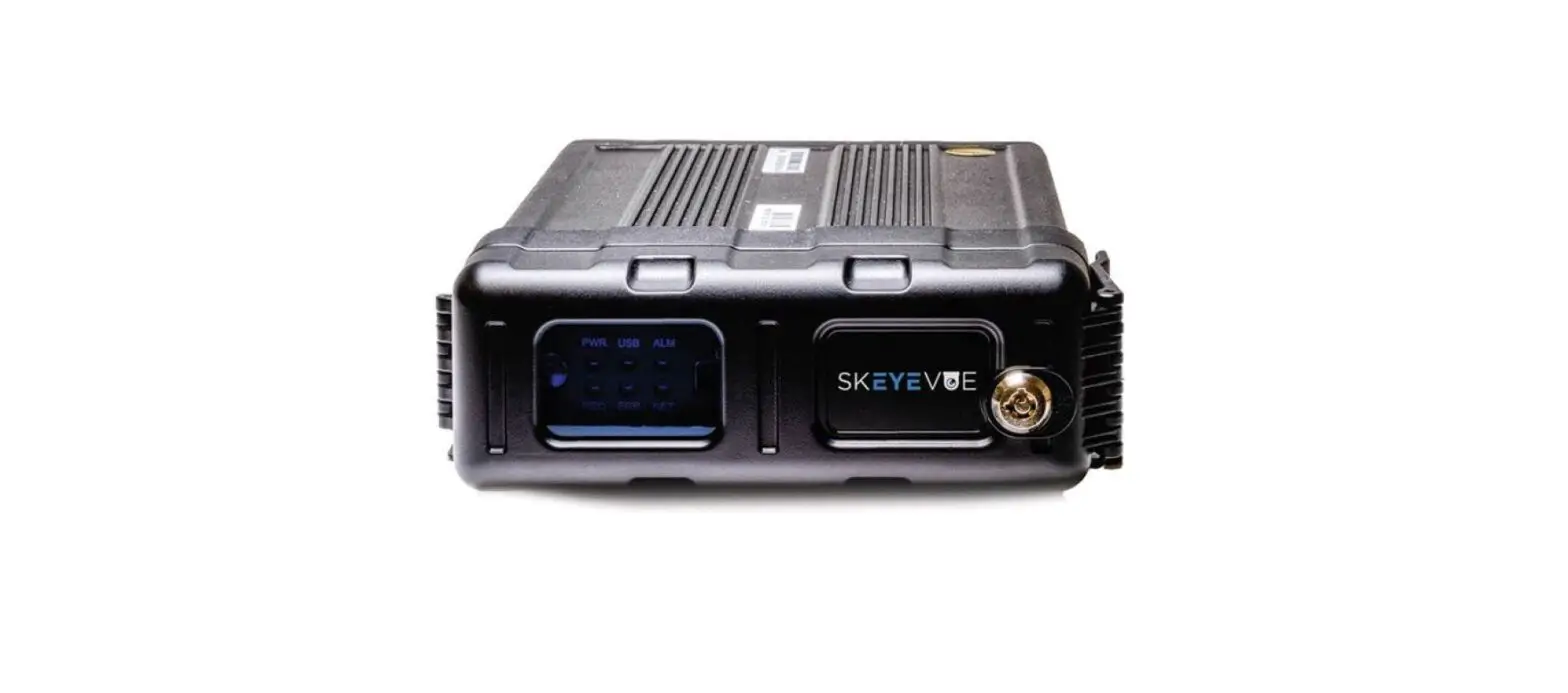

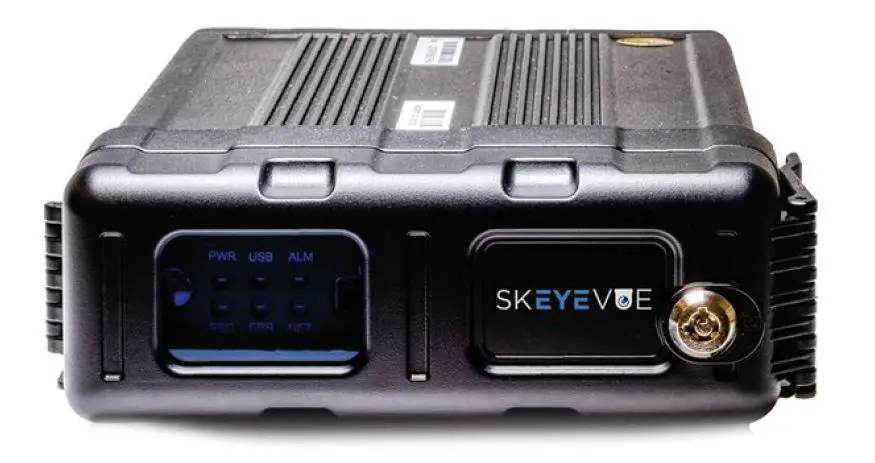
SKEYEWATCH M1-TKH0401 Mobile Digital Video Recorder
- Notice
The information in this manual was current when published. The manufacturer reserves the right to revise and improve its products. All specifications are therefore subject to change without any notice. The purpose of this manual is to kindly aid the user for the operation for our MDVR. The user should have a basic understanding of computer operation and basic knowledge of how to connect peripherals and make some settings. - Copyright
Under copyright laws, the content of this manual may not be copied, photocopied, reproduced, translated or reduced to any electronic medium or machine-readable form, in whole or in part, without prior written consent of Skeyewatch Co., Ltd. Copyright (2017-2022) - Label
This device complies with part 15 of the FCC Rules. Operation is subject to the following two conditions: (1) This device may not cause harmful interference, and (2) this device must accept any interference received, including interference that may cause undesired operation. - FCC warning:
Any Changes or modifications not expressly approved by the party responsible for compliance could void the user’s authority to operate the equipment.- Note: This equipment has been tested and found to comply with the limits for a Class B digital device, pursuant to part 15 of the FCC Rules. These limits are designed to provide reasonable protection against harmful interference in a residential installation. This equipment generates uses and can radiate radio frequency energy and, if not installed and used in accordance with the instructions, may cause harmful interference to radio communications. However, there is no guarantee that interference will not occur in a particular installation. If this equipment does cause harmful interference to radio or television reception, which can be determined by turning the equipment off and on, the user is encouraged to try to correct the interference by one or more of the following measures:
- Reorient or relocate the receiving antenna.
- Increase the separation between the equipment and receiver.
- Connect the equipment into an outlet on a circuit different from that to which the receiver is connected.
- Consult the dealer or an experienced radio/TV technician for help.
This equipment complies with FCC radiation exposure limits set forth for an uncontrolled environment. This equipment should be installed and operated with minimum distance 20cm between the radiator & your body.
Guarantee & Warnings
- Electrical Apparatus Safety
All installation and operation should comply with local electrical safety norms. - Transportation
In the process of transportation, storage and installation, please avoid heavy stress, violent vibration, impact and water splashing. - Installation
Install the equipment in accordance with the requirements, handle carefully. Do not heavily press the equipment before the MDVR installation is finished. - Requirements on Engineers & Technicians
All the work of checking and maintenance should be done by qualified technicians and engineers. We do not undertake any responsibility caused by unauthorized modifications. - Requirements on Environment
The equipment should be installed and stored in a cool and dry place, away from direct sunlight, flammable or explosive substances, etc. Keep gaps not less than 3cm around the device to facilitate ventilation for cooling. - Accessories
Make sure to use accessories from the manufacturer recommended in the attachment. Insulate circuit ground and metal shell for all the peripherals. Before installation, please open the package and ensure that all parts are included. If there are any problems, please contact us as soon as possible.
Product Characteristics
Overview
Skywatch M1-TKH0401 is a functional Mobile Digital Video Recorder specially designed for vehicle video surveillance. It has a high-speed processor and embedded operating system, combining with the most advanced H.265 video compression/decompression technology, GPS positioning technology. It supports video recording in 1080P, 720P, WD1, WHD1, WCIF, D1, HD1 and CIF formats. It is easy to use with simple design, multi-functions, superior anti-vibration, flexible installation and high reliability.
Specifications
| Function Overview | Preview, Recording, Playback, Network, Locating | |
| System | OS Control Mode | Linux 3.18.20 CP4, mouse, EasyCheck, network (3G/4G/WIFI) |
|
Video | Input | 4 channels AHD(1080P)+1 channel IPC(1080P) |
| Output | 1 channel | |
|
Total Resource | PAL: 4*720P@25fps(AHD)+1*1080P@30fps(IPC) or4*1080P@10fps(AHD)+1*1080P@30fps(IPC) NTSC: 4*720P@30fps(AHD)+1*1080P@30fps(IPC) or4*1080P@15fps(AHD)+1*1080P@30fps(IPC) | |
| Video Signal Standard | Electrical level: 1Vpp Impedance: 750 Optional NT SC/PAL | |
| Audio | Input | 5channels (1 channel IPC audio input) |
| Output Audio Signal Standard | 1channel Electrical level: 2Vpp Input impedance: 4.7kO | |
| Display | Display Split | 1/4/9 |
| OSD | GPS information, alarm, vehicle No., speed, date/time | |
| Operation Interface | Semi-transparent GUI | |
|
Recording | Video/Audio Compression | Video: H.264/H.265 Audio: ADPCM, G.711U |
|
Image Resolution | Analog: PAL: 1080P(1920X1080), 720P(1280X720), WD1(928X576), WHD1(928X288), WCIF(464X288), D1(704X576), HD1(704×288), CIF(352×288) NTSC: 1080P(1920X1080), 720P(1280X720), WD1(928X480), WHD1(928X240), WCIF(464X240), D1(704×480), HD1(704×240),CIF(352×240); | |
| Digital: 1080P(1920X1080), 720P(1280X720) | ||
| Image Quality | 1-8 levels adjustable (1 is the best) | |
| Recording Mode | Boot up/Schedule/Alarm | |
| Pre-recording | 0-60minutes | |
| Post-recording | 0-30 minutes | |
| Playback | Playback Channel | 1 channel by local playback |
| Search Mode | Date/time, channel, event | |
| Network | IPC Ethernet | 6-pin M12(1QOM x 1, PON power supply) |
| WIFI/BT4.0 | Support | |
| 4G | Support | |
| Locating | GPS | Location tracking, speed detection and time sync |
| Sensor | G-Sensor | Built-in three-axis inertia sensor |
| Storage | SD | SD card slot x 2 |
|
Interface | USS | USB2.0 x 1 |
| RS232 | RS232 x 2 | |
| Sensor | 8 inputs, 2 outputs | |
| Speed | 1 channel pulse speed detection | |
| CAN | 1xCAN | |
| Control Panel | Optional CP4 | |
| Intercommunication | 1 MIC port(CP4) | |
|
Power | Input | DC8-36V |
| Output | 5V@500mA | |
| Max Power Consumption | 29W | |
| Standby Power Consumption | =OW | |
| Physical Characteristic | Dimension (L x W x H)(mm) | 167.3 X 146.3 X 54.1 |
| Weight | 0.83Kg | |
| Environment | Operating Temperature | -40 ‘C- +70’C |
| Operating Relative Humidity | 8%-90% (No Condense) |
For more information, please visit our website www.skeyewatch.com
System Diagram
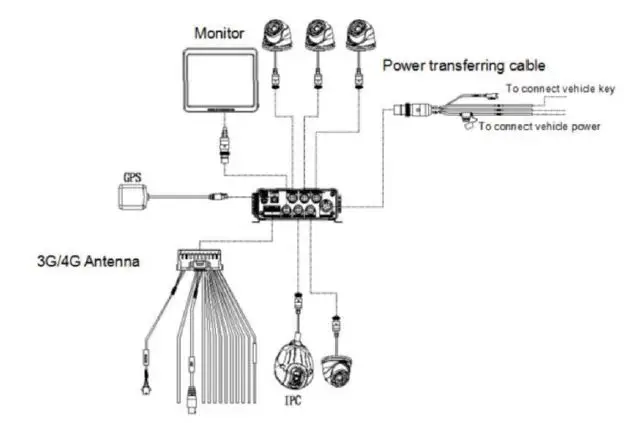
External Interface Dimension (Unit: mm)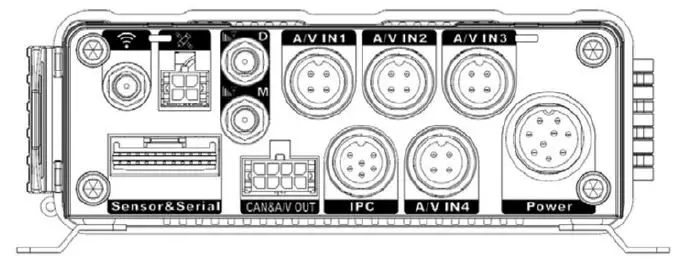

Front Panel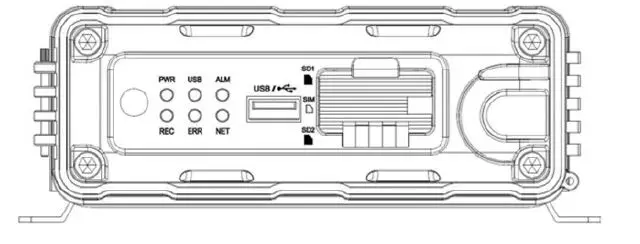
Rear Panel 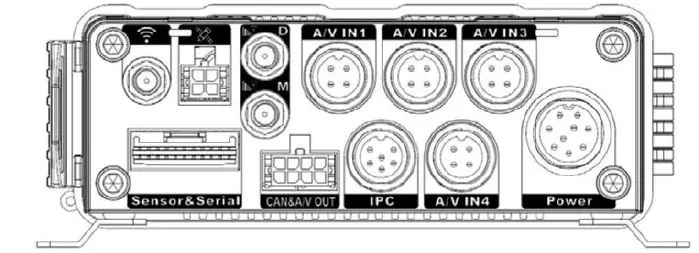
| Serial No. | Description | |
| 1 | Power | DC 8-36 V power input |
| 2 | Sensor&Serial | Interfaces of serial port and sensor |
| 3 | AHD1~4 | Analog Audio & Video input 1-4 |
| 4 | A/VOUT&CAN | Analog Audio & Video output&CAN interface |
| 5 | IPC | Interface of PON power supply |
| 6 | GPS | GPS antenna interface |
| 7 | WIFI | WIFI antenna interface |
| 8 | M | 4G main antenna interface |
| 9 | D | 4G sub antenna interface |
warning:
External antennas are only suitable for antennas of type C60-3000TKX placed in accessories boxes, and other external antennas are prohibited from use. BT, WIFI supports a maximum antenna gain of 5 dBi. 4G band 2 supports a maximum antenna gain of -2.17 dBi, 4G band 4 supports a maximum antenna gain of 0.26 dBi, 4G band 5 supports a maximum antenna gain of 0.01 dBi, 4G band 12 supports a maximum antenna gain of -1.72 dBi, 4G band 13 supports a maximum antenna gain of 0.08 dBi, 4G band 14 supports a maximum antenna gain of 0.36 dBi, 4G band 66 supports a maximum antenna gain of 0.26 dBi, 4G band 71 supports a maximum antenna gain of -1.72 dBi,
Definition and Pictures of External Cables
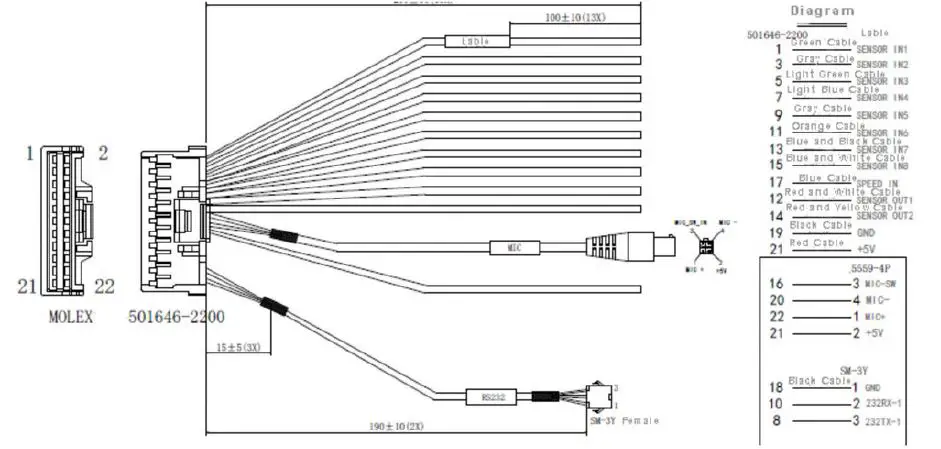
Alarm Cable Definition
FAQ
- The system can’t start?
User manual for M1-H0401 Usually this problem results from the incorrect power connection. Please follow the below steps to check the power connection:- Check the input power, whether the power wire is connected correctly, whether the ground wire is connected back to the battery, and whether the fuse on the power wire is in good condition.
- Check whether the ACC signal wire input to the power is with a voltage higher than 7 V.
- Check whether the device key is closed.
- The MDVR restarts uninterruptedly?
Please follow the below steps to check it:- Check whether the voltage of MDVR is insufficient. If the voltage is less than the start-up voltage of
the device, the device would always restart. - The problem with the hard disk/SD card may cause the failure to start. Take off the storage part and check
whether it is broken down.
- Check whether the voltage of MDVR is insufficient. If the voltage is less than the start-up voltage of
- The device can’t record?
Usually, this problem results from the storage disk or camera. Please follow the below steps to check it:- Check whether the storage disk is installed, whether it is in good contact, and whether the disk can be read normally on the computer.
- Check whether the storage disk is formatted. The storage disk should be formatted before normally storing record files.
- Check whether there is video signal input into the device from the camera and whether there is video/image on the screen.
- There is no voice in the record file?
Please follow the below steps to check it:- Check whether there is an external pickup, or whether the camera features the function of audio collection.
- Access to Video Channel Settings, and check if Audio is set on.
- There must be video input into the channel for recording and it must record normally.
- The GPS works abnormally?
Please follow the below steps to check it:- Check whether the GPS antenna is installed correctly. There is a silk print logo on the GPS antenna holder behind the host device.
- Check whether the antenna receiver is sheltered. It should not be covered by any stuff, which may cause it not to receive signals.
- Environmental influences such as three shades, being inside tunnels, driving near tall buildings or elevated roads, thunderstorms or other weather influences, etc. can also cause signal loss or receive wrong signals.
- The device can’t shut down in ignition switch mode?
- Check if the ACC line connection mode is correct, and check whether there is the voltage on ACC yellow line when the key is turned off.
- If the device has been set with schedule recording, it can’t shut down if it is still during the recording time of the task table.