
User Manual
Introduction
Dear Customer! Thank you for purchasing this NAVITEL® product. NAVITEL MSR700 is a multifunctional high-definition video recorder with many functions and features that are described in this User Manual. Please read the manual carefully before using the device and keep it for future reference.
Device layout

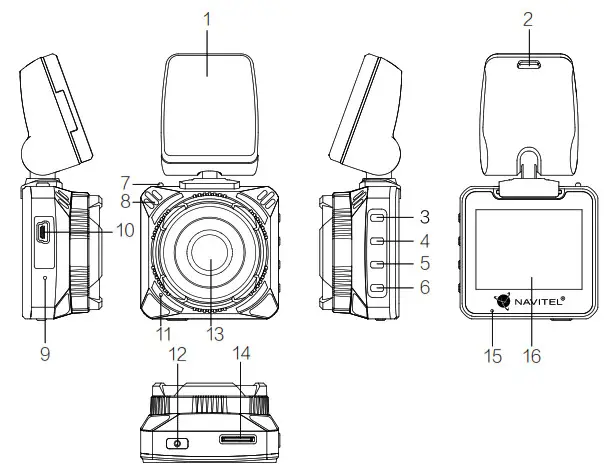
| 1. Adhesive mount (3M sticker) | 5. Down | 9. Reset | 13. Camera |
| 2. Car charger slot | 6. OK | 10. Mini-USB port | 14. microSD slot |
| 3. Menu | 7. Mount lock | 11. Microphone | 15. LED indicator |
| 4. Up | 8. Speaker | 12. Power | 16. Display |
| Button | Functions |
| Power | Press and hold for 3 seconds to turn the device on or off. |
| Menu | Press to access the main menu. In Video mode, press to stop playback and return to the beginning of the video; press once more to access the main menu. In Video/Photo mode, press and hold to display the context menu. |
| Up/Down | In the main menu, press to highlight the next/previous menu item or file. In Capture mode, press to zoom in or out. In Record mode, press Up to turn the microphone on/off; press Down to lock the file (locked files cannot be deleted or overwritten). |
| OK | In Record mode, press to start recording; press again to stop. In Capture mode, press to take a picture. In the main menu, press to select a menu item or file. |
| Reset | If the device is not responding, press to reset. |
Note: The built-in battery is designed only for recording an emergency event in parking mode and turning off the device correctly when the power is turned off. For the full operation of the device in any mode, a constant power connection is required.
NAVITEL s.r.o. hereby declares that the device NAVITEL MSR700 is compatible with the European directive EMC 2014/30/EU. The full text of Declaration of conformity is available at the following internet address: www.navitel.cz/en/declaration_of_conformity/msr700
Device functions
| Format SD-card | Formatting a microSD card in the DVR is necessary for the correct operation of the device. Before using a microSD card or in case of data error, please format the microSD card. For formatting the SD-card in Menu mode select Format SD-card and confirm it. |
| Video | Connect the device to an external power supply and it will turn on and start recording automatically (indicated by the flashing blue light). Press the OK button to stop recording (the blue light will become steady). Press OK again to record another video. Each video will be saved automatically. |
| Photo | In Capture mode, press the OK button to take a photo. It will be saved automatically. |
| Lock file | In Record mode, press Down to lock the current file; a key symbol will appear on the center top of the screen. In Photo/Video mode, select a file, then press and hold the Menu button to access the context menu and select Lock Current. Locked files cannot be deleted or overwritten. Select nlock Current to remove protection. |
| G-sensor | If the vehicle is hit by something, the DVR will automatically start record and lock the current recording. |
| Parking monitor | In shutdown state, if vibration is detected, the device will turn on automatically and start recording. The file will be locked. If nothing happens for over a minute, the device will shut down. |
| Loop recording | This feature allows you to save a video as a set of files given in the duration menu. If the memory card runs out of space, the unprotected files will be overwritten in the order in which they were created. |
| Record audio | Record video with or without sound. |
| Battery charging | Red indicator will light up when the device is plugged into an external power supply; as the battery is charging, the red will gradually dim; red light going out means the battery is full. |
| Screensaver | The device can automatically shut off the screen to reduce power consumption; time interval can be set in the Screensaver menu. |
| USB-connection * | When connecting the device to a PC using a USB cable, two connection options will appear: 1) Mass Storage: play, copy and delete files. 2) Record: standard mode. |
* This function is available only in firmware version 1.00.38 and higher.
Installation
- Stop the car engine.
- Put the microSD card into the DVR.
Note: use a high-speed microSD card (Class 6 or above); capacity should be within 8-256 GB. • To avoid malfunctions of the DVR and / or SD-card, don’t insert and remove SD-card during DVR operation.
• Before using a microSD card, please format it inside the DVR to avoid data errors. For formatting the SD-card in Menu mode select Format SD-card and confirm it. - Secure the device on the windshield with the adhesive mount.
- Connect the car charger to the cigarette lighter socket.
- Connect mini-USB interface to the car charger with the charger extension cord.
Note: charger extension cord can be placed along the edge of the windscreen. - Adjust the camera position; make sure the lens is facing parallel to the ground.
- Start the engine; check whether the device is installed correctly.
Note: if the device is installed correctly, the indicator will glow red; the device will start up and begin recording (indicated by flashing blue light).
 • To avoid malfunctions of the DVR and / or SD-card, don’t insert and remove SD-card during DVR operation.
Precautions
- Use only the original charger adapter. Using another adapter may negatively affect the device’s battery.
- Do not use the device in humid or hot environment.
- Keep the lens clean.
- Do not disassemble the device and do not perform repairs by yourself.
- Strictly follow the laws and regulatory acts of the region where the device is used. This device can not be used for illegal purposes.
- Permissible ambient temperature in operating mode: 0 to +35 °. Storage temperature: +5 to +45 °. Relative humidity: 5% to 90% without condensation (25 °).
Specifications
| Processor | NOVATEK NT96658 | USB | mini-USB 2.0 |
| Display | 2”, 960×240, TN | Power | USB 2.0 DC 5 V 1.5 A |
| Camera | SONY 307 | Frequency | 50 Hz/60 Hz |
| Recording format | MOV | Battery | 2×180 mAh 3.7 V Rechargeable battery |
| Image format | JPG | Working current | 700 mA |
| Image resolution | 12M | Microphone/speaker | Supported |
| Storage | microSD card | Language | English |
| microSD card capacity | 256 GB max |
Note: the specifications may change due to upgrades.
STARVIS and STARVIS are trademarks of Sony Corporation.
 NAVITEL Prohlášení o Shodě
 NAVITEL detailed offline maps for iPhone, iPad, Android