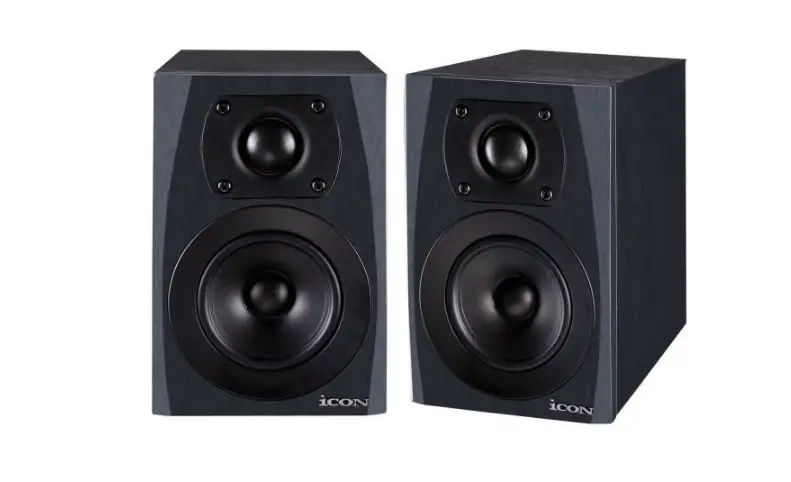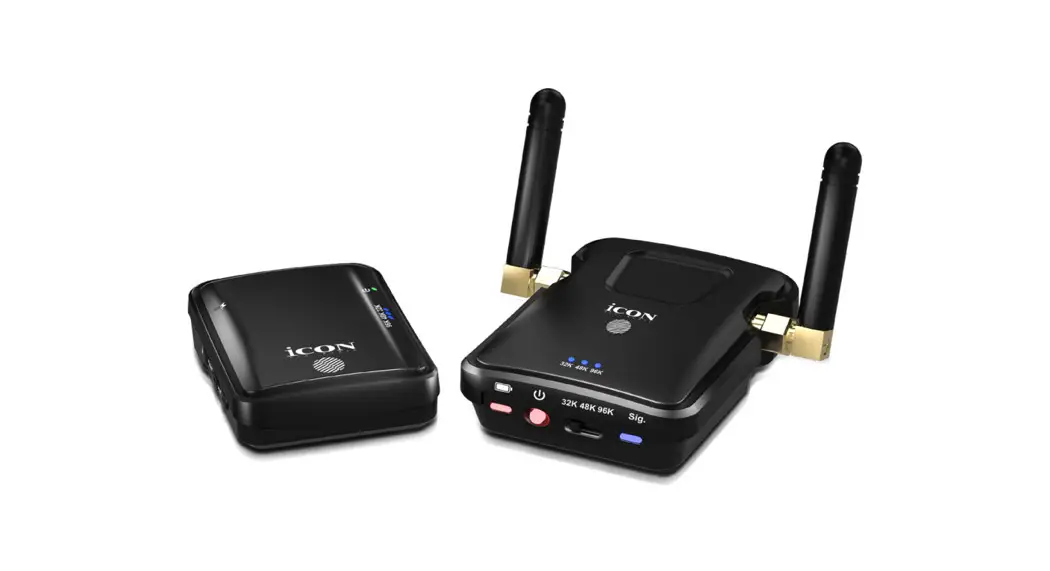

 24-bit/96KHz Stereo (uncompressed)
professional wireless monitor system
User Manual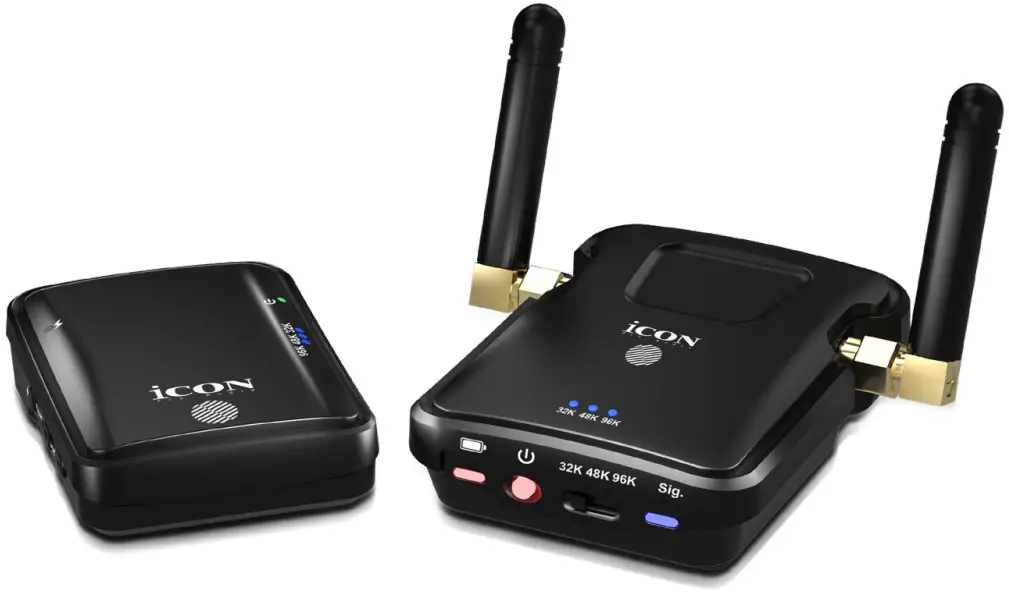
AirMonPro Professional Wireless Monitor System

 CAUTION
RISK OF ELECTRIC SHOCK DO NOT OPEN RISQUE DE CHOC ELECTRIQUE NE PAS OUVRIR
CAUTION: TO REDUCE THE RISK OF ELECTRIC SHOCK 00 NOT REMOVE COVER (OR BACK) NO USER-SERVIDEABLE PARTS INSIDE REFER SERVICING TO QUALIFIED PERSONNEL
ATTENTION: POUR EVITER LES FUSQUES DE CHOC ELECTRIQUE: NE PAS ENLEVER LE COUVERCLE AUCUN ENIRETIEN DE PIECES INTERIEURES PM L’USAGER.CONFIER L’ENTERETIEN AU PERSONNEL QUAUFIE. AVIS: POUR EVITER LES RISQUES D1NCENDIE OU &ELECTROCUTION. N EXPOSEZ PM CET ARTICLE A LA PLUIE OU A L’HUMIDITEThe lightning flash with arrowhead symbol within an equilateral trianglais intended Mated the user to the presence of uninsulated dangerous voltage within the procluct s enclosure, that may be of sufficient magnitude to electric shock to persons. Le syrnbolclair avec point de fl the I intrieur d un triangle quilat cal est utilis pour alerter I utilisateur de la pr sence I int deur du coffret de voltage dangereux non isol d ampleur suff exclamation point within an equilateral triangle is intended to alert the user of the presence of important operating and maintenance (serviving) instructions in the literature accompanying the appliance. Le point d exclamation I int rieur dun Mangle quilat ral est employ pour alerter les utilisateurs de la prsepce d instructions importantes pour le fonctionnement et I entretien (service) dans le livret d instruction accmpagnant I appari I.
Important Safety Instructions
- Read this manual thoroughly before using this unit.
- Keep this manual for future reference.
- Take notice of and comply with all warnings included in the user’s manual or indicated on the appliance.
- Follow all instructions included in this manual.
- Do not expose this unit to rain or moisture. Avoid having water or other liquids spilled on this unit.
- When cleaning the cabinet or other parts of this appliance, use only a dry or slightly damp soft cloth.
- Do not block any ventilation openings or interfere with the proper ventilation of this unit. Install in accordance with the manufacturer’s instructions.
- Do not use or store near any heat sources such as radiators, heat registers, stoves, or other heatproducing appliances.
- To avoid the risk of electrical shock, do not touch any exposed wiring while the unit is in operation.
- Only use attachments/accessories specified by the manufacturer.
- Unplug this unit and all connected electrical equipment during lightning storms or when left unused a long period of time.
- Refer all servicing to qualified service personnel. Servicing is required when the appliance has been damaged in any way or fails to operate normally.
WARNING: To reduce the risk of fire or electric shock, do not expose this unit to rain or moisture
Introduction
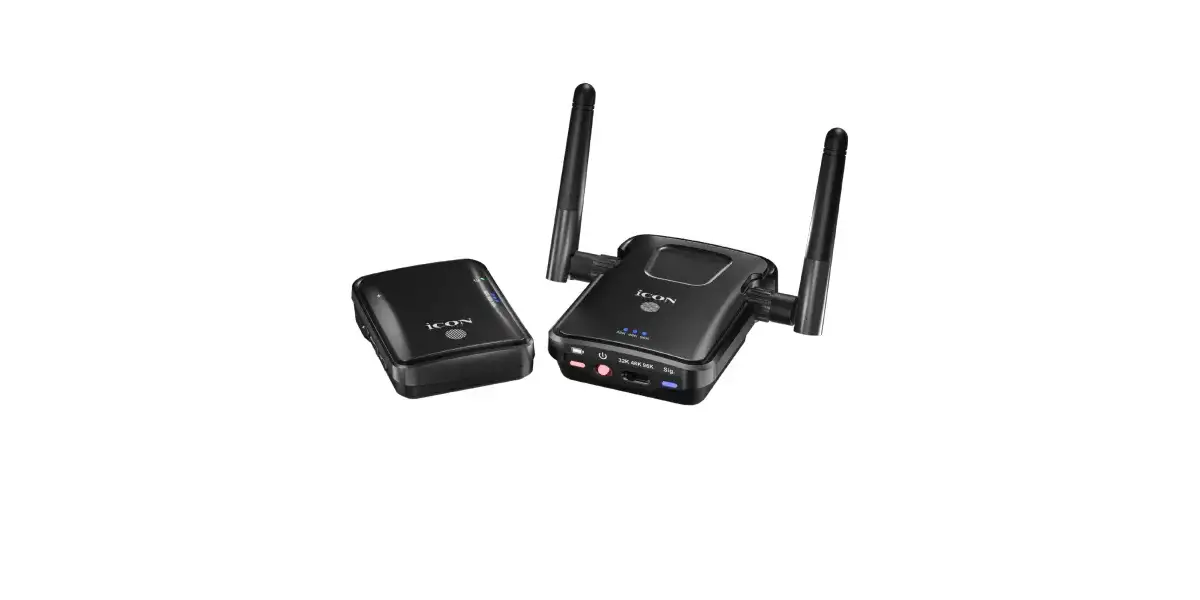
Congratulations on your purchase of the ICON Pro Audio AirMon Pro, a 24-bit/96KHz Stereo (uncompressed) professional wireless monitor system.
Designed and developed in Japan for the stage and live streaming, the AirMon Pro is a wireless monitoring system consisting of two modules; a transmitter and a receiver.
The system is expandable with limitless receivers per transmitter and up to three transmitters per immediate area, depending on Wi-Fi strength.
Super low latency was at the top of the agenda in the design brief, as was the highest possible audio quality. The signal is transmitted digitally via 2.4 GHz.
The available sample rates are 32K, 48K (16 bit mono) or 96K, the latter offering extremely high audio quality, 24 bit stereo signal. This represents unsurpassed audio quality for products of the AirMon Pro’s type and class.
Ideal for podcasters and performers who demand not only professional, but exemplary standards in audio quality, this uniquely advanced system offers robust, intelligent build quality, coupled with a stylish, sleek design.
What’s in the package?
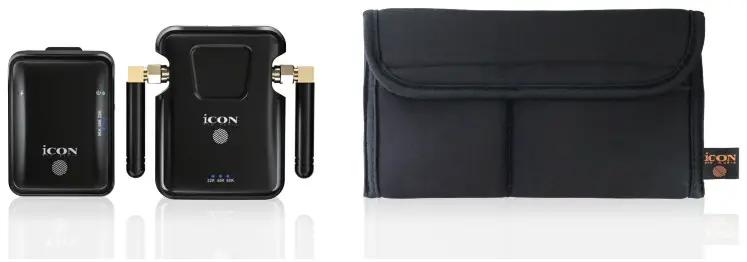
- AirMon Pro receiver
- AirMon Pro transmitter
- Re-chargeable battery (both units can be charged)
- 3.5 mm to 3.5 mm cable for connecting external sound sources to the transmitter
- Y cable for charging both devices (USB C x 2 to USB 2.00)
- Storage pouch
- Included belt clip (affixed to the receiver)
Register your ICON ProAudio product to your personal account
- Check serial number of your device
 Please go to http://iconproaudio.com/registration or scan the QR code below.
Input your device’s serial number and the other information on the screen. Click “Submit”.
A message will pop up showing your device information such as model name and its serial number – Click “Register this device to my account” or if you see any other message, please contact our after-sales service team - Log in to your personal account page for existing users or sign up as new user
Existing users: Please log into your personal user page by inputting your user name and password.
New users: Please click “Sign Up” and fill in all the information. - Download all useful materials
All your registered devices under your account will show on the page. Each product will be listed along with all its available files such as drivers, firmware, user manual in different languages and bundled software etc. for download.
 Please go to
 Features
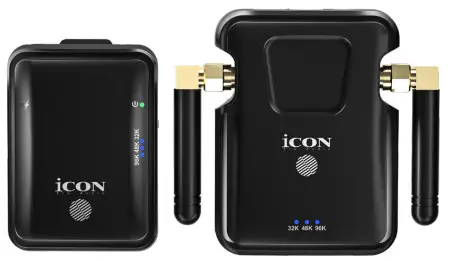
- Sleek, super compact and stylish design
- Uncompressed digital transmission up to 24-bit/96KHz sampling rate
- 2.4GHz proprietary encryption technology for ultra-low latency for wireless transmission (less than 1.58ms)
- Infinitely expandable – use unlimited receivers per one transmitter
- 16 different selectable channels for multiple, individual transmissions simultaneously (use up to three transmitters in one location, depending on Wi-Fi signal)
- Uniquely innovative technology allows the user to select transmission sample rate from 32K, 48K MONO or 96K STEREO
- Headphone output port (3.5mm)
- Simple one button pairing technology
- Type C USB connector for charging
- Included USB C Y cable for convenient charging (both units at the same time)
- Rechargeable battery for both transmitter and receiver
- Belt clip fixture (receiver)
- Approximately six hours use on a full battery charge
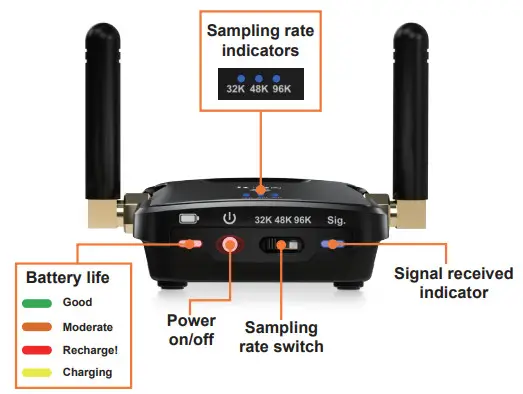
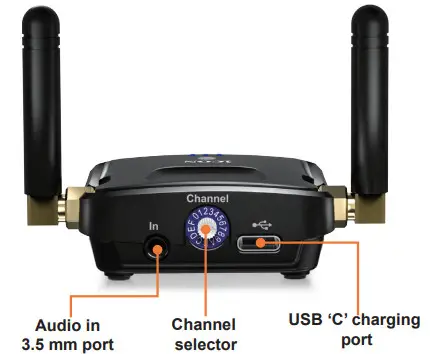
AirMon Pro: The Transmitter
 |  |
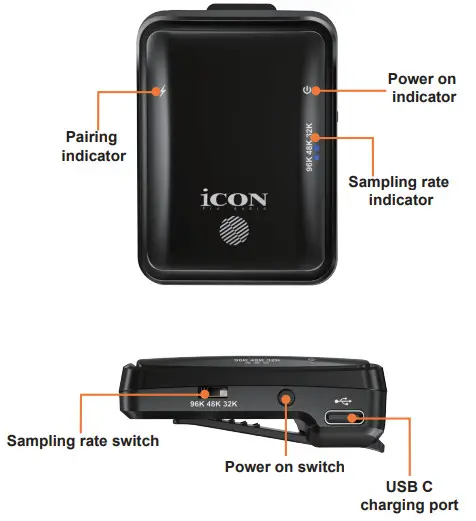
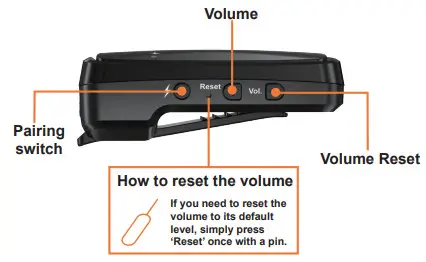
AirMon Pro: The Receiver
 |  |
Set Up
Pairing the Receiver and Transmitter.
STEP ONE
On the transmitter, select which channel you would like to broadcast on.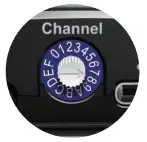 Now, let’s decide which bandwidth you would like to select i.e. 32K, 48K or 96K.
Select this on both units – make sure all units are off at this stage.
| Sample Rate | Stereo/Mono | Bit Rate | Typical Distanc |
| 32K | Mono | 16 bit | Up to 50 meters* |
| 48K | Mono | 16 bit | Up to 25 meters* |
| 96K | Stereo | 24 bit | 10 —15 meters* |
*dependent on obstacles and obstructions to the signal
Let’s say we’re going to choose 96K – the best option for outstanding audio quality.
Select 96K on both the receiver and the transmitter via the selectable switch. If you have multiple receivers you would like to use with the transmitter, make sure you switch all of these to 96k.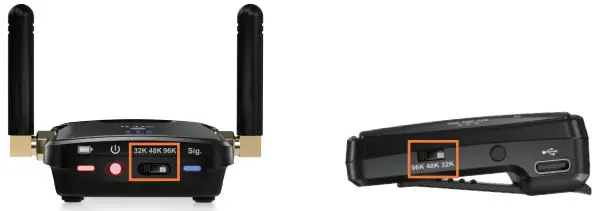 STEP TWO
Turn on the receiver power first. If you have multiple receivers, turn all of these on.
Press the ‘pair’ switch on the receiver/s ONCE, (the lightning bolt). The blue LED on top of the receiver will continually flash until paired. It will stop when paired. The sample rate light will also flash until paired, at which point it will remain lit.
STEP THREE
Turn on the transmitter’s power. The sample rate LED will flash until paired with the receiver/s. Once paired, you will not have to pair again unless you change from say, 96K to 32, (in which case, please turn off the units and repeat the pairing process).
Expansion
Endless receivers can be used per one transmitter. Two transmitters can be used together and, depending on the Wi-Fi environment, a maximum of three transmitters can be used in the same location. Please note, that this is entirely dependent on the WiFi environment. A general rule of thumb is, two transmitters per area is the norm, but where there is an excellent WiFi environment, three may be used.
Each transmitter must be assigned to an individual channel. It is best to ‘space’ these out as much as possible, as per the example below. So, if using three transmitters, it is best to use, say, channels 0,4, and 9 rather than 1, 2 and 3. If using two transmitters, it is best to use say, channel 0 and channel 7.
Example:
Let’s choose channels 0,4 and 9 for our maximum of three transmitters, (our Wi-fi is excellent). We want to use 12, 6 and 24 receivers on each of these three channels.
This is how we would organize it;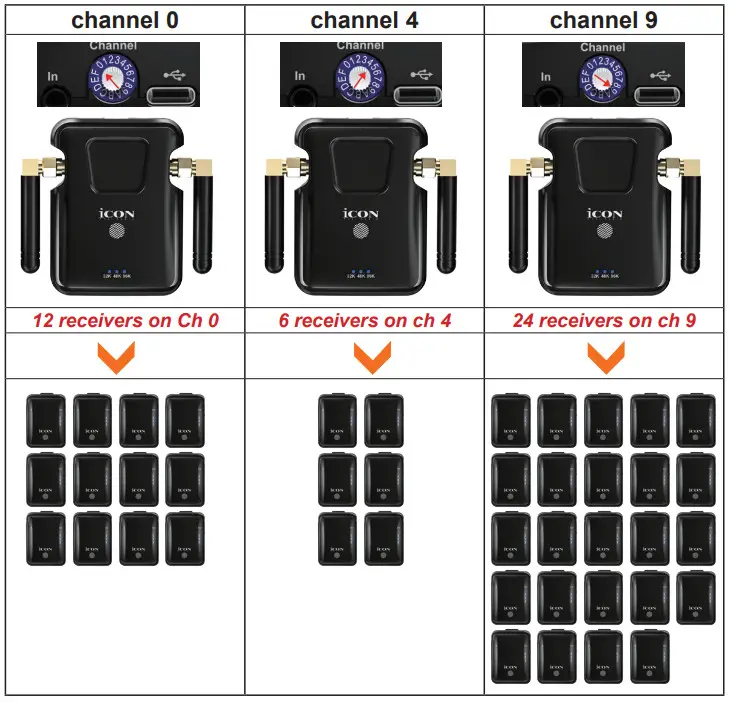
Using AirMon Pro
Simply plug in your 3.5mm cable into your sound source and then into the ‘in’ port of your AirMon Pro, (with the sound source being off/volume down).
Ensure your AirMon Pro system is paired, (as described in the ‘Set Up’ section). Plug in your ear buds into the headphone jack of the AirMon Pro.
Ensure your initial volume is at a low and safe volume level in order to protect the ear safety of users. Adjust to taste.
If you are using more than one transmitter, please ensure that these are placed at least 50cm apart in order to avoid interference between the units, (the further apart, the better).
Depending on the Wi-Fi environment, a maximum of three transmitters may be used together. In many cases, the maximum will be two, in order to avoid interference.
Need more receivers?
Additional receivers are available to purchase separately. Please contact your iCON retailer for details.
Getting Interference?
Try a different channel (there are 16 channels to choose from)!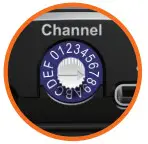
 Safety First!
The World Health Organization (WHO) suggests you should listen to your headphones at a maximum volume level of 85 decibels (dB) for a maximum 8 hours. Scientists recommend a listening range of between 60- 80 dB.
Most MP3 players, phones, and other listening devices rise above the recommended dB levels with headphones when you turn up the volume. They can normally achieve 105 dB. If you listen at these levels, it should be for a short time (10 minutes), otherwise you risk permanent damage to your hearing.
Specifications
| Audio | Transmitter | Receiver | ||||
| Sampling Frequency (Selectable) | 96KHz | 48KHz | 32KHz | 96KHz | 48KHz | 32KHz |
| Sampling bit rate | 24bit | 16bit | 16bit | 24bit | 16bit | 16bit |
| Channel Mode | STEREO | MONO | MONO | STEREO | MONO | MONO |
| Input Level | -3dBV | |||||
| Input Impedance | 10K ohm | |||||
| Output Level | 16mW | |||||
| Output Impedance | 32 ohm | |||||
| Radio Frequency | Transmitter | Receiver |
| Operating Frequency | 2400MHz-2483MHz | |
| Digital Modulation | GFSK | |
| Occupied Bandwidth | 4MHz +4MHz | |
| Transmission output | 1 OMW | |
| Receiving Sensitivity | -85dBm | |
| Selectable Channel | 16 channel | |
| Power | Transmitter | Receiver |
| Current consumption | 140mA | 90mA |
| Power Requirements | Built-in rechargeable LiPo battery charged via USB 5V, 0.5A | |
| Battery Operating Time | 6 hours for 1000 mA use. | 11 hours for 1000 mA use. |
| Dimensions and Weights | Transmitter | Receiver |
| Dimensions (WxDxH) | 53×71 x21 mm (2.1″x2.8″x0.8″) | 44×61 x21 mm (1.7″x2.4″x0.8″) |
| Weight | 78.6g | 41g |
| Accessory | USB Recharging cable and storage pouch | |
Services
If your AirMon Pro needs servicing, please follow these instructions.
Check our online Help Center at http://support.iconproaudio.com, for information, knowledge, and downloads such as:
- FAQ
- Download
- Product Registration
- Video Tutorials
Very often you will find solutions on these pages. If you don’t find a solution, create a support ticket at our online Help Center at the link below, and our technical support team will assist you as soon as we can. Navigate to http://support.iconproaudio.com and then sign in to submit a ticket.
Once you have submitted an inquiry ticket, our support team will assist you to resolve the problem with your ICON ProAudio device as soon as possible.
To send defective products for service:
- Ensure the problem is not related to operation error or external system devices.
- Keep this owner’s manual. We don’t need it to repair the unit.
- Pack the unit in its original packaging including end card and box. This is very important. If you have lost the packaging, please make sure you have packed the unit properly. ICON is not responsible for any damage that occurs due to non-factory packing.
- Ship to the ICON tech support center or the local return authorization. See our service centers and distributor service points at the link below:
If you are located in US
Send the product to:
North America
Mixware, LLC – U.S. Distributor
3086 W. POST RD.
LAS VEGAS NV 89118
Tel.: (818) 578 4030
Contact: www.mixware.net/helpIf you are located in Hong Kong
Send the product to:
ASIA OFFICE:
Unit F, 15/F., Fu Cheung Centre,
No. 5-7 Wong Chuk Yueng Street, Fotan,
Sha Tin, N.T., Hong Kong.
Tel: (852) 2398 2286
Fax: (852) 2789 3947
Email: [email protected]If you are located in Europe
Send the product to:
Sound Service GmbH
European Headquarter MorizSeeler-Straße3 D-12489
Berlin
Telephone: +49 (0)30 707 130-0
Fax: +49 (0)30 707 130-189
E-Mail: [email protected] - For additional update information please visit our website at: www.iconproaudio.com













 Global | Leading UK media company offering radio and outdoor advertising
 Dashboard – Icon Pro Audio
 Make choice for purchasing this domain - Domeinenbank
 Help - Mixware