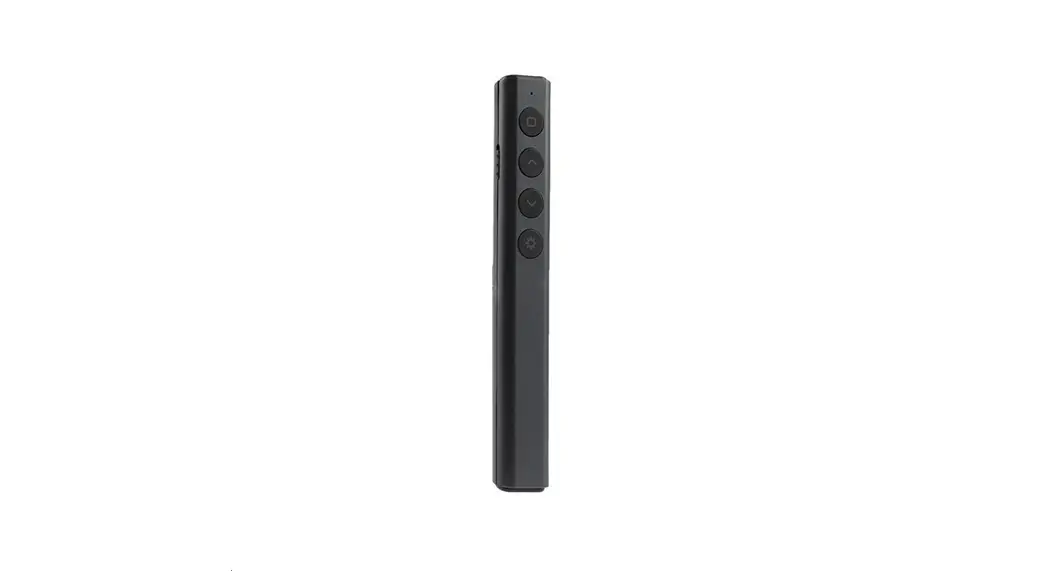

XPG140N Wireless Presenter User Manual
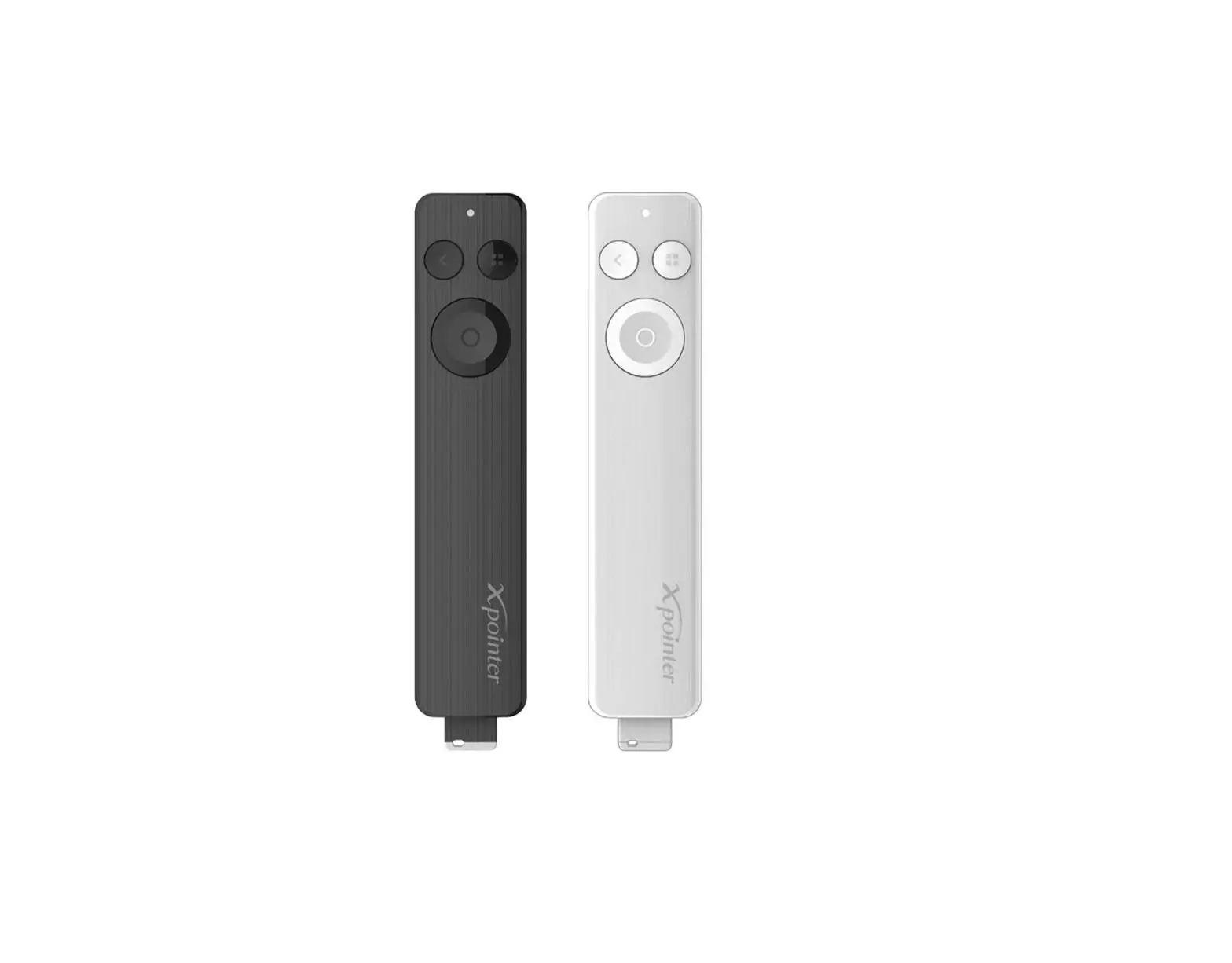
Included in Package & Function
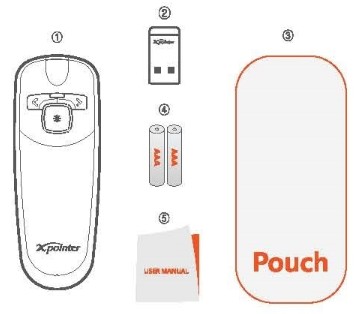
Included in Package
| Name | Qty |
| 1. Transmitter | 1EA |
| 2. Receiver | 1EA |
| 3. Pouch | 1EA |
| 4. Manual | 1EA |
| 5. Battery | 2EA |
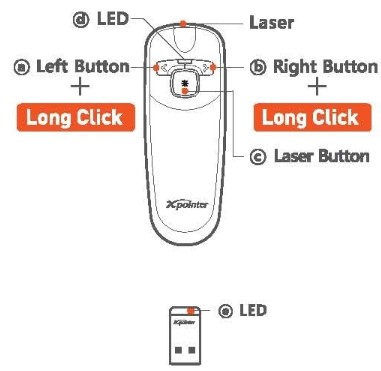
Function
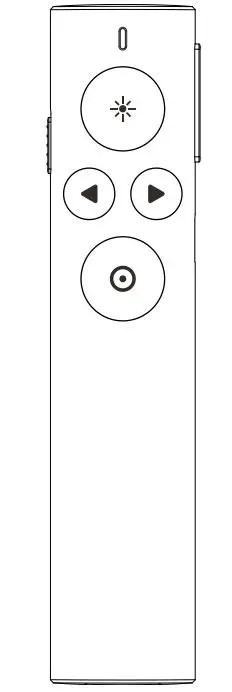
| Name | Function |
| a. Left Button | Previous Page/Page Up |
| a*. Long Click | Black Screen IXPM140Plus /XPM1451 |
| b. Right Button | Next Page/Page Down |
| b*. Long Click | Slide Show Start/Finish D(PM140Plus / XPM1451 |
| c. Laser Button | Laser Pointing |
| d. Transmitter LED | Laser Pointing and Battery Check |
| e. Receiver LED | Check Operating Status and ID Recognition |
[Table1]
* Long Click: It means push the button for more than 1 second.
* Notice
Composition and Function might be changed without warning for upgrading.
Installation
- Put batteries into the transmitter. Make sure the positive and negative ends of the batteries match the polarity markings inside the batteries compartment.
- Plug receiver into computer USB port.
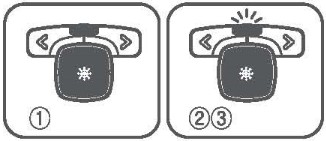
- Wait until LED(©) of receiver flickers regularly.
- If LED(©) of receiver blinks, it means that the product is correctly recognized.
- Push left or right button of transmitter for more than 2 seconds.
After stop flickering, recognizing is completed. - Open PowerPoint and push right or left button of transmitter.
And then check [table1]. - In case of failure in working [table1], separate receiver from USB port.
And insert receiver into USB port again. Repeat the process above.
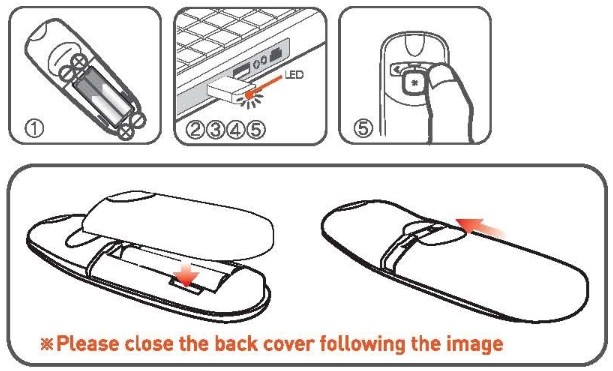
The Usage of A-pointer
- Presentation remote control
1) Open the presentation file.
2) Start slide show.
3) User can give a presentation effectively as they can move pages with left or right button a, b of transmitter.
1-2) Presentation remote control
1) Open the presentation file.
2) *Long Click right button(b) of transmitter and slide show will start.
3) User can give a presentation effectively as they can move pages with left or right button a, b of transmitter.
4) When a question period, black screen will be showing by *Long Click left button a. And black screen will be over by pushing Left button b again.
5) To end of the slide show, *Long Click right button(b).
- Laser pointing
1) Push laser button c of transmitter and laser beam will be pointing.
2) If LED d of transmitter is turning on, laser is working normally.
3) If you push it for more than 20 seconds, it turns off automatically.
It prevents the loss of the batteries and accidents in advance.
4) Laser will be working by pushing laser button(c) again.
- Battery check
1) Push laser button(c).
2) Check LED (d) of transmitter.
3) If LED(d) of transmitter blinks the batteries should be replaced.
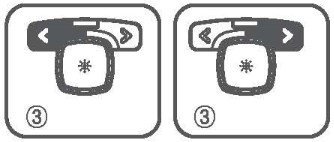
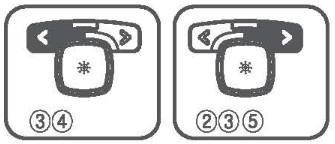
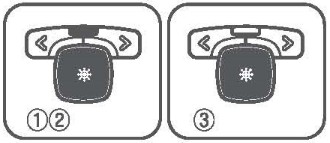
Features
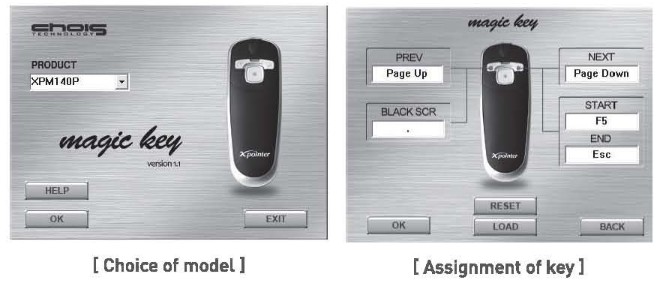
- Magic key function
Magic key allows user to use X-pointer for any program. User can give a presentation and also can remote control media player, acrobat reader, photo viewer, winamp, etc. - Ergonomic design with wrist consideration
It is designed ergonomically to prevent CTS (Carpel Tunnel Syndrome) like burdening to the wrist or wrist pains from a long time use. It is streamlined design. It makes you feel comfortable when you grip It. - Battery replacement indication
Using LED(d) of transmitter, users can know when it is time to replace the batteries. - Long Click function
One button gives you control over two functions. - High-Quality laser
High-quality 635nm Orange laser is twice brighter and superior clear to general laser.
User can point out exactly what the person want. In addition, It meets certification standards for Korea, Japan and USA. - 2.4GHz Multi Channel
2.4GHz RF technology by GFSK modulation utilizes 31 channels and 65,536 ID’s which can reduce the interference from the other RF devices or the other X-pointers. - Power sleep mode
If you push laser button[c] for more than 20seconds, it turns off automatically.
In case that transmitter doesn’t work for a fixed time (1second], it turns to the power-saving mode. It prevents the unnecessary loss of the batteries.
The Usage of Magic key
X-pointer’s function will be changed as user’s demands.
User can use X-pointer as a remote control of media player, word, winamp, etc.
Key values are saved in X-pointer and user can use it anywhere.
- Magic key program can be downloaded from : http://www.x-pointer.com
[Download : Home > support > Download) - Insert receiver into USB port, and then complete awareness of ID.
- Start > Program > ChoisTechnology > Magic key.
- Select the item to use on the initial screen and click ‘OK’.
- Enter customized key values in each button and click ‘OK’.
- Key values are saved in receiver and you can use changed function.
Specifications
- Transmitter
Frequency Used 2.402-2.480GHz Channels Used 40 channel Recognizable ID’s 65,536 Modulation GFSK Operating Temperature 10-40°C Laser Type Class II Laser Output less than l mW Laser Wavelength[Color) 635nm (ORANGE) Current Consumption less than 20mA Number of Button 3 buttons Battery AAA x 2EA Size 102 X37 X 16 mm Weight 25g(without batteries) Hours of Continuous Use 30 hours - Receiver
Interface USB 1.1 / 2.0 Power 5V(USB Power) Operating System Windows7, 8, 10/Mac OS El Capitan Consumption Current less than 23mA Operating Temperature -10-50°C Size 26 X12 X 4.5 mm Weight 1.5g
Certification & Regulatory Compliance Information
- Product Name (Model Name)
Transmitter : XPG140N, Receiver : XPR-AT3 - Certification Number
 FCC ID: RVBXPGI40N
  QG678
QG678  ID: 008nyoso012
- Manufacturer : ChoisTechnology Co., Ltd./ YT tech(H.K.) Limited
- Country of Origin : china
- Products Design : ChoisTechnology Co., Ltd.
- Date of Manufacturing : Otherwise Noted
 FCC ID: RVBXPGI40N
  QG678
QG678  ID: 008nyoso012
Regulatory Compliance FCC Compliance Statement
FCC Part 15.19
This device complies with part 15 of the FCC Rules.
Operation is subject to the following two conditions :
- This device may not cause harmful interference, and
- This device must accept any interference received, including interference that may cause undesired operation.
FCC Part 15.21
Any changes or modifications (including the antennas} made to this device that are not expressly approved by the manufacturer may void the user’s authority to operate the equipment.
RF Exposure Statement (2.1091)
FCC RF Radiation Exposure Statement : This equipment complies with FCC RF Radiation exposure limits set forth for an uncontrolled environment. This device and its antenna must not be co-located or operating in conjunction with any other antenna or transmitter.
Part 15.105 (B)
Note : This equipment has been tested and found to comply with the limits for a Class B digital device, pursuant to part 15 of the FCC Rules. These limits are designed to provide reasonable protection against harmful interference in a residential installation this equipment generates uses and can radiate radio frequency energy and, if not installed and used in accordance with the instructions, may cause harmful interference to radio communications.
However, there is no guarantee that interference will not occur in a particular installation.
If this equipment does cause harmful interference to radio or television reception, which can be determined by turning the equipment off and on, the user is encouraged to try to correct the interference by one or more of the following measures
- Reorient or relocate the receiving antenna.
- Increase these parathion between the equipment and receiver.
- Connect the equipment into an outlet on a circuit different from that to which the receiver is connected.
- Consult the dealer or an experienced radio/TV technician for help.
Changes or modifications not authorized by the party responsible for compliance could void the user’s authority to operate this product.
Support
Any problems or suggestion to improve the product, please contact us.
We welcome your input and appreciate your business.
E-mail inquiryldchoistec.com
TEL +82-32-246-3409 FAX +82-32-246-3406
Homepage www.x-pointer.com
Company Name ChoisTechnology Co., Ltd.
Warranty
We warrant this product is manufactured by ChoisTechnology Co., Ltd. and any defect of the product caused by materials and mechanical problems will be covered for free for a year. If our model you purchased is found to be defective within that time, we will promptly repair or replace it. However, this warranty does not cover problems or damages resulted from unauthorized repair, modification or disassembly.
CAUTION
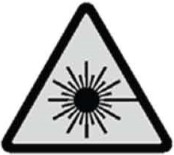 LASER RADIATION. DO NOT STARE INTO THE BEAM OR VIEW DIRECTLY WITH OPTICAL INSTRUMENTS. CLASS II LASER PRODUCT.
NEVER POINT A LASER BEAM INTO A PERSON’S EYES OR VIEW A LASER BEAM DIRECTLY, AS PROLONGED EXPOSURE CAN BE HAZARDOUS TO THE EYES.
MOMENTARY EXPOSURE FROM A LASER POINTER, SUCH AS AN INADVERTENT SWEEP OF THE LIGHT ACROSS A PERSON’S EYES, MAY CAUSE TEMPORARY FLASH BLINDNESS SIMILAR TO THE EFFECT OF ACAMERA FLASH BULB. AL-THOUGH THIS CONDITION IS TEMPORARY, IT CAN BECOME MORE DANGER-OUS IF THE EXPOSED PERSON IS ENGAGED IN A VISION-CRITICAL ACTIVITY SUCH AS DRIVING.
MODIFICATION OF THIS DEVICE MAY RESULT IN HAZARDOUS RADIATION EX-POSURE. FOR YOUR SAFETY, HAVE THIS EQUIPMENT SERVICED ONLY BY AN CHOISTECHNOLOGY AUTHORIZED SERVICE PROVIDER.
“Notice”
For accidents caused by user’s carelessness is not compensation.
Please keep in mind that the below notice.
- Do not stare into laser beam.
- Do not aim the laser at people.
- Keep out of reach of children.
- Any changes or modifications to the controller could void your authority to operate the equipment.
- Do not place the controller in a location where it is subject to direct sunlight or extreme heat.
- If any solid object or liquid falls onto the controller, disconnect it and have it checked by qualified personnel.
- The controller is capable of operation between 10~40°C and storage between 10~60°C.
- Please pay attention not to lose the receiver. PROVIDER.
FCC Information to User
This equipment has been tested and found to comply with the limits for a Class B digital device, pursuant to part 15 of the FCC Rules. These limits are designed to provide reasonable protection against harmful interference in a residential installation. This equipment generates uses and can radiate radio frequency energy and, if not installed and used in accordance with the instructions, may cause harmful interference to radio communications. However, there is no guarantee that interference will not occur in a particular installation. If this equipment does cause harmful interference to radio or television reception, which can be determined by turning the equipment off and on, the user is encouraged to try to correct the interference by one or more of the following measures:
- Reorient or relocate the receiving antenna.
- Increase the separation between the equipment and receiver.
- Connect the equipment into an outlet on a circuit different from that to which the receiver is connected.
- Consult the dealer or an experienced radio/TV technician for help.
This device complies with Part 15 of the FCC Rules. Operation is subject to the following two conditions: (1) this device may not cause harmful interference, and (2) this device must accept any interference received, including interference that may cause undesired operation.
Any changes or modifications not expressly approved by the party responsible for compliance could void the user’s authority to operate this equipment.
IMPORTANT NOTE:
FCC RF Radiation Exposure Statement:
This equipment complies with FCC radiation exposure limits set forth for an uncontrolled environment. This equipment should be installed and operated with minimum distance 20cm between the radiator & your body. This transmitter must not be co-located or operating in conjunction with any other antenna or transmitter.