Onn Hybrid Screen Protector User Guide
Very Important
- Turn on the Touch Sensitivity function on your device: Go to Settings > Display > Touch Sensitivity
- Remove the pre-installed film on your device screen.
Cleaning
If you have a case on your device, remove it.
01 Clean the Screen
Clean the device screen with the wet wipe.
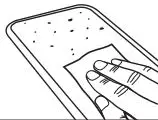
02 Dry the Screen
Dry with the microfiber cloth. Ensure the screen is completely dry before proceeding.
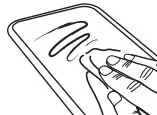
03 Remove Dust
Use the dust removal sticker to remove any fine particles from the device screen.
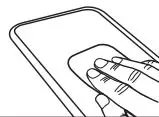
Application Tray
04 Apply the Tray
Snap the orange application tray over the front of your device.
Tip: Be sure the edge labeled Top is at the top of your device.
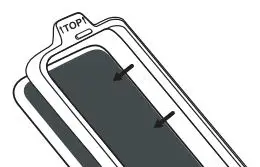
Screen Protector Application
05 Remove Safety Film
Using the tab labeled “1-back”, peel back to expose the adhesive.
Tip: Hold the screen protector using the top and bottom tabs. Do not touch the adhesive.
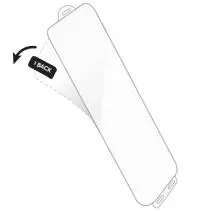
06 Place the Screen Protector
With the adhesive facing your device place the screen protector down over the tray. Use the holes in the top and bottom tabs to align over the raised pegs on the application tray.
Note: There is one raised peg at the top, and two at the bottom.
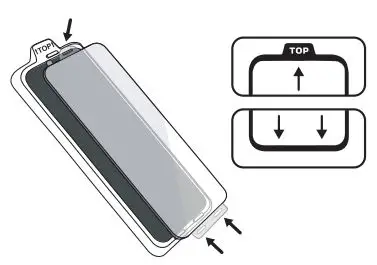
07 Attach the Screen Protector
Use the squeegee card to press up and down, starting at the middle of the screen.
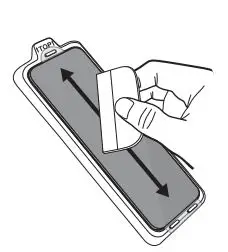
Final Steps
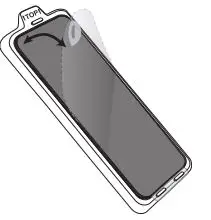
08 Remove Top Film
Now that the screen protector is partially adhered to your device screen, remove the top layer film. Use the top or bottom tabs to pull the top layer away.
09 Remove Air Bubbles
Carefully remove the application tray.
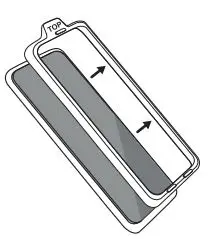
10 Remove Air Bubbles
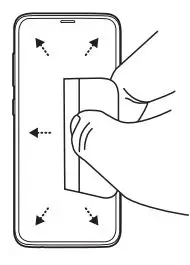
Run the squeegee card from the center out toward the edges to adhere the rest of the screen protector. Push firmly to ensure large bubbles are removed, using either edge of the squeegee card.
Note: Small bubbles should dissipate slowly over the next 24 hours.
11 Register your Fingerprint
Re-register your fingerprint ID in “Settings”.
Tip: Repeat this step if you ever experience issues.
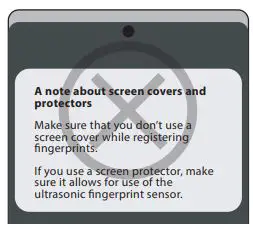
Note: If you see this warning, please ignore it. This screen protector should not be removed when registering your fingerprint.