
Quick Start Guide
H6065 RGBIC LED Gaming Lights
Step 1:
Before assembling, watch the video tutorial. The tutorial can be accessed from any of the following methods.
- Search and find the “Govee Glide Y Lights Installation Tutorial” video on our official YouTube channel.
- Scan the QR code pictured on the right.

https://app-h5.govee.com/user-manual/video/H6065
Step 2:
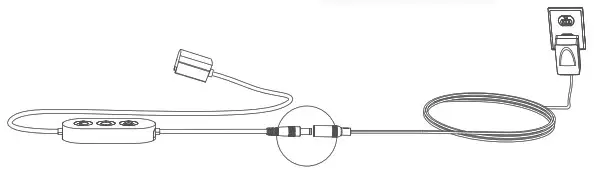
Download Govee Home App. Connect the control box to the Se power adapter and plug into power.
Step 3:
In Govee Home App, add model “H6065” on “My Devices” and follow the in-app instructions step by step.
Note:
Before installing:
- Plug each panel into power to check that each lights up.
- Design your layout in the app.
- It is recommended to use the Y-shaped cardboard included in the packaging to pre-design your layout on the wall.
During installing:
- Please clearly follow the in-app instructions on the installation page to install the light panels.
 Slide the flat side of the connector into one of the two output slots.
 Press down firmly until the input slot of another light panel snaps into place on the uneven side of the connector.
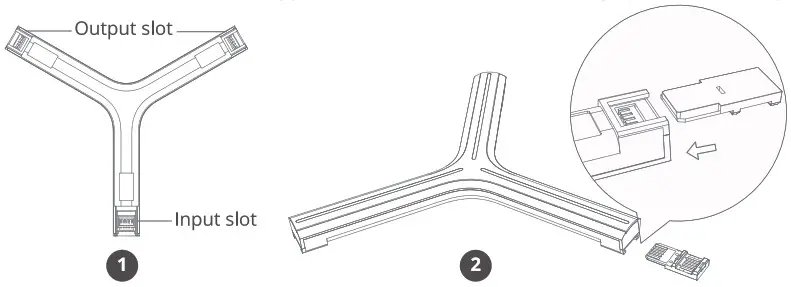 Slide the flat side of the connector into one of the two output slots.
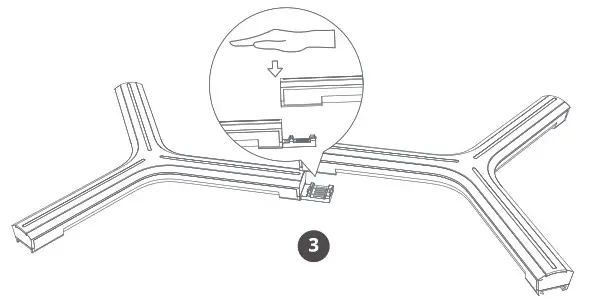 Press down firmly until the input slot of another light panel snaps into place on the uneven side of the connector.
After Installation:
- Follow the in-app instructions to complete calibrating, then enjoy your design!