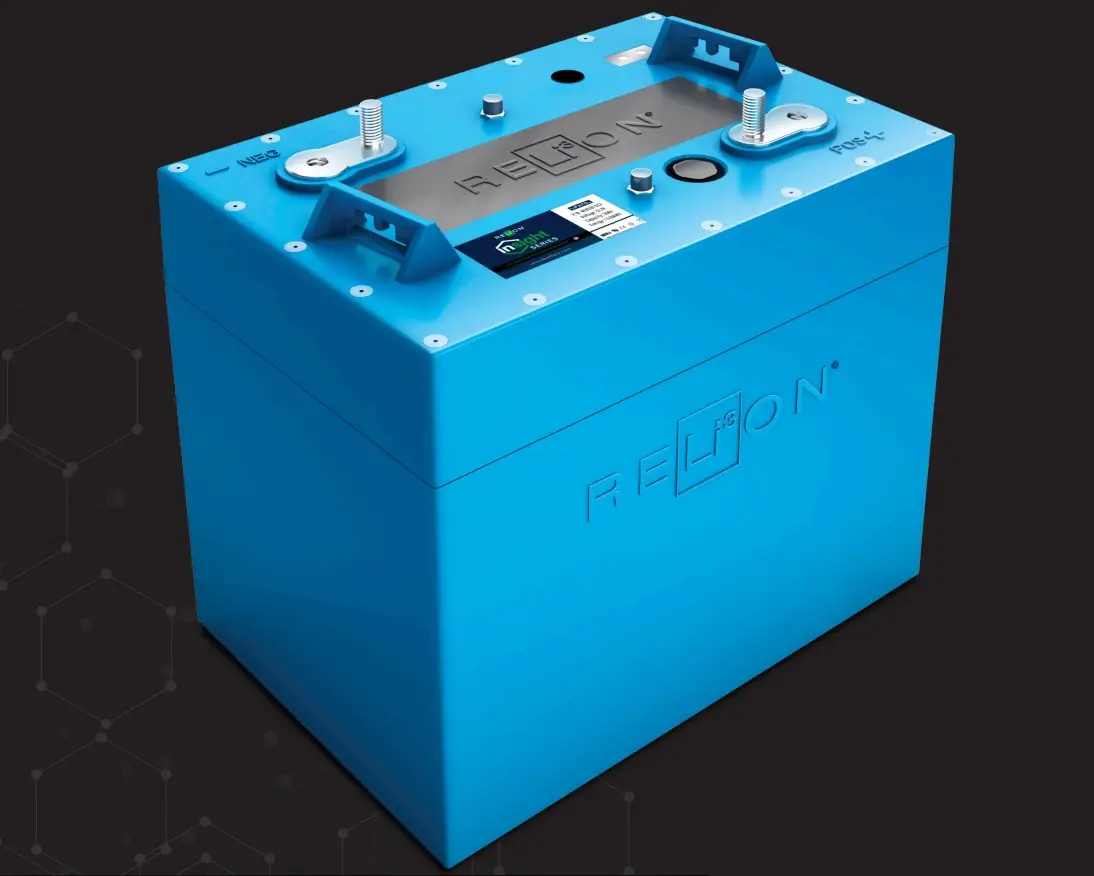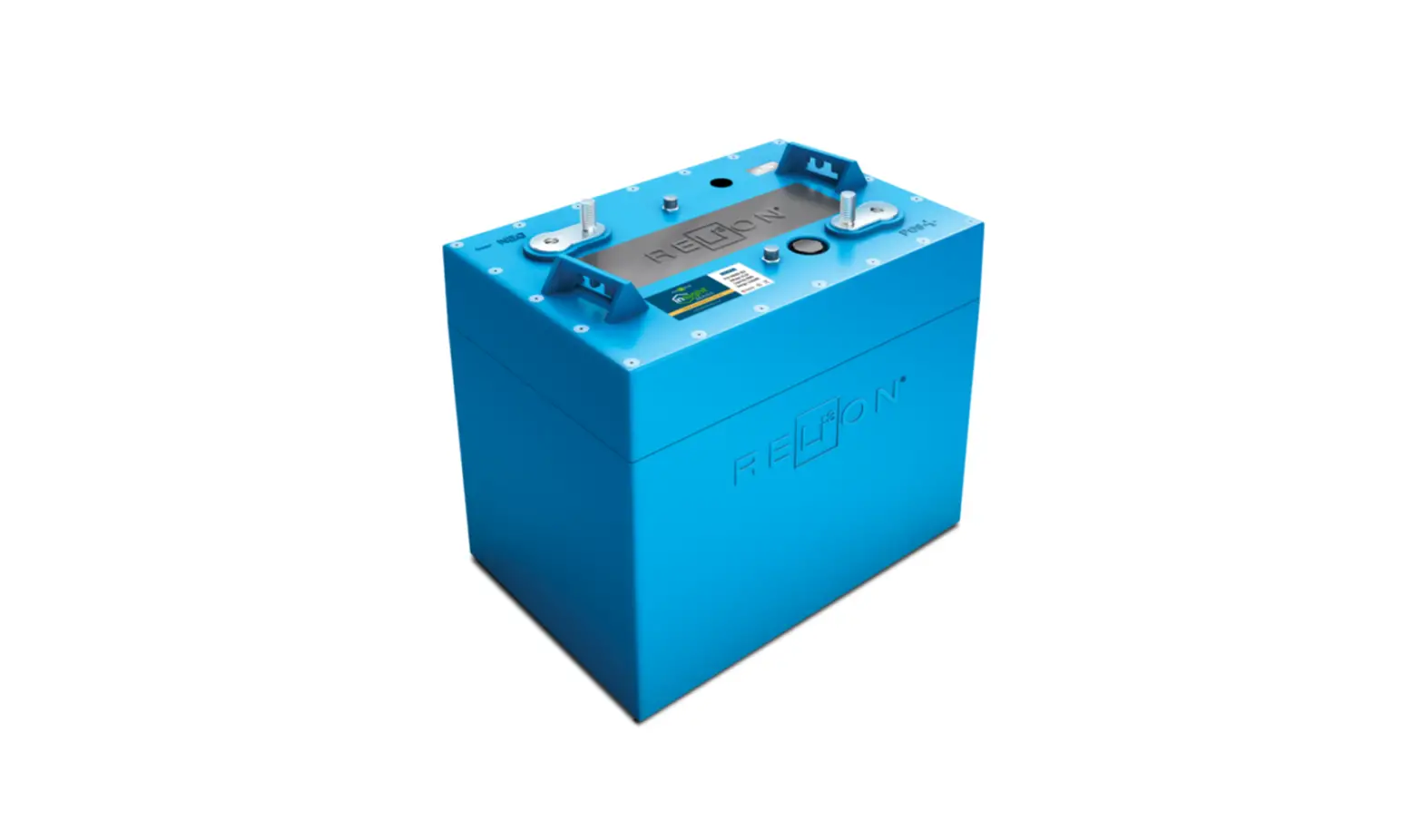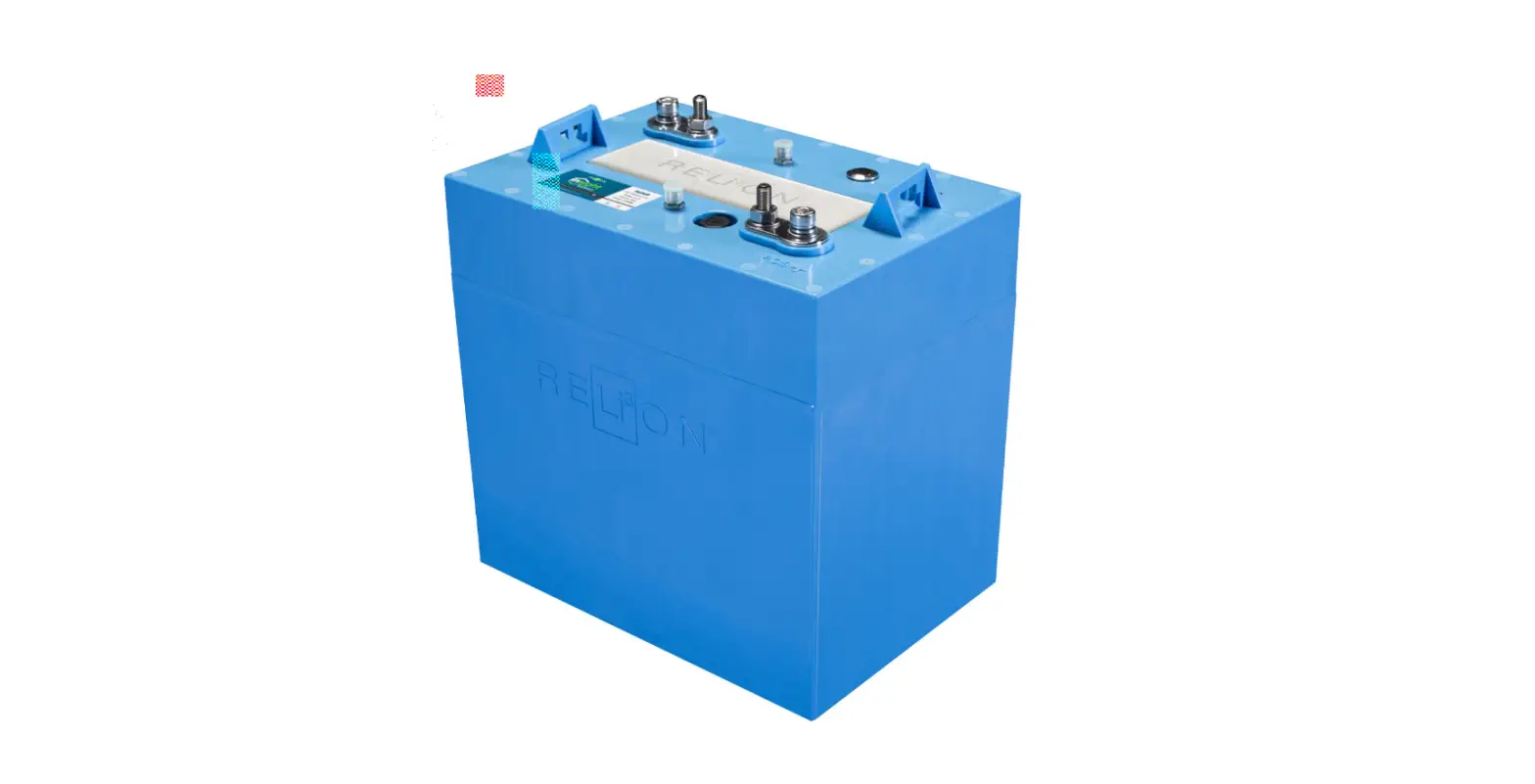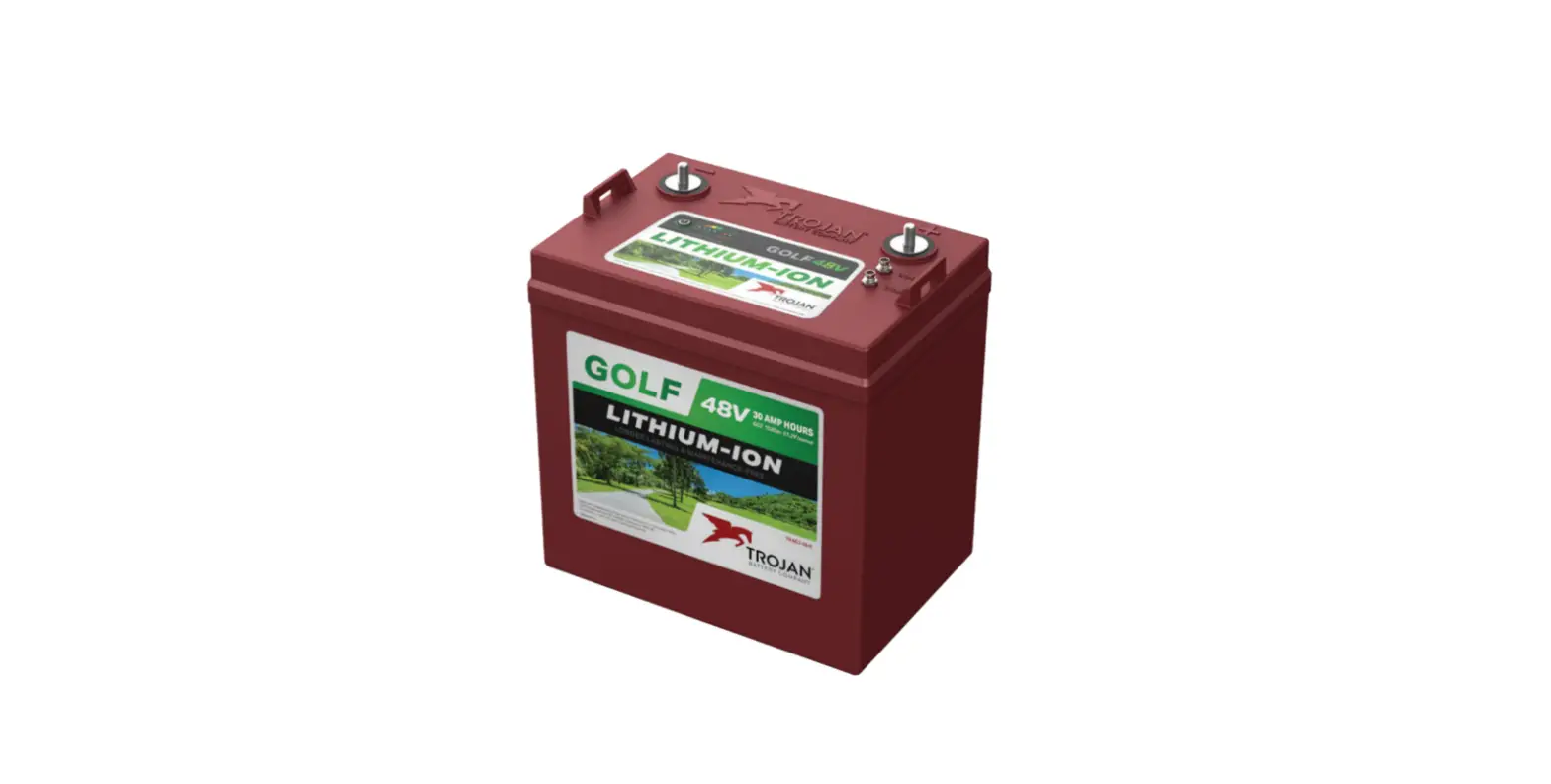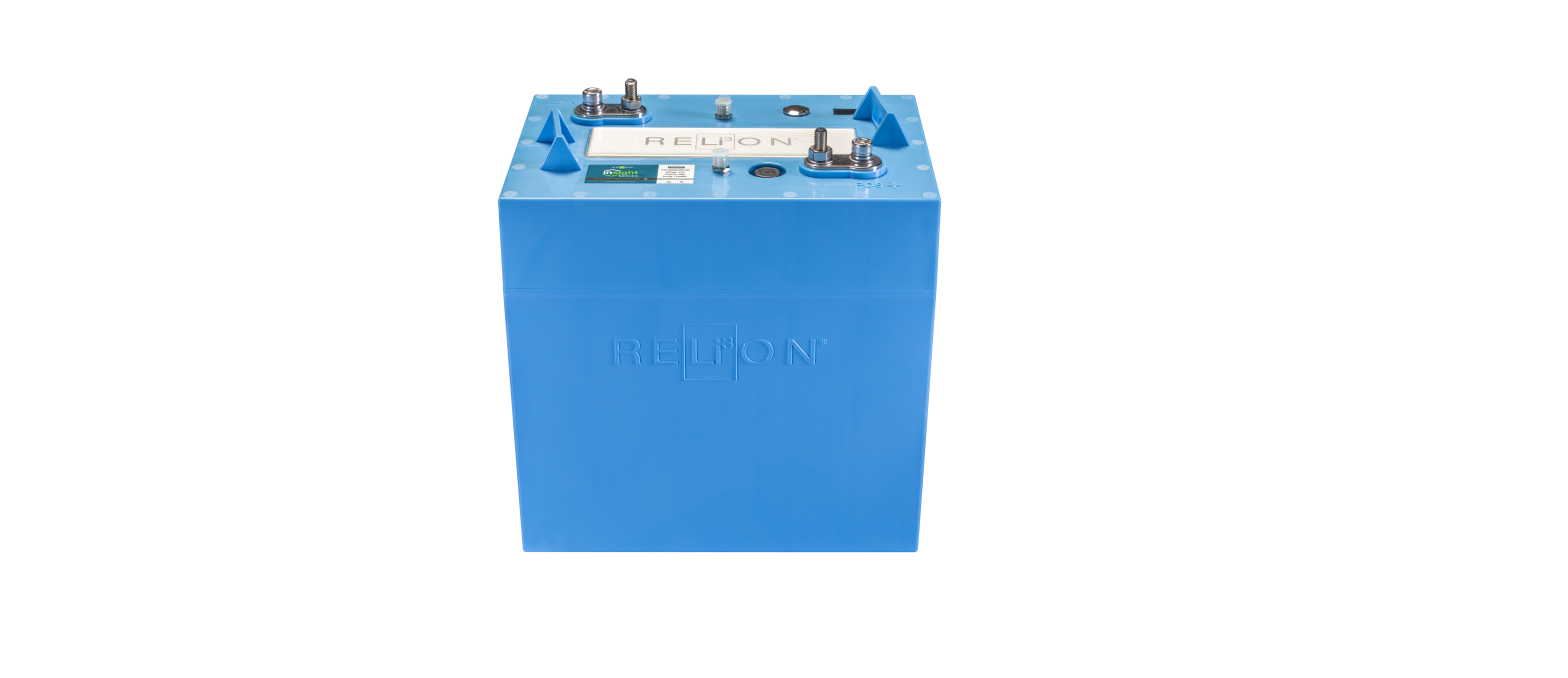

Relion Insight Series 48V030-GC2 30Ah 48V Lithium Battery
INTRODUCTION
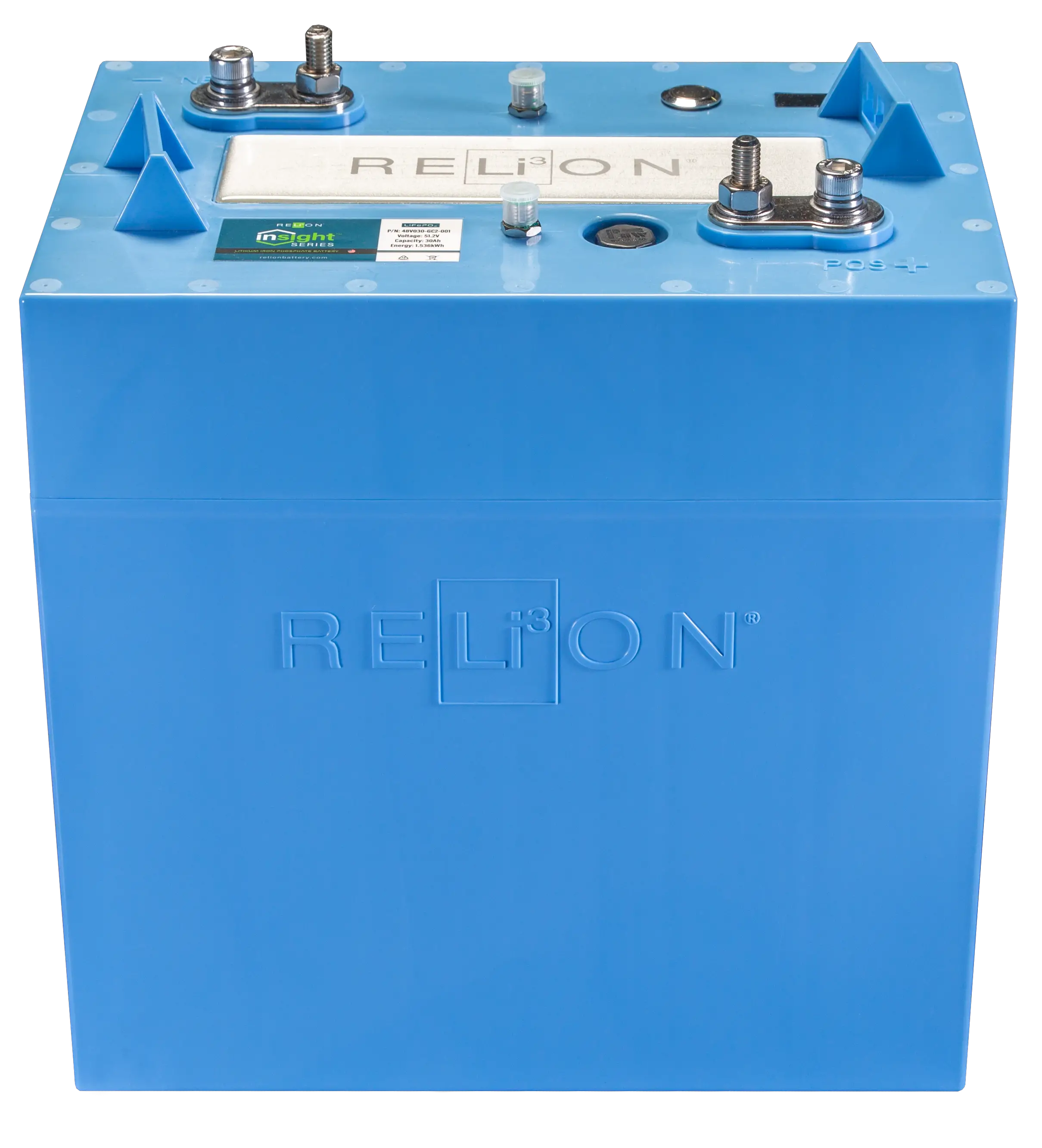
RELiON’s InSight Series batteries are the first scalable LiFePO4 drop-in replacement battery, that comes in an industry standard, GC2 size.
SCOPE
This document applies to models 48V030-GC2 and 24V060-GC2.
ABBREVIATIONS
- State of Charge (SOC)
- State of Health (SOH)
- Over Voltage Protection (OVP)
- Under Voltage Protection (UVP)
- Over Temperature Protection (OTP)
- Under Temperature Protection (UTP)
- Over Current Protection (OCP)
- Short Circuit Protection (SCP)
- Light Emitting Diode (LED)
- Pulse Recovery Operation (PRO)
- Controller Area Network bus (CANbus)
- Battery Display Indicator (BDI)
PRODUCT SPECIFICATIONS
General Specifications
| GENERAL SPECIFICATIONS | ||
| Model | 48V030-GC2 | 24V060-GC2 |
| Nominal Voltage | 51.2V | 25.6V |
| Cell Chemistry | LiFePO4 | LiFePO4 |
| Cell Type | Prismatic | Prismatic |
| Ampere-hour Capacity | 30Ah | 60Ah |
| Watt-hour Capacity | 1.536kWh | 1.536kWh |
| Specific Energy | 128Wh/kg | 128Wh/kg |
| Charge Efficiency | 99% | 99% |
| Impedance (50% SOC, 1kHz) | <150mΩ | <150mΩ |
| Cycles @ 80% DOD | >6000 | >6000 |
Electrical Specifications
| CHARGE SPECIFICATIONS | ||
| Model | 48V030-GC2 | 24V060-GC2 |
| Recommended Continuous Charge Current (single battery) | ≤60A | ≤60A |
| Maximum Charge Current (BMS will disconnect if exceeded) | 65A – 5 sec | 65A – 5 sec |
| Recommended Charge Voltage | 57.6 – 58.4V | 27.6V |
| Maximum Charge Voltage | 58.4V | 29.2V |
| Float Voltage | 54.4V | 27.2V |
| High Voltage Disconnect | 59.2V (3.7vpc) (4 sec) | 29.6V (3.7vpc) (4 sec) |
| Over Voltage Reconnect | Automatic | Automatic |
| Minimum Charger Output Voltage (for charge initiation) | 56V | 28V |
| Temperature Compensation Required | None | None |
Discharging Specifications
| DISCHARGE SPECIFICATIONS | ||
| Model | 48V030-GC2 | 24V060-GC2 |
| Continuous Discharge Current | 100A | 100A |
| Peak Discharge Current | 200A (15 sec) | 240A (15 sec) |
| Short Circuit Protection | 560A (366 μsec) | 880A (366 μsec) |
| Low Voltage Disconnect | 40V (2.5vpc) (5 sec) | 20V (2.5vpc) (5 sec) |
| Low Voltage Reconnect | See section 12.5 | See section 12.5 |
Parallel Specifications
All the currents are additive in Parallel operation. See tables below.
48V030-GC2
| CHARACTERISTIC | 48V X 1 | 48V X 2 | 48V X 3 | 48V X 4 |
| Voltage | 51.2V | 51.2V | 51.2V | 51.2V |
| Capacity | 30Ah | 60Ah | 90Ah | 120Ah |
| Cont. Discharge Current | 100A | 200A | 300A | 400A |
| Peak Discharge (15 sec) | 200A | 400A | 600A | 800A |
24V060-GC2
| CHARACTERISTIC | 24V X 1 | 24V X 2 | 24V X 3 | 24V X 4 |
| Voltage | 25.6V | 25.6V | 25.6V | 25.6V |
| Capacity | 60Ah | 120Ah | 180Ah | 240Ah |
| Cont. Discharge Current | 100A | 200A | 300A | 400A |
| Peak Discharge (15 sec) | 240A | 480A | 720A | 960A |
*When using more than one battery in parallel, we recommend limiting both continuous and peak currents to 75% of the specification. For example, if using 2, 48V030-GC2 batteries in parallel, do not exceed 150A continuous and 300A peak currents. This is to avoid the potential of a battery going into protection mode.
Mechanical Specifications
| MECHANICAL SPECIFICATIONS | ||
| Model | 48V030-GC2 | 24V060-GC2 |
| BCI Size | GC2 | |
| Dimensions (L x W x H) | 10.2 x 7.1 x 10.9 in (260 x 180 x 276 mm) | |
| Weight | 34.4 lb. (15.6 kg) | |
| Case Material | ABS | |
| Stud Terminal | M8 X 1.25 – 20 | |
| Insert Terminal | M8 X 1.25 – 20 | |
| Torque | 79.7-88.5 in-lbs. (9-10 N-m) | |
| Handles | Molded | |
| Ingress Protection Marking | IP67 | |
| Case Flame Rating | UL94 V-0 | |
Drawing
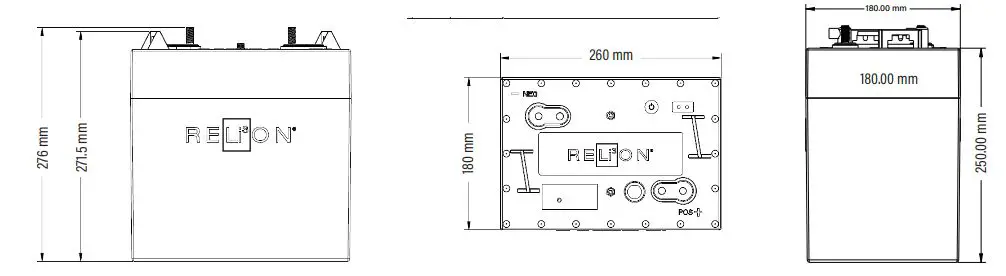
Dimensions shown in mm
BATTERY INSTALLATION
To ensure proper operation of the battery (for single-battery or multiple-battery installations), follow the steps below:
- InSight batteries can only be used in parallel (not series). Up to 10 batteries may be connected.
Select proper wire gauge for your applications electrical current (A) demands (Suggested reference: NEC 2014: Table 310.15(B)(17) Allowable Ampacities of Insulated Conductors). - On new installations, it is recommended that new battery cables (free from corrosion) be used.
- Ensure that all battery cables are equal in length to avoid battery imbalances. CAUTION : Any existing 12V accessories (lights, radio, etc) must be connected to an auxiliary DC/DC converter (48V to 12V or 24V to 12V)
- All cables should terminate at bus bars with respect to their polarity.
- Torque the battery terminals appropriately as listed in Section 4.3.
- Connect the provided Controller Area Network bus (CANbus) cables as shown in Section 5.1.
- Turn batteries ON. See the table in Section 8 or Section 12.2 for written instructions.
- Charge the batteries to 100% State of Charge (SOC) prior to use.
Parallel Connections – Options 1 and 2
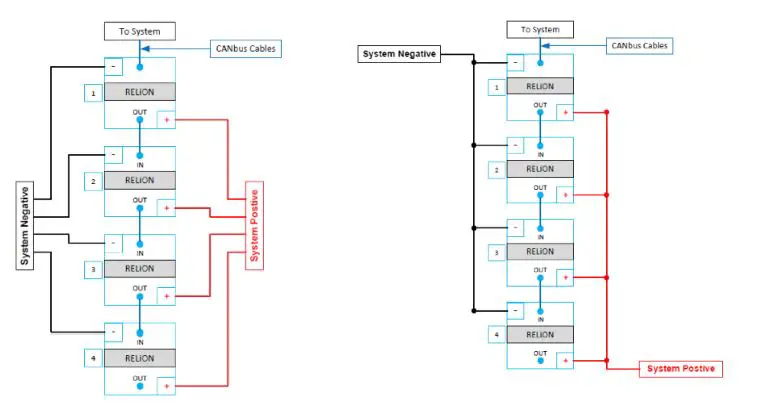
Battery Orientation
The best way to install the battery is upright as the bottom of the case is flat. The battery can be placed in the following orientations: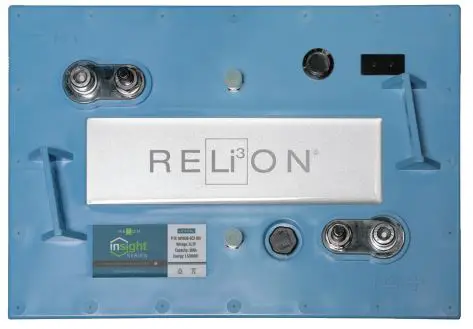
- Upright
- Short sides – either side
- Long side – only with positive side up
DO NOT INSTALL the battery on the long side with the negative side up as this can put stress on the internal connections causing damage that may result in battery failure. - Battery compartment and any material within two feet should be noncombustible.
BATTERY INTERFACE
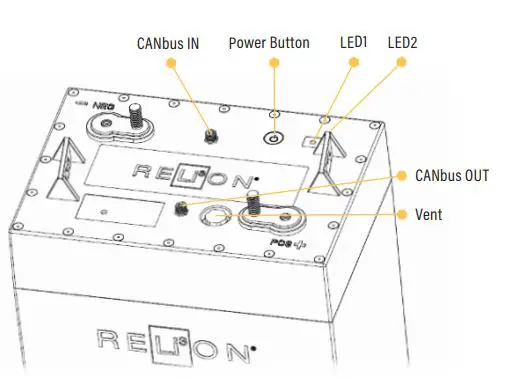
Power Button
The battery has a button located next to the LED display that is used to:
- Turn the battery ON/OFF/RESET
- Request the battery SOC
LEDs
The battery has two tri-colored LED lights on the cover (green, yellow, and red) that are used to communicate:
- Battery Status
- Battery SOC
- Battery Protection/Error Status
BATTERY MODE DESCRIPTIONS
| MODE | DESCRIPTION |
| OFF | Battery is OFF |
| ON (Active) | Battery is ON and being charged/discharged |
| ON (Standby) | Battery is ON and Idle |
| SLEEP | Battery is cycling ON/OFF intermittently |
| PROTECTION | BMS has disconnected voltage/current from terminals |
POWER BUTTON FUNCTIONS
| ACTION | OPERATION | REMARKS |
| Power ON | Press and hold button for 5s until: • LED1 Flashes Green • Then release button | Battery will turn ON |
| Display SOC | Tap button once | LED displays for 6 sec. See section 10: SOC Status |
| Power OFF | Tap, release, then press and hold button for 6s until: • LED1 Solid Red • LED2 Solid Red • Then release button | Battery will turn OFF |
| Reset BMS | Tap, Press and hold button for >2s until: • LED1 is Solid Red • LED2 is Solid Green • Then release button | • BMS program restart • SOC level re-calculate • Pack input/output close and open again |
| Wake Up from Sleep | Tap button twice | Initiates 1 min. charge pickup window |
| Wake Up from UVP | Tap button twice | Initiates 1 min. charge pickup window |
LED FUNCTION 1 – BATTERY STATUS
| MODE | LED 1 | LED 2 |
| OFF | Off | Off |
| ON (Active) | Flashing Green (every 5 sec.) | Off |
| ON (Standby) | Flashing Green (every 5 sec.) | Off |
| Charging | Off | Flashing Green (every 2 sec.) |
LED FUNCTION 2 – SOC STATUS (INITIATE WITH A SINGLE TAP OF THE POWER BUTTON)
| SOC | LED 1 | LED 2 |
| 95% – 100% | Solid Green | Solid Green |
| 75% – 95% | Solid Green | Flashing Green (every ½ sec.) |
| 50% – 75% | Solid Green | Solid Yellow |
| 30% – 50% | Solid Green | Flashing Yellow (every ½ sec.) |
| 10% – 30% | Solid Green | Solid Red |
| 0 – 10% | Solid Green | Flashing Red (every ½ sec.) |
LED FUNCTION 3 – PROTECTION/ERROR INDICATORS
| MODE | LED 1 | LED 2 |
| Under Voltage Protection | Flashing Red (every 5 sec.) | Off |
| Over Discharge Current Protection | Solid Green | Solid Yellow |
| Temperature Protection | Flashing Green (every sec.) | Flashing Red (every sec.) |
BATTERY MODE OPERATION DETAILS
OFF Mode
The battery ships in the OFF mode. There is no LED activity and voltage is not present at the terminals. To turn the battery OFF: Tap the button once, release, then press the button again holding for 6 seconds until you see both LEDs display solid red lights then release the button. This action will turn off both LEDs.
ON Mode
To turn the battery on press button for 5 seconds. LED1 will flash green every 5 seconds.
- ON (Active) – The battery is in ACTIVE mode only while being charged or discharged. The minimum charge current for active mode is 0.5A (2s). The minimum discharge current for active mode is 0.8A (1s).
- ON (Standby) – STANDBY mode is any time the battery is ON and not being discharged or charged. When a battery is in STANDBY mode, voltage is present at the terminals. If it is charged or discharged during STANDBY mode it will return to ACTIVE mode. If a battery is sitting in STANDBY mode continuously for more than 72 hours it will enter SLEEP mode.
SLEEP Mode
The battery will go into SLEEP mode if it is in STANDBY mode for more than 72 hours without being discharged or charged. The LEDs will not be illuminated.
The battery will go into a Pulse Recovery Operation (PRO) while in SLEEP mode.
Pulse Recovery Operation (PRO) During SLEEP Mode
The purpose of Pulse Recovery Operation is to place the battery in a low power state in order to preserve its energy. The battery will cycle between the OFF and ON (Standby) modes as follows:
- The battery will turn ON (Standby) for 1 minute every 10 minutes. LED1 will flash green every 0.5 seconds when the battery is ON for 1 minute.
UNDER VOLTAGE PROTECTION (UVP) Mode
If the battery voltage reduces to less than 40.0V for a 48V model or 20.0V for a 24V model, or any individual cell reduces to less than 2.5V, the battery will go into UVP protection mode. LED1 will flash RED every five (5) seconds.
The battery will go into a Pulse Recovery Operation (PRO) in UVP mode.
Pulse Recovery Operation (PRO) During UVP
The purpose of Pulse Recovery Operation is to place the battery in a low power state in order to preserve its energy. The battery will cycle between the OFF and ON (Standby) modes as follows:
- Day 1: The battery will turn ON (Standby) for 1 minute every 10 minutes. LED1 will flash green every five (5) seconds for 1 minute then return to flashing red once every five (5) seconds until next interval. (As shown below the OFF interval increases by 10 minutes each day).
- Day 2: The battery will turn ON (Standby) for 1 minute every 20 minutes.
- Day 3 to 24: The duration of the OFF phase will increase by 10 minutes every 24hrs and the duration of the ON phase will remain at 1 minute.
- Day 25: The battery will turn itself OFF indefinitely. The battery must be turned ON as described in Section 12.2.
Turn Battery ON during PRO
- Connect a compatible battery charger to the battery. During the 1-minute ON (Standby) phase in Pulse Recovery Operation the battery will return to ON (Active) mode.
- The 1 minute ON phase can also be triggered manually by tapping the button twice. A compatible battery charger must then be connected before the battery turns OFF.
BMS PROTECTION DETAILS
Under Voltage Protection (UVP)
LED1 – Flash Red (every 5 seconds), LED2 – Off
This mode protects the battery from reaching a low voltage level that can damage the battery. If the battery voltage reduces to less than 40.0V for a 48V model or 20.0V for a 24V model, or any individual cell reduces to less than 2.5V, for five (5) seconds the battery will go into UVP protection mode. The battery will simultaneously be in a PULSE RECOVERY mode as explained above. The methods for recovering the battery from PULSE RECOVERY mode and returning it to ON mode are the same as above. Depending on the cause, the battery may self-recover from UVP if allowed to rest. In the event the battery does not recover, manually initiate recovery as written above. The battery will automatically reconnect when the voltage is ≥46.4V for a 48V model or ≥23.2V for a 24V model.
Over Voltage Protection (OVP)
LED1 – Flash Green (every 5 seconds), LED2 – Off
This mode protects the battery from reaching a high voltage level that can damage the battery. If the battery voltage increases to greater than 59.2V for a 48V model or 29.6V for a 24V model for four (4) seconds, or any individual cell increases to greater than 3.7V, the battery will go into OVP protection mode. The battery will automatically reconnect if discharged or when the highest cell voltage is <3.4V and the SOC <96%.
Under Temperature Protection (UTP)
LED1 – Flash Green (1 second), LED2 – Flash Red (1 second)
This mode protects the battery from being charged in temperatures below freezing, which can damage the battery. The BMS will not allow charge current when the battery temperature is below freezing (0°C/-32°F). However, the BMS will allow discharge below freezing down to -30°C/-22°F.
Over Temperature Protection (OTP)
LED1 – Flash Green (every 1 second), LED2 – Flash Red (every 1 second)
This mode protects the battery from reaching high temperatures, which can damage the battery.
- Charge OTP – The BMS will disconnect while charging when the battery temperature exceeds 55°C/131°F.
- Discharge OTP – The BMS will disconnect while discharging when the battery temperature exceeds 65°C/149°F.
Over Current Protection (OCP)
LED 1 – Solid Green, LED 2 – Solid Yellow
This mode protects the battery from discharging at excessive levels of current. The maximum current level values for banks of up to four (4) batteries are listed in the Discharge Specification in Section 4.2.2. The maximum current levels are additive and must be calculated for banks of more than 4 batteries.
Short Circuit Protection (SCP)
LED1 – Solid Green, LED2 – Solid Yellow
This mode protects the battery from discharging at extremely high levels of current. The short circuit current level for a single battery is listed in the Discharge Specification in Section 4.2.2.
CANBUS COMMUNICATION
This section provides the basics for CANbus operation and/or integration. For additional details on how to interface to the CANbus and interpret the messages consult the RELiON CANbus Specification Document. Parallel connected InSight batteries communicate internally via CANbus. External communication is available through the CANbus OUT port of the battery.
CAN Battery Connectors: M8-5P
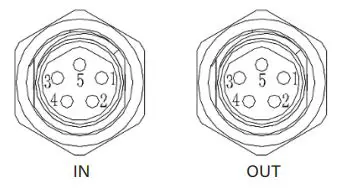
| PIN | CAN INPUT BATTERY CONNECTOR (Next to Negative Terminal) | CAN OUTPUT BATTERY CONNECTOR (Next to Postive Terminal) |
| 1 | Reserve | Reserve |
| 2 | CANbus Address IN | CANbus Address IN |
| 3 | CAN-H | CAN-H |
| 4 | CAN-L | CAN-L |
| 5 | P- (Battery Negative) | P- (Battery Negative) |
Communication Hardware
The batteries do not have 120Ω termination resistors. Up to ten batteries may be read in a single CANbus network.
CANbus Details
- CAN2.0A
- Identifier: 11-bit
- Broadcast ID: 0x5FF
- Bit Rate: 250kbps
- Multi-Byte value form: Little-Endian
Broadcast Data
The BMS broadcasts alarms, system status, and SOC every 3 seconds via ID 0x5FF. If an alarm is triggered it will be broadcasted immediately.
Broadcast Data Frame
| ID | DLC | D0 | D1 | D2 |
| 0x5FF | 8 | 0x20 | 0x81 | 0x21 |
| D3 | D4 | D5 | D6 | D7 |
| 0X01 | Alarm1 | Alarm2 | Status | SOC |
CHARGING GUIDELINES
Follow these charging guidelines to achieve optimal performance and maximum life from your RELiON Lithium Iron Phosphate (LiFePO4) InSight battery.
Conventional lead acid chargers can be connected to the InSight battery without concern/harm as the battery BMS
will protect the battery against improper charge conditions (this will not void the warranty). Please read and exercise the charging practices below to achieve the best results.
Charger Inspection
Check that your charger’s cables are insulated and free of breakage. Charger terminal connectors should be clean and properly mate with the battery terminals to ensure a good connection and optimum conductivity.
Charge Temperature
LiFePO4 batteries can be safely charged between 0°C to 55°C (32°F to 131°F).
LiFePO4 batteries do not require temperature compensation for voltage when charging at hot or cold temperatures.
The InSight Series batteries come with a BMS that protects the battery from over-temperature. If the BMS disconnects due to high temperature, wait until the temperature reduces before using or charging the battery. Please refer to your specific battery’s Data Sheet for the BMS high temperature cut-off and reconnect values.
Prior to Charge
- It is best to use/select a Lithium, GEL or AGM charge profile in that order of availability. Consult your manual or charger manufacturer for directions on this capability. Some charger models only have the stock charge profile available.
- Spot check the battery SOC LED indicators with a quick press and release of the battery Power Button. See the table in Section 10 to determine the SOC.
During Charge
- Check if charge current is being supplied in one of the following ways:
- Battery LED indicators: The proper LED sequence be displayed: LED1 – Off, LED2 – flashing green (every 2 seconds).
- RELiON Battery Display Indicator (BDI): Spot check the accessory gauge to see if charge current is flowing and battery SOC percentage increasing
- Digital Voltmeter w/amp clamp (DVM): Spot check the accessory gauge to see if charge current is properly flowing.
Charge Completion
- The Charger’s behavior at the end of a Lithium battery recharge may vary from the standard operation consistent with charging lead-acid batteries.
- Chargers typically display a solid Green Light when the charge is completed, and a flashing green light when the battery is near the end of charge (will vary by charger). Both conditions may or may not occur depending on your charger design. Neither condition is necessarily required to properly achieve a full recharge.
- Lithium batteries may temporarily disconnect their voltage as they reach a full charge, before the charger is complete. This may cause the charger to repeat its charge initiation sequence when this occurs (various lights and noises may occur during this sequence). This is acceptable and will not harm the battery. Simply unplug or disconnect the charger, if this occurs, and the battery voltage will return.
- Check to see if a full charge was completed in one of the following ways:
- Battery LED indicators: Spot check the battery LED’s with a quick press and release of the battery Power Button. See the table in Section 10 to determine the SOC.
- RELiON Battery Display Indicator (BDI): Spot check the accessory gauge to see if battery SOC percentage reached 100%.
Charge Parameters
LiFePO4 batteries can be charged with either a 1-stage profile (constant current (CC) aka Bulk Stage) or a 2-stage profile (constant current, constant voltage (CC-CV) profile aka Bulk and Absorption Stages). The 1-stage profile will charge the battery ~97% and the 2-stage profile will charge the battery 100%. The 1-stage profile is sufficient, since LiFePO4 batteries do not need to be fully charged; this will not reduce life as it does with lead-acid batteries.
CC Charge Profile – 1 Stage
| 1-STEP CHARGE DESCRIPTION | STEP | DESCRIPTION | CHARGE PARAMETERS | |
| Step 1 – Charge at a constant current until the battery reaches termination voltage. Once the termination voltage is reached, stop the charge. | 1 | Maximum Charge Current per battery | 50A for one, <60A for two, <100A for three, and <150A for four | |
| SYSTEM VOLTAGE | 48V | 24V | ||
| Stop | Termination Voltage | 55.2V* | 27.6V* | |
CC-CV Charge Profile – 2 Stage
| 2-STEP CHARGE DESCRIPTION | STEPS | DESCRIPTION | CHARGE PARAMETERS | |
| Step 1 – Charge at a constant current until the battery reaches absorption voltage. | 1 | Maximum Charge Current per battery | 50A for one, <60A for two, <100A for three, and <150A for four | |
| SYSTEM VOLTAGE | 48V | 24V | ||
| Step 2 – Hold absorption voltage until charge current reduces to the termination current. | 2 | Absorption Voltage | 55.2V* | 27.6V* |
| Stop | Termination Current | 1A (per battery) for 15 seconds | ||
BATTERY INDICATOR:
If you are using a voltage-based fuel gauge that is designed for lead-acid batteries it will not accurately provide state of charge (SOC). Please replace your fuel gauge with one that measures current rather than voltage. The BMS in the battery provides the SOC of the battery via CAN. Refer to the RELiON Battery CANbus Specification Document for details.
BATTERY STORAGE:
| TEMPERATURE | LENGTH |
| -20°C to 45°C (-4°F to 113°F) | Up to 3 months |
| -20°C to 35°C (-4°F to 95°F) | 3 – 6 months |
| -20°C to 25°C (-4°F to 77°F) | Up to 12 months |
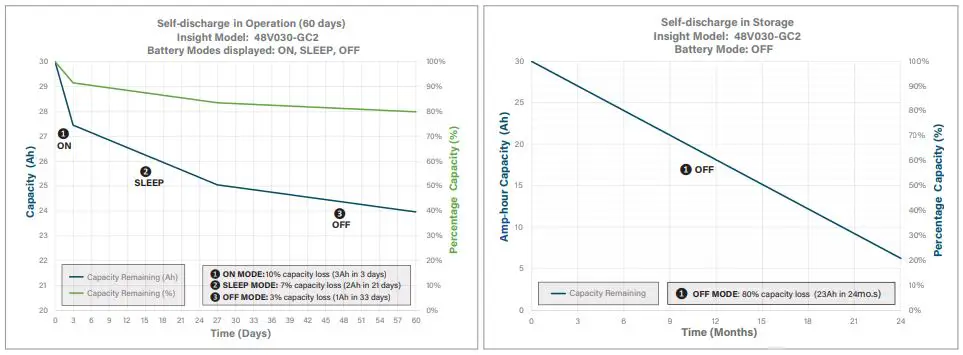
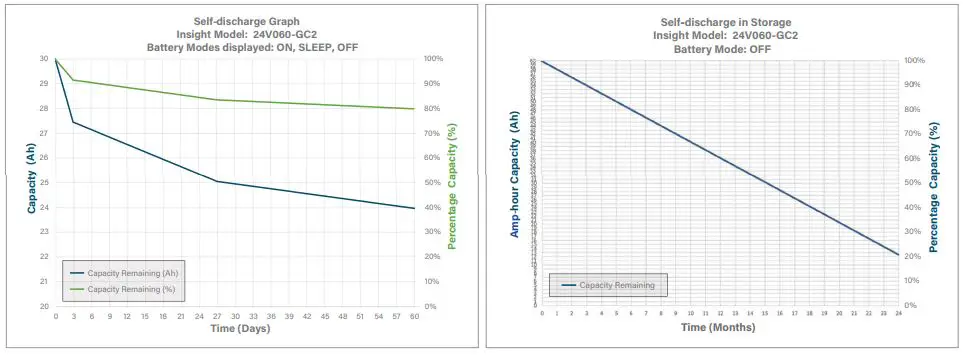
ENERGY CONSUMPTION DURING STORAGE:
Important notes about battery self-discharge:
- Golf cars consume power when idle (even in tow mode)
- The battery BMS uses battery power when idle
- Charge the batteries whenever used to maintain full vehicle range.
- The batteries will turn off after 3 days when idle to prevent substantial discharge
- Pressing the Power button for 5 seconds will wake them up
RECYCLING:
Terminals must be covered with a protective cap or non-conductive tape prior to battery disposal to lithium recycler. Dispose of LiFePO4 batteries at an authorized lithium recycling facility.
WARRANTY REGISTRATION:
We recommend you protect your investment and register your warranty at relionbattery.com/warranty-registration.
PRECAUTIONS:
Lithium Iron Phosphate (LiFePO4) batteries are an inherently safe chemistry. Please reference RELiON’s Lithium Iron Phosphate Safety Document (available on our website at relionbattery.com) for more details. However, as with any electronics, safety measures should always be taken. Please adhere to the instructions within this manual for safe handling and operation.
- Always wear protective gear when handling batteries
- Use a wrench with a rubber coated handle
- Do not place any objects on top of batteries
- Do not place batteries on a metallic surface
- Check that all cables are in good condition
- Make sure all cable connections are properly tightened
- Install and remove batteries using lifting strap brackets
- Do not smoke near batteries
- Do not install batteries in a zero-clearance compartment, overheating may result. Always leave at least 4” of space around all sides and top of battery
- Keep any flammable/combustible material (e.g., paper, cloth, plastic, etc.) that may be ignited by heat, sparks, or flames at a minimum distance of two feet away from the batteries
- Battery compartment and any material within two feet should be noncombustible.
- Keep sparks, flames and metal objects away from batteries
- Have RELiON’s LiFePO4 Safety Data Sheet (SDS) on premises
- Have a Class ABC fire extinguisher on the premises
If you have any technical questions, please contact RELiON Technical Support at 803-547-7288.