CS-W4C Wireless Conference System
Product Information
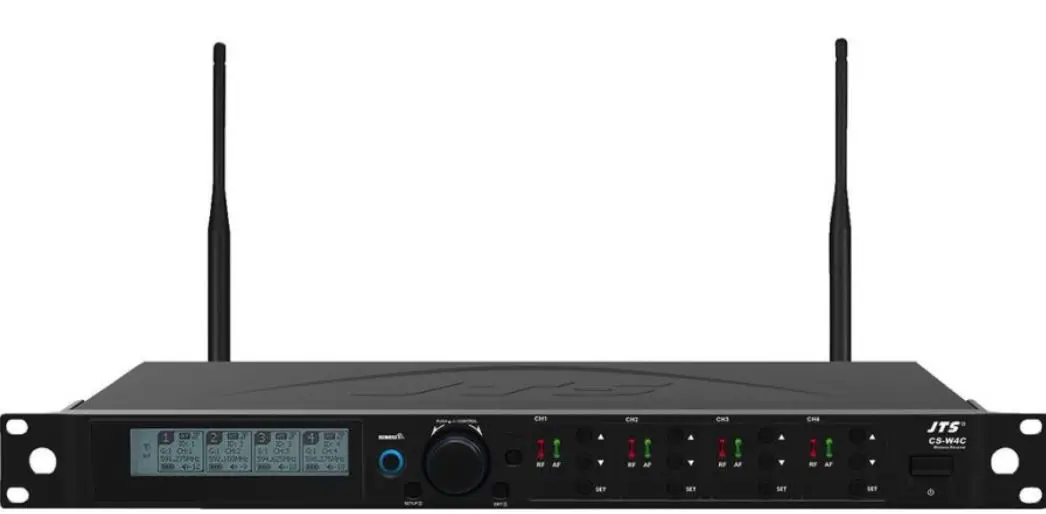
The CS-W4C Wireless Receiver is a UHF PLL 4-channel wireless
conference system receiver made by Professional Co., Ltd. It
features JTS 2.4G RF Synchronizing Technology and comes with a
one-year warranty card. The warranty is valid for one year starting
from the date of purchase shown on the warranty label attached to
the product; alternatively, the warranty is valid for 15 months
starting from the date the product was manufactured if the warranty
label is missing on the machine.
Product Usage Instructions
- Ensure that the warranty card is attached at the bottom of the
machine to ensure the validity of warranty service. - If malfunction occurs under normal operations according to the
instruction manual while the warranty is still valid, call the shop
where you purchased the product for warranty service. - Return both the machine and microphone back to the shop for
service, since this makes it easier to identify where the possible
problem is and determine whether a service fee is needed. - JTS will provide service free of charge while the warranty is
still valid. However, a fee for parts and/or service may be charged
for certain damages or if the warranty label is not found on the
machine or is damaged to the point that the validity of warranty is
not recognizable. - Keep the warranty card at a safe place, as the warranty is
invalid with a lost warranty card. - Refer to the instruction manual for notes on system operations,
features, specifications, parts, connection, installation, and
operation.
PROFESSIONAL CO., LTD.
No. 148, 9th Industry Road, Ta-Li Industrial Park,
Made in Taiwa n
Tel: 886-4-24938803 Fax: 886-4-24914890 E-mail: [email protected] www.jts.com.tw
59508-114-05
PUSH / CONTROL
CH1C
H2
CH3
CH4
SETUP
EXIT
CS-W 4C Wireless Receiver
UHF
CS-W4C / CS-W4T Wireless Conference System Instruction Manual
With JTS
2.4G RF Synchronizing Technology
One-Year Warranty Card
Product model Customer Address Date of purchase Distributor’s shop seal
Serial number Phone number
The distributor’s shop seal and date of purchase are required for the warranty to be valid!
Warranty Service
1. The warranty card must be presented with the date of purchase and attached at the bottom of the machine to ensure the validity of warranty service.
2. The warranty is valid for one year starting from the date of purchase shown on ”warranty label” attached to the product; alternatively, the warranty is valid for 15 months starting from the date the product was manufactured if the ”warranty label” is missing on the machine. If the microphone is returned for service but with the machine, the warranty is valid for 15 months starting from the date of manufacturing shown on the microphone.
3. If malfunction occurs under normal operations according to the instruction manual while the warranty is still valid, please call the shop where you purchased the product for warranty service.
4. It is important to return both the machine and microphone back to the shop for service, since this makes it easier to identify where the possible problem is and determine whether a service fee is needed.
5. JTS will provide service free of charge while the warranty is still valid. However, A fee for parts and/or service may be charged for the following:
a. Damage due to natural disaster or any other irresistible factors;
b. Damage due to dropping, immersion in water, exposure to high humidity, corrosion, ingress of alien objects, or loss of parts;
c. Consumables are not part of the warranty; or
d. The ”warranty label” is not found on the machine or the ”warranty label” is damaged to the point that the validity of warranty is not recognizable.
6. Keep this warranty card at a safe place, as the warranty is invalid with a lost warranty card.
Contents
1. Notes for system operations
1
2. Features
1
3. Specifications
2
3-1 UHF PLL 4-channel wireless conference system receiver //CS-W4C
2
3-2 UHF PLL wireless conference system transmitter //CS-W4T
3
4. Parts
4
4-1 UHF PLL 4-channel wireless conference system receiver //CS-W4C
4
4-2 UHF PLL wireless conference system transmitter //CS-W4T
7
4-3 Accessories
8
5. Connection
9
5-1 Connecting receiver //CS-W4C
9
5-2 Installing transmitter //CS-W4T
12
6. Operation
13
6-1 Operation //CS-W4C
13
6-2 Operation //CS-W4T
22
7. Alert Function
24
8. Notes for the product
24
1. Notes for system operations
· Before connecting to power, make sure the voltage marked on equipment is the same as that on the power socket.
· Do not place the machine at a place where high temperature and humidity are expected.
· Do not operate the system with wet hands. · Keep the machine away from any heat or ignition source. · Before setting up the machine, make sure that the volume is set at the minimum
for both the mixer and amplifier. · Caution : The suitable environment for this product is with a temperature
between -10°C (14°F) and +50°C (122°F).
2. Features
· CS-W4C is designed with JTS newest wireless and conferencing technology. It provides maximized compatible channels with a given bandwidth. Built in logic circuit provides conferencing feature. A microphone assigned with priority will work as a chairman unit. It overrides other microphones. Logic setting of one CS-W4C receivers can be cascaded. A microphone with priority in one receiver will also have priority in a cascaded system. JTS patented synchronizes all four microphones simultaneously by push one button.
· The microphone is of 108 MHz bandwidth(MAX). This feature allows more attendants to join the conference.
· Antenna outputs and AC power supply are designed to be cascaded.
1
3. Specifications
3-1 UHF PLL 4-channel wireless conference system receiver //CS-W4C
Model Frequency oscillation Carrier frequency No. of channels Channel pairing Diversity Bandwidth Signal/noise ratio Total harmonic distortion sensitivity Audio frequency response Antenna connector
CS-W4C PLL Synthesized Control 470~960MHz // 2.4GHz 4 channels (2412MHz, 2416MHz, 2420MHz, 2424MHz)
RF 2.4G antenna diversity 36MHz >105dB(A) <0.6%@1KHz
-95dBmS/N>80dB 60Hz~16KHz±2dB
BNC female
Antenna booster power
DC12V/100mA
Display
LCD+LED
Controls Audio output level (MAX)
Power On/Off, Groups, Channels, Frequency, Sensitivity, Key Lock, Volume, Output Attenuation (Xlr), Frequency Scan (On/ Off), Antenna Power, Display Setting, Priority Setting, Remoset Id Number, Remoset Setting
Ø6.3 Phone Jack+4dBu
XLR Jack+10dBu(Line)-10dBu(MIC)
Audio output impedance
600
Mute
Noise mute and Pilot Tone
Output port
5 balance XLR ports, 1 unbalance Ø6.3mm jack
Logic Controller & Voltage Output
+5Vdc
Automix Control Socket
in/out (8 pin mini DIN connecter)
Power
AC 100~240 VAC
Dimensions
485mm L x 260mm W x 45mm H
weight
2.4 kg
Note
Actual Product specifications may vary depending on model and region
2
3-2 UHF PLL wireless conference system transmitter // CS-W4T
Model Frequency oscillation Carrier frequency Bandwidth Paring RF power output RF stability Frequency deviation Spurious Emissions Display
Controls
Battery Charging Dimension Weight
Note
CS-W4T
PLL Synthesized Control 470~960MHz 108MHz (MAX)
2.4G RF Remoset Low / High
<±10KHzFc ±48KHz <-50dBc LCD
Power ON/OFF, Talk, groups, channels, frequency, sensitivity adjustment, Remoset ID pairing, RF output,
key lock, Low cut, Sync UM3, AA x 2 Yes
138mm(D)x 116mm(W)x 29mm(H)
0.76 kg Actual Product specifications may vary depending on
model and region
3
4. Parts
4.1 UHF PLL 4-channel wireless conference system receiver //CS-W4C
CS-W4C Front panel
6
CS-W4C Rear panel
5
39
10
8
PUSH / CONTROL
CH1
CH2
CH3
CH4
SETUP
EXIT
4
2
11
7
CS-W 4C Wireless Receiver
1
12
13
15 18 19
16 17
14
15
20
1 Power ON/OFFONpush once to turn on
OFFpush and hold until ”Power OFF” is shown on the LCD to turn off.
2 EXITPush exit to cancel a selection or exit from the current menu when CS-W4C is in the ”setting menu.”
3 Rotary Switchwhen in the ”function menu,” turn the switch to select the desired function; push the switch (or SETUP) to enter the selection and spin the switch to select the setting. Push [SETUP] to save the setting.
4 SETUPPush and hold for 2 seconds to enter the vsetting menu.” Push SETUP to save the setting once the selection and setting are made according to ”3. Rotary Switch.”
5 REMOSETWhen the receiver setting is done, push to transmit the setting data to the handheld or body-pack transmitter.
6 LCD displaySee ”Receiver LCD display instructions.”
4
7 AF indicates the current strength of audio frequency signals. 8 RF indicates the current strength of radio frequency signals. 9 Key lock: push and hold for 2 seconds to lock all keys, and again to unlock. 10 Volume keyspush/keys to adjust the volume between 0 and -31dB. 11 Selection keypush this button
a. Push SETUP to enter the setting for the selected channel for parameter settings.
b. Push REMOSET to transmit the setting data to the transmitter in this selected channel.
12 Logic Controller OutputAn external logic trigger device, such as a cameralike trigger device, can be connected.
13 Ø6.3 audio output jackunbalanced audio signal output after mixing 14 XLR audio jackbalanced audio signal output
XLR audio jackbalanced audio signal output after mixing 15 Antenna A (B) input terminalBNC antenna input jack that also provides
DC12V/100mA output. 16 LINK IN Priority Control Signal and Mixed Signal Input Port 17 LINK OUT Priority Control Signal and Mixed Signal Output Port 18 AC input 100~240 VAC
Note: Each cacading may bring1.2dB attenuation to RF signal.
19 AC input cascaded use AC double power cable (optional) for power cascading. 20 RF signal A (B) output terminal RF signal output jack; it is possible to connect the
RF A (or B) OUT of the first unit to the antenna A (or B) IN of the second unit with a BNCBNC signal cable, and then the RF A (or B) OUT of the second unit to the antenna A (or B) IN of the third unit, and so on and so forth. The cascade may consist of up to 10 units to minimize the number of antennas used.
5
CS-W4C LCD displays
24 37 28 29 25
26
27
21 22 23
31 33 32 34 30
Setting page
31
32 24 25 26 27
30 34
35
21 Key lock 22 Antenna power supply ON 23 Mixed output attenuation ON 24 Receiver channel 1 25 Receiver channel 2 26 Receiver channel 3 27 Receiver channel 4 28 Output attenuation ON 29 Antenna selection A/B 30 Device ID 31 Group/channel 32 Frequency 33 Transmitter battery
3blocks: CS-W4T microphone is used
36
34 Volume 35 Transmitter battery
3blocks: CS-W4T microphone is used
:waiting for battery information from transmitter
:no microphone signal 36 Setting window 37 Priority Indication
:waiting for battery information from transmitter
6
4-2 UHF PLL handheld transmitter // CS-W4T 1 Power Switch/LOCK: The first segment is to turn ON the machine, the sec-
ond segment is to LOCK the machine, which can lock the buttons (excluding the call button). 2 Gooseneck tube connection socket: Gooseneck tubes of different lengths can be used. 3 LED status indicator: Status indication. Including: electric quantity and frequency indication. 4 LCD screen: Displays the content parameters to be set up for the transmitter. 5 LED status indicator for a call: When in the callable state, a red light is displayed. 6 SET button: Set the content parameters. Including: frequency, group, channel, sensitivity, transmit power, bass attenuation, ID code, frequency function (ON/OFF), digital audio code. 7 Up/Down Selection Keys: The “SET key” can also be used to change the parameter settings. 8 Call Button: Press the button, the indicator light will be on, and you can make a call. Then, press the indicator light to end the call. 9 Charging contact module: if rechargeable batteries are used, charging is possible with the matching charger. 10 Battery compartmentit holds 2 UM3, AA 1.5V Alkaline batteries or MiNH rechargeable batteries.
10 9
1
2
3
4
5 6 7 8
7
CS-W4T LCD displays
11
12
MHz 13
11 Indication of frequency, group and channel 12 Battery level 13 Frequency (MHz)
4-3 Accessories
1 D8P-1 Extension Cable* 1 2 Antenna * 2 3 Winds Shield * 4 4 AC power cable* 1 5 Cascading RF cable* 2 6 XLR(M)/XLR(F) Audio cable * 1 7 AC power cascading cable* 1
3
1
4
5
2 6
SELF-MA N SM-006
7 SELF-MA N SM-018
8
5. Connection
5-1 Connecting the receiver
1.Connect the audio signal cable Connect the CS-W4C audio output to a mixer or an amplifier: Audio cable: one end of the XLR or Ø6.3mm audio cable is connected to the ”AF output balanced” of CS-W4C and the other to the audio input of the mixer or amplifier.
2.Connect the power Connect AC power cable: insert one end to the receiver’s AC jack and the other to AC power outlet (100~240VAC).
Amplifier
AC power cable
Step 2
Wall socket
Step 1
Audio output
9
Cascading of AC power cable and antennas *Up to 10 units can be cascaded for power/antenna.
Wall socket
D8P-1 Extension cable
More CS-W4C…
Mixer
10
*Logic Controller & Voltage Output
When the microphone channel is turned on, the control signal
corresponding to this channel will continue to output “High” (+5Vdc). When turned off, the control signal output of this channel will be “Low” (0V). The logic control signals can be used to trigger other applications, such as: the video camera.
Driving One device
(Larger power)
+12V
51 1W
RELAY:VDC +12V
Control Voltage
20K
GND 1 2 3 4
Driving One LED
+5V
Control Voltage
GND 1 2 3 4
1.2K LED 20K
11
5-2 Installing transmitter // CS-W4T
1.Open the battery cover (picture1) 2.Place 2 AA batteries in the battery compartment according to their polarity. 3.Cap the battery cover. 4.Boot Modepicture2
a.The first segment turns the power slide switch from off to on to turn on the power.
b.The second segment turns the power slide switch from on to lock, so as to avoid accidental trigger by users.
5.Define the transmitter parameters according to the instructions. 6.Press the Call button to make a call.(picture 3)
picture2
picture3
picture1 12
6. Operation
6-1 Operation // CS-W4C
Parameter settings
Push and hold ”SET” for 2 seconds to enter the setting mode. Turn the rotary switch to select the desired item. Push the rotary switch (or SETUP) to enter the setting page. Spin the switch to select the desired value or function. Push SETUP to save the settings. Push EXIT to return to the previous page.
System Settings
Display Contrast Brightness
Indictor Brightness
0~9 (default: 5) 0~9 (default: 5)
0~9 (default: 5)
Antenna power supply
ON OFF
(DC12V/100mA is provided to) power the external antenna booster.
Mixed output level
OFF(Line) ON(Mic)
Line output is selected for balanced mixing output level.
Mic output is selected for balanced mixing output level.
Reset to factory defaults Push and hold SETUP for 2 seconds and the system is reset to factory defaults and restarts.
Return Return: push SETUP to return to the previous page.
13
Self-defined groups
Edit a self-defined group
G
U1~U6 (group no.)
CH
1~24 (channel)
—.—MHz (frequency setting)
Delete a self-defined group
Group
Select the group to be deleted from U1~U6, push SETUP and the program will ask if you want to delete the group. Push ”Yes” to delete.
Return Return: push SETUP to return to the previous page.
Priority Settings
Calling Mode
Priority Open Mode
Turn on the Call Priority function.
Unrestricted Speech: 4 receivers can speak at the same time, and they are not subject to the trigger threshold.
Trigger Thresholds -50dB~-30dBThe threshold volume to the trigger priority function can be set. The larger the setting value, the better the sound plug can avoid receiving unnecessary noise and activating the priority function by mistake.
14
Receiver 1~4 Priority Settings
Priority
The receiver with the priority function has the highest right to make a call. When the priority is making a call, those without priority will be forced to reduce their volumes (attenuated by 30dB
approximately).
No Priority When there is no priority, the right to call is given to the one who gives a call first.
Delay Time 0.5~5 second Set the delay time for the system to release the call after the end of the call.
Return Return: push SETUP to return to the previous page.
Define receiver channel
1.Push and hold SETUP for 2 seconds. Spin the rotary switch to select the desired receiver channel in the main menu. Push the switch to start defining.
or 2.Push SEL of the receiver channel to be defined.
Push and hold SETUP for 2 seconds to start defining.
15
Receiver channel 1
Frequency setting Select the left 3 digits of the frequency; spin the rotary switch to adjust in the increment of ”+/-” 1 MHz. Push the switch to confirm the selection. Select the right 3 digits of the frequency; spin the rotary switch to adjust in the increment of ”+/-” 0.025 MHz. Push SETUP to confirm and save the selection.
Default group
Spin the rotary switch to select group ”G:” through 1 to 6: Push the switch to confirm the selection. Spin the rotary switch again to select channel
”CH:” up to 22 channels are available. Push SETUP to confirm and save the selection.
Channel scan
Scan all groups
Scan result
Scan current group
Push the rotary switch to start scanning. The system goes to the selection page once the scanning is done. It is also possible to arrive at here through menu.
Push the rotary switch to enter the selection page and examine the result. Select an available channel and push SETUP to save the selection.
The next group will be scanned every time the rotary switch is pushed. Make the selection and push SETUP to save it.
16
Squelch +10~ -5the higher the value, the less sensitive the receiving, and vice versa. The default is 0.
Device ID Device ID: 0~255: this setting affects the use of REMOSET; both the receiver and transmitter must be on the same Device ID before REMOSET is available.
Note: this does not apply when the microphone Device ID is not activated.
Output Level
Line
Line output is selected for channel 1 balanced
output level.
Mic
Mic output is selected for channel 1 balanced
output level.
17
Microphone options 1.Sensitivity Adjustment range-15dB~+15dBthe default is 0.
2.Input attenuation
ON OFF
Audio input attenuation by 20dB (depending on whether the transmitter has the corresponding function)
No attenuation (default)
3.Low Cut ON
OFF
Cut off rate at 150Hz (depending on whether the transmitter has the corresponding function)
No attenuation (default)
4.RF power HI LO
High transmission power 50mW Low transmission power 10mW (default)
5.AUTO-OFF: The Microphone’s Automatic Shutdown Time (in the MUTED state)
OFF
Turn off this function.
1
Automatic shutdown after 1 minute
10
Automatic shutdown after 10 minutes
30
Automatic shutdown after 30 minutes
Note: The Default Value is set to 10 minutes.
6.Key lock
Lock ON
Lock OFF
Microphone is in the Lock ON mode as pairing is complete
Microphone is not locked as pairing is complete (default)
18
7.Remoset options
Use the rotary switch to search the items for REMOSET and push the knob to select. Frequency Sensitivity Attenuate (Only for BPT) Low Cut RF power AutoOFF KeyLock Save and exit Exit without saving Push SETUP to save the selection, or just select ”Save and Exit.” *At least one of the above has to be selected.
8.Return Return: push SETUP to return to the previous page.
Receiver channel 2
See channel 1
Receiver channel 3
See channel 1
Receiver channel 4
See channel 1
Exit setting Push SETUP to exit the setting page and return to the main page.
Volume adjustment
Push/key at each channel to adjust the volume up or down. Mute, -31dB ~ 0dB. The default is -10 dB. 19
Pairing for REMOSET
1.REMOSETpush REMOSET and the blue indicator will start flashing, indicating that the frequency data is being transmitted.
2.REMOSET successfulthe blue indicator lights up on the transmitter for 3 seconds and that on the receiver stops flashing.
3.REMOSET failedif the blue indicator flashes slowly on the receiver, check that (1) The ”frequency range labels” on ”both” the receiver and transmitter are the same; (2)”Pairing” in the function menu of the transmitter is ”activated;” (3) The ”Device ID” on the transmitter is the same as that on the receiver; and (4) Transmitter battery is low (synchronization is impossible when battery is low).
*It should be avoided to have two or more receivers on REMOSET when REMOSET is used, as sometimes it prevents pairing due to the mutual interference of REMOSET signals.
PUSH / CONTROL
CH1
SETUP
EXIT
CS-W4C
LED
CS-W4T
4.Pairing 4 microphones simultaneously: push REMOSET and the blue indicator starts to flashing. On the display all 4 receiver channels show ”Synchronizing,” indicating that data are being transmitted to all 4 microphones.
CS-W4C
20
5.Pairing a single microphone: push SEL of the receiver channel to be paired. Push REMOSET and the blue indicator starts to flash. On the display the receiver channel is ”Synchronizing,” indicating that data is being transmitted to that microphone.
CS-W4C
CS-W4C
Others
Push ”SEL” below each of the channel volume keys: Push SETUP to enter the page containing the selections of that channel for parameter settings. Push REMOSET to start pairing that channel; other channels remains standing by.
21
6-2 Operation // CS-W4T
Push and hold SET for 2 seconds to enter the setting mode. Push SET repeatedly to locate the desired item. Use/for parameter settings. Push SET again to save the changes and exit.
FREQ: frequency setting
Increment of 1MHz Increment of 0.025MHz
Select with/ Select with/
GROUP: group/channel setting
G (group) CH (channel)
Select default group1~6 Select default channel(s), up to 22
MHz Start with those digits in 1MHz and then those in 0.025MHz
Start with group number and then channel number.
Sensitivity: for microphone input
Normal sensitivity
GAIN+15dB GAIN+12dB GAIN+9dB GAIN +6dB GAIN+3dB GAIN 0dB GAIN-3dB GAIN-6dB GAIN-9dB GAIN-12dB GAIN-15dB
RFP: RF power of microphone
rF Lo rF Hi
Lowdefault High
The sensitivity is at GAIN -6dB (default) as shown above.
RFP Hi
RFP low
22
Low Cut
Lc OFF Lc ON
OFF ON (150Hz)
Device ID ID OFF Device ID deactivated ID 0~255 Device ID 0 ~ 255
Remoset (ON/OFF) Syn on Remoset activated Syn oFF Remoset deactivated
Indicator
Green: power is sufficient, > 2V Red: power low, 2V Blue: on for 3 seconds, indicats pairing successfully Blue flashing: data receiving error
LED
CS-W4T
Others
Battery charging is supported. The transmitter turns off automatically when charging. When battery is < 1.8V, the transmitter will turn off automatically. If the microphone is turned off with the mute switch on mute, just slide the switch up to turn the microphone on.
23
7. Alert Function
The alert screen will blink slowly under these circumstance: 1.When microphone is under mute mode.
CS-W4C
2.When microphone’s power is OFF.
CS-W4C
3.When microphone’s battery level is too low. CS-W4C
8. Notes for the product
(1)For the optimized reception, keep the receiver 3m or more away from the transmitter.
(2)Receivers and transmitters shall be kept at least 50cm away from any metal object.
(3)Do not point the receiver directly into a speaker or there will be annoying feedback noises.
(4)It is recommended to hold the transmitter (microphone) at the middle section for the optimized audio pickup.
(5)In case that the microphone is not used for an extended period of time, it is recommended to remove the batteries from the battery bay in order to prevent electrolyte leaks from damaging the transmitter.
(6)When changing the batteries, it is recommended to change both batteries of the same manufacturer for the optimized power performance.
IMPORTANT NOTE The changes or modifications not expressly approved by the party responsible for
compliance could void the user’s authority to operate the equipment. To comply with the FCC RF exposure compliance requirements, no change to the antenna
or the device is permitted. Any change to the antenna or the device could result in the device exceeding the RF exposure requirements and void user’s authority to operate the device. This device complies with Part 15 of the FCC Rules. Operation is subject to the following two conditions: (1) this device may not cause harmful interference, and (2) this device must accept any interference received, including interference that may cause undesired operation.
24
 JTS - Professional Wideband True Diversity Wireless Microphone System、Wireless Microphone、Wireless Instrument Microphone、In-ear Monitoring、Wireless Camera、Wired Microphones、Headphone、Earphone、Tour Guide、Discussion、Portable Sound、 Conference System、Installe