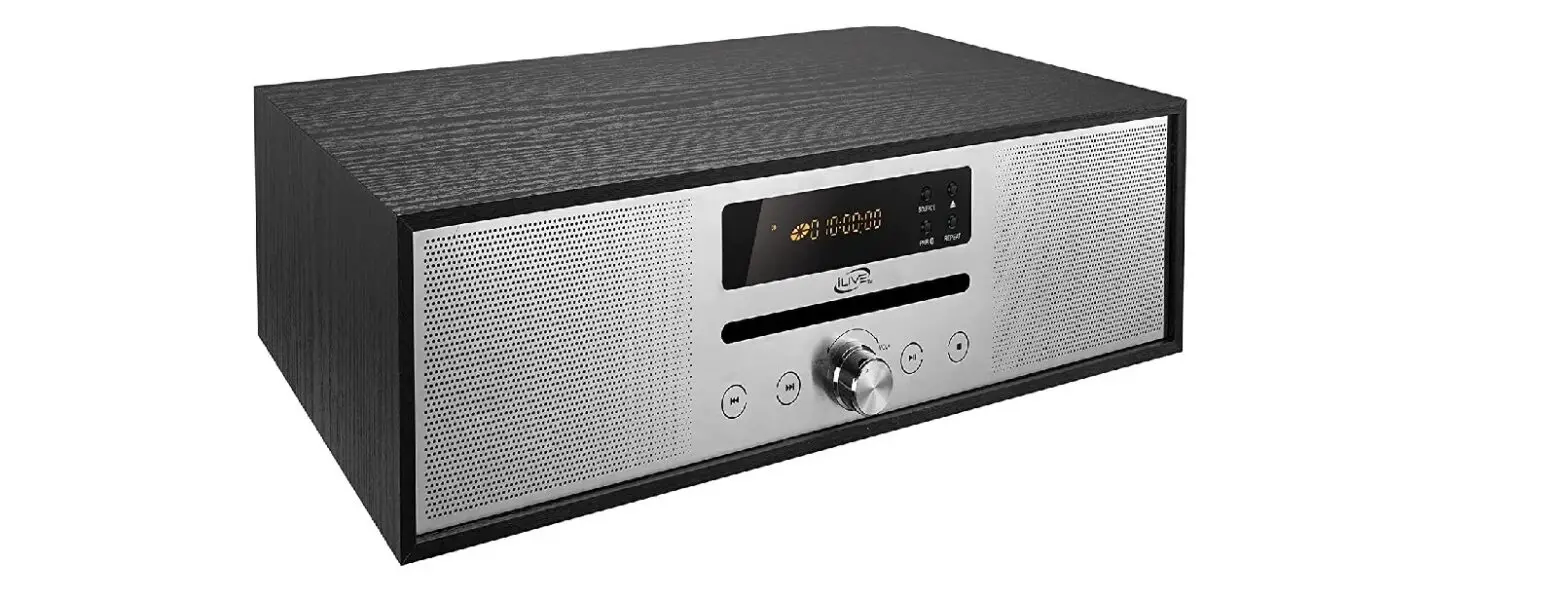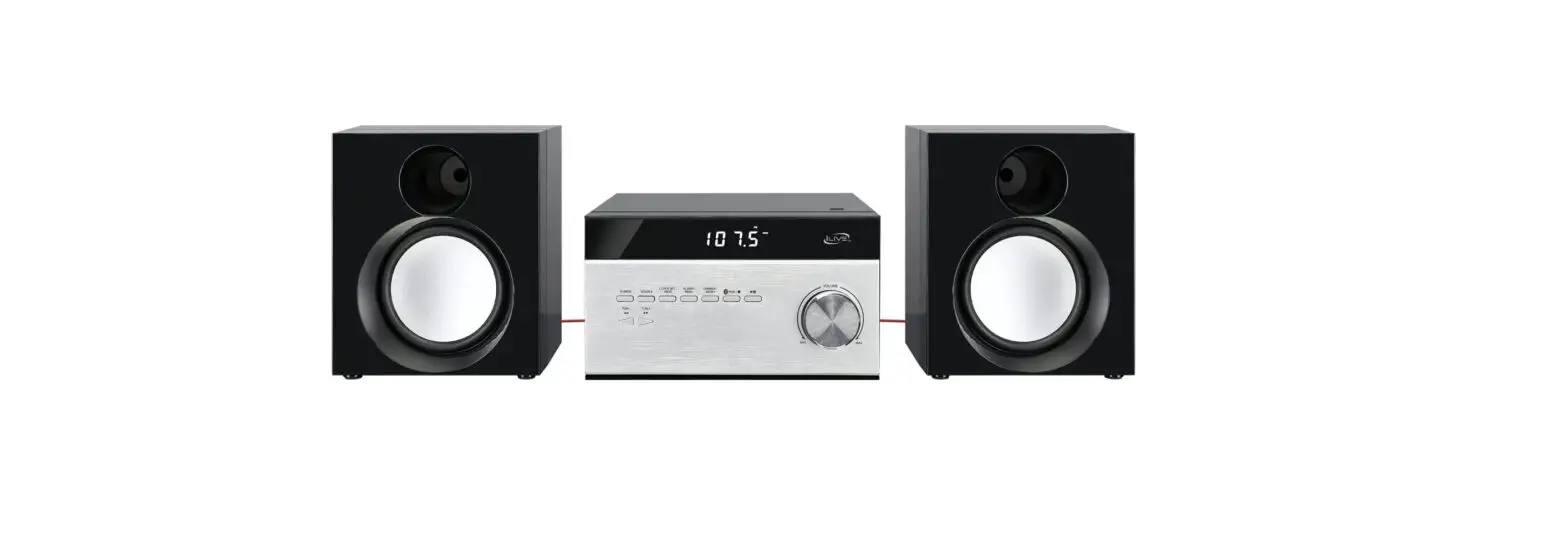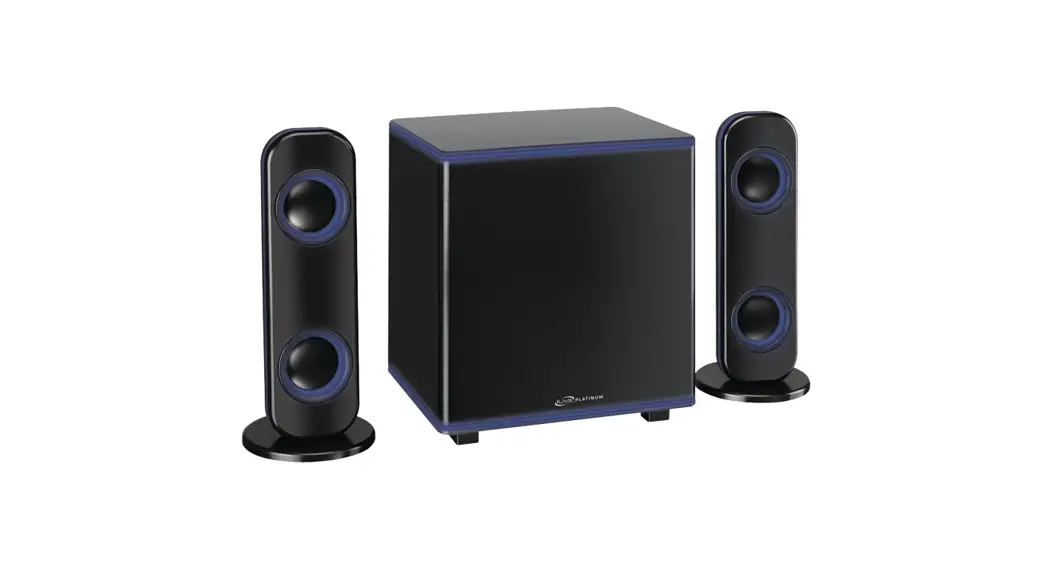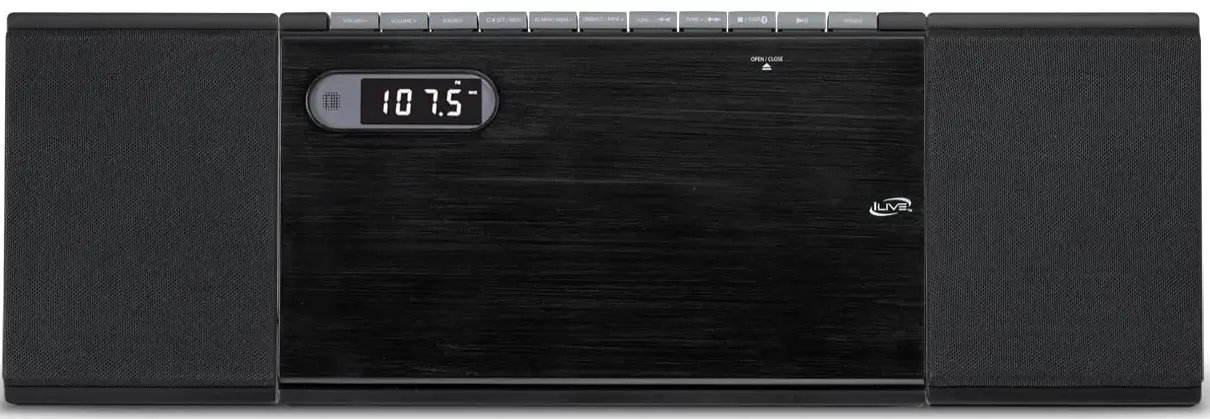

iLive IHB248B Home Music System
Safety Instructions & Warnings
Important Safety Instructions
- Read these Instructions.
- Keep these Instructions.
- Heed all Warnings.
- Follow all instructions.
- Do not use this apparatus near water.
- Clean only with a dry cloth.
- Do not block any ventilation openings. Install in accordance with the manufacturer’s instructions.
- Do not install near any heat sources such as radiators, heat registers, stoves, or other apparatus (including amplifiers) that produce heat.
- Do not defeat the safety purpose of the polarized or grounding – type plug. A polarized plug has two blades with one wider than the other. A grounding type plug has two blades and a third grounding prong. The wide blade or the third prong are provided for your safety. When the provided plug does not fit into your outlet, consult an electrician for replacement of the obsolete outlet.
- Protect the power cord from being walked on or pinched particularly at plugs, convenience receptacles, and the point where they exit from the apparatus.
- Only use attachments/accessories specified by the manufacturer.
- Unplug this apparatus during lightning storms or when unused for long periods of time.
- Refer all servicing to qualified service personnel. Servicing is required when the apparatus has been damaged in any way, such as power-supply cord or plug is damaged, liquid has been spilled or objects have fallen into the apparatus, the apparatus has been exposed to rain or moisture, does not operate normally, or has been dropped.
- Use only with a cart, stand, tripod, bracket, or table specified by the manufacturer, or sold with the apparatus. When a cart is used, use caution when moving the cart/apparatus combination to avoid injury from tip-over.
FCC Warnings
Warning: Changes or modifications to this unit not expressly approved by the party responsible for compliance could void the user’s authority to operate the equipment.
NOTE: This equipment has been tested and found to comply with the limits for a Class B digital device, pursuant to Part 15 of the FCC Rules. These limits are designed to provide reasonable protection against harmful interference in a residential installation.
This equipment generates, uses, and can radiate radio frequency energy and, if not installed and used in accordance with the instructions, may cause harmful interference to radio communications. However, there is no guarantee that interference will not occur in a particular installation. If this equipment does cause harmful interference to radio or television reception, which can be determined by turning the equipment off and on, the user is encouraged to try to correct the interference by one or more of the following measures:
- Reorient or relocate the receiving antenna.
- Increase the separation between the equipment and receiver.
- Connect the equipment into an outlet on a circuit different from that to which the receiver is connected.
- Consult the dealer or an experienced radio/TV technician for help.
Battery Warnings
- WARNING: Do not ingest the battery, Chemical Burn Hazard.
- The remote control supplied with this product contains a coin/button cell battery.
- If the coin/button cell battery is swallowed, it can cause severe internal burns in just 2 hours and can lead to death.
- Keep new and used batteries away from children. Iff the battery compartment does not close securely, stop using the product and keep it away from children.
- If you think batteries might have been swallowed or placed inside and part of the body, seek immediate medical attention.
- CAUTION: Danger of explosion if battery is incorrectly replaced. Replace only with the same or equivalent type.
- WARNING: There is a danger of explosion if you attempt to charge standard Alkaline batteries in the unit. Only use rechargeable NiMH batteries.
- Battery shall not be exposed to excessive heat such as sunshine, fire or the like.
- Do not mix old and new batteries.
- Completely replace all old batteries with new ones.
- Do not mix alkaline, standard (carbon-zinc), or rechargeable (ni-cad, ni-mh, etc) batteries.
- Batteries should be recycled or disposed of as per state and local guidelines.
- Additional Warnings and Precautions
- CAUTION: TO PREVENT ELECTRIC SHOCK, MATCH WIDE BLADE OF PLUG TO WIDE SLOT, FULLY INSERT.
- Mains plug is used as disconnect device and it should remain readily operable during intended use. In order to disconnect the apparatus from the mains completely, the mains plug should be disconnected from the mains socket outlet completely.
- CAUTION: Use of controls or adjustments or performance of procedures other than those specified may result in hazardous radiation exposure.
- WARNING: Changes or modifications to this unit not expressly approved by the party responsible for compliance could void the user’s authority to operate the equipment.
- WARNING: Use of this unit near fluorescent lighting may cause interference regarding use of the remote. If the unit is displaying erratic behavior move away from any fluorescent lighting, as it may be the cause.
- WARNING: Shock hazard – Do Not Open.
- Caution and marking information is located at the rear or bottom of the apparatus.
- WARNING: To reduce the risk of fire or electric shock, do not expose this apparatus to rain, moisture, dripping, or splashing.
- Objects filled with liquids, such as vases, shall not be placed on the apparatus.
WARNING : This product can expose you to chemicals including lead, which is known to the State of California to cause cancer and birth defects or other reproductive harm. For more information go to www. P65Warnings.ca.gov. This product meets and complies with all Federal regulations.
WARNING: To reduce the risk of electric shock, do not remove cover (or back). No user-serviceable parts inside. Refer servicing to qualified service personnel.
Warning: The exclamation point within an equilateral triangle is intended to alert the user to the presence of important operating and maintenance (servicing) instructions in the literature accompanying the appliance.
Danger: The lightning flash with arrowhead symbol, within an equilateral triangle, is intended to alert the user to the presence of un-insulated “dangerous voltage” within the product’s enclosure that may be of sufficient magnitude to constitute a risk of electric shock to persons.
This product utilizes a Class 1 laser to read Compact Discs. This laser Compact Disc Player is equipped with safety switches to avoid exposure when the CD door is open and the safety interlocks are defeated. Invisible laser radiation is present when the CD Player’s lid is open and the system’s interlock has failed or been defeated. It is very important that you avoid direct exposure to the laser beam at all times. Please do not attempt to defeat or bypass the safety switches.
Setup
Features
- Bluetooth wireless: range 60 ft.
- 2 channel stereo sound
- CD player: CD, CD-R/RW
- Built-in AM radio antenna
- FM wire antenna
- Up to 20 AM and FM radio memory presets
- Single alarm – wake to CD, radio, or alarm
- Sleep timer
- Aux In (3.5mm audio input)
- LCD display with white backlight
- Battery backup
- Full function remote
Includes
- Remote control with CR2025 battery (pre-installed)
- AC power cord
- User’s Guide & Warranty
Power
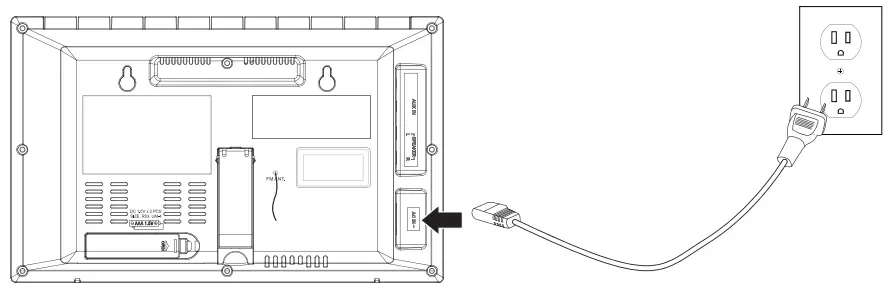
Plug the AC power cord into the AC Power Input on the rear of the CD player and a standard wall outlet.
Battery Backup
Requires 2 AAA/1.5V batteries (not included). Battery backup is for display and clock functions only. The unit will not play music on battery power.
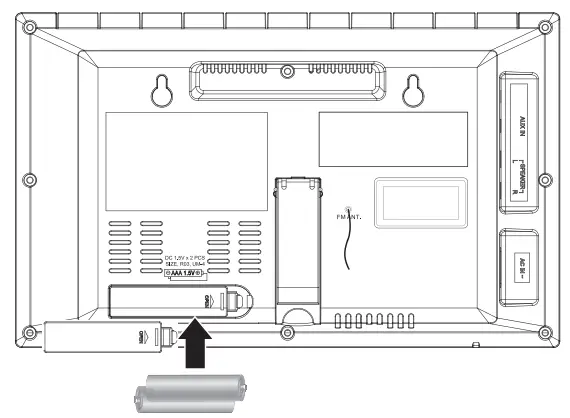
Orientation
Attach Speakers
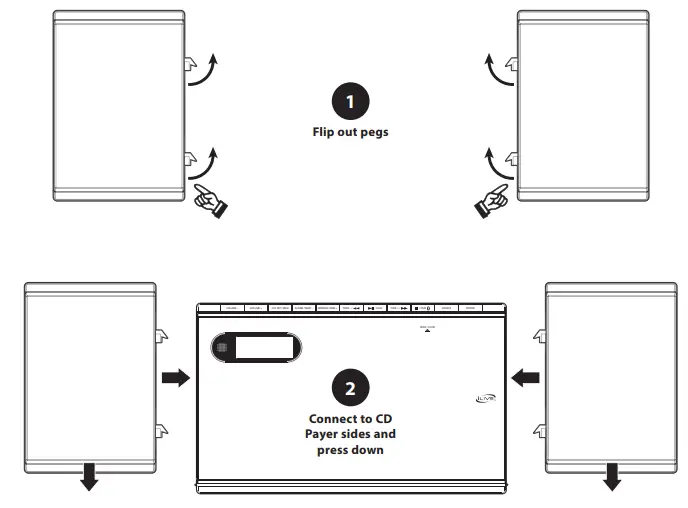
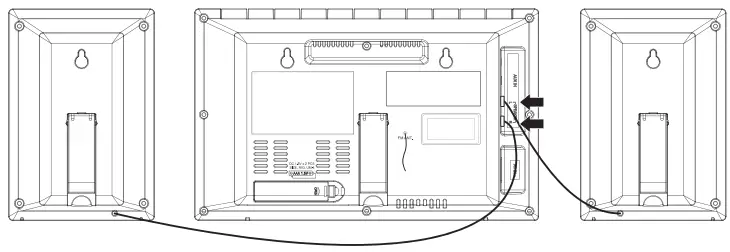
Connect Speakers
Be sure to match the left and right speaker plugs to their corresponding inputs.
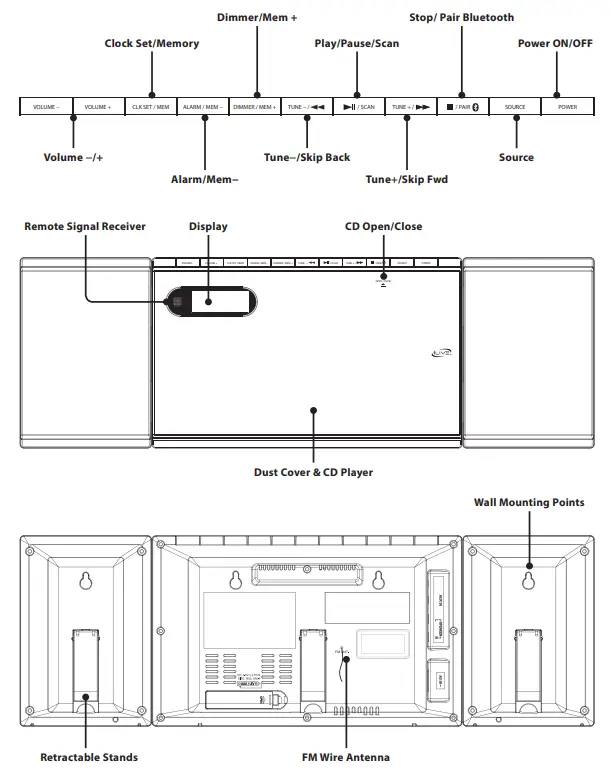
Controls & Inputs
Remote Control
Functions
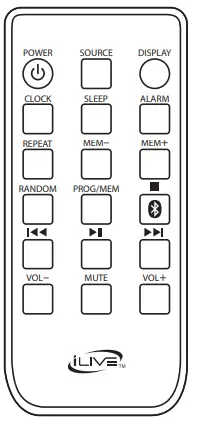
- Power Press to power the system ON or OFF. Source Press to switch media source between FM/
- AM radio, CD, Aux and Bluetooth modes.
- Clock Press to begin setting the clock time (see pg. 11).
- Repeat Press to repeat 1 audio track or all audio tracks on a loaded CD.
- Random Press to play random audio tracks on a loaded CD.
- Prog/Mem Press to program tracks to play in a specific order (CD MODE). Press to program radio stations (AM/FM MODE)
- Skip Back/Fwd Press to skip audio tracks (CD/BLUETOOTH MODES). Press and hold to search through audio tracks (CD MODES). Press to manually tune the radio (RADIO MODE).
- Play/Pause Press to play or pause audio. Press and hold to scan and automatically save radio stations to memory presets (RADIO MODE).
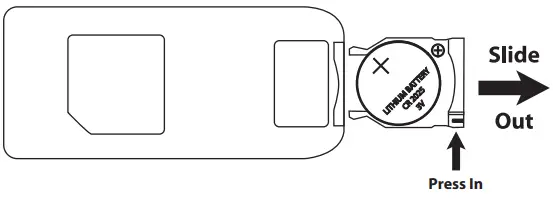
- Batteries Requires 1 CR2025 battery (included).
Connecting External Devices
Pairing Bluetooth & Playing Audio
Note: This model features automatic Bluetooth pairing.
- Set the Source to “bt” (Bluetooth Mode), the display will begin quickly flashing “bt”. When pairing, remain within 3 feet of the unit.
- Using the controls on your Bluetooth device, select IHB248 in the Bluetooth Settings to pair. When successfully paired, the “bt” indicator will turn solid. If need be, refer to the user’s manual for your specific device for more information on Bluetooth pairing.
- Use the controls on the connected Bluetooth device to select and begin playing audio. Use the controls on the device or the unit to play, pause, skip tracks.
Notes on Bluetooth
- If the devices have not successfully connected, be sure the unit is in Bluetooth Mode. Press the Pair button until the display begins quickly flashing “bt”, then repeat steps 2 and 3.
- The speaker can remember multiple Bluetooth devices and will always try to re-connect to the last device used. To re-connect to a different device, turn off Bluetooth on unwanted devices, then access the Bluetooth settings menu on the device you wish to use and select IHB248.
Aux In (3.5mm Audio Input)
Requires 3.5 mm audio input cable (not included).
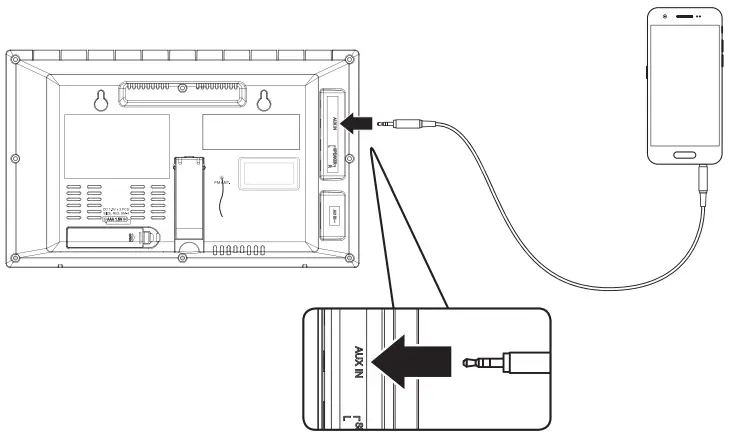
- Plug a 3.5 mm audio input cable into the Aux In on the rear of the unit and the headphone jack on a smartphone or other audio source.
- Set the Source to Aux and use the controls on your connected music player to select and play audio. Audio played through the connected device will now be heard through the speakers.
CD & Radio
Loading and Playing a CD
- Press Open/Close on the CD door and place a CD in the tray, label side facing out, then close the CD tray.
- Set the Source to CD mode.
- Use the controls on the unit or the remote to begin playing the loaded disc.
Programming a CD
- Press the Stop button to stop a loaded CD.
- Press the Prog button on the remote (“P01” will blink on the display).
- Press the Skip Back/Fwd buttons to select a track.
- Press the Prog button to add the selected track to the program. Repeat this process to program up to 20 tracks to play in a specified order.
- Press the Play button to begin the program. Press the Skip buttons to advance or reverse through the program.
- Press the Stop button at any time to cancel the program.
Playing the AM/FM Radio
This unit features an internal AM antenna and a pigtail FM antenna. To improve radio reception, adjust the position of the unit.
- Set the Source to AM or FM mode.
- Use the Skip/Tune buttons to manually tune to a desired radio frequency.
Automatically Programming Radio Station Presets
- In AM or FM mode, press and hold the Play/Scan button on the unit or the remote. The unit will scan for radio stations and automatically save up to 20 memory presets (P01-P20).
- Press the Mem −/+ button to cycle through your memory presets.
Programming Radio Station Presets Manually
- Use the Skip/Tune buttons to manually tune to a desired radio frequency.
- Press Prog/Mem on the remote.
- Use M −/+ to select a memory preset (P01-P20).
- Press Prog/Mem to confirm and save the station.
Clock, Sleep Timer & Alarm
Setting the Clock
- With the unit powered off, press the Clock Set/Mem button on the unit, or the Clock button on the remote.
- The hour will begin flashing on the display. Press the Skip/Tune buttons on the unit or the remote to set the hour. Be sure to note the PM indicator on the display.
- Press the Clock Set/Mem or Clock button again.
- The minutes will begin flashing on the display. Repeat Step 2 to set the minutes.
- Press the Clock Set/Mem or Clock button again to finish setting the time.
Setting the Sleep Timer
- With the unit powered ON, press the Sleep button on the remote. The display will show the amount of time in minutes before the timer goes off.
- Press the Sleep button to select the amount of time before the timer goes off: 90 minutes, 80, 70, etc.
- Wait for the display to return to normal. “Sleep” will be visible on the display when the timer is on.
- To turn the Sleep Timer off, perform Step 2 until the display reads “OFF”.
Setting the Alarm
- With the unit powered OFF, press the Alarm button on the unit or the remote.
- The hour will begin flashing on the display. Press the Skip/Tune buttons on the unit or the remote to set the hour. Be sure to note the PM indicator on the display.
- Press the Alarm button again.
- The minutes will begin flashing on the display. Repeat Step 2 to set the minutes.
- Press the Alarm button again to set the alarm type.
- The alarm type will begin flashing on the display. Repeat Step 2 to set the alarm type: Radio, CD or Buzzer.
- Press the Alarm button again to finish setting the alarm.
Cancelling the Alarm
- After the alarm has sounded press the Power button to cancel it.
- Press and hold the Alarm button to turn it off entirely. The alarm indicator on the display will disappear.
Customer Support
Contact Information
- Website: www.iliveelectronics.com
- Email Support: [email protected]
- Email Parts: [email protected]
- Phone Support: 1-888-999-4215
- Warranty For Warranty Information and the most up-to-date version of this User’s Guide, go to: www.iliveelectronics.com
International Support
To download this User’s Guide in English, Spanish, and French, or to get answers to frequently asked questions, visit the support section at: www.iliveelectronics.com
Copyright Copyright © 2018 Digital Products International (DPI, Inc.). All other trademarks appearing herein are the property of their respective owners. Specifications are subject to change without notice.
Frequently Asked Questions
M/Play/Pause The audio will pause or play with a brief press. Changing between Bluetooth and Wi-Fi modes requires a long tap.
Switch to Bluetooth mode by turning the device on and pressing the Source button. Blue lights on the Pairing Indicator will start to gently flash. Press the Pair button two times.
Use the Power switch to turn the device on. The machine will enter pairing mode as soon as the Pairing/Line In Indicator begins to rapidly flash blue. When pairing, stay 3 feet or less away from the device. Choose the in your Bluetooth settings to pair using the built-in controls on your Bluetooth device.
Make sure your TV is on and that you have an HDMI cable before you connect your iLive to your TV. Locate your TV’s HDMI input next. After locating it, attach the HDMI cable’s one end to the HDMI input on your TV and the other end to the HDMI output on your iLive.
Connect the speaker’s DC power input to a regular power outlet using the USB charging cable and a USB power adapter to power the device or recharge the internal battery (not included). At 50% volume, the battery lasts about 2.5 hours. The charging process takes three to four hours.
Verify that the speaker’s power wire and audio out cord are firmly plugged in and are not torn or frayed. If they are, you should, if you are able to, carefully solder the wires back together. If not, you’ll probably need to have the device’s speakers replaced.
The clock is now in alarm set mode; simply press and hold the Play/Pause/Mode button until the display begins to blink. Press and hold the Play/Pause/Mode button one more until the hour indicator blinks, indicating that the clock is in set mode. To choose the desired hour, turn the volume wheel.
whitish noise Turning the speaker ON and OFF again Speaker is still not working correctly. To return to factory settings, depress the Alexa Mute button for 10 seconds. Visit www.iLiveElectronics.com for warranty information and the most recent version of this user manual.
Use the iLive Smart Bluetooth app to take charge. With this simple to use app, you can manage your music from your tablet or smartphone to play it on your iLive speakers and more. You can manage your music, stations, and presets, as well as adjust volume, with the help of the app.
With cutting-edge Bluetooth technology and room-filling sound, you can improve your home theatre experience. You may wirelessly stream music from any Bluetooth-enabled smartphone, tablet, or computer using iLive’s Sound Bar. For better sound, use the provided optical cable to connect to your TV.
On the back of your soundbar, look for the HDMI “out” port, and on the back of your TV, look for the HDMI “in” port. Connect the cable’s two ends to the appropriate ports. With the digital optical cable, the procedure is comparable. Find the optical “out” port on your TV and the optical “in” port on your soundbar.
Press and hold the Pair button while turning on the device to start pairing. Search for and choose IHB248B in your Bluetooth settings by using your Bluetooth device’s controls to pair.The LED lights will turn solid after a successful pairing, and the speaker will emit an audible chime.
Press and hold the Power button to turn on the sound bar. Choose IHB248B in the Bluetooth Settings to pair using the controls on your Bluetooth device. A voice will say “Bluetooth is connected” after a successful pairing, and the LED indicator will become completely blue.
Make sure your TV is on and that you have an HDMI cable before you connect your iLive to your TV. Locate your TV’s HDMI input next. After locating it, attach the HDMI cable’s one end to the HDMI input on your TV and the other end to the HDMI output on your iLive.