
QUICK START GUIDE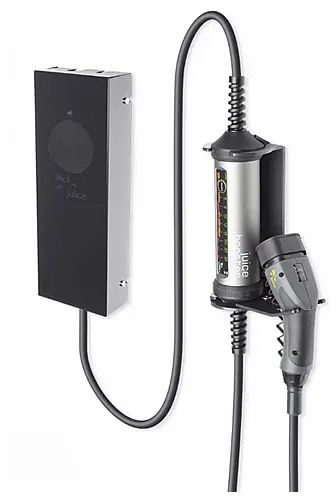

juice-world.com/installieren/juice-charger-easy
 Download the JUICE CHARGER easy Update App now. This will enable you to bring your device up to date in just a few steps.
 You can set the charging mode (Free Charge or RFID Activation) as described in Step 7 of the Installation Guide.
 Variant
FREE CHARGE
Start charging right away without the need for prior charge activation at the JUICE CHARGER is easy. Simply plug in and recharge.
 RFID
RFID
Only permit selected persons to charge at your JUICE CHARGER easy. Always maintain full, restricted control of your RFID activation. Functions with most standard RFID cards.
RFID card management
Teach-in the master card The first card held up to the device after installation automatically becomes the master card.
- Hold RFID card up to the device
 Audio signal sounds
 Audio signal sounds
Teach-in user card
- Hold RFID master card up to the device

- Hold user card to be taught-in up to the device


Delete all cards
May only be performed by electrically skilled persons
- Press the Delete button as marked in Step 6 of the Installation
Guide 

Delete user card
- Hold RFID master card up to the device
- Hold RFID user card to be deleted up to device
Audio Signal Guide
| Sound sequence | Description |
 | Confirmation |
| Rejection | |
| Master mode | |
| Teach-in | |
| Deletion | |
| Start-up completed |
How to use
Variant A
- Plug-in vehicle end
- Hold RFID card up to the device
- Charging starts
Variant B
- Hold RFID card up to device (activated for the 60s)
- Plug-in vehicle end
- Charging starts
Installation instructions
IMPORTANT: May only be installed by an electrically skilled person
Clampable cross-sections
Fine-wire conductor
AWGFine-wire conductor, wire-end ferrule with plastic collar
0.5-10mm2/20-8
2.5 -6 mm2/16 -10AWG
Cable connection
Connector cable Type min.
Connector cable Type max.
Connector cable 0
3 x 2.5 mm2 – L1/N/PE
5 x 10 mm2 – L1/L2/L3/N/PE
dia. 16 – 21 mm 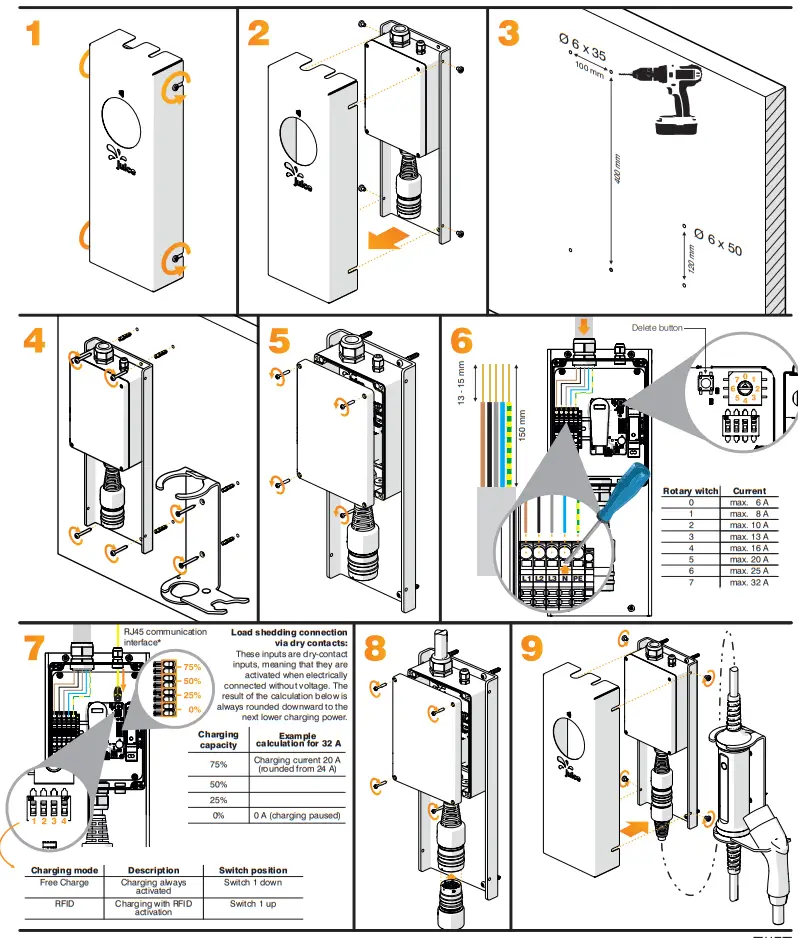
*The power provider may demand that it be possible to reduce the charging station power or the station entirely disconnected via a digital signal. This signal can be received via the RJ45 communication interface or dry-contact inputs.
The most recent version of this guide and further information can be found online at juice-world.com/installieren/juice-charger-easy
 http://juice-world.com/installieren/juice-charger-easy
 Juice Charger Easy