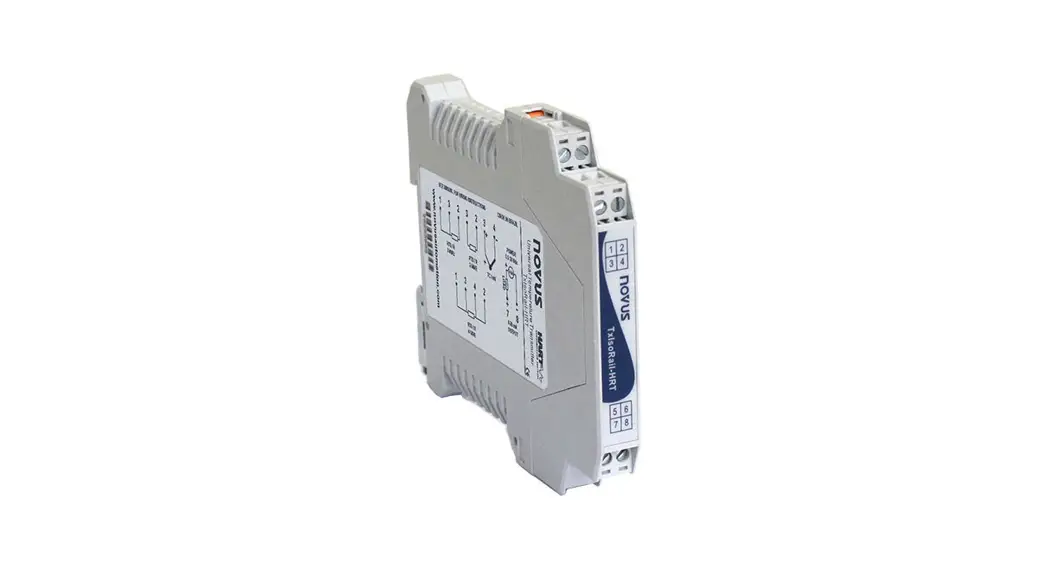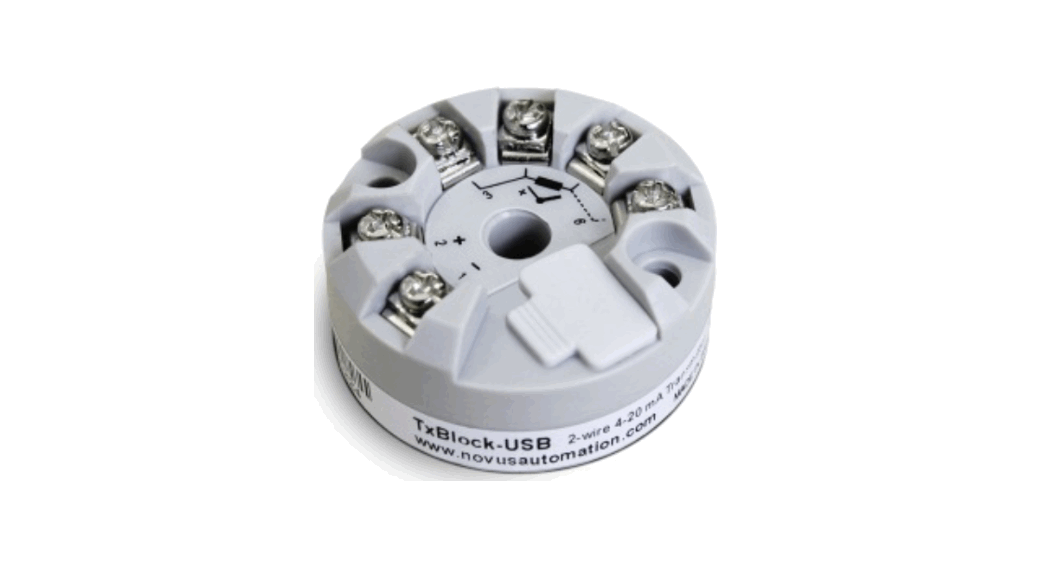

ITSensor M12-485 Compact Temperature Transmitter TxMini
INTRODUCTION
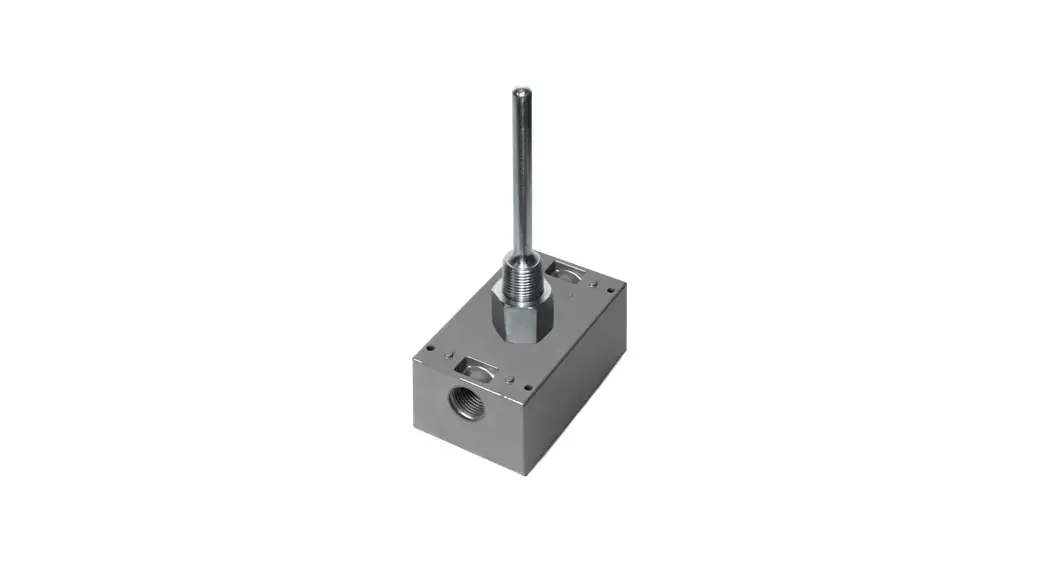
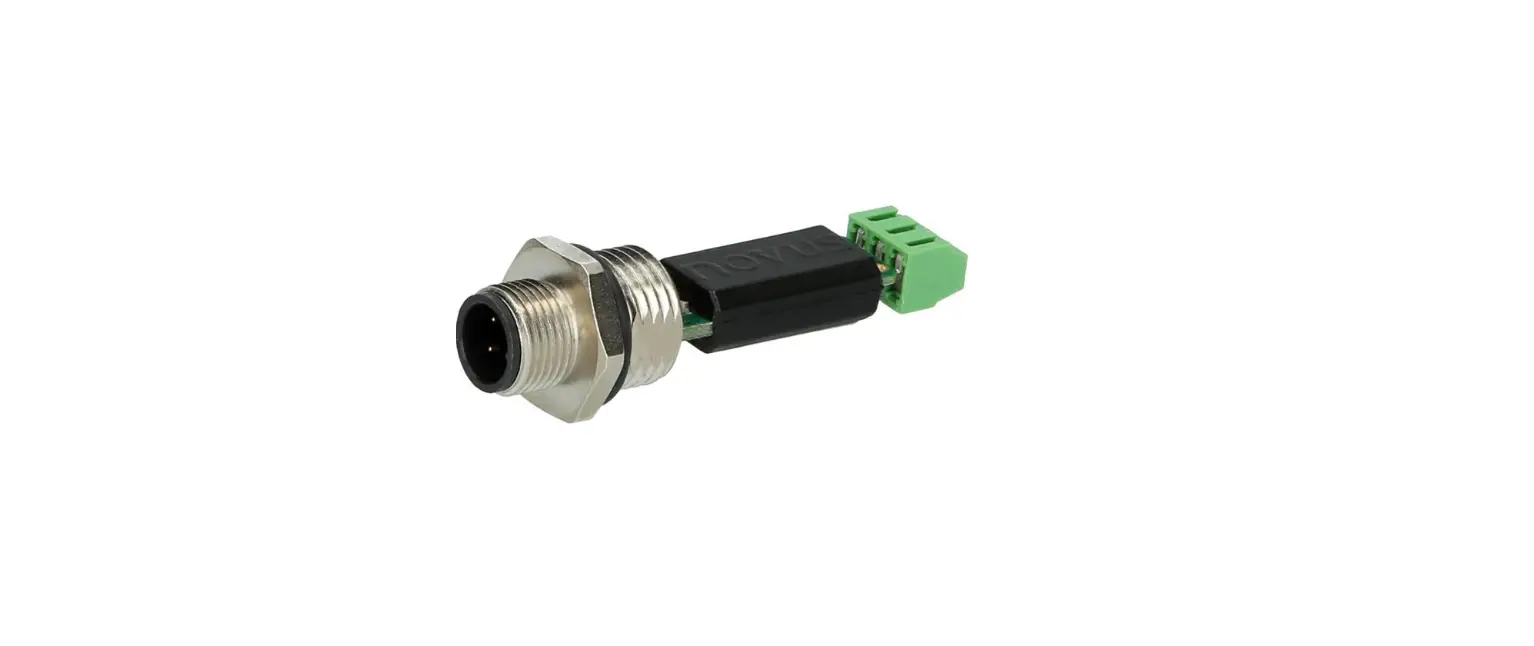
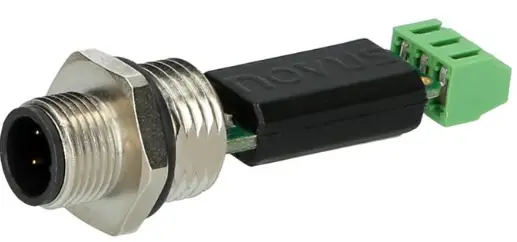
TxMini-M12-485 is a compact temperature transmitter with internal connection to temperature sensors Pt100. It consists of an electronic circuit encapsulated and a M12 connection for power and RS485 communication, which includes the screw thread for closing the sensor output.
You should use an RS485 interface with Modbus RTU commands to configure the transmitter. The DigiConfig software for Windows® allows you to configure all features of the transmitter as well as its diagnosis, and the possibility of using other Supervisory software for configuration and reading of the information provided by the device.
SPECIFICATIONS
Sensor Input:
Pt100 RTD: 3-wires connection, current drain of 0.8 mA, α= 0.00385, according NBR 13773. IEC 60751 (ITS-90).
Typical accuracy: 0.1 %;
Minimum accuracy: 0.2 %;
Measuring range: -200 to 600 ºC;
Minimum measuring range: 40 ºC.
Factory adjusted and calibrated using traceable standards.
- Resistance effect of the sensor wires: 0.005 °C / Ω.
- Maximum permissible resistance of the sensor wires: 25 Ω.
- Settling time of the measurement: < 2.5 s.
- Temperature effect: < ± 0.2 % / 25 °C.
- Response time: 2 s (typical).
- Maximum voltage allowed at input terminals no sensor: 3 V.
- Power supply: 7 to 40 Vdc, current < 10 mA.
- Operating Temperature: -40 to 85 °C.
- Ambient humidity: 0 to 90 % UR.
- No electrical isolation between input and output.
- Internal protection against polarity inversion of the supply voltage.
- Connection Wire Cross Section: 0.14 to 1.5 mm².
- Screw Tightening: 0.8 Nm.
- Housing: Polyamide.
- Order codes:
- P/N: 8806060420: TxMini-M12-485 Transmitter;
- P/N: 8806060430: TxMini-M12-485-CN Transmitter;
- P/N: 8806060520: TxMini-485 Transmitter (Equipment can only be configured during production);
- P/N: 8806060530: TxMini-485-CN Transmitter.
- P/N: 8806065000: M12 Cable Connector for TxMini-M12 (accessory).
CONFIGURATION
Table 1 shows the default parameters of the transmitter:
| Parameters | Configuration |
| Error Value | 0 |
| Offset | 0 ºC |
| Unit | ºC |
| Digital Filter | 0 |
| Timer Setting | 60 s |
| Baud Rate | 1200 |
| Data Bits | 8 |
| Parity | Par |
| Stop Bits | 1 |
| Address | 247 |
Table 1 – Default parameter values for TxMini-M12-485
When you use the transmitter with default configuration, none intervention is required and its installation can be performed immediately. When a change in the configuration parameters is necessary, you can do it using DigiConfig software. You can download the configuration software freely from the manufacturer’s website. To install it run the “DigiConfigSetup.exe” file and follow the installer´s instructions. Fig. 1 shows the main screen of DigiConfig software.
There is no electrical isolation between input and output.
SOFTWARE CONFIGURATION
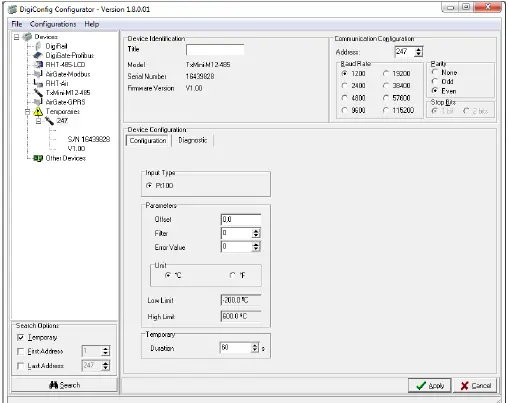
Fig. 1 – TxMini-M12-485 configuration screen in DigiConfig software
The top menu and the fields shown in Fig.1 allows configure the transmitter. Follow a brief description about the functions for each option. For more details, see the Help Help Topics option.
- File: Option to exit DigiConfig software.
- Configurations: Allows you to set the Communication and Language.
- Communication: Displays a window that allows you to configure the communication parameters of the software.
- Language: Use this menu option to choose the language for the DigiConfig. The available languages are English, Spanish and Portuguese.
- Help: Displays information on Help Topics and About.
- Help Topics: Assists through a descriptive window with detailed information about the use and parameters of compatible devices with the DigiConfig software such as TxMini-M12-485 transmitter.
- About: Shows information about the manufacturer´s website and DigiConfig software version.
- Devices: This field shows the compatible devices for DigiConfig software. After detecting a device on the Modbus network, the software displays a corresponding access icon to the family of devices to which it belongs and its Modbus address.
- Search Options: This field contains the search options for the Temporary mode, and other equipment within an address range.
- Temporary: Use to search for equipment’s in Temporary mode with the default communication parameters.
First Address: If you select the Start Address selection box, the software will search a device on the network that correspond to this address, the same baud rate and parity values as configured on DigiConfig Communication screen. - First and Last Address: If you select the Start Address box and Last Address box simultaneously, the software will search devices on the network that have addresses within this range and the same baud rate and parity values as configured in DigiConfig Communication screen.
TXMINI-M12-485 CONFIGURATION SETTINGS
Using DigiConfig to configure devices with default values: STEPS
- Run DigiConfig software (from version 1.8).
- Click on the tab Configuration Communication.
- Select the serial COM port that DigiConfig will use.
Note: Select the COM port connected to the RS485 interface. - In the Search Options field, select the Temporary box.
- Click the Search button:

- If the software detect a device, it will appear in the devices tree as a Temporary device.
- The software will show a device with the address 247, an empty Title field, Serial Number and Firmware Version for the connected TxMini-M12-485 transmitter.
- After displayed the equipment as Temporary, click the mouse on the address (247), and will open a window for the new device
- At the left-top of the screen, you can check in the Device Identification field the following items:
- Title: In this field, you can enter a title up to ten characters to identify the equipment in the devices field of the screen.
- Model: Shows the transmitter model.
- Serial Number: Shows the transmitter’s serial number.
- Firmware Version: Displays the firmware version of the device.
- In the Device Configuration field, you can check the following items:
- Input Type: It indicates the Pt100 sensor used with the TxMini-M12-485 transmitter.
- Offset: This field allows you to change the value read by the temperature sensor in the range of -10 to +10 degrees.
- Filter: You can use this field to smooth the variations in the temperature value of the readings in the Diagnostic tab, so that the read value is more stable with lower oscillation. You can use values from 0 to 20, with the value 0 as a default condition.
- Error Value: The default Error Value is 0, but can take values from -9999 to 9999 according to the requirements. The software will shows this value when there is an error in the sensor reading.
- Unit: The default Unit value is Celsius (°C), but there is the option to display the temperature in Fahrenheit (ºF).
- Low Limit and High Limit: These fields shows the measurement range for the Pt100 sensor. These two fields are read-only.

Fields Lower and Upper Limit are for viewing only.
Note: You can see detailed information about the function Temporary Duration after the Communication Settings step.
The Communication Settings field contains the following items:
- Address: On this field, you can define a Modbus network address for the device selecting a number in the range of 1 to 247.
Note: The default address is 247. - Baud Rate: On this field, you can define the communication Baud Rate selecting one of the predefined values showed in Table 2.
| Baud Rate | |
| 1200 | 19200 |
| 2400 | 38400 |
| 4800 | 57600 |
| 9600 | 115200 |
Table 2 – Options available for the baud rate
Parity: The Parity field allows the user to select one of three available values for the parity bit. The default value is Even. The available options are:
| Parity | Stop bits |
| None | 2 |
| Odd | 1 |
| Even | 1 |
Table 3 – Parity bit options
Note: The choice of parity define the quantity of stop bits in accordance with the Modbus standard.
Sending a Configuration:
- Edit the parameters in accordance with the requirements.
- Then click on the Apply button.
- The software will start to send the configuration data to the device and will show a dialog (Sending configuration to the device…).
- After completing the transfer, it will pop up a window that informs the successful of the operation. Then, click OK.
Temporary Device Configuration
The temporary mode was created in case you need to change some device settings, but do not know the previously set communication parameters such as Baud Rate, Address or Parity.
This mode aims to keep the same communication parameters to the default values for some time, based on Table 1. The Duration parameter is configured with the default value of sixty seconds (60 s), and can be set in the range of 10 to 60 s according to user needs. For further clarification, follow an example to illustrate the use of the temporary mode and function of the parameter Duration.
Ex: The user configure the device with the following parameters:
Baud Rate: 115200;
Address: 121;
Parity: None Stop Bits: 2.
Procedure for Temporary mode:
1º Disconnect the cable from the device (M12 connector).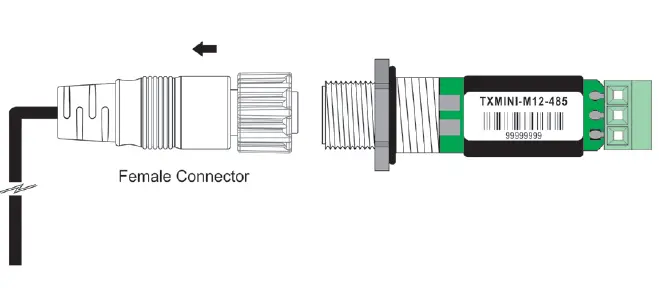
Fig. 2 – Open the M12 connection
2º When reconnecting the power and communication cable (M12), the transmitter will temporarily return to the default communication parameter values for Baud Rate (1200), Parity (Even) and Address (247). At this time, the default value of the Duration parameter (60 s) will ensure that the device remains with the default parameters mentioned during this period, i.e., the user will have this time to perform the procedures below (3 to 7) before the device returns to the communication settings previously recorded in its memory:
Baud Rate: 115200, Address: 121 and Parity: None.
Note: If the user does not perform the steps (3 to 7) before the time set in the Duration parameter, the device returns to the previously set parameters.
3º Run DigiConfig software.
4º Click in the menu Configurations Communication.
5º Make sure that you configure the DigiConfig communication parameters with default values for the requested device, according to Table 1.
6º In Search Options field, select the Temporary condition.
7º Click on the Search button:
8º The device will appear in the Devices field classified as Temporary.
9º Click on the temporary device on the tree.
10º Will be shown the equipment with the address 247, title, serial number of the transmitter (S/N) and the firmware version of TxMini-M12-485.
Now you can check the previous configuration values for baud rate (115200), parity (none) and address (121) of the device on the Device Configuration field.
DIAGNOSTIC
- Temperature: On the Diagnostics tab, it shows the read temperature value and its corresponding unit.
- Status: Close to the position of the temperature, there is the error indicator. The error states are:
- Temperature: On the Diagnostics tab, it shows the read temperature value and its corresponding unit.
- Status: Close to the position of the temperature, there is the error indicator. The error states are:allowed measurements for Pt100 sensor, the status will indicate overflow.
- Underflow: If the sensor is reading a temperature value below the allowed measurements for Pt100 sensor, the status will indicate underflow.
MODBUS COMMANDS
Table 4 lists the Modbus RTU commands (functions) that you can use to supervise or configure the main parameters of the transmitter. For further information with respect to each of these commands and the Modbus protocol in general, please access the site www.modbus.org.
READ HOLDING REGISTERS – 0 x 03
Use this command for reading the value of one or several holding registers, according to the “Holding Registers Table”.
WRITE HOLDING REGISTERS – 0 x 06
Use this command for writing in a holding register, according to the “Holding Registers Table”.
RETENTIVE REGISTERS
The specified addresses correspond to the low-level physical addresses, where zero (0) corresponds to the address of PLC 40001.
The minimum and maximum values shows the range of valid values for each parameter. The R/W column indicates whether the parameter is read-write (R/W) or read-only (R).
| Address | Description | Minimum | Maximum | R/W |
| 0 | Serial number (word high) | 0 | 65535 | R |
| 1 | Serial number (word low) | 0 | 65535 | R |
| 2 | Firmware release | 100 | 199 | R |
| 3 | Model | 0 | 255 | R |
| 4 | Input Reading – AD | – | – | R |
| 5 | Temperature Value (ºC or ºF).* | -200 | 600 | R |
| 6 | Status of error, overflow underflow. | 0 | 65535 | R |
| 7 | Baud-Rate | 0 | 7 | R/W |
| 8 | Parity | 0 | 2 | R/W |
| 9 | Modbus Address | 1 | 247 | R/W |
| 10 | Temperature Unit | 0 | 1 | R/W |
| 11 | Error value | -9999 | 9999 | R/W |
| 12 | Sensor | 0 | 0 | R |
| 15 | User offset for temperature.* | -100 | 100 | R/W |
| 16 | Title | – | – | R/W |
| 17 | Title | – | – | R/W |
| 18 | Title | – | – | R/W |
| 19 | Title | – | – | R/W |
| 20 | Title | – | – | R/W |
| 21 | Timer – Temporary Mode | 10 | 90 | R/W |
| 22 | Digital Filter | 0 | 20 | R/W |
Table 4 – Retentive Registers
* For the table above, include one decimal digit. For ex.: -100 means -10.0.
DESCRIPTION OF SOME REGISTERS
REGISTER 7 – BAUD RATE
Defines the Modbus communication speed. The transmitter comes factory-configured with a Baud Rate 1200.
| Code | Baud Rate |
| 0 | 1200 |
| 1 | 2400 |
| 2 | 4800 |
| 3 | 9600 |
| 4 | 19200 |
| 5 | 38400 |
| 6 | 57600 |
| 7 | 115200 |
REGISTER 8 – PARITY
Refers to the parity bit code used for Modbus communication. The default parity for communication with the transmitter is even.
| Code | Parity |
| 0 | None |
| 1 | Odd |
| 2 | Even |
Table 6 – Parity
REGISTER 9 – MODBUS ADDRESS
Refers to the transmitter address in the Modbus network. Valid values are between 1 and 247. The transmitter is set to address 247 by default.
REGISTER 10 – TEMPERATURE UNIT
Refers to the temperature unit code used in Modbus communication. The default value is degrees Celsius (°C).
| Code | Unity |
| 0 | °C |
| 1 | °F |
Table 7 – Temperature Unit
REGISTER 11 – ERROR VALUE
Refers to the error value established when the sensor has a problem. The default value is 0.
REGISTER 15 – USER OFFSET FOR TEMPERATURE
Refers to the offset value in engineering units for the temperature. The default value for the offset is 0.
REGISTER 16 to 20 – TITLE
Refers to an identification name for the TxMini-M12-485 transmitter, used in DigiConfig software.
REGISTER 21 – TEMPORARY TIMER
Refers to the time that the device will be in default mode of communication (Baud, Address and Parity) for cases where the user does not know or remember the previous configuration parameters of communication.
Note: TEMPORARY: 1200 bps, 247, Even.
For more details, please see the previous section Procedure for Temporary Mode.
REGISTER 22 – DIGITAL FILTER
Refers to the Digital Filter code set by the user for smooth the variations of the temperature readings. The default value for the filter is 0.
MECHANICAL INSTALLATION
You can install the TxMini-M12-485 Transmitter in pipes and other small places. Vibrations, moisture and extreme temperatures, electro-magnetic interference, high voltage and other interferences can permanently damage the unit, and could cause error in the measured value. 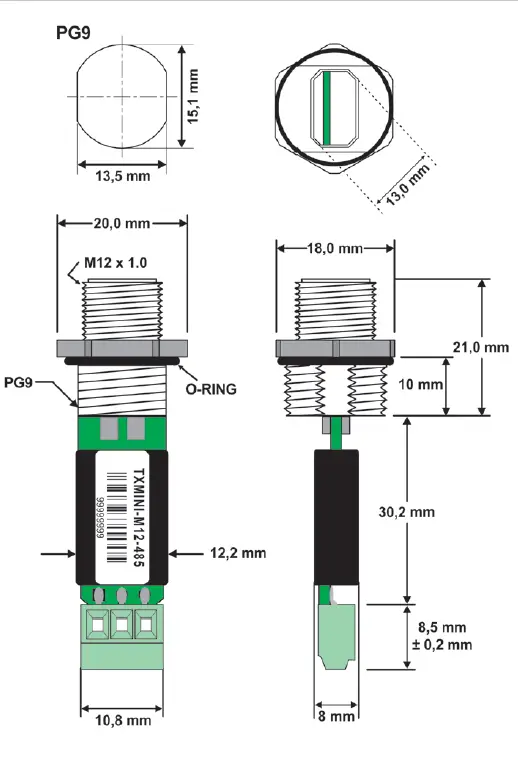
ELECTRICAL INSTALLATION
RECOMMENDATIONS FOR INSTALLATION
- Sensor signals conductors must go through the plant system separate from power cables (loop), if possible in grounded conduits.
- Use a dedicated power supply for instrumentation to energize the transmitter.
- In control and monitoring applications is essential to consider what can happen when any part of the system fails.
POWER SUPPLY AND COMMUNICATION CONNECTIONS
Serial communication uses the terminals 2 and 4, and the power supply uses the terminals 1 and 3 as shown in the table below: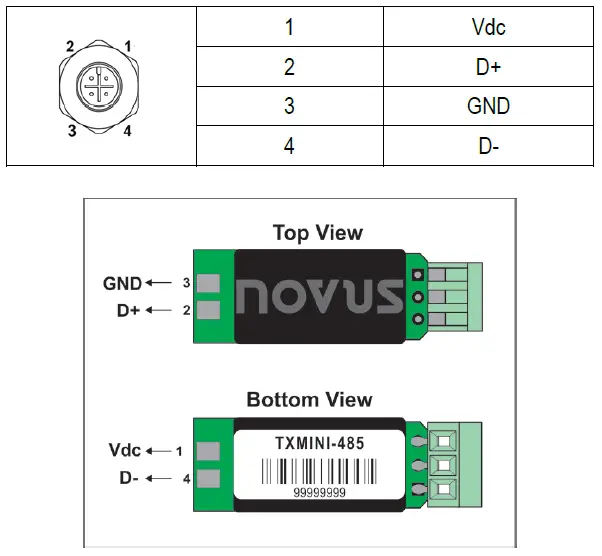
Note: this model has no configuration interface and can only be configured during production.
SENSOR CONNECTION
To connect the sensor use terminals 1, 2 and 3, and interconnect the terminals 1 and 2 as shown below.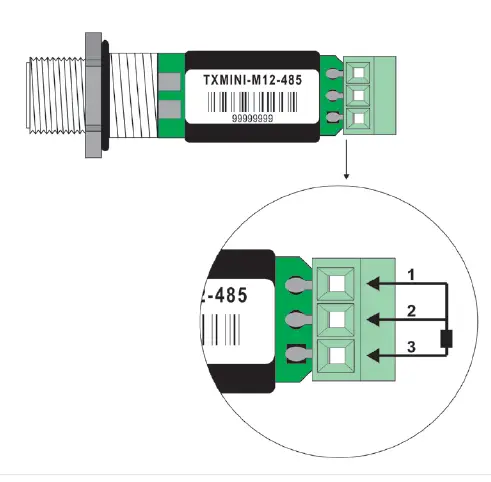
Fig. 5 – Pt100 sensor connection for the model with connector 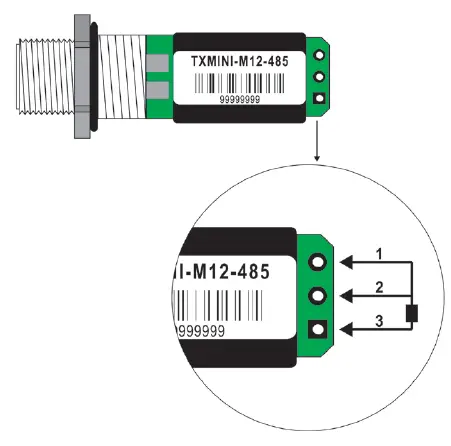
Fig. 6 – Pt100 sensor connection for the model without connector
M12 CABLE CONECTION
See below guidelines for making or purchasing the M12 cable. 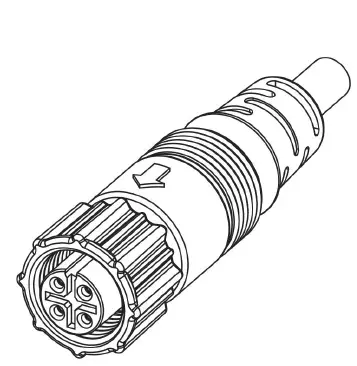
Fig. 7 – Connecting pins for M12 cable mounting
For appropriate cable resistance compensation, the same cable type should be used for all terminals. Maximum wire resistance is 25 Ω. Usage of a 3 or 4 wire with conductors of equal length and gauge is recommended (cable not supplied).
WARRANTY
Warranty conditions are available on our website www.novusautomation.com/warranty.
 The Modbus Organization
 Warranty - Company - NOVUS Automation Inc.