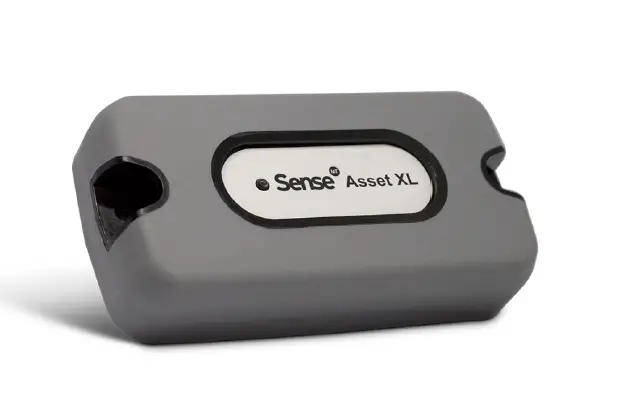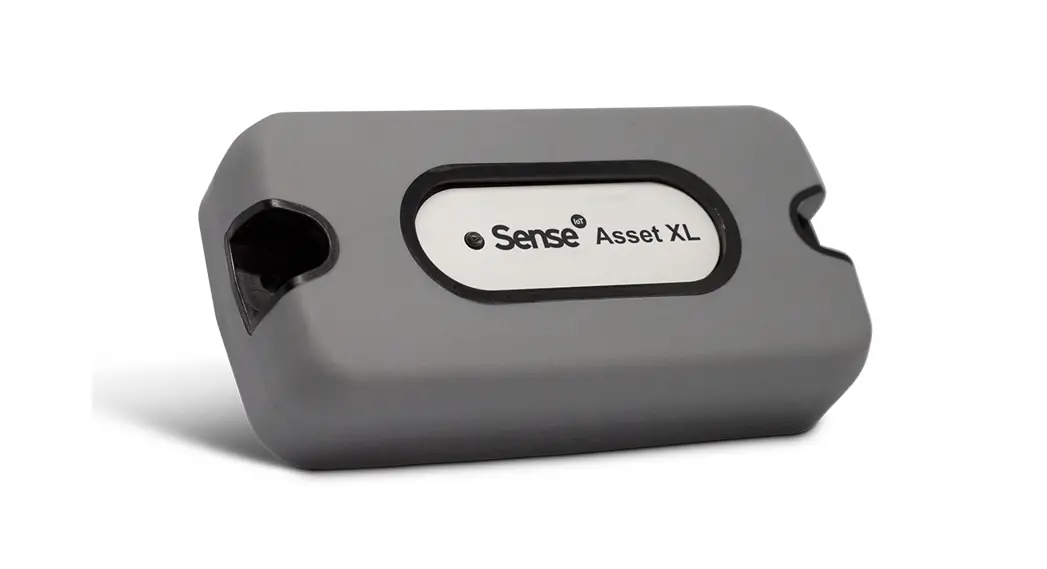
Sense Asset
User Guide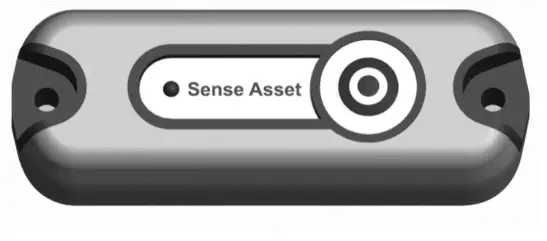 DO007273-01 Sense Asset User Guide
Revision History
| Date | Version | Notes | Author |
| 01-Apr-2021 | 01 | New Document | KAM |
INTRODUCTION
Congratulations, you are now the proud owner of the Sense IoT Bluetooth Technology Evaluation Kit that will help supercharge your IoT projects.
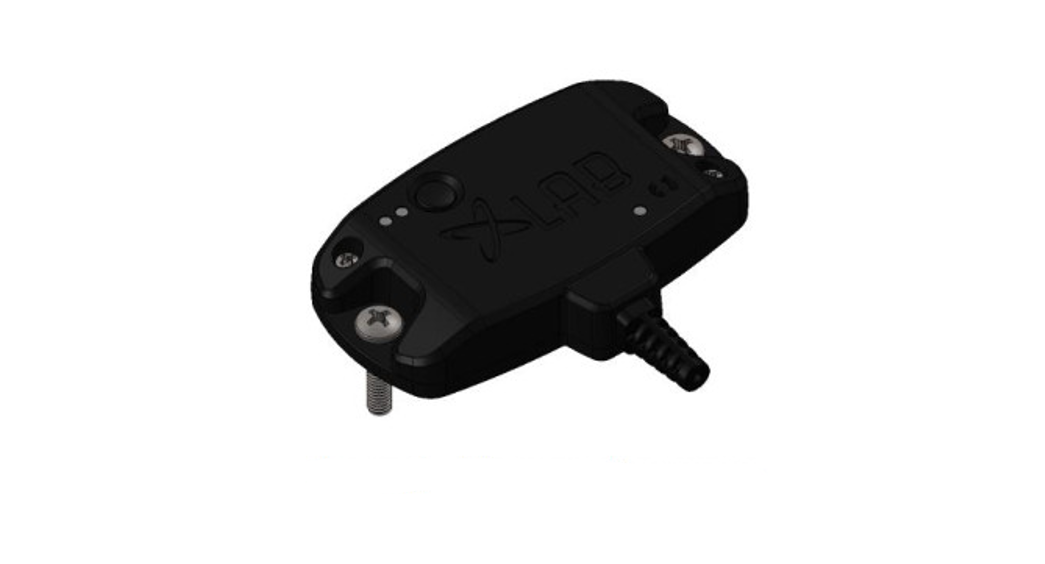
The IoT devices in this kit are called Sense Asset. As well as harnessing the power of Bluetooth Low Energy (BLE) these intelligent devices include an accelerometer and temperature sensor to provide tracking and sensing capabilities over medium distances.
Bluetooth Low Energy (BLE) – the power-efficient version of Bluetooth is compatible with a huge range of devices and infrastructure and is available with iOS, Android or
generic protocols.
Sense Asset devices communicate with any BLE compatible Android, IOS mobile phones/tablets with off the shelf available BLE Apps as well as with physical gateways (these can be dedicated standalone devices or other smart devices with BLE listening capability) which then communicate via the network (Wi-Fi, LAN, Cellular) to a cloud or locally hosted client application server.
Due to the simplicity and price points of BLE gateways vs UHF RFID readers or LoRaWAN gateways, for example, can be installed in high volumes in areas of high device density to help ensure device data is read and processed quickly. This can be additionally helpful for location-based applications where the higher density of gateways can help to increase the accuracy of the device location given. This kit contains:
- 5 Sense Asset IoT devices
- An NFC Programmer with sync cable
- Memory Stick containing Omni-ID Sense Config PC software and electronica version of this user guide
We hope you enjoy using this kit and ‘testing your Senses’.
The Omni-ID team.
Tag Operation
Sense Asset is designed for tracking and monitoring applications over BLE and is equipped with an accelerometer, a temperature sensor, and an LED light to indicate device status.
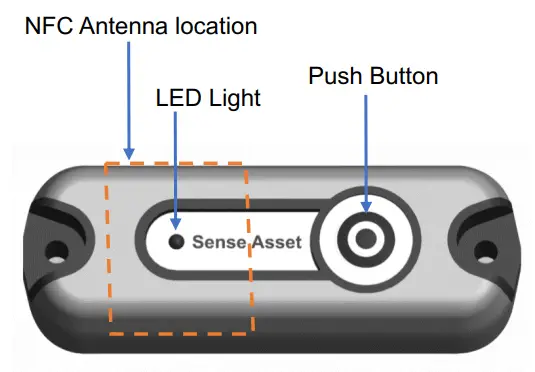
Sense Asset has the following built-in sensors:
- Accelerometer
- Temperature
The device has the following configurable beacon rates:
- Default Beacon Rate (DBR), configurable
- Alarm Beacon Rate (ABR), configurable
All beacons regardless of DBR or ABR contain the following payload data:
- Local Name
- Temperature
- Battery Voltage
- Motion Alarm
- Temperature Alarm
DBR (Default Beacon Rate)
The default beacon rate is the frequency at which the tag beacons its sensor data under normal conditions (not in an alarm state).
The tag default beacon rate can be set as a value of 1 to 10 seconds
ABR (Alarm Beacon Rate)
The alarm beacon rate is the rate at which the device beacons when in an alarm state (motion/temperature).
The alarm beacon rate can be set as a value from 0 to 10 seconds.
Setting the value to zero disables the ABR.
The tag can switch from DBR to ABR on the following alarm events:
- Motion alarm
- Temperature alarm
Motion Alarm: A motion alarm is generated when the tag’s acceleration forces are at a value that is higher than the accelerometer threshold, this has a value between 0 and 10 where 0 is off, 10 is the most sensitive and 1 is the least sensitive.
Temperature Alarm: If the temperature of the tag goes above the preconfigured high temperature or below the preconfigured low-temperature thresholds, the tag will alarm once at the ABR, then once more when its temperature returns between them, it does not stay in ABR when it is outside of thresholds
LED Status Indicator
LED status:
- Tag in the asleep state:
o The LED will flash fast red to indicate that the tag is in the asleep state on the press of the button - Tag in awake state:
o The LED will flash fast green to indicate that the tag is in an awake state on the press of the button
Supported Beacon Profiles
Sense Asset supports the following beacon profiles:
- Generic
- iBeacon
- Eddystone UUID
Generic
The generic profile also called Open of User-definable can be read by all devices and is not recognized as a brand-based profile.
The BLE asset tag version is defined in the table below:
| Generic Profile | |
| Fields | Detail |
| Local Name Temperature Battery | 0-10 Asci Characters Variable Data Field Variable Data Field |
Mobile apps will report the tag a temperature sensor:
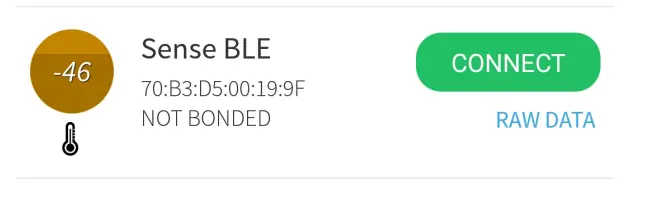
iBeacon
The iBeacon profile conforms to the iBeacon standard, the user is required to program the tag with 16 Bytes of UUID data and with 2 bytes of major and minor data.
The iBeacon scheme is shown below:
| iBeacon Profile | |
| Fields | Detail |
| Local Name UUID Major Number Minor Number Temperature Battery | 0-10 Assisi Characters 16 Bytes 2 Bytes 2 Bytes Variable Data Field Variable Data Field |
Mobile apps report the BLE asset tag as an iBeacon when using this profile:
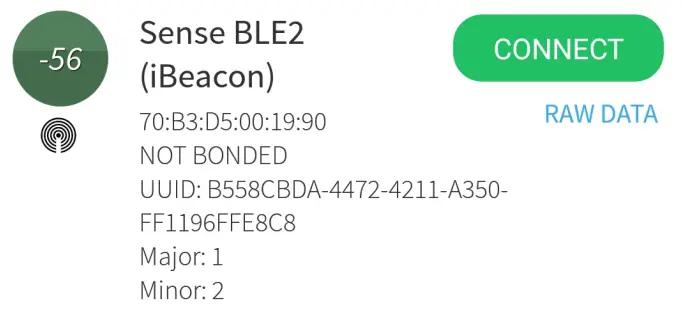
Eddystone UUID
The Eddystone profile conforms to the Eddystone UID standard; the user is required to program the tag with 10 Bytes of UID data and a 6 Byte Instance.
The Eddystone scheme is shown below:
| Eddystone Profile | |
| Fields | Detail |
| Local Name UUID Instance Temperature Battery | 0-10 Asci Characters 10 Bytes 6 Bytes Variable Data Field Variable Data Field |
Mobile apps report the BLE asset tag as an Eddystone UID when using this profile:
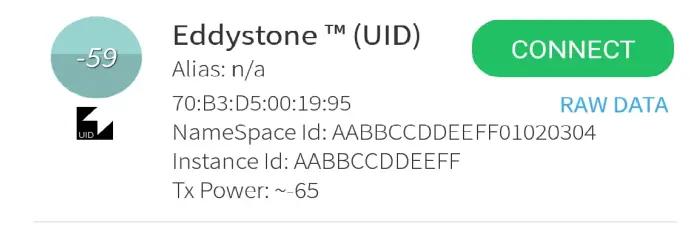
Data Packet Details
The following data is always transmitted as part of the beacon:
- Local Name
- Temperature
- Battery Voltage
- Motion Alarm
- Temperature Alarm
For all beacon types, the temperature is allocated in the byte position dictated by the corresponding beacon profile protocol, i.e., its position X for iBeacon, position Y for
Eddystone etc.
The battery voltage for all beacon profile protocols is in the same place, it can be found in the manufacturer variable data field.
This manufacturer variable field is used to store battery voltage as well as temperature alarm and motion alarm bits.
BLE beacon payload breakdown is shown as below:
BLE Payload – Generic Profile
Beacon Raw Data: 07 FFFFFF9DOOC000D4160918110201060B0953656E736520424C45000204D8
Table: 1.1
| •BLE Data type Value | BLE Data Type Name | Value | Explanation |
| OxFF | Manufacturer’s specific Data | FFFF 9D00C000 | The first 2 Bytes are manufacturers ID (FFFF) The next 4 are defined in Table 1.2 |
| Oxib | Service Data – 16-bit UUiD | 091811 | (0918) is the temp format. 11 is the temperature in signed 2’S complement (17°C when converted in Decimal) |
| 0x09 | Complete Local Name | 53656E736.5204240500 | Sense BLE (Convert to Ascii) |
| OxCA | Tx Power Level | D8 | 8dBm |
Table: 1.21
| Byte Position | Store(bits) | Field | Hex Value | Binary Value | Decimal Value | Operation (Data Manipulation) | Result |
| 0 | 6 | Battery Voltage | 9D | 11011101 BO to BS | 29 | Node Decimal Value by 10 | 2-9 |
| 1 | Motion Alarm | 0 | 0=Not detected 1=Motbon Detected | Motion not Detected | |||
| 1 | Reserved for Internal Use | 1 B7 | X | X | X | ||
| r–I | 1 | Temperature Alarm | 00 | 0000000 B7 | 0 | 0=No Alarm 1= Yes Temperature Alarm | No Temperature Alarm |
| 7 | Reserved for Internal Use | 0000000 B0 to B6 | 0 | X | X | ||
| 2 | 8 | Reserved for Internal Use | CO | 11000000 | X | X | X |
| 3 | 8 | Reserved for Internal Use | 00 | x | x | x | x |
BLE Payload – iBeacon
Beacon Raw Data:
1AF4C0002158558CBDA44724211A3OFF1196FF ESC8DDFFAABBB000201060B0953655E736520424C45007FFFFFF9D00C0000416091816
Table: 2.1
| •BLE Data Type Value | BLE Data Type Name | Value | Explanation |
| OxFF | Manufacturer’s specific Data | 4C0002156558CBDA44724211 A3OFF1196FFE8C8DDFFAABBBO | The first 2 Bytes are manufacturers ID (4C00) UUID As per (beacon standard (details in Table 2.2) |
| 0tc09 | Complete Local Name | 53655E736520424C4500 | Sense BLE (Convert to Ascii) |
| OxFF | Manufacturer’s specific Data | FFFF 90000000 | The first 2 Bytes are the manufacturer’s ID (FFFF) The next 4 are defined In Table 2.3 |
| that, | Service Data – 16-bit UUID | 091816 | (0918) is the temp format, 16 is the temperature in signed 2’S complement (22°C when converted in decimal) |
Table: 2.2
Payload
| Beacon Profile | 4000 (Apple)-iBeacon |
| UUID | B558CBDA44724211A350FF1196FFE8 |
| Major Number | DOFF Converted to decimal 56831 |
| Minor Number | AABB Converted to decimal 43707 |
| RSSI | BD ( Convert to decimal ) Value a Value -255 Value • -79 |
Table: 2.3
| Byte Position | Size(bits) | Field | Flax Value | Binary Value | Decimal Value | Operation (Data Manipulation) | Result |
| 0 | 6 | Battery Voltage | 9D Motion Alarm | 11011101 B0 to B5 | 29 | 0 !wide Decimal Value by 10 | 2 9 |
| 1 | 0 B6 | I D | 0-Not detected 1rMotionDetected | Motion not Detected | |||
| 1 | Reserved for Internal Use | 1 B7 | X | X | X | ||
| 1 | 1 | Temperature Alarm | 00 | 00000000 B7 | 0 | 0=No Alarm 1= Yes Temperature Alarm | No Temperature Alarm |
| 7 | Reserved for Internal Use | 0000000 B0 to B6 | X | X | |||
| 2 | 8 | Reserved for Internal Use | CO | 11000000 | X | X | X |
| 3 | 8 | Reserved for Internal Use | 00 | x | x | x | x |
BLE Payload – Eddystone UUID
Beacon Raw Data:
1716 AAFE00BFAABBCCDDEEFF01020304AABBCCDDEEFF00000303AAFE0201060B0953656E736520424C450007FFFFFF9D00C0000416091818
Table: 3.1
| •BLE Data Type Value | BLE Data Type Name | Value | Explanation |
| 0X16 | Service Data – 16-bit UUID | AAFE00BFAABBCCODEEFF0 102o3D4AABBCCODEEFF00000 | UUID and Instance as shown in Table 3.2 |
| 0x09 | Complete Local Name | 536S6E736520424C4500 | Sense BLE (Convert to Ascii) |
| OxFF | Manufacturer’s specific Data | FFFF 90000000 | The first 2 Bytes are manufacturers ID (FFFF) The next 4 are defined in table 3.3 |
| 0x16 | Service Data – 16-bit UUID | 091818 | (0918) is the temp format, 18 is the temperature in signed 2’S complement (24*C when converted in decimal) |
Table: 3.2
| Beacon Profile | AAFE(Google)-Eddystone UUID |
| UUID | AABBCCDDEEFF01020304 |
| Instance | AABBCCDDEEFF |
Table: 3.3
| Byte Position | Size(bits) | Field | Hax Value | Binary Value | Decimal Value | Operation (Data Manipulation) | Result |
| 0 | 6 | Battery Voltage | 9D | 11011101 B0 to B5 | 29 | Donde Decimal Value by 10 | 2-9 |
| 1 | Motion Detected | 0 B6 | 0 | 0-Not detected 1rMotion Detected | Motion not Detected | ||
| 1 | Reserved for Internal Use | 1 B7 | X | X | X | ||
| 1 | 1 | Temperature Alarm | 00 | 0000000 B7 | 0 | 0-No Alarm 1-r Yes Temperature Alarm | No Temperature Alarm |
| 1 | Reserved for Internal Use | 0000000 B0 to B6 | 0 | X | X | ||
| 2 | 8 | Reserved for Internal Use | CO | 11000000 | X | X | X |
| 3 | 8 | Reserved for Internal Use | 00 | x | x | x | x |
- BLE Data Type values and BLE Data Type Names are as defined in the FILE Standards document which can be accessed by the following link,
https://www.bluetooth.com/specificationsjassigned-numbersjeeneric-access-profilej
Receiving / Reading Data from a Tag
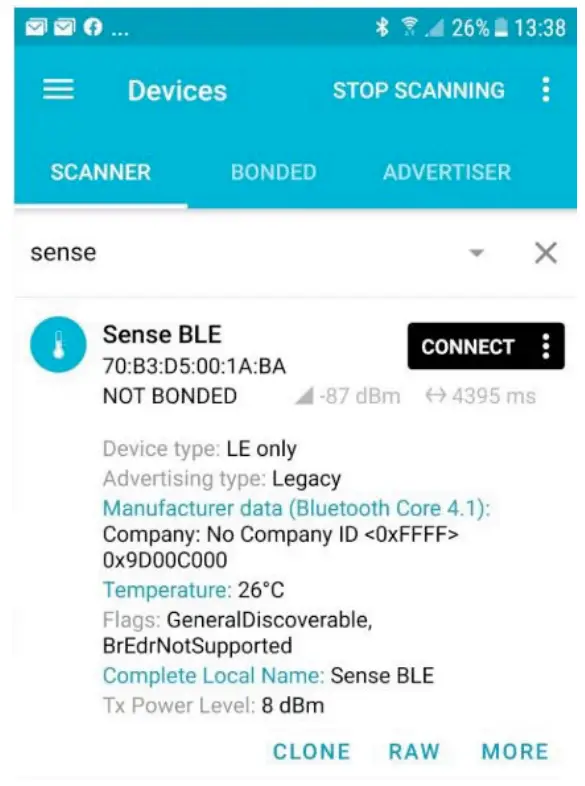
Sense Asset devices communicate with any BLE compatible Android, IOS mobile phones/tablets with off-the-shelf available BLE Apps.
BLE Apps are freely available to download on compatible devices from the Play store (Android Platform) and App store (IOS Platform).
An example of the apps shown below:
- NRF Connect
- BLE Scanner
Example from NRF Connect (IOS App): Tag in Example: SenseBLE14
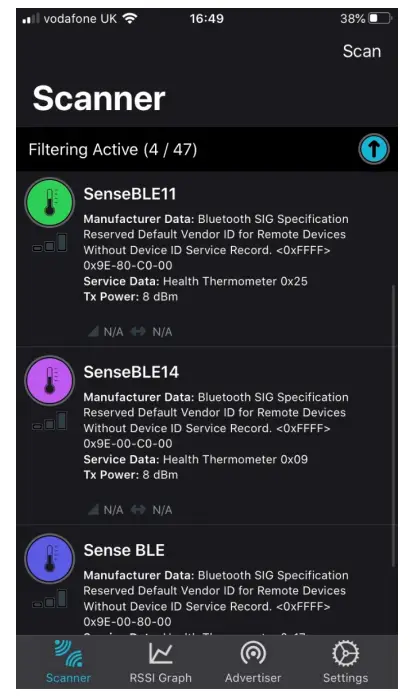
Data(<0xFFF> mentioned in App: 0x9E-00-C0-00
To read battery voltage we take the value 0x9E (Hexadecimal value)
Convert in Binary 10011110
Take last 5 bits 11110
Convert to Decimal = 30
Divide by 10 = 3.0
Battery Voltage = 3.0 volts
Device Configurable settings
The device settings can be configured via NFC. Omni-ID provides both a PC software that works with ST Microelectronics M24LR Discovery NFC PCB tool or alternatively an Android application. For further information refer to Omni-ID ‘Sense Config PC App User Guide’ and ‘Sense Config Android App User Guide’.
The Sense Asset supports three types of beacon profiles, these are Generic, iBeacon, and Eddystone UUID. These values are selectable via the PC software or Android app.
The settings are the same for all three profiles.
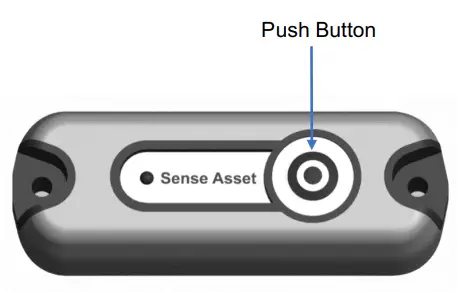
Note: Regardless of sleep or awake status the tags will require the button pressed for two seconds for NFC settings to be read.
The following are the configurable parameters:
- Tag Type (Beacon profile): The device supports the following three beacon profiles:
o Generic
o iBeacon
o Eddystone UUID - Local Name: Device’s Unique Name/ID 0-10 ASCII Characters
- DBR: Default Beacon Rate
o Values can be set between 1-10 seconds - ABR: Alarm Beacon Rate
o Values can be set between 0-10 seconds
o Setting value to 0 will stop ABR - Motion Threshold: Motion sensitivity of Device
o Values can be set between 0-10
o 1 is least and 10 is most sensitive
o Setting value to 0 will stop the accelerometer - This will stop the temperature sensor and report temperature as 0°C
- Hi Temperature Threshold:
o Values can be set between -20°C to +80°C - Low Temperature Threshold:
o Values can be set between -20°C to +80°C - Tag TX Power: Device’s transmit power
o Values can be set between -15dBm to +8dBm
o Higher the value more the read range and higher battery consumption
Care and Maintenance
Your Sense Asset is a product of superior design and craftsmanship and should be treated with care. The following suggestions will help you protect your warranty coverage.
- Do not attempt to open the device
- Do not submerge the device in deep water (> 1m)
- Do not use harsh chemicals, cleaning solvents, or strong detergents to clean the device. Only use water and soap or a dry cloth to clean the surface of the device.
- Do not paint the device
- Keep the device out of reach of small children
Recycling and Disposal
Always return your used electronic devices, batteries, and packaging materials to the dedicated collection point. This way you help prevent uncontrolled waste disposal and promote the recycling of materials.
 Disposal of Electrical and Electronic Equipment. This crossed-out wheeled-bin symbol indicates that this product should not be treated as household waste. Instead, hand it over to the appropriate collection point for the recycling of electrical and electronic equipment in accordance with local environmental regulations for waste disposal.
 Disposal of Waste Batteries. This product contains a battery. Do not dispose of them with other household waste. Instead, hand them over to the appropriate collection point for recycling. The battery does not contain Mercury (Hg), Cadmium (Cd), or Lead (Pb).
Ensuring correct product and battery disposal prevents potential negative impacts on the environment and human health.
Sense Asset Data Sheet
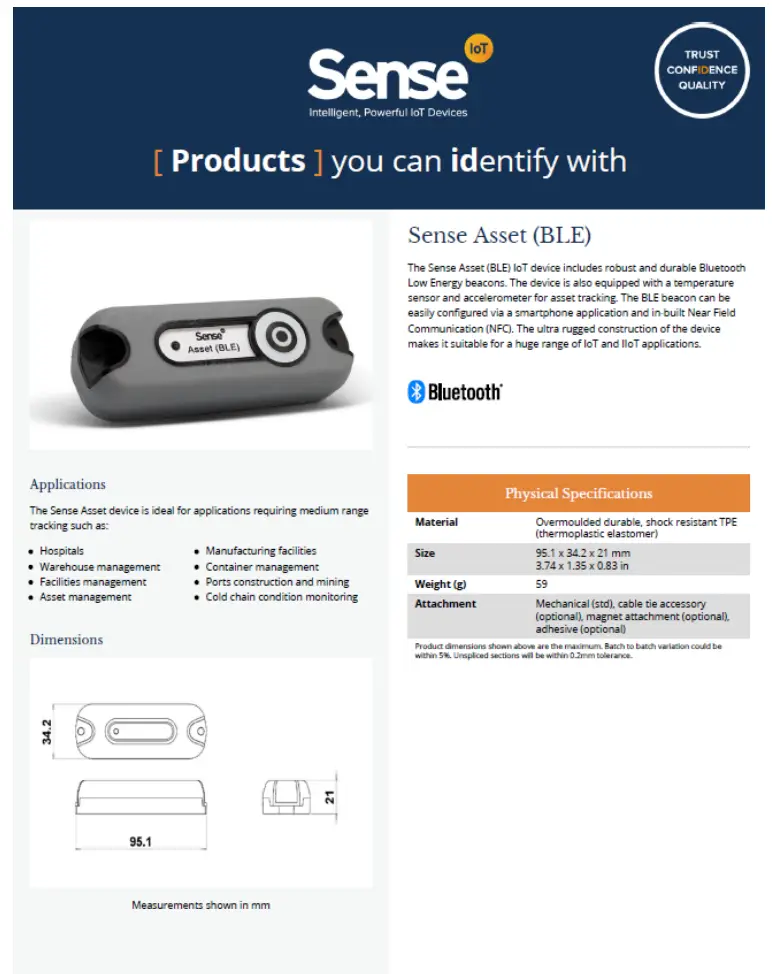
Visit Omni-id.com to learn more about the complete line of Omni-p grip products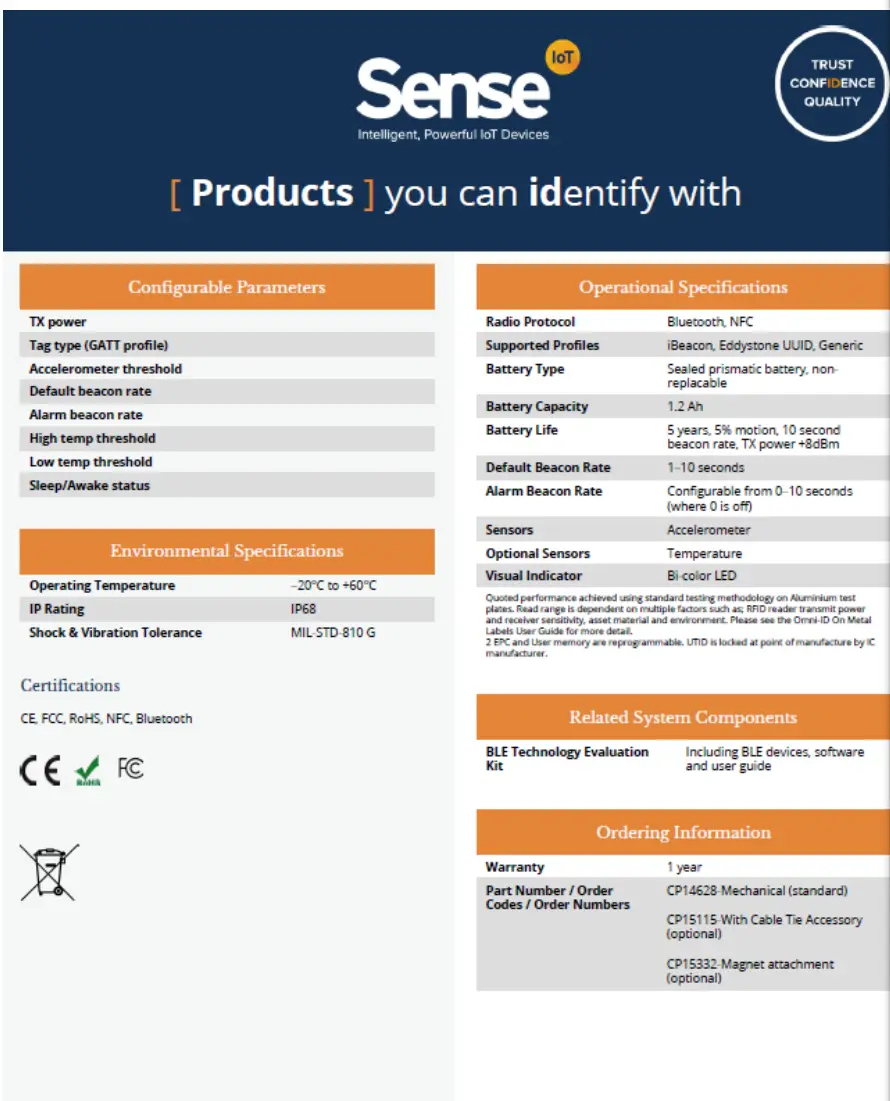 For product or technology inquiries email: [email protected].
Visit Omni-id.com to learn more about the complete line of Omni-ID RFD products
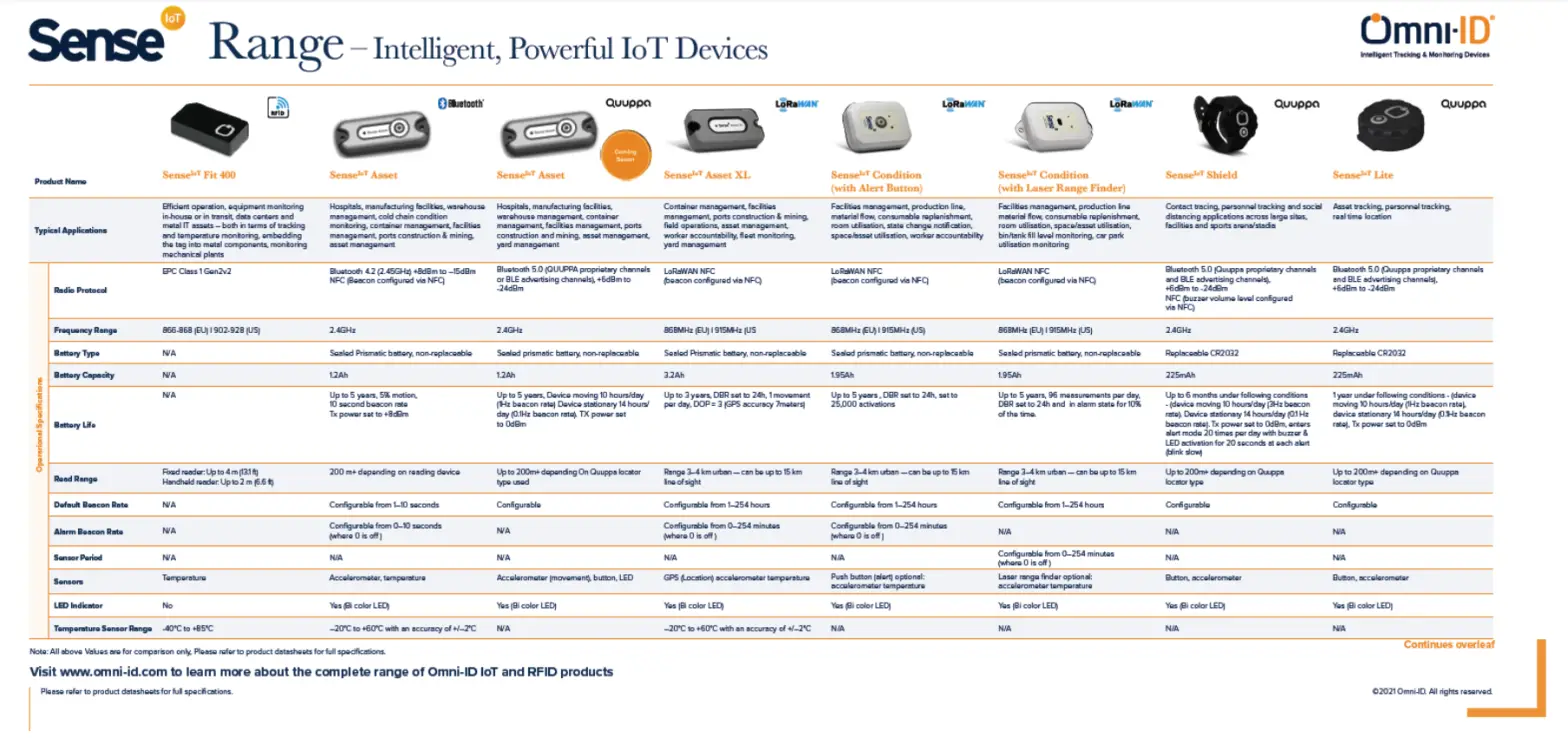
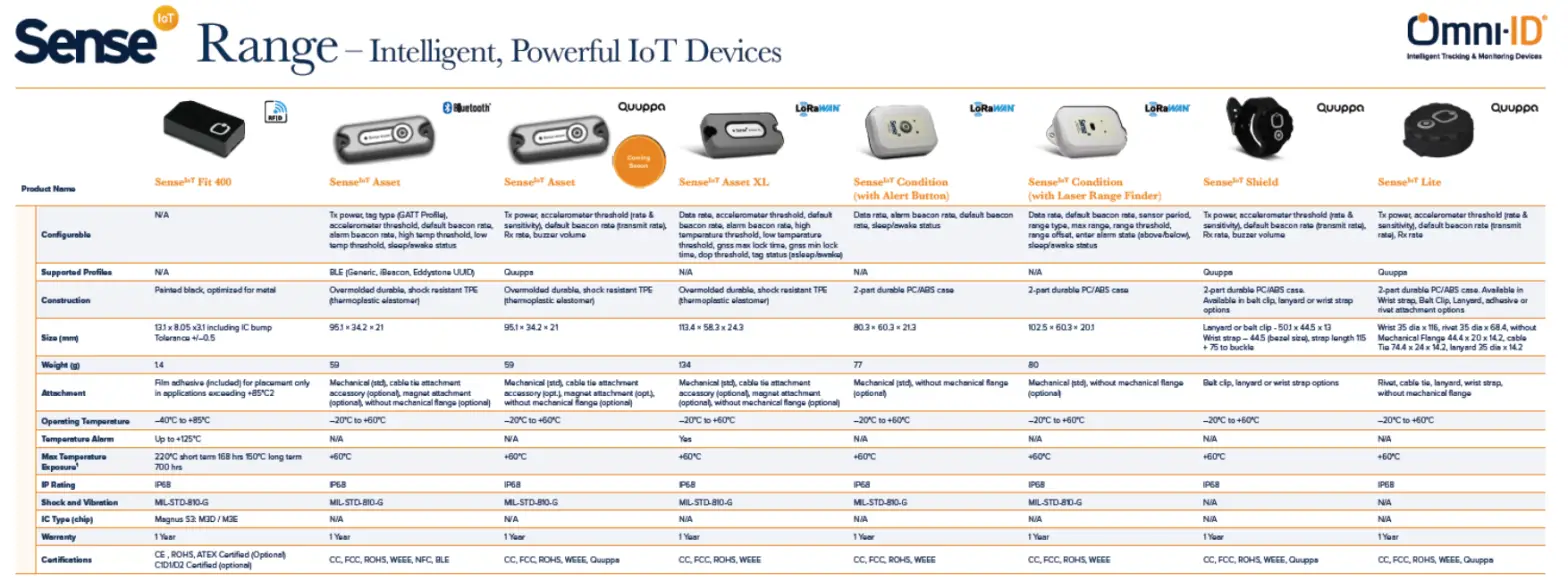
Comparison Guide
DO007273-01 Sense Asset User Guide