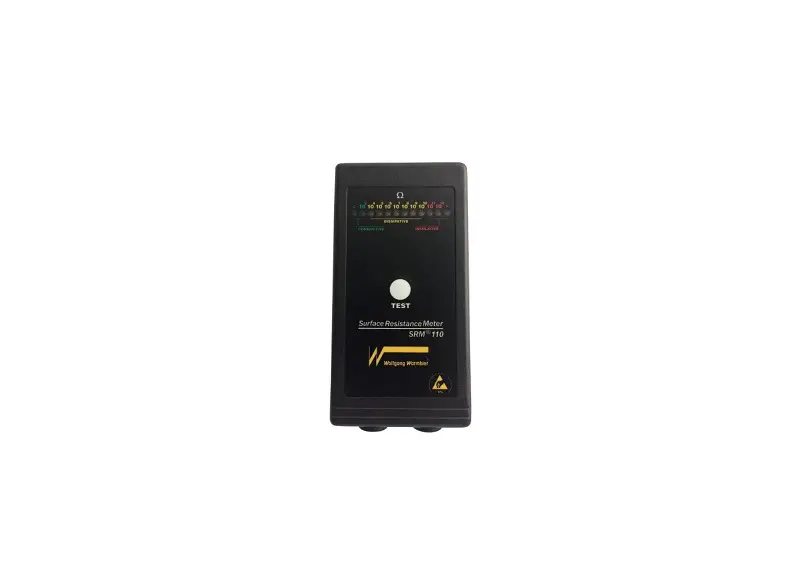

Wolfgang Warmbier PGT 120 Personnel Grounding Tester
Introduction
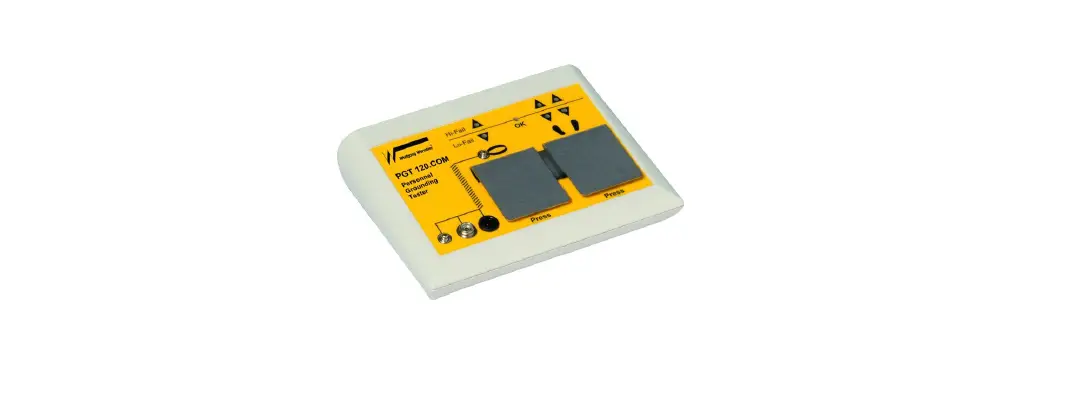
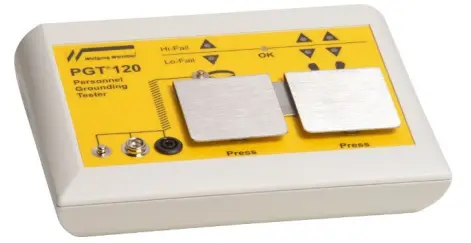
The Personnel Grounding Tester PGT®120.COM is an electronic test instrument for checking personnel grounding systems such as wrist straps, coil cords and footwear. The PGT®120 is suitable for compliance verification of the above products, according to the IEC 61340-5-1 or ANSI/ESD S 20.20 .
- The unit operates with 3 independent measuring circuits for the left shoe, the right shoe and the wrist strap. This makes it possible to measure all the values at the same time
- The unit has a serial port which is isolated from the measurement circuits.
- It is possible to enable or disable separately the measuring circuits.
- The order of tests is random.
- Footwear measurement can be configured to measure in series with hands free for passenger gates.
- Visual and audible test results, serial port and a dry relay contact for door opener
- Persons with active implants (i.e. pacemakers) should use the Personnel Grounding Tester only after consultation with a specialist.
- Use the optionally available “Calibration Unit ” Part No. 7100.PGT120.CU to check the unit Hi and Lo limit values
Device return and environmentally compatible disposal
The instrument is a category 9 product (monitoring and control instrument) in accordance with ElektroG (German Electrical and Electronic Device Law). This device is not subject to the RoHS directive. We identify our electrical and electronic devices (as of August 2005) in accordance with WEEE and ElektroG in actual with the symbol shown to the right per DIN EN 50419. These devices may not be disposed of with the trash. Please contact our service department regarding the return of old devices.
Installation
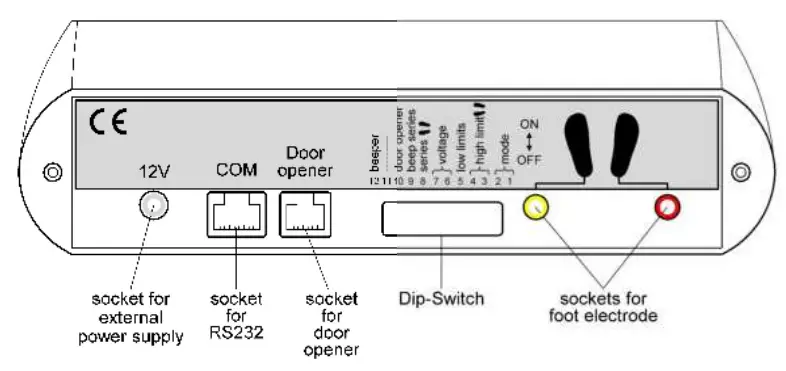
The Unit is for desktop or wall mounting. The optionally available wall mounting frame (Part No. 7100.PGT120.WK) can be used to fix the unit to a wall. The power is supplied by a power supply. Use only an original power supply connected to the “12V” socket on the rear.. Do not connect any conducting articles with PGT®120.COM exept original accessories (power supply, foot wear electrode and cabel for serial port) and the door opener Connect the foot electrode with the coloured marked plugs to the back of the unit for footwear test.
Operation
- This tester has no power switch. Connecting the power supply activates the electrical circuit.
- The measuring voltage is preset to 100V. Use the DIP switches 6+7 to adjust the voltage to either 30V or 50V.
Wrist strap test
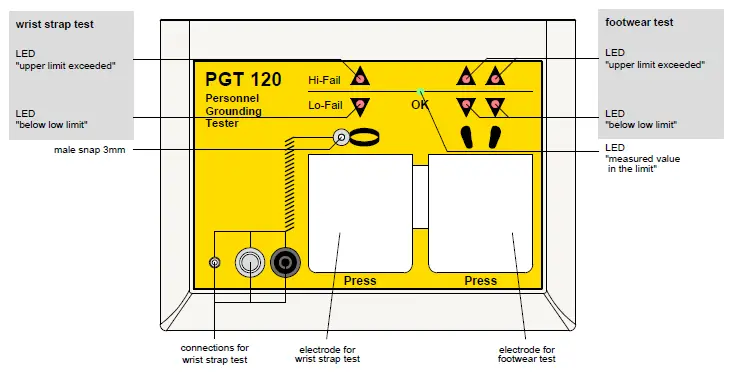
Settings: Only wrist strap or OR is activated (DIP switch 1+2) Put on the wrist strap and connect it via a coil cord to the snap or to the socket on the left side of the unit. Press the left electrode and keep it pressed. A peep signal indicates the start of measurement. After a short measuring time the result is displayed.
| OK | Green LED lights up | The measured value is o.k. | |
| Hi-Fail | Red LED flashes, audible signal | Above the resistance upper limit | |
| Lo-Fail | Red LED flashes, audible signal | Below the resistance lower limit (not applicable if lower limit is disabled) |
Coil cord test
Settings: Only wrist strap or OR is activated (DIP switch 1+2) To check only the coil cord, connect the coil cord to the 3mm snap located inside the wrist strap symbol and to the 10mm snap or socket on the left side of the unit Press the left electrode and keep it pressed. A peep signal indicates the start of the measurement. After a short measuring time the result is displayed.
| OK | Green LED lights up | The measured value is o.k. |
| Hi-Fail | Red LED flashes, audible signal | Above the resistance upper limit |
| Lo-Fail | Red LED flashes, audible signal | Below the resistance lower limit (not applicable if lower limit is disabled) |
Footwear test (single shoe)
Settings: Only footwear or OR is activated (DIP switch 1+2) Stand on the foot electrode, then press the right electrode and keep it pressed. A peep signal indicates the start of measurement. After a short measuring time the result is displayed.
| OK | Green LED lights up | The measured values of both shoes are o.k. |
| Hi-Fail right | Red LED flashes, audible signal | Right shoe above the resistance upper limit |
| Hi-Fail left | Red LED flashes, audible signal | Left shoe above the resistance upper limit |
| Lo-Fail right | Red LED flashes, audible signal | Right shoe below the resistance lower limit (not applicable if lower limit is disabled) |
| Lo-Fail left | Red LED flashes, audible signal | Left shoe below the resistance lower limit (not applicable if lower limit is disabled) |
Wrist strap and footwear test
Settings: AND function is activated (DIP switch1+2) Put on the wrist strap and connect it via a coil cord to the snap or socket on the left side of the unit. Stand on the foot electrode, then press one electrode and keep it pressed. A peep signal indicates the start of measurement. After a short measuring time the result is displayed.
| OK | Green LED lights up | All measured values are o.k. |
| Hi-Fail | Red LED flashes, audible signal | Above the resistance upper limit |
| Lo-Fail | Red LED flashes, audible signal | Below the resistance lower limit (not applicable if lower limit is disabled) |
Footwear in series
Settings: Footwear in series activated (DIP switch 8)
To show that “Footwear in series” is activated the red LED’s for Hi-Fail of Footwear flash for a short time every 2s, while disspative shoes are not detected. The footwear test can be accomplished hands free, without touching a electrode. This is useful in combination with passenger handling gates. The resistance is measured between the two shoes. This mode cannot directly indicate the faulty shoe. Press the Shoe electrode on the instrument to identify it. Stand with both feet onto the foot electrode. If the shoes are dissipative the measurement starts automatically. After a short measuring time the result is displayed and the connected gate will open.
| OK | Green LED lights up | The measurement of the footwear in series is o.k. |
| Hi-Fail | Red LED flashes, audible signal | Above the resistance upper limit for series connection |
| Lo-Fail | Rote LED flashes, audible signal | Below the resistance lower limit (not applicable if lower limit is disabled) |
You can step of the foot electrode. Even if footwear in series is active, you can perform a test according chapter 4.1 to chapter 4.4 by pressing a electrode, for example to identify a bad shoe.
Configuration
The unit can be configured with the DIP switches on the rear according to the table below. Standard settings are marked bold.
| Switch 1 | Switch 2 | Test mode |
| OFF | OFF | “OR” (wrist strap or footwear test) |
| ON | OFF | Only footwear test |
| OFF | ON | Only wrist strap test |
| ON | ON | “AND” (wrist strap and footwear test) |
| Switch 3 | Switch 4 | Footwear upper limit |
| OFF | OFF | 20 Mn for single shoe / 40 Mn for series |
| OFF | ON | 35 Mn for single shoe / 70 Mn for series |
| ON | OFF | 70 Mn for single shoe / 140 Mn for series |
| ON | ON | 100 MO for single shoe / 200 MO for series |
| Switch 5 | Lower limit | |
| OFF | Lower limit disabled | |
| ON | Lower limit enabled | |
| Switch 6 | Switch 7 | Test voltage |
| OFF | OFF | 30 V |
| OFF | ON | 50 V |
| ON | — | 100 V |
| Switch 8 | Footwear test mode | |
| OFF | test according to switch 1 + 2 | |
| ON | footwear in series active | |
| Switch 9 | Piep for footwear in series | |
| OFF | At start of test | |
| ON | At end of test if shoes OK | |
| Switch 10 | Door opener time | |
| OFF | 3s | |
| ON | 1s | |
| Switch 11 | Not used | |
| OFF | – | |
| ON | – | |
| Switch 12 | beeper | |
| OFF | inactive | |
| ON | active |
Data output via RS232
Measured values and test result were output via serial port.
| No. | Sense | Start | Prefix | Data | End | ||
| 1 | value footwear in series | <STX> | RSG | <SP> | value in kOhm (UNR → under range) (OVR → over range) | <ETX> | <CR> <LF> |
| 2 | value wrist strap | <STX> | RHG | <SP> | value in kOhm (UNR → under range) (OVR → over range) | <ETX> | <CR> <LF> |
| 3 | value left shoe | <STX> | RSL | <SP> | value in kOhm (UNR → under range) (OVR → over range) | <ETX> | <CR> <LF> |
| 4 | value right shoe | <STX> | RSR | <SP> | value in kOhm (UNR → under range) (OVR → over range) | <ETX> | <CR> <LF> |
| 5 | test OK | <STX> | ERG | <SP> | OK | <ETX> | <CR> <LF> |
| 6 | Test failed | <STX> | ERG | <SP> | Error no. | <ETX> | <CR> <LF> |
The order of data of one test is the same as above numbers, but not all data are output by one test.
- <STX> = control character “Start of Text” (ASCII 002)
- <ETX> = control character “End of Text” (ASCII 003)
- <CR> = control character “Carriage Return” (ASCII 013)
- <LF> = control character “Line Feed” (ASCII 010)
- <SP> = Space (ASCII 032)
| Error no. | Sense |
| 1 | Resistance wrist strap to low |
| 2 | Resistance wrist strap to high |
| 4 | Resistance left shoe to low |
| 8 | Resistance left shoe to high |
| 16 | Resistance right shoe to low |
| 32 | Resistance right shoe to high |
| 64 | Voltage to low or to high |
| 128 | tbd |
| -10 | contact electrode was released to early |
If several errors occur the error numbers are added.
Example 1:
- Data : <STX>RHG 2671<ETX><CR><LF>
<STX>ERG OK<ETX><CR><LF> - Sense : Resistance wrist strap 2,671 MOhm, Test result OK
Example 2:
- Data : <STX>RSL OVR<ETX><CR><LF>
<STX>RSR 12415<ETX><CR><LF>
<STX>ERG 8<ETX><CR><LF> - Sense : Resistance left shoe exceeds the measurment range Resistance right shoe is 12,415 MOhm Test faild with error no. 8 (Resistance left shoe to high)
Connectors
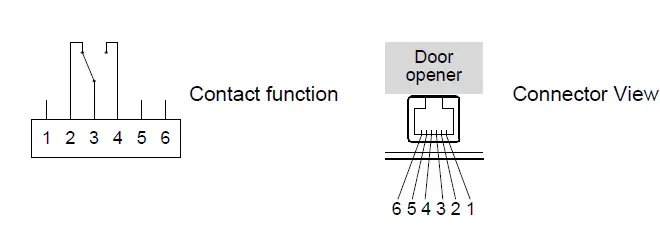
The connectors for the power supply, the foot electrode, the door opener and the serial port are located on the rear side of the unit. Use a “RJ12” western modular plug to connect the dry contact of the door opener. The door opener relay is triggered and stays for 1s or 3 seconds when the test result indicates OK.
- Normally Open Pin 3,4
- Normally Closed Pin 2, 3

The PGT®120.COM has a serial port RS232 to communicate with a PC or terminal. The connector is located on the rear side of the unit. Use a “RJ45” western modular plug to connect PGT®120.COM to PC or terminal. Pin 4 = GND
- Pin 5 = RxD
- Pin 6 = TxD

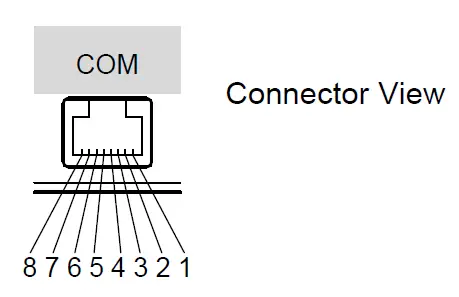
The names RxD and TxD are related to the function of PGT®120.COM If you connect PGT®120.COM to a PC RxD and TxD have to be cross connected.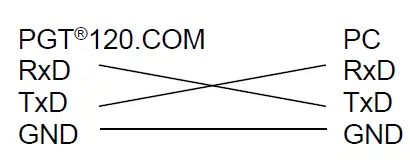
Wall mounting instructions
(Part No. 7100.PGT120.WK)
Fix the wall mounting plate with the supplied dowels and screws and stick the self-adhesive Velcro tapes according to the picture.
- The surface of the plate and the bottom side of the PGT®120.COM have to be clean, dry and free of grease.
- Remove protecting foil of the velcro tapes and do not touch the sticky side.
- Apply the velcro tapes according to the picture onto the mounting plate.
- Remove the second protecting foil of the velcro tapes and press the PGT®120.COM agianst them.
- After 24 Hour curing time the PGT®120.COM can be removed from the wall mounting plate
Before removing the unit, please unplug all wires. Hold the unit on both sides and pull it forwards. To fix it again, press it back onto the velcro tapes.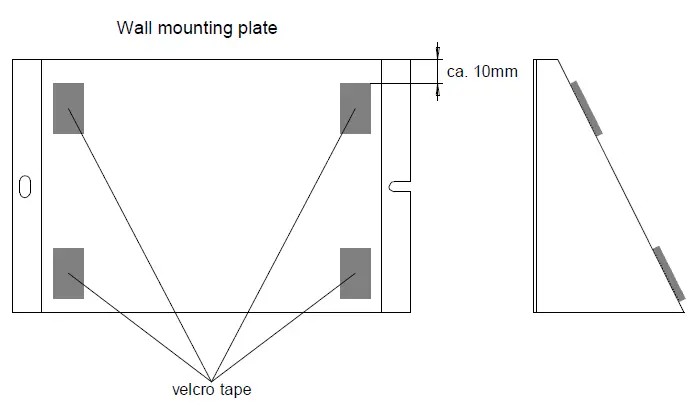
Specifications
| Operating conditions: | 15 … 40°C | up to 75% relative humidity, non condensing |
| Storage conditions: | -10 … 60°C | up to 85% relative humidity, non condensing |
| Connectors: | Wrist strap | 10mm snap, 4mm snap, 4mm socket |
| Foot electrode | 2 sockets 4mm | |
| Door opener | Western socket 6 pin RJ-12 | |
| Serial port | Western socket 8 pin RJ-45 |
| Measuring ranges: | Wrist strap | no Parity 1 Stop bit 750kn … 35Mn | |
| Footwear – each shoe | 100kn … 100Mn | ||
| Footwear in series | 200kn … 200Mn (Hands-free-Mode) | ||
| Tolerance | ± 10% | ||
| Display ranges: | Wrist strap | 650kn … 200Mn | |
| Footwear | 80kn … 200Mn | ||
| each shoe / in series | |||
| Test voltage: | open circuit voltage | 30V ± 10% 50V ± 10% 100V ± 10% | |
| Signals: | Green LED | “OK” | |
| Rote LED’s | “Hi-Fail“ or ”Lo-Fail” | ||
| and buzzer | |||
| Door opener | Dry contact “OK“ | ||
| Contact ratings: | max. voltage | 60V | |
| max. current | 2A | ||
| max. power | 50 VA | ||
| Operating modes: | Single test ”OR“ | , | Double test “AND” |
| Only wrist strap test | , | Only footwear test | |
| Hands-free-Mode | |||
| Weight: | app. 500g | ||
| Dimensions: | 150 x 200 x 63 mm | ||
| Serial number: | On the side of the unit | ||
| Complies with CE |
Pictures
Änderungen vorbehalten
WOLFGANG WARMBIER GmbH & Co. KG Untere Gießwiesen21
D-78247 Hilzingen
Telefon +49 77 31 86 88-0
Telefax +49 77 31 86 88-30
e-mail: [email protected]
https://www.warmbier.com
 Wolfgang Warmbier