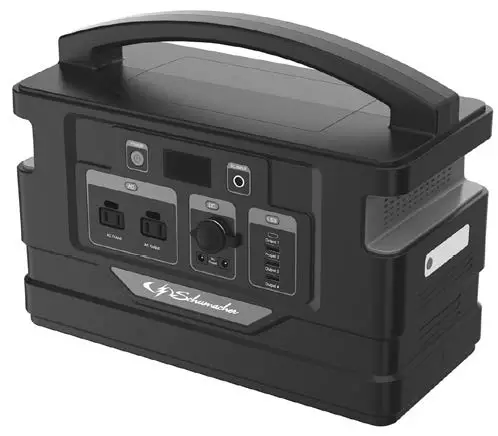
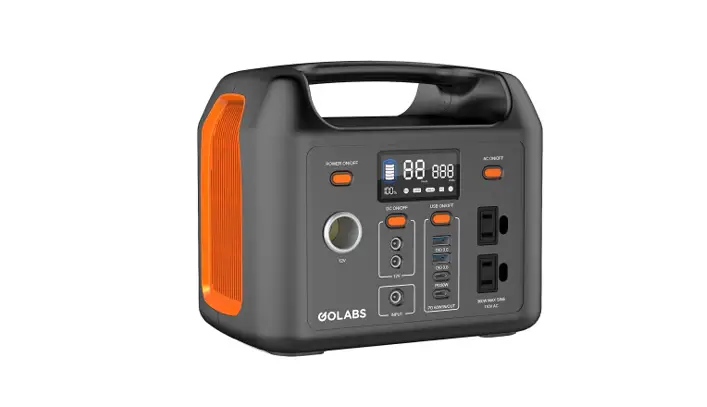
VPG750 Portable Power Generator
Product Information
The VMAX Power Generator VPG750 is a portable power supply
solution that utilizes advanced lithium-ion battery technology. It
is designed for both indoor and outdoor activities such as camping,
tailgating, and emergency power backup. The generator comes with
various accessories, including a charger, optional solar panel,
5-in-1 USB cable, and a DC light.
The VPG750 features multiple output options, including AC
outputs, USB outputs (both USB-A and Type-C), 12V DC outputs, and a
12V DC cigarette lighter output. It also has a built-in cooling fan
and a lighting system with multiple modes (high brightness, normal,
energy saving, emergency flash, and SOS).
Product Usage Instructions
- Charging: Before using the VPG750, fully
charge it using the included charger. Do not discharge the
generator while charging. - Power On: Press and hold the power switch for
3 seconds to turn on the VPG750. All the icons on the LCD screen
will display during the start-up process. - Using AC Output: Press the AC output button to
activate the AC ports. An LED indicator will illuminate, and the AC
output icon on the LCD screen will be activated. To turn off the AC
output, press the AC output button again. Wait for at least 5
seconds between pressing the button on/off. - Using USB Output: The USB outputs can be used
to charge devices. When a load is detected, the USB icon on the LCD
screen will be activated. Refer to the technical specifications on
Page 9 for output parameters. - Using 12V DC Output: The 12V DC outputs can be
used directly to charge DC devices. When a load is detected, the DC
icon on the LCD screen will be activated. - Using 12V DC Cigar Lighter Output: The 12V DC
cigarette lighter output can be used directly to charge devices.
When a load is detected, the 12V DC cigarette lighter icon on the
LCD screen will be activated. The maximum output power is 96W. - Lighting: The VPG750 has 5 lighting modes.
Press the light button firmly to turn the light on/off, and press
gently to switch between different modes. - Recharging:
- Wall Charging: Use the charger to recharge the
VPG750. It is recommended not to discharge the generator while
charging. - Solar Charging: Place solar panels towards the
sun at a proper angle to improve solar charging efficiency. The
recharge time is approximately 7-10 hours.
- Wall Charging: Use the charger to recharge the
Portable Power Supply
Ideal for Tailgating, Camping & Emergency Power
VPG750
User Manual
Dear Customer, Thank you for choosing a VMAX Power generator! VMAX portable generators feature advanced lithium-ion battery technology and are an ideal portable power supply solution for indoor and outdoor activities. VMAX Power Generators are great for camping, tailgating and other outdoor activities. Furthermore, they can also be used as critical backup power in an emergency. Please carefully read and follow the instructions before using VMAX portable generators.
* Please use the included charger to fully charge your VMAX portable generator. * Please read this manual before using your VMAX portable generator.
What’s inside the box
Packing List
VPG750
Charger
Optional Accessories
Manual
Solar Panel
5-in-1 USB cable
DC Light
VPG750 Parts List
1. ON/OFF power switch 2. LCD screen 3. AC Charger input 4. Solar charging input 5. USB outputs 6. 12V DC outputs 7. Cigar lighter output 8. AC output button 9. AC output indicator 10. AC outputs
Please refer to below respective outlet types
USA,MEX, CAN & JPN
11. Cooling fan 12. Light 13. Light button 14. Handle
Using the VPG750
* When battery capacity is below 20%, AC outputs will be automatically disabled. * When battery capacity is below 5%, DC (USB & 12V) outputs will be automatically
disabled. * When DC is in use or AC is on, the discharging indicator on the right side of LCD
screen will rotate ( ).
Power On Press for 3 seconds to turn on the VPG750. During the start-up process, all the icons on the LCD screen will display. The LCD screen will turn to normal display if all functions are normal.
Using AC Output Press the AC output button, an LED indicator will illuminate and the AC output icon ( ) on the LCD screen will be activated, the AC ports are now active. When you finish using AC ports, press the AC output button to turn off the AC output. The interval time between pressing AC output button on/off should not be less than 5 seconds.
Using 5V Output
USB outputs can be used to charge your devices. When the VPG750 detects the load, the USB icon ( ) on the LCD screen will be activated. The VPG750 has both USB-A and Type-C ports. Please see the technical specifications for output parameters on Page 9.
Using 12V DC Output
12V DC outputs can be used directly to charge your DC devices. When the VPG750
detects the load, the DC icon (
) on the LCD screen will be activated.
Using 12V DC Cigar Lighter Output 12V DC cigarette lighter outputs can be used directly to charge your devices. When the VPG750 detects the load, the 12V DC cigarette lighter icon ( ) on the LCD screen will be activated. The maximum output power is 96W.
Lighting The VPG750 has 5 lighting modes: High brightness (100% power), Normal (50% power), Energy saving (25% power), Emergency flash and SOS. Press the light button hard to turn the light on/off, and press gently to shift between different modes.
Power Off When finished using your VPG750, please power it off by following these steps: æ Remove all the connected cables and loads. ç Press the AC Output button to turn off the AC output. ç Press and hold the ON/OFF button for 3 seconds to switch off.
Recharging Wall Charging Important: Please do not discharge your VPG750 while charging!
Solar Charging
Recharge time: approximately 7-10 hours.
Place solar panels toward the sun at a proper angle to significantly improve solar charging efficiency.
The following estimated charging times are based on the most ideal conditions:
Model VPG750
40W Input 20hrs-25hrs
60W Input 12hrs-15hrs
80W Input 10hrs-12hrs
100W Input 120W Input 8hrs-10hrs 10hrs-12hrs
LCD Screen Guide
Battery
Battery Power Indicator
Output
USB in use 12V DC in use 12V Cigarette Lighter in use AC Power Indicator Icon rotates when DC power is in use or AC is on
Input
Solar Charging
AC Charging
Charging Indicator
Warning States
Item Buzzer
Icon Display
Causes
Troubleshooting
No. Faults
Causes
Solutions
Please charge VPG750. Please remove the loads and recharge VPG750. If the problem can not be solved, please ask for customer service.
Please contact VMAX USA for repair or replacement
Please charge VPG750. Please check and ensure the powerof loads are within the allowed range. Please turn off VPG750. and restart after cooling down.
Please contact VMAX USA for repair or replacement
Please contact VMAX USA for repair or replacement Please contact VMAX USA for repair or replacement Please contact VMAX USA for repair or replacement
Specifications
VPG750786.24Wh (10.8V / 72.8Ah)
VPG75016.5lbs (7.5kg) 13.7 × 6.3 × 11.2 in(349 × 160 × 285 mm)
VPG750:AC Wall Charger 12.6V / 10A
12.5V-25V / Max. Power up to 125W 2 x 5V 2.4A / 9V 2A / 12V 1.5A 2 x 20V 3.25A / 15V 3A / 12V 3A / 9V 3A / 5V 3A 2 x 12V 5A / 60W 1 x 12V 10A / 120W 2 x 230V / 50Hz or 2 x 110V / 60Hz VPG750: 500W 1W High Brightness LED with SOS mode Working: -10 ~ 45 C (14 ~ 113 F) Storage: 0 ~ 45 C (32 to 113 F)
Model
12V 3W Lighting
Stereo
PSP
Canera
Smart Phone
Tablet
Laptop 60W Fan
TV
VPG750 230h+ 500X+ 90X+ 160X+ 70X+ 17X+ 8X+ 12h+ 7h+
Mini Bar 15h+
12V 3W Lighting
Stereo
PSP
Camera
Smart phone
Tablet
Laptop
60W Fan
TV
Mini Bar
Attentions
Please use VPG750 to power/charge your devices within the following operating temperature range: 14°F (-10°C) to 113°F (45°C) Please recharge VPG750 within the following operating temperature range: 32°F (0°C) to 113°F (45°C). Do not charge VPG750 when ambient temperature is above 113°F (45°C).
Please do not recharge VPG750 more than 12 hours, overcharging may shorten the service life.
Please use the included charger when charging via an AC wall outlet.
To maximize the service life of your VPG750, do not discharge below 20% state of charge. Note: Discharging below 20% is acceptable.
Please do not expose VPG750 to fire or high temperature (under direct sunlight or in vehicle under high heat), which may cause accidents such as fire and explosion. Please recharge or use VPG750 at least once every four months for a longer service life.
Please ensure close supervision when using VPG750 around children or pets.
Please do not take on planes or aircraft.
Please do not disassemble, this may lead to risks such as fire, explosion, or electric shock.
Please avoid dropping VPG750.
Please charge and use in a dry and well ventilated area to avoid rain and water. Do not restrict ventilation in any way.
Warranty
Limited Warranty Conditions · The warranty is only valid if the product is used and handled correctly as per the
included instructions. · The warranty starts from the purchasing date. To make a warranty claim you must
present the original invoice or sales receipt as evidence of your purchase. · If any fault or failure happens, please contact the authorized seller or contact us
directly to arrange a repair or replacement. · The warranty is limited to the original purchaser when purchased from an
authorized seller. The warranty is not transferable.
Warranty Exclusions:
· Warranty period exceeded. · No valid purchase voucher (like invoice, etc.) can be provided. · Repaired or modified by unauthorized agency or individual. · Damage caused by using the unauthorized accessories, or not using the included charger. · Damage caused by improper transportation, usage, operation, or storage. · Damage caused by lightning, abnormal voltage, flood, fire, natural disaster, or accidental
breakage, etc. · Damage caused if used in environments where it is not intended for. · Warranty does not apply to the battery cell unless the battery cell is fully charged within 30 days
after your purchase and at least once every 6 months thereafter.
Disposal
Properly recycle your device at the end of its service life. Please dispose batteries by following local regulations.
Customer Service
18-month Limited Warranty
Lifetime Technical Support
Please contact us or visit our website for more information. VMAX USA 5850 Sheldon Rd, Belleville, Mi 48111 1-888-862-9826 | [email protected] | vmaxtanks.com
All rights reserved.
 Welcome to VMAXTANKS - Tough Batteries For Tough Applications