
M240
Panel PC

General Information
Revision History
| Date | Version | Updates |
| 2021/8 | 1.0 | First Release |
Trademark Recognition
All product names and trademarks used in this user’s guide are properties of their respective owners.
Intended Use
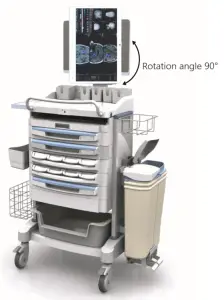
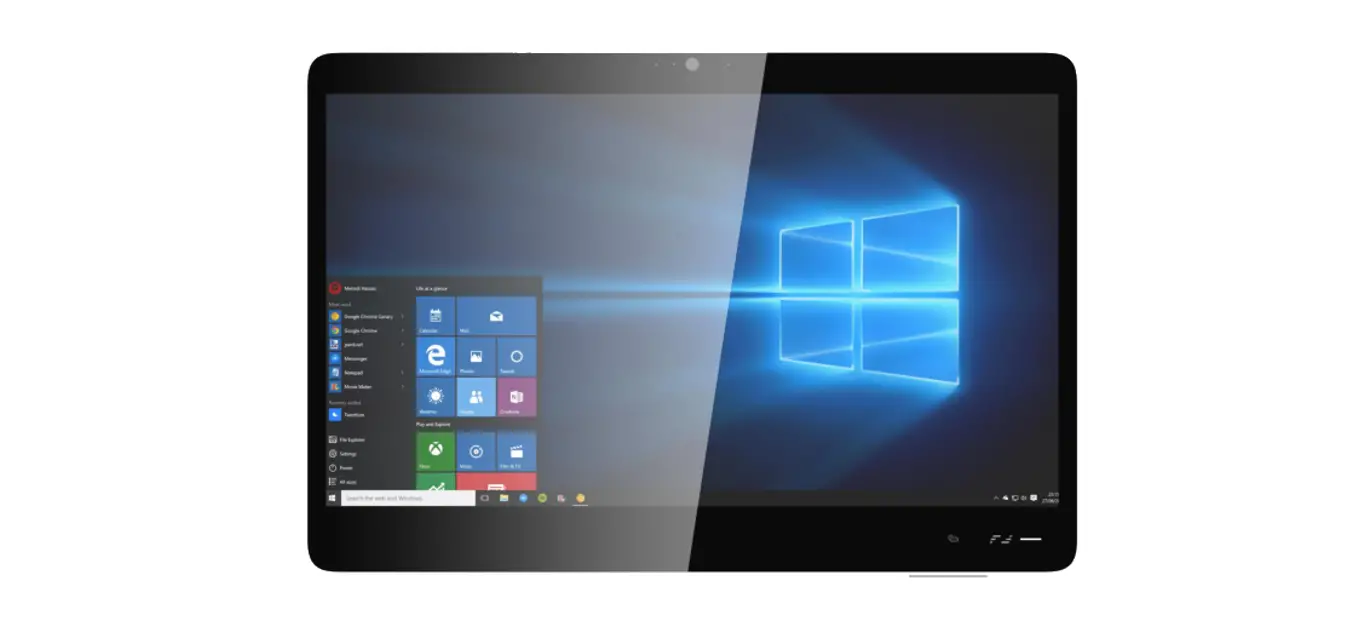
Thank you for choosing the M240 product. This device is intended to serve as a computing unit in a healthcare institution for general use by healthcare personnel. It can be mounted on the wall, placed on a nursing cart, or any other flat surface for easy access and control.
Operating Principle
- By utilizing computing unit, it can translate inputs into meaningful data and information, and show on the screen for user easy access.
- Users are allowed to gain data and information from it, and input feedback proactively through touch screen or relative peripherals.
Significant Performance Characteristics
- It is able to connect with relative devices as supplementary unit to the main frame for efficiency.
- Such as:
– Bar code scanner
– Keyboard & Mouse
– IP phone
– Printers
Operator Profile / Intended User Profile
- Software and hardware are adjustable for relative personnel upon different applications.
- No particular limitation.
Contact Information
Inventec Corporation
No. 66 Hou-Kang Street, Shih-Lin District,
TAIPEI 111, TAIWAN
Webpage: www.inventec.com
Safety and Maintenance
To avoid any damages caused by improper usage, please read the following information carefully before you start using your panel PC.
Electrical and Power Source Related Hazards
- Use only the power supply and power cord included with your device.
- Ensure your electrical outlet is the same voltage and frequency as shown on the power supply. If you are unsure of the outlet’s voltage and frequency, please consult the local power authority.
- To avoid power circuit overloads, ensure your wall outlet, extension cord, power strip, or other electrical receptacles are rated to handle the total current drawn by the M215 in combination with other devices sharing the same power circuit.
- Please route the power cord properly to prevent people from stepping on the cords.
- For your safety, avoid touching the plug if your hands are wet.
- Hold the power cord by the plug when disconnecting it from the electrical outlet.
- If the device is not going to be in use for an extended period of time, disconnect the device from the electrical outlet.
- Allowing foreign objects or liquids to enter the device could result in fire or electric shock. Abnormal Handling Procedure / Technical Support and Contact Information
- Product itself is designed with “long-press” on the “Power Button” as enforced shut-down.
- Access number to local system integrator partners. Environmental Related Hazards
- Do not use the device under the following conditions:
– In extremely hot, cold or humid environments. For more information, please refer to page 14.
– In areas susceptible to excessive dirt, dust, fumes, or steam.
– In direct sunlight or heat generating sources.
Disposal of the Battery
- Most rechargeable lithium polymer batteries are classified as non-hazardous waste and can be safely disposed of in accordance with normal urban waste disposal procedures. In many areas, laws have been enacted to require the recycling of batteries. Please confirm local regulations to ensure that rechargeable batteries can be disposed of as normal waste. To safely discard lithium polymer batteries, protect the battery terminals with packaging, covering, or electrical insulation tape to avoid contact with other metals and transport without causing a fire. However, lithium polymer batteries do contain recyclable materials and can be recycled according to the Rechargeable Battery Recycling Corporation (RBRC) battery recycling program.
Do not throw the battery into a fire to avoid an explosion.
RISK OF EXPLOSION IF BATTERY IS REPLACED BY AN INCORRECT TYPE.
Other Hazards
- Do not block the ventilation openings on top of the device.
- Do not use the device if it has been dropped, power supply cord or plug has been damaged, liquid has been spilled on to the device, device has been exposed to rain or moisture, or other physical damage has occurred.
Caring for Your Device - Turn off and unplug the power cord from the electrical outlet before cleaning the device.
- Please use a PDI detergent wipe or a similar product to clean the screen/panel.
- Do not use any acids or cleaning alkali liquids as this may cause cosmetic damage.
FEDERAL COMMUNICATIONS COMMISSION INTERFERENCE STATEMENT
This equipment has been tested and found to comply with the limits for a Class B digital device, pursuant to part 15 of the FCC Rules. These limits are designed to provide reasonable protection against harmful interference in a residential installation. This equipment generates, uses and can radiate radio frequency energy and, if not installed and used in accordance with the instructions, may cause harmful interference to radio communications. However, there is no guarantee that interference will not occur in a particular installation. If this equipment does cause harmful interference to radio or television reception, which can be determined by turning the equipment off and on, the user is encouraged to try to correct the interference by one or more of the following measures:
- Reorient or relocate the receiving antenna.
- Increase the separation between the equipment and receiver.
- Connect the equipment into an outlet on a circuit different from that to which the receiver is connected.
- Consult the dealer or an experienced radio/ TV technician for help.
CAUTION:
Any changes or modifications not expressly approved by the grantee of this device could void the user’s authority to operate the equipment.
RF Exposure Information (SAR)
This device meets the government’s requirements for exposure to radio waves.
This device is designed and manufactured not to exceed the emission limits for exposure to radio frequency (RF) energy set by the Federal Communications Commission of the U.S. Government.
The exposure standard employs a unit of measurement known as the Specific Absorption Rate, or SAR. The SAR limit set by the FCC is 4 W/kg. Tests for SAR are conducted using standard operating positions accepted by the FCC with the EUT transmitting at the specified power level in different channels. egulatory Information
Product Overview
Package Contents
Before using your panel PC, ensure all of the following items are included in the package. If any of the items are missing or are damaged, please contact your dealer.
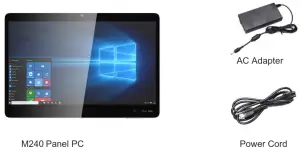
Features
Device features include:
- Fanless all-in-one design
- With battery 7.5 kg/ 16.53 lbs , without 7.1 kg/ 15,65 lbs.
- IP65 at the front, IPX1 at the rear
- Up to Intel® Core™ i7 processor
- 10 points projected capacitive (PCAP) multi-touch display with dual layers glove support
- Webcam with security cover and integrated microphone
- Stereo speakers
- Standard VESA mounts
- Versatile I/O interface
- Reading light
- Radio-Frequency Identification (RFID)
- Touch cap button
- One Physical power button
Font View
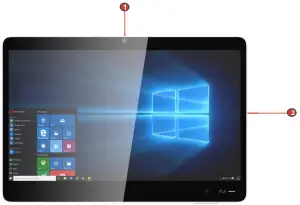
| No. | Icon | Item | Description |
| 1 | Webcam | Use camera to capture images, record videos, or hold a video conference. | |
| 2 | Touchscreen | 10 point projected capacitive multi-touch display with glove support. |
Top View
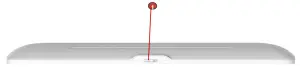
| No. | Icon | Item | Description |
| 1 | Webcam Security Cover | Slide to cover or uncover the webcam lens. |
Bottom View
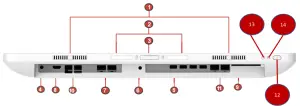
NOTE: The bottom view is displayed with the cable management cover removed.
No. | Icon | Item | Description |
1 | Speakers | Stereo audio output. | |
2 | Reading Light | Helps illuminate work areas. | |
3 | Reading Light Switch | Toggle reading light on/off. | |
4 | Audio Combo Jack | External Line Out + Mic output. | |
5 | (4) USB 2.0 Ports | Connect USB 2.0 compatible devices. | |
6 | DC-In Jack | Power input from the supplied AC adapter. | |
7 | (2) LAN Ports | Connect to a Local Area Network (LAN). | |
8 | HDMI Out port | Auxiliary HDMI compatible video monitor output. | |
9 | Smart Card Reader plus RFID combo module | Could use SCR to read data from smart card to complete personal identification or financial services. Could use RFID combo module easily complete access control tasks. | |
10 | (4) USB 3.0 Ports | Connect USB 3.0 compatible devices. | |
11 | (2) Com Ports | Connect RS-232 compatible devices. | |
12 | Power Button | Short press for 1 seconds to toggle the system on/off. | |
13 | Volume (up) | The volume increases by you press | |
14 | Volume (down) | The volume decreases by you press |
Left and Right Views
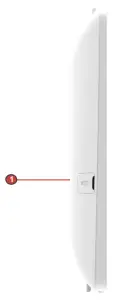
| No. | Icon | Item | Description |
| 1 | USB 2.0 Port | Connect USB 2.0 compatible devices. NOTE: To use the USB port, open the port cover first. After using, replace the cover. |
Rear View
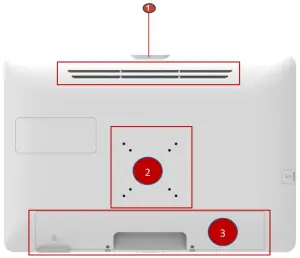
| No. | Icon | Item | Description |
| 1 | Ventilation Slots | Allows proper ventilation of the device. WARNING! To prevent overheating, do not block ventilation slots. | |
| 2 | Screw holes for VESA mounting installation. | ||
| 3 | Cable Management Cover | Use for cable management. | |
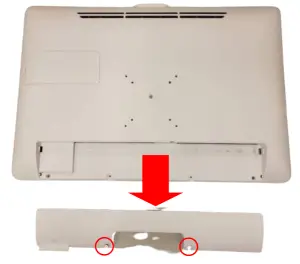
Switching On the Device
To start using your panel PC, do the following:
- Unscrew the cable cover 2 screws as shown.
- Remove the cable management cover.

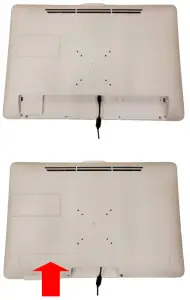
There are 1 cables needs to be connected to the IO connector first.
The DC-in jack in that order, and then organize them into the cable management slot. After confirming that the cables are fixed, lock the cable cover back.
- Connect the AC adapter to the DC-in jack on the panel PC’s bottom, and secure the cable to the cable guide as illustrated.Connect the power cord to an electrical outlet.
- Press the Power button on the right side of the device. The Power button is illuminated green. Your panel PC is ready to be used.(Handset is optional)
Specifications
The following table includes all the features and operational requirements regarding your panel PC.
| Item | Description | |
| Size / Resolution | 23.8″ FHD dual LVDS 8 bit 250 nits | |
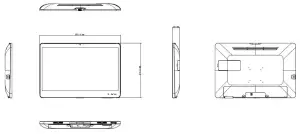
| Dimension (W x H x L) | ♦ 560.4 mm x 379.6 mm x 49.1 mm ♦ 22.1 in x 14.9 in x 1.9 in NOTE: Please refer to page 14. | |
| Weight | With battery | ♦ 7.5 kg/ 16.53 lbs |
| Without battery | ♦ 7.1 kg/ 15,65 lbs | |
| Processor | Intel Tiger lake-U | |
| Touch Feature | 10 points PCAP multi-touch display with dual layers glove support | |
| Graphics | Integrated Intel Graphics | |
| Memory | (2) DDR4 slots, up to 32G | |
| Network | (2) Intel GbE LAN | |
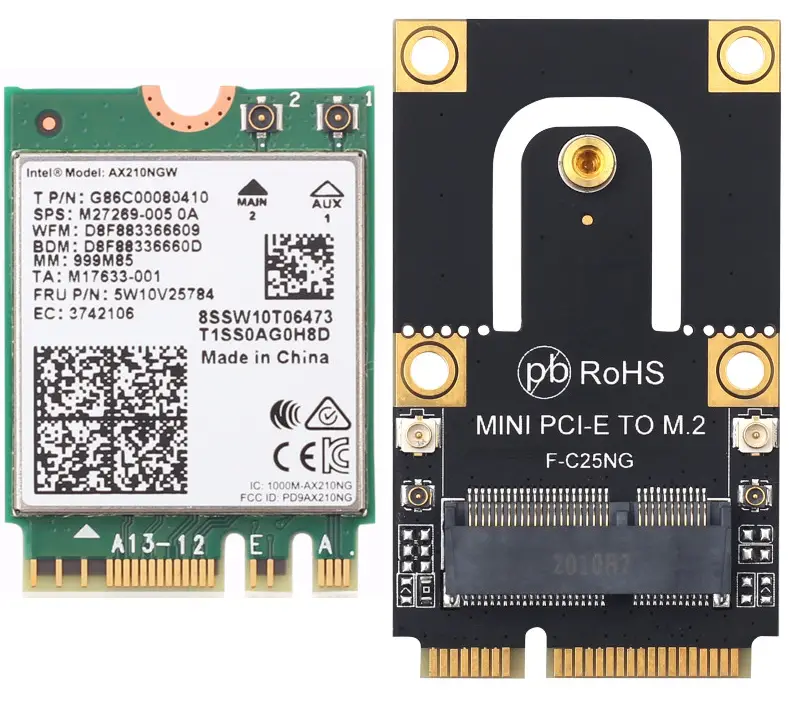
| Wireless | WiFi 802.11 a/b/g/n/ac + Bluetooth 4.2 | |
| Intel vPro technology | Yes | |
| Audio | (2) Speakers 5W | |
| Webcam | 2M webcam with digital microphone | |
| Storage | M.2 mPCle SSD 256GB (replaceable by service door) | |
| 2nd Storage | M.2 mPCle SSD | |
| Battery | UPS battery pack 14.8V 5000mAh (optional) | |
| I/O Ports | ♦ (4) USB 3.0 ♦(1) Audio Out | |
| ♦ (1) HDMI Out ♦(1) Side USB 2.0 | ||
| ♦ (2) LAN (RJ45) ♦(2) RS232 | ||
| ♦ (1) DC-In ♦(4) USB 2.0 | ||
| Touch cap button | ♦ (1) Volume up ♦(1) Volume down | |
| ♦ (1) Power key | ||
| Physical button | (1) Power key | |
| Light Bar | (1) Logo LED | |
| RFID | RFID reader supports RFID card tapping (optional) | |
| Adapter | Input: 100-240V∼1.5A 50/60Hz | Output: 19V/4.7A, max. 90W (Medical Adapter: FSP FSP090-RBBM1) |
| IP Rating | IP65 front panel , IPX1 Top | |
| Thermal Solution | Fanless housing | |
| VESA Wall Mount | ♦ 75×75 & 100x100mm VESA mounting, Compatible with ARS5 Arm Head (Quantity : 4 pcs) | |
| Temperature | ♦ Operational: 0°C∼40°C (32°F∼104°F) ♦ Storage: -10°C∼50°C (14°F∼122°F) ♦ Transport: -10°C∼+50°C (14°F∼122°F) | |
| Humidity | ♦ Operational: 20%∼80% @40°C non-condensing ♦ Transport: 15%∼95% | |
| Atmospheric Pressure Range | ♦ Operational: 650 to 1060 hPa ♦Transport: 375 mmHg to 800 mmHg (500 hPa to 1060 hPa) | |
| Operation Altitude | 4000m | |
| Operating System | Windows 10 (optional) | |
| Safety and Certifications | UL 60601-1 3.1 Edition | FCC Class B |
| EN 60601-1-2 4th Edition | CE | |
| IEC 60601-1-2 3.1 Edition | Energy Star 8.0 | |
| Other Features | ♦ Reading light ♦ Camera privacy latch | |
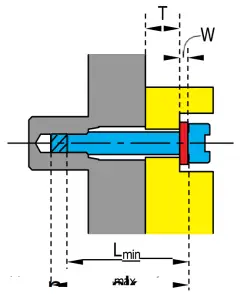 ♦ Arm selection suggestions:
Dimensions
Transport
- Ambient Air Temperature: -10°C ~ +50°C.
- Relative Humidity: 15% ~ 95%.
- Ambient Pressure: 375 mmHg ~ 800 mmHg (500 hPa ~ 1060 hPa).
About the Panel PC
- Panel PC rotation angle: 0 degrees.
- Can be fixed on the arm device, and being able to be moved.