PNi DS890 Portable Maritime Radio Station User Manual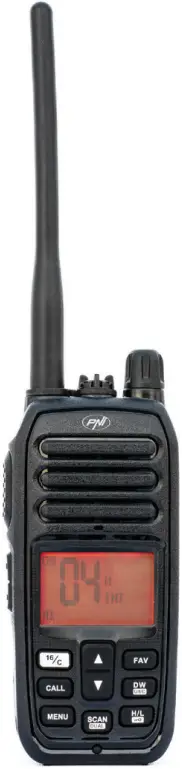
Safety warnings
- DO NOT operate the radio without a suitable antenna attached, as this may damage the radio and may also cause RF exposure limits to be exceeded. A suitable antenna is an antenna supplied with this radio by the manufacturer or an antenna specifically authorized by the manufacturer.
- DO NOT transmit more than 50% of the total usage time of the radio, more than 50% of the time may cause RF exposure limits to be exceeded.
- During transmissions, your radio generates RF energy that may cause interference with other devices or systems. To avoid such interference, turn off the radio in areas where signs indicating this are displayed.
- DO NOT use the radio in areas sensitive to electromagnetic radiation, such as hospitals, airplanes and places with a risk of explosion.
- Hold the radio in a vertical position at least 2.5 cm (one inch) from your head. Respecting this distance is important because RF exposure decreases with increasing distance from the antenna.
- DO NOT use a different battery type than the one recommended by the manufacturer.
- When the life of the battery has expired, do not throw the battery anywhere, take it to a specialized collection center.
- Do not throw the battery into fire, risk of explosion.
Warnings regarding RF energy exposure
The instructions for use should accompany the device when it is transferred to other users.
Do not use this device if the safety and operating requirements described in this manual are not met.
This two-way radio uses electromagnetic energy in the radio frequency (RF) spectrum to allow long-distance communications between two or more users. RF energy, when used improperly, can cause biological damage.
All PNI two-way radios are designed, manufactured and tested to ensure they meet RF exposure levels set by law. These instructions are important because they inform users about exposure to RF energy and provide simple procedures for controlling it.
Please refer to the following website http://www.who.int/en/ for more information on exposure to RF energy. The user manual for this device includes information and operating instructions necessary to control RF exposure and meet compliance requirements.
To comply with legal requirements, device repair should only be performed by or under the supervision of a person certified as technically qualified. Do not open the case of the device and do not repair it yourself in case of failure.
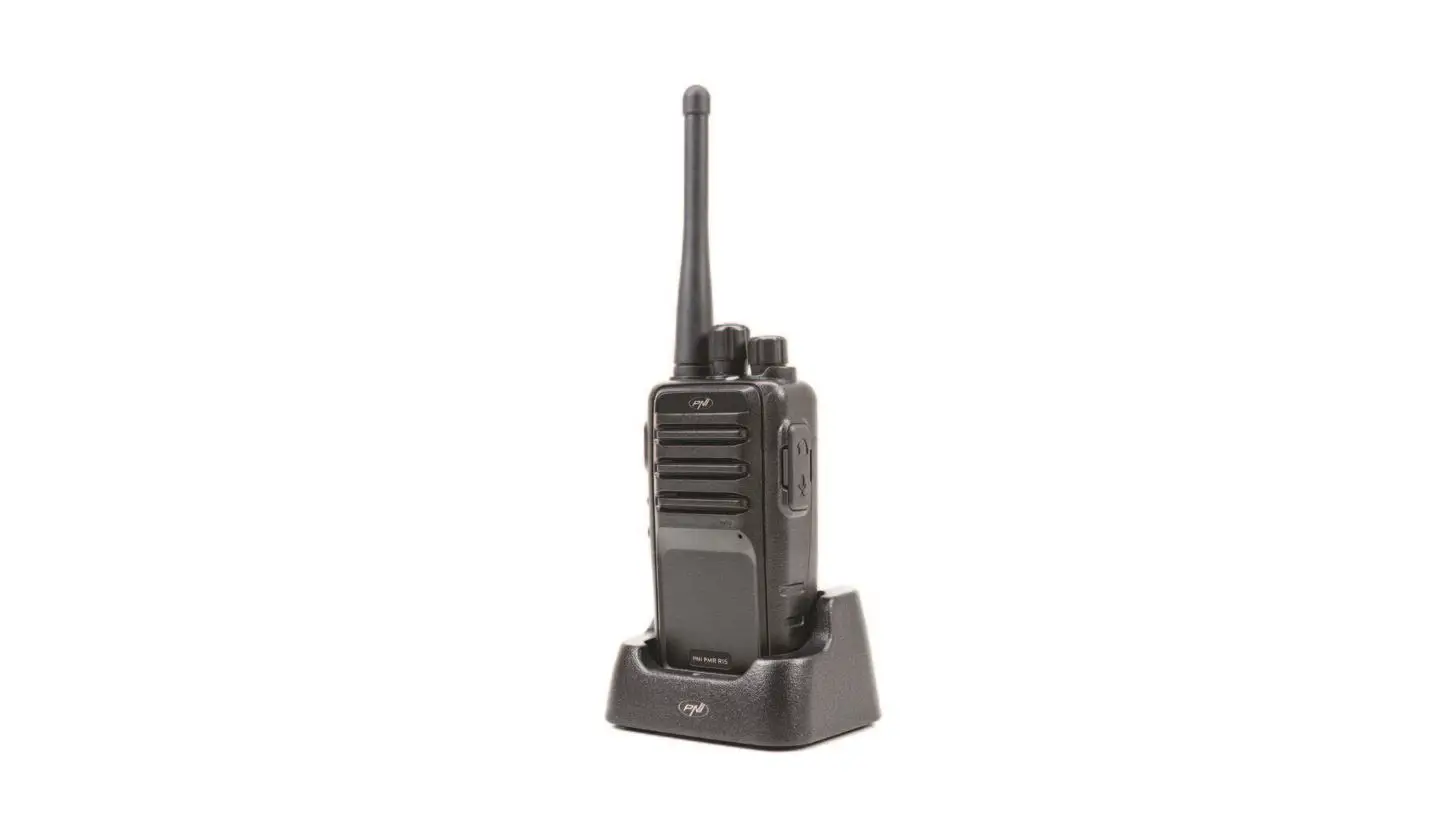
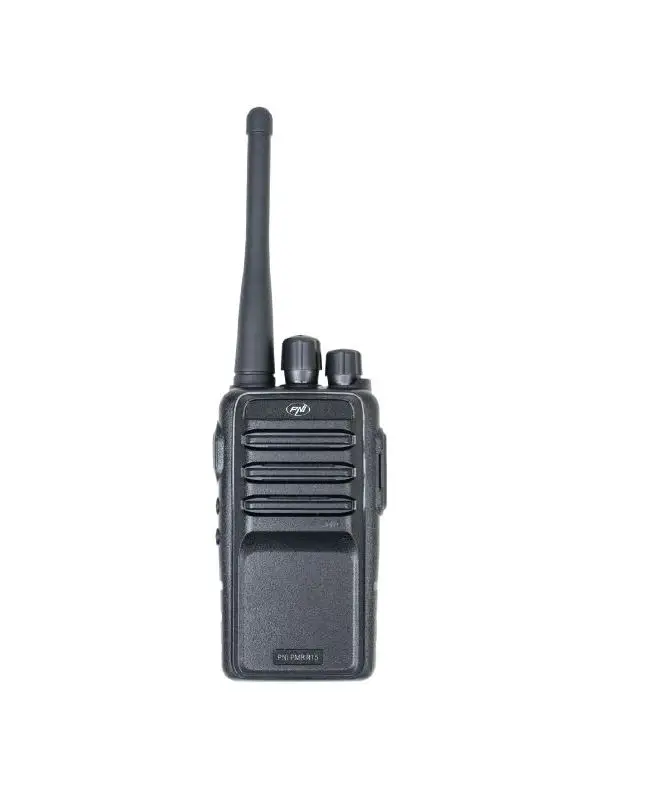
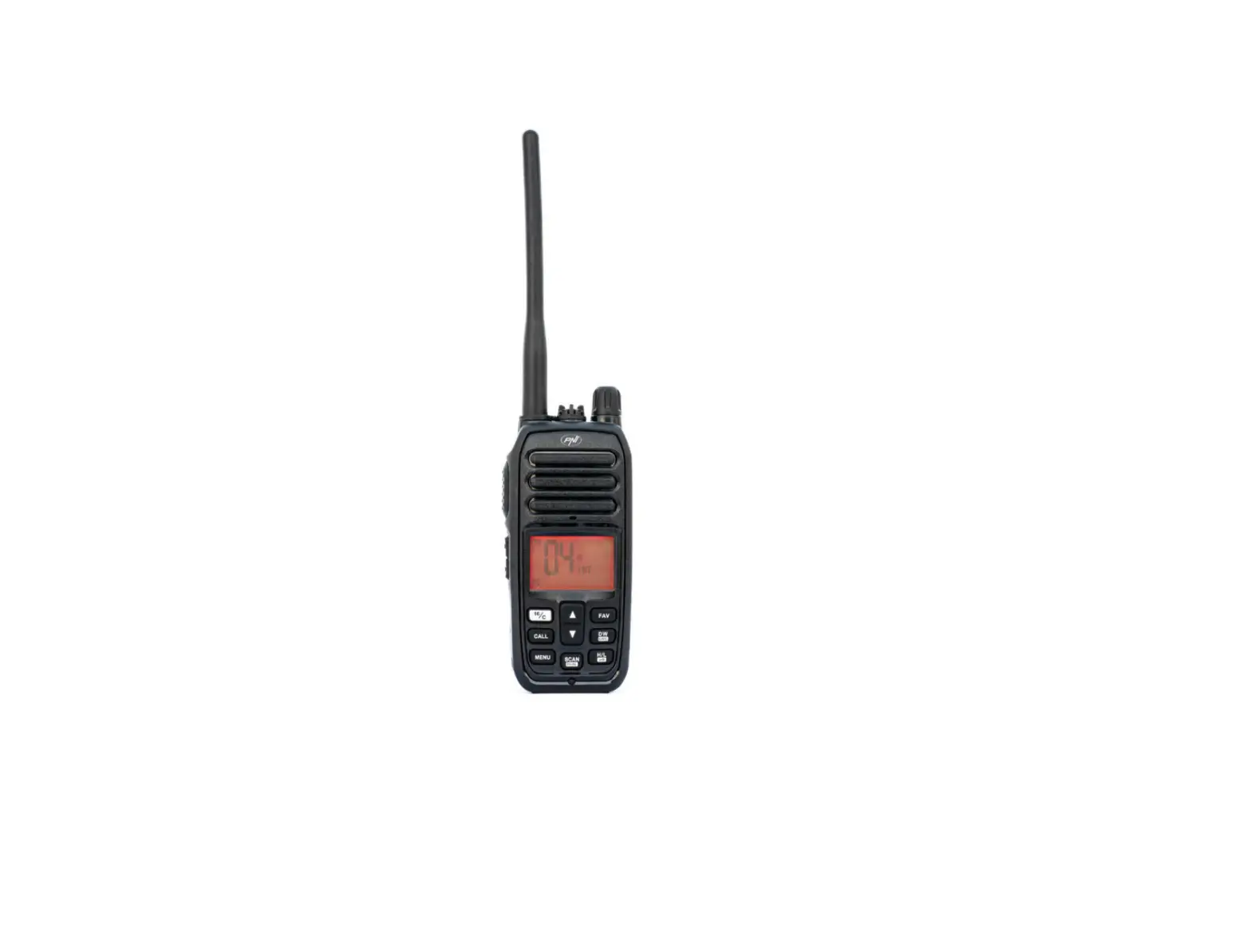
Keys and functions
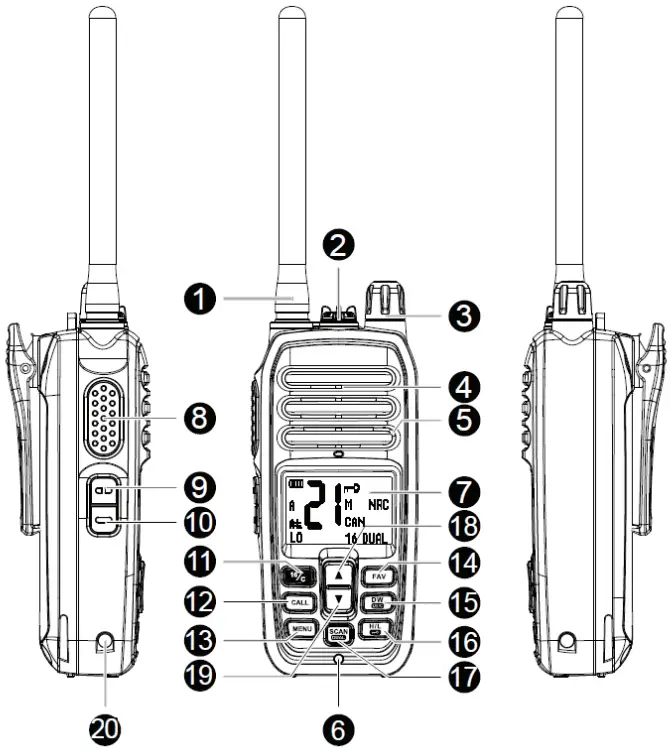
- Antenna
- Jack for connecting headphones (optional) or data cable.
- When you are not using this connector, put the protective cover back in place, screwing clockwise.
- On/off button and Volume adjustment
- To turn on the radio, turn the knob clockwise. Continue to rotate to the right or to the left to adjust the volume to the desired level. Turn the knob counterclockwise to turn off the radio.
- Speaker
- Microphone
- Water sensor
- When the water sensor and the side contacts for battery charging are in the water at the same time, the radio’s screen lights up flashing red and the keys light up flashing to communicate the alarm situation.
- Display
- PTT key
- NRC (Noise Reduction Circuit) key
- Briefly press the key to enable the NRC function. The NRC icon appears on the screen. Briefly press the key again to disable the NRC function. The NRC icon disappears.
- Simultaneously press the NRC and ▲ key for 2 seconds to emit a low-frequency signal that will last for 10 seconds.
- Monitor key
- Briefly press the key to enable the Monitor function (channel monitoring). The icon
 appears on the screen. Briefly press the key again to return to normal operating mode. The icon will disappear from the screen.
- Briefly press the key to enable the Monitor function (channel monitoring). The icon
- 16/C key
- Channel 16 is the default emergency channel. When the Dual Watch function is enabled, the radio will simultaneously monitor emergency channel 16 and the other channels.
- Briefly press the key to switch to channel 16.
- Press the key for 1 second to switch to the other communication channels.
- Press and hold the 16/C key until the channel number blinks.
Press the ▲ or ▼ keys to reach the desired channel. Briefly press the 16/C key again to set the channel as a frequently used channel. Thus, leaving the emergency channel, you will go directly to the previously set channel as a frequently used channel.
- CALL key
- Press the CALL key once to send a call. The ringtone can be selected from the radio’s menu. After 30 seconds, press the CALL key again to send a new signal. If you try to send a new signal earlier than 30 seconds, the Er icon will appear on the screen.
- Note: if the NRC function is enabled on the receiving radio, the alarm signal (CALL) will not be heard, but this will not affect its reception. The screen of the receiving radio will light up and show the reception indicator.
- MENU
- Press this key to access the menu with additional settings.
- FAV key
- Press the ▲ and ▼ keys until you reach the channel you want to set as a Favorite, then long press the FAV key. On the screen, next to the channel number, the M icon will appear.
To remove a channel from the Favorites list, long press the FAV key. The M icon associated with the channel number will disappear. To select a Favorite channel, press the FAV key repeatedly until you reach the desired channel. - Note: when the Scan function is enabled, only channels saved as Favorite and the current weather channel will be scanned.
- Press the ▲ and ▼ keys until you reach the channel you want to set as a Favorite, then long press the FAV key. On the screen, next to the channel number, the M icon will appear.
- DW U/I/C key
- Briefly press the key to switch between communication channels and weather channels. Press the ▲ and ▼ keys to navigate through the channels.
- Long press the key to switch to the channels of the 3 regions: international (INT icon), Canada (CAN icon) and the United States of America (USA icon).
- Note: the weather channels can be monitored (Dual Watch) together with the emergency channel.
- H/L key
- Short press the H/L key to switch between high power (HI icon), medium power (MI icon) and low power (LO icon).
- Long press the H/L key to lock the keys. The icon
 appears on the screen. All keys are locked except the PTT key. To disable the function, long press the H/L key. The icon will disappear from the screen.
- SCAN/DUAL key
- Briefly press the key to start channel scanning. The SC icon will blink on the screen. Only favorite channels and the current weather channel will be scanned. If no channel is saved in the favorites list, the Er (Error) icon will appear on the screen.
- Long press the SCAN/DUAL key to enable the Dual Watch function. The current communication channel (A) and emergency channel 16 will be monitored simultaneously. The icon 16 and DUAL flashing appear on the screen. To exit the Dual Watch function, briefly press the SCAN/DUAL key.
Dual-Band Watch function
When a signal is received from the current communication channel (A), the channel number blinks. When a signal is received from emergency channel 16, icon 16 in the lower right corner of the screen will blink.
Dual Watch uses the last channel from which it received a signal for transmission.
For example, if the last signal was received from channel 20 (A), pressing the PTT key will transmit on the frequency of channel 20 (A) and channel 20 (A) will be displayed on the screen. The signal will be received only on channel 20 (A). Channel 16 cannot receive the signal. If no signal is received on channel 20 (A) for 5 seconds, the radio returns to Dual Watch mode.
If the last signal was received from emergency channel 16, by pressing the PTT key you will transmit on the frequency of the channel and channel 16 will be displayed on the screen. The signal will be received only on channel 16. Channel A cannot receive the signal. If no signal is received on channel 16 for 5 seconds, the radio returns to Dual Watch.
- ▲ key. Press briefly to increase the channel number or to navigate through the options in the menu.
- ▼ key. Short press to decrease the channel number or to navigate through the options in the menu.
- Battery charging contact.
 appears on the screen. Briefly press the key again to return to normal operating mode. The icon will disappear from the screen.
 appears on the screen. All keys are locked except the PTT key. To disable the function, long press the H/L key. The icon will disappear from the screen.
Display
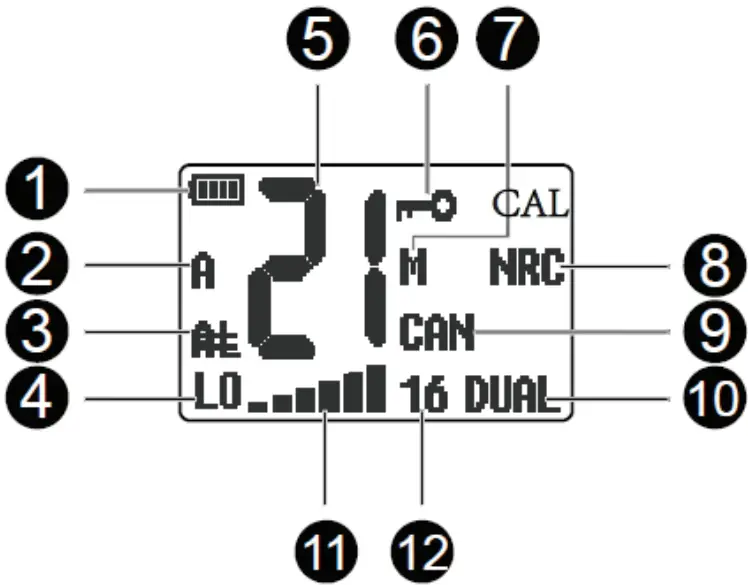
 Battery level indicator.
- When the battery is discharged, the icon blinks.
While charging the battery, the icon blinks indicating the charge level. - When the battery is fully charged, the icon remains constantly lit.
- When the battery is discharged, the icon blinks.
- A or B
- When A appears on the screen next to the channel number,
- the radio transmits and receives from the same channel.
- When B appears on the screen next to the channel number, the radio is transmitting and receiving from an inter-frequency channel.
- When neither A nor B is displayed next to the channel number, the respective channel is only for transmission, not for the reception.
- Consult the frequency table at the end of the manual.
- AL
If the NRC function is enabled on the receiving radio, the alarm audio signal (CALL) will not be heard, but this will not affect its reception. The screen of the receiving radio will light up and show the reception indicator. - LO, MI, HI, TX, RX
- LO – low emission power
- HI – average emission power
- HI – high emission power
- TX – transmission
- RX – reception
- 21 – Indicates the channel number.
- Key Lock function is enabled.
- M
- Shown next to the channel saved in Favorites.
- NRC
- NRC (Noise Reduction Circuit) function is enabled.
- CAN/INT/USA:
- Indicates the channel group: INT (International), CAN (Canada), USA (United States of America).
- DUAL
- Dual Watch function is enabled.
- 16
- Dual Watch function is enabled.
- It blinks when a signal is received on the emergency channel 16.

- Sent/received signal strength indicator.
- WX
- Indicates a weather channel. There are 10 weather channels in total.
- CAL
- Indicates a channel saved as a frequently used channel.
 Battery level indicator.
MENU
- Press the MENU key to access the additional settings menu.
- Use the ▲ and ▼ keys to navigate through a submenu’s options.
- Long press the MENU key to save and exit the menu.
- Briefly press the MENU key to save and go to the next submenu.
SQUELCH
9 levels (00 – 09) of squelch are available. The higher the squelch level, the more you will receive only channels with a strong signal, without interference. The default level is 03.
SCAN
Options: CS and TS
CS (Carrier Scanning): when the radio detects a signal, it stays on that channel until the signal disappears, after which it resumes scanning.
TS (Time Scanning): when the radio detects a signal, it stays on that channel for 5 seconds, after which it resumes scanning. If the signal disappears earlier than these 5 seconds, the radio immediately resumes scanning.
PRIWATCH
Options: On and Off
On: the radio will also scan the emergency channel 16: 1-16-2-16- 3-16 …… Off: the radio will scan the channels cyclically: 1-2-3-4 …..
CALLTONE
Choose one of the 5 available ringtones.
BUSYLOCK
Options: On and Off
On: when you enable the Busy Channel Lockout function, the BCL icon will be displayed on the screen. If you try to transmit (by pressing the PTT key) while receiving a signal, the BCL icon and the channel number will blink.
Off: the Busy Channel Lockout function is disabled.
ROGER
Options: On and Off
On: enable the Roger Beep function, that is, you will also send a tone at the end of the transmission.
BACKLIGHT
Choose the color of the screen backlight. 7 colors are available: green (01), red (02), yellow (03), blue (04), cyan (05), purple (06), white (07), no backlight (00).
BRIGHTNESS
Choose the screen brightness level. There are 3 levels available.
BEEP
Options: On and Off
On: The key sound function is enabled. Off: The key sound function is disabled.
NRC
Options: On and Off
On: The Noise Reduction Circuit function is enabled. The screen has the NRC icon. Off: The Noise Reduction Circuit function is disabled.
BATTERY SAVE
Options: On and Off
On: if no key is pressed or no signal is received for 10 seconds, the radio’s screen turns off to save battery. Off: the Battery Save
function is disabled.
WEATHER ALERT
Options: On and Off
On: enable if you want to receive an alarm sound on the weather channel. Off: the function is disabled.
VERSION
Displays the software version.
FACTORY
Options: On and Off On: enable the return to factory values (Reset).
Weather channel frequency table
| Channel | Frequency MHz | Channel | Frequency MHz |
| 1 | 162.550 | 6 | 162.500 |
| 2 | 162.400 | 4 | 162.525 |
| 3 | 162.475 | 8 | 162.650 |
| 4 | 162.425 | 9 | 162.775 |
| 5 | 162.450 | 10 | 162.275 |
Frequency chart for different regions
| Channel number | Frequency(MHz) | Channel number | Frequency(MHz) | ||||||||||
| USA | INT | CAN | Transmit | Receive | USA | INT | CAN | Transmit | Receive | ||||
| 01 | 01 | 156.050 | 160.650 | 19 | 156.950 | 161.550 | |||||||
| 1001 | 1001*⁴ | 156.050 | 156.050 | 1019 | 1019 | 1019 | 156.950 | 156.950 | |||||
| 02 | 02 | 156.100 | 160.700 | 2019 | Rx only | 161.550 | |||||||
| 03 | 03 | 156.150 | 160.750 | 20 | 20 | 20*¹ | 157.000 | 161.600 | |||||
| 04 | 156.200 | 160.800 | 1020 | 1020 | 157.000 | 157.000 | |||||||
| 1004 | 156.200 | 156.200 | 2020 | Rx only | 161.600 | ||||||||
| 05 | 156.250 | 160.850 | 21 | 157.050 | 161.650 | ||||||||
| 1005 | 1005*⁴ | 1005 | 156.250 | 156.250 | 1021 | 1021*⁴ | 1021 | 157.050 | 157.050 | ||||
| 06 | 0607 | 06 | 156.300156.350 | 156.300160.950 | 22 | 2021 | Rx Only157.100 | 161.6L50161.700 | |||||
| 1007 | 1007*⁴ | 1007 | 156.350 | 156.350 | 1022 | 1022*⁴ | 1022 | 157.100 | 157.100 | ||||
| 08 | 08 | 08 | 156.400 | 156.400 | 23 | 23 | 157.150 | 161.750 | |||||
| 09 | 09 | 09 | 158.450 | 156.450 | 1023 | 1023*⁴ | 157.150 | 157.150 | |||||
| 10 | 10 | 10 | 156.500 | 156.500 | 2023 | Rx Only | 161.750 | ||||||
| 11 | 11 | 11 | 156.550 | 156.550 | 24 | 24*⁵ | 24 | 157.200 | 161.800 | ||||
| 12 | 12 | 12 | 156.600 | 156.600 | 25 | 25*⁵ | 25 | 157.250 | 161.850 | ||||
| 13*¹ | 13 | 13*¹ | 156.650 | 156.650 | 2025 | Rx Only | 161.850 | ||||||
| 14 | 14 | 14 | 156.700 | 156.700 | 26 | 26*⁵ | 26 | 157.300 | 161.900 | ||||
| 15*³ | 15*² | 15*¹ | 156.750 | 158.750 | 27 | 27 | 27 | 157.350 | 161.950 | ||||
| 16 | 16 | 16 | 158.800 | 156.800 | 1027*⁴ | 157.350 | 157.350 | ||||||
| 17*¹ | 17 | 17*¹ | 156.850 | 156.850 | 28 | 28 | 28 | 157.400 | 162.000 | ||||
| 18 | 156.900 | 161.500 | 1028*⁴ | 157.400 | 157.400 | ||||||||
| 1018 | 1018*⁴ | 1018 | 156.900 | 156.900 | 2028 | Rx Only | 162.000 | ||||||
| USA | INT | CAN | Transmit | Receive | USA | INT | CAN | Transmit | Receive | ||||
| 60 | 60 | 156.025 | 160.625 | 1078 | 1078 | 1078 | 156.925 | 156.925 | |||||
| 61 | 156.075 | 160.675 | 2078 | Rx Only | 161.525 | ||||||||
| 1061 | 156.075 | 156.075 | 79 | 156.975 | 161.575 | ||||||||
| 62 | 156.125 | 160.725 | 1079 | 1079 | 1079 | 156.975 | 156.975 | ||||||
| 1062 | 156.125 | 156.125 | 2079 | Rx Only | 161.575 | ||||||||
| 63 | 156.175 | 160.775 | 80 | 157.025 | 161.625 | ||||||||
| 1063 | 1063*⁴ | 1063 | 156.175 | 156.175 | 1080 | 1080*⁴ | 1080 | 157.025 | 157.025 | ||||
| 64 | 64 | 156.225 | 160.825 | 81 | 157.075 | 161.675 | |||||||
| 1064 | 156.225 | 156.225 | 1081 | 1081*⁴ | 1081 | 157.075 | 157.075 | ||||||
| 65 | 156.275 | 160.875 | 82 | 157.125 | 161.725 | ||||||||
| 1065 | 1065*⁴ | 1065*¹ | 156.275 | 156.275 | 1082 | 1082*⁴ | 1082 | 157.125 | 157.125 | ||||
| 66 | 156.325 | 160.925 | 83 | 157.175 | 161.775 | ||||||||
| 1066 | 1066*⁴ | 1066*¹ | 156.325 | 156.325 | 1083 | 1083*⁴ | 1083 | 157.175 | 157.175 | ||||
| 67*¹ | 67 | 67 | 156.375 | 156.375 | 2083 | Rx Only | 161.775 | ||||||
| 68 | 68 | 68 | 156.425 | 156.425 | 84 | 84*⁵ | 84 | 157.225 | 161.825 | ||||
| 69 | 69 | 69 | 156.475 | 156.475 | 85 | 85*⁵ | 85 | 157.275 | 161.875 | ||||
| 71 | 71 | 71 | 156.575 | 156.575 | 86 | 86*⁵ | 86 | 157.325 | 161.925 | ||||
| 72 | 72 | 72 | 156.625 | 156.625 | 87 | 87 | 87 | 157.375 | 157.375 | ||||
| 73 | 73 | 73 | 156.675 | 156.675 | 88 | 88 | 88 | 157.425 | 157.425 | ||||
| 74 | 74 | 74 | 156.725 | 156.725 | |||||||||
| 75*² | 75*¹ | 156.775 | 156.775 | ||||||||||
| 76*² | 76*¹ | 156.825 | 156.825 | ||||||||||
| 77*¹ | 77 | 77*¹ | 156.875 | 156.875 | |||||||||
| 78 | 156.925 | 161.525 | |||||||||||
- ¹ Low power (LO) only
- ² Only low power (LO) except AU version
- ³ RX only
- ⁴ Only for the USA and EXP version
- ⁵ Only for AU version
Technical specifications
| Frequency range | Transmission: 156.025-163.275MHZ Reception: 156.025-157.425MHZ |
| Channel spacing | 50kHz |
| Frequency synthesis | Synthesizer (PLL) |
| Antenna impedance | FM (F3E) |
| Modulation | 50 Ohm |
| Dimensions | 60 x 38 x 275 mm |
| Antenna length | 145 mm |
| Weight | 273 g (battery included) |
| Working temperature | -26°C ~ +80°C |
| Waterproof | IP67 |
| Power supply | Li-ion battery 7.4V 1800mAh |
| Transmitter | |
| Output power | 5W/2W |
| Frequency stability | /-2.5ppm (-20°C~+60°C) |
| Spurious emissions | ≤-36dBm |
| Frequency offset | ≤+/-5kHz |
| Audio distortion | ≤5% |
| Receiver | |
| Sensitivity | 12dB signal-to-noise ratio ≤0.25uV |
| Adjacent channel selectivity | ≥60 dB |
| Intermodulation anti- interference | ≥65 dB |
| Distortion | ≤5% |
| Audio power | 16R 1W (<10% distortion ) |
Simplified EU declaration of conformity
SC ONLINESHOP SRL declares that the PNI DS890 portable marine radio complies with the RED Directive 2014/53/EU. The full text of the EU declaration of conformity is available at the following internet
address: https://www.mypni.eu/
products/8938/download/certifications

 World Health Organization (WHO)
 mypni.eu/products/8938/download/certifications