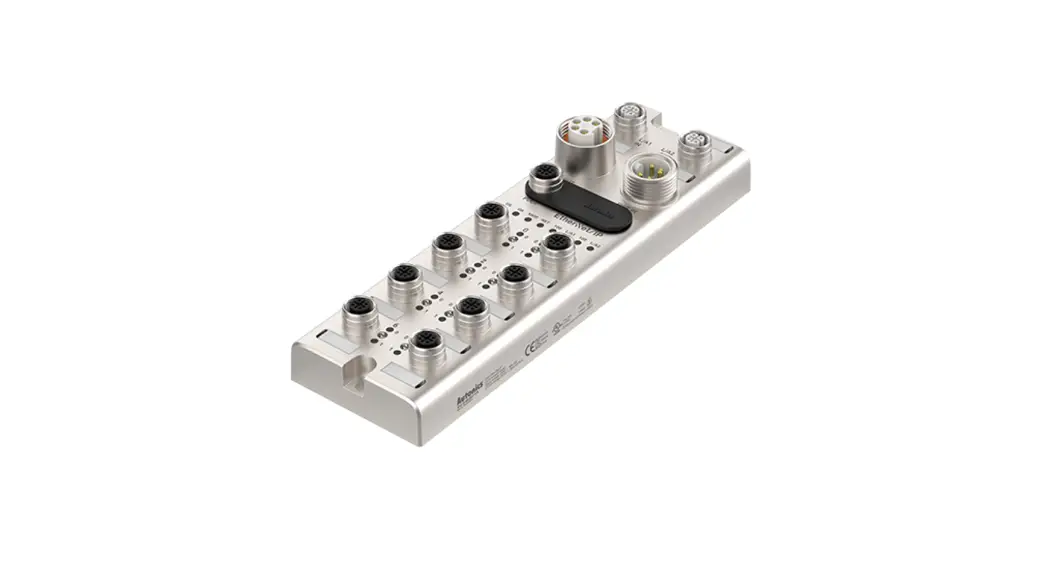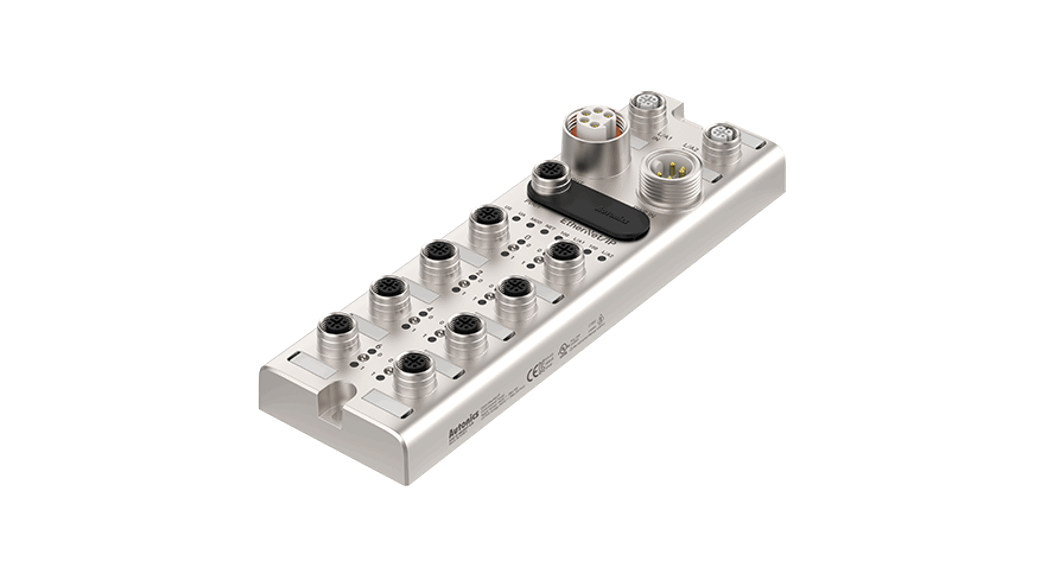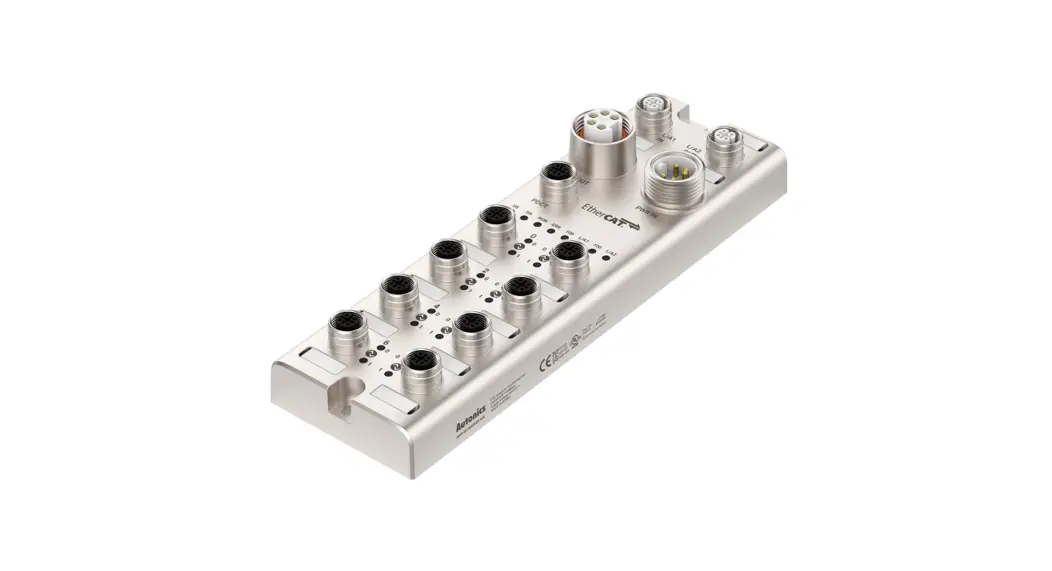
 Remote I/O Boxes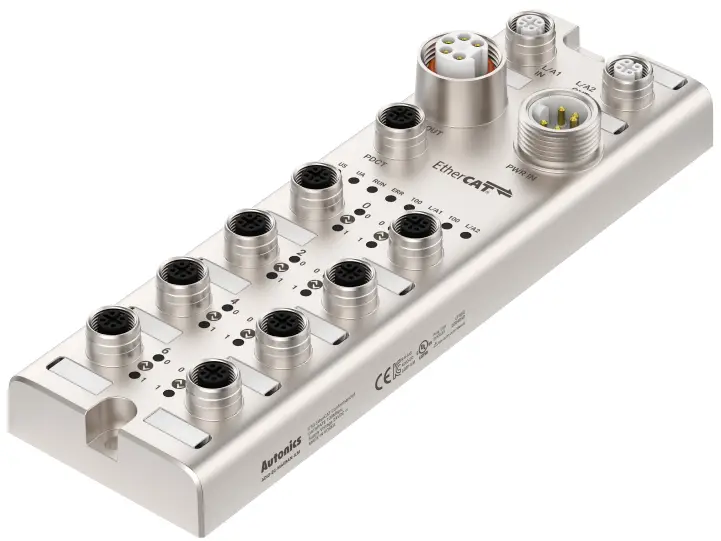
ADIO-EC
PRODUCT MANUAL
For your safety, read and follow the considerations written in the instruction manual, other manuals and Autonics website.
The specifications, dimensions, etc. are subject to change without notice for product improvement. Some models may be discontinued without notice.
Features
- The upper level communication protocol: EtherCAT
- The lower level communication protocol: IO-Link ver. 1.1 (port class: Class A)
- Housing material: Zinc Die casting
- Protection rating: IP67, IP69K
- The daisy chain allows the power supply using the connection technology in a standardized 7/8” connector
- The maximum output current of power supply: 2 A per port
- I/O port settings and status monitoring (cable short / disconnection, connection status, etc.)
- Supports digital input filter
Safety Considerations
- Observe all ‘Safety Considerations’ for safe and proper operation to avoid hazards.
- symbol indicates caution due to special circumstances in which hazards may occur.
Warning Failure to follow instructions may result in serious injury or death.
- Fail-safe device must be installed when using the unit with machinery that may cause serious injury or substantial economic loss.(e.g. nuclear power control, medical equipment, ships, vehicles, railways, aircraft, combustion apparatus, safety equipment, crime/disaster prevention devices, etc.)
Failure to follow this instruction may result in personal injury, economic loss or fire. - Do not use the unit in the place where flammable/explosive/corrosive gas, high humidity, direct sunlight, radiant heat, vibration, impact or salinity may be present.
Failure to follow this instruction may result in explosion or fire. - Do not connect, repair, or inspect the unit while connected to a power source.
Failure to follow this instruction may result in fire. - Check ‘Connections’ before wiring.
Failure to follow this instruction may result in fire. - Do not disassemble or modify the unit.
Failure to follow this instruction may result in fire. - Do not touch the product during operation or for a certain period of time after stopping.
Failure to follow this instruction may result in burn.
Caution Failure to follow instructions may result in injury or product damage.
- Use the unit within the rated specifications.
Failure to follow this instruction may result in fire or shortening the life cycle of the product. - Use a dry cloth to clean the unit, and do not use water or organic solvent.
Failure to follow this instruction may result in fire. - Keep the product away from metal chip, dust, and wire residue which flow into the unit.
Failure to follow this instruction may result in fire or product damage. - Connect the cable correctly and prevent poor contact.
Failure to follow this instruction may result in fire or product damage. - Do not connect or cut off the wire of the cable while operating the unit.
Failure to follow this instruction may result in fire or product damage.
Cautions during Use
- Follow instructions in ‘Cautions during Use’. Otherwise, it may cause unexpected accidents.
- The UA power (actuator power) and US power (sensor power) should be insulated by the individually isolated power device.
- Power supply should be insulated and limited voltage/current or Class 2, SELV power supply device.
- Use the rated standard cables and connectors. Do not apply excessive power when connecting or disconnecting the connectors of the product.
- Keep away from high voltage lines or power lines to prevent inductive noise.
In case installing power line and input signal line closely, use line filter or varactor at power line and shielded wire at input signal line.
For stable operation, use shield wire and ferrite core, when wiring communication wire, power wire, or signal wire. - Do not use near the equipment which generates strong magnetic force or high frequency noise.
- Do not connect, or remove this unit while connected to a power source.
- This unit may be used in the following environments.
– Indoors (in the environment condition rated in ‘Specifications’)
– Altitude max. 2,000 m
– Pollution degree 2
– Installation category II
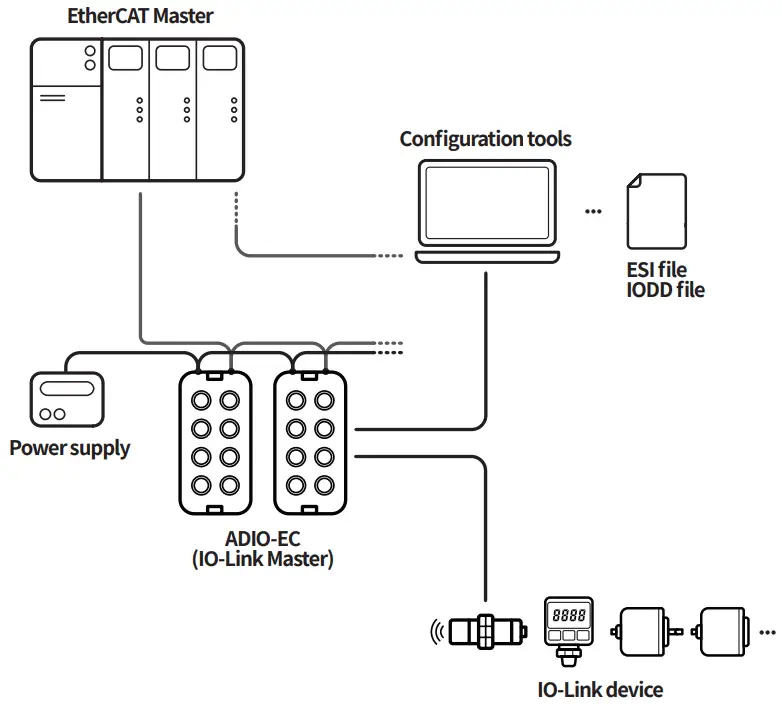
Configuration of ADIO-EC
The figure below shows the EtherCAT network and the devices that compose it.
For proper use of the product, refer to the manuals and be sure to follow the safety considerations in the manuals. Download the manuals from the Autonics website.
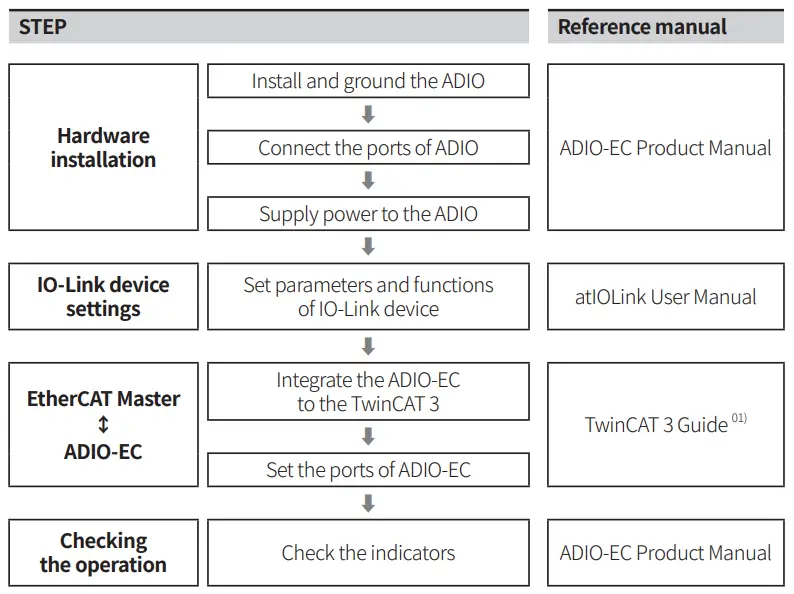
01) The purpose of this document is to provide supplementary information for users’ convenience.
The project planning software of the upper level communication system may be different depending on the user’s environment. For more information, refer to the manufacturer’s manual.
The supported objects
| Operation mode | Safe State 01) | Vali-ration | Data Storage | Input Filter 01) | Vendor ID | Device ID | Cycle Time |
| Digital Input | – | – | – | ○ | – | – | – |
| Digital Output | ○ | – | – | – | – | – | – |
| IO-Link Input | – | ○ | ○ | – | ○ | ○ | ○ |
| IO-Link Output | – | ○ | ○ | – | ○ | ○ | ○ |
| IO-Link Input/ Output | – | ○ | ○ | – | ○ | ○ | ○ |
Software
Download the installation file and the manuals from the Autonics website.
atIOLink
“airlink” is the Port and Device Configuration Tool (PDCT).
It supports the settings for ports and devices in the Field Network.
Ordering Information
This is only for reference, the actual product does not support all combinations.
For selecting the specified model, follow the Autonics website.
ADIO – EC – MA 08 A ❶ – ILM
- I/O specification
N: NPN
P: PNP
Product Components
- Product × 1
- Name plates × 20
- M4×10 screw with washer × 1
- Instruction manual × 1
- Waterproof cover × 4
Sold Separately
- Name plates
- Waterproof cover
Connections
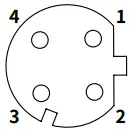
Ethernet port
| M12 (Socket-Female), A-coded | Pin | Function | Description |
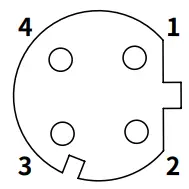 | 1 | TX + | Transmit Data + |
| 2 | RX + | Receive Data + | |
| 3 | TX – | Transmit Data – | |
| 4 | RX – | Receive Data – |
Power supply port
| OUT (7/8″, Socket Female) | IN (7/8″, Plug-Male) | Pin | Function | Description |
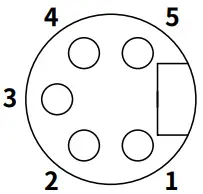 | 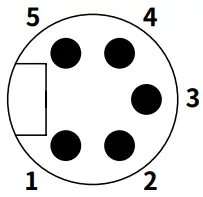 | 1,2 | 0 V | Sensor and actuator supply |
| 3 | F.G. | Frame ground | ||
| 4 | +24 VDC— | Sensor supply | ||
| 5 | +24 VDC— | Actuator supply |
PDCT port
| M12 (Socket-Female), A-coded | Pin | Function |
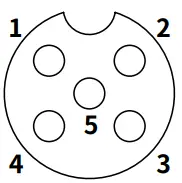 | 1 | Not Connected (N.C.) |
| 2 | Data – | |
| 3 | 0 V | |
| 4 | Not Connected (N.C.) | |
| 5 | Data + |
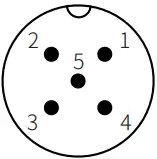
I/O port
| M12 (Socket-Female), A-coded | Pin | Function |
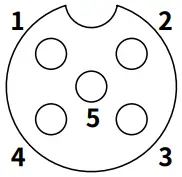 | 1 | +24 VDC |
| 2 | I/Q: Digital Input | |
| 3 | 0 V | |
| 4 | C/Q: IO-Link, Digital Input/output | |
| 5 | Not Connected (N.C.) |
Dimensions
- Unit: mm, For the detailed dimensions of the product, follow the Autonics website.
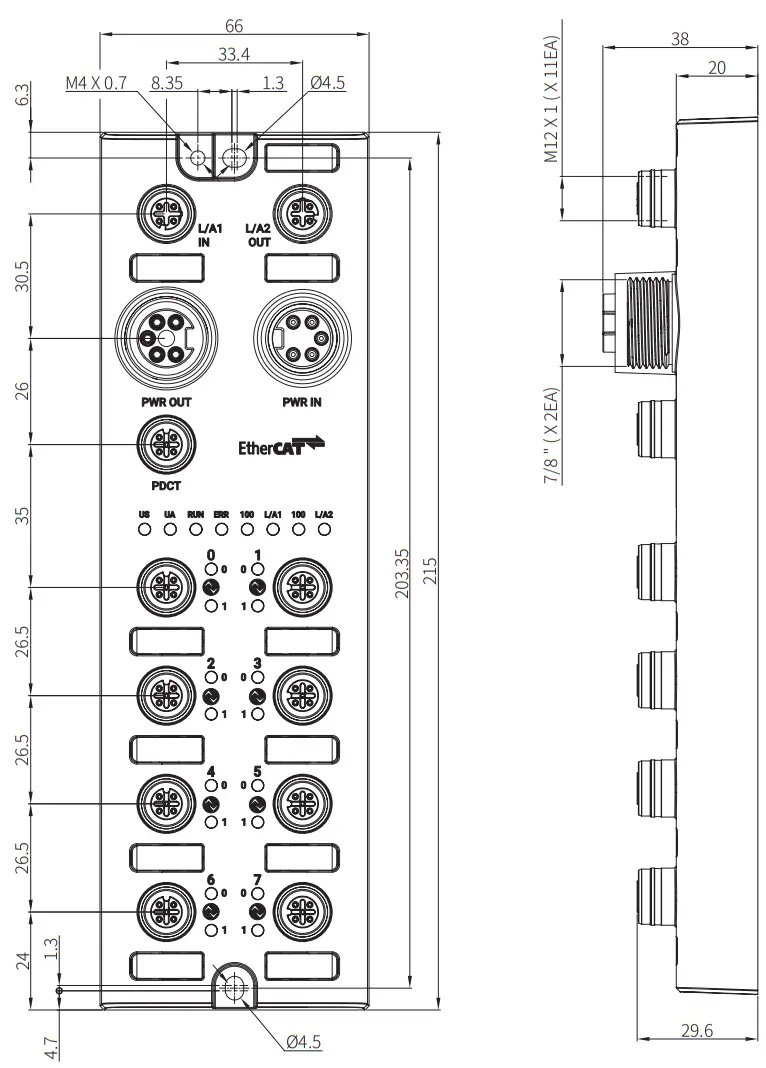
Unit Descriptions
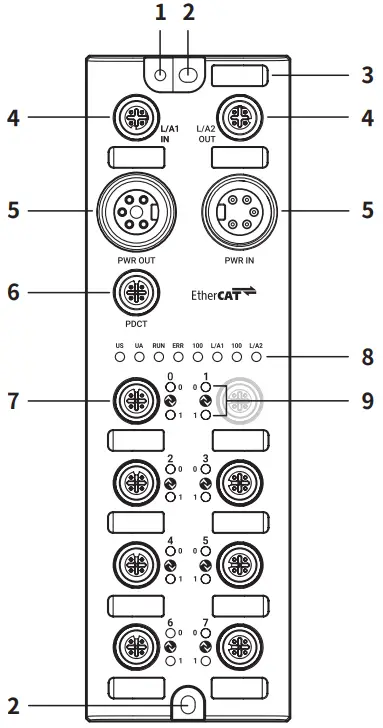
- Grounding hole
- Mounting hole
- Insertion part for the name plate
- Ethernet port
- Power supply port
- PDCT port
- I/O port
- Status indicator
- I/O port indicator
Installation
Mounting
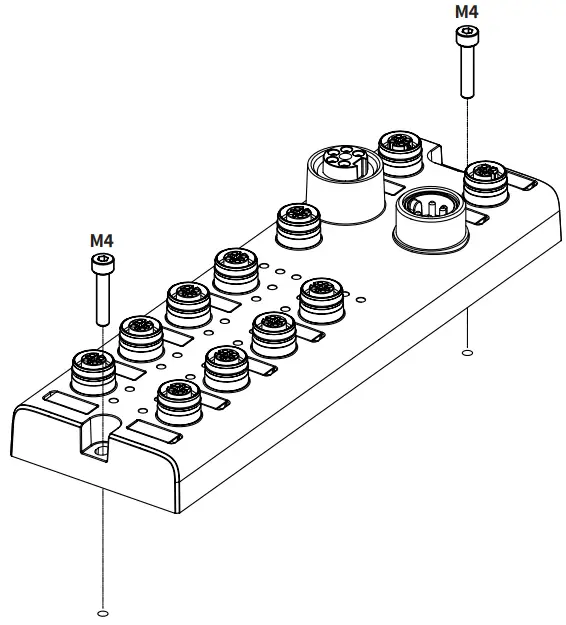
- Prepare a flat or metal panel in the enclosure.
- Drill a hole to mount and ground the product on the surface.
- Turn off all power.
- Fix the product using M4 screws in the mounting holes.
Tightening torque: 1.5 N m
Grounding
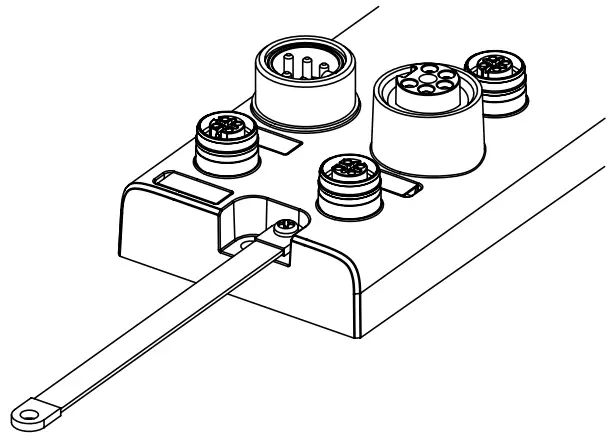
- Be sure to use a cable with low impedance and as short as possible for connecting the housing to the product.
- Connect the grounding strap and M4×10 screw with washer.
- Fix the screw in the grounding hole.
Tightening torque: 1.2 N m
Port Connections
Port specifications
Be sure to check the port specifications below before connecting the device. Prepare a cable that complies with the protection rating IP67/IP69K.
| Ethernet port | I/O port | PDCT port | Power supply port | |
| Type | M12 (Socket-Female), 4-pin, D-coded | M12 (Socket-Female), 5-pin, A-coded | M12 (Socket-Female), 5-pin, A-coded | Input: 7/8” (Plug-Male), 5-pin Output: 7/8” (Socket-Female), 5-pin |
| Push-Pull | YES | YES | YES | N.A |
| Number of ports | 2 | 8 | 1 | 2 |
| Tightening torque | 0.6 N m | 0.6 N m | 0.6 N m | 1.5 N m |
| Supported function | Daisy chain | – | USB serial communication | Daisy chain |
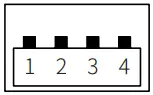
The example of communication cable for the PDCT port
| Connector 1 | Connector 2 | Wiring | ||||||||||||||||||||||||
|
|
|
 USB Type A (Plug-Male)
Connect to the Ether CAT
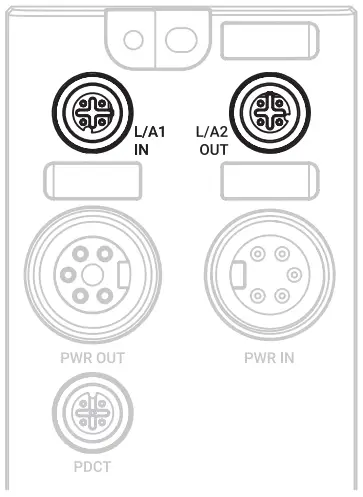
- Connect the M12 connector to the Ethernet port. See the connections below.

1 TX + Transmit Data + 2 RX + Receive Data + 3 TX – Transmit Data – 4 RX – Receive Data – - Connect the connector to the Ether CAT network.
Network device: PLC or Ether CAT device supporting Ether CAT protocol - Put the waterproof cover on the unused port.
Connect the IO-Link devices
The maximum output current is 2 A at each I/O port. Configure the device so that the total current of the I/O ports does not exceed 9 A.
Check the wiring information in the manual of the IO-Link device to be connected.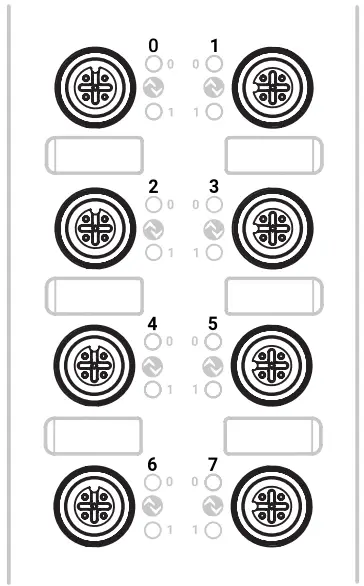
01. Connect the M12 connector to the I/O port. See the connections below.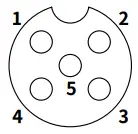
| 1 | +24 VDC |
| 2 | I/Q: Digital Input |
| 3 | 0 V |
| 4 | C/Q: IO-Link, Digital InputOutput |
| 5 | Not Connected (N.C.) |
02. Put the waterproof cover on the unused port.
Connect with the atIOLink
Do not use the PDCT port and the Ethernet port at the same time.
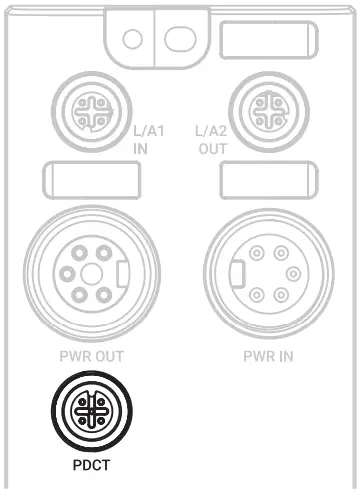
01. Connect the M12 connector to the PDCT port. See the connections below.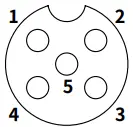
| 1 | Not Connected (N.C.) |
| 2 | Data – |
| 3 | 0 V |
| 4 | Not Connected (N.C.) |
| 5 | Data + |
Connect the connector to the network device.
Network device: PC/laptop that airlink software is installed
Put the waterproof cover on the unused port.
Connect the power supply to ADIO
Be sure not to exceed 9 A of the maximum supplying current to the sensor (US).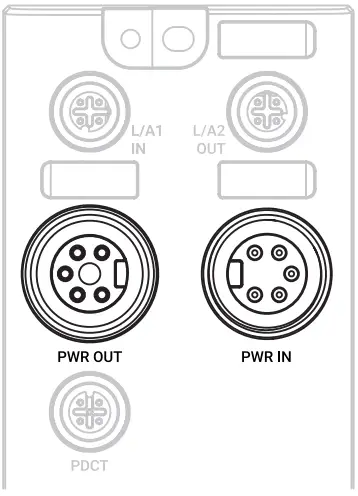
01. Turn off all power.
02. Connect the 7/8″ connector to the power supply port. See the connections below.
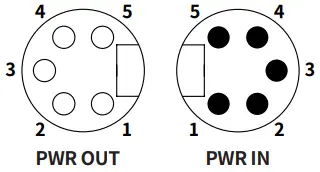
| 1, 2 | 0 V | Sensor and actuator supply |
| 3 | F.G. | Frame ground |
| 4 | +24 VDC | Sensor supply |
| 5 | +24 VDC | Actuator supply |
Indicators
Status indicator

The power supply of sensor
| Indicator | LED Color | Status | Description |
| US | Green | ON | Applied voltage: normal |
| Red | Flashing (1 Hz) | Applied voltage: low (< 18 VDC) |
The power supply of actuator
| Indicator | LED Color | Status | Description |
| UA | Green | ON | Applied voltage: normal |
| Red | Flashing (1 Hz) | Applied voltage: low (< 18 VDC) | |
| ON | Applied voltage: none (< 10 VDC) |
Product initialization
| Indicator | LED Color | Status | Description |
| US, UA | Red | ON | ADIO initialization failure |
Ether CAT State Machine
| Indicator | LED Color | Status | Description |
| RUN | Green | OFF | EtherCAT state: INIT |
| Flashing | EtherCAT state: PRE-OPERATIONAL | ||
| Flashing (once) | EtherCAT state: SAFE-OPERATIONAL | ||
| ON | EtherCAT state: OPERATIONAL |
Error alert
| Indicator | LED Color | Status | Description |
| ERR | Red | OFF | No error |
| Flashing | Invalid configuration | ||
| Flashing (once) | Local error | ||
| ON | Error in application |
Ethernet connection
| Indicator | LED Color | Status | Description |
| L/A1 L/A2 | Green | OFF | No Ethernet connection. |
| ON | The Ethernet connection is established. |
Transmission rate of the Ethernet
| Indicator | LED Color | Status | Description |
| 100 | Green | ON | Transmission rate: 100 Mbps |
I/O port indicator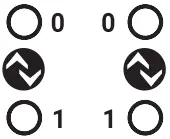
Pin 4 (C/Q)
| Indicator | LED Color | Status | Description |
| 0 | Yellow | OFF | DI/DO: pin 4 OFF |
| ON | DI/DO: pin 4 ON | ||
| Green | ON | Port configuration: IO-Link | |
| Flashing (1 Hz) | Port configuration: IO-Link, No IO-Link device found | ||
| Red | Flashing (2 Hz) | IO-Link configuration error | |
| ON | Short circuit occurred on pin 4 |
Pin 2 (I/Q)
| Indicator | LED Color | Status | Description |
| 1 | Yellow | OFF | DI: pin 2 OFF |
| ON | DI: pin 2 ON |
The power supply of the I/O port
| Indicator | LED Color | Status | Description |
| 0,1 | Red | Flashing (1 Hz) | Short circuit occurred in the I/O supply power (pin 1, 3) |
Specifications
Electrical/Mechanical specifications
| Supply voltage | 18 – 30 VDC |
| Rated voltage | 24 VDC |
| Current consumption | 2.4 W ( ≤ 216 W) |
| Supplying current per port | ≤ 2 A/Port |
| Sensor current (US) | ≤ 9 A |
| Dimensions | W 66 × H 215 × D 38 mm |
| Material | Zinc Die casting |
| Ethernet port | M12 (Socket-Female), 4-pin, D-coded, Push-Pull Number of ports: 2 (IN/OUT) Supported function: daisy chain |
| Power supply port | Input: 7/8” (Plug-Male), 5-pin Output: 7/8” (Socket-Female), 5-pin Number of ports: 2 (IN/OUT) Supported function: daisy chain |
| PDCT port | M12 (Socket-Female), 5-pin, A-coded, Push-Pull Number of ports: 1 Connection method: USB serial communication |
| I/O port | M12 (Socket-Female), 5-pin, A-coded, Push-Pull Number of ports: 8 |
| Mounting method | Mounting hole: fixed with M4 screw |
| Grounding method | Grounding hole: fixed with M4 screw |
| Unit weight (packaged) | ≈ 700 g (≈ 900 g) |
Mode specifications
| Mode | Digital Input |
| Number of channels | 16-CH (I/Q: 8-CH, C/Q:8-CH) |
| I/O common | NPN / PNP |
| Input current | 5 mA |
| ON voltage/current | Voltage: ≥ 15 VDC Current: ≥ 5 mA |
| OFF voltage | ≤ 5 VDC |
| Mode | Digital Output |
| Number of channels | 8-CH (C/Q) |
| I/O common | NPN / PNP |
| Power supply | 24 VDC (18 – 30 VDC), Max. 300 mA |
| Leakage current | ≤ 0.1 mA |
| Residual voltage | ≤ 1.5 VDC |
| Short circuit protection | YES |
| Mode | IO-Link |
| Input current | 2 mA |
| ON voltage/current | Voltage: ≥ 15 VDC Current: ≥ 2 mA |
| OFF voltage | ≤ 5 VDC |
Environmental conditions
| Ambient temperature 01) | -5 to 70 °C, Storage: -25 to 70 °C (no freezing or condensation) |
| Ambient humidity | 35 to 75%RH (no freezing or condensation) |
| Protection rating | IP67 (IEC standard), IP69K (DIN standard) |
01) UL approved ambient temperature: 45 ℃
Approvals
| Approval |  |
| Association approval |  |
Communication Interface
Ethernet
| Ethernet standard | 100BASE-TX |
| Cable spec. | STP (Shielded Twisted Pair) Ethernet cable over Cat 5 |
| Transmission rate | 100 MPs |
| Cable length | ≤ 100 m |
| Protocol | EtherCAT |
IO-Link
| Version | 1.1 |
| Transmission rate | COM1 : 4.8 kbps / COM2 : 38.4 kbps / COM3 : 230.4 kbps |
| Port class | Class A |
| Standard | IO-Link Interface and System Specification Version 1.1.2 IO-Link Test Specification Version 1.1.2 |
18, Bansong-ro 513Beon-gil, Haeundae-gu,
Busan, Republic of Korea, 48002
www.autonics.com
+82-2-2048-1577
[email protected]
 autonics.com