
LE-37R
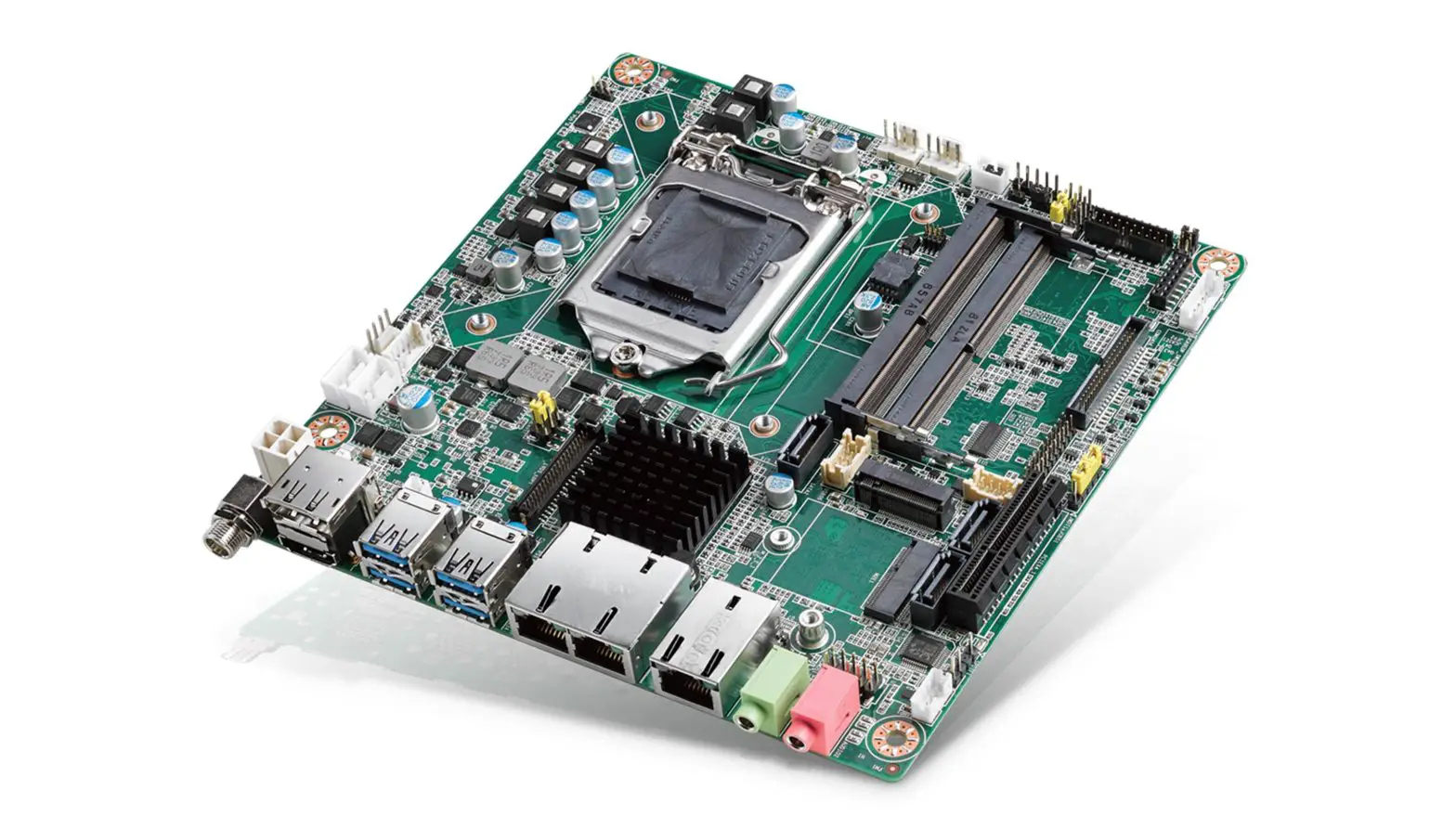
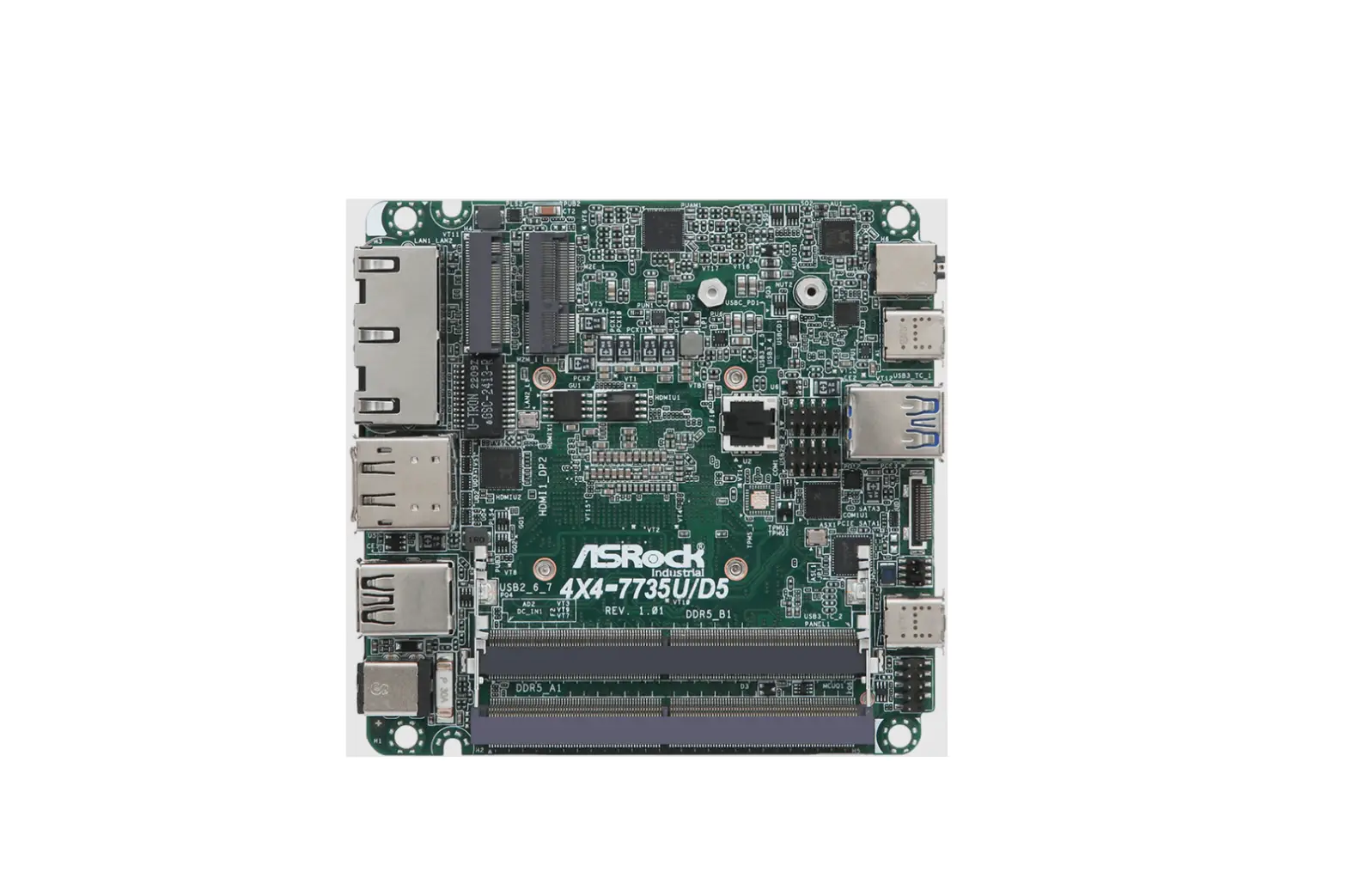
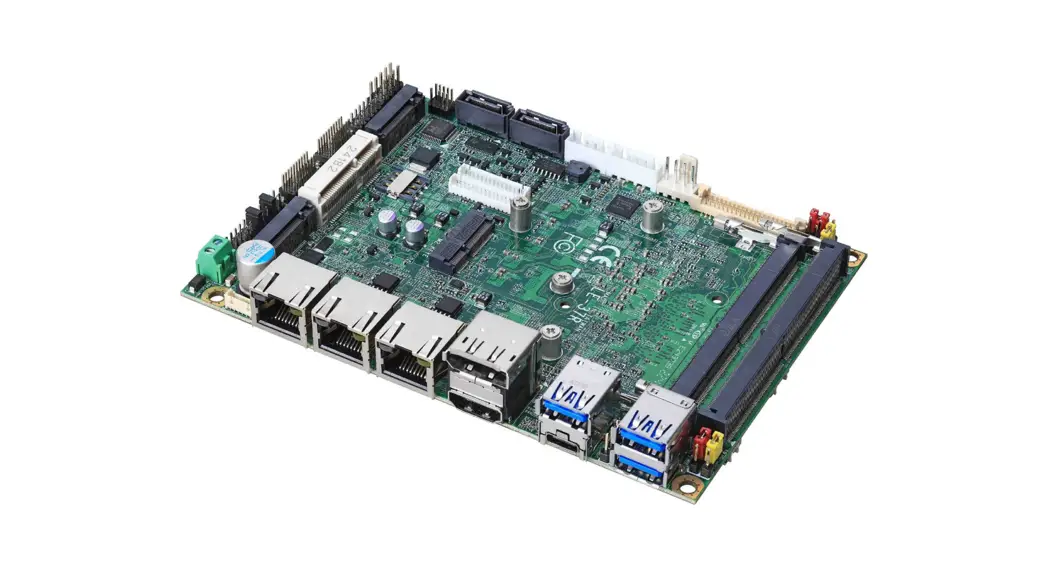
3.5 inch Motherboard
User’s Manual
Edition 1.2
2023/01/31
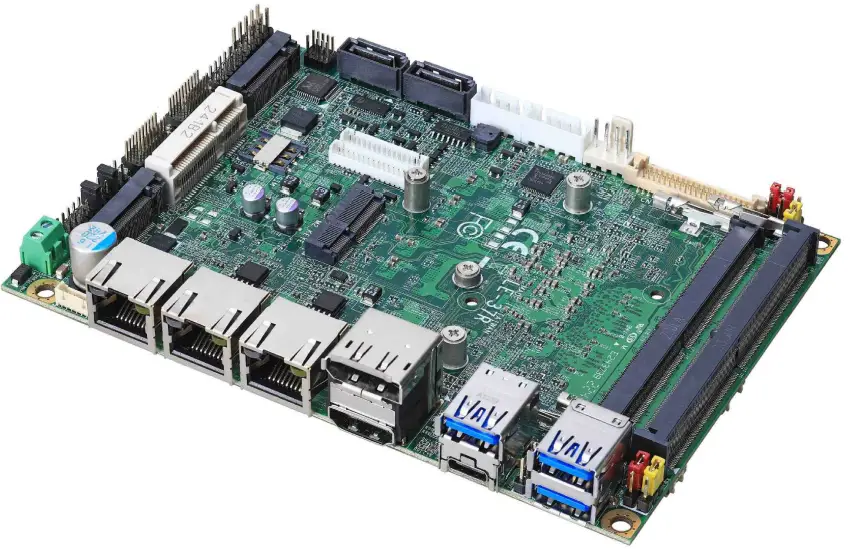
LE-37R 3.5 Inch Motherboard
Copyright
Copyright 2022, all rights reserved. This document is copyrighted and all rights are reserved.
The information in this document is subject to change without prior notice to make improvements to the products.
This document contains proprietary information and protected by copyright. No part of this document may be reproduced, copied, or translated in any form or any means without prior written permission of the manufacturer.
All trademarks and/or registered trademarks contains in this document are property of their respective owners.
Disclaimer
The company shall not be liable for any incidental or consequential damages resulting from the performance or use of this product.
The company does not issue a warranty of any kind, express or implied, including without limitation implied warranties of merchantability or fitness for a particular purpose.
The company has the right to revise the manual or include changes in the specifications of the product described within it at any time without notice and without obligation to notify any person of such revision or changes.
Trademark
All trademarks are the property of their respective holders.
Any questions please visit our website at TU http://www.commell.com.twUT
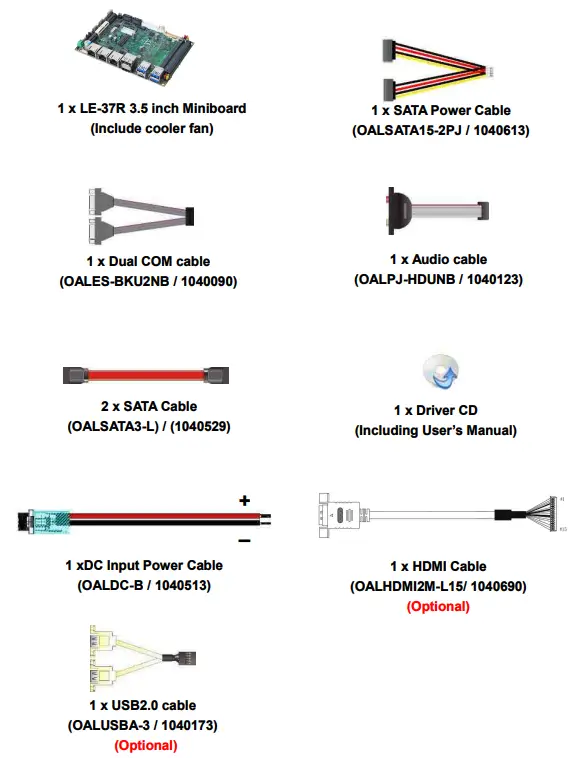
Packing List:
Please check the package content before you starting using the board.
Chapter 1 <Introduction>
1.1 <Product Overview>
LE-37R is a 3.5” Motherboard which supports Alder Lake/12th Gen P Processors, integrated Intel® Xe Graphics, DDR5 memory, Realtek High Definition Audio, Intel Gigabit LAN, USB3.2 Gen2, SATA3, Type C with AHCI function for a system.
New feature for Alder Lake
Alder Lake/12th Gen Processors are based on the 7nm SuperFin process, and offer long-life availability. i7-1270PE processor with 4 P-cores and 8 E-cores. P-cores can help
you handle heavy tasks, and E-cores run background tasks efficiently to save power.
All in One multimedia solution
The board provides high performance onboard graphics, and supports Type C (Alt mode), HDMI, and High Definition Audio, to meet the very requirement of the multimedia application.
Alder Lake support Windows 10 version 21H2 64bit and Linux 5.18
Intel recommends using Windows 10 version 21H2 64bit. It may lose some drivers if you use other Windows version.
1.2 <Product Specification>
| System | |
| Processor | Intel® Alder Lake P Processor FCBGA1744 package |
| Memory | 2 x DDR5 SO-DIMM up to 4800 MHz 64GB, Support Non-ECC, unbuffered memory |
| Watchdog Timer | Generates a system reset with internal timer for 1min/s ~ 255min/s |
| Real Time Clock | Chipset integrated RTC with onboard lithium battery |
| Expansion | 1 x MiniPCIe with SIM Slot (support mSATA) (Note3) 1 x M.2 (Key E 2230) for Wi-Fi and Bluetooth 2 x M.2 (Key M 2280) support PCIe Gen4 for NVMe |
| Graphics | |
| Chipset | Intel® Iris® Xe Graphics (i7, i5) Intel® UHD Graphics (i3, Celeron 7305E) |
| Display Interface | 1 x LVDS (Note1) ,1 x DisplayPort (Note2), 1 x HDMI, 2 x HDMI / DVI, 1 x Type-C (DP Alt. Mode) |
| LAN | |
| Chip | 1 x Intel® I219-LM Gigabit PHY LAN (supports Intel® AMT 16) 2 x Intel® I226-LM Gigabit LAN (up to 2.5GbE) |
| I/O | |
| Serial ATA | 2 x SATA3 (Note3) |
| Audio | Realtek ALC888S HD Audio |
| Internal I/O | 2 x SATA3, 2 x USB2.0, 2 x HDMI / DVI, 2 x RS232, 2 x RS232/485/422 1 x LVDS, 1 x LCD inverter connector, 1 x GPIO, 1 x Audio, 1 x Audio Amplifier, 1 x SMBus |
| Rear I/O | 1 x DisplayPort (Note2), 1 x HDMI, 1 x Type-C (DP Alt. Mode), 3 x USB3.2 Gen2, 3 x LAN |
| Mechanical & Environmental | |
| Power Requirement | DC input 9~35V |
| Size | 146mm x 101mm (L x W) |
| Temperature | Operating within 0°C~60°C (32°F~140°F) Storage within -20°C~80°C (-4°F~176°F) |
| Relative Humidity | 10%~90%, non-condensing |
Note1: Onboard 18/24-bit single/dual channel +3.3V/ +5V/ +12V LVDS.
Note2: Change pin header to support ADP-3355 or ADP-3460, please contact with our sales for OEM version.
Note3: SATA2 cannot use when Mini_card change to mSATA.
Note4: Intel Iris Xe Graphics has to install two memory cards.
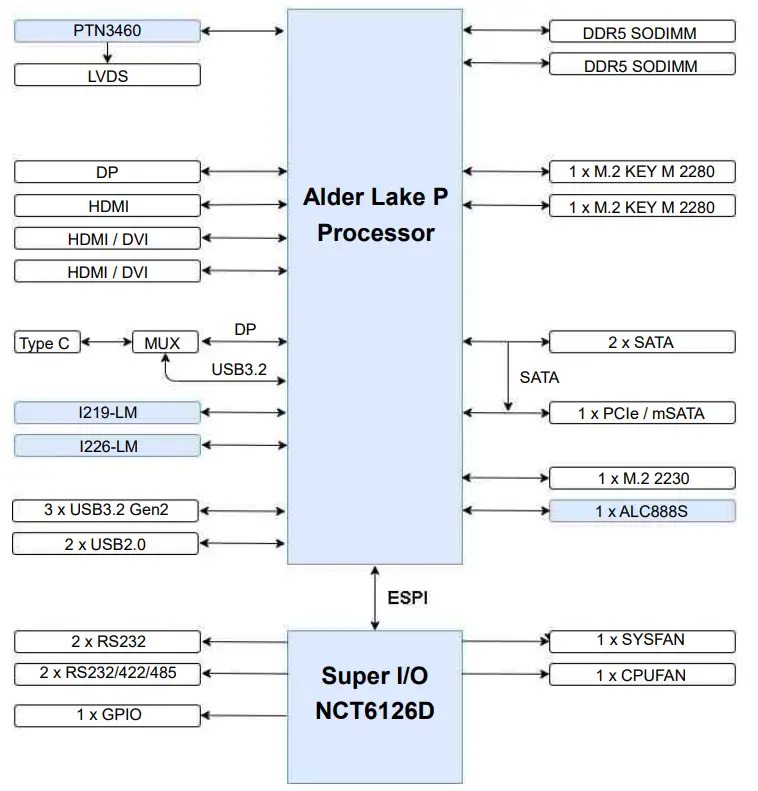
1.3 <Block Diagram>
Chapter 2 <Hardware setup>
2.1 <Connector Location and Reference>
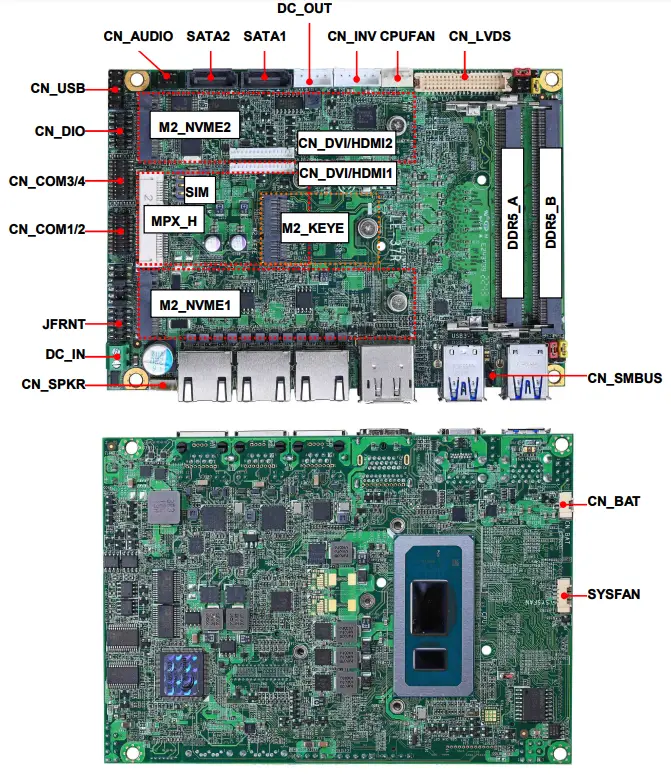
2.1.1 <Internal connectors list>
| Connector | Function |
| DDR5_A/B | 262-pin DDR5 SO-DIMM slot |
| SATA1/2 | 7-pin SATA3 connector |
| CN_AUDIO | 5 x 2-pin audio pin header |
| CN_LVDS | 20 x 2-pin LVDS connector |
| CN_INV | 5-pin LCD inverter connector |
| CN_SMBUS | 3-pin SMBus connector |
| CN_COM 1/2 | 20-pin RS232/RS422/RS485 connector |
| CN_COM 3/4 | 20-pin RS232 connector |
| CN_USB | 5 x 2-pin USB2.0 pin header |
| CN_DIO | 6 x 2-pin digital I/O connector |
| CN_BAT | 2-pin Battery connector |
| CN_SPKR | 6-pin Speaker connector |
| CPUFAN | 4-pin CPU fan connector |
| SYSFAN | 4-pin system fan connector |
| JFRNT | 10-pin front panel switch/indicator connector |
| MPX_H | 52-pin MiniPCIe card slot |
| M2_KEYE | 75-pin M.2 Key E slot |
| M2_NVME1/2 | 75-pin M.2 2280 Key M slot support PCIe Gen4 |
| DC_IN | 2-pin power input Terminal Block |
| DC_OUT | 4-pin SATA Power connector |
| SIM | 6-pin SIM socket |
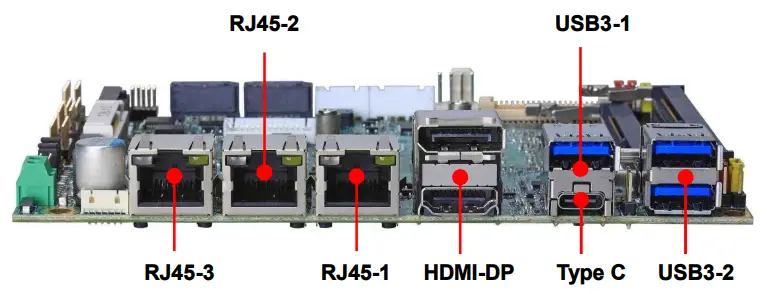
2.1.2 <External connectors list>
| Connector | Function |
| HDMI-DP | DisplayPort and HDMI dual layer connector |
| USB3-1 | 1 x USB3.2 Gen2 connector |
| USB3-2 | 2 x USB3.2 Gen2 connector |
| RJ45-1 | RJ45 connector (I219-LM) |
| RJ45-2/3 | RJ45 connector (I226-LM) |
| Type C | Support USB3.2 gen2 or DP |
2.2 <Memory Setup>
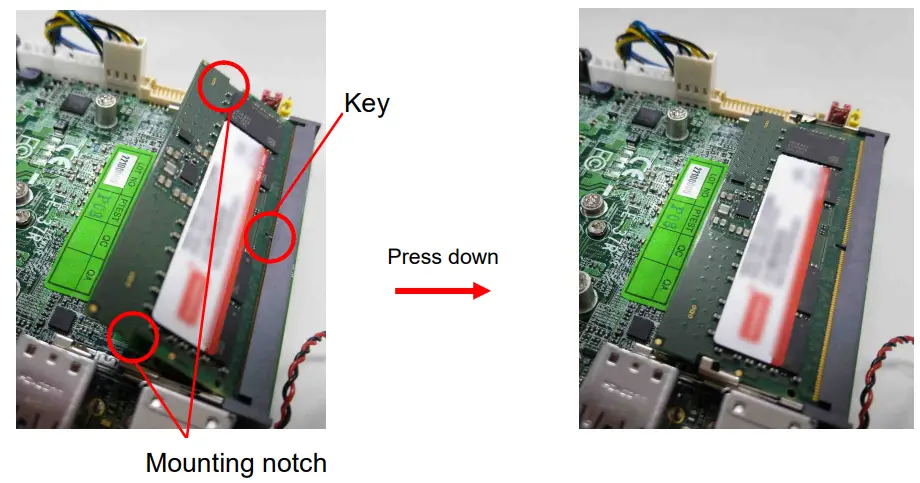
LE-37R has 262-pin DDR5 SODIMM support up to 64GB of memory capacity and 1.1
Voltage. Only Non-ECC memory is supported.
In the process, the board must be powered off.
- Put the memory tilt into the slot. Note the Memory notch key aligned slot key.
- Then press down till lock into the mounting notch.

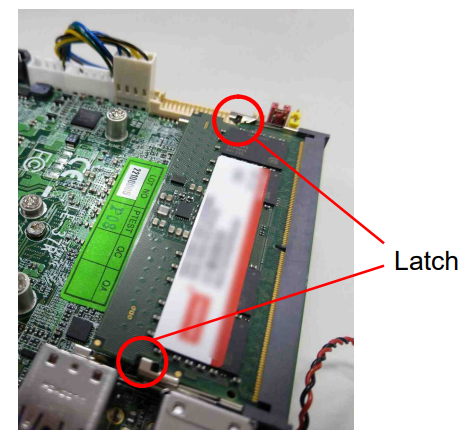
- To remove the memory, push outward on both sides of the latch.
2.3 <Jumper Location and Reference>
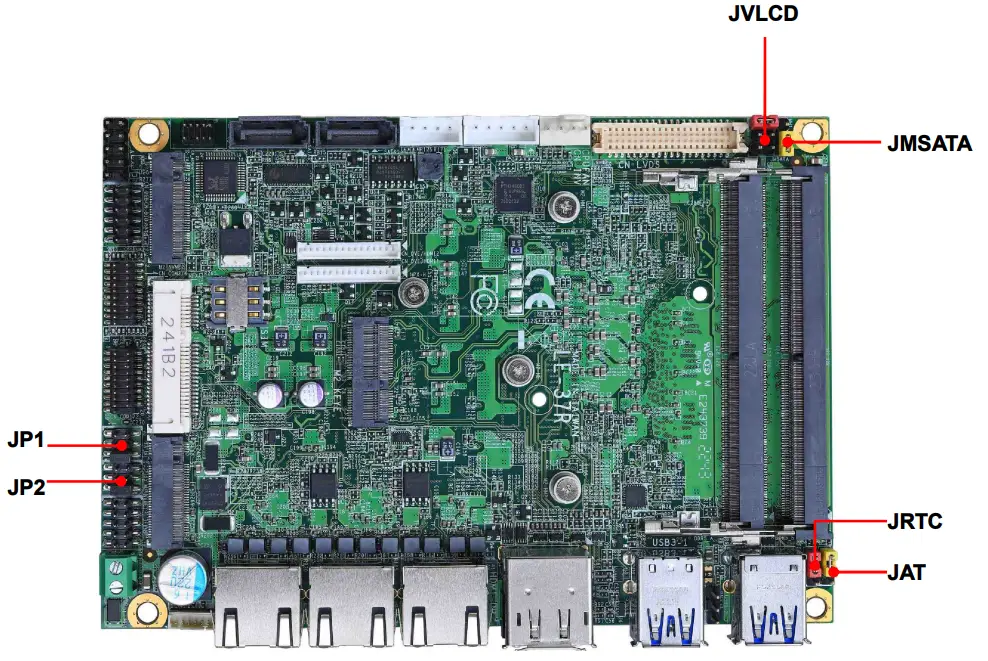
2.3.1 <Jumper list>
| Jumper | Function |
| JAT | Power mode select |
| RTC | CMOS Normal/Clear Setting |
| JVLCD | Panel Voltage Setting |
| JMSATA | MiniCard mSATA Setting |
| JP1 | COM1 Voltage Setting (For Pin 9) |
| JP2 | COM2 Voltage Setting (For Pin 9) |
2.3.2 <Clear CMOS and Power on type selection>
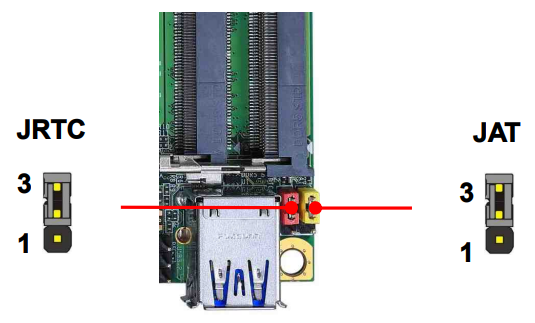
JAT: AT/ATX mode select jumper
| Jumper settings | Function |
| 1-2 | AT mode |
| 2-3 | ATX mode (Default) |
JRTC: Clear CMOS data jumper
| Jumper settings | Function |
| 1-2 | Clear CMOS |
| 2-3 | Normal (Default) |
2.4 <I/O interface>
2.4.1 <Serial ATA interface>
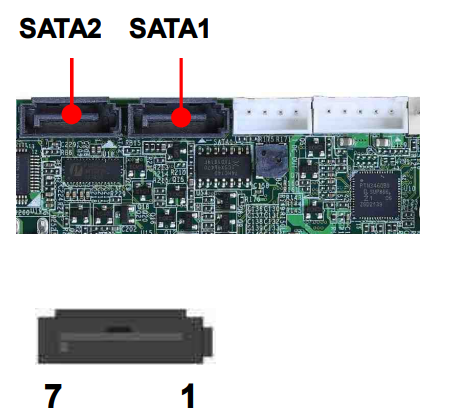
SATA 1/2 : SATA3 7-pin connector
| Pin | Signal |
| 1 | GND |
| 2 | TX+ |
| 3 | TX- |
| 4 | GND |
| 5 | RX- |
| 6 | RX+ |
| 7 | GND |
2.4.2 <Ethernet interface>
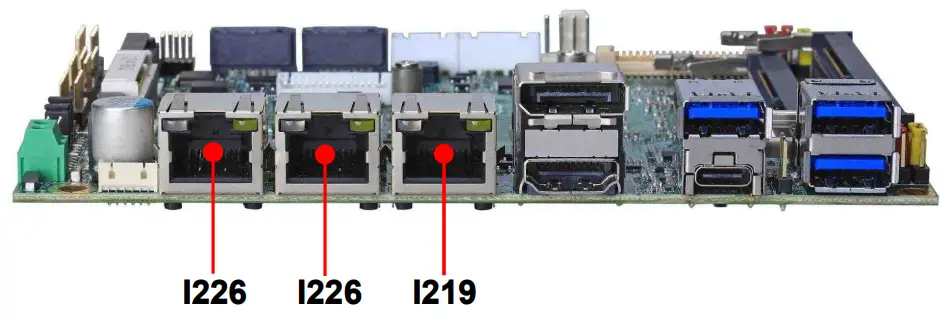
The board provides I219-LM Gigabit Ethernet which supports WOL on rear I/O. It supports Intel® AMT 16.0 feature on I219-LM.
(Note that the CPU must support vPro technology.)
2.4.3 <Display interface>
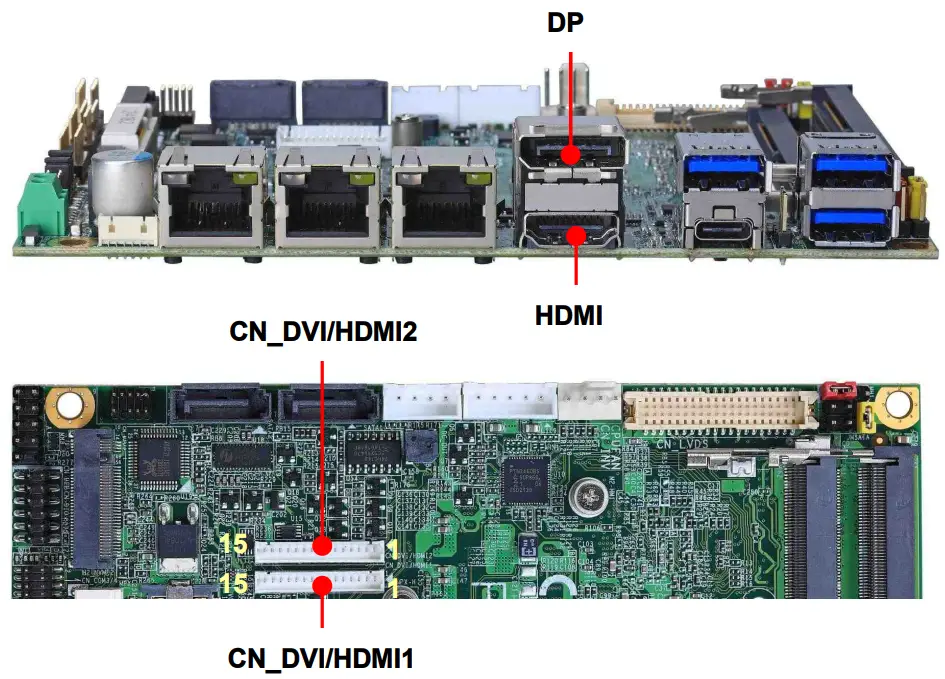
Based on the 12th Gen CPU with built-in Intel® Xe Graphics, the DisplayPort resolution up to 3840×2160 @ 60Hz or 4096×2304 @ 60Hz, the HDMI up to 4096×2304 @ 24Hz and LVDS up to 1920×1200 @ 60Hz supports single bus or dual bus LVDS signaling with color depths of 18 bits or 24 bits. About select LCD Panel Type in BIOS, please refer Appendix B.The built-in Iris® Xe Graphics support Quad display function with clone mode and extended mode.
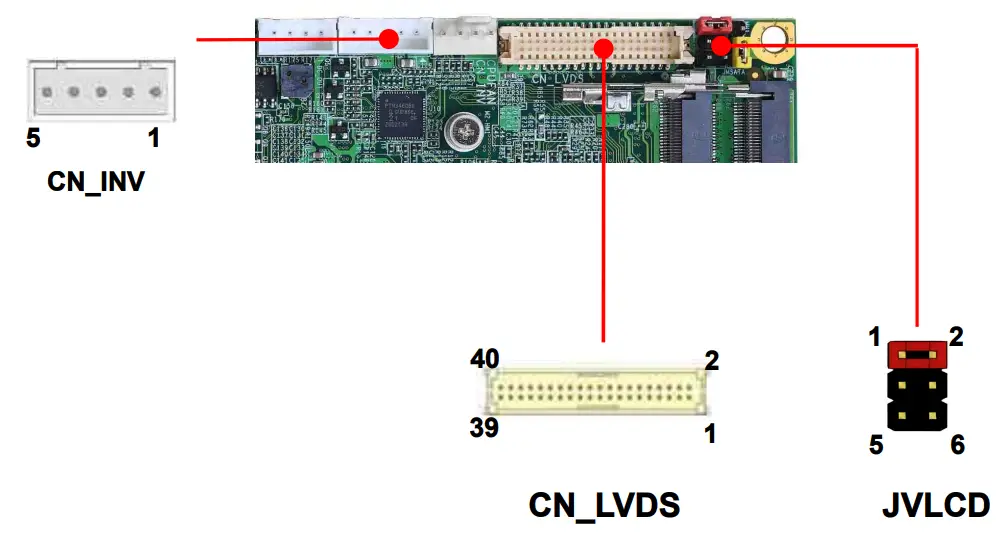
CN_LVDS: LVDS 40-pin connector (Model: HIROSE DF13-40DP-1.25V compatible)
| Pin | Signal | Pin | Signal |
| 2 | Set by JVLCD | 1 | Set by JVLCD |
| 4 | Detect (Active low) | 3 | GND |
| 6 | A_LVDS_0- | 5 | B_LVDS_0- |
| 8 | A_LVDS_0+ | 7 | B_LVDS_0+ |
| 10 | GND | 9 | GND |
| 12 | A_LVDS_1- | 11 | B_LVDS_1- |
| 14 | A_LVDS_1+ | 13 | B_LVDS_1+ |
| 16 | GND | 15 | GND |
| 18 | A_LVDS_2- | 17 | B_LVDS_2- |
| 20 | A_LVDS_2+ | 19 | B_LVDS_2+ |
| 22 | GND | 21 | GND |
| 24 | A_LVDS_CLK- | 23 | B_LVDS_3- |
| 26 | A_LVDS_CLK+ | 25 | B_LVDS_3+ |
| 28 | GND | 27 | GND |
| 30 | A_LVDS_3- | 29 | B_LVDS_CLK- |
| 32 | A_LVDS_3+ | 31 | B_LVDS_CLK+ |
| 34 | GND | 33 | GND |
| 36 | LVDS_DDCSCL | 35 | NC |
| 38 | LVDS_DDCSDA | 37 | NC |
| 40 | NC | 39 | NC |
Pin4 only need to be connected to GND
CN_INV: LVDS 5-pin Backlight power connector
| Pin | Signal |
| 1 | 12V |
| 2 | Backlight Control |
| 3 | 5V |
| 4 | GND |
| 5 | Enable Backlight |
JVLCD: LVDS panel power select jumper
| Jumper settings | Function |
| 1-2 | 3.3V (Default) |
| 3-4 | 5V |
| 5-6 | 12V |
CN_DVI/HDMI1/2 : DVI or HDMI connector
| Jumper settings | Function | Jumper settings | Function |
| 1 | TMDS Data2+ | 9 | GND |
| 2 | TMDS Data2– | 10 | TMDS Clock+ |
| 3 | GND | 11 | TMDS Clock– |
| 4 | TMDS Data1+ | 12 | SCL |
| 5 | TMDS Data1– | 13 | SDA |
| 6 | GND | 14 | +5 V Power |
| 7 | TMDS Data0+ | 15 | HPD |
| 8 | TMDS Data0– |
2.4.4 <Serial Port interface>
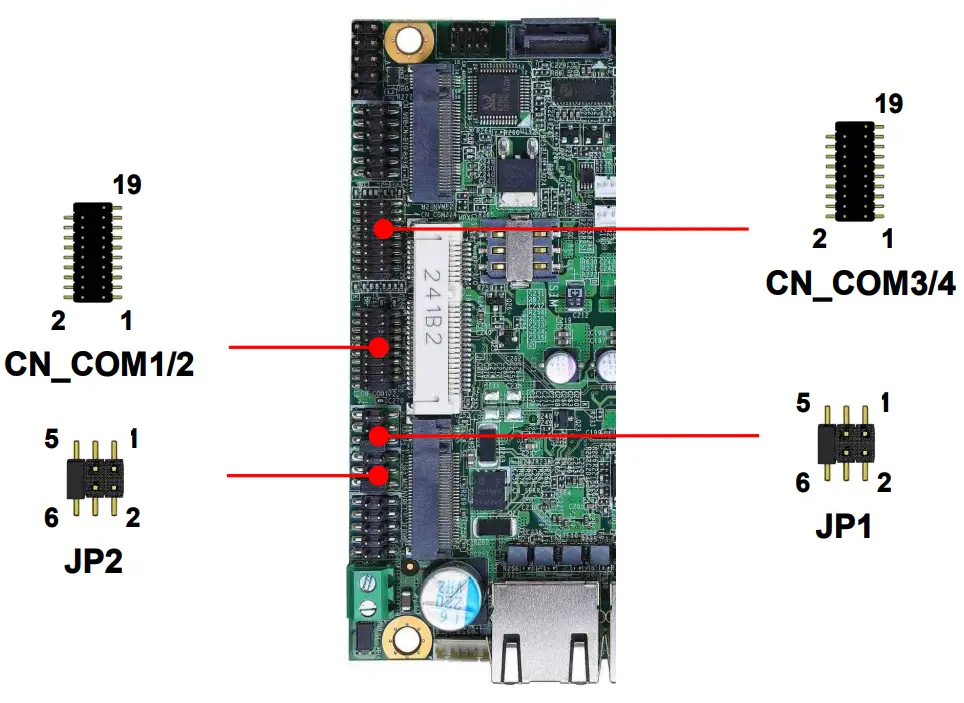
`CN_COM1/2: RS232/422/485 20-pin header (Pitch 2.54 x 1.27mm)
| Pin | Signal | Pin | Signal |
| 1 | DCD1/ 422TX-/ 485- | 2 | RXD1/ 422TX+/ 485+ |
| 3 | TXD1 | 4 | DTR1 |
| 5 | GND | 6 | DSR1/ 422RX+ |
| 7 | RTS1 | 8 | CTS1/ 422RX- |
| 9 | Set by JP1 | 10 | NC |
| 11 | DCD2/ 422TX-/ 485- | 12 | RXD2/ 422TX+/ 485+ |
| 13 | TXD2 | 14 | DTR2 |
| 15 | GND | 16 | DSR2/ 422RX+ |
| 17 | RTS2 | 18 | CTS2/ 422RX- |
| 19 | Set by JP2 | 20 | Key |
CN_COM1/2 RS-232/422/485 can set by BIOS.
You can find the setting from
Advanced-> Motherboard Advanced menu-> Super IO configuration-> Serial Port configuration->Interface

If you want to use RS485, please follow below step before connection. .
COM1 RTX- Data- : short Pin1& Pin8
COM1 RTX+ Data+ : short Pin2& Pin6
COM2 RTX- Data-: short Pin1& Pin8
COM2 RTX+ Data+: short Pin2& Pin6
JP1, JP2: COM1, COM2 pin-9 setting
| Jumper settings | Function | Effective patterns of connection: |
| 1-2 | 5V | 1-2 / 3-4 / 5-6 |
| 3-4 | 12V | Other may cause damage |
| 5-6 | RI (Default) |
CN_COM3/4: RS232 20-pin header (Pitch 2.54 x 1.27mm)
| Pin | Signal | Pin | Signal |
| 1 | DCD1 | 2 | RXD1 |
| 3 | TXD1 | 4 | DTR1 |
| 5 | GND | 6 | DSR1 |
| 7 | RTS1 | 8 | CTS1 |
| 9 | RI1 | 10 | NC |
| 11 | DCD2 | 12 | RXD2 |
| 13 | TXD2 | 14 | DTR2 |
| 15 | GND | 16 | DSR2 |
| 17 | RTS2 | 18 | CTS2 |
| 19 | RI2 | 20 | Key |
2.4.5 <USB interface & Type C >
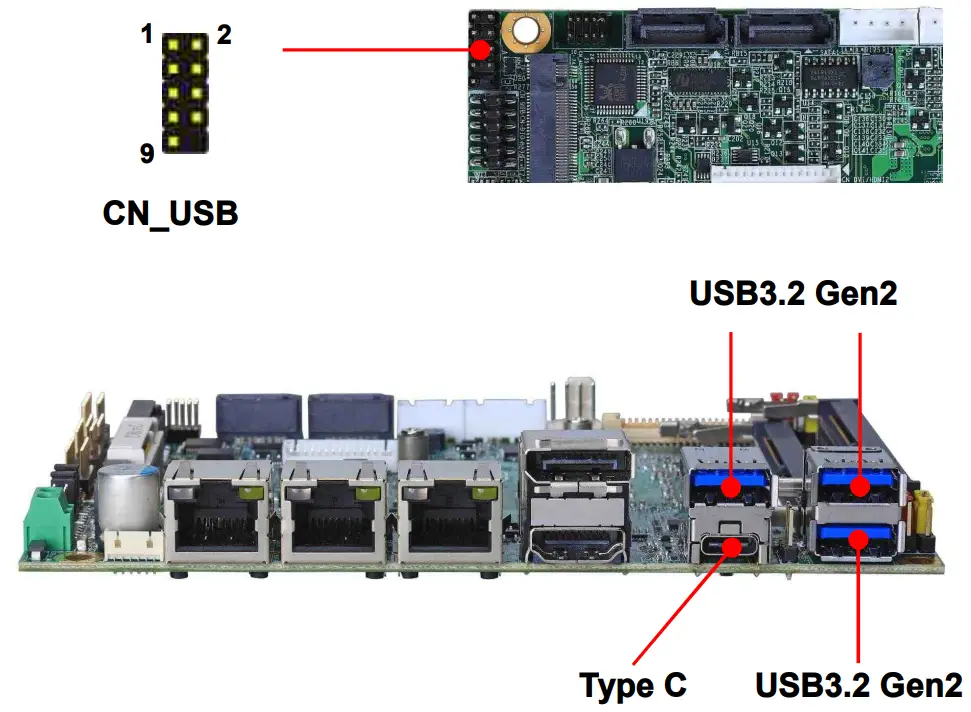
CN_USB: USB2.0 10-pin header (Pitch 2.54 mm)
| Pin | Signal | Pin | Signal |
| 1 | 5VSB | 2 | 5VSB |
| 3 | DATA0- | 4 | DATA1- |
| 5 | DATA0+ | 6 | DATA1+ |
| 7 | GND | 8 | GND |
| 9 | GND | 10 | Key |
Type C supports USB 3.1 gen2 and DP Alt. mode, and provides 5V at 3A.
2.4.6 <Audio interface>
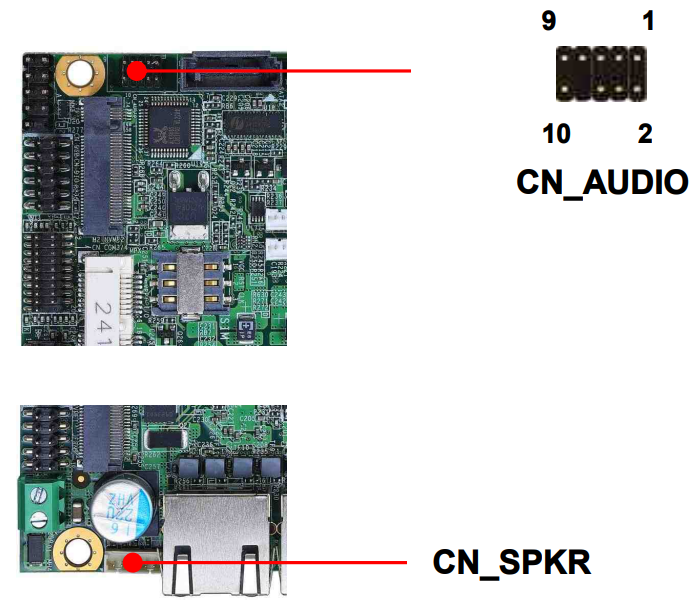
CN_AUDIO: Front panel audio 10-pin header (Pitch 2.54*1.27mm)
| Pin | Signal | Pin | Signal |
| 1 | MIC_L | 2 | GND |
| 3 | MIC_R | 4 | NC |
| 5 | FP_OUT_R | 6 | MIC_DETECT |
| 7 | SENSE | 8 | Key |
| 9 | FP_OUT_L | 10 | FP_OUT_DETECT |
CN_SPKR: 6-pin Two channel Audio Amplifier
| Pin | Signal | Pin | Signal |
| 1 | FP_OUT_L_P | 2 | FP_OUT_L_N |
| 3 | JD_Front | 4 | GND |
| 5 | FP_OUT_R_P | 6 | FP_OUT_R_N |
2.4.7 <Expansion slot>
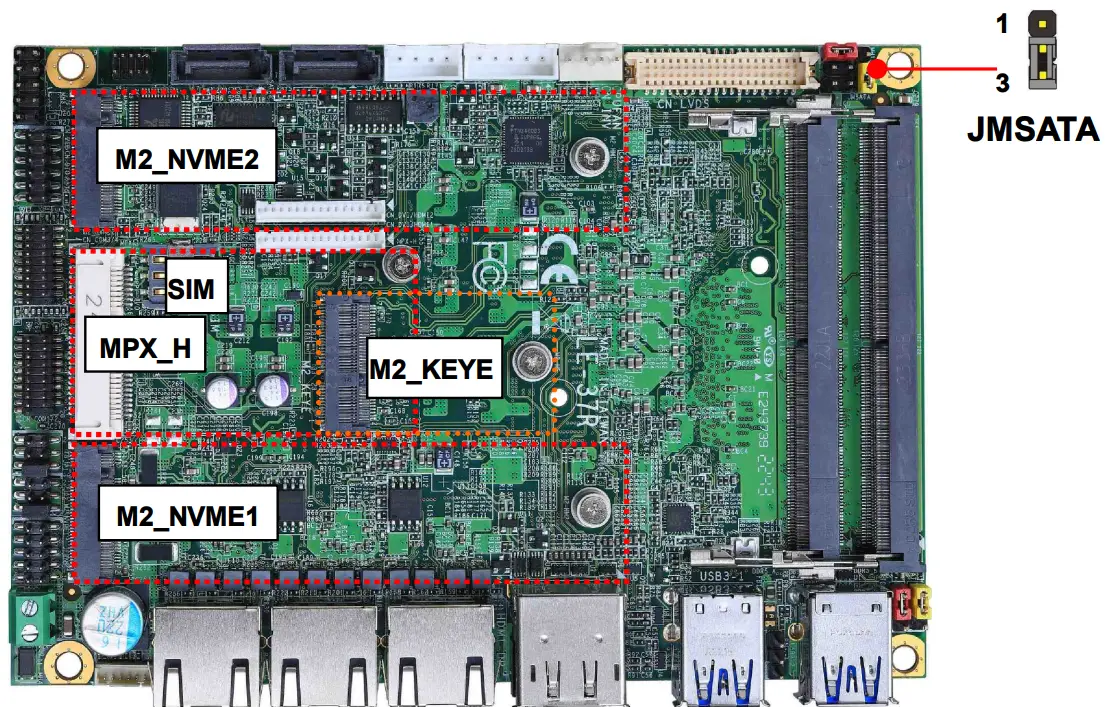
MPX_H support mSATA by JMSATA, and connect SIM card
M.2_NVME1 /2 support PCIe Gen4
M2_KEYE support WI-FI and Bluetooth Module
JMSATA: Setting MPX_H to support PCIe/mSATA
| Jumper settings | Function |
| 1-2 | Support mSATA |
| 2-3 | Normal operation (Default) |
2.4.8 <Front panel switch and indicator>
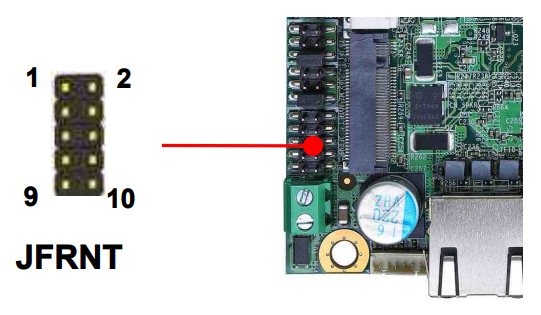
JFRNT: Front panel switch and indicator 10-pin header
| Pin | Signal | Pin | Signal |
| 1 | Power_ON- | 2 | Power_ON+ |
| 3 | Speaker- | 4 | Speaker+ |
| 5 | HDD_LED- | 6 | HDD_LED+ |
| 7 | Power_LED- | 8 | Power_LED+ |
| 9 | Reset+ | 10 | Reset- |
2.4.9 <GPIO and Other interface>
When using GPIO function, please note:
As Output: Open-drain, most applications need use an external pull up resistor.
(If not may cause damage)
As Input: TTL-level.
GPIO DC characteristics (open drain mode)
| Parameter | SYM | MIN | TYP | MAX | UNIT | Conditions |
| Input Low Voltage | VIL | 0.8 | V | ||
| Input High Voltage | VIH | 2.0 | V | ||
| Output Low Voltage | VOL | 0.4 | V | IOL =12mA | |
| Input High Leakage | ILIH | +10 | μA | VIN =3.3V | |
| Input Low Leakage | ILIL | -10 | μA | VIN =0V |
Please refer to Appendix E to program the configuration register
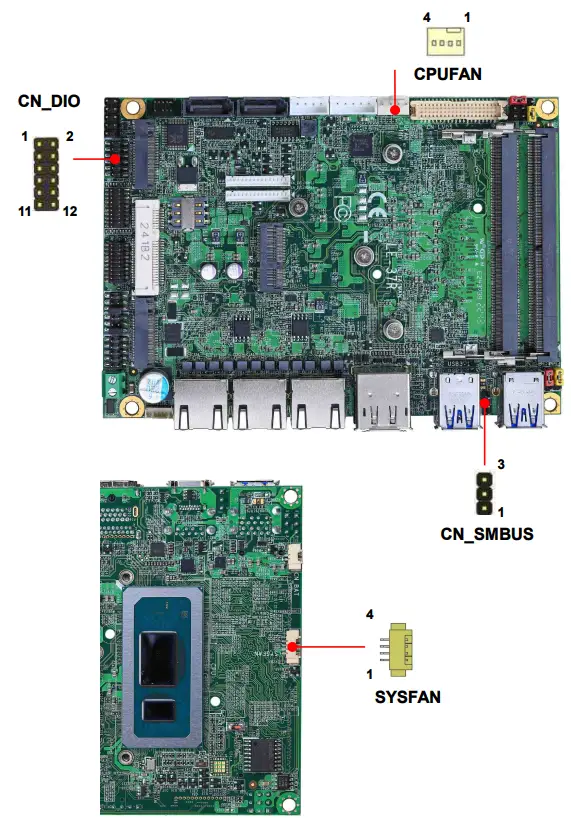
CN_DIO: GPIO 12-pin header (Pitch 2.00mm)
| Pin | Signal | Pin | Signal |
| 1 | GND | 2 | GND |
| 3 | GP40 | 4 | GP44 |
| 5 | GP41 | 6 | GP45 |
| 7 | GP42 | 8 | GP46 |
| 9 | GP43 | 10 | GP47 |
| 11 | 5V | 12 | 12V |
CN_SMBUS: SMBus 5-pin connector (Pitch 2.54mm)
| Pin | 1 | 2 | 3 |
| Signal | SMBCLK | GND | SMBDAT |
CPUFAN: CPU cooler fan 4-pin connector
| Pin | 1 | 2 | 3 | 4 |
| Signal | GND | 12V | Sensor | Control |
SYSFAN: System cooler fan 4-pin connector
| Pin | 1 | 2 | 3 | 4 |
| Signal | GND | 12V | Sensor | Control |
2.5 <Power supply>
2.5.1 <Power input>
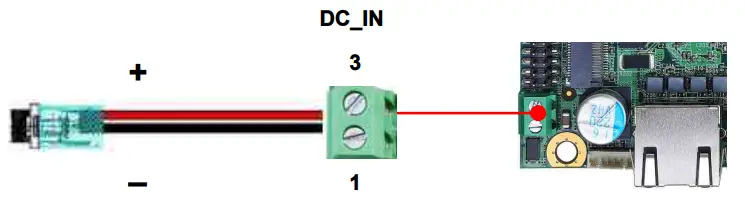
DC_IN: Terminal block 2-pin power connector
| Pin | Signal | Pin | Signal |
| 1 | GND | 3 | DC input 9~35V |
2.5.2 <Power Output>
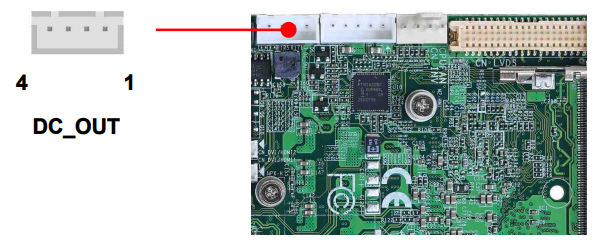
DC_OUT: SATA power 4-pin connector
| Pin | Signal |
| 1 | 12V |
| 2 | GND |
| 3 | GND |
| 4 | 5V |
Appendix A <Flash BIOS>
A.1 <Flash tool>
The board is based on Phoenix BIOS and can be updated easily by the BIOS auto flash tool. You can download the tool online at the address below: FPT Tool
The tool’s file name is “FPT.exe”, it’s the utility that can write the data into the BIOS flash chip and update the BIOS.
A.2 <Flash BIOS process>
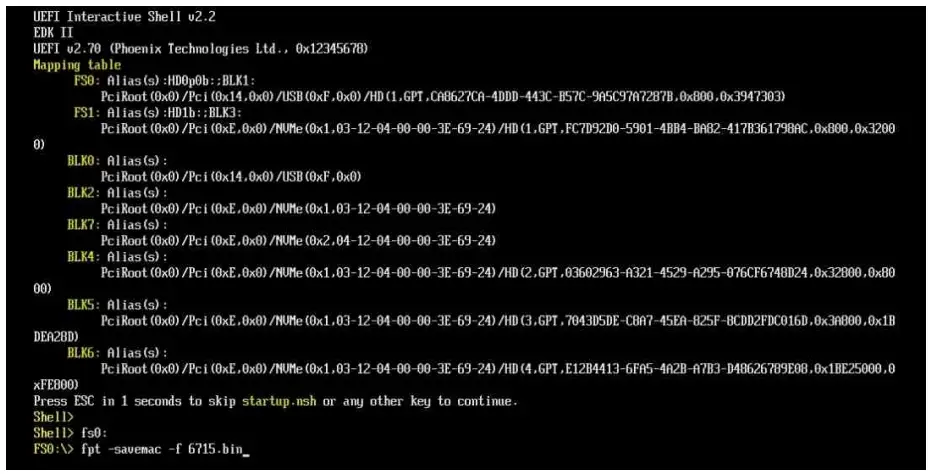
- Extract the zip file(re-flash tool and BIOS file) to root of the USB flash drive.
- Insert your USB flash drive in USB port of the board and power on the system.
- Press F5 in the Phoenix Logo screen
- Click the Internal Shell, then input the “fs0:” command to switch to the root of the USB flash drive.
- Type the ” fpt -savemac -f xxx.bin” command to start flash BIOS processes. ( xxx.bin means the BIOS file that you want to update)
- When it finished all update processes, restart the system.
Appendix B <LCD Panel Type select>
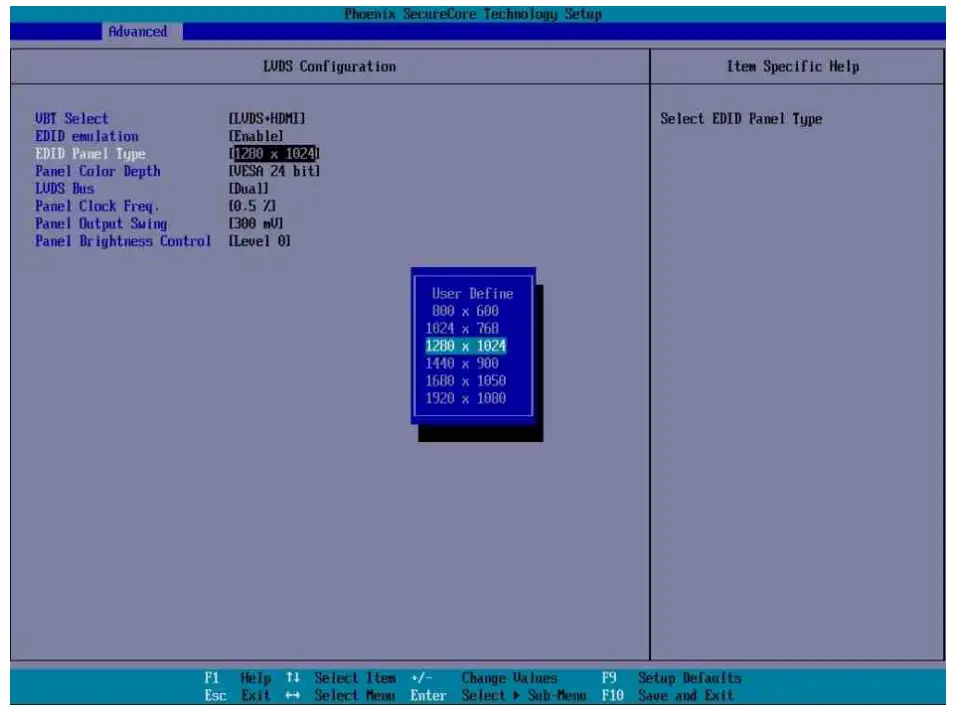
According your panel, it needs to select the correct resolution in the BIOS. If there is no fit your panel type, please feedback for us to make OEM model.
Find the setting from
Advanced->Motherboard Advanced menu->LVDS Configuration
EDID Panel type: There are 7 resolutions in LCD Panel Type, if your panel is not in the list, please contact [email protected]
LVDS Bus: Select Single / Dual channel
Panel Color Depth: Select VESA 24 bit / JEIDA 24 bit / VESA and JEIDA 18 bit
Appendix C <Programmable Watch Dog Timer>
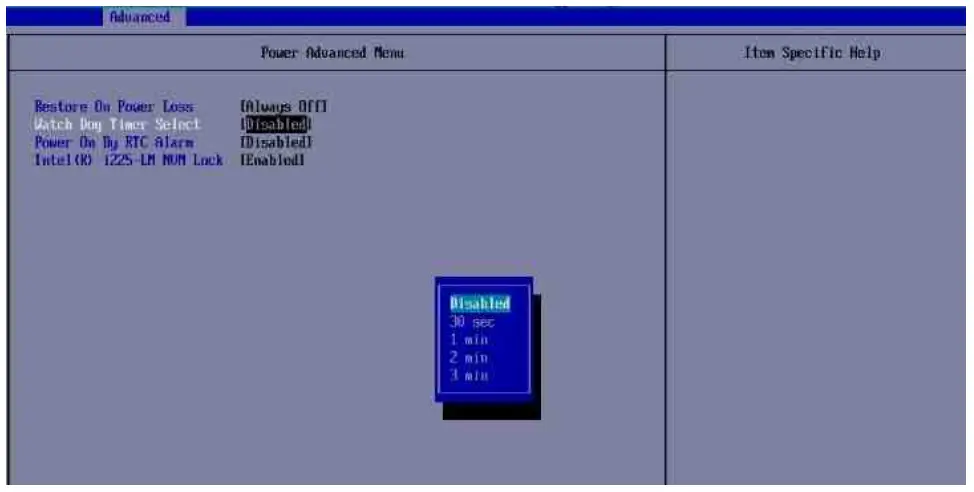
The watchdog timer makes the system auto-reset while it stops to work for a period. The integrated watchdog timer can be setup as system reset mode by program. You can select Timer setting in the BIOS, after setting the time options, the system will reset according to the period of your selection. Find the setting from Advanced⇒Motherboard Advanced Menu->Power Advanced menu-> Watch dog timer select
Program sample
Watchdog timer setup as system reset with 5 second of timeout
| -o 4E 87 -o 4E 87 -o 4E 07 -o 4F 08 -o 4E 30 -o 4F 01 -o 4E F0 -o 4F 00 -o 4E F1 -o 4F 05 | ;enter configuration ;select Logical Device ; activate WDTO# function ;set “00” is second mode, set “08” is minute mode ;00h: Timeout Disable ;01h: Timeout occurs after 1 minute only ;02h: Timeout occurs after 2 second/minute ;03h: Timeout occurs after 3 second/minute … ;FFh: Timeout occurs after 255 second/minute (The deviation is approx 1 second.) |
For further information, please refer to Nuvoton NCT6126D datasheet
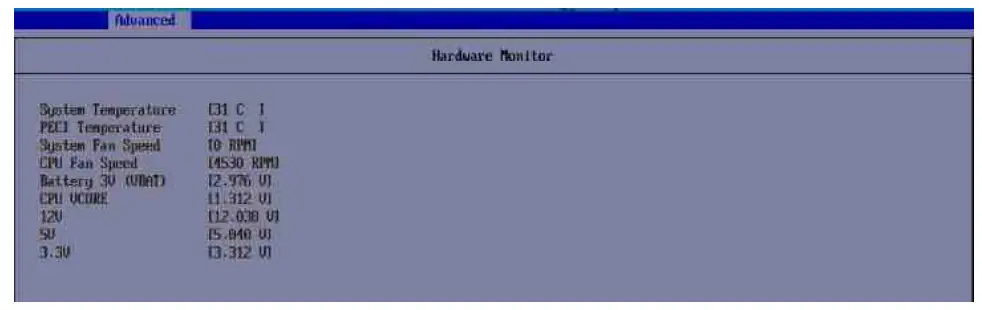
Appendix D <Hardware Monitor>
Find the setting from
Advanced-> Motherboard Advanced menu-> Super IO configuration->⇒Hardware Monitor
Appendix E <Programmable GPIO>
The GPIO can be programmed with the MS-DOS debug program using simple IN/OUT commands.
| GPIO | 0 | 1 | 2 | 3 | 4 | 5 | 6 | 7 |
| bit | 0 | 1 | 2 | 3 | 4 | 5 | 6 | 7 |
| -o 4E 87 -o 4E 87 -o 4E 07 -o 4F 07 -o 4E 30 -o 4F 10 -o 4E F0 -o 4F XX -o 4E F1 -o 4F XX Optional -o 4E F2 -o 4F XX | ;enter configuration ;select Logical Device ;activate GPIO function (The board use GPIO4) ;set “01” GPIO as input, set “00” GPIO as output ;if set GPIO as output, this register’s value can be set “00~ FF” ;set “01”, the respective bit are inverted (Both input and output) ;set “00”, the respective bit are normal |
For further information, please refer to Nuvoton NCT6126D datasheet
Contact information
Any advice or comment about our products and service, or anything we can help you please don’t hesitate to contact with us. We will do our best to support you for your products, projects and business.
Taiwan Commate computer Inc.
| Address | 19F., NO.94, Sec. 1, Xintai 5th Rd., Xizhi Dist., New Taipei City 22102, Taiwan. |
| TEL | +886-2-26963909 |
| Website | www.commell.com.tw |
| [email protected] (General information) [email protected] (Technical Support) |
Commell is a brand name of Taiwan Commate computer Inc.
 Taiwan Commate Computer Inc.(COMMELL)-Industrial PC,Surveillance,OEM/ODM Service
 Taiwan Commate Computer Inc.(COMMELL)-Industrial PC,Surveillance,OEM/ODM Service