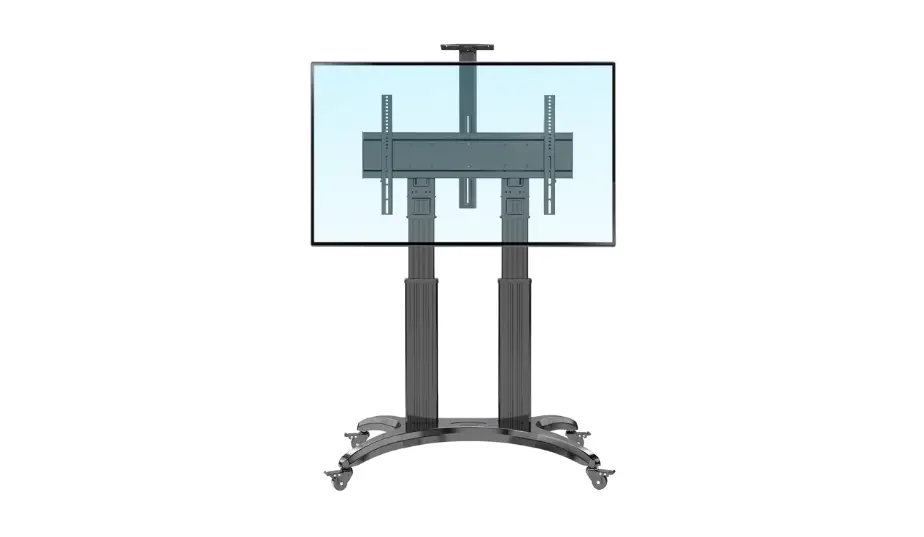
ECO 650 Mobile TV Stand
Product Information: Product Name: MOBILIFT ECO 650 Model: ECO 650
Contents of the Set: – Reinforced lifter – Horizontal beam –
Horizontal beam brackets – Controller bracket – Transport brackets
– Controller – RF-Remote-2W remote control – ISO 4032 caps – ISO
4762 screws – ISO 7045 screws – ISO 7380 screws – ISO 7089 washers
– Assembly and operating manual – Allen wrenches – Plastic washers
(15mm) – Plastic washers (10mm) Additional Required Tools: –
Crosshead screwdriver – Flathead screwdriver Product Usage
Instructions: 1. Before planning the installation, determine the
following: – The thread size of the mounting holes on the rear of
the TV. – The shape of the back of the TV (curved, flat, etc.). –
The audio/video cable mounting locations on the rear of the TV. –
The TV’s weight. 2. Start by sliding the cover bracket into the
lifter guides, as shown in the diagram. Make sure the edges of the
cover are hidden behind the guides. 3. Remove the red safety part
from the cover. 4. Attach the controller to the lifter using the
included ISO 7380 M5x16 screws. 5. Attach the transport brackets
using the included ISO 7380 M8x20 screws. 6. Attach the brackets to
the horizontal beams. 7. Place the TV with the horizontal beams on
the stand. 8. Adjust the clamps on the lifter to match the spacing
of the horizontal beams. Secure the clamps by tightening the
screws. 9. Connect the controller to the lifter. 10. Connect the
power supply to the controller. 11. The controller has two modes:
Setup mode and Programming mode. To enter Setup mode, press and
hold the SETUP button until the red SETUP LED lights up. Note that
holding the RC-SET button for 5 seconds will reset all registered
radio remotes. Please refer to the provided assembly and operating
manual for further instructions and safety precautions.
MOBILIFT
Instrukcja montau i obslugi/Assembly and operating manual
Model ECO 650
MOBILIFT ECO 650
Spis treci/Table of contents
[PL] Instrukcja montau i obslugi……………………………………………………………………………………………….3
Zawarto zestawu………………………………………………………………………………………………………..3 Monta podnonika ……………………………………………………………………………………………………….5 Monta telewizora do podnonika ……………………………………………………………………………………8 Informacje o sterowniku………………………………………………………………………………………………….9 Obsluga podnonika sterowanie …………………………………………………………………………………10 Ustawienie preferowanej wysokoci urzdzenia ………………………………………………………………11 [ENG]
Assembly and operating manual ……………………………………………………………………………………….13 Set contents ………………………………………………………………………………………………………………. 13 Lift assembly ………………………………………………………………………………………………………………15 Monta telewizora do podnonika ………………………………………………………………………………….18 Device operating …………………………………………………………………………………………………………19 Lift operating control ………………………………………………………………………………………………….20 Setting favorite position ………………………………………………………………………………………………..21
Przed zaplanowaniem montau instalator musi okreli:
Rozmiar gwintu otworów montaowych z tylu telewizora
Ksztalt tylu telewizora (zakrzywiony, plaski itp.)
Miejsca montau kabli audio/wideo z tylu telewizora
Wag telewizora
Before planning the installation, the installer must determine the following:
The thread size of the mounting holes on the rear of the TV
The shape of the back of the TV (curved, flat, etc.)
The audio/video cable mounting locations on the rear of the TV
The TV’s weight
Instrukcja montau i obslugi
Instrukcja montau i obslugi
Zawarto zestawu
Lp.
Nazwa czci
1.
Podstawa/wózek
Ilo 1 szt.
2.
Pokrywa wózka z oslon
1 szt.
3.
Wzmocniony podnonik
1 szt.
4.
Belka pozioma
5.
Uchwyty belki poziomej
6.
Uchwyt sterownika
7.
Uchwyty transportowe
8.
Kólka samonastawne
9.
Trzpienie kólek
10.
Sterownik
11.
Pilot RF-Remote-2W
12.
Nakrtki ISO 4032
www.rtv.sabaj.pl
2 szt. 2 szt. lewe
+ 2 szt. prawe
1 szt.
2 szt. 4 szt. 4 szt. 1 szt. 1 szt. 8 szt.
Rys.
M6 3
13.
ruby ISO 4762
14.
ruby ISO 7045
1 kpl. 4 szt.
15.
ruby ISO 7380
1 kpl.
16.
Podkladki ISO 7089
17.
Instrukcja montau i obslugi*
18.
Klucze imbusowe
19.
Plastikowe podkladki (15mm)
20.
Plastikowe podkladki (10mm)
Wymagane narzdzia dodatkowe:
Lp.
Nazwa narzdzia
1.
rubokrt krzyakowy
2.
Klucz plaski
8 szt. 1 szt. 1 kpl. 4 szt. 4 szt.
MOBILIFT ECO 650
M5x12
rozm. 6 *niniejszy dokument
rozm. 2,5; 3; 5; 6
Rys. rozm. 13
Instrukcja montau i obslugi
Monta podnonika 1. Zdejmij pokryw wózka. W tym celu wykr z pokrywy ruby mocujce. Nastpnie wypakuj elementy zlczne dostarczone w wózku (rys. 1).
4x ruby ISO 7380 M4x8
rys. 1
2. Zamontuj kólka samonastawne. W tym celu: KROK 1: Przymocuj trzpienie kólek do wózka KROK 2: Wcinij mocno kólka na wystajce trzpienie (rys. 2)
KROK 1 KROK 2
rys. 2
kólka z hamulcem
UWAGA: Dwa z kólek samonastawnych dolczonych w zestawie s wyposaone w hamulce. Kólka z hamulcami naley zawsze montowa po przektnej.
www.rtv.sabaj.pl
5
3. Przymocuj podnonik do wózka zgodnie z rys. 3.
MOBILIFT ECO 650
7x ruby ISO 4762 M8x25 do dolnej czci 2x ruby ISO 7380 M8x25 do tylnej czci
rys. 3 UWAGA: Pamitaj, eby przeprowadzi kable podnonika przez otwór w podstawie.
4. Zamontuj pokryw wózka z oslon (rys. 4). KROK 1: Poló pokryw przed wózkiem. Nacignij oslon, eby ulatwi monta. UWAGA: W tym kroku nie wycigaj z oslony zabezpieczenia prcika z czerwon kocówk.
KROK 2: Zacznij wsuwa uchwyt oslony w prowadnice podnonika, zgodnie z rysunkiem. Krawdzie oslony powinny by schowane za prowadnicami.
KROK 3: Dokr uchwyt oslony. Uyj dwóch dolczonych rub ISO 7380 M5x16
KROK 4: Poló pokryw na wózku i dokr czterema dolczonymi rubami ISO 7380 M4x8
rys. 4
KROK 5: Wyjmij z oslony czerwony prt bezpieczestwa
6
Instrukcja montau i obslugi
5. Przykr sterownik do podnonika (rys. 5). Uyj czterech dolczonych rub ISO 7380 M5x16.
rys. 5 6. Przymocuj uchwyty transportowe (rys. 6). Uyj czterech dolczonych rub ISO 7380
M8x20.
rys. 6 www.rtv.sabaj.pl
7
MOBILIFT ECO 650
Monta telewizora do podnonika 7. Za pomoc rub, przykr belki poziome do tylnej ciany telewizora (rys. 7 moesz uy rub i podkladek dolczonych do telewizora lub dobra odpowiednie ruby zgodne z instrukcj producenta TV). KROK 2: Przymocuj belki poziome do tylnej czci telewizora
KROK 1: Przykr uchwyty do belek poziomych
rys. 7 8. Powie telewizor z belkami poziomymi na stojaku (rys. 8)
rys. 8
KROK 1: Ustaw zaciski na
KROK 2: Zawie uchwyty wraz KROK 3: Dokr ruby
podnoniku w odlegloci “A”
z ramionami i telewizorem na mocujce uchwyty do
odpowiadajcej rozstawieniu ramion ustawionych suwakach.
suwaków oraz dokr od
poziomych po przykrceniu do
Upewnij si, e wszystkie
góry dodatkowe ruby
telewizora. Nastpnie zabezpiecz uchwyty zostaly zawieszone zabezpieczajce.
suwaki dokrcajc doln rub.
prawidlowo.
8
Instrukcja montau i obslugi
9. Podlcz sterownik do podnonika (rys. 9)
rys. 9 Informacje o sterowniku Sterownik dostarczony w zestawie jest zaprogramowany fabrycznie do maksymalnych zakresów ruchu podnonika.
10. Panel sterowania
rys. 10 11. Podlczanie sterownika: podlcz do sterownika wtyczk podnonika. Nastpnie podlcz
wtyczk zasilajc sterownika do sieci. Zalczenie zasilania sterownik zasygnalizuje zapaleniem kontrolki POWER (zielony kolor). Sterownik przeprowadzi procedur autotestu, sygnalizujc to trzema sygnalami dwikowymi i miganiem kontrolki SETUP (czerwony kolor). Po zakoczeniu tej operacji sterownik jest gotowy do pracy. Nacinicie dowolnego przycisku jest potwierdzone krótkim sygnalem dwikowym. 12. Aktywne gniazdo RJ-45: Twój sterownik jest wyposaony w aktywne gniazdo RJ-45, które pozwala na podlczenie dodatkowych akcesoriów dostarczanych przez firm SabajSystem.
www.rtv.sabaj.pl
9
MOBILIFT ECO 650
UWAGA: Tylko oryginalne akcesoria produkowane przez Sabaj-System bd kompatybilne z Twoim sterownikiem. Jeli podejmiesz prób modyfikacji lub podlczenia innych urzdze przez port RJ-45, moesz uszkodzi lub zniszczy sterownik – skutkuje to utrat gwarancji.
Obsluga podnonika sterowanie Kady sterownik z funkcj sterowania radiowego jest dostarczany z zaprogramowanym ju pilotem radiowym. Tylko piloty dostarczane przez Sabaj-System mog operowa sterownikiem Sabaj. Przyciski na pilocie RF s zaprogramowanie fabrycznie i nie mog by zmienione (rys. 11).
Uwaga! Ze wzgldów bezpieczestwa przyciski w podnonikach serii Mobilift dzialaj na zasadzie monostabilnej oznacza to , e wraz ze zwolnieniem przycisku jazdy urzdzenie przestaje si porusza.
góra
dól
rys. 11
Sterownik posiada 2 tryby ustawie.
Tryb programowania (SETUP mode) osigamy przez nacinicie i przytrzymanie przycisku SETUP, jest on sygnalizowany przez czerwon diod SETUP.
Tryb pamici (Motion MEMORY mode) uruchamiamy przez krótkie nacinicie przycisku RCSET. Uslyszysz krótkie sygnaly dwikowe.
UWAGA: Podnonik moe by obslugiwany przez wicej ni jeden pilot RF. Preferowane zakresy ruchów bd takie same dla wszystkich pilotów.
13. Programowanie nowego pilota RF (opcjonalnie): Sterownik moe zapamita do 8-miu pilotów radiowych. Aby zaprogramowa nowy pilot RF: a. nacinij i zwolnij przycisk RC-SET. Na wywietlaczu pojawi si symbol b. nacinij i podtrzymaj przez okolo 2 sekundy dowolny przycisk na pilocie RF. Symbol na wywietlaczu zganie i uslyszysz sygnal beepera. Pilot RF jest zaprogramowany.
UWAGA: Nacinicie i przytrzymanie przez 5 sekund przycisku RC-SET kasuje wszystkie zarejestrowane piloty radiowe.
14. IR-Multicode programowanie pilota IR: System IR-Multicode pozwala na wykorzystanie dowolnego pilota podczerwieni najbardziej popularnych producentów ekranów TV. Moesz zaprogramowa pilot, którym obslugujesz swój telewizor pracujcych w standardzie RC-5. Niektóre nowsze piloty dzialaj w oparciu o system WiFi/Bluetooth i, mimo e wygldaj jak klasyczne piloty, uywaj zupelnie innej czstotliwoci fali wobec czego nie bd wspólpracowa z odbiornikiem IR- EYE. Naley pamita, e odbiornik IR-EYE podlczony do sterownika przez gniazdo RJ-45 jest konieczny, aby operowa podnonikiem za porednictwem pilota IR.
Uwaga! Ze wzgldu na monostabilny tryb pracy urzdzenia, korzystanie z pilotów podczerwieni nie jest zalecane. Aby zaprogramowa pilot IR:
[email protected]
10
Instrukcja montau i obslugi
a. nacinij i przytrzymaj przycisk SETUP przez okolo 2 sekundy, a uslyszysz dwa krótkie sygnaly dwikowe i zapali si czerwona lampka SETUP. Jeste teraz w trybie programowania
b. nacinij przycisk RC-SET (rozlegn si krótkie sygnaly dwikowe), a nastpnie nacinij przycisk SETUP (sygnal dwikowy wylczy si). Na wywietlaczu pojawi si symbol .
c. skieruj pilota IR na odbiornik IR-EYE i nacinij 2 wybrane przyciski na pilocie. Kady poprawnie zaprogramowany przycisk zostanie zasygnalizowany przez dwik i symbol na wywietlaczu:
(I) – GÓRA (1 sygnal) (II) – DÓL (2 sygnaly)
d. nacinij i przytrzymaj przycisk SETUP przez okolo 2 sekundy, a uslyszysz dwa krótkie sygnaly dwikowe i czerwona dioda SETUP zganie. Sterownik jest teraz w trybie normalnej pracy.
Uwaga: Zaprogramowane przyciski pilota bd jednoczenie aktywne dla dotychczas obslugiwanego tym pilotem urzdzenia. Podnonik moe by obslugiwany przez wicej ni jeden pilot. Preferowane zakresy ruchów bd takie same dla wszystkich pilotów.
Ustawienie preferowanej wysokoci urzdzenia Przy pomocy zaprogramowanego pilota, moesz ustawi maksymalne zakresy ruchu:
a. nacinij i przytrzymaj przycisk SETUP przez okolo 2 sekundy, a uslyszysz dwa
krótkie sygnaly dwikowe i zapali si czerwona dioda SETUP. Jeste teraz w trybie
programowania
b. nacinij i zwolnij przycisk DOWN, aby ustawi doln pozycj preferowan. Nacinij i
zwolnij przycisk DOWN, aby zatrzyma podnonik w pozycji dolnej preferowanej.
Jeli nie zatrzymasz podnonika przyciskiem DOWN, to zatrzyma si automatycznie
w najniszej pozycji po osigniciu wylcznika kracowego dolnego
c. nacinij przycisk RC-SET (rozlegnie si seria krótkich sygnalów dwikowych), a
nastpnie nacinij przycisk DOWN (sygnal dwikowy wylczy si). Na wywietlaczu
pojawi si symbol . Dolna pozycja jest zaprogramowana
d. nacinij i zwolnij przycisk UP, aby ustawi górn pozycj. Nacinij i zwolnij przycisk
UP, aby zatrzyma podnonik w pozycji górnej ulubionej. Jeli nie zatrzymasz
podnonika przyciskiem UP, to zatrzyma si automatycznie w najwyszej pozycji po
osigniciu wylcznika kracowego górnego
e. nacinij i zwolnij przycisk RC-SET (rozlegn si krótkie sygnaly dwikowe), a
nastpnie nacinij i zwolnij przycisk UP (sygnal dwikowy wylczy si). Na
wywietlaczu pojawi si symbol
. Pozycja górna preferowana jest
zaprogramowana
f. po ustawieniu pozycji preferowanych nacinij i przytrzymaj przycisk SETUP przez
okolo 2 sekundy, a uslyszysz dwa krótkie sygnaly dwikowe i czerwona dioda
SETUP zganie. Pozycje preferowane s teraz ustawione i sterownik jest w trybie
normalnej pracy.
15. Resetowanie ustawie: Aby zresetowa ustawienia zakresów ruchu podnonika, naley
nacisn i przytrzyma przycisk SETUP przez ok 5 sekund. Sterownik potwierdzi reset
www.rtv.sabaj.pl
11
sygnalem dwikowym oraz tym symbolem na wywietlaczu:
MOBILIFT ECO 650
Po zresetowaniu urzdzenie moe porusza si znaczco wolniej, dopóki nie osignie wszystkich wylczników kracowych jako referencji ruchu, dokonujc tym samym kalibracji.
16. Rozwizywanie problemów: Tabela symboli wywietlacza powinna by traktowana jako wskazówki mogce pomóc w rozwizaniu danego bldu. Zawsze naley sprawdzi, czy zielona dioda POWER wieci si oznacza to, e urzdzenie jest zasilane. Po wpiciu wtyczki do gniazda zasilania 230V uslyszysz sygnal dwikowy, a dioda LED zawieci si. Jeli powysze nie ma miejsca, moliwe, e uszkodzony zostal bezpiecznik lub nie ma zasilania w gniazdku.
Warto
Opis
Tryb przypisania pilota RF do urzdzenia
Tryb przypisania pilota IR do urzdzenia
Rozwizanie
Wcinij dowolny przycisk na pilocie aby przypisa, lub poczekaj 30 sekund by wyj z
trybu
Wcinij kolejno przycisk (I) i (II), aby zaprogramowa
Funkcja nieaktywna
Wizka wylczników kracowych podnonika
odlczona.
——-
Sprawd wszystkie polczenia wizki wylczników podnonika. Niektóre z nich mogly zosta poluzowane podczas montau
Pozycja dolna zapamitana
——-
Pozycja górna zapamitana
——-
Przecienie silnika podnonika
Obni obciene podnonika
Reset ustawie sterownika
——-
Assembly and operating manual
Assembly and operating manual
Set contents
No.
Part name
Quantity
1.
Trolley
1 pc.
2.
Trolley cover with blind
1 pc.
3.
Reinforced body
1 pc.
4.
Horizontal beam
2 pcs.
5.
Horizontal beam brackets
2 pcs. left + 2 pcs. right
6.
Control box hanger
7.
Handle bars
8.
Caster wheels
9.
Wheel pins
10.
Control box
11.
RF-Remote-2W
12.
Nuts ISO 4032
rtv.sabaj.pl/en/home/
1 pc.
2 pcs. 4 pcs. 4 pcs. 1 pc. 1 pc. 8 pcs.
Fig. M6
13.
Screws ISO 4762
14.
Screws ISO 7045
1 set. 4 pcs.
15.
Screws ISO 7380
1 set.
16.
Pads ISO 7089
17.
Assembly and operating manual*
18.
Allen keys
19.
Plastic spacers (15mm)
20.
Plastic spacers (10mm)
8 pcs. 1 pc. 1 set. 4 pcs. 4 pcs.
Additional tools required:
No.
Tool name
1.
Cross screwdriver
2.
Flat wrench
MOBILIFT ECO 650
M5x12
size 6 *this document
size 2,5; 3; 5; 6
Fig. size 13
Assembly and operating manual
Lift assembly 1. After unpacking all the elements unscrew the screws, take the cover off the cart and put it aside (fig. 1).
4x screws ISO 7380 M4x8
fig. 1
2. Install the wheels to the trolley:
Step 1 – Fasten the pins to the cart Step 2 – Push wheels firmy onto the pin (fig. 2)
STEP 1 STEP 2
fig. 2
Wheels with brakes
NOTE: Two of the caster wheels included in the kit are equipped with brakes. Wheels with brakes should always be installed diagonally.
rtv.sabaj.pl/en/home/
3. Tighten the body to the cart according to the fig. 3.
MOBILIFT ECO 650
7x screws ISO 4762 M8x25 to the bottom side 2x screws ISO 7380 M8x25 to the back side
fig. 3 UWAGA: Remember to lead lifts cables through the opening in the cart.
4. Installing the cover with blind (fig. 4). STEP 1: Lay the cover in front of the cart. Stretch the blind to ease the installation. NOTE: Do not pull the blind’s red safety pin in this step.
STEP 2: Start inserting the blinds bracket from the lower side of the reinforced body accordingly to the drawing below. The blinds material should be under the lifts body.
STEP 3: Tighten the blinds bracket. Use two of the included screws ISO 7380 M5x16
STEP 4: Put the cover on the cart and tighten with 4 screws ISO 7380 M4x8
fig. 4 16
STEP 5: Unlock the blind’s red safety pin.
Assembly and operating manual
5. Tighten the control box chassis to the lift (fig. 5). Use four of the included screws ISO 7380 M5x16.
fig. 5 6. Install handle bars (fig. 6). Use four of the included screws ISO 7380 M8x20.
fig. 6 rtv.sabaj.pl/en/home/
MOBILIFT ECO 650
Monta telewizora do podnonika 7. Using the screws, attach the horizontal beams to the back of the TV (fig. 7 you can use the screws supplied with the TV or select the screws in accordance with the TV producer’s recommendation). STEP 2: Attach horizontal beams to the back of the TV.
STEP 1: Tighten the brackets to the horizontal beams
fig. 7 8. Hang the TV with mounted vertical beams on the lift (rys. 8).
fig. 8
KROK 1 Set clamps on lifts body on distance “A” corresponding to the arms setup on TV. After setting secure the clamps by tightening screws as on drawing.
STEP 2: Hang the screen with arms and brackets on the clamps. Make sure that the screen sits firmly and evenly on the lifts body.
18
STEP 3: Tighten the brackets and all the corresponding screws.
[email protected]
Assembly and operating manual
9. Connect the control box to the lift (fig. 9).
fig. 9 Device operating The control box supplied with the set is pre-programmed for the maximum ranges of the lift movement.
10. Control panel
fig. 10 11. Connecting the controller: connect cable from the lift with the control box. Then plug in
the main socket. The power supply is signaled by lighting the indicator POWER (green). Then the controller carries out the procedure “self-test” indicating this by three sound signals and flashing lights “SETUP” (red). After finish this operation the control box is ready to work. Pressing any button is confirmed by a short beep sound. 12. Active RJ-45 Socket: Your control box is equipped with the active RJ-45 socket, which allows to plug in additional accessories supplied by SABAJGROUP. NOTE: Only the original SABAJGROUP accessories will work with your control box. If you attempt to modify or connect any other devices via the RJ-45 port, you might damage the control box and you will loose the warranty for doing so.
rtv.sabaj.pl/en/home/
MOBILIFT ECO 650
Lift operating control Every control box with RF function is delivered with a pre-progammed RF Remote. Only Sabaj RF remotes can operate with Sabaj control boxes. The buttons on the RF remote control are preprogrammed and cannot be changed (fig. 11).
up
down
fig. 11
The control box has 2 levels of setup.
SETUP mode is acquired by pressing & holding the SETUP button, and is signalized by a RED SETUP LED light.
Motion MEMORY mode is acquired by pressing the RC-SET button. You will hear short beeping sound.
13. Programming a new RF remote (optional): The control box can store up to 8 different RF remotes. To program a new RF remote: a. Press the RC-SET button. You will see this symbol on the digital display b. Press & hold for about 2 seconds any button on the RF remote. Properly programmed remote will result with the digital display symbol disappearing, and a short beep.
NOTE: Pressing and holding the RC-SET button for 5 seconds deletes all registered RF remotes.
14. IR-Multicode – IR Remote Setup (optional – requires the purchase of an IR-EYE accessory): The IR-Multicode system allows you to use any infrared remote control of the most popular TV screen manufacturers. You can program the remote control with which you control your TV working in RC-5 Coding. Some newer remotes work on a WiFi/Bluetooth and, although they might look like a standard remote, they use a completely different wavelength not using the IR receiver. Please be advised, that you will need the IR-EYE Sabaj Accessory connected to the controller via the RJ-45 socket to operate your lift with an IR remote.
Due to monostable operating mode it is not recommended to use infrared remote. To start acquiring the IR remote:
a. Press & hold SETUP button for about 2 seconds red SETUP led will be lit. b. Press RC-SET (Memory) button once – you will hear constant short beep signals.
Then press SETUP button beep signal will stop. You will see this symbol on the display: . The control box is now awaiting IR signals.
c. Aiming your remote towards the IR-Receiver, press 2 buttons you want to use for controlling the lift. Every properly received button will be confirmed by short pauses. Number of pauses correspond to the button set:
(I) – UP (1 beep)
20
Assembly and operating manual
(II) – DOWN (2 beeps)
d. Press & hold SETUP button for about 2 seconds until the red SETUP led is off. The controller is now in normal operation mode.
NOTE: The programmed buttons of the remote control will be active at the same time for the device operated by this remote control. The lift can be operated by more than one remote control. The preferred ranges of motion will be the same for all pilots.
Setting favorite position Using the programmed remote control, you can set the maximum ranges of motion:
a. Press & hold SETUP button for about 2 seconds red SETUP led will be lit and you will hear 2 short “beep” signals. You are in SETUP mode.
b. Press the DOWN button to set the position. Press the DOWN button again to stop the lift. If you do not stop the lift with DOWN button, it will automatically stops at the lowest position when the lower limit switch is reached.
c. Press RC-SET button (You will hear intermittent beeper signal) and press the DOWN button. You will see this symbol on the display. The down position has been set.
d. Press the UP button to set the position. Press the UP button again to stop the lift. If you do not stop the lift with UP button, it will automatically stops at the highest position when it reaches the up limit switch.
e. Press RC-SET button (You will hear intermittent beeper signal) and press the UP button. You will see this symbol on the display . The up position has been set.
f. After you are done with all the settings, simply leave the SETUP mode by pressing & holding the SETUP button for about 2 seconds, until the red SETUP LED light will go off. The preferred positions are now set and the controller is in normal operation mode.
15. Reset settings: It is possible to reset all the favorite positions. To reset the lift press & hold SETUP button for about 5 seconds. Control box will confirm resetting by short “beep” signal and showing you this symbol on the digital display: After resetting the lift, it will move substantially slower until it will reach the marginal positions, to calibrate itself.
16. Troubleshooting: The table of symbols on the digital display should also be used as a troubleshooting guide. Always check, if the green POWER led light is on this signals, that the control box is powered. When you put the plug to the socket, you will hear the beeper sound, and the green led will be turned on. If the LED is not on, the problem might be with the control box fuse breakdown, or there is no power in the socket.
rtv.sabaj.pl/en/home/
MOBILIFT ECO 650
Display
Explanation
Assigning RF remote to control box
Solution
Press any button on RF remote to assign, orwait 15 seconds to quit mode
Assign IR remote to control box
Press (I) and (II) consequently to program
LIFT Limit switch cable harness disconnected
Check all the connections and contacts from Lift to control box. Some pins might be loose due to transportof furniture fitting
Down VP Memory approved
——-
UP VP Memory approved
——-
LITF electric motor overload
Lower the LIFTs load
Full motion reset
——-
 Mechanical TV brackets | TV lifts and TV Automation | Sabaj System
 Podnośniki do telewizorów i Windy projektora Sabaj System