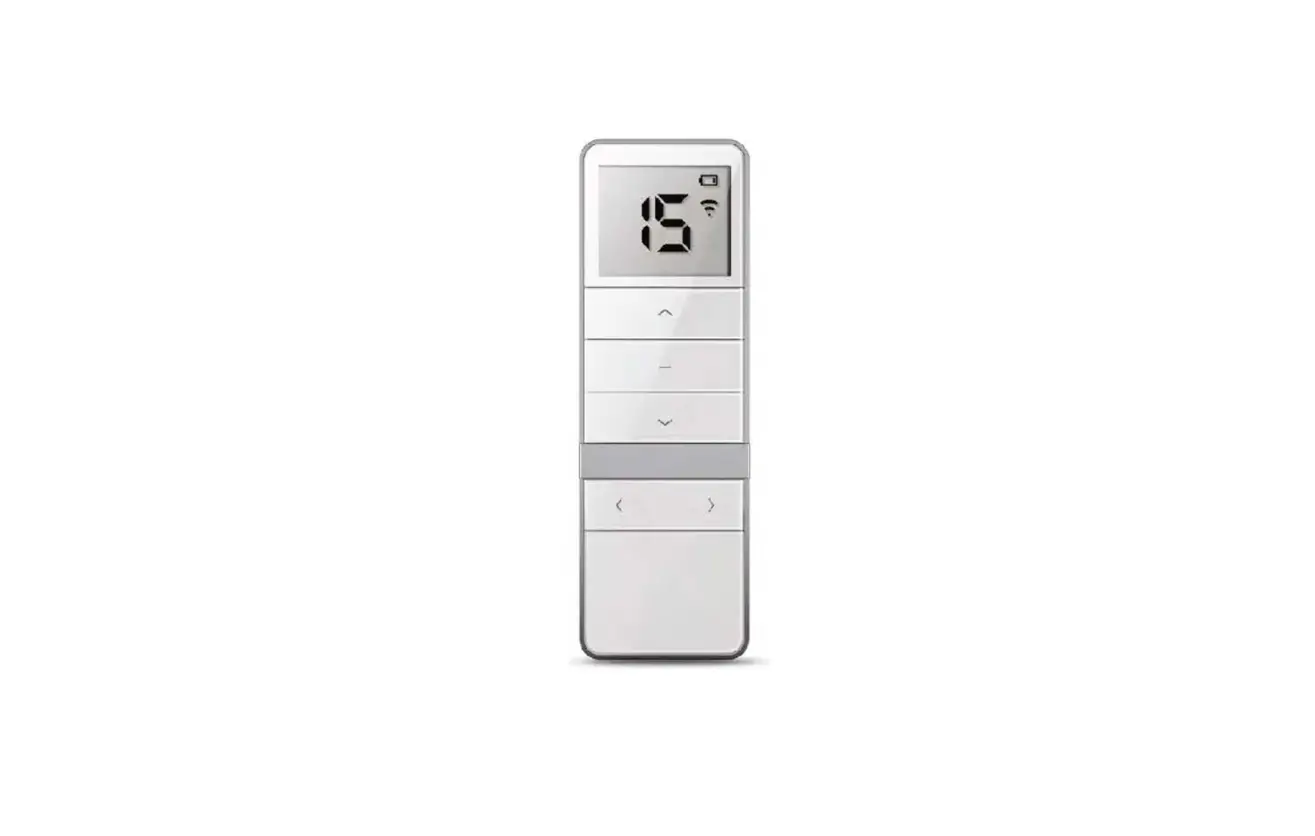
DD1602H 15 Channel LCD Emitter
Product Information
| Product Name | DD1602H 15-channel LCD Emitter |
|---|---|
| Version | A/03 |
| Technical Specification | Battery: 3V (CR2450) Working Temperature: -10~50°C Battery Life: >2 years Transmitting Power: 10 mW Radio Frequency: 433.92MHz Radio Range: 200 meters outdoor, 35 meters indoor |
| Warning |
|
Product Usage Instructions
Max. Channels Adjustment
- In the setting status, press the UP or DOWN button to exit
quickly. - Repeat the same process if you want to adjust the Max.
channels. - Press and hold the CH+ and CH- buttons simultaneously.
- Use the CH+ or CH- button to select the desired channel (from 1
to 15). - The effective channels have been set successfully.
Uni-directional / Bi-directional Mode Switch
- The factory default mode is the bi-directional mode. Repeat the
same operation to switch the mode circularly. - To switch to uni-directional mode, remove the battery from the
emitter, hold the P2 button, and then install the battery. - To switch back to bi-directional mode, repeat the same
procedure.
- If there is no operation for 10 seconds, the setting status
will automatically exit. - The factory default status is unlock. Repeat the same operation
to switch statuses circularly. - Under lock status, the combination buttons don’t work. Under
unlock status, the combination buttons will work normally. - Only the transmitting code will be affected if the combination
buttons are locked. - To lock or unlock, press and hold the STOP button for more than
15 seconds.
DD1602H
15-channel LCD Emitter Instruction
Version: A/03
Instruction Of Buttons
Note: After the operation is completed, after the back cover of the emitter is closed, please screw on Turnbuckle of the back cover. If you need to replace the battery, push the back cover down.
UP
STOP
DOWN Channel(-)
(CH-)
LCD
Channel(+) (CH+)
Setting button
(P2)
DD1602H
15-channel emitter
DD1602H
Back
Technical specification Battery3V (CR2450) Working temperature-10~50
Battery life: >2 years Transmitting power: 10 mW
Radio frequency: 433.92MHz Radio range: 200 meters outdoor, 35 meters indoor
Warning
1, Emitter couldn’t expose to moisture or be striked heavily, or else the emitter life will be affected; 2, If the emitter is not so sensitive or the radio range becomes shorter, pls check whether to change the battery; 3, If the voltage is less than 2.6V, there will be a low voltage indication; 4, Under uni-directional mode, if you press any button more than 20S, while under bi-directional mode, you press
any button 5S, the emitter will stop sending radio signals; 5, It’s forbidden to use different type battery to avoid any dangerous risk; 6, Dispose of used batteries properly.
Max. Channels Adjustment
Note: 1,In the setting status, press UP or DOWN button to exit quickly. 2,Repeat the same process if you want to adjust the Max. channels.
(CH+ + CH-)×1
Press CH+ and CHand hold on
Press CH+ or CH- button to select the desired channels (from 1 to 15)
STOP×1
The effective channels has been set successfully
Uni-directional / Bi-directional Mode Switch
Note: The factory default mode is Bi-directional mode, repeat the same operation to switch the mode circulary.
Emitter without battery
Hold P2 button and install the battery
Uni-directional mode Bi-directional mode
Combination Button Lock / Unlock Operation
Note: 1,If there is no operation for 10 seconds, it will automatically exit the setting status. 2,The factory default is unlock status, repeat same operation to switch status circulaly. 3,Under lock status, the combination buttons don’t work; Under unlock status, the combination buttons will work normally. 4,Only the transmitting code will be affected if the combination buttons are locked.
Press and hold STOP button more than 15s
P2×1
Press and hold STOP button more than 15s
T<10S Combination button is locked
P2×1
Lock status
T<10S
Combination button unlock
Unlock status
Caution: This device complies with Part 15 of the FCC. Operation is subject to the following two conditions: (1) this device may not cause harmful interference, and (2) this device must accept any interference received, including interference that may cause undesired operation.
Any changes or modifications not expressly approved by the party responsible for compliance could void the user’s authority to operate the equipment.
This equipment has been tested and found to comply with the limits for a Class B digital device, pursuant to part 15 of the FCC Rules. These limits are designed to provide reasonable protection against harmful interference in a residential installation. This equipment generates uses and can radiate radio frequency energy and, if not installed and used in accordance with the instructions, may cause harmful interference to radio communications. However, there is no guarantee that interference will not occur in a particular installation. If this equipment does cause harmful interference to radio or television reception, which can be determined by turning the equipment off and on, the user is encouraged to try to correct the interference by one or more of the following measures: –Reorient or relocate the receiving antenna. –Increase the separation between the equipment and receiver. –Connect the equipment into an outlet on a circuit different from that to which the receiver is connected. –Consult the dealer or an experienced radio/TV technician for help.