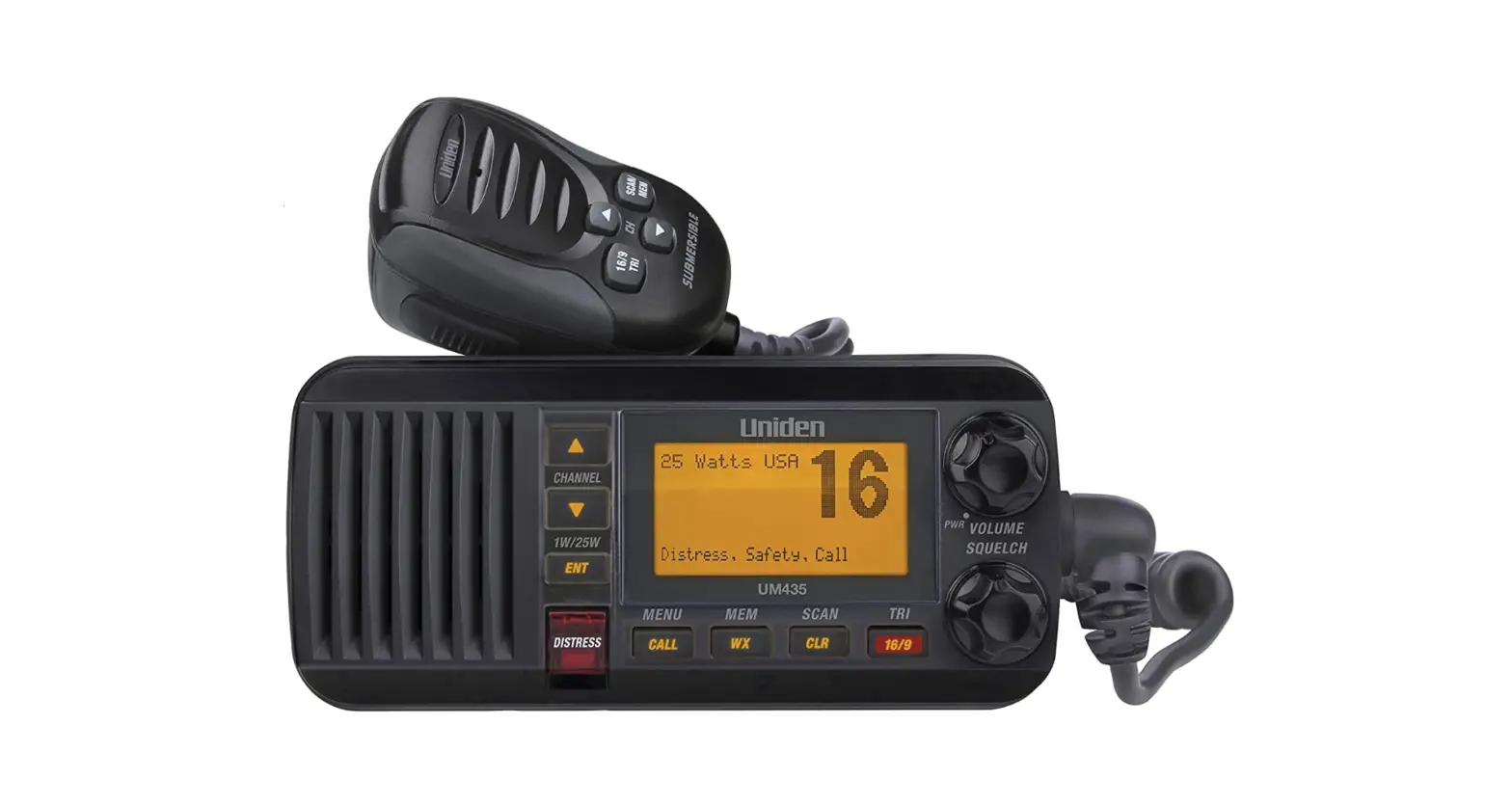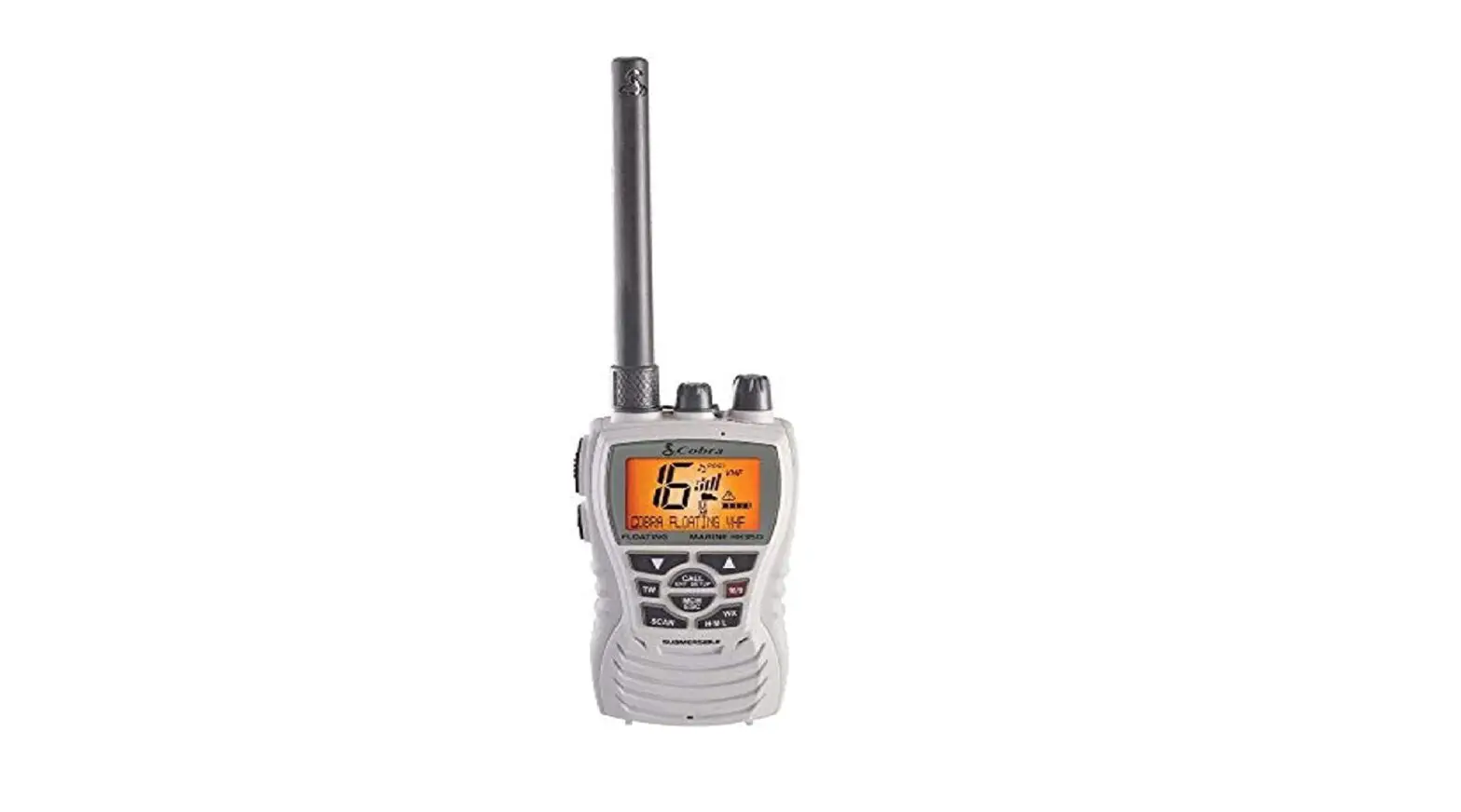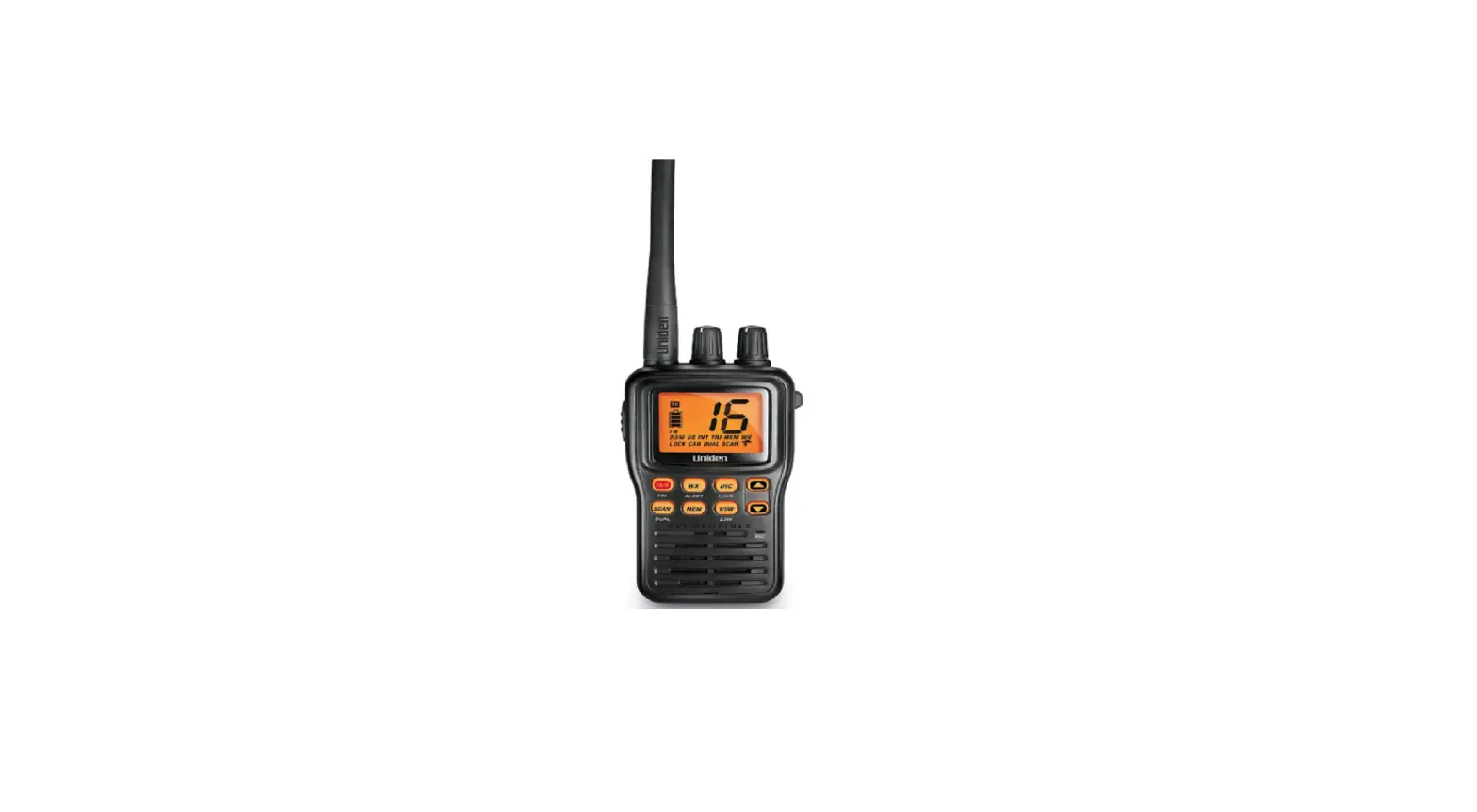

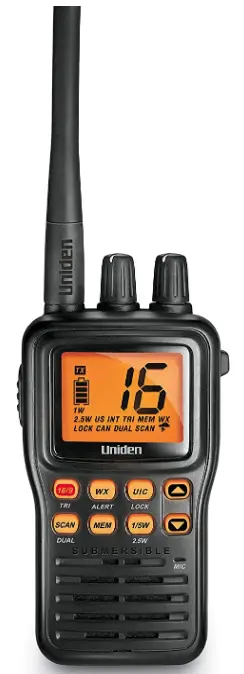
Uniden MHS75 VHF MARINE RADIO
Making a Distress Call
For future reference, write your boat’s name & call sign here:
Speak slowly — clearly — calmly.
- Make sure your radio is on.
- Press the 16/9-Tri button to switch to Channel 16 (156.800 MHz). (If the corner of the display does not show 16, press the 16/9-Tri button again until it does.)
- Press the Push to Talk button and say, “MAYDAY –MAYDAY– MAYDAY.”
- Say, “THIS IS {name or call sign of your boat}.”
- Say, “MAYDAY{name or call sign of your boat}.”
- Tell where you are (what navigational aids or landmarks are near, or give your position from a GPS).
- State the nature of your distress (e.g. sinking, medical emergency, man overboard, fire, adrift, etc.).
- Give the number of persons aboard and describe the condition of any injured persons.
- Estimate the present seaworthiness of your ship (e.g. how immediate is the danger due to flooding or fire or proximity to shore).
- Briefly describes your ship (length, type, color, hull).
- Say, “I WILL BE LISTENING ON CHANNEL 16.”
- End the message by saying, “THIS IS {name or call sign of your boat} OVER.”
- Release the Push to Talk button and listen for a response.
If you do not get an answer after 30 seconds, repeat your call, beginning at step 3, above.
Introduction
Features
The MHS75 provides the following key features:
- Submersible design
Complies with JIS8/IPX8 water-resistant standards, which means the radio can be submerged in 1.5 meters of water for 30 minutes without damage. - Memory scan mode
Lets you save channels to memory and monitor them in quick succession. - Transmitter power level select
Lets you boost the transmitter power from 1 watts to 2.5 or 5 Watts for added transmission distance. - Battery level display and low battery alert.
- Dual, Triple, and Quad Watch operation
These different watch modes let you monitor up to two Coast Guard Distress/Hailing channels and one weather channel along with one regular marine channel. - All marine VHF channels for the U.S., Canada, and international waters
- National Oceanic and Atmospheric Administration
(NOAA) weather channel watch Sounds like a warning tone when a hazard alert is issued.
Getting Started
What’s included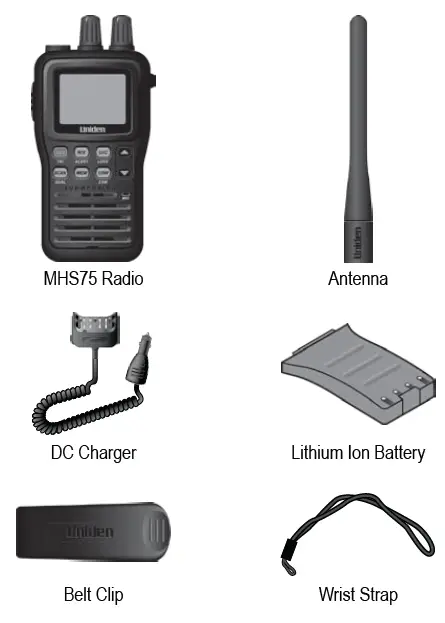
If any pieces are missing or damaged, contact Uniden Customer Service (see back cover for contact information). For information on available accessories, visit www.uniden.com.
Parts of the MHS75
Front view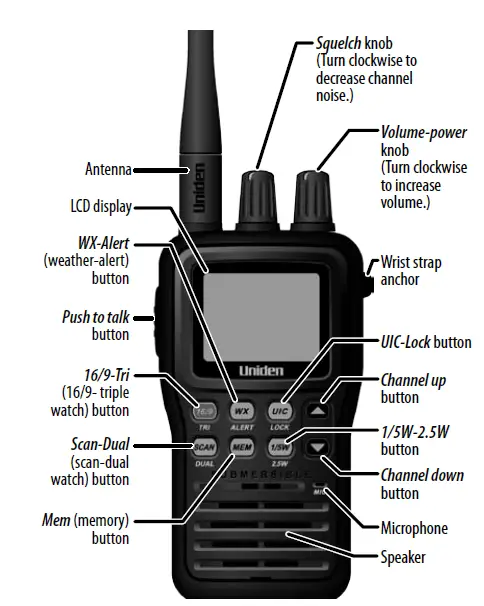
Back view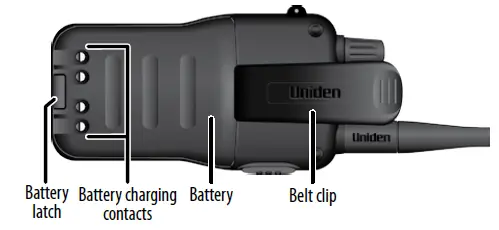
| Knob | Turn clockwise to…: | Turn counter-clockwise to…: |
| Volume- Power | Turn on the radio or increase the volume. | Decrease the volume or turn off the radio. |
| Squelch | Raise the squelch level to reduce channel noise. | Lower the squelch level to hear weaker signals. |
| Button | Press to… | Press and hold to… |
| Push to talk | NA | Transmit on a channel |
| 16/9-Tri | 1st press: Go to channel 16. 2nd press: Go to channel 9. 3rd press: Go back to the starting channel. | Turn Triple Watch on and off. |
| Mem | Save a channel into memory or delete a channel from memory. | NA |
| UIC-Lock | Switch from US to Canadian or international channels. | Lock the keys; press and hold again to unlock. |
| Channel Up | Move up one channel at a time. | Move quickly up the channels. |
| Channel Down | Move down one channel at a time. | Move quickly down the channels. |
| WX-Alert | Listen to the weather channels. | Turn Weather Alert Watch on and off. |
| Scan-Dual | Start scanning the channels saved in memory. | Turn the Dual Watch on and off. |
| 1/5W-2.5W | Switch the transmit power between 1 watts and 5 Watts. | Change the transmit power to 2.5 Watts. |
DC Charger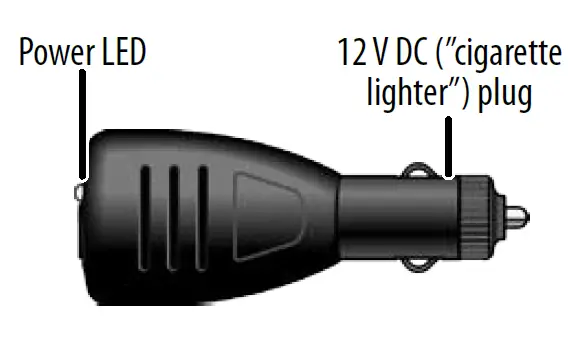
 Reading the display
The LCD display shows different information depending on what you are doing. This sample screen shows some of this information. The table below shows all the possible icons and what they mean.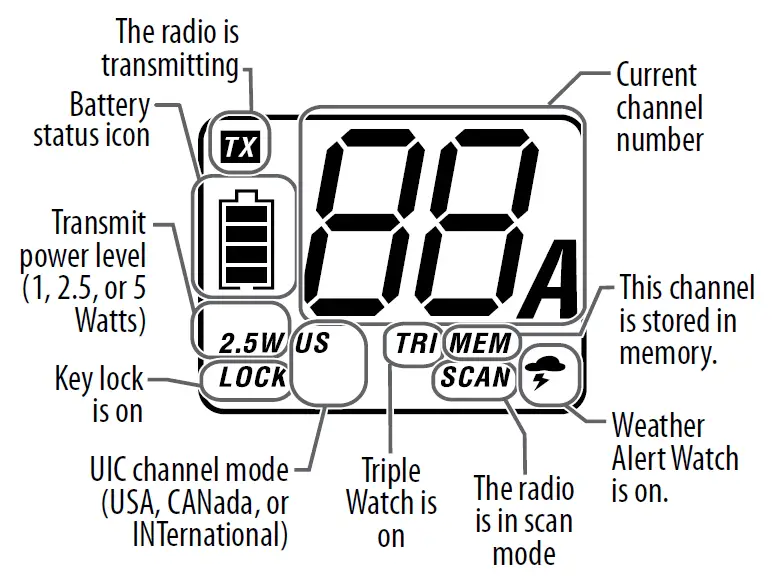
Display icons and what they mean
| Icon | What it means |
 | You are currently transmitting. |
| 1 W, 5 W, or 2.5 W | The transmitter power is set to 1 Watt, 5 Watts, or 2.5 Watts. |
| LOCK | The keys are locked. |
| US, CAN, or INT | The radio is set to use US channels, Canadian channels, or international channels. |
| TRI or DUAL | Triple Watch or DUAL Watch is turned on. |
| MEM | The current channel is saved in memory. |
| SCAN | The radio is in Scan mode. |
| WX | The radio is in Weather Mode |
 | Weather Alert Watch is turned on. |
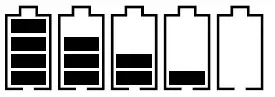 | The battery is fully charged, mostly charged, half charged, mostly empty, or completely empty. |
How It Works
The MHS75 radio has three main operation modes: normal mode, scan mode, and weather mode.
| Mode | What it does | Use it when you want to…: | To turn it on/off |
| Normal mode | Monitors a single marine channel and lets you talk on that channel. | Monitor a channel or talk to another radio. | (default mode) |
| Scan mode | Monitors all the channels you save into memory. | Check a small group of regularly-used channels for traffic. | Press Scan- Dual. |
| Weather mode | Monitor the selected NOAA weather channel. | You want to hear the current or forecasted weather. | Press WX- Alert. |
In addition to the three operation modes, the MHS75 provides four different watch modes which you can activate during any operation mode. In the watch modes, the radio briefly checks for activity on a specific channel, then returns to its previous operation.
| Watch mode | What it does | To turn it on/off |
| Weather Alert Watch | Checks the last-used weather channel for hazard alerts every 7 seconds. | Press and hold WX-Alert for 2 seconds. |
| Dual Watch | Checks channel 16 for activity every 2 seconds. | Press and hold Scan- Dual for 2 seconds. |
| Triple Watch | Checks channels 16 and 9 for activity every 2 seconds. | Press and hold 16/9-Tri for 2 seconds. |
| Quad Watch | Checks channels 16 and 9 for activity every 2 seconds, and checks the last-used weather channel every 7 seconds. | Turn on Triple Watch, then turn on Weather Alert Watch. |
Note: Private boats must monitor channel 16 whenever they are underway. Water-going vessels should have either Triple Watch or Dual Watch on at all times.
Normal mode operation
- To transmit, remove the radio from the charger, then press and hold the Push to Talk button. Release the button when you are finished talking.
- For the best sound quality, hold the microphone about two inches from your mouth while you’re talking.
- Press the Channel Up button to move up one channel at a time. Press and hold the button to scroll quickly up the channels.
- Press the Channel Down button to move down one channel at a time. Press and hold the button to scroll quickly down the channels.
- To change the transmit power, press the 1/5W-2.5W button. The transmit power switches between 1 watts and 5 Watts each time you press the 1/5W-2.5W button.
- To change the transmit power to 2.5 Watts, press and hold the 1/5W-2.5W button for 2 seconds. Press and hold the button again to change back to the previous transmit power (either 1 watts or 5 Watts).
Normal mode with Weather Alert Watch
If you activate Weather Alert Watch while operating in normal mode, the radio checks the most Monitoring Channel 25 recently used weather channel every seven seconds. If it detects a weather or other hazard alert, it will switch to that weather channel. (If you are actively transmitting, the radio waits until you finish your transmission before checking the weather channel.)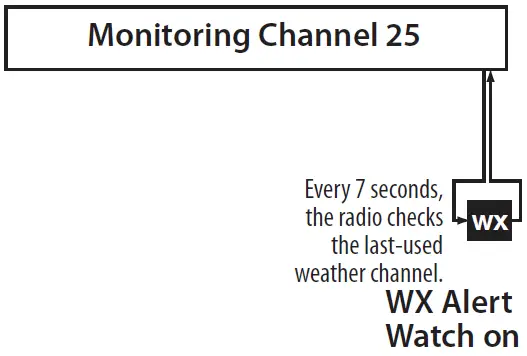
Normal mode with Triple Watch or Dual Watch
If you activate Triple Watch while operating in normal mode, the radio checks channels 16 and 9 every two seconds; with Dual Watch turned on, the radio only checks channel 16. The radio will not check channels 16 or 9 while you are actively transmitting; it waits until your transmission is finished and then checks the channels.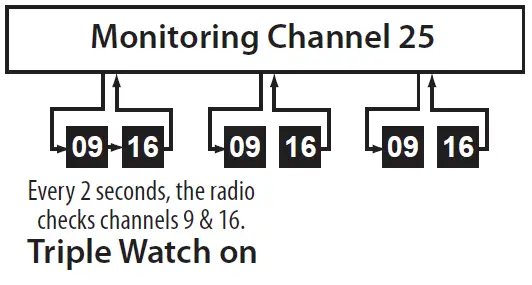
Normal mode with Quad Watch
You can activate Weather Alert Watch and Triple Watch at the same time to monitor four channels at once (Quad Watch). The radio performs the Triple Watch and Weather Alert Watch checks at their scheduled time: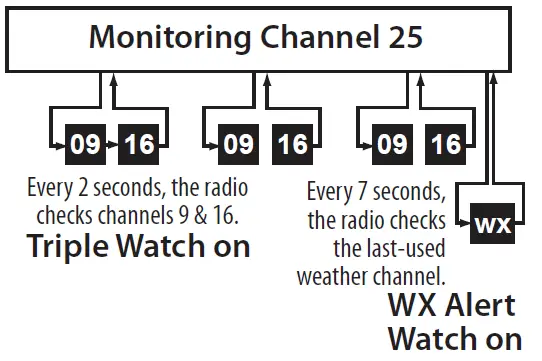
Scan mode operation
You can save channels into memory and then use scan mode to monitor those channels from lowest to highest. If the radio detects a signal on a channel, it stays on that channel as long as the signal is received; when the signal stops, the radio continues scanning.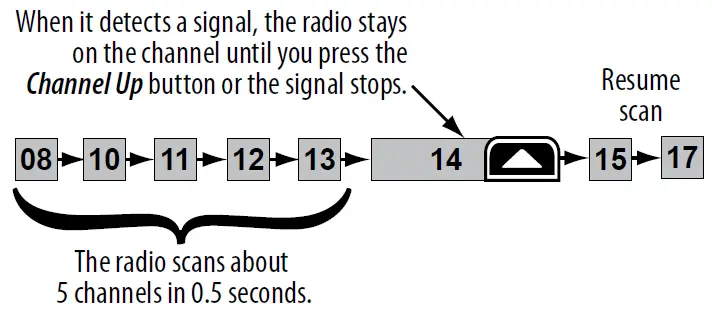
Using the radio in scan mode
- To activate scan mode, press Scan-Dual.
- You must have at least two channels in memory to start a scan.
- You cannot transmit while in scan mode.
- To save a channel into memory, select the channel, then press the Mem button. The Mem icon shows on the display whenever you tune to that channel.
- To remove a channel from memory, set the radio to that channel, then press the Mem button. The Mem icon no longer shows on the display.
- When the radio stays on a channel, press Channel Up to leave that channel and resume scanning.
- To end the scan, press the Scan-Dual button again; the radio remains on the last scanned channel.
Scan mode with Weather Alert Watch
If you activate Weather Alert Watch while in scan mode, the radio checks the most-recently-used weather channel every seven seconds, then continues scanning the next channel in memory: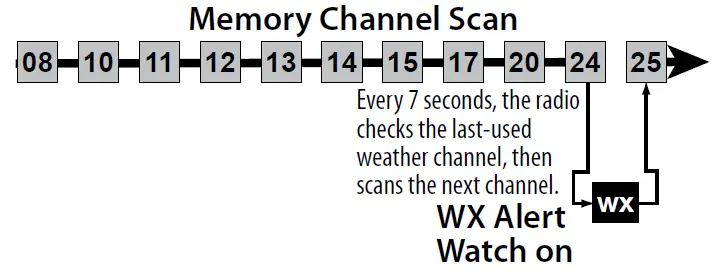
Scan mode with Triple Watch or Dual Watch
If you activate Triple Watch while operating in scan mode, the radio checks channels 16 and 9 every two seconds, then goes on to scan the next channel; with Dual Watch turned on, the radio only checks channel 16: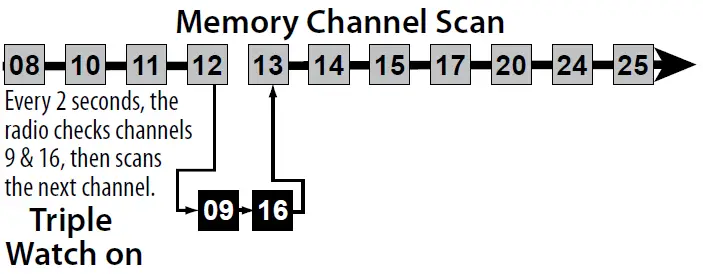
Both Weather Alert and Triple/Dual Watch in scan mode
You can activate Weather Alert Watch and Triple/Dual Watch at the same time. The radio performs both checks at their scheduled time: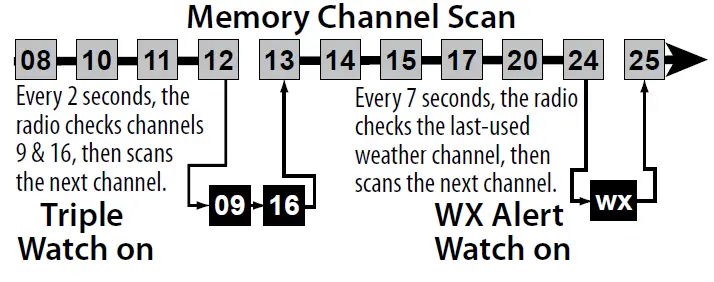
Weather mode
The NOAA weather channels now cooperate with the FCC to alert you of other hazards besides weather (child abduction alerts, nuclear, biological, etc.). In weather mode, the radio monitors one of the ten NOAA weather channels. If any type of alert is received, the radio sounds an alert tone and the display blinks.
Using the radio in weather mode
- You cannot transmit while in weather mode.
- To enter weather mode, press the WX-Alert button.
- To turn off the radio’s alert tone, press any button.
- To cancel weather mode and return to the previous marine channel, press the WX-Alert button again.
Weather mode with Weather Alert Watch
Because weather mode already monitors the weather channels, you don’t need Weather Alert Watch to check the weather channel every seven seconds. If you activate Weather Alert Watch while operating in weather mode, it operates as a type of “sleep mode”: the radio stays on the weather channel and mutes the speaker. If an alert is detected, the radio sounds an alert tone and turns the speaker back on. This mode is very useful when you are anchoring for the night but want to keep informed of hazards.
Weather mode with Triple Watch or Dual Watch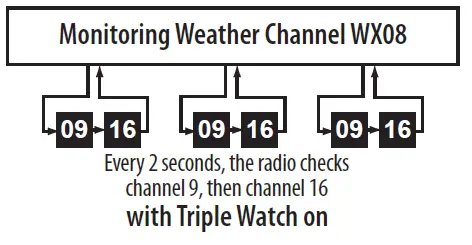
If you activate Triple Watch while operating in weather mode, the radio checks channels 16 and 9 every two seconds; with Dual Watch turned on, the radio only checks channel 16.
Setting Up the Hardware
Attaching the antenna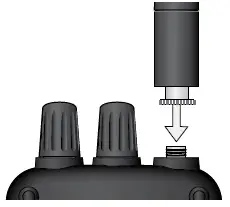
The antenna detaches from the radio for easy shipping or storage. To attach the antenna to your radio, screw it tightly onto the anchor post at the top of the radio.
Installing the battery
Your MHS75 comes with a rechargeable Lithium Ion battery; for shipping safety, the battery is not installed at the factory.
- Insert the hook on the battery into the notch at the top of the battery compartment.
 Note: Each time you remove the battery, check the rubber seal around the battery compartment. Make sure the seal is seated in the groove and there is no dirt or debris on it. If the seal looks worn or damaged, contact customer service to order a replacement (see the back cover page for contact information).
 - Lower the battery until it rests flat in the compartment.

- Bring the battery latch up and snap it into place.
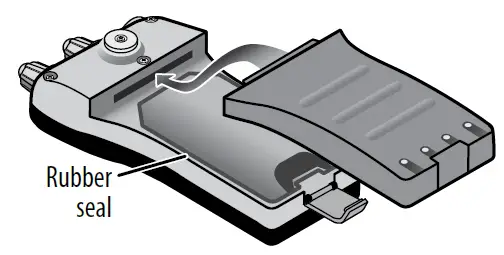 Note: Each time you remove the battery, check the rubber seal around the battery compartment. Make sure the seal is seated in the groove and there is no dirt or debris on it. If the seal looks worn or damaged, contact customer service to order a replacement (see the back cover page for contact information).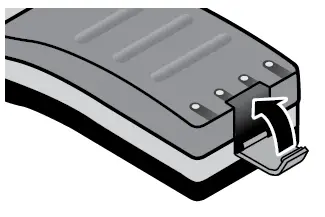
Charging the battery
Connecting the charger Align the charger with the battery (on the rear side of the radio). Slide the radio into the charger until it clicks into place. Connect the other end of the charger to any standard 12 volt DC “cigarette lighter” style outlet. The power LED on the top of the plug should turn orange and remain lit.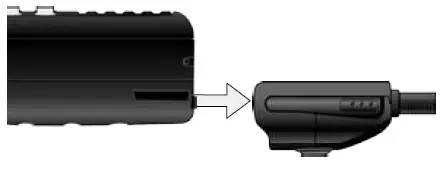
- CAUTION: If the LED blinks, immediately disconnect the charger from the DC outlet. Reseat the radio in the charger before reconnecting the charger to power.
- CAUTION: Use only the battery and charger supplied with this radio. Using a different charger or battery can damage the radio and create a risk of fire or shock.
Important notes on charging the battery
- Charge the battery fully before using the radio.
- When the battery is completely charged, the power LED turns green.
- Don’t use the charger when the ambient temperature is below 0º C (32º F) or above 45º C (113º F).
- If the radio is powered down, the battery can charge in about three and a half hours. (If the radio is powered on, the battery takes longer to charge.)
- If the battery is empty, the radio can’t transmit, even if it’s in the charger.
- Be careful moving the charger cord. If you have to move the cord while the radio is charging, pick up the radio first so you don’t drop it.
Disconnecting the charger
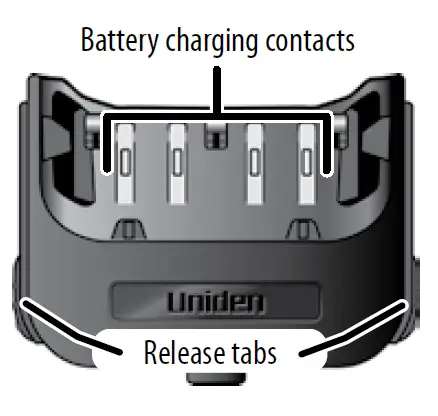
Squeeze in on the release tabs at the base of the charger, and slide the radio out.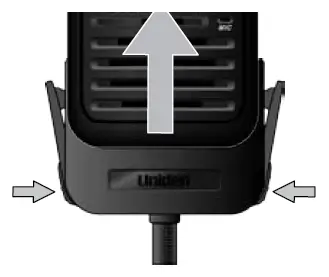
Attaching the belt clip
To attach the belt clip: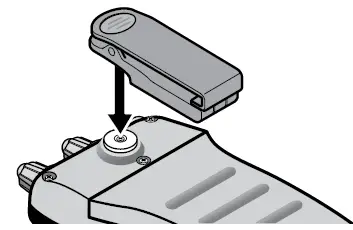
- Rotate the belt clip so that the finger indentation is towards the top of the radio.
- Align the center of the clip with the anchor post.
- Place the clip on the post and slide the clip upwards until it clicks into place.

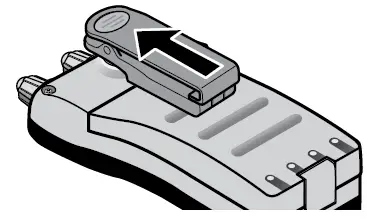
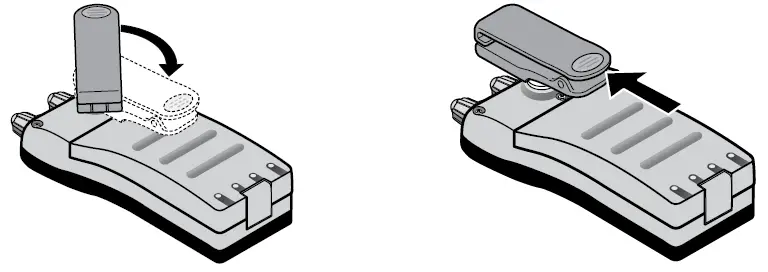
To remove the belt clip:
- Rotate the clip so that the finger indentation is towards the bottom of the radio.
- Slide the clip up until it comes free of the anchor post.

Using Your Radio
Changing the volume
To increase the speaker volume, turn the Volume-Power knob clockwise; turn it counter-clockwise to decrease the volume.
Setting the squelch level
The squelch feature reduces static on the speaker by filtering out any background channel noise. At the lowest squelch level, the speaker plays all signals, including any channel noise. Setting the squelch level higher filters out noise and lets only actual radio transmissions through.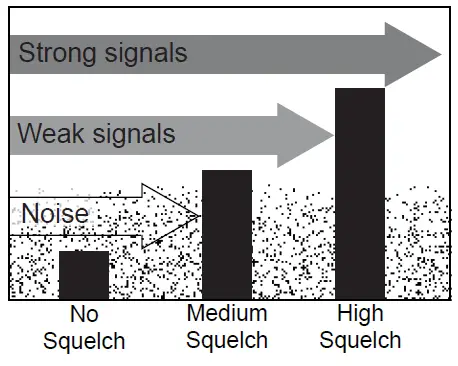
While listening to a channel, adjust the SQUELCH knob until the noise is filtered and you can hear only the transmission. If you switch to a channel with a lot of noise or a weak trans-mission, you may need to readjust the squelch level again.
Note: Setting the squelch level too high may prevent you from hearing weaker transmissions. If you are having difficulty hearing a transmission, try setting the squelch level lower.
Changing the channel
Press the Channel Up and Channel Down buttons briefly to scroll through the channels one channel at a time. Press and hold the Channel Up or Channel Down button to quickly scroll through the channels.
Making a transmission
Select the channel you want to transmit on, then press and hold the Push to Talk button. Release the Push to Talk button when you’re finished talking to let the other party respond.
- To prevent stuck microphone problems or situations where the Push to Talk button is pushed accidentally, the radio limits your talk time to 5 minutes in a single transmission.
- For the best sound quality, hold the microphone about two inches away from your mouth.
- See the channel lists starting on page 19 for a list of receive-only channels.
Boosting the transmission power
In most situations, the 1 Watt transmission power is all you need. If you find yourself far away from other stations and have trouble getting a response, you may need to boost the transmission power from 1 Watt to 2.5 Watts or 5 Watts:
- Press the 1/5W-2.5W button to switch from 1 watts to 5 Watts. Press the button again to switch back to 1 Watt.
- To switch to 2.5 Watts, press and hold the 1/5W-2.5W button for about two seconds. Press and hold the button again to switch back to 1 watts or 5 Watts (whichever you were on when you switched to 2.5 Watts).
- The transmit power remains at the new setting until you change it again. The transmit power icon always shows the current transmission power.
Note: Don’t forget to change the transmission setting back to 1 watts when you move close to other stations. - Some channels (for example, channels 13 and 67) limit the transmission power to 1 watts. When you tune to a limited-power channel, the radio automatically switches to 1 watts. See the channel lists starting on page 19 for a list of power-restricted channels.
Setting the UIC channel mode
The radio comes preset to use the channels assigned for the US. If your current area uses Canadian or international channel assignments, press the UIC-Lock key to rotate through the US, Canadian, and international channels.
Maintenance and Troubleshooting
Due to its rugged design, the MHS75 requires very little maintenance. However, it is a precision electronic instrument, so you should follow a few precautions:
- If the antenna has been damaged, do not transmit except in an emergency situation. Transmitting with a defective antenna may cause further radio damage.
- You are responsible for continued FCC technical compliance of your radio.
- You should arrange for periodic performance checks with your Uniden dealer.
Common questions
| Problem | Things to Try |
| The radio won’t turn on. | Charge the battery. |
| The power LED on the charger doesn’t turn on. | – Replace the fuse inside the charger. (Contact customer service for a replacement fuse and instructions on changing it. – Replace the battery. |
|
The radio won’t transmit. | – Make sure you are not in weather or scan mode. – Make sure you are not trying to transmit on a receive-only channel or transmit at the wrong power level for this channel (see the channel lists starting on page 19). – Check the battery power level; if it’s low, charge the battery before trying to transmit. – Make sure the duration of each transmission is less than 5 minutes. |
| Problem | Things to Try |
| I can’t hear anything from the speaker. | Adjust the squelch level; it is probably too high. |
| Noise comes out of the speaker all the time | Adjust the squelch level; it is probably too low. |
| I can transmit, but no one can hear me. | Check your UIC channel settings: does the area you are in use different channel assignments? |
| I’m not getting hazard alerts. | Make sure the Weather Alert Watch is turned on. |
| The display flashes, and I don’t know why. | The channel number on the display will flash if the radio is in watch mode or in scan mode. Try turning off scanning, Weather Alert Watch, Triple Watch, or Dual Watch (see page 6). |
| Where can I find my radio’s serial number? | The serial number is on a plate inside the battery compartment. |
Specifications
| General | |
| Channels | All US/International/Canadian marine channels |
| 10 Weather channels | |
| Freq. Control | POLL |
| Freq. Tol. | Transmit: 1.5 PPM (at 25°C) |
| Receive: 1.5 PPM (at 25°C) | |
| Oper. Temp. | -4°F (-20°C) to +122°F(+50°C) |
| Antenna | Flexible Whip |
| Microphone | Built-in Electret type |
| Display | Liquid Crystal Display |
| Speaker | 8Ω 0.5 Watt |
| Power Source | Rechargeable Lithium Ion Battery 7.4V 1040 mAh |
| Size (without antenna) | 4.57 (H) x 2.49 (W) x 1.53 (D) inch 116.2 (H) x 63.3 (W) x 39 (D) mm |
| Weight | 10.2 oz (290g) (w/battery and antenna) |
| Transmitter | |
| Frequency Range | 156~158 MHz |
| Frequency Stability | ±10 PPM |
| Power Output | 1.0 W & 2.5W & 5W |
| Spurious Emissions | 70 dBc |
| Current Drain | 1400 mA (5W) |
| Receiver | |
| Type | Double Conversion Super Heterodyne Phase Locked Loop system for Local Oscillator |
| Frequency Range | 156~164 MHz |
| Sensitivity | 0.20 μV for 12dB SINAD |
| Squelch Sensitivity | Threshold 0.12μV |
| Audio Frequency Response | +5 dB @ 500 Hz; -6 dB @ 2000Hz |
| Adjacent Channel Selectivity | 75 dB @ ±25 kHz |
| Audio Output Power | 0.4 W @10% THD |
| Current Drain | Squelched: 55 mA; Max. Audio: 210 mA |
Channels and Frequencies US channel frequencies and names
| US Marine Channels | ||||
| Ch | RX Freq | TX Freq | Status | Name |
| 1A | 156.050 | 156.050 | Simplex | Vessel traffic system/commercial |
| 5A | 156.250 | 156.250 | Simplex | Vessel traffic system/commercial |
| 6 | 156.300 | 156.300 | Simplex | Inter-ship safety |
| 7A | 156.350 | 156.350 | Simplex | Commercial |
| 8 | 156.400 | 156.400 | Simplex | Commercial |
| 9 | 156.450 | 156.450 | Simplex | Noncommercial |
| 10 | 156.500 | 156.500 | Simplex | Commercial |
| 11 | 156.550 | 156.550 | Simplex | Vessel traffic system |
| 12 | 156.600 | 156.600 | Simplex | Vessel traffic system |
| 13 | 156.650 | 156.650 | Simplex, 1W | Bridge to bridge |
| US Marine Channels | ||||
| Ch | RX Freq | TX Freq | Status | Name |
| 14 | 156.700 | 156.700 | Simplex | Vessel traffic system |
| 15 | 156.750 | Inhibit | Receive only | Environmental |
| 16 | 156.800 | 156.800 | Simplex | Distress, safety, and calling |
| 17 | 156.850 | 156.850 | Simplex, 1W | Govt maritime control |
| 18A | 156.900 | 156.900 | Simplex | Commercial |
| 19A | 156.950 | 156.950 | Simplex | Commercial |
| 20 | 161.600 | 157.000 | Duplex | Port operation |
| 20A | 157.000 | 157.000 | Simplex | Port operation |
| 21A | 157.050 | 157.050 | Simplex | Coast guard only |
| 22A | 157.100 | 157.100 | Simplex | Coast guard |
| 23A | 157.150 | 157.150 | Simplex | Coast guard only |
| 24 | 161.800 | 157.200 | Duplex | Marine operator |
| 25 | 161.850 | 157.250 | Duplex | Marine operator |
| 26 | 161.900 | 157.300 | Duplex | Marine operator |
| 27 | 161.950 | 157.350 | Duplex | Marine operator |
| 28 | 162.000 | 157.400 | Duplex | Marine operator |
| 63A | 156.175 | 156.175 | Simplex | Vessel traffic system |
| 65A | 156.275 | 156.275 | Simplex | Port operation |
| 66A | 156.325 | 156.325 | Simplex | Port operation |
| 67 | 156.375 | 156.375 | Simplex, 1W | Bridge To Bridge |
| 68 | 156.425 | 156.425 | Simplex | Non-Commercial |
| 69 | 156.475 | 156.475 | Simplex | Non-Commercial |
| 70 | 156.525 | Inhibit | Receive only | Digital Selective Calling |
| 71 | 156.575 | 156.575 | Simplex | Non-Commercial |
| 72 | 156.625 | 156.625 | Simplex | Non-Commercial (Ship-Ship) |
| 73 | 156.675 | 156.675 | Simplex | Port Operation |
| 74 | 156.725 | 156.725 | Simplex | Port Operation |
| 75 | 156.775 | 156.775 | Simplex, 1W | Port Operation |
| 76 | 156.825 | 156.825 | Simplex, 1W | Port Operation |
| 77 | 156.875 | 156.875 | Simplex, 1W | Port Operation (Ship-Ship) |
| 78A | 156.925 | 156.925 | Simplex | Non-Commercial |
| US Marine Channels | ||||
| Ch | RX Freq | TX Freq | Status | Name |
| 79A | 156.975 | 156.975 | Simplex | Commercial |
| 80A | 157.025 | 157.025 | Simplex | Commercial |
| 81A | 157.075 | 157.075 | Simplex | Coast Guard |
| 82A | 157.125 | 157.125 | Simplex | Coast Guard |
| 83A | 157.175 | 157.175 | Simplex | Government |
| 84 | 161.825 | 157.225 | Duplex | Marine Operator |
| 85 | 161.875 | 157.275 | Duplex | Marine Operator |
| 86 | 161.925 | 157.325 | Duplex | Marine Operator |
| 87A | 157.375 | 157.375 | Simplex | Marine Operator |
| 88A | 157.425 | 157.425 | Simplex | Commercial (Ship-Ship) |
Canadian channel frequencies and names
| Canadian Marine Channels | ||||
| Ch | RX Freq | TX Freq | Status | Name |
| 1 | 160.650 | 156.050 | Duplex | Marine Operator |
| 2 | 160.700 | 156.100 | Duplex | Marine Operator |
| 3 | 160.750 | 156.150 | Duplex | Marine Operator |
| 4A | 156.200 | 156.200 | Simplex | Canadian Coast Guard |
| 5A | 156.250 | 156.250 | Simplex | Vessel Traffic System |
| 6 | 156.300 | 156.300 | Simplex | Inter-Ship Safety |
| 7A | 156.350 | 156.350 | Simplex | Commercial |
| 8 | 156.400 | 156.400 | Simplex | Commercial |
| 9 | 156.450 | 156.450 | Simplex | Boater Calling Channel |
| 10 | 156.500 | 156.500 | Simplex | Commercial |
| 11 | 156.550 | 156.550 | Simplex | Vessel Traffic System |
| 12 | 156.600 | 156.600 | Simplex | Vessel Traffic System |
| 13 | 156.650 | 156.650 | Simplex, 1W | Bridge To Bridge |
| 14 | 156.700 | 156.700 | Simplex | Vessel Traffic System |
| 15 | 156.750 | 156.750 | Simplex, 1W | Environmental |
| 16 | 156.800 | 156.800 | Simplex | Distress, safety, calling |
| 17 | 156.850 | 156.850 | Simplex, 1W | State Control |
| Canadian Marine Channels | ||||
| Ch | RX Freq | TX Freq | Status | Name |
| 18A | 156.900 | 156.900 | Simplex | Commercial |
| 19A | 156.950 | 156.950 | Simplex | Canadian Coast Guard |
| 20 | 161.600 | 157.000 | Duplex, 1W | Port Operation |
| 21A | 157.050 | 157.050 | Simplex | Canadian Coast Guard |
| 22A | 157.100 | 157.100 | Simplex | Canadian Coast Guard |
| 23 | 161.750 | 157.150 | Duplex | Canadian Coast Guard |
| 24 | 161.800 | 157.200 | Duplex | Marine Operator |
| 25 | 161.850 | 157.250 | Duplex | Marine Operator |
| 26 | 161.900 | 157.300 | Duplex | Marine Operator |
| 27 | 161.950 | 157.350 | Duplex | Marine Operator |
| 28 | 162.000 | 157.400 | Duplex | Marine Operator |
| 60 | 160.625 | 156.025 | Duplex | Marine Operator |
| 61A | 156.075 | 156.075 | Simplex | Canadian Coast Guard |
| 62A | 156.125 | 156.125 | Simplex | Canadian Coast Guard |
| 63A | 156.175 | 156.175 | Simplex | Port Operation |
| 64 | 160.825 | 156.225 | Duplex | Marine Operator |
| 64A | 156.225 | 156.225 | Simplex | Port Operation |
| 65A | 156.275 | 156.275 | Simplex | Port Operation |
| 66A | 156.325 | 156.325 | Simplex, 1W | Port Operation |
| 67 | 156.375 | 156.375 | Simplex | Bridge To Bridge |
| 68 | 156.425 | 156.425 | Simplex | Non Commercial |
| 69 | 156.475 | 156.475 | Simplex | Non-Commercial |
| 70 | 156.525 | Inhibit | Receive only | Digital Selective Calling |
| 71 | 156.575 | 156.575 | Simplex | Non-Commercial |
| 72 | 156.625 | 156.625 | Simplex | Non-Commercial |
| 73 | 156.675 | 156.675 | Simplex | Port Operation |
| 74 | 156.725 | 156.725 | Simplex | Port Operation |
| 75 | 156.775 | 156.775 | Simplex, 1W | Port Operation |
| 76 | 156.825 | 156.825 | Simplex, 1W | Port Operation |
| 77 | 156.875 | 156.875 | Simplex, 1W | Port Operation |
| 78A | 156.925 | 156.925 | Simplex | Inter Ship |
| Canadian Marine Channels | ||||
| Ch | RX Freq | TX Freq | Status | Name |
| 79A | 156.975 | 156.975 | Simplex | Inter Ship |
| 80A | 157.025 | 157.025 | Simplex | Inter Ship |
| 81A | 157.075 | 157.075 | Simplex | Canadian Coast Guard |
| 82A | 157.125 | 157.125 | Simplex | Canadian Coast Guard |
| 83 | 161.775 | 157.175 | Duplex | Canadian Coast Guard |
| 83A | 157.175 | 157.175 | Simplex | Canadian Coast Guard |
| 84 | 161.825 | 157.225 | Duplex | Marine Operator |
| 85 | 161.875 | 157.275 | Duplex | Marine Operator |
| 86 | 161.925 | 157.325 | Duplex | Marine Operator |
| 87 | 157.375 | 157.375 | Simplex | Port Operation |
| 88 | 157.425 | 157.425 | Simplex | Port Operation |
International channel frequencies and names
| International Marine Channels | ||||
| Ch | RX Freq | TX Freq | Status | Name |
| 1 | 160.650 | 156.050 | Duplex | Marine operator |
| 2 | 160.700 | 156.100 | Duplex | Marine operator |
| 3 | 160.750 | 156.150 | Duplex | Marine operator |
| 4 | 160.800 | 156.200 | Duplex | Marine operator |
| 5 | 160.850 | 156.250 | Duplex | Marine operator |
| 6 | 156.300 | 156.300 | Simplex | Inter-ship safety |
| 7 | 160.950 | 156.350 | Duplex | Marine operator |
| 8 | 156.400 | 156.400 | Simplex | Commercial (ship-ship) |
| 9 | 156.450 | 156.450 | Simplex | Boater calling channel |
| 10 | 156.500 | 156.500 | Simplex | Commercial |
| 11 | 156.550 | 156.550 | Simplex | Vessel traffic system |
| 12 | 156.600 | 156.600 | Simplex | Vessel traffic system |
| 13 | 156.650 | 156.650 | Simplex | Bridge to bridge |
| 14 | 156.700 | 156.700 | Simplex | Vessel traffic system |
| 15 | 156.750 | 156.750 | Simplex, 1W | Environmental |
| 16 | 156.800 | 156.800 | Simplex | Distress, safety, calling |
| International Marine Channels | ||||
| Ch | RX Freq | TX Freq | Status | Name |
| 17 | 156.850 | 156.850 | Simplex, 1W | Govt maritime control |
| 18 | 161.500 | 156.900 | Duplex | Port operation |
| 19 | 161.550 | 156.950 | Duplex | Commercial |
| 20 | 161.600 | 157.000 | Duplex | Port operation |
| 21 | 161.650 | 157.050 | Duplex | Port operation |
| 22 | 161.700 | 157.100 | Duplex | Port operation |
| 23 | 161.750 | 157.150 | Duplex | Marine operator |
| 24 | 161.800 | 157.200 | Duplex | Marine operator |
| 25 | 161.850 | 157.250 | Duplex | Marine operator |
| 26 | 161.900 | 157.300 | Duplex | Marine operator |
| 27 | 161.950 | 157.350 | Duplex | Marine operator |
| 28 | 162.000 | 157.400 | Duplex | Marine operator |
| 60 | 160.625 | 156.025 | Duplex | Marine operator |
| 61 | 160.675 | 156.075 | Duplex | Marine operator |
| 62 | 160.725 | 156.125 | Duplex | Marine operator |
| 63 | 160.775 | 156.175 | Duplex | Marine operator |
| 64 | 160.825 | 156.225 | Duplex | Marine operator |
| 65 | 160.875 | 156.275 | Duplex | Marine operator |
| 66 | 160.925 | 156.325 | Duplex | Marine operator |
| 67 | 156.375 | 156.375 | Simplex | Bridge to bridge |
| 68 | 156.425 | 156.425 | Simplex | Noncommercial |
| 69 | 156.475 | 156.475 | Simplex | Noncommercial |
| 70 | 156.525 | Inhibit | Receive only | Digital Selective Calling |
| 71 | 156.575 | 156.575 | Simplex | Noncommercial |
| 72 | 156.625 | 156.625 | Simplex | Noncommercial |
| 73 | 156.675 | 156.675 | Simplex | Port operation |
| 74 | 156.725 | 156.725 | Simplex | Port operation |
| 75 | 156.775 | 156.775 | Simplex, 1W | Port operation |
| 76 | 156.825 | 156.825 | Simplex, 1W | Port operation |
| 77 | 156.875 | 156.875 | Simplex | Port operation (ship-ship) |
| 78 | 161.525 | 156.925 | Duplex | Port operation |
| International Marine Channels | ||||
| Ch | RX Freq | TX Freq | Status | Name |
| 79 | 161.575 | 156.975 | Duplex | Port operation |
| 80 | 161.625 | 157.025 | Duplex | Port operation |
| 81 | 161.675 | 157.075 | Duplex | Port operation |
| 82 | 161.725 | 157.125 | Duplex | Port operation |
| 83 | 161.775 | 157.175 | Duplex | Port operation |
| 84 | 161.825 | 157.225 | Duplex | Marine operator |
| 85 | 161.875 | 157.275 | Duplex | Marine operator |
| 86 | 161.925 | 157.325 | Duplex | Marine operator |
| 87 | 157.375 | 157.375 | Simplex | Marine operator |
| 88 | 157.425 | 157.425 | Simplex | Marine operator |
Weather channel frequencies and names
| Channel | RX |
| WX01 | 162.5500 |
| WX02 | 162.4000 |
| WX03 | 162.4750 |
| WX04 | 162.4250 |
| WX05 | 162.4500 |
| WX06 | 162.5000 |
| WX07 | 162.5250 |
| WX08 | 161.6500 |
| WX09 | 161.7750 |
| WX10 | 163.2750 |
Regulations and Safety Warnings
WARNING! Read this information before using the radio.
Maritime radio services operation
Warning! This transmitter will operate on channels/frequencies that have restricted use in the United States. The channel assignments include frequencies assigned for exclusive use of the U.S. Coast Guard, use in Canada, and use in international waters. Operation on these frequencies without proper authorization is strictly forbidden. See pages 19 through 25 for tables of the available channels and their uses. If you are still not certain which channels to use, see the FCC maritime radio page at the FCC website
(http://wireless.fcc.gov/marine/) or contact the FCC Call Center at 1-888-CALL-FCC. For individuals requiring a license, such as commercial users, you should obtain a license application from your nearest FCC field office (for US users) or Industry Canada (for Canadian users).
Basic radio guidelines
You should familiarize yourself with the rules on marine radios and be aware of which rules apply to your boat. Complete guidelines for all ship and marine radio types can be found at the US Coast Guard website under the topic Radio Info for Boaters (the direct link is http://www.navcen.uscg.gov/marcomms/boater.htm). Here are a few guidelines that affect nearly all boaters.
- If you have a VHF radio on your boat, you must maintain a watch on channel 16 (156.800 MHz) whenever the radio is not being used to communicate. Starting in 2004, if a radio is carried, it must be on and set to channel 16 whenever your boat is underway.
- If you hear a distress call, wait a few minutes to let a shore station or Coast Guard vessel respond. If no other station has responded after 5 minutes, you must respond to the distress call.
- Do not make false mayday or distress calls as a prank or to test your radio. (This is essentially like making a false 9- 1- 1 call; you may be subject to fines.)
FCC/Industry Canada information
- Certification: FCC Part 80 or RSS-182
- Output Power: 5W
- Emission: 16K0F3E
- Transmitter Frequency Range: 156.025-157.425 MHz
This device complies with Part 80 of the FCC Rules, as well as Part 15 of the FCC Rules. Operation is subject
to the condition that this device does not cause harmful interference. Unauthorized changes or modifications to this equipment may void compliance with the FCC Rules. Any change or modification must be approved in writing by Uniden. Changes or modifications not approved by Uniden could void the user’s authority to operate the equipment.
FCC RF exposure information
In August 1996 the Federal Communications Commission (FCC) of the United States with its action in Report and Order FCC 96-326 adopted an updated safety standard for human exposure to radio frequency electromagnetic energy emitted by FCC regulated transmitters. Those guidelines are consistent with the safety standard previously set by both U.S. and international standards bodies. The design of the radio complies with the FCC guidelines and these international standards. Never allow children to operate the radio without adult supervision and the knowledge of the following guidelines.
WARNING! It is up to the user to properly operate this radio transmitter to ensure safe operation. Please adhere to the following:
- Use only the supplied or approved antenna. Unauthorized antennas, modifications, or attachments could impair call quality, damage the radio, or violate FCC regulations.
- Do not use a radio with a damaged antenna. If a damaged antenna comes into contact with the skin, a minor burn may result. Please contact your local dealer for a replacement antenna.
Lithium-ion battery warning
This equipment contains a rechargeable Lithium Ion battery. The rechargeable Lithium Ion battery contained in this equipment may explode if disposed of in a fire. Do not short-circuit the battery. Do not charge the rechargeable battery used in this equip-ment in any charger other than the one specified in the owner’s manual. Using another charger may damage the battery or cause the battery to explode.
Li-Ion batteries must be recycled or disposed of properly.
Avoid exposing the battery (whether attached to the radio or not) to direct sunlight, heated cars, or temperatures below -4°F (-20°C) or above +140°F (+60°C). Exposing the chemical contained within the battery pack to temperatures above +140°F (+60°C) may cause the battery to rupture, fail, or reduce performance. In case of exposure to the cell contents, wash the affected area thoroughly, and seek medical attention.
Three-Year Limited Warranty Statement
WARRANTOR:
UNIDEN AMERICA CORP. (“Uniden”)
ELEMENTS OF WARRANTY:
Uniden warrants, for three years, to the original retail owner, this Uniden Product to be free from defects in materials and craftsmanship with only the limitations or exclusions set out below.
WARRANTY DURATION:
This warranty to the original user shall terminate and be of no further effect 36 months after the date of the original retail sale. The warranty is invalid if the Product is (A) damaged or not maintained as reasonable
or necessary, (B) modified, altered, or used as part of any conversion kits, subassemblies, or any configurations not sold by Uniden, (C) improperly installed, (D) serviced or repaired by someone other than an authorized Uniden service center for a defect or malfunction covered by this warranty, (E) used in any conjunction with equipment or parts or as part of any system not manufactured by Uniden, or (F) installed or programmed by anyone other than as detailed by the Operating Guide for this product.
STATEMENT OF REMEDY:
In the event that the product does not conform to this warranty at any time while this warranty is in effect, the warrantor will repair the defect and return it to you without charge for parts, service, or any other cost (except shipping and handling) incurred by the warrantor or its representatives in connection with the performance of this warranty. THE LIMITED WARRANTY SET FORTH ABOVE IS THE SOLE AND ENTIRE WARRANTY PERTAINING TO THE PRODUCT AND IS IN LIEU OF AND EXCLUDES ALL OTHER WARRANTIES OF ANY NATURE WHATSOEVER, WHETHER EXPRESS, IMPLIED, OR ARISING BY OPERATION OF LAW, INCLUDING, BUT NOT LIMITED TO ANY IMPLIED WARRANTIES OF MERCHANTABILITY OR FITNESS FOR A PARTICULAR PURPOSE. THIS WARRANTY DOES NOT COVER OR PROVIDE FOR THE REIMBURSEMENT OR PAYMENT OF INCIDENTAL OR CONSEQUENTIAL DAMAGES. Some states do not allow this exclusion or limitation of incidental or consequential damages so the above limitation or exclusion may not apply to you.
LEGAL REMEDIES:
This warranty gives you specific legal rights, and you may also have other rights which vary from state to state. This warranty is void outside the United States of America.
PROCEDURE FOR OBTAINING PERFORMANCE OF WARRANTY:
If, after following the instructions in this Operating Guide you are certain that the Product is defective, pack the Product carefully (preferably in its original packaging). Include evidence of the original purchase and a note describing the defect that has caused you to return it. The Product should be shipped freight prepaid, by traceable means, or delivered, to the warrantor at:
Uniden America Corporation Parts and Service Division 4700 Amon Carter Boulevard Fort Worth, TX, 76155 (800) 554-3988
QUESTIONS?
Visit our website at www.uniden.com or call 1-800-297-1023.
FREQUENTLY ASKED QUESTIONS
What is the Uniden MHS75 VHF Marine Radio?
The Uniden MHS75 is a handheld VHF marine radio designed for communication on boats and other marine vessels.
What is the range of the Uniden MHS75 VHF Marine Radio?
The Uniden MHS75 has a maximum range of up to 5 miles, depending on the terrain and environmental conditions.
Does the Uniden MHS75 have weather alert features?
Yes, the Uniden MHS75 has a built-in NOAA weather alert feature that allows you to receive emergency weather alerts.
Is the Uniden MHS75 waterproof?
Yes, the Uniden MHS75 is waterproof and designed to meet JIS8/IPX8 standards, which means it can be submerged in water up to 5 feet for 30 minutes.
What type of battery does the Uniden MHS75 use?
The Uniden MHS75 uses a rechargeable lithium-ion battery pack.
How long does the battery of the Uniden MHS75 last?
The battery life of the Uniden MHS75 varies depending on usage, but it can last up to 12 hours on a single charge.
Can the Uniden MHS75 be used for channel scanning?
Yes, the Uniden MHS75 has a channel scanning feature that allows you to scan through all available channels to find active communications.
Does the Uniden MHS75 have a built-in GPS?
No, the Uniden MHS75 does not have a built-in GPS. It is a basic VHF marine radio without GPS functionality.
Can the Uniden MHS75 be used for dual watch?
Yes, the Uniden MHS75 has a dual watch feature that allows you to monitor two channels simultaneously.
Does the Uniden MHS75 have a noise-canceling microphone?
Yes, the Uniden MHS75 has a noise-canceling microphone that helps reduce background noise for clearer communication.
Can the Uniden MHS75 be used with a headset?
Yes, the Uniden MHS75 has a 3.5mm audio jack that allows you to connect a headset for hands-free communication.
Does the Uniden MHS75 have a backlit display?
Yes, the Uniden MHS75 has a backlit LCD display that provides visibility in low-light conditions.
Can the Uniden MHS75 be used for digital selective calling (DSC)?
No, the Uniden MHS75 does not support DSC functionality. It is a basic VHF marine radio without advanced features like DSC.
Does the Uniden MHS75 come with a belt clip?
Yes, the Uniden MHS75 comes with a belt clip that allows you to conveniently attach it to your belt or clothing.
Is the Uniden MHS75 compatible with other VHF marine radios?
Yes, the Uniden MHS75 operates on the standard VHF marine radio frequencies and is compatible with other VHF marine radios.
VIDEO – PRODUCT OVERVIEW
DOWNLOAD THE PDF LINK: Uniden MHS75 VHF MARINE RADIO OWNER’S MANUAL