 HIMUNICATION
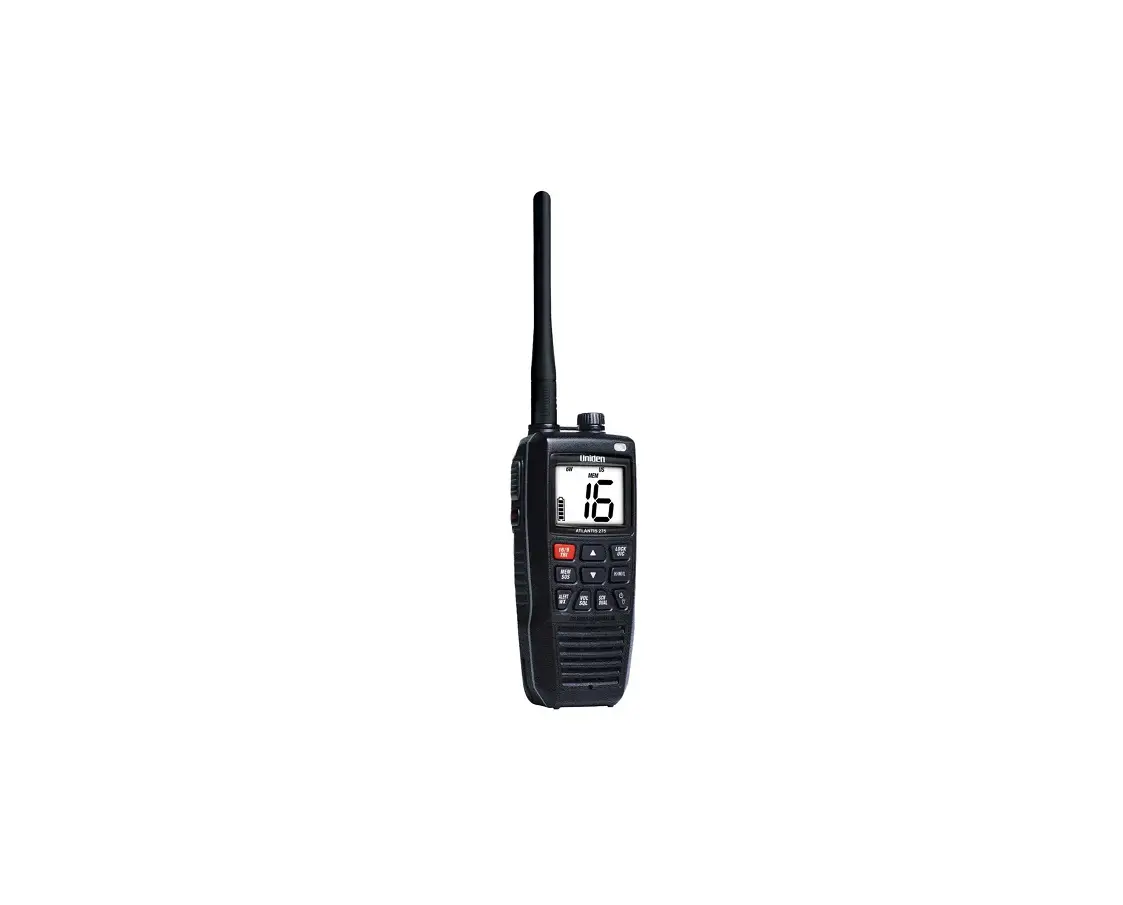
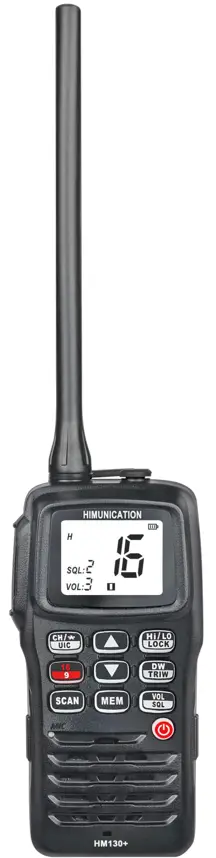
VHF MARINE RADIO
HM130+
User Manual
 http://www.himunication.com
Please Scan the QR Code to Download
EN/FR/ES/ITA Multi-language User Manual
HM130 + Instruction Manual
Utility Model Hand-held Marine Radio with China Exclusive Patent Technology
EU Regulatory Conformance
As certified by the qualified laboratory, the product is in compliance with the essential requirements and other relevant provisions of Directive 1999/5/EC. Please note that the above information is applicable to EU countries only.
Fabricant:HIMUNICATION
Numbel:11005103
Adresse:3rd Floor, Block C, Huafeng Second Industry Park, Hangcheng Road, Gushu, Xixiang town, Baoan District, Shenzhen, China
Hereby, HIMUNICATION declares that this Maritime Radio is in compliance with essential requirements and other relevant provisions of Directive 2014/53/EU.

Caution
- The device can only receive signals when in charging mode.
- Risk of explosion if the battery is replaced by an incorrect type. Dispose of used batteries according to the instructions.
- Adapter shall be installed near the equipment and shall be easily accessible.
- The device operating temperature range is -20~55℃.
- The plug is considered as a disconnect device of the adapter.
- The device complies with RF specifications when the device is used at 25mm from your front face and 0mm from your body.
- Declaration of Conformity.
The information listed above provides the user with the information needed to make him or her aware of an RF exposure, and what to do to assure that this radio operates within the CE exposure limits of this radio.
The device complies with RF specifications when the device is used at 25mm from your front face and 0mm from your body. Third-party belt clips, holsters, and similar accessories used by this device should not contain any metallic components. Body-worn accessories that do not meet these requirements may not comply with RF exposure requirements and should be avoided. Maximum SAR Value (10g):1.99W/Kg.
Waterproof Design Warning:
This product is the IPX8 waterproof design, in order to achieve the best performance, before the end-user use it, please pay the highest attention to the following three points:
- To tight the antenna because there is an O-ring at the bottom of the antenna side
- To rotate tightly the round socket cap because there is an O-ring design around the cap
- Non-professionals can not disassemble the machine.
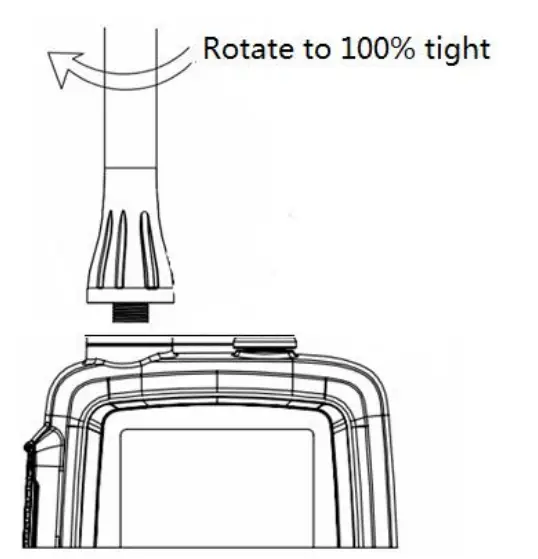
Installation and charging of the Li-Polymer battery pack
Place the battery on the device and secure it with the clip.
The battery pack can be charged when installed on the VHF, or separately on its supplied charger.
- Insert the adapter connector into the charger.
- Plug the adapter into a 220V socket.
- Place the battery and VHF, installed on the VHF or separatly, on the base of charge.
Note: The battery pack charges only on its base. The connector on the top of the VHF connects a micro-headset.
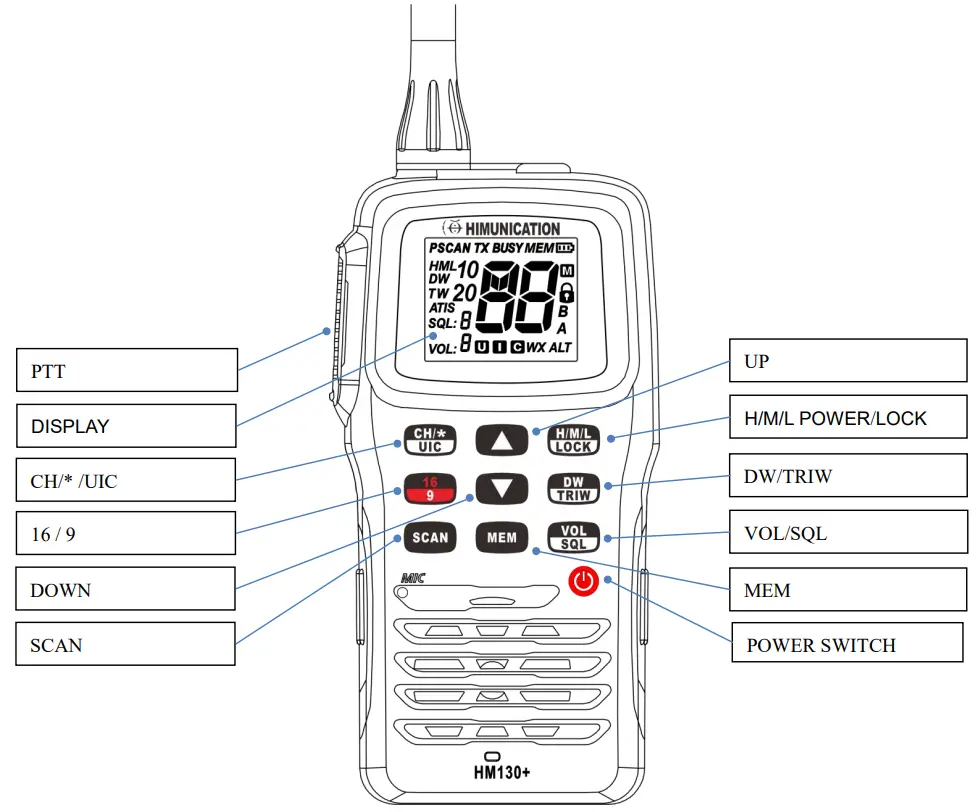
HM130+ KEYS LOCATION DESCRIPTION
Caution:
- Risk of explosion if the battery is replaced by an incorrect type. Dispose of used batteries according to the instructions.
- Adapter shall be installed near the equipment and shall be easily accessible.
- The plug is considered as a disconnect device of the adapter.
A.KEY Arrangement FUNCTION
| Key | Short Press ( < 3 sec ) | Long Press ( > 3 sec ) |
| H/M/L /Lock | TX Power H/M/L /Lock | Key Lock |
| 16/9 | CH16 | CH09 |
| DW/TRIW | Dual Watch mode | Tri Watch mode |
| Power Switch | On | Off |
| SCAN | All Scan/all memory Scan | Priority all/memory Scan |
| MEM | MEMORY Mode | Save/Delete Memory Channel |
| Up/Down | Channel/ Setting Up/Down | Channel Fast up/Fast down |
| CH/*/UIC | Private channel | Band Selection |
| VOL/SQL | VOL Set | SQL Set |
A.1 Key Arrangement
| PTT | CH/*/UIC | Up | H/M/L/LOCK |
| 16/9 | DOWN | DW/TRIW | |
| SCAN | MEM | VOL/SQL | |
| POWER SWITCH |
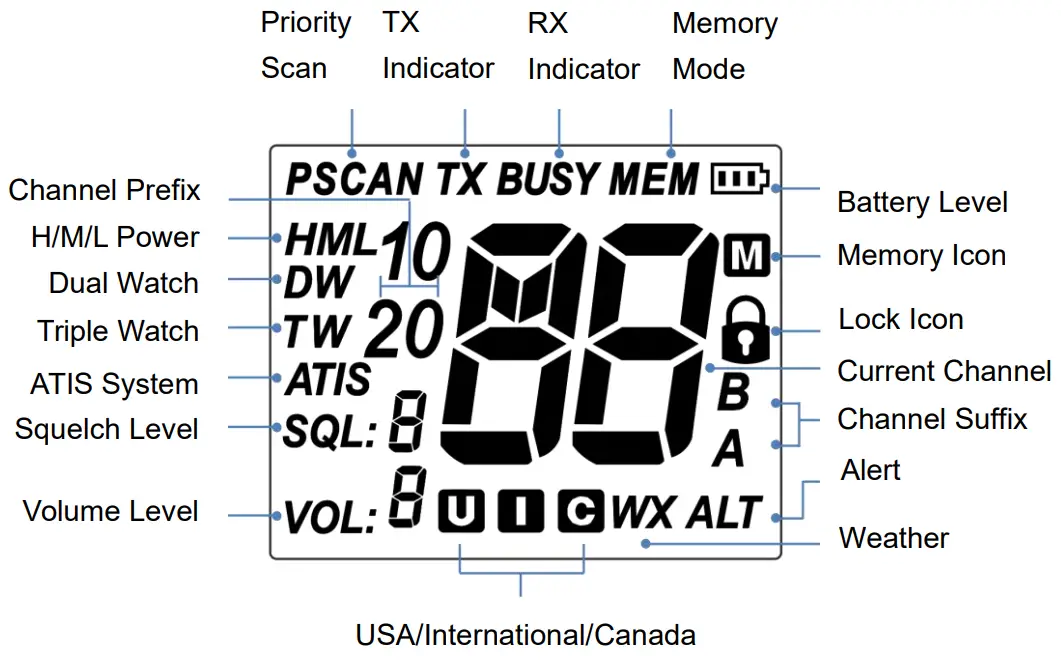
A.2 LCD
B. DIRECT KEY OPERATION
B.1 Power ON/OFF (Hardware)
Long press power switch 2s to start normal operation mode, long press again 2s will power down.
B.2 VOL/SQL KEY
Short press VOL/SQL key to adjust the volume level, and press the UP/DOWN key to select the volume level accordingly. Long press VOL/SQL key will flash the squelch level, press the UP/DOWN key to select the squelch level accordingly.
B.3 UP/DOWN
At the normal mode, they act as Channel Up/Down. When it press > 0.5 sec, the unit will start to scroll through the channels at 125ms intervals. It returns to normal mode when the key press is released
B.4 16/9 Channel
Summary of CH16/9 Key operation:
- If the current channel was not the priority channel, press 16/9 key will directly jump to the 16 channel or 9 channel(short press to jump to priority CH16 at High Power and long press to jump to priority CH9 at High Power)
Note: Accessing the priority channel will change the power setting to high power. The user can change the power setting to low power by pressing H/M/L/LOCK Key. If the priority channel is limited by the cloning software for 1-W only, accessing the priority channel will still follow the low power limitation. - After the channel is tuned to the priority channel, the “P” icon is lit to indicate that the priority CH16 or CH9 has been reached. UP and Down key functions normally
- When the radio already tunes to the priority channel, pressing the 16/9 key will revert the radio to the previously used working channel depending on how it is being pressed (see flow chart above).
16/9 Key also acts ‘esc key’ to exit other modes
To reprogram a secondary priority channel:
- Tune to priority CH9. It is indicated by the “P” icon. It is done by pressing the “16/9” key for more than 3 seconds.
- Then, press and hold the “16/9” key for 3 seconds.
- and Currently, the secondary priority channel number should start flashing and the current secondary priority channel number should start flashing.
- While the channel number is flash, it can be changed with the “UP” and“DOWN” arrow buttons. The selection can be saved by short pressing the ‘’16/9’’ key and the screen display the ‘’P’’ icon to indicate that the second priority channel has been changed.
- The user can reprogram the secondary priority channel on the HM130+
B.5 H/M/L/LOCK Key
Short press Hi/LO/LOCK Key will toggle the TX power from H to M or L, corresponding from H to M or the L icon will display on the LCD.
Some of the channels have been limited to low power only or high power only. Thus, the software needs to check against the channel setting stored in the EEPROM.
If the operation request is denied, the error beeps tone will out.
All keypads will be locked except PTT key by pressing Hi/LO/LOCK Key for more than 3 seconds, correspondingly the ’’lock icon ’’will display on the LCD, press Hi/LO/LOCK Key again for more than 3 seconds will release the the the the the key lock function
B.6 Private Channel
Shore press CH/*/UIC to enter into private channel mode, and switch it by pressing the UP/DOWN key. If the private channel didn’t exist, it will display’’–’’.
B.7 WX Channel(Only available for USA, Canada)
Short press the CH/*/UIC key will enter WX mode. Press the Up/Down key to change the WX channel. Long press the CH/*/UIC key to enable and detect the weather alarm, if the alert tone is detected, the ‘’ALT’’ symbol should flash in the screen, long press CH/*/UIC again to cancel the weather alarm,‘’ ALT’’ symbol will disappear accordingly.
B.8 UIC Band
Long press CH/*/UIC to switch operational channel bands (USA, INT, and CAN). When the band was switched, the band sequence will change accordingly.
Noted: If one frequency was programmed to this radio device, activating this function will generate the wrong alarm.
B.9 SCAN
This is the function to scan for broadcasting channels. When the available channel is detected, the receiver will stop at that channel and continue to search when that transmission ceased.
There are 4 Scan modes available – All SCAN, Memory Scan, Priority Scan & memory Scan, The default is All Scan
- At the normal mode, short press the SCAN key to activate the SCAN function.
- When the radio is in normal mode, All scans will be initiated. When the radio is in the All Scan mode, all channels will be scanned in sequence.
- When the radio in memory mode, short press the SCAN key to initiate Memory Scan, will be. long press the Scan key will initiate Priority Scan.
During the scan, long press SCAN key will activate All Scan or Memory Scan.’’p’’ icon (priority icon)will light
The memory channel will be stated whenever a signal is received. Once the transmission is finished, the SCAN will automatically carry on to searching for next channel.
All Memory Scan M1 — M2 — M3 – M10 — M1- …
All Scan CH1-CH2-CI-13- -CH88-CH1
Priority Memory Scan M1 —CH 16 — M2 — Chl 16 – Chi 16 — M1 — M16 –
(M1; M2; M3 means 1st, 2′, 3rd programmed channel) Priority All Scan CF-11-CH16-CH2-CH16-CH3-CH16- CI-188-CH16-L1-CH16-… (The radio only has L1 as its private channel)
B.10 MEM
Press the MEM to enter the memory mode when there is at least one channel in the memory.
The channel sequences will follow the programmed channels in the memory. The “MEM” icon will be turned on. Short press the SCAN will start MEMORY SCAN Adding CH from the memory:
- During the normal mode, use the UP/DOWN key to select the desired channel for programming.
- Long press the MEM key to store up the channel as a memory channel. The “M” icon shows up to indicate the current channel has been saved in the memory. No limited memory channels.
- Separate memory channel exists for USA, International, and Canadian Frequency group.
Deleting CH from the memory:
- During the normal mode, use the UP/DOWN key to select the channel to be deleted.
- Long press the MEM key to delete the channel from the memory.’M’icon will disappear
B.11 Watch
Dual Watch
Short press DW/TRIW key to activate the DUAL WATCH mode. Monitor the current channel and Ch 16 in cycle.
TRI Watch
Long press DW/TRI key to activate the TRI WATCH mode. Monitor the Ch 16, current channel, and the 2nd Priority CH in cycle.
Programmable channel is CH9 by default.
Note: programmed channel is the secondary priority Channel.Current Channel – CH 16 – 2nd
Priority CH – Current Channel – CH 16 – 2nd Priority CH – Current Channel – …
B.12 Back Light
Any key press will turn on the backlight (if the back-light setting is ON) except the PTT key. The backlight should be remaining on for 5 sec if no keys are pressed. The time-out will be reset if any key is pressed within the time frame except the PTT key. If the backlight is on, press the ‘PTT‘ key will turn off back-light
C.SPECIAL FUNCTION OPERATION
C.1 TX time out
The transmission will be automatically turned off after the PTT key is pressed over 3 consecutive minutes. The Tx mode will be terminated and back to Rx mode. Once the PTT key is released, the TX time-out timer will be reset. PTT key will work back normally.
C.2 Power save Mode
Normal Mode
100ms ON, 300ms OFF
C.3 TX Indicator
When the radio is transmitting, the “TX” icon will be lit up.
C.4 BEEP Adjustment
The radio features BEEP by default. However, you can choose to switch on/off BEEP.
Power off the radio when the radio is on, press the POWER key as well as SQL/VOL key to start up the radio, and the BEEP by default will switch off.
If you want BEEP return to the original setting. Just power off, then press the POWER key as well as SQL/VOL key to start up the radio again, then it will work, which means BEEP will switch on.
D. EUROPEAN KEY OPERATION
Most of the functions in the radio are the same as in the US model. These are the functions that work differently.
D.1 Programming ATIS ID
ATIS function only exists in European Model. Therefore, it only functions when the European radio is tuned to the International Frequency Group. After ATIS ID is being programmed into the radio via the keypad or the cloning software, the ATIS function will be enabled all the time. The user cannot disable it. To enable the customer to enter ATID ID into the radio from the keypad, the check box next to the ATIS entry by the user on the Cloning software has to be ticked.
Programming ATIS ID from the Keypad
- Programming start with the radio turn OFF.
- Long press DOWN and turn radio ON to access the ATIS mode.
- The front digit will indicate the digit position of the ATIS ID. The rear digit will blink continuously. The rear digit indicates the ATIS ID. Changing the value of the rear digit can be achieved using the “UP/DOWN” Key.
- Press the “MEM” key to confirm the selection and move to the next digit.
- After the user completes the 9-digit ATIS ID, the user has to enter the ATIS ID the second time to avoid invalid entry. If a different ATIS ID is entered, the operation will be canceled The user has to repeat step one to initiate the ATID ID entering sequence.
- The operating procedure to enter a valid ATID ID for the second time is same as the first time, the ATIS ID will be flashed in sequence one time on the screen.
- Turn off the radio, and permanently save the ATIS ID to the EEPROM of the radio.
- After the ATIS ID being programmed into the radio, from the OFF position holding H/M/L/LOCK and turning the radio ON will make the radio flash its ATIS ID. After this stage, only with the cloning software the ATIS ID is modified or erased.
- At the ATIS mode, part of international channels is restricted to transmitting on low-power, such as CH6, CH8, CH10, CH11, CH12, CH13, CH14, CH71, CH72, CH74, and CH77.

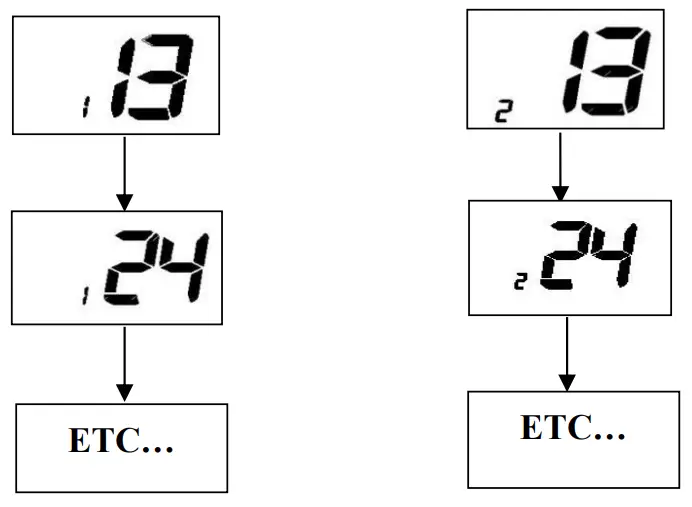
D.2 Special Function Keys
Press DW/TRIW key as well as power key to directly enter into write channel mode as below displayed.

Appendix A – Near Lightning Strike Test
This appendix describes the general procedure for evaluating the immunity to near lightning strikes (NLS) of the RT411 VHF Radio.
The test simulates a slow, high-energy pulse produced by an NLS event. Relative external documents as below
- BS EN 61000-4-5 : 2006
- EMC Directive 2004/108/EC
List of Abbreviations
| AE | Auxiliary Equipment |
| CE | Conducted Emissions |
| EMC | Electromagnetic Compatibility |
| EN | European Norm |
| EUT | Equipment Under Test |
| FTB | Fast Transient Burst |
| MED | Marine Equipment Directive |
| QP | Quasi Peak |
Safety
The high voltage interference pulse can contain a very large quantity of energy and every precaution shall be taken to avoid contact with EUT during a test. It is highly recommended that at least one other person is present (or very close by) during the test.
Test Configuration
EUT Setup
The EUT shall be setup in a typical system configuration on an isolated wooden bench with NO GROUNDPLANE. The power to the EUT and auxiliary equipment shall be from 12V or 24V sealed lead-acid batteries via a suitable fuse. The length of the EUT power cable shall be no more than 2m. Any screens within the system shall be terminated at the battery–vet connection.
Caution: The max operating of the EUT is 50℃.
EUT Configuration
All operating configurations should be tested with appropriate performance criteria defined for each test.
Performance Criteria
From BS EN 61000-4-5 : 2006
Performance criteria C: Temporary loss of function or degradation of performance, the correction of which requires operator intervention.
Appendix B – Channel List
| International Marine VHF Channels & Frequencies | ||||
| CH | TX Freq | RX Freq | Simplex | Freq Use |
| 1 | 156.050 | 160.650 | Public Correspondence, Port Operations and Ship Movement | |
| 2 | 156.100 | 160.700 | Public Correspondence, Port Operations and Ship Movement | |
| 3 | 156.150 | 160.750 | Public Correspondence, Port Operations and Ship Movement | |
| 4 | 156.200 | 160.800 | Public Correspondence, Port Operations and Ship Movement | |
| 5 | 156.250 | 160.850 | Public Correspondence, Port Operations and Ship Movement | |
| 6 | 156.300 | 156.300 | x | Inter-ship [1] |
| 7 | 156.350 | 160.950 | Public Correspondence, Port Operations and Ship Movement | |
| 8 | 156.400 | 156.400 | x | Inter-ship |
| 9 | 156.450 | 156.450 | x | Inter-ship, Port Operations and Ship Movement |
| 10 | 156.500 | 156.500 | x | Inter-ship, Port Operations, and Ship Movement [2] |
| 11 | 156.550 | 156.550 | x | Port Operations and Ship Movement |
| 12 | 156.600 | 156.600 | x | Port Operations and Ship Movement |
| 13 | 156.650 | 156.650 | x | Inter-ship Safety, Port Operations and Ship Movement [3] |
| 14 | 156.700 | 156.700 | x | Port Operations and Ship Movement |
| 15 | 156.750 | 156.750 | x | Inter-ship and On-board Communications at 1W only [4] |
| 16 | 156.800 | 156.800 | x | Distress, Safety, and Calling |
| 17 | 156.850 | 156.850 | x | Inter-ship and On-board Communications at 1W only [4] |
| 18 | 156.900 | 161.500 | Public Correspondence, Port Operations and Ship Movement | |
| 19 | 156.950 | 161.550 | Public Correspondence, Port Operations and Ship Movement | |
| 1019 | 156.950 | 156.950 | Public Correspondence, Port Operations and Ship Movement | |
| 2019 | 161.550 | 161.550 | Public Correspondence, Port Operations and Ship Movement | |
| 20 | 157.000 | 161.600 | Public Correspondence, Port Operations and Ship Movement | |
| 1020 | 157.000 | 157.000 | Public Correspondence, Port Operations and Ship Movement | |
| 2020 | 161.600 | 161.600 | Public Correspondence, Port Operations and Ship Movement | |
| 21 | 157.050 | 161.650 | Public Correspondence, Port Operations and Ship Movement | |
| 22 | 157.100 | 161.700 | Public Correspondence, Port Operations and Ship Movement | |
| 23 | 157.150 | 161.750 | Public Correspondence, Port Operations and Ship Movement | |
| 24 | 157.200 | 161.800 | Public Correspondence, Port Operations and Ship Movement | |
| 25 | 157.250 | 161.850 | Public Correspondence, Port Operations and Ship Movement | |
| 26 | 157.300 | 161.900 | Public Correspondence, Port Operations and Ship Movement | |
| 27 | 157.350 | 161.950 | Public Correspondence, Port Operations and Ship Movement | |
| 28 | 157.400 | 162.000 | Public Correspondence, Port Operations and Ship Movement | |
| 60 | 156.025 | 160.625 | Public Correspondence, Port Operations and Ship Movement | |
| 61 | 156.075 | 160.675 | Public Correspondence, Port Operations and Ship Movement | |
| 62 | 156.125 | 160.725 | Public Correspondence, Port Operations and Ship Movement | |
| 63 | 156.175 | 160.775 | Public Correspondence, Port Operations and Ship Movement | |
| 64 | 156.225 | 160.825 | Public Correspondence, Port Operations and Ship Movement | |
| 65 | 156.275 | 160.875 | Public Correspondence, Port Operations and Ship Movement | |
| 65A | 156.275 | 156.275 | Non-Commercial | |
| 66 | 156.325 | 160.925 | Public Correspondence, Port Operations and Ship Movement | |
| 66A | 156.325 | 156.325 | Non-Commercial | |
| 67 | 156.375 | 156.375 | x | Inter-ship, Port Operations and Ship Movement [2] |
| 68 | 156.425 | 156.425 | x | Port Operations and Ship Movement |
| 69 | 156.475 | 156.475 | x | Inter-ship, Port Operations and Ship Movement |
| 71 | 156.575 | 156.575 | x | Port Operations and Ship Movement |
| 72 | 156.625 | 156.625 | x | Inter-ship |
| 73 | 156.675 | 156.675 | x | Inter-ship [2] |
| 74 | 156.725 | 156.725 | x | Port operations and Ship movement |
| 75 | 156.775 | 156.775 | x | See Note [5] |
| 76 | 156.825 | 156.825 | x | See Note [5] |
| 77 | 156.875 | 156.875 | x | Inter-ship |
| 78 | 156.925 | 161.525 | Public correspondence, Port Operations and Ship Movement | |
| 1078 | 156.925 | 156.925 | Public correspondence, Port Operations and Ship Movement | |
| 2078 | 161.525 | 161.525 | Public correspondence, Port Operations and Ship Movement | |
| 79 | 156.975 | 161.575 | Public correspondence, Port Operations and Ship Movement | |
| 1079 | 156.975 | 156.975 | Public correspondence, Port Operations and Ship Movement | |
| 2079 | 161.575 | 161.575 | Public correspondence, Port Operations and Ship Movement | |
| 80 | 157.025 | 161.625 | Public correspondence, Port Operations and Ship Movement | |
| 81 | 157.075 | 161.675 | Public correspondence, Port Operations and Ship Movement | |
| 82 | 157.125 | 161.725 | Public correspondence, Port Operations and Ship Movement | |
| 83 | 157.175 | 161.775 | Public correspondence, Port Operations and Ship Movement | |
| 84 | 157.225 | 161.825 | Public correspondence, Port Operations and Ship Movement | |
| 85 | 157.275 | 161.875 | Public correspondence, Port Operations and Ship Movement | |
| 86 | 157.325 | 161.925 | Public correspondence, Port Operations and Ship Movement | |
| 87 | 157.375 | 157.375 | x | Port Operations and Ship Movement |
| 88 | 157.425 | 157.425 | x | Port Operations and Ship Movement |
- Inter-ship channels are for communications between ship stations. Inter-ship communications should be restricted to Channels 6, 8, 72, and 77. If these are not available, the other channels marked for Inter-ship may be used.
- Channel 70 is used exclusively for Digital Selective Calling (DSC) and is not available for regular voice communications.
Notes:
- Channel 06 may also be used for communications between ship stations and aircraft engaged in coordinated search and rescue operations. Ship stations should avoid harmful interference to such communications on channel 06 as well as to communications between aircraft stations, ice breakers, and assisted ships during ice seasons.
- Within the European Maritime Area and in Canada, channels 10, 67, and 73 may also be used by the individual admin stations concerned for communication between ship stations, aircraft stations, and participating land stations engaged in coordinated search and rescue and anti-pollution operations in local areas. Channels 10 or 73 (depending on location) are also used for the broadcast of Marine Safety Information by the Maritime and Coast Guard Agency in the UK only.
- Channel 13 is designated for use on a worldwide basis as a navigation safety communication channel, primarily for inter-ship navigation safety communications.
- Channels 15 and 17 may also be used for onboard communications provided the effective radiated power does not exceed 1 Watt.
- The use of Channels 75 and 76 should be restricted to navigation-related communication only and all precautions should be taken to avoid harmful interference to channel 16. Transmit power is limited to 1 Watt.
| U.S. Marine VHF Channels and Frequencies | ||||
| CH | TX Freq | RX Freq | Simplex | Freq Use |
| 01A | 156.050 | 156.050 | x | Port Operations and Commercial, VTS. Available only in New Orleans / Lower Mississippi area. |
| 03A | 156.150 | 156.150 | x | U.S. Government only |
| 05A | 156.250 | 156.250 | x | Port Operations or VTS in the Houston, New Orleans, and Seattle areas. |
| 6 | 156.300 | 156.300 | x | Inter-ship Safety |
| 07A | 156.350 | 156.350 | x | Commercial |
| 8 | 156.400 | 156.400 | x | Commercial (Inter-ship only) |
| 9 | 156.450 | 156.450 | x | Boater Calling. Commercial and Non-Commercial. |
| 10 | 156.500 | 156.500 | x | Commercial |
| 11 | 156.550 | 156.550 | x | Commercial. VTS in selected areas. |
| 12 | 156.600 | 156.600 | x | Port Operations. VTS in selected areas. |
| 13 | 156.650 | 156.650 | x | Inter-ship Navigation Safety (Bridge-to-bridge). Ships > 20 meters in length maintain a listening watch on this channel in US waters. |
| 14 | 156.700 | 156.700 | x | Port Operations. VTS in selected areas. |
| 15 | – | 156.750 | x | Environmental (Receive only). Used by Class ‘C’ EPIRBS. |
| 16 | 156.800 | 156.800 | x | International Distress, Safety, and Calling. Ships are required to carry radio, USCG, and most coast stations maintain a listening watch on this channel. |
| 17 | 156.850 | 156.850 | x | State Control |
| 18A | 156.900 | 156.900 | x | Commercial |
| 19A | 156.950 | 156.950 | x | Commercial |
| 20 | 157.000 | 161.600 | Port Operations (duplex) | |
| 20A | 157.000 | 157.000 | x | Port Operations |
| 21A | 157.050 | 157.050 | x | U.S. Coast Guard only |
| 22A | 157.100 | 157.100 | x | Coast Guard Liaison and Maritime Safety Information Broadcasts. Broadcasts are announced on channel 16. |
| 23A | 157.150 | 157.150 | x | U.S. Coast Guard only |
| 24 | 157.200 | 161.800 | Public Correspondence (Marine Operator) | |
| 25 | 157.250 | 161.850 | Public Correspondence (Marine Operator) | |
| 26 | 157.300 | 161.900 | Public Correspondence (Marine Operator) | |
| 27 | 157.350 | 161.950 | Public Correspondence (Marine Operator) | |
| 28 | 157.400 | 162.000 | Public Correspondence (Marine Operator) | |
| 61A | 156.075 | 156.075 | x | U.S. Government only |
| 63A | 156.175 | 156.175 | x | Port Operations and Commercial, VTS. Available only in New Orleans / Lower Mississippi area. |
| 64A | 156.225 | 156.225 | x | U.S. Coast Guard only |
| 65A | 156.275 | 156.275 | x | Port Operations |
| 66A | 156.325 | 156.325 | x | Port Operations |
| 67 | 156.375 | 156.375 | x | Commercial. Used for Bridge-to-bridge communications in lower Mississippi River. Inter-ship only. |
| 68 | 156.425 | 156.425 | x | Non-Commercial |
| 69 | 156.475 | 156.475 | x | Non-Commercial |
| 70 | 156.525 | 156.525 | x | Non-Commercial |
| 71 | 156.575 | 156.575 | x | Non-Commercial |
| 72 | 156.625 | 156.625 | x | Non-Commercial (Inter-ship only) |
| 73 | 156.675 | 156.675 | x | Port Operations |
| 74 | 156.725 | 156.725 | x | Port Operations |
| 77 | 156.875 | 156.875 | x | Port Operations (Inter-ship only) |
| 78A | 156.925 | 156.925 | x | Non-Commercial |
| 79A | 156.975 | 156.975 | x | Commercial. Non-Commercial in Great Lakes only. |
| 80A | 157.025 | 157.025 | x | Commercial. Non-Commercial in Great Lakes only |
| 81A | 157.075 | 157.075 | x | U.S. Government only – Environmental protection operations. |
| 82A | 157.125 | 157.125 | x | U.S. Government only |
| 83A | 157.175 | 157.175 | x | U.S. Coast Guard only |
| 84 | 157.225 | 161.825 | Public Correspondence (Marine Operator) | |
| 84A | 157.225 | 157.225 | Non-Commercial | |
| 85 | 157.275 | 161.875 | Public Correspondence (Marine Operator) | |
| 85A | 157.275 | 157.275 | Non-Commercial | |
| 86 | 157.325 | 161.925 | Public Correspondence (Marine Operator) | |
| 86A | 157.325 | 157.325 | Non-Commercial | |
| 87 | 157.375 | 161.975 | Public Correspondence Marine Operator) | |
| 87A | 157.375 | 157.375 | Non-Commercial | |
| 88 | 157.425 | 162.025 | Public Correspondence only near the Canadian border | |
| 88A | 157.425 | 157.425 | x | Commercial, Inter-ship only |
- Recreational boaters normally use channels listed as Non-Commercial: 68, 69, 71, 72,
- Channel 70 is used exclusively for Digital Selective Calling (DSC) and is not available for regular voice
- Channels 75 and 76 are reserved as guard bands for Channel 16 and are not available for regular voice
Notes:
- The letter “A” following a channel number indicates simplex use of the ship station transmit side of an international semi-duplex Operations are different from that of international operations on that channel.
- Channel 13 should be used to contact a ship when there is a danger of All ships of length 20 meters or greater are required to guard VHF channel 13, in addition to VHF channel 16 when operating within U.S. territorial waters.
- Channel is Receive
- Channel 16 is used for calling other stations or for distress
- Output power is fixed at 1 watt
- Output power is initially set to 1 User can temporarily override this restriction to transmit at high power.
| Canadian Marine VHF Channels and Frequencies | |||
| CH | TX Freq | RX Freq | Area of Operation Use |
| 1 | 156.050 | 160.650 | PC Public Correspondence |
| 2 | 156.100 | 160.700 | PC Public Correspondence |
| 3 | 156.150 | 160.750 | PC Public Correspondence |
| 04A | 156.200 | 156.200 | PC Inter-ship, Ship/Shore and Safety: Canadian Coast Guard S&R |
| 05A | 156.250 | 156.250 | Ship Movement |
| 6 | 156.300 | 156.300 | All areas Inter-ship, Commercial, Noncommercial, and Safety: May Be used for search and rescue communications between ships and aircraft. |
| 07A | 156.350 | 156.350 | All areas Inter-ship, Ship/Shore, Commercial |
| 8 | 156.400 | 156.400 | WC, EC Inter ship, Commercial, and Safety: Also assigned for operations in the Lake Winnipeg area. |
| 9 | 156.450 | 156.450 | AC Inter-ship, Ship/Shore, Commercial, Non-commercial, and Ship Movement: May be used to communicate with aircraft and Helicopters in predominantly maritime support operations. |
| 10 | 156.500 | 156.500 | AC, GL Inter-ship, Ship/Shore, Commercial, Non-commercial, Safety, and Ship Movement: May also be used for communications with aircraft engaged in coordinated search and rescue and antipollution operations. |
| 11 | 156.550 | 156.550 | PC, AC, GL Inter-ship, Ship/Shore, Commercial, Non-commercial, and Ship Movement: Also used for pilotage purposes. |
| 12 | 156.600 | 156.600 | WC, AC, GL Inter-ship, Ship/Shore, Commercial, Non-commercial, and Ship Movement: Port operations and pilot information and messages. |
| 13 | 156.650 | 156.650 | All areas Inter-ship, Commercial, Non-commercial, and Ship Movement: Exclusively for bridge-to-bridge navigational traffic. Limited to 1-watt maximum power. |
| 14 | 156.700 | 156.700 | AC, GL Inter-ship, Ship/Shore, Commercial, Non-commercial, and Ship Movement: Port operations and pilot information and Messages. |
| 15 | 156.750 | 156.750 | All areas Inter-ship, Ship/Shore, Commercial, Non-commercial, and Ship Movement: All May also be used for on-board Communications. |
| 16 | 156.800 | 156.800 | All areas of International Distress, Safety, and Calling. |
| 17 | 156.850 | 156.850 | All areas Inter-ship, Ship/Shore, Commercial, Non-commercial, and Ship Movement: All operations are limited to 1-watt maximum power. May also be used for onboard Communications. |
| 18A | 156.900 | 156.900 | All areas Inter-ship, Ship/Shore, and Commercial: Towing on the Pacific Coast. |
| 19A | 156.950 | 156.950 | All areas except PC Inter-ship and Ship/Shore: Canadian Coast Guard only. |
| 20 | 157.000 | 161.600 | All areas Ship/Shore, Safety and Ship Movement: Port operation |
| 21A | 157.050 | 157.050 | All areas Inter-ship and Ship/Shore: Canadian Coast Guard only. |
| 21B | – | 161.650 | All areas Safety: Continuous Marine Broadcast (CMB) service. |
| 22A | 157.100 | 157.100 | All areas Inter-ship, Ship/Shore, Commercial and Non-commercial: For communications between Canadian Coast Guard and non-Canadian Coast Guard stations only. |
| 23 | 157.150 | 161.750 | PC Ship/Shore and Public Correspondence: Also in the inland waters of British Columbia and the Yukon. |
| 23B | – | 161.750 | Continuous Marine Broadcast Service |
| 24 | 157.200 | 161.800 | All areas of Ship/Shore and Public Correspondence |
| 25 | 157.250 | 161.850 | PC Ship/Shore and Public Correspondence: Also assigned for operations in the Lake Winnipeg area. |
| 25B | – | 161.850 | AC Safety: Continuous Marine Broadcast (CMB) service. |
| 26 | 157.300 | 161.900 | All areas of Ship/Shore, Safety, and Public Correspondence |
| 27 | 157.350 | 161.950 | AC, GL, PC Ship/Shore and Public Correspondence |
| 28 | 157.400 | 162.000 | PC Ship/Shore, Safety and Public Correspondence |
| 28B | – | 162.000 | AC Safety: Continuous Marine Broadcast (CMB) service. |
| 60 | 156.025 | 160.625 | PC Ship/Shore and Public Correspondence. |
| 61A | 156.075 | 156.075 | EC Inter-ship, Ship/Shore, and Commercial: Commercial fishing only. |
| 62A | 156.125 | 156.125 | EC Inter-ship, Ship/Shore, and Commercial: Commercial fishing only. |
| 63A | 156.175 | 156.175 | Tow Boats – BCC area |
| 64 | 156.225 | 160.825 | PC Ship/Shore and Public Correspondence |
| 64A | 156.225 | 156.225 | EC Inter-ship, Ship/Shore, and Commercial: Commercial fishing only. |
|
65A |
156.275 |
156.275 | Inter-ship, Ship/Shore, Commercial, Non-commercial, Safety: Search & rescue and antipollution operations on the Great Lakes. Towing on the Pacific Coast. Port operations only in the St. Lawrence River areas with 1W maximum power. Pleasure craft in the inland waters of Alberta, Saskatchewan, and Manitoba (excluding Lake Winnipeg and the Red River). |
| 66A | 156.325 | 156.325 | Inter-ship, Ship/Shore, Commercial, Non-commercial, Safety, and Ship Movement: Port operations only in the St.Lawrence River/Great Lakes Areas with 1-watt maximum power. |
| 67 | 156.375 | 156.375 | All areas except EC Inter-ship, Ship/Shore, Commercial, Non-commercial, Safety: May also be used for communications with aircraft engaged in coordinated search and rescue and antipollution operations. |
| 68 | 156.425 | 156.425 | All areas Inter-ship, Ship/Shore, and Non-commercial: For marinas and yacht clubs. |
| 69 | 156.475 | 156.475 | All areas except EC Inter-ship, Ship/Shore, Commercial and Non-commercial |
| 71 | 156.575 | 156.575 | PC Inter-ship, Ship/Shore, Commercial, Non-commercial, Safety, and Ship Movement on the East Coast and on Lake Winnipeg. |
| 72
73 | 156.625
156.675 | 156.625
156.675 | EC, PC Inter-ship, Commercial and Non-commercial: May be used to communicate with aircraft and helicopters in predominantly maritime support All areas except EC Inter-ship, Ship/Shore, Commercial, Non-commercial, Safety: May also, be used for communications with aircraft engaged in coordinated search and rescue and antipollution operations. |
| 74 | 156.725 | 156.725 | EC, PC Inter-ship, Ship/Shore, Commercial, Non-commercial and Ship Movement. |
| 75 | 156.775 | 156.775 | Simplex port operation, Ship movement, and navigation-related communication only. 1 watt maximum |
| 76 | 156.825 | 156.825 | Simplex port operation, Ship movement, and navigation-related communication only.1 watt maximum |
| 77 | 156.875 | 156.875 | Inter-ship, Ship/Shore, Safety and Ship Movement: Pilotage on Pacific Coast. Port operations only in the St. Lawrence River/Great Lakes areas with 1W maximum power. |
| 78A | 156.925 | 156.925 | EC, PC Inter-ship, Ship/Shore and Commercial |
| 79A | 156.975 | 156.975 | EC, PC Inter-ship, Ship/Shore and Commercial |
| 80A | 157.025 | 157.025 | EC, PC Inter-ship, Ship/Shore and Commercial |
| 81A | 157.075 | 157.075 | Inter-ship and Ship/Shore: Canadian Coast Guard use only in the St. Lawrence River/ Great Lakes areas. |
| 82A | 157.125 | 157.125 | Inter-ship and Ship/Shore: Canadian Coast Guard use only in the St. Lawrence River/ Great Lakes areas. |
| 83A | 157.175 | 157.175 | EC Inter-ship and Ship/Shore: Canadian Coast Guard and other Government agencies. |
| 83B | – | 161.775 | AC, GL Safety: Continuous Marine Broadcast (CMB) Service. |
| 84 | 157.225 | 161.825 | PC Ship/Shore and Public Correspondence |
| 85 | 157.275 | 161.875 | AC, GL, NL Ship/Shore and Public Correspondence |
| 86 | 157.325 | 161.925 | PC Ship/Shore and Public Correspondence |
| 87 | 157.375 | 161.975 | AC, GL, NL Ship/Shore and Public Correspondence |
| 88 | 157.425 | 162.025 | AC, GL, NL Ship/Shore and Public Correspondence |
AC: Atlantic Coast, Gulf, and St. Lawrence River up to and including Montreal
EC: (East Coast): includes NL, AC, GL, and Eastern Arctic areas
GL: Great Lakes (including St. Lawrence above Montreal)
NL: Newfoundland and Labrador
PC: Pacific Coast
WC:(West Coast): Pacific Coast, Western Arctic, and Athabasca-Mackenzie Watershed areas All areas: includes East and West Coast areas
Notes:
- An “A” following a channel number indicates simplex use of the ship station transmits side of an international
- duplex channel. Operations are different from that of international operations on that channel.
- Channel 16 is used for calling other stations or for distress alerting.
- The letter “B” following a channel number indicates simplex use of the coast station transmits side of an international duplex channel. That is, the channel is Receive Only.
- Channel 70 is used exclusively for Digital Selective Calling(DSC)and is not available for regular voice communications.
- Channels 75 and 76 are reserved as guard bands for Channel 16 and are not available for regular voice communications.
European Private Channels and Frequencies
In addition to the channels listed above in the International Marine VHF Channels & Frequencies table, your radio may also include some of the following private channels. Which channels are included depends upon the country in which the radio is to be operated and whether you possess the appropriate licensing
| Country | CH | TX Freq | RX Freq | Freq Use |
| Belgium | 96 | 162.425 | 162.425 | Marina |
| Denmark | L1 | 155.500 | 155.500 | Leisure |
| L2 | 155.525 | 155.525 | Leisure | |
| Denmark, Finland, | F1 | 155.625 | 155.625 | Fishing |
| Norway & Sweden | F2 | 155.775 | 155.775 | Fishing |
| F3 | 155.825 | 155.825 | Fishing | |
| Finland, Norway&Sweden | L1 | 155.500 | 155.500 | Leisure |
| L2 | 155.525 | 155.525 | Leisure | |
| L3 | 155.650 | 155.650 | Leisure | |
| Netherlands | 31 | 157.550 | 162.150 | Marina |
| 37 | 157.850 | 157.850 | Leisure | |
| UK | M1 | 157.850 | 157.850 | Marina |
| M2 | 161.425 | 161.425 | Marina |
Notes: A license may be required to operate the radio on private channels. It is your responsibility to obtain the proper license to operate the radio on these frequencies.
Weather Channels and Frequencies
| WX channel | Frequency(MHz) | Remarks | |
| Transmit | Receive | ||
| 1 | RX only | 162.550 | Weather(receive only) |
| 2 | RX only | 162.400 | Weather(receive only) |
| 3 | RX only | 162.475 | Weather(receive only) |
| 4 | RX only | 162.425 | Weather(receive only) |
| 5 | RX only | 162.450 | Weather(receive only) |
| 6 | RX only | 162.500 | Weather(receive only) |
| 7 | RX only | 162.525 | Weather(receive only) |
| 8 | RX only | 161.650 | Weather(receive only) |
| 9 | RX only | 161.775 | Weather(receive only) |
| 10 | RX only | 163.275 | Weather(receive only) |
SPECIFICATIONS
| DESCRIPTION | Unit | LIMIT |
| Frequnecy Range: Transmit | MHz | 156.025 To 157.425 |
| Frequnecy Range: Receive | MHz | 156.300 To 162.000 |
|
Number Of Channels | 56 INT Channels | |
| 52 USA Channels | ||
| 59 Canada Channels | ||
| 10 Weather Channels(only for USA) | ||
| 99 Private Channels | ||
| Oscillate Mode | PLL | |
| Modulation | FM(16K0G3E) | |
| Channel Spacing | KHz | 25 |
| Frequency Stability | PPM | ±5 |
| Standard Operation Temperature | °C | -20 ~ +55 |
| Controls: Volume | Adjust by UP/DOWN Key | |
| Channel | UP, DOWN Keys | |
| SQL | SQL Key | |
| Feature Keys | PTT | |
| CH/*/UIC,UP,H/M/L/LOCK,16/9,DOWN, DW/TRI,SCAN,MEM,VOL/SQL | ||
| Normal Working Voltage | V | 7.4V(With Li-Polymer Battery 1200mAh) |
| Low Limit Working Voltage | V | 6.0 |
| Battery Lifetime ( Tx 5% / Rx 5% / Standby 90%) | H | ≥10 |
| Memory | EEPROM | |
| Antenna Socket | SMA | |
| Display | Segment Code LCD With White Back Light | |
| Built-ln Speaker | Diamter 40mm / Impedance 8 Ohm | |
|
Accessory : | Belt Clip | |
| Hand Strap | ||
| Rubber Duck Antenna | ||
| 7.4V slide lock Li-Polymer Battery Pack (1200mAH) | ||
| AC 100~240V / DC 12V Desktop charger (worldwide) | ||
| TRANSMITTER | ||
| 1. Carrier power(no mod) | ||
| High power | W | 6 |
| Middle power | W | 3 |
| Low power | W | 1 |
| 2. Carrier freq.Tolerance | ppm | ±5 |
| 3. Max Modulation limiting | ±KHz | 5 |
| 4. Audio frequency response | ||
| @300Hz | dB | -13.5~-9.5 |
| @2000Hz | dB | 3.0~7.0 |
| @3000Hz | dB | +7.5~+10.5 |
| 5.Audio distortion @ 3 KHz Dev. | % | <5 |
| 6. Residual modulation | dB | ≤-40 |
| 7. Mic sens.For 3KHz | mV | 13±3 |
| 8. Conducted spurious emission | dBm | ≤-36 |
| 9. Current drain | ||
| Transmit(High) | A | ≤1.6 |
| Transmit(Middle) | A | ≤1.2 |
| Transmit(Low) | A | ≤0.9 |
| RECEIVER | ||
| 1. Sensitivity For 12dB Sinead | dBμV | ≤-6(EMF) |
| 2. Squelch | ||
| a) squelch threshold | dBμV | <-6.0(EMF) |
| b) hysteresis | dB | 3~6 |
| c) squelch tight | dBμV | 0dBuV ~ +6dBuV |
| 3. Rated audio output | ||
| @10% Thd Speaker | mW | ≥1000 |
| 4.Max.S/N ratio @ 1mV | dB | ≥40 |
| 5. Audio frequency resp. | dB | 1000Hz/0dB ref. |
| @300Hz | dB | +7.5~+11.5 |
| @2000Hz | dB | -9~-5 |
| @3000Hz | dB | -12.5~-8.5 |
| 6. Adjacent ch.Rejection | dB | ≥70 |
| 7. Image rejection | dB | ≥70 |
| 8.Intermod rejection(3-Gen.Method) | dB | ≥68 |
| 9. Spurious response rejection(CH16)80MHz to 1GHz | dB | ≥70 |
| 10. Scan time. Per channel | ms | ≤200 |
| 11. Speaker output | ||
| 12.StandBy Current | mA | ≤65 |
| 13. Max Audio Power | mA | ≤380 |
| 14. Charging current | mA | 760±130 |
| GENERAL STANDARD | ||
| 1. Floating&Flash | ||
| 2. Waterproof: IPX8 | ||
| 3. Communication Range: About 5 nautical miles | ||
| 4. Individual/removable battery with charger cradle | ||
| DIMENSION & WEIGHT | ||
| Dimension (L/W/H) | mm | 130×58×30 |
| Weight | g | 220 |
HM130+
 首页
首页