
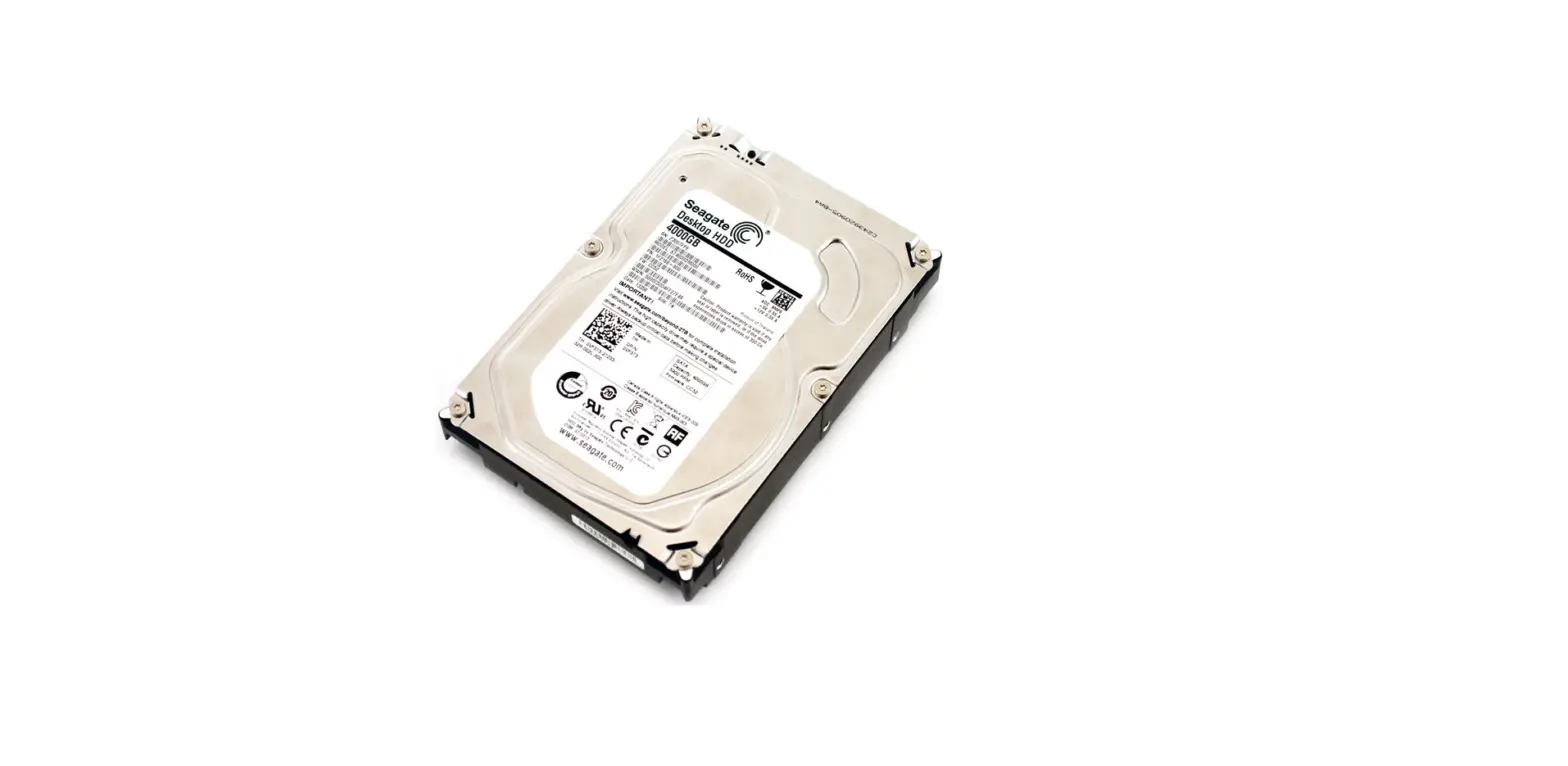
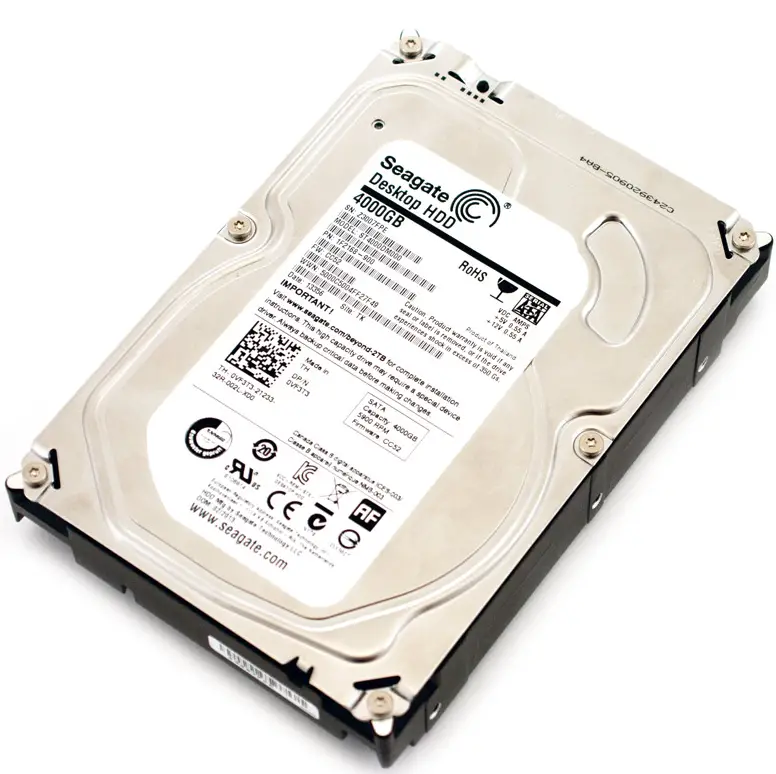
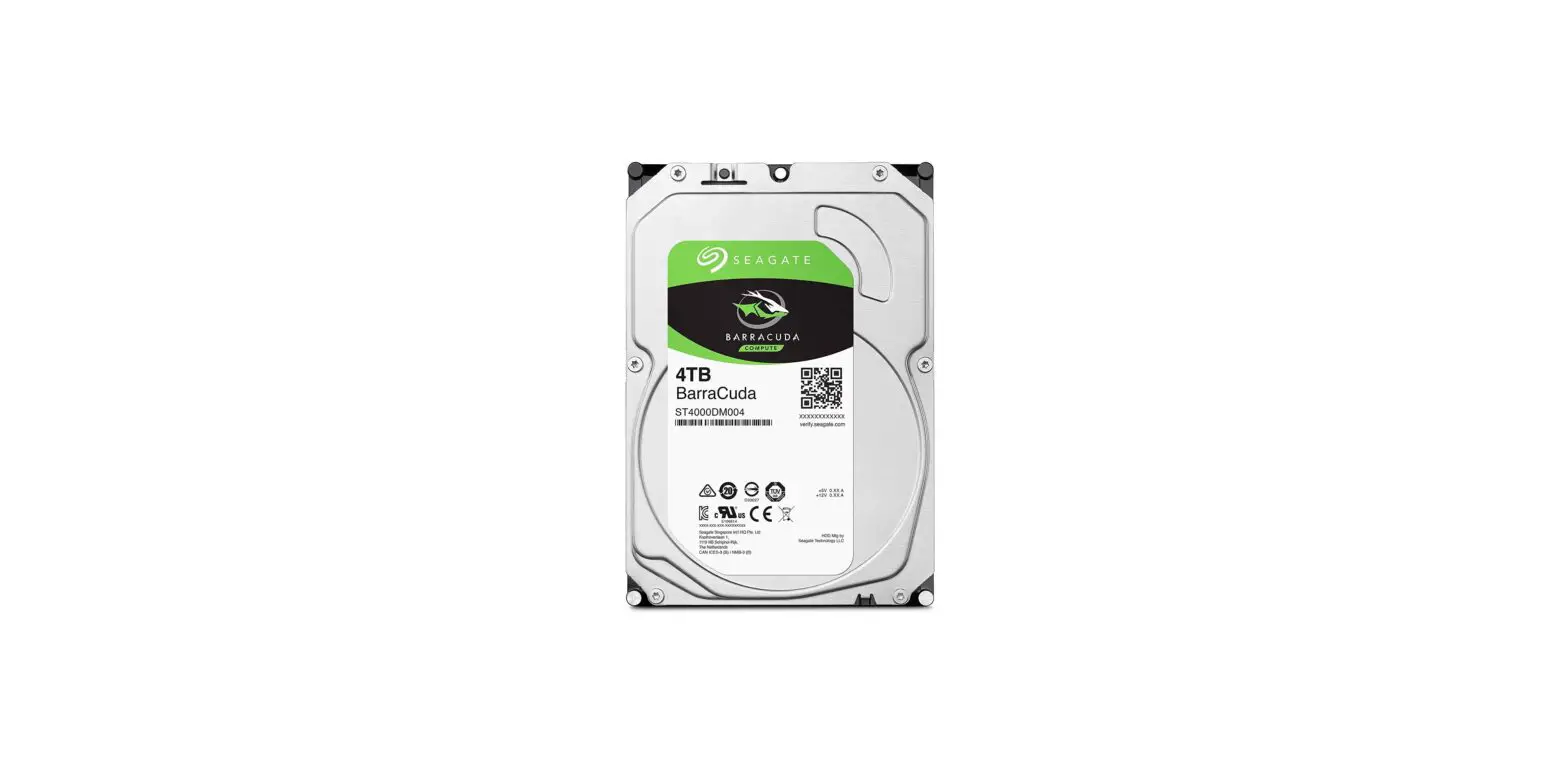
Seagate ST4000DM000 Desktop HDD
Introduction
- This manual describes the functional, mechanical, and interface specifications for the following Seagate® Desktop HDD model drives: ST4000DM000 ST3000DM003
These drives provide the following key features:
- High instantaneous (burst) data-transfer rates (up to 600MB per second).
- TGMR recording technology provides the drives with increased areal density.
- State-of-the-art cache and on-the-fly error-correction algorithms.
- Native Command Queueing with command ordering to increase performance in demanding applications.
- Full-track multiple-sector transfer capability without local processor intervention.
- Seagate AcuTrac™ servo technology delivers dependable performance, even with hard drive track widths of only 75 nanometers.
- Seagate OptiCache™ technology boosts overall performance by as much as 45% over the previous generation.
- Seagate SmartAlign™ technology provides a simple, transparent migration to Advanced Format 4K sectors
- Quiet operation.
- Compliant with RoHS requirements in China and Europe.
- SeaTools diagnostic software performs a drive self-test that eliminates unnecessary drive returns.
- Support for S.M.A.R.T. drive monitoring and reporting.
- Supports latching SATA cables and connectors.
- Worldwide Name (WWN) capability uniquely identifies the drive.
About the SATA interface
- The Serial ATA (SATA) interface provides several advantages over the traditional (parallel) ATA interface. The primary advantages include:
- Easy installation and configuration with true plug-and-play connectivity. It is not necessary to set any jumpers or other configuration options.
- Thinner and more flexible cabling for improved enclosure airflow and ease of installation.
- Scalability to higher performance levels.
- In addition, SATA makes the transition from parallel ATA easy by providing legacy software support. SATA was designed to allow users to install a SATA host adapter and SATA disk drive in the current system and expect all of the existing applications to work as normal.
- The SATA interface connects each disk drive in a point-to-point configuration with the SATA host adapter. There is no master/slave relationship with SATA devices like there is with parallel ATA. If two drives are attached on one SATA host adapter, the host operating system views the two devices as if they were both “masters” on two separate ports. This essentially means both drives behave as if they are Device 0 (master) devices.
- The SATA host adapter and drive share the function of emulating parallel ATA device behavior to provide backward compatibility with existing host systems and software.
- The Command and Control Block registers, PIO and DMA data transfers, resets, and interrupts are all emulated.
- The SATA host adapter contains a set of registers that shadow the contents of the traditional device registers, referred to as the Shadow Register Block. All SATA devices behave like Device 0 devices. For additional information about how SATA emulates parallel ATA, refer to the “Serial ATA International Organization: Serial ATA Revision 3.0”. The specification can be downloaded from www.sata-io.org.
Note
- The host adapter may, optionally, emulate a master/slave environment to host software where two devices on separate SATA ports are represented to host software as Device 0 (master) and Device 1 (slave) accessed at the same set of host bus addresses. A host adapter that emulates a master/slave environment manages two sets of shadow registers. This is not a typical SATA environment.
Drive Specifications
- Unless otherwise noted, all specifications are measured under ambient conditions, at 25°C, and nominal power. For convenience, the phrases the drive and this drive are used throughout this manual to indicate the following drive models:
Specification summary tables
- The specifications listed in Table 1 are for quick reference. For details on specification measurement or definition, refer to the appropriate section of this manual.
Table 1 Drive specifications summary for 4TB and 3TB models
| Drive Specification* | ST4000DM000 | ST3000DM003 |
| Formatted capacity (512 bytes/sector)** | 4000GB (4TB) | 3000GB (3TB) |
| Guaranteed sectors | 7,814,037,168 | 5,860,533,168 |
| Heads | 8 | |
| Disks | 4 | |
| Bytes per sector (4K physical emulated at 512-byte sectors) | 4096 | |
| Default sectors per track | 63 | |
| Default read/write heads | 16 | |
| Default cylinders | 16,383 | |
| Recording density (max) | 1807kFCI | 1550kFCI |
| Track density (avg) | 340ktracks/in | |
| Areal density (avg) | 625Gb/in2 | 536Gb/in2 |
| Internal data transfer rate (max) | 1813Mb/s | |
| The average data rate, read/write (MB/s) | 146MB/s | |
| The maximum sustained data rate, OD read (MB/s) | 180MB/s | |
| ATA data-transfer modes supported | PIO modes: 0 to 4 Multiword DMA modes: 0 to 2 Ultra DMA modes 0 to 6 | |
| I/O data-transfer rate (max) | 600MB/s | |
| Cache buffer | 64MB | |
| Height (max) | 26.1mm / 1.028 in | |
| Width (max) | 101.6mm /4.0 in (+ 0.010 in) | |
| Length (max) | 146.99mm / 5.787 in | |
| Weight (typical) | 610g / 1.345 lb | |
| Average latency | 5.1ms | |
| Power-on to ready (max) | <18.0s | |
| Standby to ready (max) | <15.0s | |
| Average seek, read (typical) Average seek, write (typical) | <12.0ms typical <12.0ms typical | |
| Startup current (typical) 12V | 2.0A | |
| Voltage tolerance (including noise) | 5V: ±5% 12V: ±10% | |
| Ambient temperature | 0° to 60°C (operating) –40° to 70°C (non-operating) | |
| Drive Specification* | ST4000DM000 | ST3000DM003 |
| Temperature gradient | 20°C per hour max (operating) 30°C per hour max (nonoperating) | |
| Relative humidity | 5% to 90% (operating) 5% to 95% (non-operating) | |
| Relative humidity gradient (max) | 30% per hour | |
| Wet bulb temperature (max) | 37.7°C max (operating) 40.0°C max (nonoperating) | |
| Altitude, operating | –304m to 3048m (–1000 ft to 10,000 ft) | |
| Altitude, non-operating (below mean sea level, max) | –304m to12,192m (–1000 ft to 40,000+ ft) | |
| Operational shock (max) | 80 Gs at 10ms | |
| Non-operational shock (max) | 300 Gs at 2ms | |
| Vibration, operating | 2Hz to 22Hz: 0.25 Gs, Limited displacement 22Hz to 350Hz: 0.50 Gs 350Hz to 500Hz: 0.25 Gs | |
| Vibration, non-operating | 5Hz to 22Hz: 3.0 Gs 22Hz to 350Hz: 3.0 Gs 350Hz to 500Hz: 3.0 Gs | |
| Drive acoustics, sound power Idle*** Seek | ||
| 2.3 bels (typical) 2.5 bels (max) | ||
| 2.8 bels (typical) 3.0 bels (max) | ||
| Non-recoverable read errors | 1 per 1014 bits read | |
|
Rated workload | The average rate of <55TB/year. The AFR specification for the drive assumes the I/ O workload does not exceed the average annualized workload rate limit of 55TB/year. Workloads exceeding the annualized rate may degrade the drive AFR and impact product reliability. The average annualized workload rate limit is in units of TB per year or TB per 8760 power-on hours. Workload rate limit = TB transferred × (8760/recorded power-on hours). | |
|
Warranty | To determine the warranty for a specific drive, use a web browser to access the following web page: http://www.seagate.com/support/warranty-and- replacements/ From this page, click on “Check to see if the drive is under Warranty”. Users will be asked to provide the drive serial number, model number (or part number), and country of purchase. The system will display the warranty information for the drive. | |
| Load/unload cycles (25°C, 50% rel. humidity) | 300,000 at 25°C, 50% rel. humidity | |
| Supports hotplug operation per the Serial ATA Revision 3.0 specification | Yes | |
- All specifications above are based on native configurations.
- One GB equals one billion bytes and 1TB equals one trillion bytes when referring to hard drive capacity. Accessible capacity may vary depending on the operating environment and formatting.
- During periods of drive idle, some offline activity may occur according to the S.M.A.R.T. specification, which may increase acoustic and power to operational levels.
Formatted capacity
| Model | Formatted capacity* | Guaranteed sectors | Bytes per sector |
| ST4000DM000 | 4000GB | 7,814,037,168 | 4k |
| ST3000DM003 | 3000GB | 5,860,533,168 |
- One GB equals one billion bytes and 1TB equals one trillion bytes when referring to hard drive capacity. Accessible capacity may vary depending on operating environment and formatting.
LBA mode
When addressing these drives in LBA mode, all blocks (sectors) are consecutively numbered from 0 to n–1, where n is the number of guaranteed sectors as defined above.
See Section 4.3.1, “Identify Device command” (words 60-61 and 100-103) for additional information about 48-bit addressing support of drives with capacities over 137GB.
Default logical geometry
- Cylinders: 16,383
- Read/write heads: 16
- Sectors per track: 63
LBA mode
- When addressing these drives in LBA mode, all blocks (sectors) are consecutively numbered from 0 to n–1, where n is the number of guaranteed sectors as defined above.
Recording and interface technology
| Interface | SANTA |
| Recording method | TGMR |
| Recording density | |
| 3TB | 1550kFCI |
| 4TB | 1807kFCI |
| Track density (tracks/inch avg) | |
| 3TB and 4TB | 340 |
| Areal density (Gb/in2) | |
| 3TB | 625 |
| 4TB | 536 |
| Internal data transfer rate (Mb/s max) | |
| 3TB | 1813 |
| 4TB | 1813 |
| Maximum sustained data transfer rate, OD read (MB/s) | |
| 3TB and 4TB | 180 |
| The average data rate, read/write (MB/s) | |
| 3TB and 4TB | 146 |
| I/O data-transfer rate (MB/s max) | 600 |
Physical characteristics
| Maximum height | 26.11mm / 1.028 in |
| Maximum width | 101.6mm / 4.0 in (± 0.010 in) |
| Maximum length | 146.99mm / 5.787 in |
| Typical weight | 610g / 1.345 lb |
| Cache buffer | 64MB |
Seek time
Seek measurements are taken with nominal power at 25°C ambient temperature. All times are measured using drive diagnostics. The specifications in the table below are defined as follows:
- Track-to-track seeks time is an average of all possible single-track seeks in both directions.
- Average seek time is a true statistical random average of at least 5000 measurements of seeks between random tracks, with less overhead.
| Typical seek times (ms) | Read | Write |
| Track-to-track | 1.0 | 1.2 |
| Average | 12.0 | 12.0 |
| Average latency | 5.1 | |
Note
These drives are designed to consistently meet the seek times represented in this manual. Physical seeks, regardless of mode (such as track-to-track and average), are expected to meet the noted values. However, due to the manner in which these drives are formatted, benchmark tests that include command overhead or measure logical seeks may produce results that vary from these specifications.
Start/stop times
The start/stop times listed below are for the 3TB and 4TB models.
| Power-on to ready (in seconds) | 15 (typical) 18 (max) |
| Standby to ready (in seconds) | 15 (typical) 18 (max) |
| Ready to spindle stop (in seconds) | 10 (typical) 11 (max) |
Time-to-ready may be longer than normal if the drive power is removed without going through normal OS power-down procedures.
Power specifications
The drive receives DC power (+5V or +12V) through a native SATA power connector. Refer to Figure 1 on page 16.
Power consumption
Power requirements for the drives are listed in Table 2. Typical power measurements are based on an average of drives tested, under nominal conditions, using 5.0V and 12.0V input voltage at 25°C ambient temperature.
Spinup power
- Spinup power is measured from the time of power-on to the time that the drive spindle reaches operating speed.
- Read/write power and current
- Read/write power is measured with the heads on track, based on a 16-sector write followed by a 32-ms delay, then a 16-sector read followed by a 32-ms delay.
Operating power and current
- Operating power is measured using 40 percent random seeks, 40 percent read/write mode (1 write for each 10 reads) and 20 percent drive idle mode.
Idle mode power
- Idle mode power is measured with the drive up to speed, with servo electronics active and with the heads in a random track location.
Standby mode
- During Standby mode, the drive accepts commands, but the drive is not spinning, and the servo and read/write electronics are in power-down mode.
Table 2 DC power requirements (3TB and 4TB)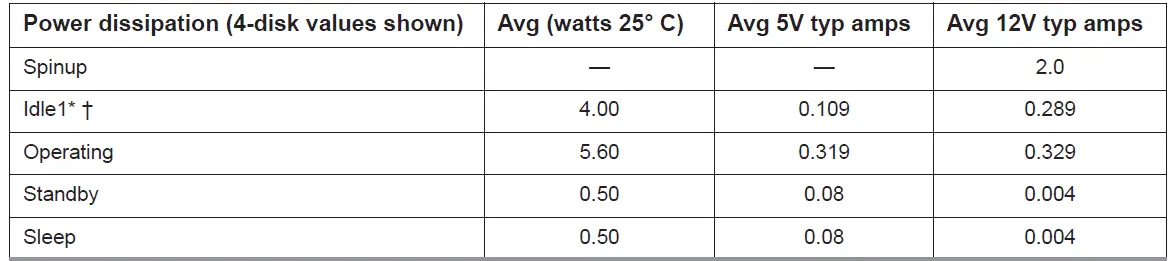
- During periods of drive idle, some offline activity may occur according to the S.M.A.R.T. specification, which may increase acoustic and power
to operational levels. 5W IDLE with DIPLM Enabled
Conducted noise
- Input noise ripple is measured at the host system power supply across an equivalent 80-ohm resistive load on the +12 volt line or an equivalent 15-ohm resistive load on the +5 volt line.
- Using 12-volt power, the drive is expected to operate with a maximum of 120 mV peak-to-peak square-wave injected noise at up to 10MHz.
- Using 5-volt power, the drive is expected to operate with a maximum of 100 mV peak-to-peak square-wave injected noise at up to 10MHz.
- Note Equivalent resistance is calculated by dividing the nominal voltage by the typical RMS read/write current.
Voltage tolerance
Voltage tolerance (including noise):
- 5V
- ±5%
- 12V
- ±10%
Power-management modes
- The drive provides programmable power management to provide greater energy efficiency. In most systems, users can control power management through the system setup program. The drive features the following power management modes:
| Power modes | Heads | Spindle | Buffer |
| Active | Tracking | Rotating | Enabled |
| Idle | Tracking | Rotating | Enabled |
| Standby | Parked | Stopped | Enabled |
| Sleep | Parked | Stopped | Disabled |
- During periods of drive idle, some offline activity may occur according to the S.M.A.R.T. specification, which may increase acoustic and power to operational levels.
5W IDLE with DIPLM Enabled
Conducted noise
- Input noise ripple is measured at the host system power supply across an equivalent 80-ohm resistive load on the+12 volt line or an equivalent 15-ohm resistive load on the +5 volt line.
- Using 12-volt power, the drive is expected to operate with a maximum of 120 mV peak-to-peak square-wave injected noise at up to 10MHz.
- Using 5-volt power, the drive is expected to operate with a maximum of 100 mV peak-to-peak square-wave injected noise at up to 10MHz.
Note Equivalent resistance is calculated by dividing the nominal voltage by the typical RMS read/write current.
Voltage tolerance
Voltage tolerance (including noise):
- 5V±5%
- 12V±10%
Power-management modes
- The drive provides programmable power management to provide greater energy efficiency. In most systems, users can control power management through the system setup program. The drive features the following power-management modes:
| Power modes | Heads | Spindle | Buffer |
| Active | Tracking | Rotating | Enabled |
| Idle | Tracking | Rotating | Enabled |
| Standby | Parked | Stopped | Enabled |
| Sleep | Parked | Stopped | Disabled |
Active mode
- The drive is in Active mode during the read/write and seek operations.
Idle mode
- The buffer remains enabled, and the drive accepts all commands and returns to Active mode any time disk access is necessary.
Standby mode
- The drive enters Standby mode when the host sends a Standby Immediate command. If the host has set the standby timer, the drive can also enter Standby mode automatically after the drive has been inactive for a spec-ifiable length of time. The standby timer delay is established using a Standby or Idle command. In Standby mode, the drive buffer is enabled, the heads are parked and the spindle is at rest. The drive accepts all com-mands and returns to Active mode any time disk access is necessary.
Sleep mode
- The drive enters Sleep mode after receiving a Sleep command from the host. In Sleep mode, the drive buffer is disabled, the heads are parked and the spindle is at rest. The drive leaves Sleep mode after it receives a Hard Reset or Soft Reset from the host. After receiving a reset, the drive exits Sleep mode and enters Standby mode with all current translation parameters intact.
Idle and Standby timers
- Each time the drive performs an Active function (read, write, or seek), the standby timer is reinitialized and begins counting down from its specified delay times to zero. If the standby timer reaches zero before any driving activity is required, the drive makes a transition to Standby mode. In both the Idle and Standby modes, the drive accepts all commands and returns to Active mode when disk access is necessary.
Environmental specifications
This section provides the temperature, humidity, shock, and vibration specifications for Desktop HDDs. Ambient temperature is defined as the temperature of the environment immediately surrounding the drive. Above 1000ft. (305 meters), the maximum temperature is derated linearly by 1°C every 1000 ft. Refer to Section 3.4 on page 17 for the base plate measurement location.
Ambient Temperature
| Operating | 0° to 60°C (32° to 140°F) |
| Non-operating | –40° to 70°C (–40° to 158°F) |
Temperature gradient
| Operating | 20°C per hour (68°F per hour max), without condensation |
| Non-operating | 30°C per hour (86°F per hour max) |
Humidity
Relative humidity
| Operating | 5% to 90% non-condensing (30% per hour max) |
| Nonoperating | 5% to 95% non-condensing (30% per hour max) |
Wet bulb temperature
| Operating | 37.7°C (99.9°F max) |
| Non-operating | 40°C (104°F max) |
Altitude
| Operating | –304m to 3048m (–1000 ft. to 10,000 ft.) |
| Non-operating | –304m to 12,192m (–1000 ft. to 40,000+ ft.) |
Note
- The maximum storage period:
- 90 days in uncontrolled storage conditions
Shock
- All shock specifications assume that the drive is mounted securely with the input shock applied at the drive mounting screws. Shock may be applied in the X, Y, or Z axis.
Operating shock
- These drives comply with the performance levels specified in this document when subjected to a maximum operating shock of 80 Gs based on half-sine shock pulses of 10ms during read operations. Shocks should not be repeated more than two times per second.
Non-operating shock 4TB and 3TB
- The non-operating shock level that the driver can experience without incurring physical damage or degradation in performance when subsequently put into operation is 300 Gs based on a non-repetitive half-sine shock pulse of 2ms duration.
Operating vibration
- The maximum vibration levels that the drive may experience while meeting the performance standards specified in this document are specified below.
| 2Hz to 22Hz | 0.25 Gs (Limited displacement) |
| 22Hz to 350Hz | 0.50 Gs |
| 350Hz to 500Hz | 0.25 Gs |
All vibration specifications assume that the drive is mounted securely with the input vibration applied at the drive mounting screws. Vibration may be applied in the X, Y or Z axis. Throughput may vary if improperly mounted.
Non-operating vibration
The maximum non-operating vibration levels that the drive may experience without incurring physical damage or degradation in performance when subsequently put into operation are specified below.
| 5Hz to 22Hz | 3.0 Gs (Limited displacement) |
| 22Hz to 350Hz | 3.0 Gs |
| 350Hz to 500Hz | 3.0 Gs |
Acoustics
Drive acoustics are measured as overall A-weighted acoustic sound power levels (no pure tones). All measurements are consistent with ISO document 7779. Sound power measurements are taken under essentially free-field conditions over a reflecting plane. For all tests, the drive is oriented with the cover facing upward.
Note
- For seek mode tests, the drive is placed in seek mode only. The number of seeks per second is defined by the following equation:
- (Number of seeks per second = 0.4 / (average latency + average access time
Table 3 Fluid Dynamic Bearing (FDB) motor acoustics
| Idle* | Seek | |
| 4-Disk | 2.3 bels (typical) 2.5 bels (max) | 2.8 bels (typical) 3.0 bels (max) |
- During periods of drive idle, some offline activity may occur according to the S.M.A.R.T. specification, which may increase acoustic and power to operational levels.
- Test for Prominent Discrete Tones (PDTs)
Seagate follows the ECMA-74 standards for the measurement and identification of PDTs. An exception to this process is the use of the absolute threshold of hearing. Seagate uses this threshold curve (originated in ISO 389-7) to discern tone audibility and to compensate for the inaudible components of sound prior to the computation of tone ratios according to Annex D of the ECMA-74 standards.
Electromagnetic immunity
- When properly installed in a representative host system, the drive operates without errors or degradation in performance when subjected to the radio frequency (RF) environments defined in Table 4.
Table 4 Radiofrequency environments
| Test | Description | Performance level | Reference standard |
| Electrostatic discharge | Contact, HCP, VCP: ± 4 kV; Air: ± 8 kV | B | EN61000-4-2: 95 |
| Radiated RF immunity | 80MHz to 1,000MHz, 3 V/m, 80% AM with 1kHz sine 900MHz, 3 V/m, 50% pulse modulation @ 200Hz | A | EN61000-4-3: 96 ENV50204: 95 |
| Electrical fast transient | ± 1 kV on AC mains, ± 0.5 kV on external I/O | B | EN61000-4-4: 95 |
| Surge immunity | ± 1 kV differential, ± 2 kV common, AC mains | B | EN61000-4-5: 95 |
| Conducted RF immunity | 150kHz to 80MHz, 3 Vrms, 80% AM with 1kHz sine | A | EN61000-4-6: 97 |
| Voltage dips, interrupts | 0% open, 5 seconds 0% short, 5 seconds 40%, 0.10 seconds 70%, 0.01 seconds | C C C B | EN61000-4-11: 94 |
Warranty
- To determine the warranty for a specific drive, use a web browser to access the following web page: http://www.seagate.com/support/warranty-and-replacements/
- From this page, click on “Check to see if the drive is under Warranty”. Users will be asked to provide the drive serial number, model number (or part number), and country of purchase. The system will display the warranty information for the drive.
Agency certification
Safety certification
- These products are certified to meet the requirements of UL60950-1, CSA60950-1 and EN60950 and so marked as to the certify agency.
Electromagnetic compatibility
- Hard drives that display the CE mark comply with the European Union (EU) requirements specified in the Electromagnetic Compatibility Directive (2004/108/EC) as put into place on 20 July 2007. Testing is performed to the levels specified by the product standards for Information Technology Equipment (ITE). Emission levels are defined by EN 55022, and Class B, and immunity levels are defined by EN 55024.
- Drives are tested in representative end-user systems. Although CE-marked Seagate drives comply with the directives when used in the test systems, we cannot guarantee that all systems will comply with the directives. The drive is designed for operation inside a properly designed enclosure, with properly shielded I/O cable (if necessary) and terminators on all unused I/O ports. Computer manufacturers and system integrators should confirm EMC compliance and provide CE marking for their products.
Korean RRL
- If these drives have the Korean Communications Commission (KCC) logo, they comply with paragraph 1 of Article 11 of the Electromagnetic Compatibility control
- Regulation and meet the Electromagnetic Compatibility (EMC) Framework requirements of the Radio Research Laboratory (RRL) Communications Commission, Republic of Korea.
- These drives have been tested and comply with the Electromagnetic Interference/Electromagnetic Susceptibility (EMI/EMS) for Class B products. Drives are tested in a representative, end-user system by a Korean-recognized lab.
- Family name: Barracuda (Desktop HDD)
- Certificate number: In the process
Australian C-Tick (N176)
- If these models have the C-Tick marking, they comply with the Australia/New Zealand Standard AS/NZ CISPR22 and meet the Electromagnetic Compatibility (EMC) Framework requirements of the Australian Communication Authority (ACA).
FCC verification
- These drives are intended to be contained solely within a personal computer or similar enclosure (not attached as an external device). As such, each drive is considered to be a subassembly even when it is individually marketed to the customer. As a subassembly, no Federal Communications Commission verification or certification of the device is required.
- Seagate has tested this device in enclosures as described above to ensure that the total assembly (enclosure, disk drive, motherboard, power supply, etc.) does comply with the limits for a Class B computing device, pursuant to Subpart J, Part 15 of the FCC rules. Operation with non-certified assemblies is likely to result in interference to radio and television reception.
- Radio and television interference. This equipment generates and uses radio frequency energy and if not installed and used in strict accordance with the manufacturer’s instructions, may cause interference to radio and television reception.
- This equipment is designed to provide reasonable protection against such interference in a residential installation. However, there is no guarantee that interference will not occur in a particular installation. If this equipment does cause interference to radio or television, which can be determined by turning the equipment on and off, users are encouraged to try one or more of the following corrective measures:
- Reorient the receiving antenna.
- Move the device to one side or the other of the radio or TV.
- Move the device farther away from the radio or TV.
- Plug the computer into a different outlet so that the receiver and computer are on different branch outlets.
- If necessary, users should consult the dealer or an experienced radio/television technician for additional suggestions. Users may find helpful the following booklet prepared by the Federal Communications Commission: How to Identify and Resolve Radio-Television Interference Problems. This booklet is available from the Superintendent of Documents, U.S. Government Printing Office, Washington, DC 20402. Refer to publication number 004-000-00345-4.
Environmental protection
- Seagate designs its products to meet environmental protection requirements worldwide, including regulations restricting certain chemical substances.
European Union Restriction of Hazardous Substances (RoHS) Directive
- The European Union Restriction of Hazardous Substances (RoHS) Directive, restricts the presence of chemical substances, including Lead, Cadmium, Mercury, Hexavalent Chromium, PBB, and PBDE, in electronic products, effective July 2006. This drive is manufactured with components and materials that comply with the RoHS Directive.
China Restriction of Hazardous Substances (RoHS) Directive
- This product has an Environmental Protection Use Period (EPUP) of 20 years. The following table contains information mandated by China’s “Marking Requirements for Control of Pollution Caused by Electronic Information Products” Standard.
- “O” indicates the hazardous and toxic substance content of the part (at the homogeneous material level) is lower than the threshold defined by the China RoHS MCV Standard.
- “X” indicates the hazardous and toxic substance content of the part (at the homogeneous material level) is over the threshold defined by the China RoHS MCV Standard.
Corrosive environment
Seagate electronic drive components pass accelerated corrosion testing equivalent to 10 years exposure to light industrial environments containing sulfurous gases, chlorine and nitric oxide, classes G and H per ASTM B845. However, this accelerated testing cannot duplicate every potential application environment. Users should use caution exposing any electronic components to uncontrolled chemical pollutants and corrosive chemicals as electronic drive component reliability can be affected by the installation environment. The silver, copper, nickel and gold films used in Seagate products are especially sensitive to the presence of sulfide, chloride, and nitrate contaminants. Sulfur is found to be the most damaging. In addition, electronic components should never be exposed to condensing water on the surface of the printed circuit board assembly (PCBA) or exposed to an ambient relative humidity greater than 95%. Materials used in cabinet fabrication, such as vulcanized rubber, that can outgas corrosive compounds should be minimized or eliminated. The useful life of any electronic equipment may be extended by replacing materials near circuitry with sulfide-free alternatives.
Configuring and Mounting the Drive
- This section contains the specifications and instructions for configuring and mounting the drive.
Handling and static-discharge precautions
- After unpacking, and before installation, the drive may be exposed to potential handling and electrostatic discharge (ESD) hazards. Observe the following standard handling and static-discharge precautions:
Caution - Before handling the drive, put on a grounded wrist strap, or ground oneself frequently by touching the metal chassis of a computer that is plugged into a grounded outlet.
- Wear a grounded wrist strap throughout the entire installation procedure.
- Handle the drive by its edges or frame only.
- The drive is extremely fragile—handle it with care. Do not press down on the drive top cover.
- Always rest the drive on a padded, antistatic surface until users mount it on the computer.
- Do not touch the connector pins or the printed circuit board.
- Do not remove the factory-installed labels from the drive or cover them with additional labels.
- Removal voids the warranty. Some factory-installed labels contain information needed to service the drive.
- Other labels are used to seal out dirt and contamination.
Configuring the drive
- Each drive on the SATA interface connects point-to-point with the SATA host adapter. There is no master/slave relationship because each drive is considered a master in a point-to-point relationship. If two drives are attached on one SATA host adapter, the host operating system views the two devices as if they were both “masters” on two separate ports. Both drives behave as if they are Device 0 (master) devices.
- SATA drives are designed for easy installation. It is usually not necessary to set any jumpers on the drive for proper operation; however, if users connect the drive and receive a “drive not detected” error, the SATA-equipped motherboard or host adapter may use a chipset that does not support SATA speed auto-negotiation.
SATA cables and connectors
- The SATA interface cable consists of four conductors in two differential pairs, plus three ground connections. The cable size may be 30 to 26 AWG with a maximum length of one meter (39.37 inches). See Table 5 for connector pin definitions. Either end of the SATA signal cable can be attached to the drive or host.
- For direct backplane connection, the drive connectors are inserted directly into the host receptacle. The drive and the host receptacle incorporate features that enable the direct connection to be hot-pluggable and blind-mateable.
- For installations that require cables, users can connect the drive as illustrated in Figure 1.
Figure 1 Attaching SATA cabling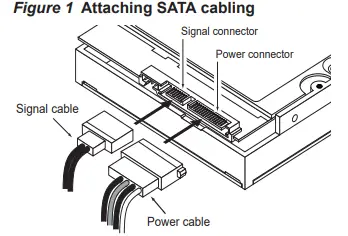
Each cable is keyed to ensure correct orientation. Desktop HDD drives support latching SATA connectors.
Drive mounting
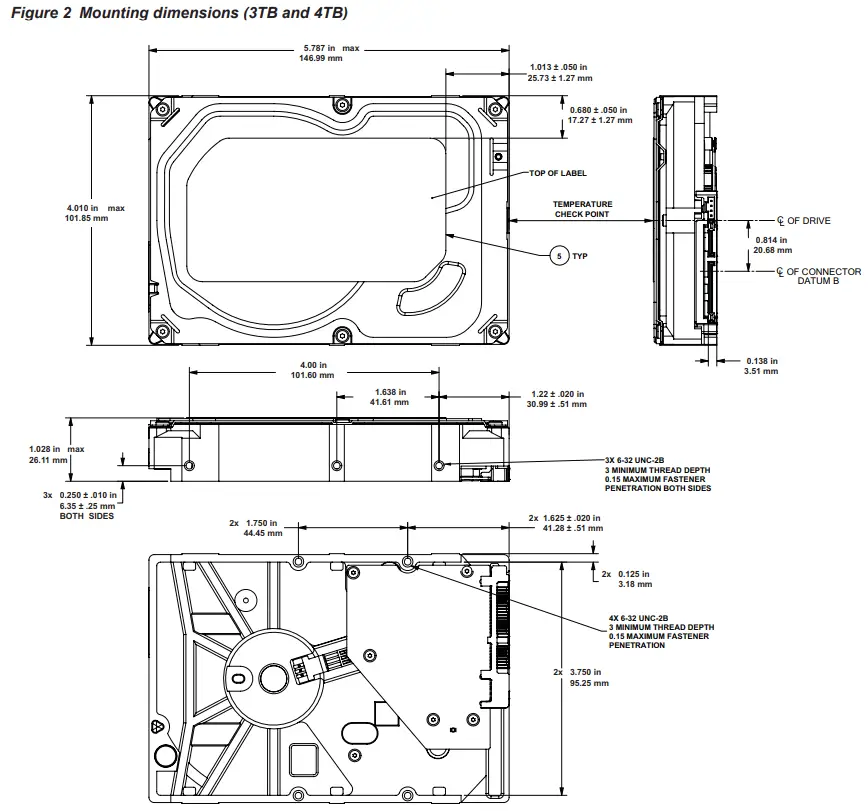
- Users can mount the drive in any orientation using four screws in the side-mounting holes or four screws in the bottom-mounting holes. Refer to Figure 2 for drive mounting dimensions. Follow these important mounting precautions when mounting the drive:
- Allow a minimum clearance of 0.030 inches (0.76mm) around the entire perimeter of the drive for cooling.
- Use only 6-32 UNC mounting screws.
- The screws should be inserted no more than 0.150 inch (3.81mm) into the bottom or side mounting holes.
- Do not overtighten the mounting screws (maximum torque: 6 inch-lb). Figure 2 Mounting dimensions (3TB and 4TB)

SATA Interface
- These drives use the industry-standard Serial ATA (SATA) interface that supports FIS data transfers. It supports ATA programmed input/output (PIO) modes 0 to 4; multiword DMA modes 0 to 2, and Ultra DMA modes 0 to 6.
For detailed information about the SATA interface, refer to the “Serial ATA: High-Speed Serialized AT Attachment” specification.
Hot-Plug compatibility
- Desktop HDD drives incorporate connectors that enable users to hot plug these drives in accordance with the SATA Revision 3.0 specification. This specification can be downloaded from www.serialata.org.
SATA device plug connector pin definitions
- Table 5 summarizes the signals on the SATA interface and power connectors.
Table 5 SATA connector pin definitions
| Segment | Pin | Function | Definition |
| Signal | S1 | Ground | 2nd mate |
| S2 | A+ | Differential signal pair A from Phy | |
| S3 | A- | ||
| S4 | Ground | 2nd mate | |
| S5 | B- | Differential signal pair B from Phy | |
| S6 | B+ | ||
| S7 | Ground | 2nd mate | |
| Key and spacing separate signal and power segments | |||
| Power | P1 | V33 | 3.3V power |
| P2 | V33 | 3.3V power | |
| P3 | V33 | 3.3V power, pre-charge, 2nd mate | |
| P4 | Ground | 1st mate | |
| P5 | Ground | 2nd mate | |
| P6 | Ground | 2nd mate | |
| P7 | V5 | 5V power, pre-charge, 2nd mate | |
| P8 | V5 | 5V power | |
| P9 | V5 | 5V power | |
| P10 | Ground | 2nd mate | |
| P11 | Ground or LED signal | If grounded, the drive does not use a deferred spin | |
| P12 | Ground | 1st mate. | |
| P13 | V12 | 12V power, pre-charge, 2nd mate | |
| P14 | V12 | 12V power | |
| P15 | V12 | 12V power | |
Notes
- All pins are in a single row, with a 1.27 mm (0.050 in) pitch.
- The comments on the mating sequence apply to the case of the backplane blind mate connector only. In this case, the mating sequences are:
- the ground pins P4 and P12.
- the pre-charge power pins and the other ground pins.
- the signal pins and the rest of the power pins.
- There are three power pins for each voltage. One pin from each voltage is used for pre-charge when installed in a blind-mate backplane configuration.
- All used voltage pins (Vx) must be terminated.
Supported ATA commands
- The following table lists SATA standard commands that the drive supports.
- For a detailed description of the ATA commands, refer to the Serial ATA International Organization: Serial ATA Revision 3.0 (http://www.sata-io.org).
- See “S.M.A.R.T. commands” on page 26 for details and subcommands used in the S.M.A.R.T. implementation.
Table 6 SATA standard commands
| Command name | Command code (in hex) |
| Check Power Mode | E5H |
| Device Configuration Freeze Lock | B1H / C1H |
| Device Configuration Identify | B1H / C2H |
| Device Configuration Restore | B1H / C0H |
| Device Configuration Set | B1H / C3H |
| Device Reset | 08H |
| Download Microcode | 92H |
| Execute Device Diagnostics | 90H |
| Flush Cache | E7H |
| Flush Cache Extended | EACH |
| Format Track | 50H |
| Identify Device | EACH |
| Idle | E3H |
| Idle Immediate | E1H |
| Initialize Device Parameters | 91H |
| Read Buffer | E4H |
| Read DMA | C8H |
| Read DMA Extended | 25H |
| Read DMA Without Retries | C9H |
| Read Log Ext | 2FH |
| Read Multiple | C4H |
| Read Multiple Extended | 29H |
| Read Native Max Address | F8H |
| Read Native Max Address Extended | 27H |
| Read Sectors | 20H |
| Read Sectors Extended | 24H |
| Read Sectors Without Retries | 21H |
| Read Verify Sectors | 40H |
| Read Verify Sectors Extended | 42H |
| Read Verify Sectors Without Retries | 41H |
| Recalibrate | 10H |
| Security Disable Password | F6H |
| Security Erase Prepare | F3H |
| Security Erase Unit | F4H |
| Security Freeze | F5H |
| Security Set Password | F1H |
| Security Unlock | F2H |
| Command name | Command code (in hex) | |
| Seek | 70H | |
| Set Features | EFH | |
| Set Max Address | F9H | |
| Note: Individual Set Max Address | Address: | 00H |
| commands are identified by the value | Password: | 01H |
| placed in the Set Max Features Register | Lock: | 02H |
| as defined to the right. | Unlock: Freeze Lock: | 03H 04H |
| Set Max Address Extended Set Multiple Mode | 37H C6H | |
| Sleep | E6H | |
| S.M.A.R.T. Disable Operations | B0H / D9H | |
| S.M.A.R.T. Enable/Disable Autosave | B0H / D2H | |
| S.M.A.R.T. Enable Operations | B0H / D8H | |
| S.M.A.R.T. Execute Offline | B0H / D4H | |
| S.M.A.R.T. Read Attribute Thresholds | B0H / D1H | |
| S.M.A.R.T. Read Data | B0H / D0H | |
| S.M.A.R.T. Read Log Sector | B0H / D5H | |
| S.M.A.R.T. Return Status | B0H / DAH | |
| S.M.A.R.T. Save Attribute Values | B0H / D3H | |
| S.M.A.R.T. Write Log Sector | B0H / D6H | |
| Standby | E2H | |
| Standby Immediate | E0H | |
| Write Buffer | E8H | |
| Write DMA | CASH | |
| Write DMA Extended | 35H | |
| Write DMA FUA Extended | 3DH | |
| Write DMA Without Retries | CBH | |
| Write Log Extended | 3FH | |
| Write Multiple | C5H | |
| Write Multiple Extended | 39H | |
| Write Multiple FUA Extended | CEH | |
| Write Sectors | 30H | |
| Write Sectors Without Retries | 31H | |
| Write Sectors Extended | 34H | |
| Write Uncorrectable | 45H | |
Identify Device command
The Identify Device command (command code ECH) transfers information about the drive to the host following power up. The data is organized as a single 512-byte block of data, whose contents are shown in on page 19. All reserved bits or words should be set to zero. Parameters listed with an “x” are drive-specific or vary with the state of the drive.
The following commands contain drive-specific features that may not be included in the SATA specification.
Table 7 Identify Device commands
| Word | Description | Value |
|
0 | Configuration information: • Bit 15: 0 = ATA; 1 = ATAPI • Bit 7: removable media • Bit 6: removable controller • Bit 0: reserved |
0C5AH |
| 1 | Number of logical cylinders | 16,383 |
| 2 | ATA-reserved | 0000H |
| 3 | Number of logical heads | 16 |
| 4 | Retired | 0000H |
| 5 | Retired | 0000H |
| 6 | Number of logical sectors per logical track: 63 | 003FH |
| 7–9 | Retired | 0000H |
| 10–19 | Serial number: (20 ASCII characters, 0000H = none) | ASCII |
| 20 | Retired | 0000H |
| 21 | Retired | 0400H |
| 22 | Obsolete | 0000H |
| 23–26 | Firmware revision (8 ASCII character string, padded with blanks to end of string) | x.xx |
| 27–46 | Drive model number: (40 ASCII characters, padded with blanks to end of string) | |
| 47 | (Bits 7–0) Maximum sectors per interrupt on Read multiple and Write multiple (16) | 8010H |
| 48 | Reserved | 0000H |
| 49 | Standard Standby timer, IORDY supported and may be disabled | 2F00H |
| 50 | ATA-reserved | 0000H |
| 51 | PIO data-transfer cycle timing mode | 0200H |
| 52 | Retired | 0200H |
| 53 | Words 54–58, 64–70, and 88 are valid | 0007H |
| 54 | Number of current logical cylinders | xx xx |
| 55 | Number of current logical heads | xx xx |
| 56 | Number of current logical sectors per logical track | xx xx |
| 57–58 | Current capacity in sectors | xx xx |
| Word | Description | Value |
| 59 | Number of sectors transferred during a Read Multiple or Write Multiple commands | xx xx |
|
60–61 | Total number of user-addressable LBA sectors available (see Section 2.2 for related information) *Note: The maximum value allowed in this field is: 0FFFFFFFh (268,435,455 sectors, 137GB). Drives with capacities over 137GB will have 0FFFFFFFh in this field and the actual number of user-addressable LBAs is specified in words 100-103. This is required for drives that support the 48-bit addressing feature. |
0FFFFFFFh* |
| 62 | Retired | 0000H |
| 63 | Multiword DMA active and modes supported (see note following this table) | xx07H |
| 64 | Advanced PIO modes supported (modes 3 and 4 supported) | 0003H |
| 65 | Minimum multiword DMA transfer cycle time per word (120 nsec) | 0078H |
| 66 | Recommended multiword DMA transfer cycle time per word (120 nsec) | 0078H |
| 67 | Minimum PIO cycle time without IORDY flow control (240 nsec) | 0078H |
| 68 | Minimum PIO cycle time with IORDY flow control (120 nsec) | 0078H |
| 69–74 | ATA-reserved | 0000H |
| 75 | Queue depth | 001FH |
| 76 | SATA capabilities | xxxxH |
| 77 | Reserved for future SATA definition | xxxxH |
| 78 | SATA features supported | xxxxH |
| 79 | SATA features enabled | xxxxH |
| 80 | Major version number | 01F0H |
| 81 | Minor version number | 0028H |
| 82 | Command sets supported | 364BH |
| 83 | Command sets supported | 7F09H |
| 84 | Command sets support extension (see note following this table) | 4163H |
| 85 | Command sets enabled | 30xxH |
| 86 | Command sets enabled | BE09H |
| 87 | Command sets enable extension | 4163H |
| 88 | Ultra DMA support and current mode (see note following this table) | xx7FH |
| 89 | Security erase time | 0039H |
| 90 | Enhanced security erase time | 0039H |
| 92 | Master password revision code | FFFEH |
| 93 | Hardware reset value | xxxxH |
| 94 | Automatic acoustic management | 8080H |
| 95–99 | ATA-reserved | 0000H |
| Word | Description | Value |
| 100–103 | Total number of user-addressable LBA sectors available (see Section 2.2 for related information). These words are required for drives that support the 48- bit addressing feature. Maximum value: 0000FFFFFFFFFFFFh. | ST4000DM000 = 7,814,037,168 ST3000DM003 = 5,860,533,168 |
| 104–107 | ATA-reserved | 0000H |
| 108–111 | The mandatory value of the world wide name (WWN) for the drive. NOTE: This field is valid if word 84, bit 8 is set to 1 indicating 64-bit WWN support. | Each drive will have a unique value. |
| 112–127 | ATA-reserved | 0000H |
| 128 | Security status | 0001H |
| 129–159 | Seagate-reserved | xxxxH |
| 160–254 | ATA-reserved | 0000H |
| 255 | Integrity word | xxA5H |
- Note Advanced Power Management (APM) and Automatic Acoustic Management (AAM) features are not supported.
- Note See the bit descriptions below for words 63, 84, and 88 of the Identify Drive data.
| Description (if the bit is set to 1) | ||
| Bit | Word 63 | |
| 0 | Multiword DMA mode 0 is supported. | |
| 1 | Multiword DMA mode 1 is supported. | |
| 2 | Multiword DMA mode 2 is supported. | |
| 8 | Multiword DMA mode 0 is currently active. | |
| 9 | Multiword DMA mode 1 is currently active. | |
| 10 | Multiword DMA mode 2 is currently active. | |
| Bit | Word 84 | |
| 0 | SMART error login is supported. | |
| 1 | SMART self-test is supported. | |
| 2 | Media serial number is supported. | |
| 3 | Media Card Pass Through Command feature set is supported. | |
| 4 | The streaming feature set is supported. | |
| 5 | GPL feature set is supported. | |
| 6 | WRITE DMA FUA EXT and WRITE MULTIPLE FUA EXT commands are supported. | |
| 7 | WRITE DMA QUEUED FUA EXT command is supported. | |
| 8 | 64-bit World Wide Name is supported. | |
| 9-10 | Obsolete. | |
Seagate Desktop HDD Product Manual, Rev. F
| 11-12 | Reserved for TLC. | |
| 13 | IDLE IMMEDIATE command with IUNLOAD feature is supported. | |
| 14 | Shall be set to 1. | |
| 15 | Shall be cleared to 0. | |
| Bit | Word 88 | |
| 0 | Ultra DMA mode 0 is supported. | |
| 1 | Ultra DMA mode 1 is supported. | |
| 2 | Ultra DMA mode 2 is supported. | |
| 3 | Ultra DMA mode 3 is supported. | |
| 4 | Ultra DMA mode 4 is supported. | |
| 5 | Ultra DMA mode 5 is supported. | |
| 6 | Ultra DMA mode 6 is supported. | |
| 8 | Ultra DMA mode 0 is currently active. | |
| 9 | Ultra DMA mode 1 is currently active. | |
| 10 | Ultra DMA mode 2 is currently active. | |
| 11 | Ultra DMA mode 3 is currently active. | |
| 12 | Ultra DMA mode 4 is currently active. | |
| 13 | Ultra DMA mode 5 is currently active. | |
| 14 | Ultra DMA mode 6 is currently active. |
Set Features command
This command controls the implementation of various features that the drive supports. When the drive receives this command, it sets BSY, checks the contents of the Features register, clears BSY and generates an interrupt. If the value in the register does not represent a feature that the drive supports, the command is aborted. Power-on default has the read look-ahead and write caching features enabled. The acceptable values for the Features register are defined as follows:
Table 8 Set Features command
| 02H | Enable write cache (default) |
| 03H | Set transfer mode (based on value in Sector Count register) Sector Count register values: |
| 00H Set PIO mode to default (PIO mode 2) | |
| 01H Set PIO mode to default and disable IORDY (PIO mode 2) | |
| 08H PIO mode 0 | |
| 09H PIO mode 1 | |
| 0AH PIO mode 2 | |
| 0BH PIO mode 3 | |
| 0CH PIO mode 4 (default) | |
| 20H Multiword DMA mode 0 | |
| 21H Multiword DMA mode 1 | |
| 22H Multiword DMA mode 2 | |
| 40H Ultra DMA mode 0 | |
| 41H Ultra DMA mode 1 | |
| 42H Ultra DMA mode 2 | |
| 43H Ultra DMA mode 3 | |
| 44H Ultra DMA mode 4 | |
| 45H Ultra DMA mode 5 | |
| 46H Ultra DMA mode 6 | |
| 06H | Enable the PUIS feature set |
| 07H | PUIS feature set device spin-up |
| 10H | Enable use of SATA features |
| 55H | Disable read look-ahead (read cache) feature |
| 82H | Disable write cache |
| 86H | Disable the PUIS feature set |
| 90H | Disable use of SATA features |
| AAH | Enable read look-ahead (read cache) feature (default) |
| F1H | Report full capacity available |
Note
At power-on, or after a hardware or software reset, the default values of the features are as indicated above.
S.M.A.R.T. commands
- S.M.A.R.T. provides near-term failure prediction for disk drives. When S.M.A.R.T. is enabled, the drive monitors predetermined drive attributes that are susceptible to degradation over time. If self-monitoring determines that a failure is likely, S.M.A.R.T. makes a status report available to the host. Not all failures are predictable. S.M.A.R.T. predictability is limited to the attributes the drive can monitor. For more information on S.M.A.R.T. commands and implementation, see the Draft ATA-5 Standard.
- SeaTools diagnostic software activates a built-in drive self-test (DST S.M.A.R.T. command for D4H) that eliminates unnecessary drive returns. The diagnostic software ships with all new drives and is also available at: http://seatools.seagate.com.
- This drive is shipped with S.M.A.R.T. features disabled. Users must have a recent BIOS or software package that supports S.M.A.R.T. to enable this feature. The table below shows the S.M.A.R.T. command codes that the drive uses.
Table 9 S.M.A.R.T. commands
| Code in features register | S.M.A.R.T. command |
| D0H | S.M.A.R.T. Read Data |
| D2H | S.M.A.R.T. Enable/Disable Attribute Autosave |
| D3H | S.M.A.R.T. Save Attribute Values |
| D4H | S.M.A.R.T. Execute Off-line Immediate (runs DST) |
| D5H | S.M.A.R.T. Read Log Sector |
| D6H | S.M.A.R.T. Write Log Sector |
| D8H | S.M.A.R.T. Enable Operations |
| D9H | S.M.A.R.T. Disable Operations |
| DAH | S.M.A.R.T. Return Status |
Note
If an appropriate code is not written to the Features Register, the command is aborted and 0x 04 (abort) is written to the Error register.
Seagate Technology LLC
- AMERICAS Seagate Technology LLC 10200 South De Anza Boulevard, Cupertino, California 95014, United States, 408-658-1000
- ASIA/PACIFIC Seagate Singapore International Headquarters Pte. Ltd. 7000 Ang Mo Kio Avenue 5, Singapore 569877, 65-6485-3888 EUROPE, MIDDLE EAST AND AFRICA Seagate Technology SAS 16-18 rue du Dôme, 92100 Boulogne-Billancourt, France, 33 1-4186 10 00
- Publication Number: 100710254, Rev. F
- May 2014
Document Revision History
| Revision | Date | Description of Change |
| Rev. A | 01/14/2013 | Initial release. |
| Rev. B | 02/13/2013 | Updated internal data transfer rate in Table 1 and section 2.4. |
| Rev. C | 03/14/2013 | Updated environmental information note on page 18; added rate workload to Table 1 specifications. |
| Rev. D | 03/07/2014 | Revised: copyright statement – below; rated workload statement – page 4: warranty URL & message – pages 4 & 12; Replaced MTBF w/AFR in rated workload statement – page 4. |
| Rev. E | 05/08/2014 | Added metric “mm” values to mechanical drawing (page 16) |
| Rev. F | 05/29/2014 | Corrected ST model # (page 2-3, 5 & 23); edits to DC power table (page 8) |
- © 2014 Seagate Technology LLC. All rights reserved.
- Publication number: 100710254, Rev. F May 2014
- Seagate, Seagate Technology and the Wave logo are registered trademarks of Seagate Technology LLC in the United States and/or other countries. Desktop HDD and SeaTools are either trademarks or registered trademarks of Seagate Technology LLC or one of its affiliated companies in the United States and/or other countries. All other trademarks or registered trademarks are the property of their respective owners.
- No part of this publication may be reproduced in any form without written permission of Seagate Technology LLC.
- Call 877-PUB-TEK1(877-782-8351) to request permission.
- When referring to drive capacity, one gigabyte, or GB, equals one billion bytes and one terabyte, or TB, equals one trillion bytes. Your computer’s operating system may use a different standard of measurement and report a lower capacity. In addition, some of the listed capacity is used for formatting and other functions, and thus will not be available for data storage. Actual quantities will vary based on various factors, including file size, file format, features and application software. Actual data rates may vary depending on operating environment and other factors. The export or re-export of hardware or software containing encryption may be regulated by the U.S. Department of
- Commerce, Bureau of Industry and Security (for more information, visit www.bis.doc.gov), and controlled for import and use outside of the U.S. Seagate reserves the right to change, without notice, product offerings or specifications.
Seagate Technology Support Services
- For information regarding online support and services, visit: http://www.seagate.com/about/contact-us/technical-support/Available services include:
- Presales & Technical support
- Global Support Services telephone numbers & business hours
- Authorized Service Centers
- For information regarding Warranty Support, visit: http://www.seagate.com/support/warranty-and-replacements/
- For information regarding data recovery services, visit: http://www.seagate.com/services-software/data-recovery-services/For Seagate OEM and Distribution partner portal, visit: http://www.seagate.com/partners
- For Seagate reseller portal, visit: http://www.seagate.com/partners/my-spp-dashboard/
 Warranty & Replacements | Support Seagate US
 Home | SATA-IO
 The Leader in Mass Data Storage Solutions | Seagate US
 Home | SATA-IO

![Seagate Barracuda [st5000lm000-2u8170, St4000lm024-2u817v] User Manual](https://static-data1.manualsee.com/1/img/37/16952/2020/12/ST5000LM000-2U8170-1568x1568.jpg "Seagate Barracuda [st5000lm000-2u8170, St4000lm024-2u817v] User Manual")