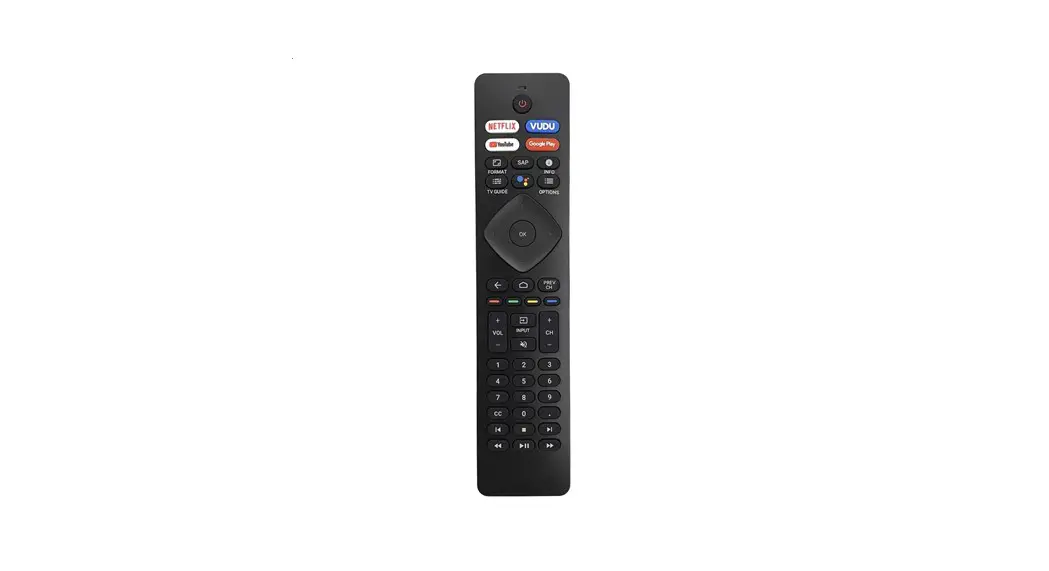

Ohsung Electronics C009 RF Remote Control Unit
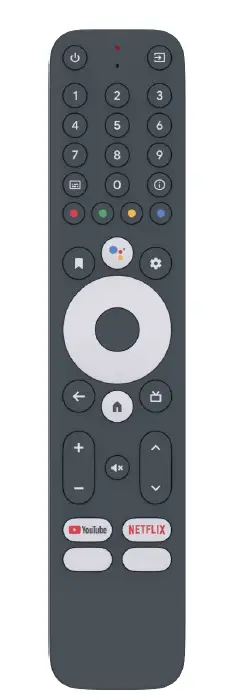
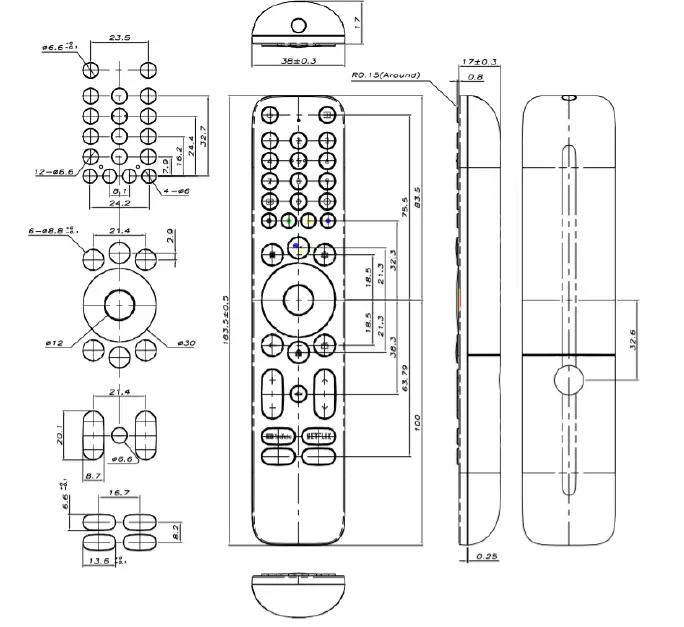
Dimensions
Materials & colors
| PART NAME | DESCRIPTION | SPECIFICATION | |
| TOP/BOTTOM CASE | MATERIAL | ABS(DARK ANTHRACITE) | |
| BATTERY COVER | MATERIAL | ABS(DARK ANTHRACITE) | |
| NAVI KNOB | MATERIAL | ABS(ROCK CANDY) | |
| OK KNOB | MATERIAL | ABS(DARK ANTHRACITE) | |
| WINDOW FILTER | MATERIAL | PC | |
| RUBBER BUTTON | MATERIAL | SILICONE RUBBER | |
| EXCEPT FOR DESIGNATED FORMING COLOR | DARK ANTHRACITE | ||
| EXCEPT FOR DESIGNATED PRINT COLOR | ROCK CANDY | ||
| PRINT COLOR (ASSISTANT) | BLUE P.T 2173C | ||
| RED P.T 1795C | |||
| YELLOW P.T 1225C | |||
| GREEN P.T 7738C | |||
| PRINT COLOR (HOME) | DARK ANTHRACITE | ||
| FORMING COLOR (ASSISTANT/HOME/YOUTUBE,NETFLIX) | ROCK CANDY | ||
| FORMING COLOR (ASSISTANT/HOME) | ROCK CANDY | ||
| PRINT COLOR | YOUTUBE | BLACK | |
| P.T 1795C | |||
| NETFLIX | P.T 1795C | ||
| SUFACE TREAMENT | PU COATING | ||
Barcode label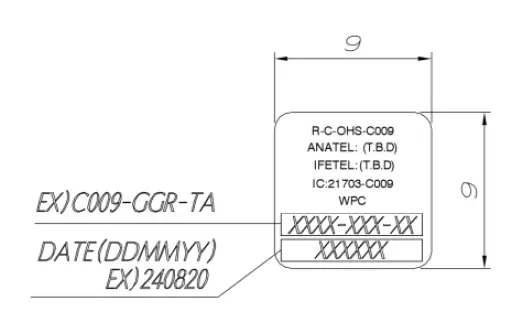
It is attached to the PCB and it can be seen into the battery compartment after removing the battery cover.
Packing
- Remote Control
- PE bag dimensions : 80 x 250mm (LDPE 0.05t)
- Weight: 60g (without battery)
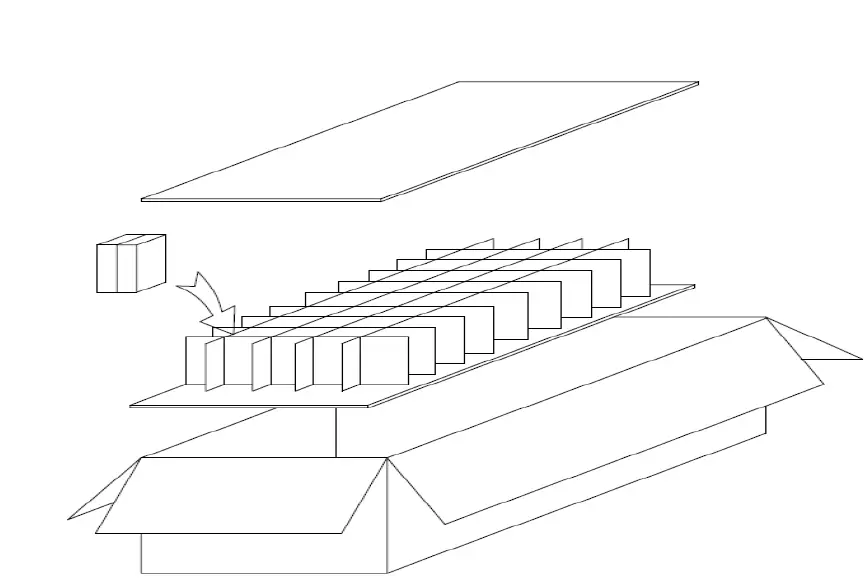
- Carton box

- Box dimensions : W 600 x D 400 x H 200 mm
- Quantity: 140pcs
- Box weight: TBD
- Pallet
- Pallet itself dimensions: W 1200 x D 800 x H 140mm
- Overall pallet dimensions: W 1200 x D 800 x H 1340mm
- Quantity per pallet: 2,800pcs (4 boxes / layer – 5 layers)
Electrical
Electrical Characteristic
| Parameter | Condition | Spec | Unit | |
| Frequency Range | Bluetooth Low Energy Specification | 2.402 ~ 2.480 | [GHz] | |
| Channel | 40 | [Num] | ||
| RF Power | 4 | [dBm] | ||
| Test channel |
TC-3000 (RF measuring instrument) | 19 | [Num] | |
| RF Power | PAvg | -20~+10 | [dBm] | |
| PMax | +8 | [dBm] | ||
| Pmin | -20 | [dBm] | ||
| Modulation Characteristic s | ∆f1 avg | 225~275 | [KHz] | |
| ∆f2 avg | ≥ 185 | [KHz] | ||
| ∆f2/∆f1 | 0.8 | |||
| ∆f2min | ≥ 92.5 | [KHz] | ||
| ∆f2rate | ≥ 99 | [%] | ||
| Carrier Frequency Offset and Drift | fTx-fn | ≤ 150 | [KHz] | |
| ∆f0-fn | ≤ 50 | [KHz] | ||
| f1-f0 | ≤ 20 | [KHz] | ||
| ∆fn-f(n-5) | ≤ 20 | [KHz] | ||
| Operating Voltage | RF (Bluetooth) | 2.2~3.6 | [V] | |
| LVI Voltage | Low Voltage Indicate | 2.25±0.2V | [V] | |
| Operating current (IR) | Power: 3V | ≤ 50 | [mA] | |
| Operating current (RF KEY) |
Power: 3V Non-directional distance | ≤ 10 | [mA] | |
| Operating current (RF+Voice) | ≤ 20 | [mA] | ||
| Leakage current | 10 | [㎂] | ||
| RF range (distance) | ≥10 | [m] | ||
| IR Range | Direct | ≥12 | [m] | |
| Horizontal | 7 (±15°) | [m] | ||
| VOICE | 300Hz | Voice Inspection JIG | -30~-14 | [dB] |
| 2KHz | -30~-10 | [dB] | ||
| 3.8KHz | -30~-14 | [dB] | ||
Battery Management
- Remote Control sends the information for battery level using Bluetooth battery service.
- The level of LVD is 2.1V ±0.1V.
- If the battery voltage has reached the LVD value, Remote Control cannot enter the pairing mode and the factory reset mode.
- If the battery voltage is under 2.0V, Remote Control does not operate.
- When the battery voltage is 2.2V or higher, the Remote Control operates again.
Software
Bluetooth 5.0 LE identification
- Device Name: RemoteG20
- Vender ID: 0x0957
- Product ID: 0x0001
- Vendor ID Source : Blutooth SIG
- Hardware Version : ‘V’, ‘1’, ’.’, ‘0’
Pairing mode & Re-pairing mode
- If the user presses the [HOME] + [BACK] keys on the Remote Control for more than 4 secs, the Remote Control enters pairing mode.
- The green led stays on while pressing and holding the keys.
- After that, the green lead starts blinking to indicate that the Remote Control has entered pairing mode.
- If pairing is successfully made, the green lead stops blinking and the Remote Control starts working in Bluetooth.
- If pairing is not successfully made for 2mins(re-pairing) or 10mins(pairing), the green lead stop blinking and the red lead blinks 4times. The Remote Control stops pairing and goes back to the previous state.
- If a pin or key is missing, the Remote Control sends the un-direct advertising data for 2mins or 10mins in pairing mode after disconnect.
Advertising
| Item | Data | Detail |
| Appearance | 0x80, 0x01 | Generic Remote Control |
| UUID | 0x12, 0x18,0x0F, 0x18 | Human Interface Device Battery |
| Complete local name | RemoteG20 | Device Name |
- The Remote Control shall choose a very aggressive advertising interval, aimed at the best possible reconnection experience.
- An advertisement interval of 20ms is recommended.
- This interval may be downgraded after the 30s if no connection has been established.
- Additional Data of Un-direct advertising Data
Scan Response Data
| Item | Data | Detail |
| Complete local name | RemoteG20 | Device Name |
Un-Pairing mode
- Un-pairing from the STB clears the Remote Control bonding cache.
- Remove Device bonding cache (manual approach – Optional): Press and hold [BACK] key while inserting batteries.
Connection Parameter
- Connection Interval Time: 10ms
- Connection Slave Latency: 99 (1s)
- Connection Supervision Time Out: 4s
Reconnection
- Upon an unexpected disconnect from the STB, the Remote Control shall automatically attempt to reconnect to the STB.
- It is recommended that the Remote Control uses an aggressive advertising interval (ex. 20ms) for the first 30-60secs after being disconnected. The Remote Control may then switch to a more battery-friendly advertising interval if the connection was not re-established after 30~60secs. The Remote Control may stop attempting to connect after a 2mins interval if no user interaction (ex. Button press) has been detected.
- If the Remote Control is not connected and the user initiates the Remote Control wake-up and connection by pressing a button on the Remote Control, the Remote Control shall cache the button press event and forward it to the STB after successfully establishing a connection.
- If a button event is cached and being held until the connection is established, any further key presses may be discarded until the cached event is successfully passed to the STB.
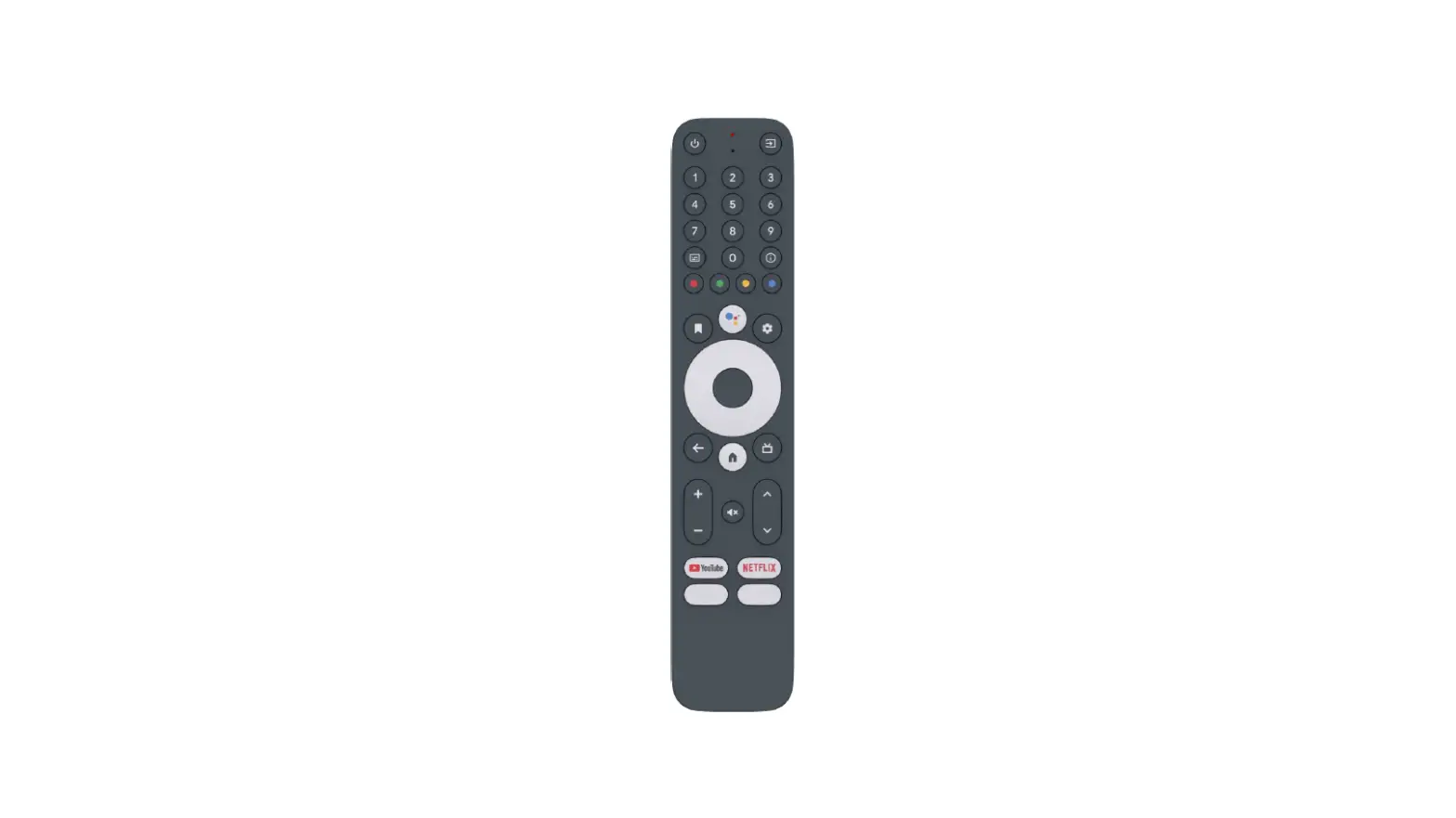
Key codes for STB
- In Bluetooth mode, HID Profile is used.
- In IR Mode, NEC format is used
- Structure of the NEC format: Custom Code – Data – Inverse data
- Custom Code : 0x8877
- Code list
| Key Name | Android key code for BT HID code | IR code | HID | |
| Costom Code : 0x8877 | Usage Page | Usage ID | ||
| Power | KEYCODE_POWER | 0x21 | 0x0C | 0x0030 |
| Input | KEYCODE_TV_INPUT | 0x60 | 0x0C | 0x01BB |
| 1 | KEYCODE_1 | 0x01 | 0x07 | 0x001E |
| 2 | KEYCODE_2 | 0x02 | 0x07 | 0x001F |
| 3 | KEYCODE_3 | 0x03 | 0x07 | 0x0020 |
| 4 | KEYCODE_4 | 0x04 | 0x07 | 0x0021 |
| 5 | KEYCODE_5 | 0x05 | 0x07 | 0x0022 |
| 6 | KEYCODE_6 | 0x06 | 0x07 | 0x0023 |
| 7 | KEYCODE_7 | 0x07 | 0x07 | 0x0024 |
| 8 | KEYCODE_8 | 0x08 | 0x07 | 0x0025 |
| 9 | KEYCODE_9 | 0x09 | 0x07 | 0x0026 |
| Subtitles | KEYCODE_CAPTIONS | 0x58 | 0x0C | 0x0061 |
| 0 | KEYCODE_0 | 0x0A | 0x07 | 0x0027 |
| Info | KEYCODE_INFO | 0x29 | 0x0C | 0x01BD |
| Red | KEYCODE_PROG_RED | 0x4B | 0x0C | 0x0069 |
| Green | KEYCODE_PROG_GREEN | 0x4A | 0x0C | 0x006A |
| Yellow | KEYCODE_PROG_YELLOW | 0x49 | 0x0C | 0x006C |
| Blue | KEYCODE_PROG_BLUE | 0x4C | 0x0C | 0x006B |
| Bookmark | KEYCODE_BOOKMARK | 0x74 | 0x0C | 0x022A |
| Assistant | KEYCODE_ASSIST | 0x46 | 0x0C | 0x0221 |
| Settings | KEYCODE_SETTINGS | 0x0F | 0x0C | 0x0096 |
| D-pad Up | KEYCODE_DPAD_UP | 0x15 | 0x0C | 0x0042 |
| D-pad Left | KEYCODE_DPAD_LEFT | 0x17 | 0x0C | 0x0044 |
| D-pad Center | KEYCODE_DPAD_CENTER | 0x19 | 0x0C | 0x0041 |
| D-pad Right | KEYCODE_DPAD_RIGHT | 0x18 | 0x0C | 0x0045 |
| D-pad Down | KEYCODE_DPAD_DOWN | 0x16 | 0x0C | 0x0043 |
| Back | KEYCODE_BACK | 0x48 | 0x0C | 0x0224 |
| Home | KEYCODE_HOME | 0x47 | 0x0C | 0x0223 |
| TV(Guide) | KEYCODE_GUIDE | 0x32 | 0x0C | 0x008D |
| Volume + | KEYCODE_VOLUME_UP | 0x23 | 0x07 | 0x0080 |
| Program ∧ | KEYCODE_CHANNEL_UP | 0x33 | 0x0C | 0x009C |
| Mute | KEYCODE_VOLUME_MUTE | 0x25 | 0x0C | 0x00E2 |
| Volume – | KEYCODE_VOLUME_DOWN | 0x24 | 0x07 | 0x0081 |
| Program ∨ | KEYCODE_CHANNEL_DOWN | 0x34 | 0x0C | 0x009D |
| YOUTUBE | KEYCODE_F18 | 0x64 | 0x0C | 0x0077 |
| NETFLIX | KEYCODE_F17 | 0x63 | 0x0C | 0x0078 |
| APP03 | KEYCODE_F19 | 0x67 | 0x0C | 0x0079 |
| APP04 | KEYCODE_F20 | 0x68 | 0x0C | 0x007A |
ATV Voice service
| Type | Short-form | UUID | Properties |
| ATV Voice Service | ATVV_SERVICE_UUID | AB5E0001-5A21-4F05-BC7D- AF01F617B664 | |
| Write Characteristic | ATVV_CHAR_TX | AB5E0002-5A21-4F05-BC7D- AF01F617B664 | Write |
| Read Characteristic | ATVV_CHAR_RX | AB5E0003-5A21-4F05-BC7D- AF01F617B664 | Notify |
| Control Characteristic | ATVV_CHAR_CTL | AB5E0004-5A21-4F05-BC7D- AF01F617B664 | Notify |
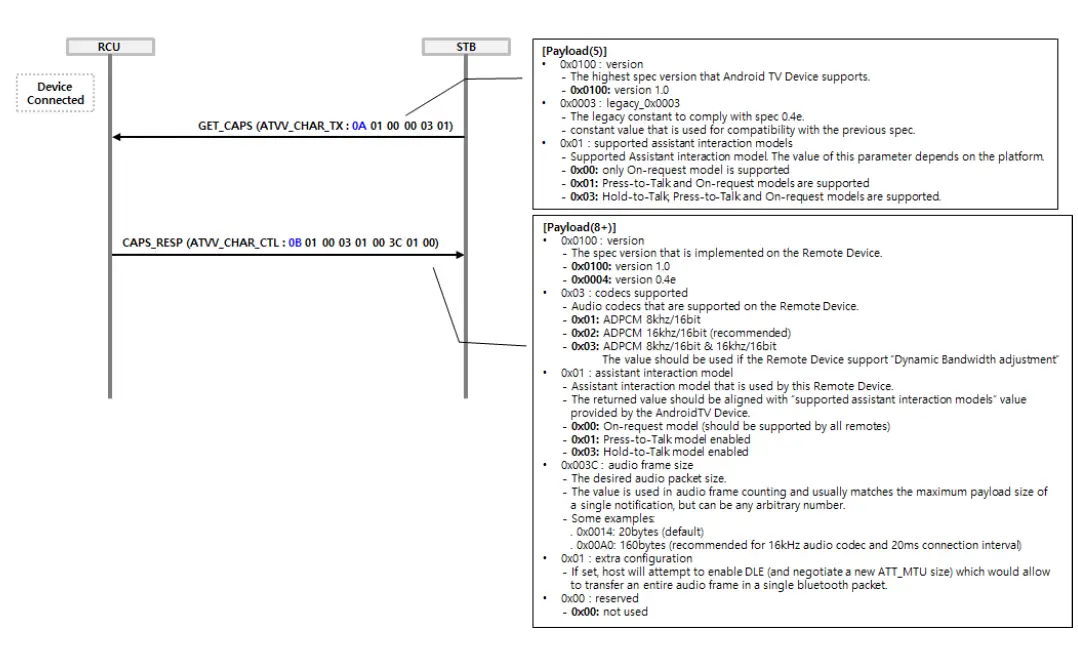
ATV Voice initialization (Capability)
- After the Remote Control device is paired and connected, the STB will send it a command to get the capabilities of the Remote Control.
- This command will be sent via the ATVV_CHAR_TX characteristic.
- The Remote Control should then respond back with its capabilities using ATVV_CHAR_CTL notification.
- Flow chart

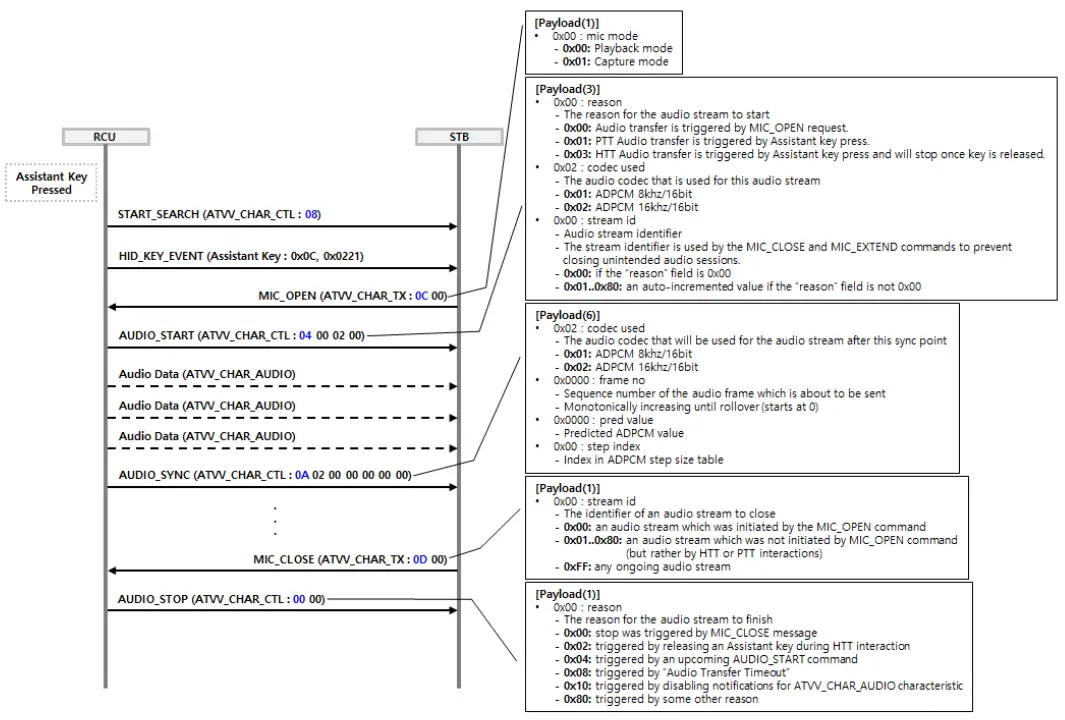
Voice Search initiated by the Remote Control (On-request, legacy)
- For Voice function, it is recommended to be more than 10meters from the receiver.
- Distance between mouth and microphone should be between 5 to 30cm.
- If [ASSISTANT] key is pressed, the Remote Control sends the START_SEARCH command first followed by the HID_KEY_EVENT to the STB and the STB sends back the MIC_OPEN command to the Remote Control.
- The green led turns on, the Remote Control sends the AUDIO_START command and transmits the voice data for 15secs timeout duration.
- After timeout duration or the Remote Control receives the MIC_CLOSE command from the STB, the Remote Control sends the AUDIO_STOP command to the STB and the green led goes off.
- Flow chart.

Note: The “On-request” assistant interaction model must be supported by all Remote Control and it should be used by default before any other interaction model is negotiated by GET_CAPS, CAPS_RESP messages exchange.
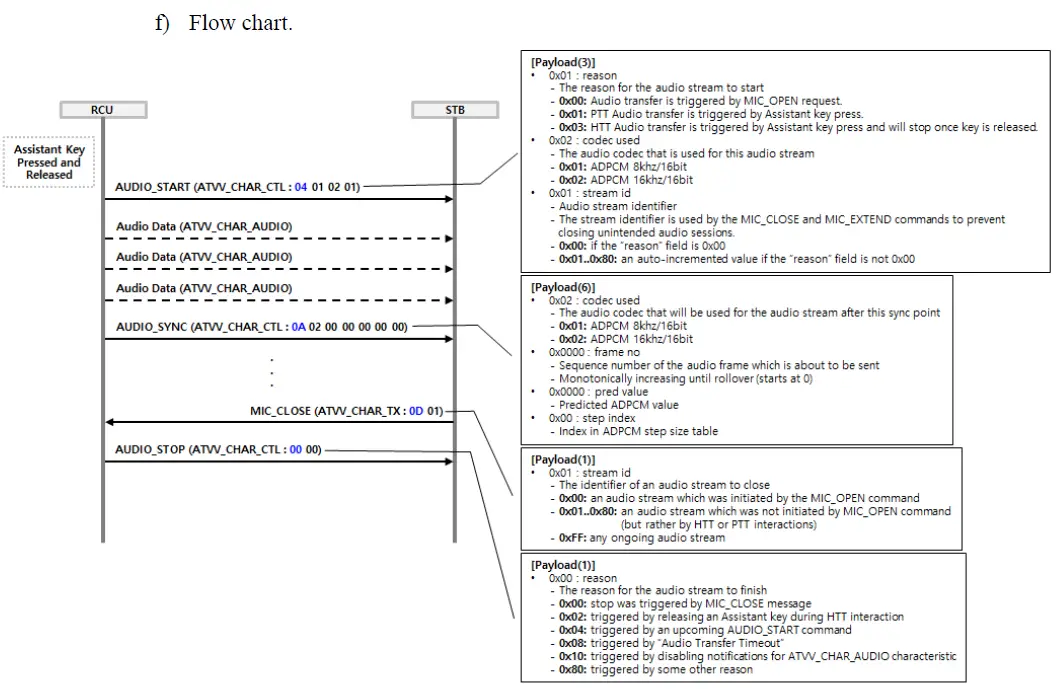
Voice Search initiated by the Remote Control (PTT, Press-to-Talk)
- For the Voice function, it is recommended to be more than 10meters from the receiver.
- Distance between mouth and microphone should be between 5 to 30cm.
- If [ASSISTANT] key is pressed and released, the green led starts blinking.
- The Remote Control sends the AUDIO_START command and transmits the voice data for 15secs timeout duration.
- After timeout duration or the Remote Control receives the MIC_CLOSE command from the STB, the Remote Control sends the AUDIO_STOP command to the STB and the green led goes off.
- Flow chart.

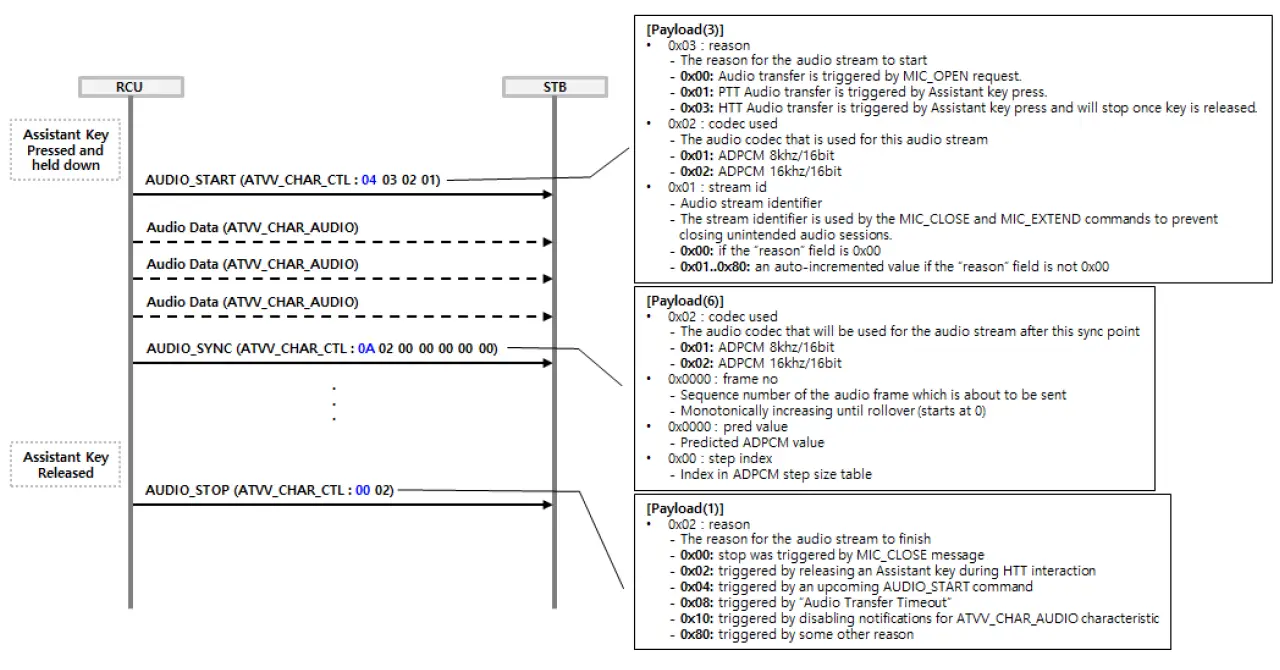
Voice Search initiated by the Remote Control (HTT, Hold-to-Talk)
- For the Voice function, it is recommended to be more than 10meters from the receiver.
- Distance between mouth and microphone should be between 5 to 30cm.
- If [ASSISTANT] key is pressed and held down, the green lead turns on
- The Remote Control sends the AUDIO_START command and transmits the voice data.
- If the [ASSISTANT] key is released, the Remote Control sends the AUDIO_STOP command to the STB and the green led goes off.
- Flow chart.

Voice Search initiated by the launcher
- For Voice function, it is recommended to be within 10meters from the receiver.
- Distance between mouth and microphone should be between 5 to 30cm.
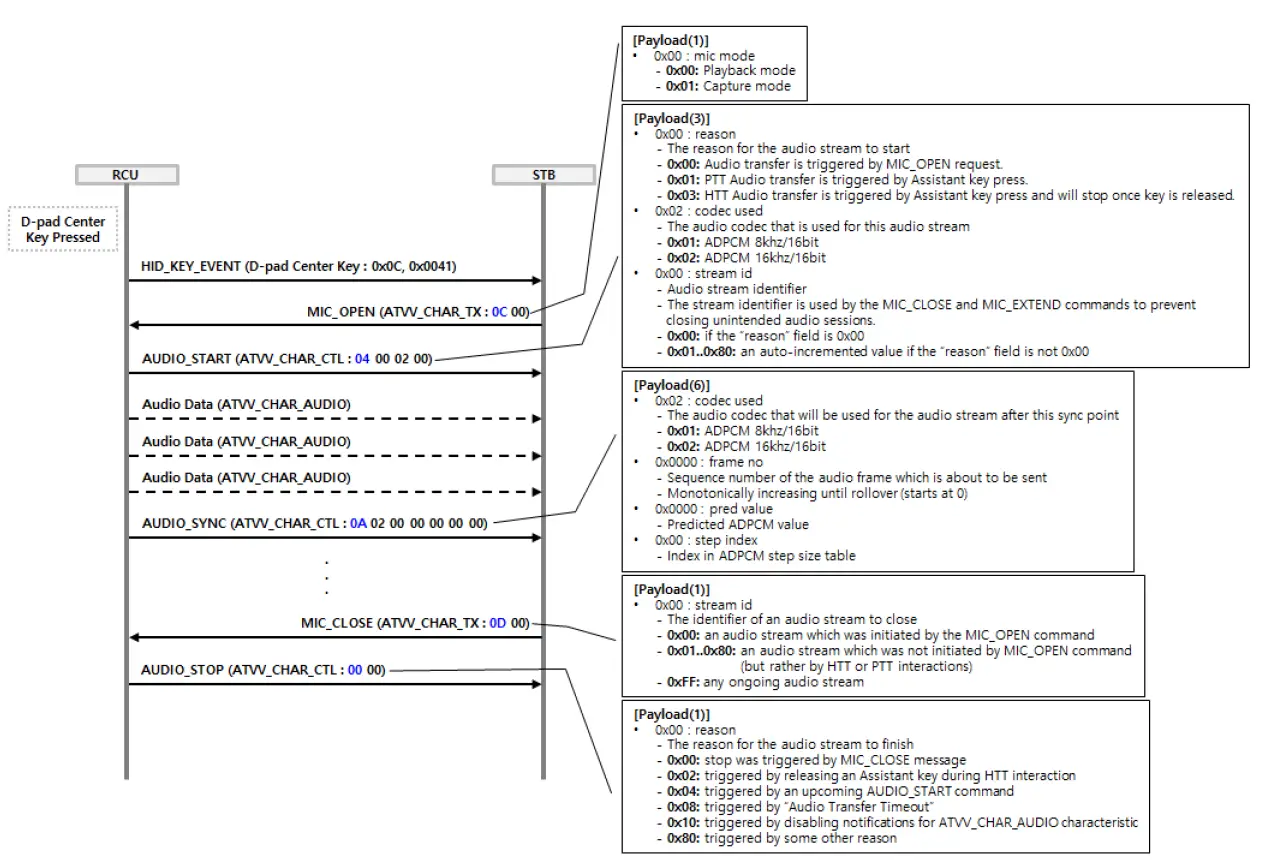
- User selects and validates the voice search on the launcher by using navigation and [D-PAD CENTER] keys.
- The Remote Control sends the HID_KEY_EVENT to the STB and the STB sends back the MIC_OPEN command to the Remote Control.
- The green led turns on, the Remote Control sends the AUDIO_START command and transmits the voice data for 15secs timeout duration.
- After timeout duration or the Remote Control receives the MIC_CLOSE command from the STB, the Remote Control sends the AUDIO_STOP command to the STB and the green led goes off.
- Flow chart

Couch mode
If a key or multiple keys are pressed continuously for more than 30s, the Remote Control stops transmission in order to protect the battery discharge.
OAD mode
| Type | Short-form | UUID | Properties |
| OAD Service | OAD_SERVICE_UUID | 00010203-0405-0607-0809-0A0B0C0D1912 | |
| Write Characteristic | OAD_CMD_OUT | 00010203-0405-0607-0809-0A0B0C0D2B12 | Write |
- OAD proceeds according to the Telink specification.
- OAD service

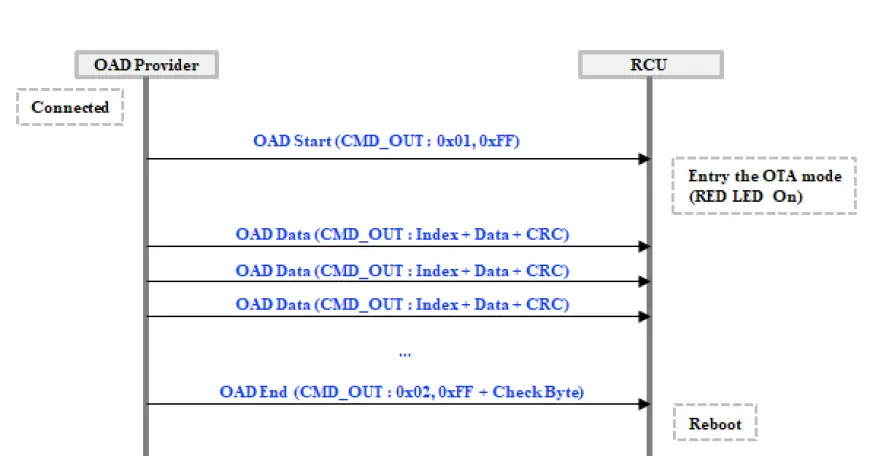
- Note1 : OAD Data = Index(2byte) + Data(16byte) + CRC(2byte)
- Note2 : Check Byte is last index and inverse of last index.Ex) last index = 0x09D7 à Check Byte = 0xD7 0x09 0x28 0xF6
- OAD time < 30secs
- The update should be able to complete without the user having to repeat the pairing process
- Minimal Battery level to support firmware upgrade: 30%
- Must be able to support successful DFU update with as little as 30% battery capacity
- Even if the OTA fails, the Remote Control should still operate normally.
Scheduled Silent Upgrade
- When waking up, the Remote Control sends a message to the STB to trigger the upgrade procedure.
- In the event the Remote Control would not be able to reconnect with the STB, the Remote Control should try 5 more times increasing the wait time after each attempt to 2, 3, 5, 8, and 13hours.
Bug Report
- Press the [D-PAD CENTER] + [BACK] keys for over 1sec to get the STB bug report.
- In IR mode, the sent code data is 0x96.
Factory Reset mode
- Press the [D-PAD CENTER] + [MUTE] keys for longer than 4secs.
- The green led blinks 2times to confirm that it is deleting the existing pairing table or setting value.
- When the factory reset is completed, the green led goes off and the Remote Control operates like it.
IR over BLE
IR service
| Type | Short-form | UUID | Properties |
| IR Service | IR_SERVICE | D343BFC0-5A21-4F05-BC7D- AF01F617B664 | |
| Control Characteristic | IR_PROG_CONTROL | D343BFC1-5A21-4F05-BC7D- AF01F617B664 | Write |
| Key Code Characteristic | IR_KEY_ID | D343BFC2-5A21-4F05-BC7D- AF01F617B664 | Write |
| IR Code Characteristic | IR_CODE | D343BFC3-5A21-4F05-BC7D- AF01F617B664 | Write |
| IR Suppress Characteristic | IR_SUPPRESS | D343BFC4-5A21-4F05-BC7D- AF01F617B664 | Write |
| Key Down Characteristic | IR_KEY_EVENT | D343BFC5-5A21-4F05-BC7D- AF01F617B664 | Notify |
Characteristics and Commands
- The IR_PROG_CONTROL characteristic is used to START(0x01) and FINISH(0x00) the update process.
- The IR_KEY_ID characteristic specifies the Remote Control KEY that is currently programmed. (Android keycode: 2bytes)
- The IR_CODE characteristic is used to send IR codes. (IR Code fragment: variable length payload)
- The IR_SUPRESS characteristic is used to switch between IR and BLE HID modes.(list of Android keycodes: 2bytes per item)
- The IR_KEY_EVENT characteristic is used to notify about KEY_UP(0x01, Key Code: 2bytes) and KEY_DOWN(0x00, Key Code: 2bytes) events.
IR Programming Operation Sequence
- ATV writes 0x01 to IR_PROG_CONTROL to START an IR programming session. This invalidates any previously started session.
- For each key that ATV wants to program:
- ATV writes the corresponding key ID to IR_KEY_ID.
- The key ID is 2 bytes. Keys are identified by Android key codes and are always written in ascending key code order.
- The remote should ignore any key codes that it does not support.
- ATV writes the corresponding IR code to IR_CODE.
- The IR code might be split into multiple consecutive writes. Payloads shall be concatenated in the order of arrival.
- The resulting byte sequence shall be interpreted according to IR Code Format.
- ATV writes 0x00 to IR_PROG_CONTROL to FINISH the IR programming session. A successful response guarantees that specified keys have been successfully programmed.
Note: Not specified keys shall operate in the BLE HID mode. Specified keys shall operate in IR mode unless configured in temporary BLE HID mode.
Temporary BLD HID mode
- IR programmed keys can be temporarily switched back to BLE HID mode by writing the IR_SUPPRESS characteristic.
- The payload shall be interpreted as a list of 2 bytes Android key codes that identify the keys that should operate in BLE HID mode.
- All other IR programmed keys shall operate in IR mode.
- This configuration remains valid until another successful write to IR_SUPPRESS or a disconnection.
Key Event Notifications
- The IR_KEY_EVENT characteristic can be subscribed for notifications about KEY_DOWN and KEY_UP events.
- Notifications shall be sent only for keys in IR mode.
Environmental Tests
Temperatures Conditions
- Operating Temperature: 0°C ~ +45°C
- Storage Temperature: -10°C ~ +60°C at 95% Humidity
Mechanical Tests
Drop Test
- Floor Material: Wood
- Test Method: Drop the sample from a height of 76cm with batteries instalLED.
- Top and Bottom faces: 5 time
- Up, Left, Right, Down faces: 1 time
- Test quantity: 3EA
- Required level: After drop tests, the product should work well without failure. If any part of the sample is disassembLED, it should be re-assembLED without problem.
Operating Key Force
- Test requirements: Check operating key force 230g ± 100g
- Test quantity: 2 EA
Operating Life Time Test
- Test requirements: apply static pressure on key
- Activation time: 300, 000 times
- Test quantity: 2EA
- Requested level: To confirm Remote Control complies with the requirement.
Cleaning liquid Test
- Test method: Rubs using Alcohol-wet cotton cloth.
- Time: 100 rubs for rubber sheet
- Weight: 230g for rubber sheet
- Test quantity: 2EA and 2 keys / EA for rubber sheet
- Required level: The printing is not faded or destroyed.
Certification
Assessment of compliance of the product to the requirements relating to Electromagnetic Compatibility is based on the following standards:
- EN 62368-1:2014 + A11:2017
- ETSI EN 301 489-1 V2.1.1:2017 (Published) / ETSI EN 301 489-1 V2.2.0 (Draft)
- ETSI EN 301 489-17 V3.1.1:2017 (Published) / ETSI EN 301 489-17 V3.2.0 (Draft)
- ETSI EN 300 328 V2.1.1:2016
- EN 62479:2010
- FCC Part 15 subpart C
Manufacturer & Importer
Manufacturer
- Name: Ohsung Electronics Co., Ltd.
- Address: #181 Gongdan-dong, Gumi, Gyeongbuk Republic of Korea.
Importer
Name: Google
Federal Communication Commission Interference Statement
This equipment has been tested and found to comply with the limits for a Class B digital device, pursuant to part 15 of the FCC Rules. These limits are designed to provide reasonable protection against harmful interference in a residential installation. This equipment generates, uses, and can radiate radio frequency energy and, if not installed and used in accordance with the instructions, may cause harmful interference to radio communications. However, there is no guarantee that interference will not occur in a particular installation. If this equipment does cause harmful interference to radio or television reception, which can be determined by turning the equipment off and on, the user is encouraged to try to correct the interference by one more of the following measures
- Reorient or relocate the receiving antenna.
- Increase the separation between the equipment and receiver.
- Connect the equipment into an outlet on a circuit different from that to which the receiver is connected.
- Consult the dealer or an experienced radio/TV technician for help.
Warning! Changes or modifications not expressly approved by the manufacturer could void the user’s authority to operate the equipment.
Note: The manufacturer is not responsible for any radio or TV interference caused by unauthorized modifications to operate the equipment.
FCC Caution
This device complies with Part 15 of the FCC Rules. Operation is subject to the following two conditions:
- This device may not cause harmful interference
- This device must accept any interference received, including interference that may cause undesired operation. Any changes or modifications not expressly approved by the party responsible for compliance could void the authority to operate the equipment. The antenna(s) used for this transmitter must not be co-located or operating in conjunction with any other antenna or transmitter.
Federal Communication Commissions (FCC)
Radiation Exposure Statement This equipment complies with FCC radiation exposure limits set forth for an uncontrolled environment. The device has been evaluated to meet general RF exposure requirements. The device can be used in portable exposure conditions without restriction. Canadian (IC) Two-part Statement (English and French) This device contains license-exempt transmitter(s)/receiver(s) that comply with Innovation, Science, and Economic Development Canada’s license-exempt RSS(s). Operation is subject to the following two conditions: (1) This device may not cause interference. (2) This device must accept any interference, including interference that may cause undesired operation of the device.
Address: #181 GONG DAN-DONG, GUMI, GYEONG BUK, KOREA TEL: 82-54-468-7063 / FAX: 82-54-461-8368 http://www.ohsungec.com/
 OHSUNG Electronics