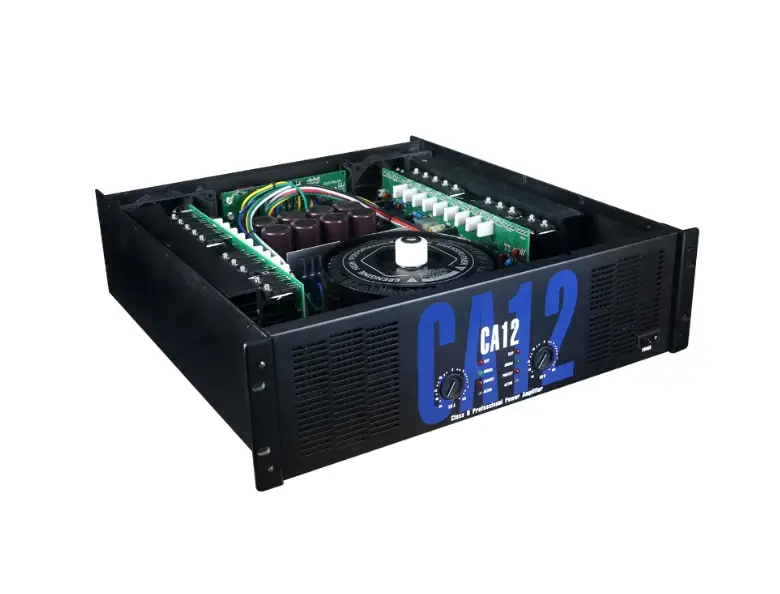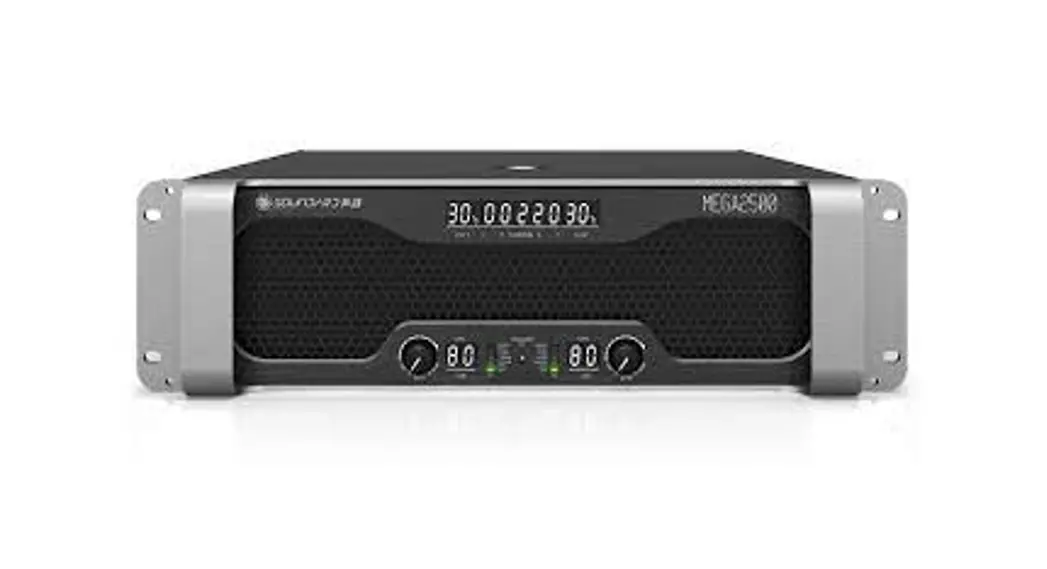
 MEGA2500
User Manual
Important Safety Instruction and symbol description
Important Safety Notice
- Read the rules, pay attention to all warnings, and comply with these rules.
- It is forbidden to spray liquid around the product. Please do not place the liquid container above the product, such as vases, etc. The dry cloth and air pressure gun can be used for cleaning.
- Be careful not to form a hot air circulation. Please install as the recommended way. 4. Do not install the product near the heat source, and try to keep the environment temperature below 35°C. 5. @Ground protection, when connect to the power supply, corresponding ground protection measurements should be taken.
- Please protect the power cord from treading and squeezing, especially the plug, power socket, and connected devices. Warning: The power plug/Equipment coupler, as a circuit cutting-off device, should be kept available at any time.
- Must be in accordance with the following sequence switch to use the product: Turn on Pre-Amp – Amplifier; Turn off: Amplifier Pre-Amp.
- Before powering on, must ensure that the power supply voltage in accordance with the requirement of the product.
- If the input signal parallels with more than three power amplifiers, it is suggested to use a signal distributor to make sure no distortion of the input signal.
- Do not connect an output port of one channel to an input port of the other channel in the same amplifier. Do not connect an output port to an output port of another amplifier in series or parallel.
- When configuring an amplifier into a system, the output power of the amplifier should be 50%-100% higher than the nominal power which is the same impedance as the loudspeaker. And be careful to use the bridge mode.
- It is forbidden to connect an oscilloscope probe into an amplifier output interface in the state of the bridge when the amplifier is being maintained, to avoid the amplifier or oscilloscope getting broken.
- Suggest 1) Please use qualified NL4 SPEAKON connectors. 2) Please make the appropriate power distribution when more than one amplifier working at the same time, to achieve a qualified using environment.
Safety instructions
 When stacking non-horizontally, the air outlet should be upward or straight to the vent. When stacking non-horizontally, the air outlet should be upward or straight to the vent. |  This product is suitable for safe use below altitudes of 2000m.(Only for our company Switching Mode Power Supply equipment) This product is suitable for safe use below altitudes of 2000m.(Only for our company Switching Mode Power Supply equipment) |
| Input/output connection cables can not be stacked on the air outlet of the product. They should be tied up on both sides of the amplifier. |  This product is suitable for safe use of nontropical climate conditions. This product is suitable for safe use of nontropical climate conditions. |
 The ambient temperature should be lower than 35°C while running the amplifier The ambient temperature should be lower than 35°C while running the amplifier |  The materials need to be technically recycled and can not be placed in the trash can. The materials need to be technically recycled and can not be placed in the trash can. |
| Please verify the temperature in the cabinet when the project is debugged and should be kept below 35°C even though in extreme conditions. |  The lightning bolt triangle is used to alert the user The lightning bolt triangle is used to alert the userTo the risk of electric shock. Non-professional Qualified technicians do not open top or bottom covers for maintenance |
| WARNING: To reduce the risk of fire or electric shock, do not expose this apparatus To rain or moisture. | |
Foreword
Welcome
Thank you for purchasing our products. The MEGA series power amplifier is specially designed for a sound system in large stadiums, tours, and theaters. Please take the time to study this manual so that you can obtain the best possible service from your amplifier.
Unpacking
Please unpack and inspect your amplifier for any damage that may have occurred during transit. Confirm the preset voltage of the power amplifier matches your local voltage rating ( Please refer to the print on the rear panel for detailed information). We also recommend that you save all packing materials so you will have them when need to return the power amplifier.
Important safety precautions
Our products have already taken the safe requirement into consideration and all the finished products have been tested under the requirement of the government before sale. Due to the inner dangerous high voltage and electricity, we strongly recommend you read all instructions, warnings, and cautions contained in this manual. It will increase the chance of getting shocked by the electricity if the product falls down, recess in the appearance, is soaked or there were some parts loose internally. If there are problems above, please turn off the power immediately and send the defective units to a local distributor for service.
Power & Wiring distribution
Refers to the power dissipation and power supply/AC of different products for wiring We suggest the users to match not less than the following wiring size specifications, to obtain better comprehensive properties.
The Standard Voltage: 220V –
| Model | Dissipation Power | Cable size |
| MEGA2500 | 4500W | 3.5mrt-V |
Front Panel functions
Front Panel
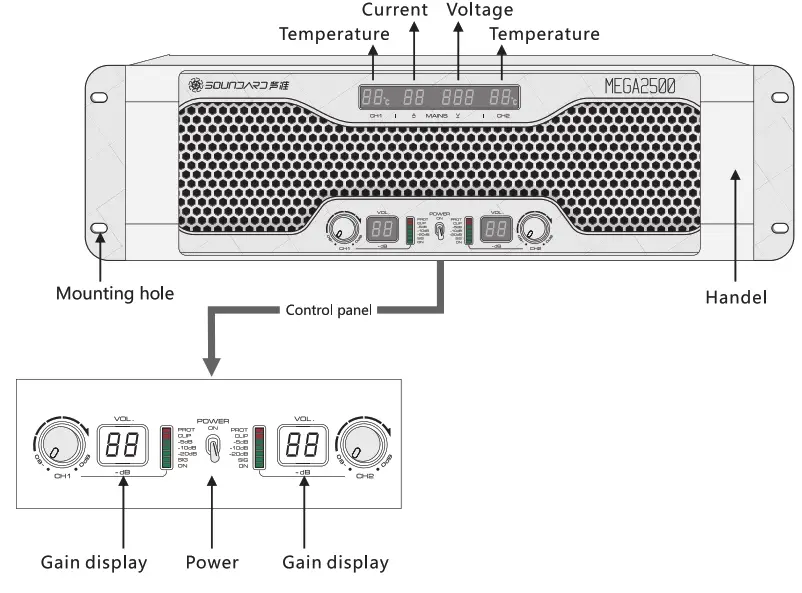
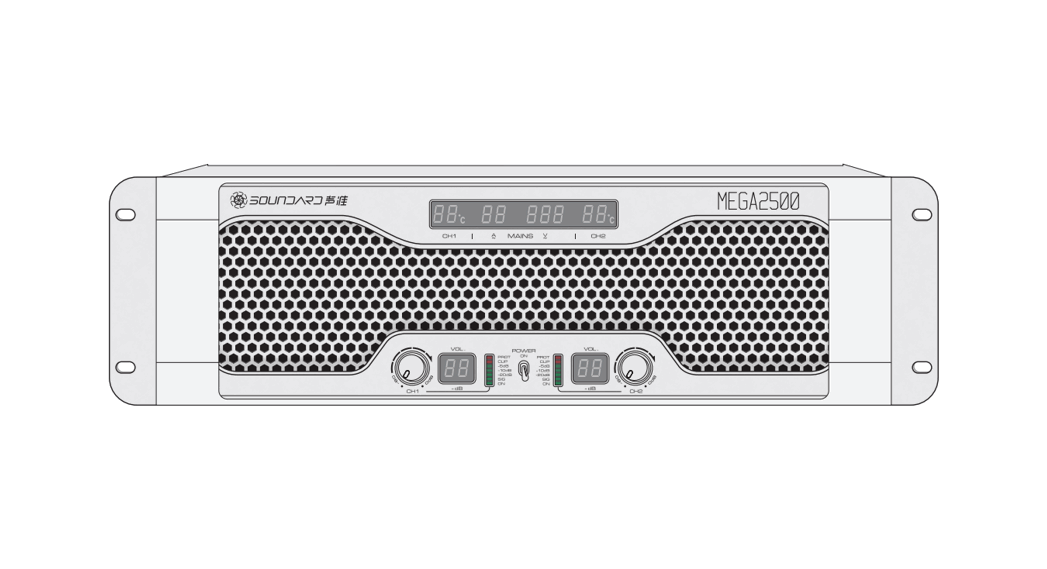
CH1-CH2→ Gain Controller Knob 300°volume knob from 0 to -80dB.
PROT→ Illuminates when either protection circuit action.
CLIP→ Illuminates when compressor/limiter is protecting the amplifier from input overload.
-5dB→ Illuminates when output signal around -5dB than full power.
-10d B→ Illuminates when output signal around -10dB than full power.
-20d B→ Illuminates when output signal around -20dB than full power.
SIG→ The signal light
ON→ Illuminates when the amplifier start.
Cleaning guide of the dust filter The first time cleaning of the strainer mesh should be right after installation. Recommend cleaning the strainer mesh quarterly.
Please do not run the product without the dust filter, or it makes the service life of the product shorten.
Such condition will be considered as no warranty.
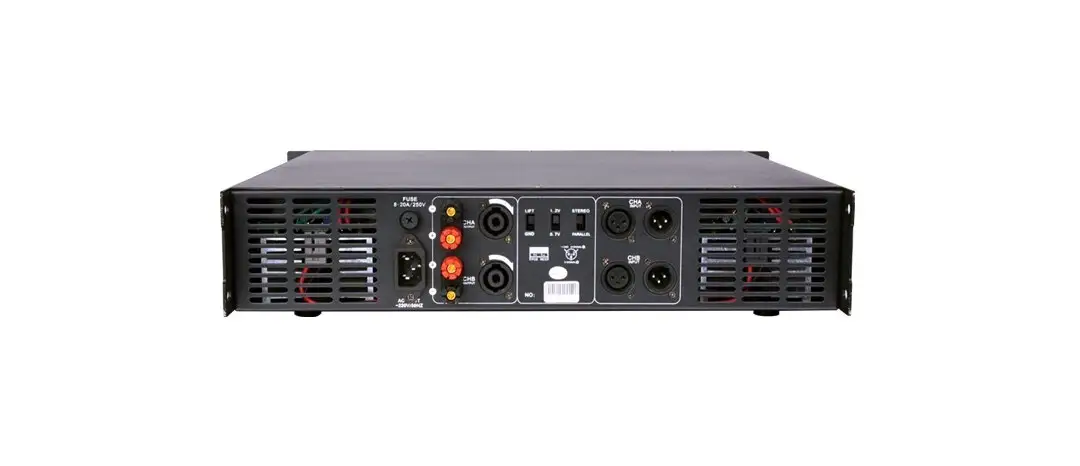
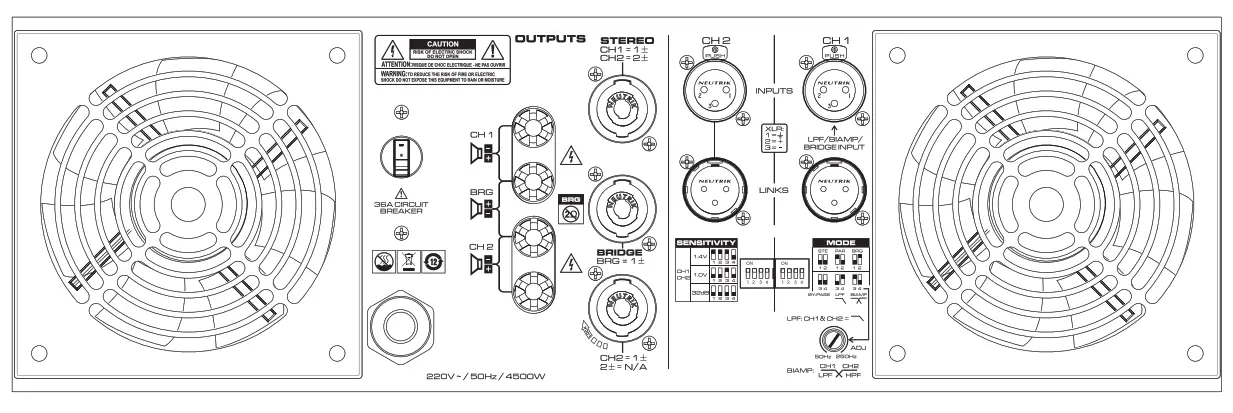
Rear Panel
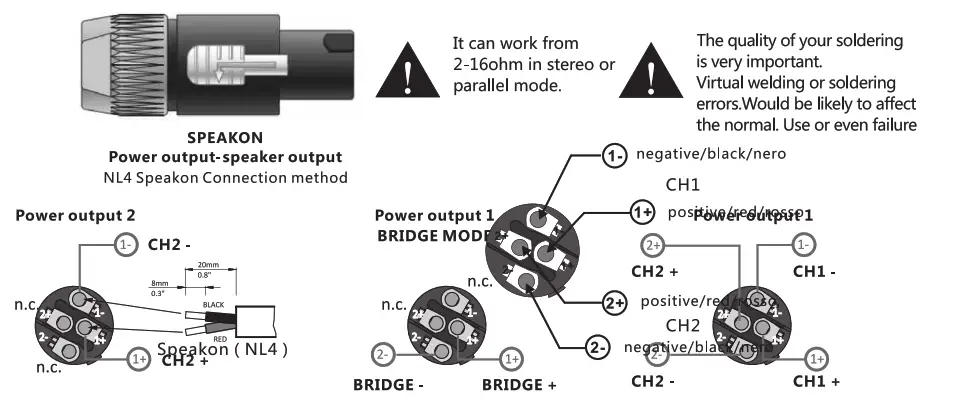
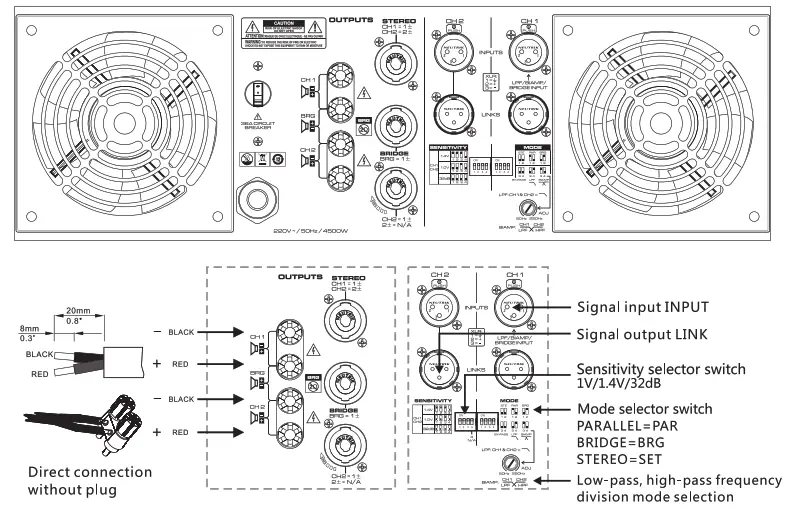 Connection method
 Cross-over mode introduction
1. Frequency divider mode: Low-pass and high-pass frequency division functions are realized through the DIP switch on the rear panel and the adjustable potentiometer. Customers can choose to use this power according to the actual application, that is, one power amplifier can be used. Pushing full-range speakers can also push subwoofers, without the need for external crossovers. 2. Practical application: the built-in low-pass and high-pass filters of the power amplifier, when DIP switch 4 on the rear panel is set to ON, it is CH1 LPF low-pass 50HZ-250H adjustable frequency range; when DIP switch 3 is set to When “ON”, it is the adjustable frequency range of CH2 HPF high pass 50HZ-250H, and the frequency division curves are as follows. 50Hz-250HZ continuously adjustable low-pass and high-pass frequency response curves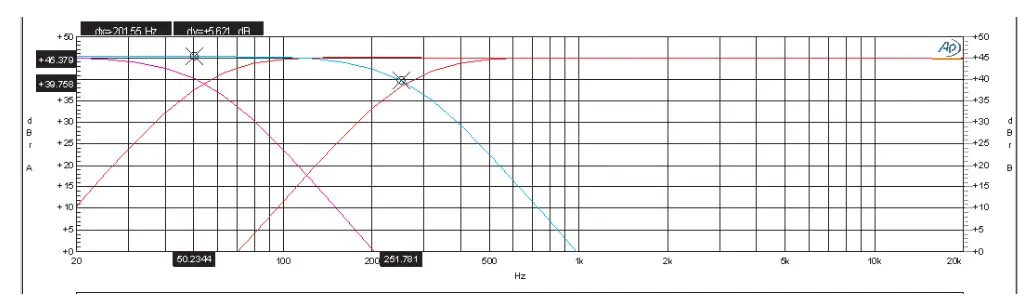
System connection cases
Bridge mode Parallel mode
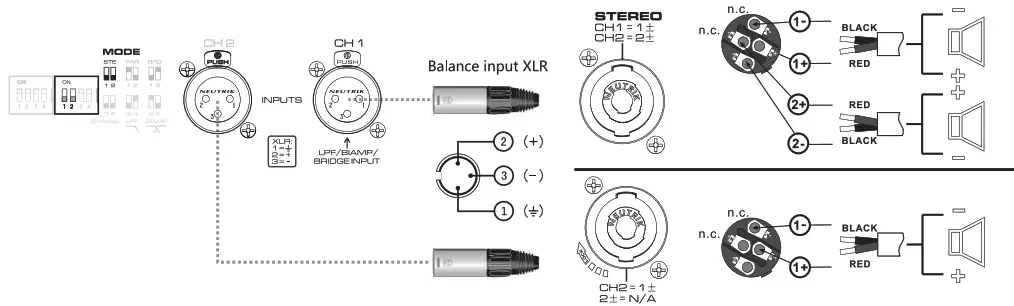
Stereo mode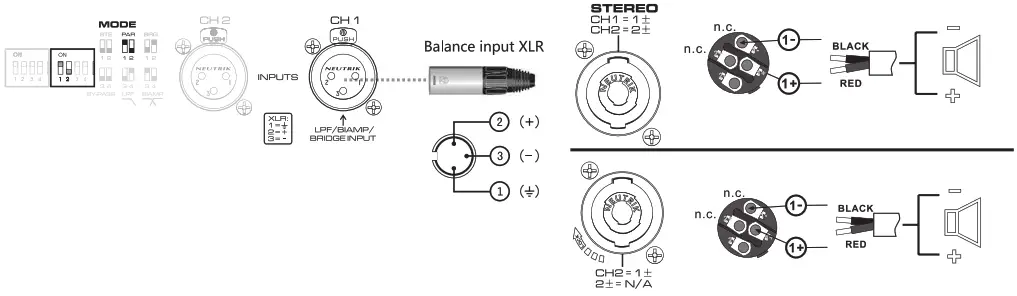
Specifications
| Model Output power 8Ω stereo 4Ω stereo 2Ω stereo 8Ω bridge 4Ω bridge | MEGA2500 2500Wx2 4000Wx2 5000Wx2 8000W 9600W |
Other Specifications
| Frequency response THD+N S/N rate Damping factor Input sensitivity Input impedance(bal/unbal) Voltage gain (8 ohms) Output circuitry Cooling Protection | 20Hz-20kHz(+0/-0.5dB) ≤0.05% ≥95dB ≥500 1V/1.4V/32dB 20k0/10kΩ 42.5dB Class I Air flow rear to front Soft start, short circuit, over load, clip limit, overheat, over-voltage, progressive volume |
Connection
| Input Output Function Front panel | Balance input XLR-F, Balance output XLR-M NL4 SPEAKON/Binding post Working indicator Signal/Clip/Protection/Power on/ volume control knob, Real-time temperature/current/voltage/gain display |
Dimensions/Weight Product
| Dimension(mm) Packaging Dimension(mm) G.W. Power Supply | 483x514x133 620x585x210 46.2 kg 3.5mm2 power cord |
Remark: 1. The power is tested under the condition of 40ms burst,kHz sine wave, and 1% THD
Product dimension(mm)
 Suitable model: MEGA2500
The manufacturer reserves the right to make changes in the specification without prior notice. The final specification is subject to the user’s manual.
Troubleshooting
After powering without any response
Measure the outlet with a multimeter to check if there is power available and when no multimeter, you can have a test pencil. If the power supply is normal and the amplifier still has no response when powered then there is something wrong with the amplifier, need a professional person to check it.
No signal output
- First, check if the signal input is right.
 check the connection of XLR, if the 2 and 3 reverted or the ground is reliable. Different circuitry designs will have different connect ways of the XLR, please follow the 2+, 3- to soldering. It can not be judged by comparing it with other amplifiers (including other amplifiers in the same factory).
 - The signal light doesn’t light up If all the signal input is fine and the signal light doesn’t light up then may the amplifier has failed, you need to ask a professional person to check it.
- Signal input normal but no sound The signal light will flash with the change of input Volume, but now sound out, then you can check the connect of speakon if it is connected good and the wires are connected right(sometimes the problem of the wires connect, check its 1 and ±2 connect), after the check above if still no sound out, please change a speaker cable and check again. Because some times also caused by the bad quality of the Speakon connector problem of the amplifier. Through experience, it may be caused by the bad connection of some plugs and the socket.
Output sound distortion
- After checking, the signal and loudspeaker are fine and still can hear distortion when small sound, then may the amplifier has failed, need a professional person to check it.
- Some frequency band has distortion First, check if the loudspeaker is already overloads, normally judge it in 95-105dB for higher SPL we don’t comment here. Here we just think about the failure recovery of the amplifier. If in the middle have some rupture sound and smaller volume more obvious, then it should be crossover distortion of the amplifier and this kind of distortion is easy to confuse with the failure of the loudspeaker itself. If the amplifier has a problem then you should send it back to the manufacturer for repair.
- Distortion is High SPL If the sound is normal when small volume and then you need to check the limit SPL of the loudspeaker. You can listen to it in a suitable volume and if the clip light works, then you need reduce the output. Both loudspeakers and amplifiers have limit, you should use them in their limit if in very high SPL they have distortion you should take care of them and reduce the output to the right position.
The protection light blinks When the PROT light works, the amplifier into protection mode.
- Maybe the temperature is too high or output short or near short and they are not failed they can recover after you can use it normally. But overheating will take more time to recover. Also when overheat happened you should check the fan and the temperature of the install environment if do you should solve the problem and then can use an amplifier. If you think the speaker was short, you can with a multimeter to check if the resist is lower than 2 ohms or 1 ohm with DC(Please calibrate the multimeter to measure for accuracy because of the small resistance).
- If the PROT light always lights up then it should be the problem of the amplifier, you should send it back to the professional person for repair.
Hum in the system
- Hum exists even when there is no signal Please keep the amplifier away from the earth wire of power supply cables, just connect the firewire and zero wire, no ground wire. If the hum is still existing, it can be judged that there are some problems in the amplifier. Please get in touch with professionals.
- Hum exists when the system is completely connected This is caused by the different ground voltages in different devices in the system, mainly happening when the power supply is under a three-phase distribution condition, each device is connected to a different phase. This is not caused by the amplifier.
Solution experiences, just for reference
A. Combing the electricity, the power distribution box using the same one for all if possible.
B. Make sure the grounding wire potential is zero and force the different grounding wires to the same level, if the grounding wire Itself is charged, indicates that the wire may be connected with the zero line. Please solve this problem.
C. If unavailable above, then only disconnect the ground wires of all devices, which helps to reduce the AC. But this is not meet the safe use of electricity, users must know what will happen if to do it in this way. We do not recommend floating use.
The amplifier is required maintenance in the condition below:
- If the amplifier smokes or smells burning.
- If the cabinet has severe indentation and deformation
- If the amplifier is dipped into the water
- If the internal components loosen
- If the AC breaker skips out when the current increases.
Warranty
Disclaimer
SAE Audio Co., Ltd. is not responsible for any damage to loudspeakers or other equipment caused by negligence or improper installation.
SAE Audio Co., Ltd. offers 2 years limited warranty for this product. SAE Audio Co., Ltd. Guarantees that this product has no material defect for two years from the date of the sale; if the damage is caused under the normal installation and operation, SAE Audio Co., Ltd. shall change the defective component and repair faulty product for free according to this Quality Guarantee Agreement. However, users must send the product to our factory or any authorized maintenance points or designated distributors, affording the re-paid freight, together with buying proof (including a customer copy of the product warranty card and payment receipt or invoice copy).
As per this Quality Guarantee Agreement, the returned product must be judged to have a manufacturing defect itself after our inspection. This agreement doesn’t apply for products with damage caused by any wrong operation negligence, accident, inappropriate installation or products with no date code and sequence no or damaged ones beyond recognition. SAE Audio Co., Ltd. shall not afford responsibility for any damage caused by accident or indirect factors. The agreement authorized you specific legal rights. Address: SAE Audio Co., Ltd. After-Sale Department No.39, East, Wenjiao Road, Heshun, Lishui, Nanhai, Foshan, Guangdong, China.
PC:
528241
Tel: 0757-8560-8331
Fax: 0757-8568-8191
Email: [email protected]
Brand website: www.soundard.com
Website: www.saeaudio.com  www.soundard.com
Manufacturer: Sae Audio Co., LTD.
Sae reserves the right to make changes in specifications and products without prior notice.