
TWINKO
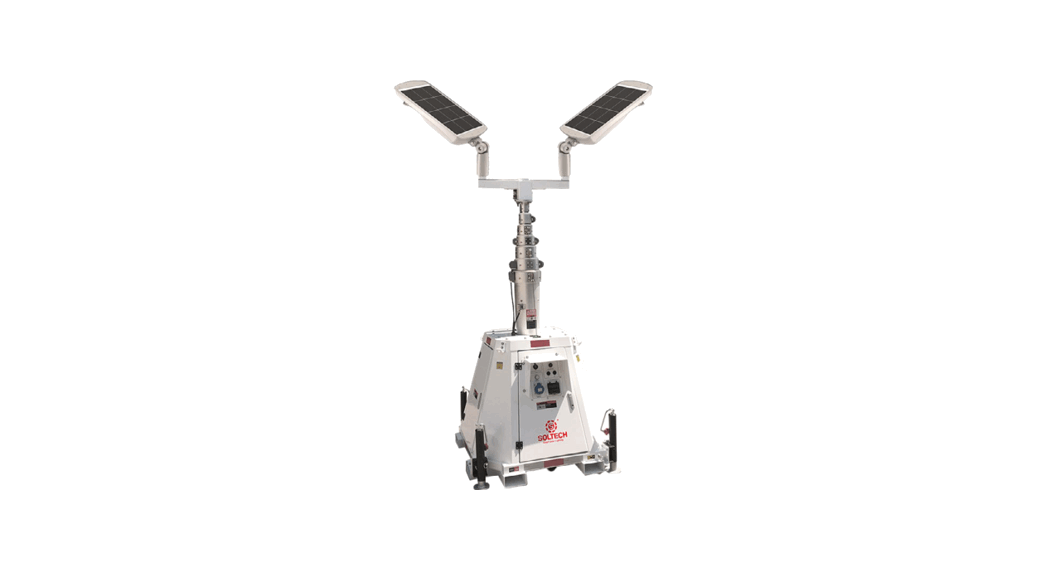
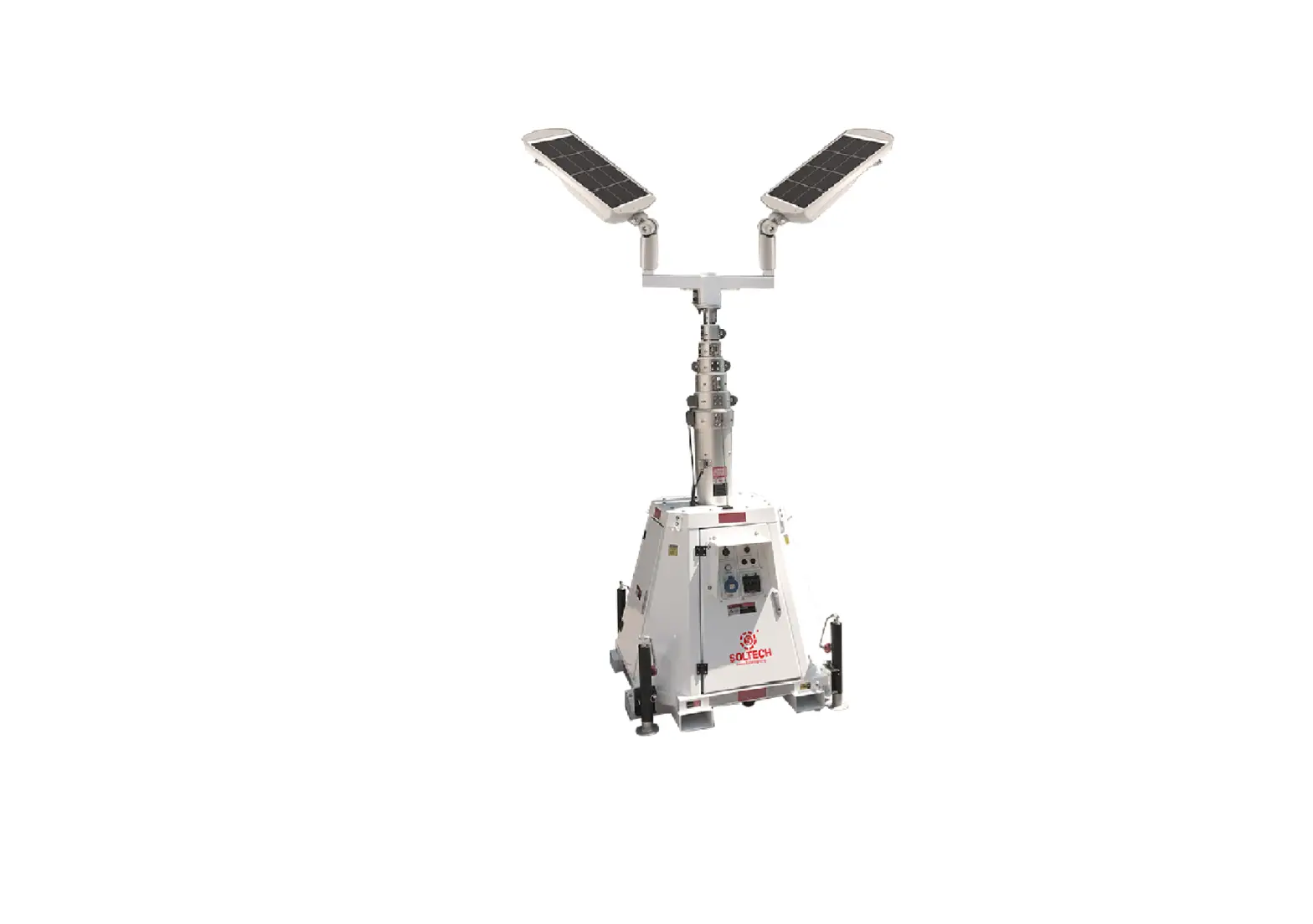
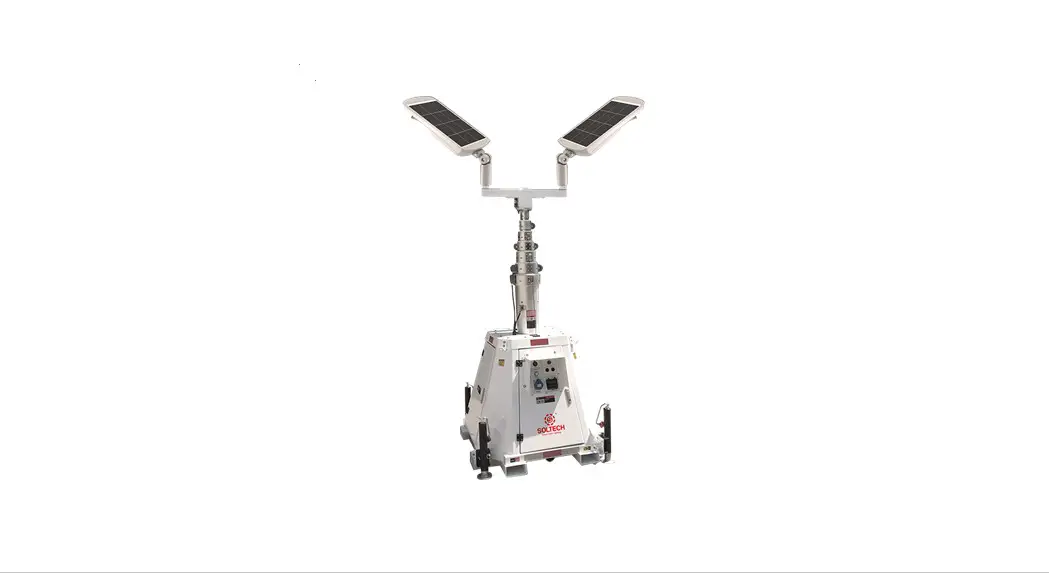
MOBILE SOLAR LIGHT TOWER
Installation Manual
Ideal for Construction, Natural Disasters, and Other Temporary Lighting Needs.
TWINKO
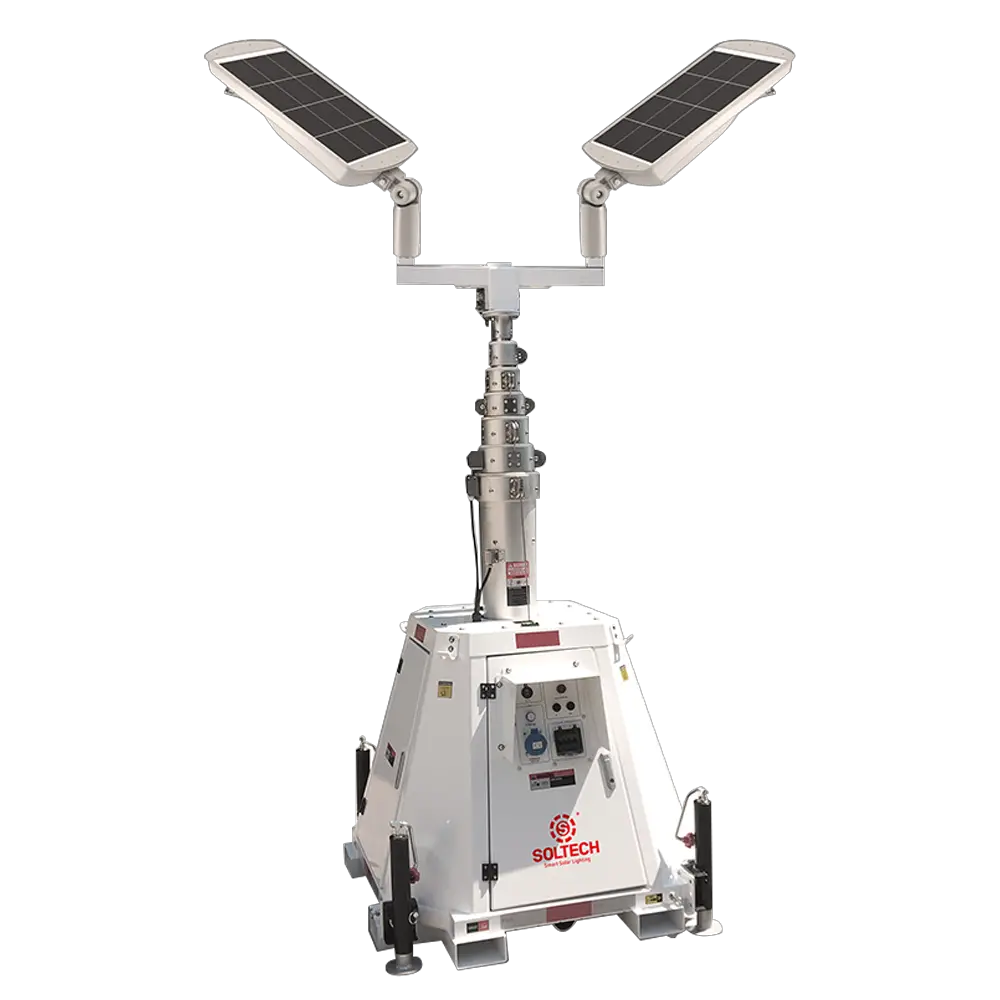
MOBILE SOLAR LIGHT TOWER
Introduction
Thank you for purchasing the TWINKO mobile solar light tower.
Introduction
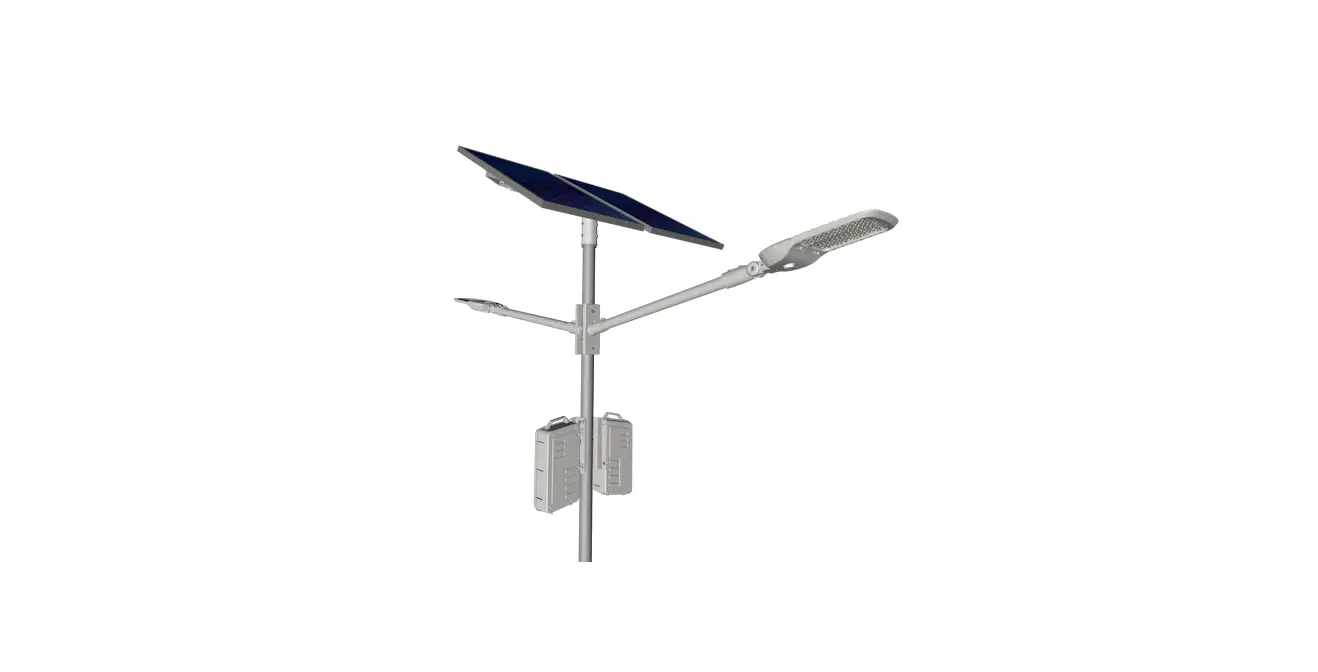
Outdoor solar lighting systems use solar cells which convert sunlight into electricity. Electricity is stored in batteries for use at night. TWINKO Mobile Solar Light Tower combined with SUNLIKE solar lights are easy to install and virtually maintenance free. Using them avoids trenching, cabling, and electricity costs .
Important
In order to avoid deep discharge of the battery during storage, please fully recharge your battery every 4 months. Please make sure that the light is installed in an area with sufficient sunlight. A strict minimum of 3.5 hours/day of sunshine on average is recommended. Select the right operating mode according to local codes and solar conditions. Keep it away from shadows. Self-cleaning occurs when the light fixture has minimum angle of 15 degrees above horizontal.
Please save these instructions. Read all of the instructions carefully before attempting to carry out any installation or wiring. Do not open or attempt to repair a SOLTECH luminaire on your own, as it many cause serious damage and would void the product warranty. Contact your local distributor for any questions concerning the installation.
Range of the lighting fixtures is 20–26 feet (6–8 meters). The ideal installation spacing betweeen fixtures is <16 feet (5 meters). When installing two or more light fixtures on one pole, select desired operating mode before installation. Radiofrequency interference can cause delay or malfunction of the remote control when changing operating modes, after installation.
Precautions when working with solar panels
When the solar panel is exposed to sunlight, a voltage appears at the output terminals of the solar panel, turning it into a source of electricity. To avoid a shock hazard, make sure the solar panel is covered with an opaque (dark) covering, such as paper or cloth, during the installation. Do not make contact with the terminals when the panel is exposed to sunlight or any other light source.
Luminaire Options
Specifications
| Specifications | TWINKO |
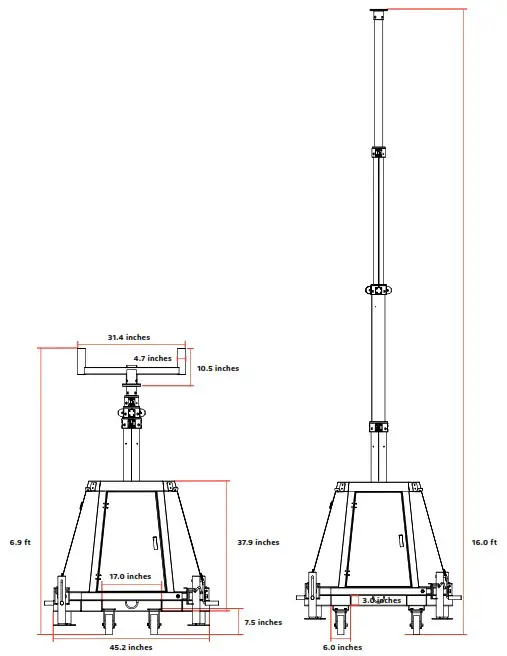
| Max Height | 16 ft (Without Luminaire) |
| Collapsed Height | 6.9 ft (Without Luminaire) |
| Mast Material | Steel |
| Mast Profile | Round |
| Mast Sections | 4 |
| Operation | Electric Winch 3000 Lbs, DC12V |
| Battery | GEL DC12V 150AH, 1,200 times Lift and Down Autonomy |
| Charger | 1,500W AC 110V Input |
| Mast Max Load | 88 Lbs |
| Max Wind Speed | 90 mph |
| Warning Strips | Included |
| Lift Limit Stopper | Included |
| Lifting Eyes | X4 |
| Fork Pockets | Included |
| Wheel | Included (With Brake) |
| Mast Flange | Included |
| Weight | 1,210 Lbs (Without Luminaire) |
| Dimensions | 45.2 inches X 45.2 inches X 83.0 inches (Collapsed Without Luminaire) |
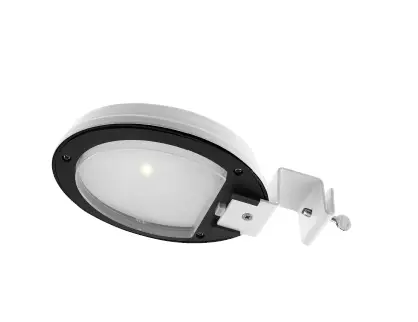
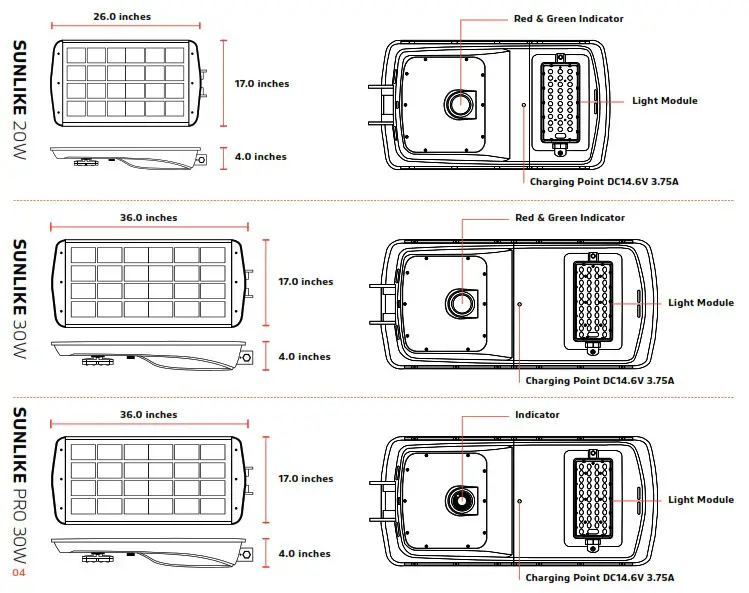
| Luminaire Specifications | SUNLIKE 20W | SUNLIKE 30W | SUNLIKE PRO 30W |
| LED Nominal Power | 20W | 30W | 30W |
| Solar Panel | 18V 36W | 18V 52W | 18V 52W |
| Battery | 256WH 12.8V 20AH LiFePO4 | 384WH 12.8V 30AH LiFePO4 | 320 WH 12.8V 25AH Superior |
| Weight | 21.4 lbs | 29.8 lbs | 47.1 lbs |
| Lumen Output@5000K | 4,000 | 6,000 | 6,000 |
| CRI | > 70 | > 70 | > 70 |
| LED Chip | Lumileds 5050 (215lm-CR>70) | Lumileds 5050 (215lm-CR>70) | Lumileds 5050 (215lm-CR>70) |
| EPA | 4.75 | 6.26 | 6.26 |
| Waterproof Rating | IP65 | IP65 | IP65 |
| Casting | Aluminum | Aluminum | Aluminum |
| Efficiency@5000K | 200 lm/W | 200 lm/W | 200 lm/W |
| * Charging Time | 7hrs | 7hrs | 7hrs |
| Run Time(@Full Power) | 10hrs | 10hrs | 11hrs |
| Operation Mode | Remote control and One-key Setting | Remote control and One-key Setting | Remote control and One-key Setting |
| Installation Height | 9 to 16ft | 9 to 20ft | 9 to 20ft |
| * Operating Temperature | -4 °F to 122 °F | -4 °F to 122 °F | -4 °F to 140 °F |
| * Charging Temperature | 32 °F to 149 °F | 32 °F to 149 °F | -58 °F to 140 °F |
| Maximum Autonomy | |||
| Motion Sensor Mode | 40%–100% 35hrs 20%–80% 55hrs | 40%–100% 35hrs 20%–80% 55hrs | 40%–100% 25hrs 20%–80% 50hrs |
| Time Control Mode | Night Owl 28hrs Early Bird 25hrs | Night Owl 28hrs Early Bird 25hrs | Night Owl 23hrs Early Bird 20hrs |
| Constant Mode | 100% 11hrs 70% 15.5hrs 40% 27hrs | 100% 11hrs 70% 15.5hrs 40% 27hrs | 100% 11hrs 70% 15hrs 40% 26hrs |
Installation and Wiring Requirements
- Installation and wiring must comply with the State and NationalElectrical Codes.
- The SUNLIKE 20W/30W/30W PRO models are intended for outdoor use only and should not be installed in an unventilated area, and must be installed in an environment within the operating temperatures defined for the product.
- The average sunshine in the installation area should be above 3.5 hours/day in order to ensure full function of the light fixture. Avoid areas with shade.
- Before installation, if applicable, please ensure the light pole and its foundation are stable enough to withstand the lighting fixture(s).
- Before installation, please ensure that the battery is fully charged. Install during sunny days if possible.
- Before installation, press the ON/OFF key on the remote control and check whether it shows a red light on the indicator. Cover the solar panel and check if the light module turns on normally within 1 minute.
After Installation
The light fixture will automatically turn on at night and turn off during daylight.
Important
Always orient the solar panel facing the equator (e.g. facing south if in northern hemisphere). Always have a tilt angle of at least 15° to avoid dust accumulation (0°=horizontal plane).
Ordering Information
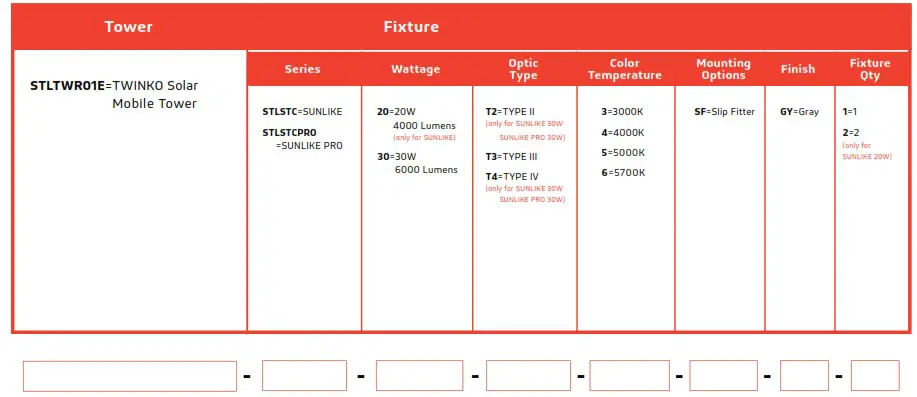
For example: STLTWR01ESTLSTC020T33SFGY2
This means the customer wants a Solar Mobile Tower TWINKO, SUNLIKE 20W, TYPE III, 3000K CCT, Slip Fitter installation, with a Gray finish, and 2 Fixtures.
DO NOT send the sample number directly to our salesperson. Use the information in the chart above to create a model number with the correct series, wattage, temperature, mounting option, and finish for the product that you want.
Installation
- Install Tenon
 Install Tenon on the top of the pole.
 - Install Luminaire

- Adjust The Pole Height
 Press the UP and DOWN buttons on the control board to adjust the pole height.
Control Board
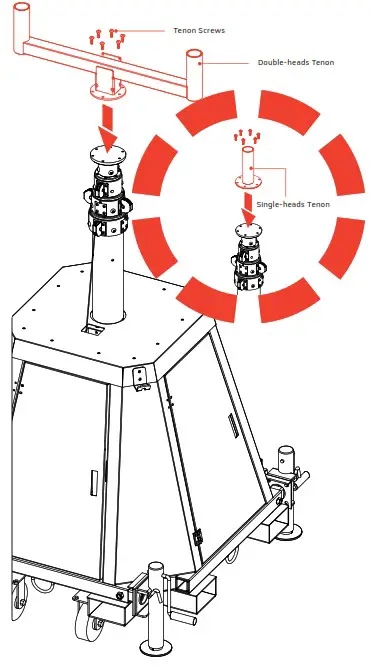 Install Tenon on the top of the pole.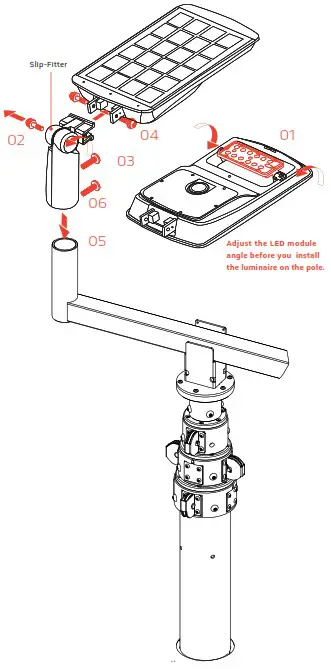
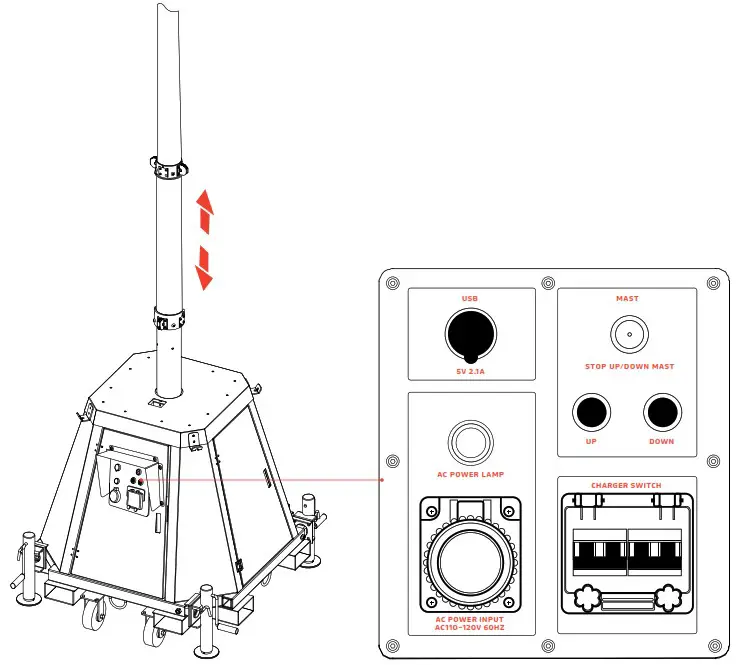 Press the UP and DOWN buttons on the control board to adjust the pole height.
Panel Angle
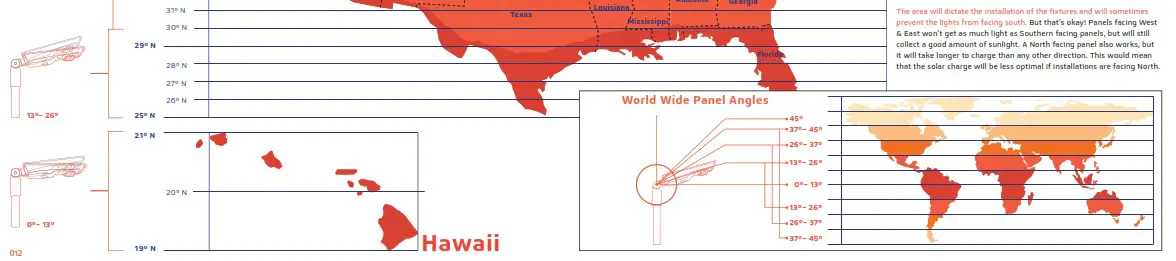
The Solar charge in a battery pack won’t last forever. The off–grid system relies on stored solar energy for autonomy. Angling your solarpanels properly can boost the power intake of your solar lighting system. You want to angle your solar panels at a tilt based on the area’s latitude.
Tip
You can increase the tilt 15° in the winter or decrease 15° in the summer. In this way, you can get the maximum sunlight to recharge the battery bank
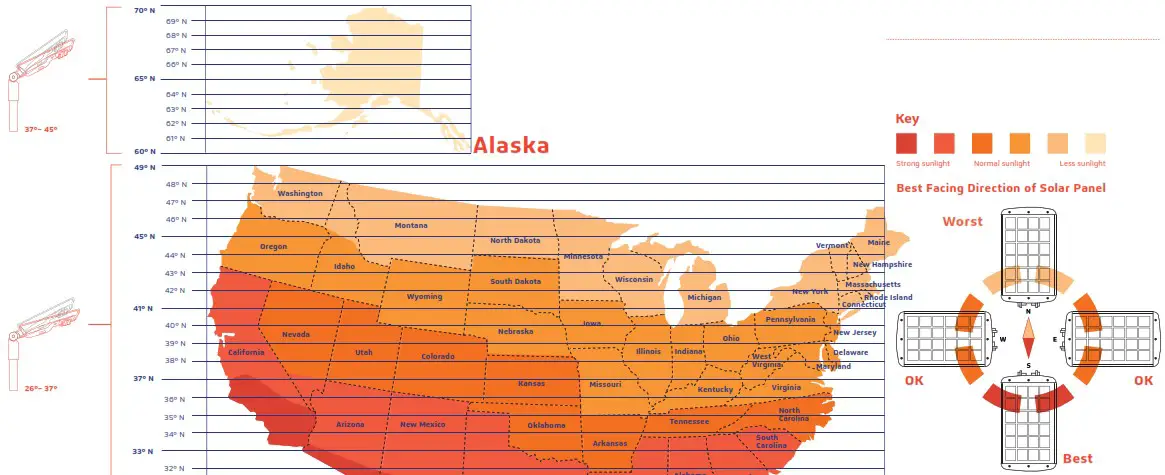
Remote Control Guide
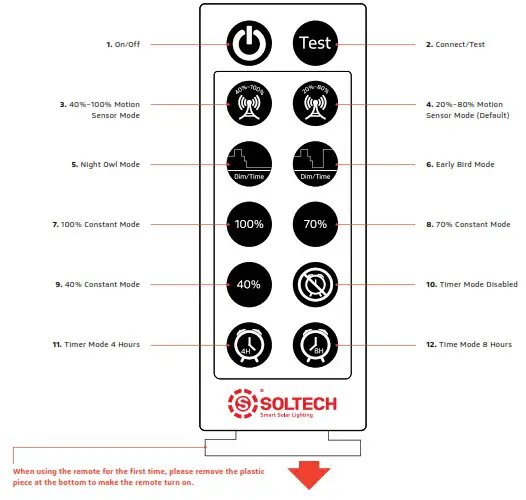
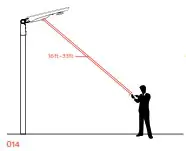
The range of the remote control to the indicator is 16ft (Day time) to 33ft (Night time). Because the sunlight will impact the signal of the remote control, we suggest our users to set up the mode before they install the light.
- On/Off
When off is selected, the light will stop working. The solar panel will not charge the battery and the battery will not supply electricity to the light. - Connect/Test
Remote control device can be connected with any lighting fixture, one at a time. To connect, press the button once. It also functions as a test button. To test, press the “Test” button once, the red light will indicate the fixture is charging, green light indicates that the fixture is operating. Testing lasts for 10 seconds, and then it goes back to the mode previously in use. - 40%~100% Motion Sensor Mode
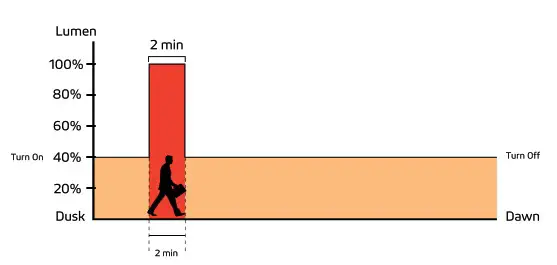
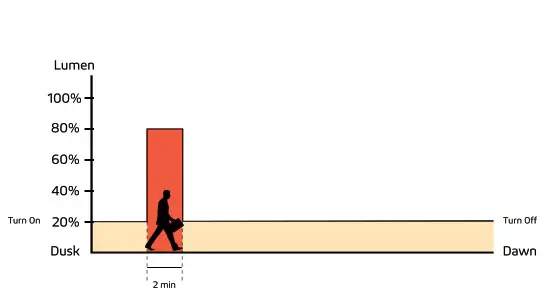
Constant 40% brightness (turns on at dusk, turns off at dawn); 100% brightness turns on for 2 minutes when motion is detected.
- 20%~80% Motion Sensor Mode (Default)
Constant 20% brightness (turns on at dusk, turns off at dawn); 80% brightness turns on for 2 minutes when motion is detected.
Night Owl Mode
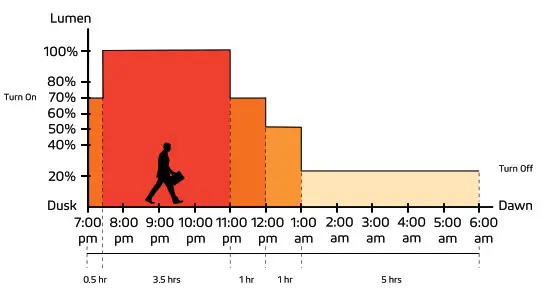
Changes as natural light decreases/increases (turns on at dusk); 70% brightness for 0.5 hour, 100% brightness for 3.5 hours, 70% brightness for 1 hour, 50% brightness for 1 hour, 20% brightness for 5 hours (turns off at Dawn).
Early Bird Mode
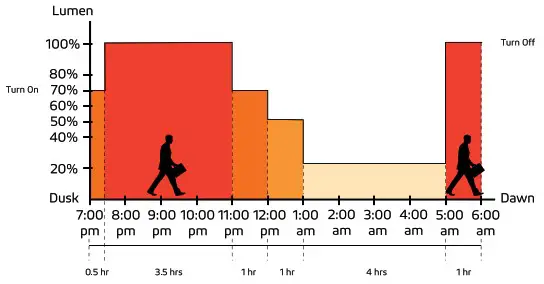
Changes as natural light decreases/increases with increased brightness near dawn for early risers (turns on at dusk); 70% brightness for 0.5 hour, 100% brightness for 3.5 hours, 70% brightness for 1 hour, 50% brightness for 1 hour, 20% brightness for 4 hours, 100% brightness for 1 hour (turns off at Dawn). (IAP) Intelligent Adaptive Program Battery Control Technology
In order to extend the off-grid autonomy of the SOLTECH solar products under shady trees, heavy rain, and thick clouds, our controllers now integrate an adaptive smart control feature to actively track battery capacity and adjust light output accordingly. Before integrating this feature, selecting a light output percentage on the remote would yield an accurate percentage of max LED brightness. Now with (IAP), the controller actively monitors the battery and regulates the electrical current to the LEDs. The controller makes light output of the selected percentage on the remote relative to battery capacity rather than max LED output. This smart-control feature can increase our off-grid performance by up to 40%.
Important
Dusk and dawn time can vary for different locations and seasons.
The sensors in our products will monitor the light levels where it is installed. The time period shown in the chart above is just an example to help you understand the different lighting modes.100% Constant Mode
100% brightness from dusk to dawn.
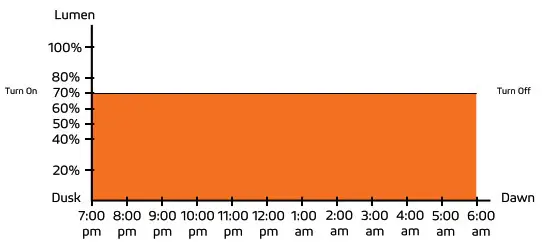
- 70% Constant Mode
70% brightness from dusk to dawn.
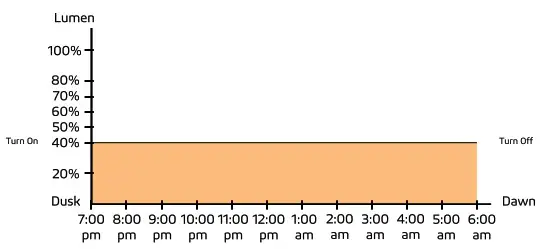
- 40% Constant Mode
40% brightness from dusk to dawn.
- Timer Mode Disabled
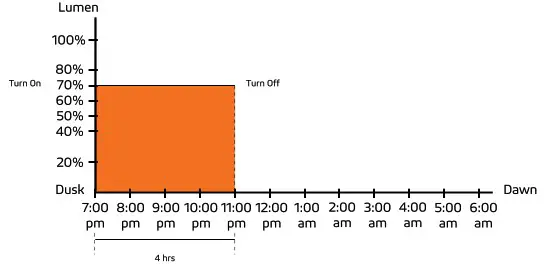
Press this button to turn off Timer Mode; settings revert back to before Timer Mode was last activated. - Timer Mode 4 Hours
This is an additional mode which can work with any other modes. For example: press this button at any time after you turn on 70% Constant Mode. If the light turns on at 7pm at dusk, it will turn off at 11pm. It will repeat the same schedule hereafter until it is canceled by pressing Timer Mode Disabled.
- Time Mode 8 Hours
This is an additional mode which can work with any other modes. For example: press this button at any time after you turn on 70% Constant Mode. If the light turns on at 7pm at dusk, it will turn off at 3am. It will repeat the same schedule hereafter until it is canceled by pressing Timer Mode Disabled.
 (IAP) Intelligent Adaptive Program Battery Control Technology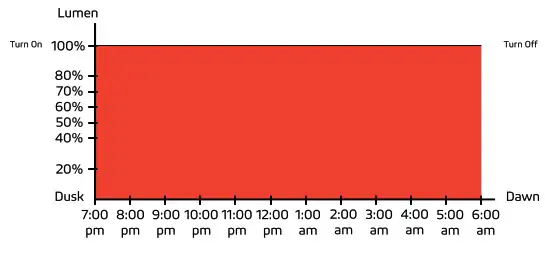
Important
Dusk and dawn time can vary for different locations and seasons. The sensors in our products will monitor the light levels where it is installed. The time period shown in the chart above is just an example to help you understand the different lighting modes.
TWINKO Solar Light Mobile Tower products are covered by a 5-year limited warranty. SOLTECH warrants to the original purchaser that this product is free from defects in materials and workmanship for the period of 5 years from date of purchase. To obtain warranty service please contact your local distributor or sales rep for further instruction.
1460 Park Avenue.
Emeryville, CA 94608 USA
www.soltechlighting.com
SOLTECH LLC reserves the right to update all product data sheets at any time. Consult SOLTECH marketing specialists for publication updates at
[email protected]
Copyright©2021–2022 SOLTECH LLC, All Rights Reserved. 018
SOLTECH Provides Advanced LED Technology Powered With Eco-friendly, Clean, Solar Energy. 020
 Solar LED Lights Commercial | Solar LED Home | SOLTECH Solar Lighting