70278 String Light Hanging Install Kit
Product Information
This product is a cable management system designed to support
and organize string lights. It has a cable length capacity of 66ft
and can support up to six sets of 25 foot string lights.
Product Usage Instructions
- Before using the product, make sure to read and understand all
the safety instructions provided in the manual. - Check the packaging to ensure that the product is intact and
undamaged. If any parts are missing or broken, contact customer
support at 1-888-866-5797. - Assemble the Rope Clamp by laying one end of the Cable in the
Clamp around the threaded posts to form a loop. Refer to Figure A
for illustration. - Place the Lock over the threaded posts of the Clamp, ensuring
that the Cable end extends slightly past the Rope Clamp and is
visible when the Lock is resting on top of the Cable. - Thread the Nuts onto the threaded posts until snug against the
Lock. - Determine the desired location for mounting the Wall Mounts and
mark these locations. - Insert a Wall Mount into the Cable Loop and secure it in one of
the desired mounting locations using two Wood Screws. Refer to
Figure C for illustration.
Please note that these instructions provide a general overview
of the assembly and installation process. For more detailed
guidance, refer to the user manual or contact technical support at
1-888-866-5797.
Owner’s Manual & Safety Instructions
Save This Manual Keep this manual for the safety warnings and precautions, assembly,
operating, inspection, maintenance and cleaning procedures. Write the product’s serial number in the
back of the manual near the assembly diagram (or month and year of purchase if product has no number).
Keep this manual and the receipt in a safe and dry place for future reference.
22i
Visit our website at: http://www.harborfreight.com Email our technical support at: [email protected]
When unpacking, make sure that the product is intact and undamaged. If any parts are missing or broken,
please call 1-888-866-5797 as soon as possible.
Copyright© 2022 by Harbor Freight Tools®. All rights reserved. No portion of this manual or any artwork contained herein may be reproduced in any shape or form without the express written consent of Harbor Freight Tools. Diagrams within this manual may not be drawn proportionally. Due to continuing improvements, actual product may differ slightly from the product described herein.
Tools required for assembly and service may not be included.
Read this material before using this product. Failure to do so can result in serious injury. SAVE THIS MANUAL.
WARNING SYMBOLS AND DEFINITIONS This is the safety alert symbol. It is used to alert you to potential personal injury hazards.
Obey all safety messages that follow this symbol to avoid possible injury or death.
Indicates a hazardous situation which, if not avoided, will result in death or serious injury.
Indicates a hazardous situation which, if not avoided, could result in death or serious injury.
Indicates a hazardous situation which, if not avoided, could result in minor or moderate injury.
Addresses practices not related to personal injury.
IMPORTANT SAFETY INSTRUCTIONS
1. Do not mount or place near gas or electric heaters, fireplaces, candles or other similar sources of heat.
2. Do not use this product for other than its intended use.
3. Do not close doors or windows on the product or extension cords as this may damage the wire insulation.
4. Do not cover the product with cloth, paper or any material not part of the product when in use.
5. Read and follow all instructions that are on the product or provided with the product.
6. Keep proper footing and balance at all times during installation.
7. The warnings, precautions, and instructions discussed in this instruction manual cannot cover all possible conditions and situations that may occur. It must be understood by the operator that common sense and caution are factors which cannot be built into this product, but must be supplied by the operator.
SAVE THESE INSTRUCTIONS.
SPECIFICATIONS
Cable Length Capacity
66ft Supports up to six sets of 25 foot string lights
Page 2
For technical questions, please call 1-888-866-5797.
Item 70278
Installation
1. Disassemble a Rope Clamp, and then lay one end of the Cable in the Clamp around the threaded posts to form a loop as illustrated in Figure A:.
2. Place the Lock over the threaded posts of the Clamp, resting on top of the Cable.
Note: Make sure the Cable end extends slightly past the Rope Clamp and is visible when the Lock is resting on top of the Cable.
3. Thread the Nuts onto the threaded posts until snug against the Lock.
Nuts
5. Determine the desired location of the Cable, and mark the locations for mounting the Wall Mounts.
6. Place a Wall mount into the Cable Loop, and secure the Wall Mount in one of the desired mounting locations with two Wood Screws as illustrated in Figure C:. Wood Screw
Wall Mount
Lock
Cable Loop
Clamp Figure A:
Cable
4. Tighten the Nuts with the included Wrench to secure the Cable within the Rope Clamp. See Figure B:.
Wrench
Nuts
Figure C:
7. Mount the remaining Wall Mount(s) in the desired mounting locations with Wood Screws as before.
Note: Most mounting scenarios will use two of the four Wall Mounts for stringing the Cable between two points, but additional Wall mounts can be used to allow for the Cable to bend around corners, extra support, etc.
8. If using more than two Wall Mounts, route the Cable through all of them except for the last Wall Mount.
Figure B:
Cable Rope Clamp
Item 70278
For technical questions, please call 1-888-866-5797.
Page 3
9. Hook the Turnbuckle onto the last Wall mount as illustrated in Figure D:.
10. Thread the remaining end of the Cable through the eyelet of the Turnbuckle as illustrated in Figure D:. Pull excess Cable through the eyelet until the Cable is taut, then relax the tension slightly to allow a little slack.
11. Disassemble the remaining Rope Clamp, and then lay the Cable in the Clamp around the threaded posts to form a loop as illustrated in Figure A: on page 3, with the excess cable outside of the Rope Clamp as illustrated in Figure D:.
12. Place the Lock over the threaded posts of the Clamp, resting on top of the Cable as illustrated in Figure A: on page 3.
13. Thread the Nuts onto the threaded posts until snug against the Lock as illustrated in Figure A: on page 3.
14. Tighten the Nuts with the included Wrench to secure the Cable within the Rope Clamp as illustrated in Figure B: on page 3.
15. Turn/tighten the Turnbuckle to remove the slack in the Cable as illustrated in Figure E:.
Note: If tightening the Turnbuckle through its adjustment range does not remove all of the slack from the Cable, repeat steps 10 through 14 leaving less slack in the Cable.
CAUTION! Do not overtighten the Turnbuckle! Cable failure can result.
Cable
Turnbuckle
Screw
Wall Mount Turnbuckle
Cable Loop
Screw
Rope Clamp Excess Cable
Figure D:
Figure E:
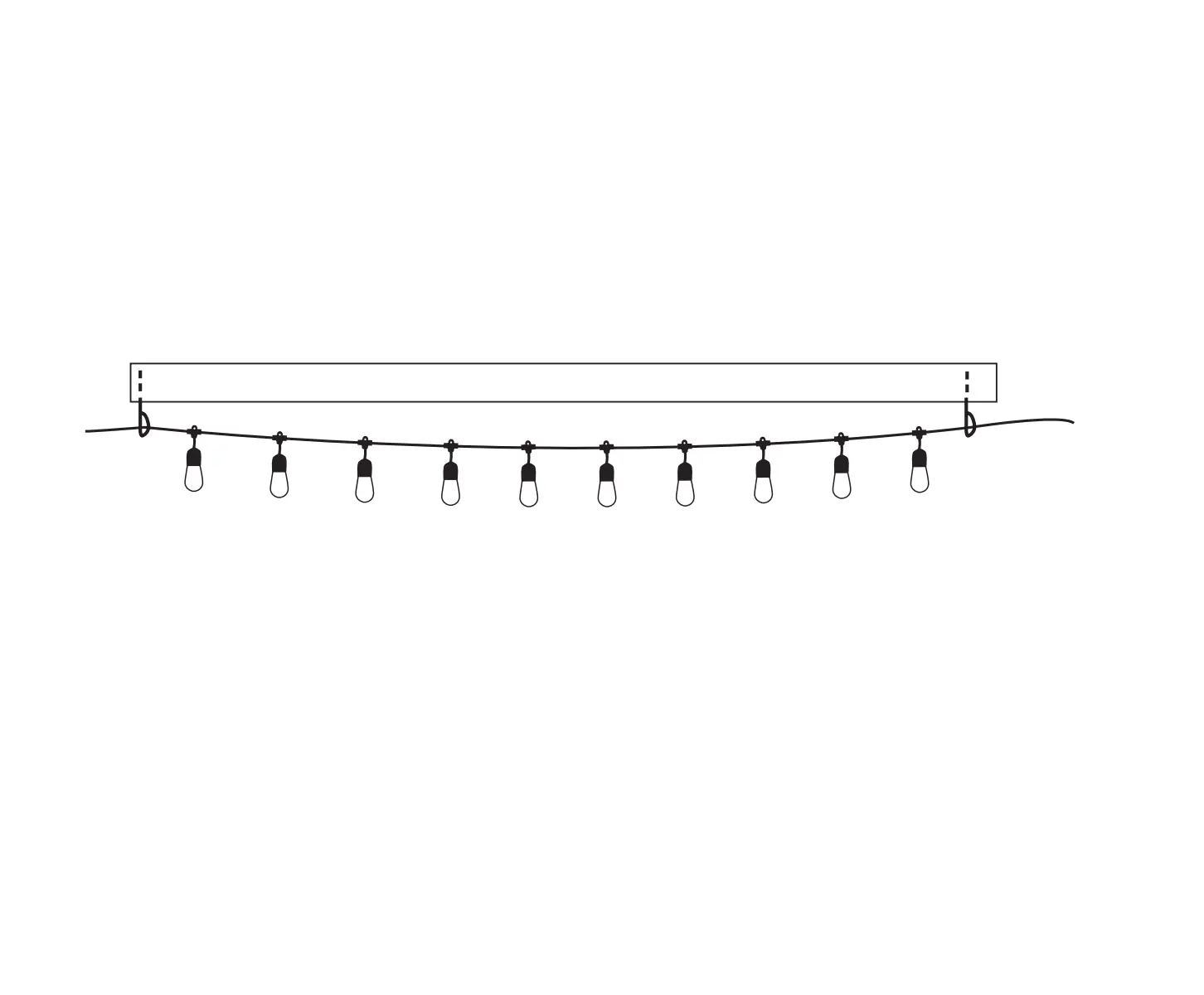
16. If desired, loosely wrap the Light String around the Cable so it may support the Light String in multiple locations.
17. The Light String may be secured to the Cable in one of three ways:
a. Option 1: Hang the individual lights from the Cable using S-Hooks (not included) hooked through the eyelet on the back of the Light.
b. Option 2: Hang the individual lights from the Cable using Zip Ties looped through the eyelet on the back of the Light. Snip the Zip tie close to its square lock.
c. Option 3: Hang the individual lights from the Cable using Zip Ties looped around the Cable and Light String on either side of the Light. Snip the Zip tie close to its square lock.
Zip Tie
S-Hook Eyelet
Light
Page 4
1
2
Figure F:
For technical questions, please call 1-888-866-5797.
3
Item 70278
Maintenance
1. PERIODICALLY, inspect the general condition of the hardware. Check for: · loose hardware, · misalignment or binding of parts, · cracked or broken parts, and · any other condition that may affect its safe operation.
Record Product’s Serial Number Here: Note: If product has no serial number, record month and year of purchase instead. Note: Replacement parts are not available for this item. Reference UPC 193175494559.
Item 70278
For technical questions, please call 1-888-866-5797.
Page 5
Parts List and Diagram
PLEASE READ THE FOLLOWING CAREFULLY
THE MANUFACTURER AND/OR DISTRIBUTOR HAS PROVIDED THE PARTS LIST AND ASSEMBLY DIAGRAM IN THIS MANUAL AS A REFERENCE TOOL ONLY. NEITHER THE MANUFACTURER OR DISTRIBUTOR MAKES ANY REPRESENTATION OR WARRANTY OF ANY KIND TO THE BUYER THAT HE OR SHE IS QUALIFIED TO MAKE ANY REPAIRS TO THE PRODUCT, OR THAT HE OR SHE IS QUALIFIED TO REPLACE ANY PARTS OF THE PRODUCT. IN FACT, THE MANUFACTURER AND/OR DISTRIBUTOR EXPRESSLY STATES THAT ALL REPAIRS AND PARTS REPLACEMENTS SHOULD BE UNDERTAKEN BY CERTIFIED AND LICENSED TECHNICIANS, AND NOT BY THE BUYER. THE BUYER ASSUMES ALL RISK AND LIABILITY ARISING OUT OF HIS OR HER REPAIRS TO THE ORIGINAL PRODUCT OR REPLACEMENT PARTS THERETO, OR ARISING OUT OF HIS OR HER INSTALLATION OF REPLACEMENT PARTS THERETO.
Parts List
Part
Description
Qty
Part
Description
Qty
1 Cable
1
5 Wood Screw
8
2 Zip Tie
120
6 Wall Mount
4
3 Wrench
1
7 Rope Clamp
2
4 Turnbuckle
1
Page 6
For technical questions, please call 1-888-866-5797.
Item 70278
Parts Diagram
1
6
2
5
3
7
4
Item 70278
For technical questions, please call 1-888-866-5797.
Page 7
Limited 90 Day Warranty
Harbor Freight Tools Co. makes every effort to assure that its products meet high quality and durability standards, and warrants to the original purchaser that this product is free from defects in materials and workmanship for the period of 90 days from the date of purchase. This warranty does not apply to damage due directly or indirectly, to misuse, abuse, negligence or accidents, repairs or alterations outside our facilities, criminal activity, improper installation, normal wear and tear, or to lack of maintenance. We shall in no event be liable for death, injuries to persons or property, or for incidental, contingent, special or consequential damages arising from the use of our product. Some states do not allow the exclusion or limitation of incidental or consequential damages, so the above limitation of exclusion may not apply to you. This warranty is expressly in lieu of all other warranties, express or implied, including the warranties of merchantability and fitness. To take advantage of this warranty, the product or part must be returned to us with transportation charges prepaid. Proof of purchase date and an explanation of the complaint must accompany the merchandise. If our inspection verifies the defect, we will either repair or replace the product at our election or we may elect to refund the purchase price if we cannot readily and quickly provide you with a replacement. We will return repaired products at our expense, but if we determine there is no defect, or that the defect resulted from causes not within the scope of our warranty, then you must bear the cost of returning the product. This warranty gives you specific legal rights and you may also have other rights which vary from state to state.
26677 Agoura Road · Calabasas, CA 91302 · 1-888-866-5797