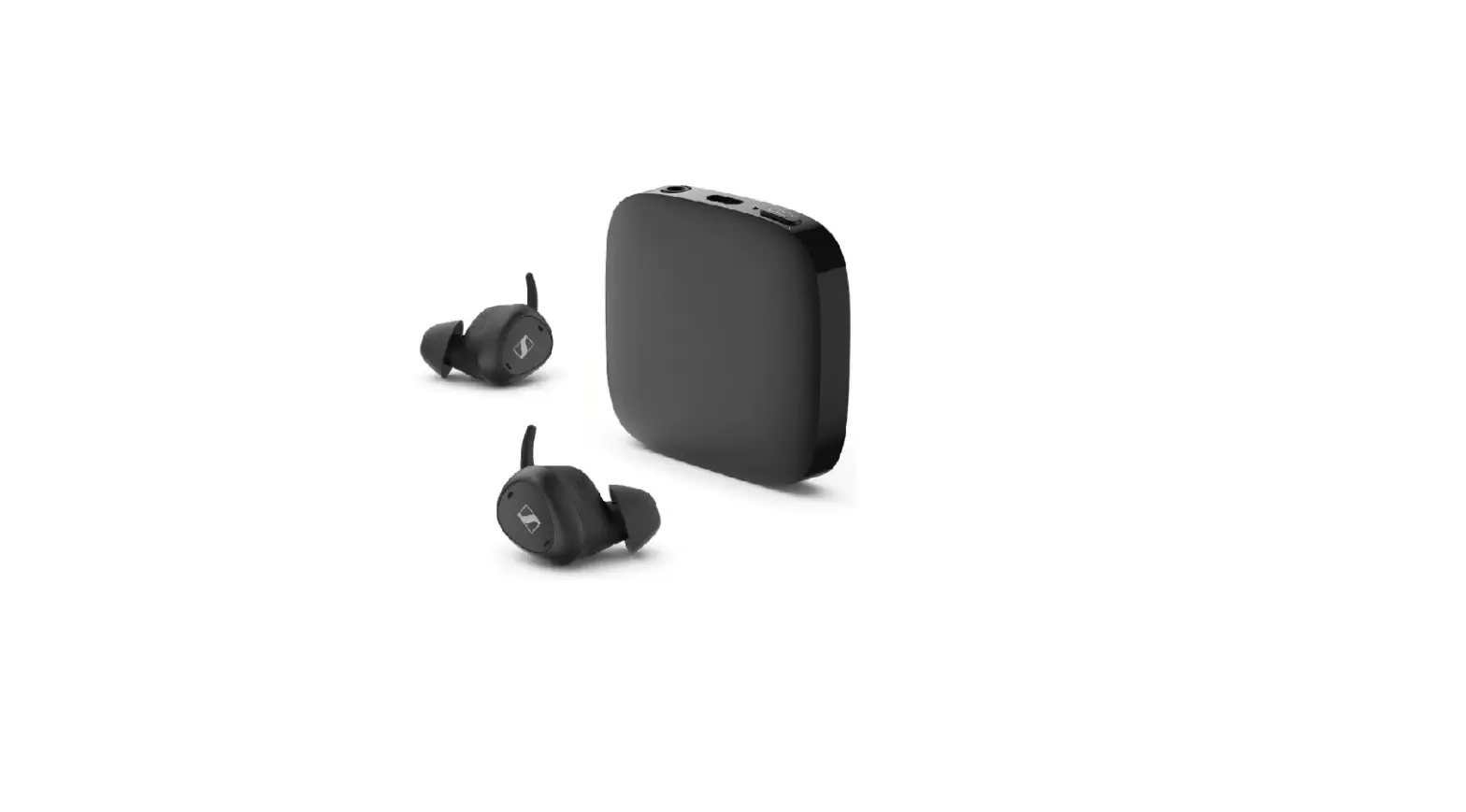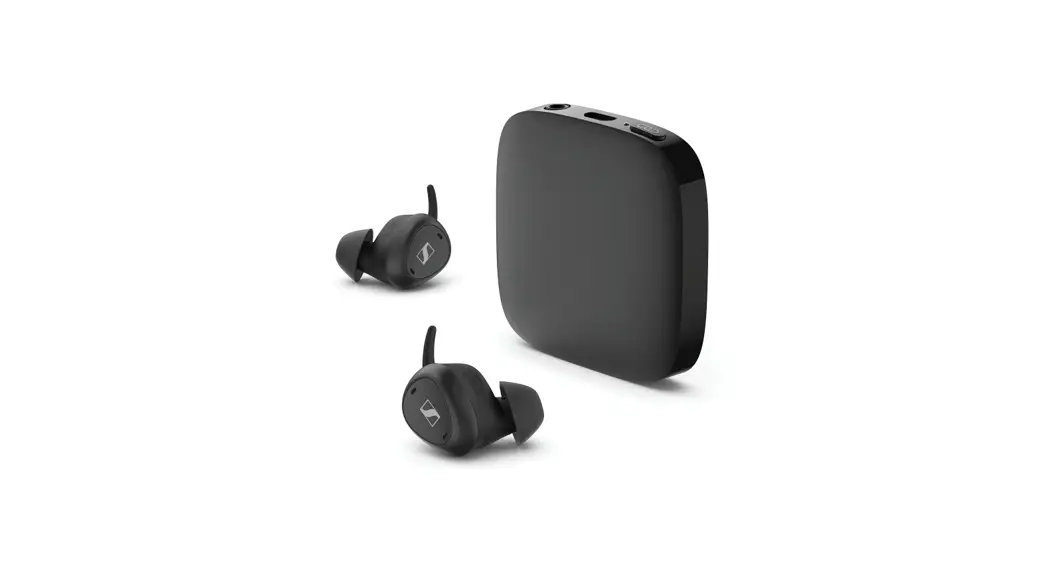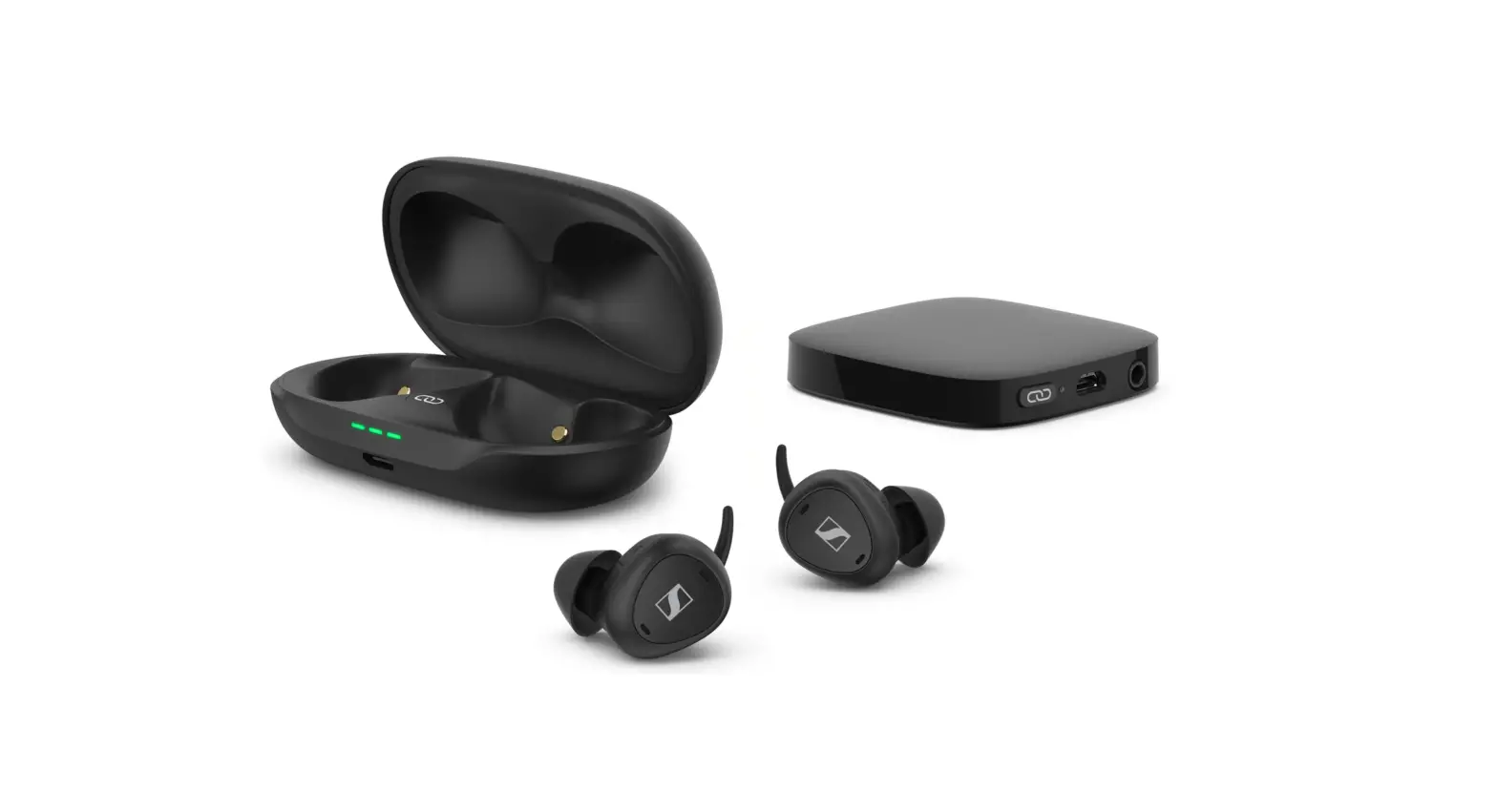

Sennheiser TVCE1-EB TV Connector
Important safety instructions
Please read the following information before using your device.
General warnings for TV Clear Earbuds and transmitter „TV Connector“
- These devices are not for children below 36 months. They contain small parts that can cause choking, if swallowed by children. Keep out of reach of children and mentally challenged people or pets. If swallowed, consult a physician or hospital immediately.
- Changes or modifications to any of the devices that were not explicitly approved by Sonova Communications AG are not per-mitted. Such changes may damage your ear or the devices.
- Only authorized personnel are allowed to disassemble the devices due to possible electrical hazard.
- Do not use these devices in explosive areas (mines or industrial areas with danger of explosions, oxygen rich environments or areas where flammable anesthetics are handled) or where electronic equipment is prohibited.
- High-powered electronic equipment, larger electronic installations and metallic structures may impair and significantly reduce the operating range.
- Do not use excessive force when connecting the devices to the cables or when inserting the earbuds into the charging case.
- The USB ports of the devices are to be used for the described purpose only.
- These devices may generate magnetic fields. If any influence of the devices on the implantable device (e.g. pace-makers, defibrillators, etc.) is experienced, stop using the devices and contact your doctor and /or the manufacturer of the implantable device for advice.
- X-ray radiation, CT or MRI scans may destroy or adversely affect the correct functioning of the device.
- If these devices have been dropped or damaged, if they overheat, have a damaged cord or plug, or have been dropped into liquid, stop using the devices and contact an authorized Sonova Communications AG service partner.
- Protect the devices connectors, plugs, power supply from dirt and debris.
- Protect the devices from excessive moisture (bathing or swim-ming areas) and heat sources (radiator). Protect the devices from excessive shock and vibration. Never immerse them in water.
- Clean the devices using a damp cloth. Never use household cleaning products (washing powder, soap, etc.) or alcohol to clean them. Never use a microwave or other heating devices to dry the devices.
- Dispose of electrical components in accordance with your local regulations.
Hazard warnings for TV Clear Earbuds
- External devices may only be connected if they have been tested in accordance with the relevant standards IEC 62368-1 or other applicable safety standards.
- For charging, use only IEC 62368-1 certified equipment with an output rating of 5 VDC, min. 600 mA.
- Do not cover the charging case while charging, e.g. with a cloth etc.
- Use of this equipment adjacent to or stacked with other equipment should be avoided because it could result in improper operation. If such use is necessary, this equipment and the other equipment should be observed to verify that they are operating normally.
- Portable RF communications equipment (including peripherals such as antenna cables and external antennas) should be used no closer than 30 cm (12 inches) to any part of the earbuds or charging case including cables specified by the manufacturer. Otherwise, degradation of the performance of this equipment could result.
- The earbuds and charging case contain lithium-ion batteries that can be taken onto airplanes as carry-on luggage only.
- The system operates between 2.4 GHz – 2.48 GHz frequency range. When flying please check if flight operator requires devices to be off.
- Use caution and follow applicable laws regarding mobile phone and headphone use if using the earbud for phone calls while driving. Some jurisdictions impose specific limitations, such as single earbud configuration, on the use of such products while driving. Don’t use the earbuds for any other purpose while driving.
- Focus on your safety and that of others if you use the earbuds while engaging in any activity requiring your attention, e.g., while riding a bicycle or walking in or near traffic, a construction site or railroad, etc. Remove the earbuds or adjust your volume to ensure you can hear surrounding sounds, including alarms and warning signals.
- The ambient awareness mode can reduce background noises. Please be aware that warning signals or noises coming from behind, e. g. cars, are partially or entirely suppressed.
- Do not use the earbuds at a high volume for any extended period. To avoid hearing damage, use your earbuds at a comfortable, moderate volume level.
- Put on the earbuds at low volume then slowly adjust the volume control to a comfortable level.
- The earbuds should not be used by clients with perforated ear-drums, inflamed ear canals or otherwise exposed middle ear cavities. In the unlikely case that any part of this product should remain in the ear canal, it is strongly recommended to see a medical specialist for safe removal.
- Do not insert the earbuds too deep into your ears and never insert them without the ear adapters.
- Always remove the earbuds slowly and carefully from your ears.
- If the ear adapter – or parts of the ear adapter (dome, retention) -is broken or damaged it needs to be replaced.
- If you feel pain in or behind your ear, if it is inflamed or if skin irritation and accelerated accumulations of earwax occur, please check with your hearing care professional or physician.
- Avoid strong physical impacts to the earbuds or the ear when wearing them. A strong physical impact to the earbuds or ear (e.g. during sports) may lead to perforation of the ear canal or eardrum.
- The devices contain lithium-ion batteries with a Watt hour rating <20 Wh which have been tested according to UN 38.3 of the “UN Manual of Tests and Criteria” and should be shipped in accordance with all the rules and regulations on the safe shipment of lithium-ion batteries.
- The following is only applicable for persons with active implant-able medical devices (i.e. pacemakers, defibrillators, etc.): Keep the earbuds and charging case at least 15 cm (6 inches) away from the active implant. If you experience any interference, switch off the earbuds and contact the manufacturer of the active implant. Please, note that interference can also be caused by power lines, electrostatic discharge, airport metal detectors etc.
- Only authorized personnel are allowed to disassemble the charging case due to possible electrical hazard.
Product safety information for TV Clear Earbuds
- Never wash the microphone inputs. Doing so could cause it to lose its special acoustic features.
- Special medical or dental examination including radiation described below, may adversely affect the correct functioning of the devices. Remove and keep them outside the examination room/area before undergoing:
- Medical or dental examination with X-ray (also CT scan).
- Medical examinations with MRI/NMRI scans, generating mag-netic fields.
- Protect your earbuds and charging accessories from heat (never leave near a window or in the car). Never use a microwave or other heating devices to dry your earbuds or charging accessories (due to risk of fire or explosion).
- Do not place the earbuds and charging case close to an induction cooking surface. Conductive structures inside the charging accessories could absorb inductive energy resulting in thermal destruction.
- Ensure to use the earbuds and charging case within operating temperature range: +5° to +40° Celsius (41° to 104° Fahrenheit).
- Always make sure that the earbuds and charging case are dry and clean, especially before charging. Otherwise the charging reli-ability cannot be guaranteed.
- If you are not using the earbuds, store them in the charging case in a well ventilated location. This allows moisture to evaporate and prevents a potential impact on performance.
- Use of accessories and cables other than those specified or pro-vided by the manufacturer of this device could result in increased electromagnetic emissions or decreased electromagnetic immunity of this device and result in improper operation.
Hazard warnings for transmitter „TV Connector“
- External devices may only be connected if they have been tested in accordance with corresponding safety standards. Only use accessories approved by Sonova Communications AG.
- ▷ For safety reasons, only use chargers supplied by Sonova Communications AG or stabilized chargers with a rating of 5 VDC, min. 500 mA.
▷ Protect your eyes of the optical light from the optical Tos link cable when plugged into a TV/device.
Notes on data collection and processing and on firmware updates
The earbuds locally store individual settings such as the volume, the sound profiles and the Bluetooth addresses of paired devices to ensure proper operation.
When used with the “Sennheiser TV Clear” app the settings and usage data such as power-on cycles and operating times (e.g. music playback, used speech modes) are encrypted and transferred in an anonymous form to Sonova Communications AG or companies com-missioned by Sonova Communications AG, where they are stored and processed. The data is processed to determine statistical characteristics regarding the provision, maintenance and improvement of the earbuds and the app. At no time does the data processed permit direct association with any specific individual. If you do not want this data to be transferred and processed, revoke your consent to the use by adjusting your settings in the “Privacy” section of the app menu.
Using the “Sennheiser TV Clear” app, you can update the firmware of the product for free via an Internet connection. If the device on which the app is installed is connected to the Internet, the following data is automatically transferred to and processed by Sonova Communications AG or companies commissioned by Sonova Communications AG in order to provide and transfer suitable firmware updates: hard-ware identifier, hardware revision number, firmware version of the product, type of the operating system (Android, iOS), version of the operating system and version of the app. The data will only be used as specified and will not be stored permanently. If you do not want this data to be transferred and processed, do not connect to the Internet.
Intended use/Liability
The intended use of the TV Clear Earbuds is to wirelessly connect to Bluetooth® enabled devices such as mobile and smart phones or tab-lets. You can stream the stereo audio signal to the earbuds and make hands-free phone calls. To watch TV, best results are achieved when using the low latency interface transmitter “TV Connector”.
The intended use of the transmitter “TV Connector” is to establish a wireless connection between the TV Clear Earbuds and a TV (or any other audio source). It sends audio signals within a 15 meter (50 ft) radius wirelessly to the TV Clear Earbuds.
General
Sonova Communications AG does not accept liability for damage arising from improper use or misuse of the product and its attachments/accessories. Sonova Communications AG is not liable for damages to USB devices that are not consistent with the USB specifications.
Sonova Communications AG is not liable for damages resulting from the loss of connection due to flat or overaged rechargeable batteries or exceeding the Bluetooth/ 2.4 GHz transmission range.
Before putting the products into operation, please observe the respective country-specific regulations.
The Sennheiser TV Clear Set
General use
On the one hand, the „TV Clear Set“ allows you to connect wirelessly to Bluetooth®-enabled devices such as cell phones, smartphones or tablets. You can stream the stereo audio signal to the earbuds and make hands-free phone calls.
On the other hand, you can use it to transmit the TV sound. Best results are achieved when using the dedicated low latency interface transmitter „TV Connector“. The transmitter can be connected to a TV using a digital optical connection or an analog audio output.
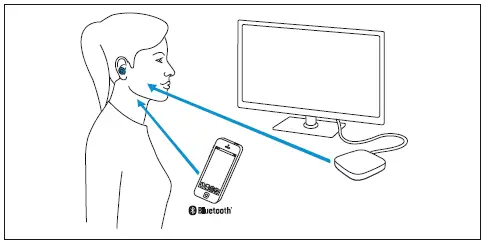
Components of the TV Clear Set
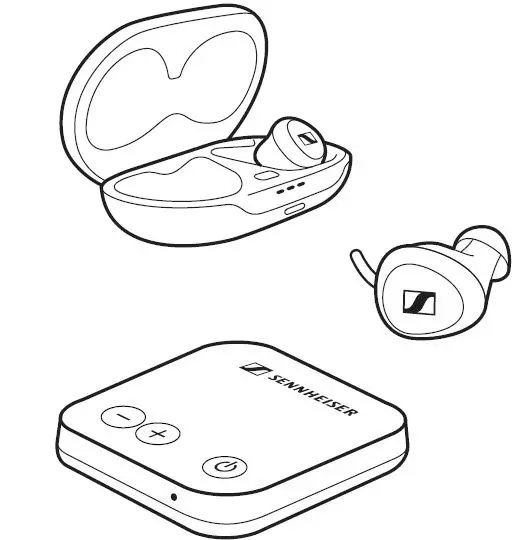
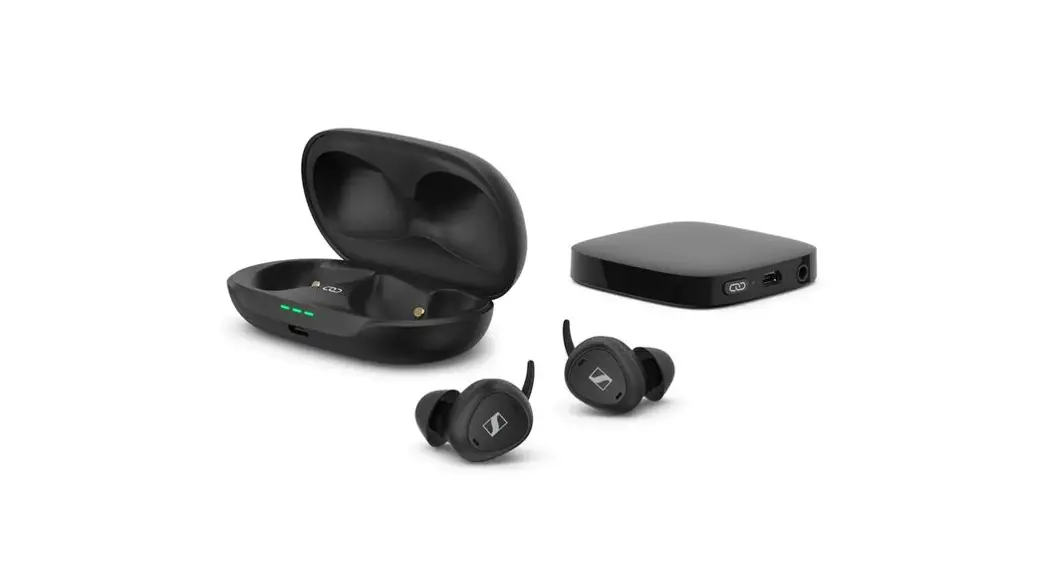
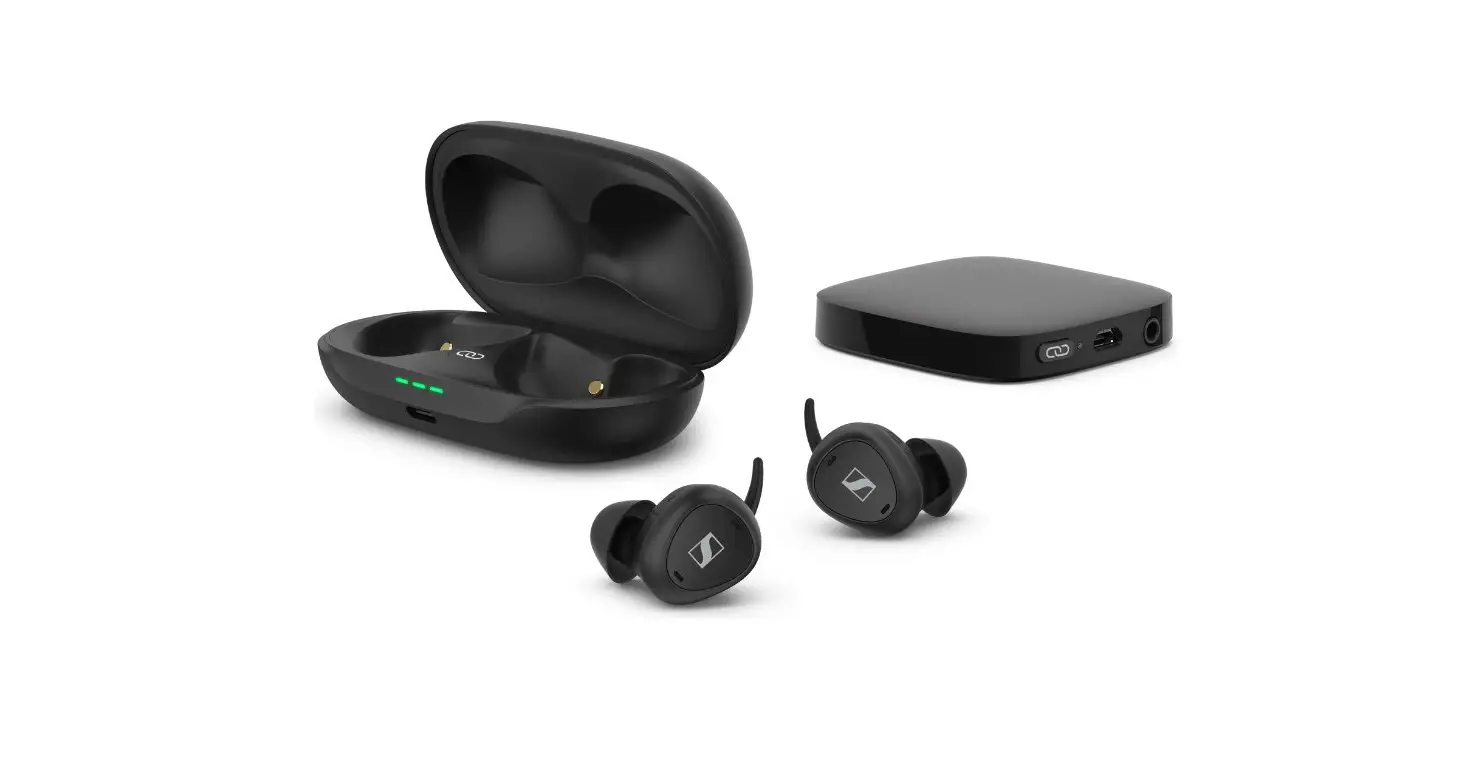
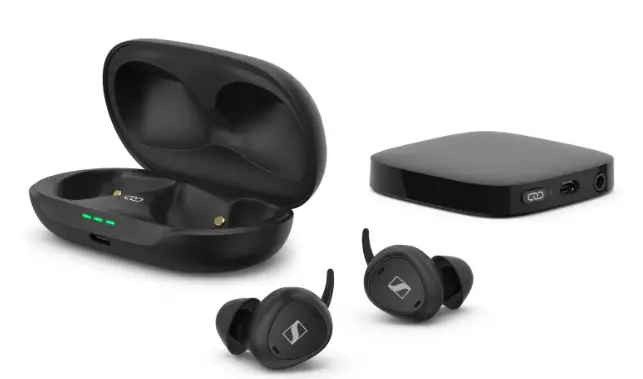
The „TV Clear Set“ consist out of the „TV Clear Earbuds“ and the transmitter „TV Connector“.
You can purchase the set or the single products on its own. Please note that depending on whether you have the set or a single product, the descriptions in this manual may have to be skipped.
Streaming stability
Line-of-sight between your earbuds and the connected device is not required.
The connection range is typically up to 10 meters (30 ft).
The range may be reduced when the signal is obstructed by obstacles such as walls or the human body.
Best results are achieved when using the earbuds in line of sight to the connected device.
If the audio transmission is interrupted, reduce the distance and avoid obstacles in between.
Package contents
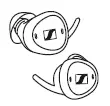
TV Clear Earbuds
- Earbuds for right and left ear (model: TVCE1-EB)

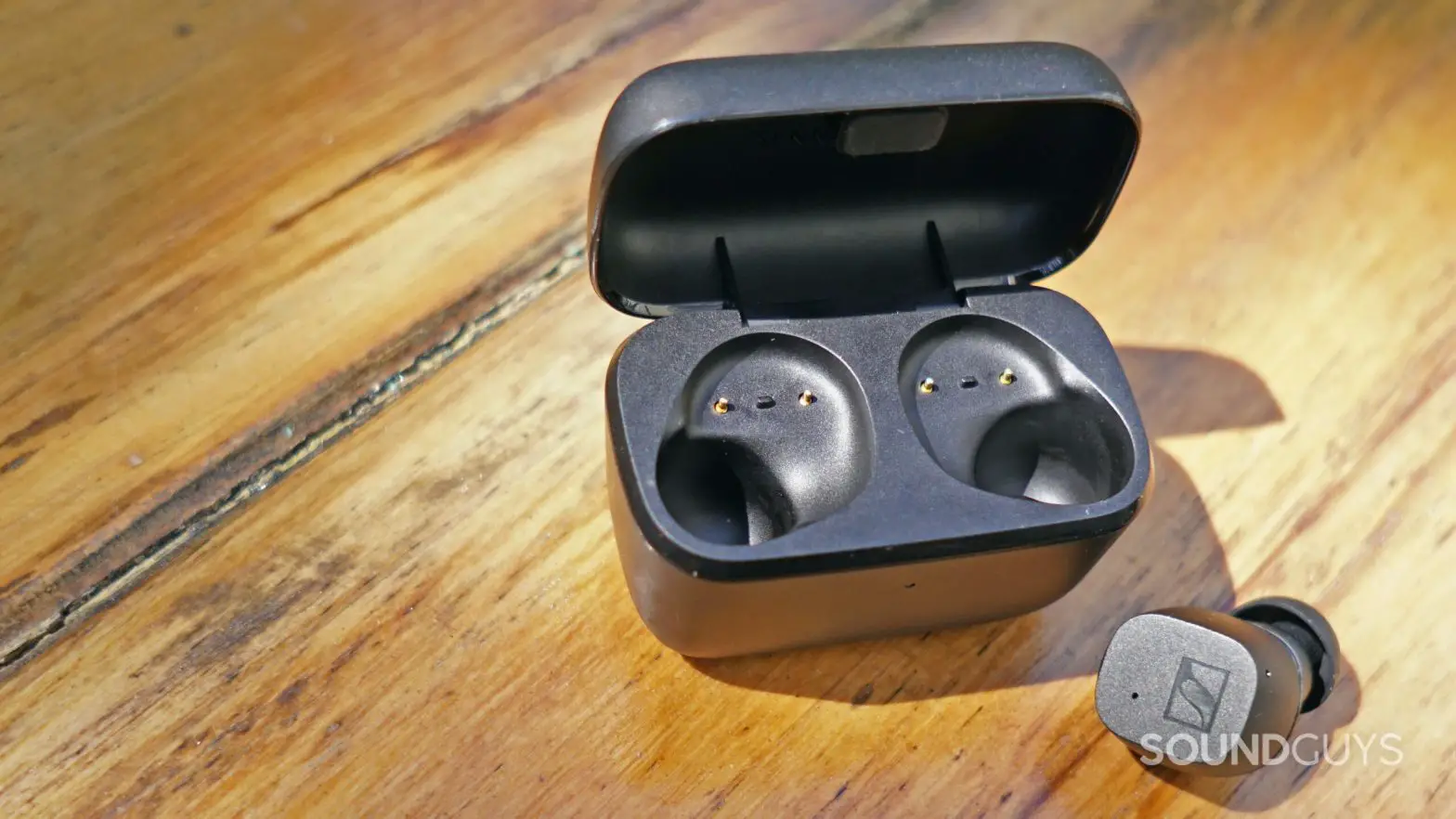
- Charging case with built-in rechargeable battery for the earbuds (model: TVCE1)

- USB charging cable with USB-C and USB-A connector

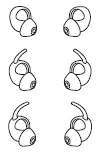
- Silicone ear adapters pairs (size 1, 2 (pre-mounted to the earbuds) and 3)

Transmitter „TV Connector“
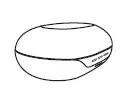
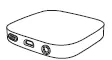
- Transmitter (model: TV Connector)

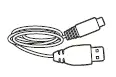
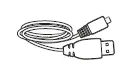
- USB power cable with USB-Micro-B and USB-A connector

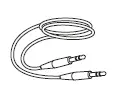
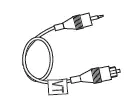
- Analog 3.5 mm audio cable

- Optical (TOSLINK) audio cable

General
- Quick guide

- Safety guide

Online you can find:
- Frequently Asked Questions (FAQ):
www.sennheiser-hearing.com/tv-clear-faq - The Sennheiser TV Clear app for configuring the headphones and for additional functions:
- Google Play store: click
- Apple App store: click
- Additional information (like this user manual, spec sheet): www.sennheiser-hearing.com/download
- A list of accessories for the TV Clear Set products:
www.sennheiser-hearing.com/TV-Clear
Product overview
TV Clear Earbuds
Earbuds Model: TVCE1-EB
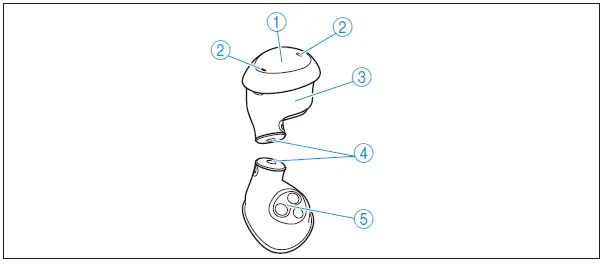
- Multi-function button (short and long press/ double tap)
- Microphones
- Left/right marking
- Sound outlet
- Charging contacts and ear sensor
Ear adapters
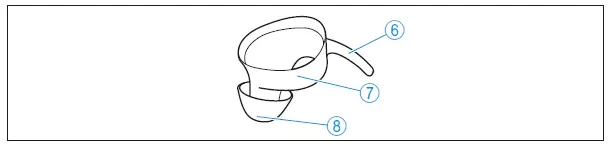
- Retention for secure hold
- Size (1-3) and left (L) / right (R) marking
- Dome
The default voice prompt language is English. This – and other configurations – can be adjusted with the Sennheiser TV Clear app.
Charging case Model: TVCE1
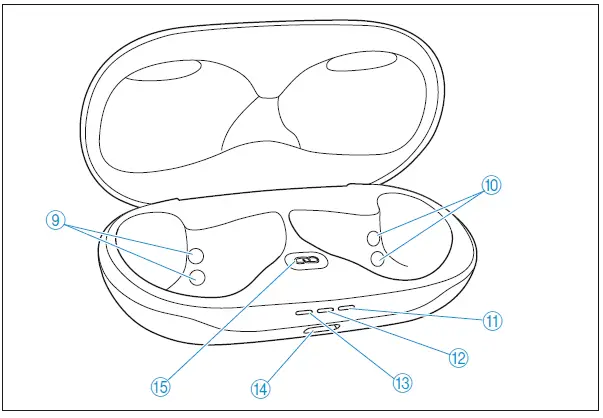
- Charging contacts left earbud
- Charging contacts right earbud
- Battery indicator light right earbud
- Battery indicator light case
- Battery indicator light left earbud
- USB-C charging socket
- Pairing button
Transmitter
Model: TV Connector
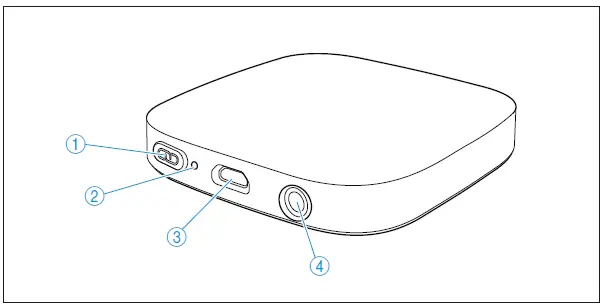
- Pairing button
- Indicator light
- Micro-B-USB power port Audio port for:
- Optical (TOSLINK) audio cable
- Analog 3.5 mm audio cable
Overview of the indicator light
| Indicator light | Transmitter | |
| lights up green | … is ON | |
| – | off | … is OFF |
Getting started
The following steps describe the optimum way to use the TV Clear Set for the first time.
If you purchased a single product „TV Clear Earbuds“ or transmitter „TV Connector“ on its own please read the respective chapter:
- TV Clear Earbuds: > 17
- Transmitter TV Connector: > 15
- Connecting the transmitter TV Connector to the TV
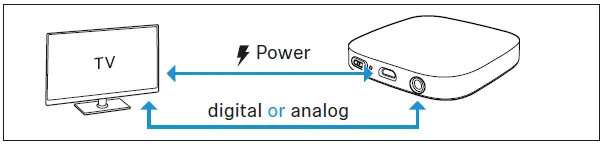
Connect the USB power cable and the audio connection (digital or analog) to your TV (> 15).
- Waking up the earbuds and the charging case and charging the rechargeable batteries
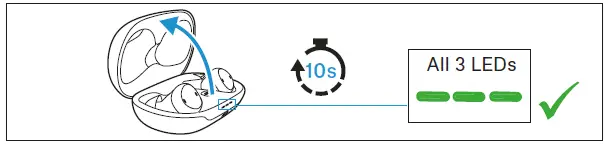
Upon delivery, the rechargeable batteries of the earbuds and the charging case are in sleep mode and have to be woken up by opening the lid of the charging case and wait at least 10 seconds. We recommend charging the earbuds and the charging case for a complete charging cycle without interruption before using for the first time (> 27).
- Connecting the earbuds the transmitter TV Connector
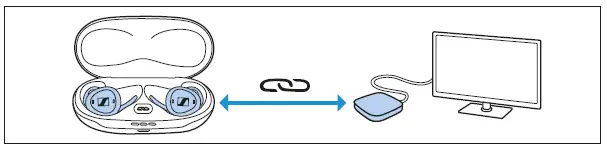
If you purchased the products in the Set, the earbuds will now automatically connect to the transmitter when taken out of the charging case (> 19).
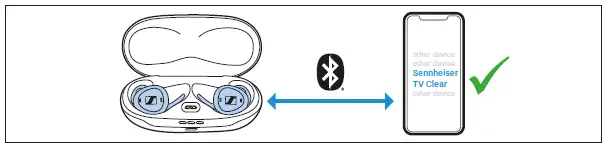
- Connecting the earbuds to a Bluetooth device
Connect the earbuds to your phone (or tablet) via Bluetooth (> 18).
- Selecting suitable ear adapters for optimum
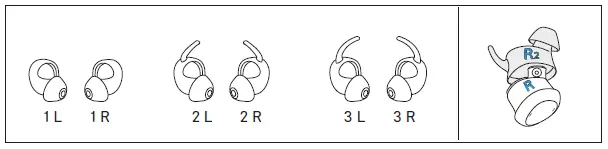
fit of the earbuds The perceived sound quality including bass performance, the best voice quality for phone calls and a secure hold of the earbuds in the ear depends to a large extent on the correct fit of the earbuds. There-fore, you can choose between ear adapters with retentions in differ-ent sizes.- Test which ear adapter size with retentions give you the best sound quality and the best wearing comfort (> 20).
- Assign the right earbud to your right ear and the left earbud to your left ear.
- Insert the earbuds at a slight angle into the ears and twist them slightly into the ear canal so that they sit comfortably and snugly in the ear canal and auricle (> 21).

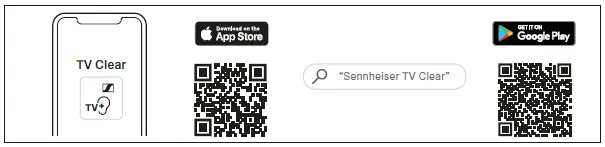
- Installing the TV Clear app on your smart-phone
The Sennheiser TV Clear app allows you to use all functions and set-tings of the earbuds (> 26).- Apple App store: click
- Google Play store: click

Getting started transmitter TV Connector
Connecting the transmitter to a USB power supply
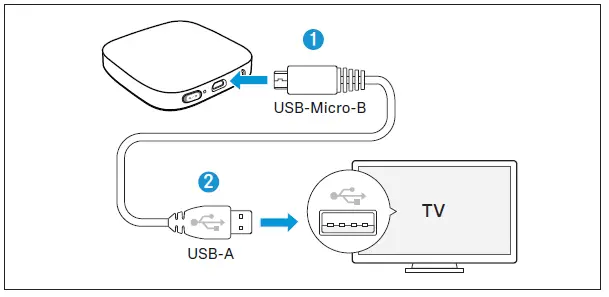
- Connect the USB-micro-B plug of the supplied USB power cable to the USB-micro-B port of the transmitter.
- Connect the USB-A plug to the USB-A port of your TV. For older TV models without built-in USB port, connect the USB plug to an external USB power adapter and connect to the power source (not included, optional accessory).
The transmitter automatically switches on (> 22).
Connecting the transmitter to an audio source
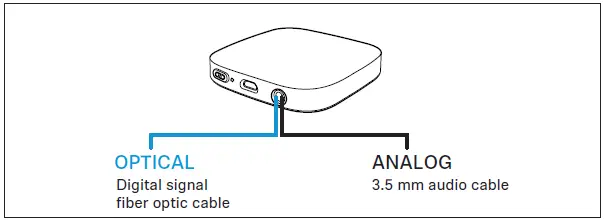
The transmitter can be connected to any audio source such as a TV, PC or stereo system. It supports two different audio cable inputs: optical (TOSLINK) or analog. Either of these audio cables must be plugged into the dedicated audio port on the transmitter.
Select the audio cable that is compatible with your audio source. Best audio transmission is ensured with the digital optical audio connection.
Ensure the chosen audio cable is firmly inserted into both the transmitter and the audio source.
Connecting the transmitter with the optical cable
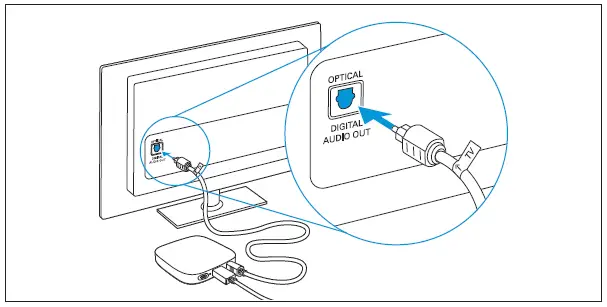
Insert the slim end of the optical cable into the transmitter and connect the wider end of the optical cable into the OPTICAL DIGITAL AUDIO OUTPUT of your TV (or audio source).
Connecting the transmitter with the analog cable
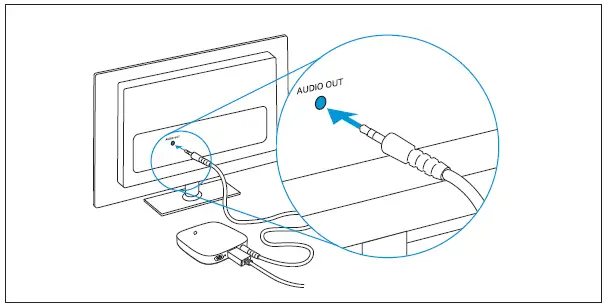
Connect one end of the analog 3.5 mm audio cable into the transmitter and the other end into the AUDIO OUT port of your TV (or audio source).
If your TV loudspeakers switch off when connected with the analog 3.5 mm audio cable, use the optical audio cable instead or check the menu of your TV to turn on the TV loudspeakers again.
Connecting the TV Clear earbuds with the transmitter
Follow the steps in the chapter “Connecting your earbuds to the transmitter „TV Connector“” (> 19).
Getting started TV Clear earbuds
Switching earbuds ON or OFF is easy
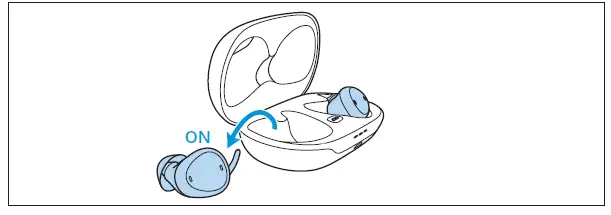
The earbuds automatically switch on when removed from the case. They switch off when back in the case.
The indicator lights will light up:
| Indicator light | Meaning | |
| green | Battery ok | |
| red | Battery <20%, consider charging | |
In the event an earbud switched off, a short press on the button switches it on again.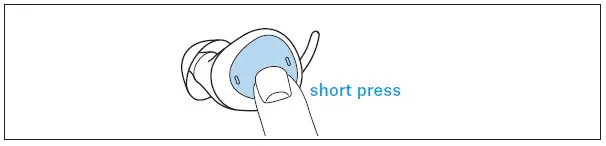
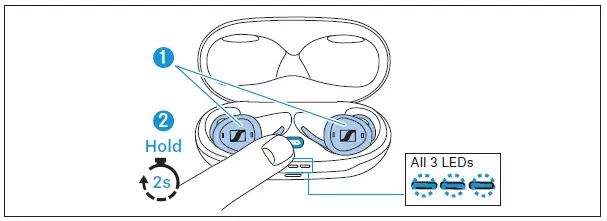
Put the earbuds into pairing mode
- Make sure both earbuds are placed in the case correctly.
- Press and hold the pairing button for 2 seconds, until the indicator light starts to blink blue.

- Wait until all 3 indicator lights blink blue (this may take up to 10 seconds). The pairing mode will stop after 8 minutes or when th e pairing was successful.
- Leave the earbuds in the case and continue to “Connecting your earbuds to your phone (or tablet)” (> 18) or “Connecting your ear-buds to the transmitter „TV Connector“” (> 19).
Connecting your earbuds to your phone (or tablet)
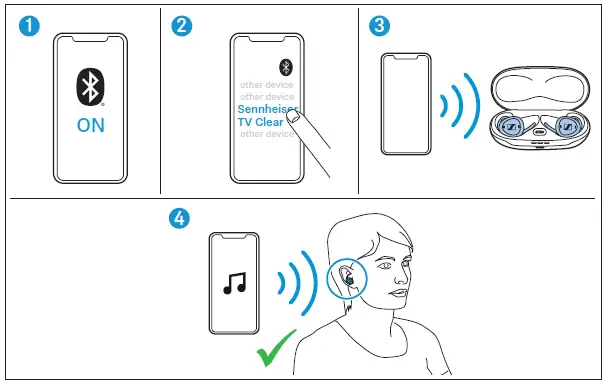
If it is the first time connecting the earbuds to the device, you must put them into pairing mode as described in chapter “Put the earbuds into pairing mode” (> 17). After they have been paired, the earbuds should connect automatically when removed from the case.
- Open the “Bluetooth” settings and activate Bluetooth on your phone.
- Wait until you see the „Sennheiser TV Clear“ in the list of available devices and select it.
- Your phone will now connect to the earbuds and the indicator lights of the charging case will stop blinking.
- Insert the earbuds into both ears. You will hear a confirmation when inserted. The sound from your phone will be played through the earbuds when connected.
If the Sennheiser TV Clear app is installed and connected, you may see “Sennheiser TV Clear LE” in the list of paired devices. Do not select it.
When you remove both earbuds from the ear, the sound will be paused. This behavior can be configured in the Sennheiser TV Clear app.
Connecting your earbuds to the transmitter „TV Connector“
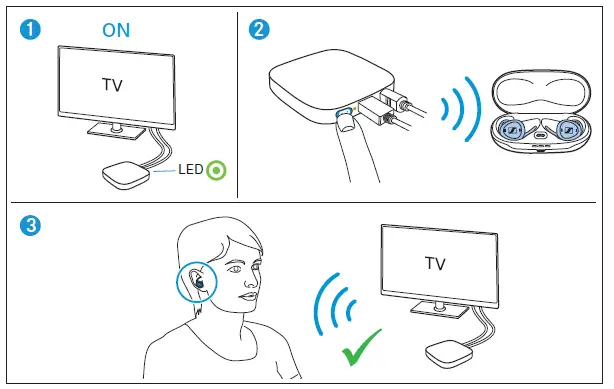 If it is the first time connecting the earbuds to the TV Connector, you must put them into pairing mode as described in chapter “Put the earbuds into pairing mode” (> 17). After they have been paired, the earbuds should connect automatically when removed from the case. When the transmitter was purchased in the TV Clear Set, transmitter and earbuds are already paired during production. Just open the lid of the charging case and proceed to the chapter “Daily use of the transmitter TV Connector” (> 22).
- Make sure the transmitter is properly connected to the TV or sound source (> 15) and switch it on (> 22).
- Press the pairing button on the back of the transmitter.
The transmitter will now connect to the earbuds and the indicator lights of the charging case will stop blinking. - Insert the earbuds into both ears. You will hear a confirmation when inserted. The sound from your transmitter will be played through the earbuds when connected.
Additional information about pairing
- The earbuds can be paired to a maximum of 6 devices. A 7th pairing will replace the least used device.
- All 3 indicator lights will blink blue during pairing. This can take up to 2 minutes, but typically is finished within a few seconds.
- The earbuds must be paired only once to a phone, tablet or transmitter „TV Connector“. Devices remain paired after powering off and will reconnect automatically when powered on if they are within reach.
- To connect manually, go to your devices Bluetooth menu, select “Sennheiser TV Clear” from the list or short press either of the earbud buttons while wearing them.
Fit your earbuds perfectly to your ears
The silicone ear adapter is an important part of your earbuds and is available in three sizes – 1, 2 and 3. The size is indicated on the adapter.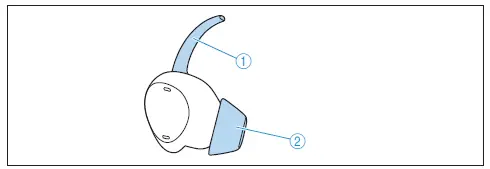
- The rentention finger helps to hold the earbud in place.
- The dome must sit firmly on your ear canal for a good seal.
If the default medium size adapter (size 2) is too large or small for you, choose size 1 or 3.
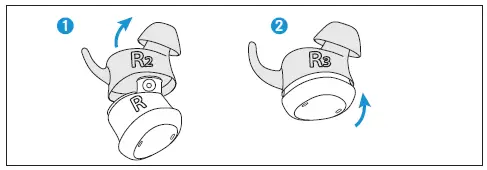
- Pull the adapter carefully from the earbud.
- Gently insert earbud into the adapter that fits you best.
- Repeat for the other side.
The size of the adapter may be different for the left and right ear.
Make sure the left and right side of the adapter and earbud are aligned (L= left side, R = right side).
Place the earbuds into your ears
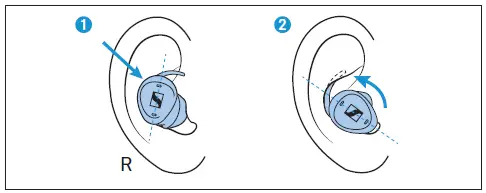
The left and right side indication (L, R) is printed on the adapter. Select the correct side for insertion into your ear.
- With the dome pointing to your ear canal and downward, gently insert the earbud.
- Rotate the retention until it sits firmly and comfortably in the bowl of the ear.
Daily use
Daily use of the transmitter TV Connector
Switching ON audio transmission
- Switch ON your TV or audio source. Make sure the transmitter has power and its indicator light is green. The transmitter will automatically transmit the audio signal to the connected TV Clear erbuds.
- You will hear the audio directly in your TV Clear erbuds.
- For more details on how to use the TV Clear earbuds please read “Daily use of the TV Clear earbuds” (> 22).
Switching OFF audio transmission
- To end the transmission of the audio signal from the transmitter, simply switch OFF the TV or audio source. The transmitter will go into standby mode automatically after 3 minutes and stop streaming.
The transmitter has no on/off button. To turn it off permanently, remove the power source.
Daily use of the TV Clear earbuds
Re-connection for every day use
The pairing as described in (> 17) is only needed once the device are connected for the first time. They do not need to be re-paired again.
- Ensure Bluetooth is switched ON on your phone – or the transmitter TV Connector is powered ON – before taking the earbuds out of the case.
- When removing the earbuds from the case they will connect t o the phone automatically within 12 seconds.
- This is indicated in the phones status screen or the Bluetooth menu (exact details may depend on your phone model)
- If you switched Bluetooth on after the earbuds were already taken out of the charging case, or if you were out of range of your phone, you can short press the earbud button to re-connect.
- You can also stream from the phone if only one earbud was removed from the charging case. The first earbud removed from the charging case is your primary. This is important as during a phone call the primary picks up your voice.
- When putting the primary back to the charging case, they switch role and the other earbud will become the primary. This will shortly interrupt your stream for about 5 seconds as the remaining earbud must re-connect to the phone.
How to control the earbuds
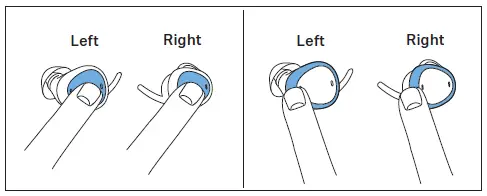
The earbuds offer two ways to control various features.
- Button control
Each earbud has a real button with click feeling in the middle of the button surface.
The button on the right earbud is “up”, the button on the left ear-bud is “down”. The buttons are not configurable. - Configurable Touch Control
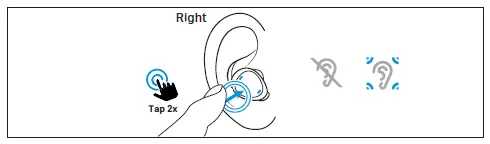
Each earbud has a touch control surface. To trigger the feature, double-tap gently but clearly on the frame of the earbud. Th e Touch Control can be configured by the TV Clear app.
The default configuration on the right earbud is Ambient Aware-ness function Off/On and on the left earbud Pause/Resume play-back.
Speech clarity settings
During streaming or a phone call, you can select one of five pre-defined Speech Clarity settings.
Setting 1: no additional amplification.
Settings 2-5: increase of the high frequency sound for more speech clarity.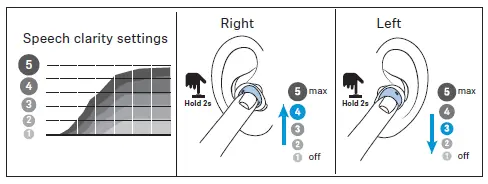
- Use long press right (>1.5 sec) to increase clarity.
- Use long press left (>1.5 sec) to reduce sharpness.
Setting the volume
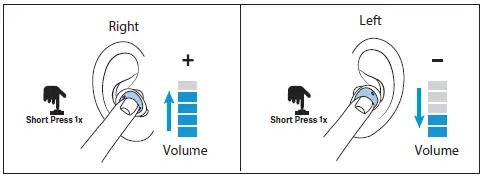
During streaming or a phone call, you can change the volume.
- Use short press right (<0.5 sec) to increase volume.
- Use short press left (<0.5 sec) to decrease volume.
Alternatively you can also change the volume using the phone. Volume and Speech Clarity settings are automatically stored when earbuds are powered off.
Making a phone call
To make a hands-free phone call, ensure the earbuds are connected to the phone and correctly inserted into your ears (> 18 and 21). To start a call, initiate the call from the phone.
When receiving an incoming call you will hear the ringtone through the earbuds. Use earbud on either side to accept or reject the call.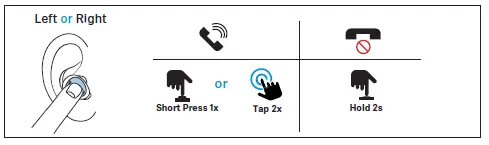
Accept call
- Double tap or short press.
Reject call
- Long press (>1.5 sec).
Microphone pick up

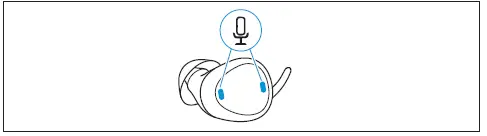
During a phone call your voice is picked up by the “primary” earbud microphones.
It is important to protect the two small microphone inlets from dirt and debris.
The primary earbud is the one removed from the charging case first.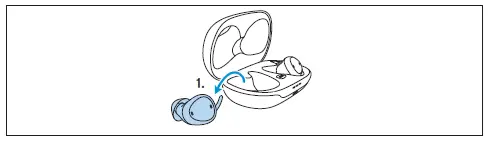
When putting the primary back to the charging case, they switch role and the other earbud will become the primary.
The switch between primary earbuds can take up to 5 seconds and you may hear an interruption. This is normal.
Phone call features
Usually the call is controlled via the phone. Some key features how-ever can be assigned to a double tap such as microphone mute or ending the call.
To enable those features, download the Sennheiser TV Clear app from the app store and follow the instructions (> 26).
Phone calls via Bluetooth will always take priority over sound streaming if for example you are streaming from TV, you will hear the ringtone through the earbuds and can accept the call.
Ambient awareness
One important feature of the earbuds is the ability to hear ambient sound while streaming.
By default, you will hear the ambient sound on level 3.
- Double tap onto the right earbud to switch ambient sound OFF or ON.
You can configure the level of the ambient sound through the TV Clear app.
During phone call the ambient sound cannot be changed but a double tap will mute or unmute the earbud microphone.
Pause and resume streaming
You can control the sound streaming directly from the earbud.
- Double tap onto the left earbud to pause or resume streaming.
- Initially you must start the playback of music from your device.
- The configurations of the double tap function can be changed with the TV Clear app.
Using the Sennheiser TV Clear app
We recommend to benefit from the Sennheiser TV Clear app. It offers many advantages such as:
- Earbuds stay up-to-date with the latest firmware.
- Ability to change and configure the default English spoken messages.
- Ability to configure the double tap touch control for additional features such as starting the voice assistant, pause and resume streaming, previous and next track, information about the battery state, control of ambient sound, and more.
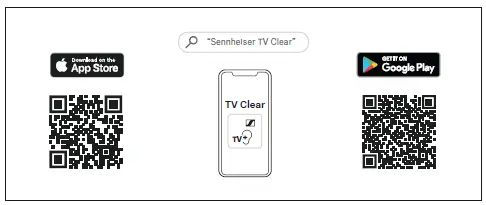
- Download the app from the Apple App Store or Google Play and install it on your smartphone:
- Apple App store: click
- Google Play store: click

Charging the earbuds
The charging case is equipped with its own rechargeable battery.
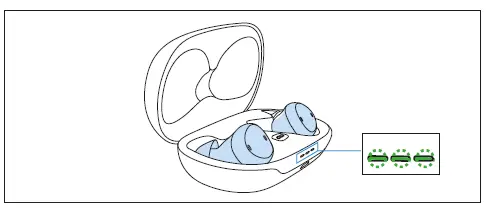
- To charge earbuds, place the earbuds into the case.
- The green blinking light indicates earbuds have been inserted correctly and charging started.
- Bluetooth will disconnect when earbuds are placed into the case.
When not in use it is recommended to store the earbuds safely in the case.
Ensure the charging contacts are free of dirt and debris.
Charging the case
The charging case will charge the earbuds up to 1.5 times before it must be charged.
With USB-C cable
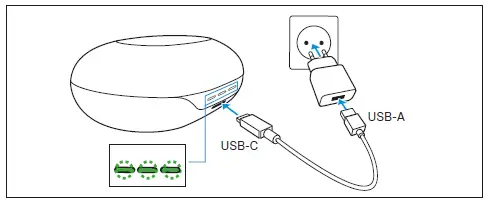
- Plug the USB-C cable into the charging case.
- Plug the other end of the cable into any certified USB-A compatible power source (not included, optional accessory).
- The indicator light on the case will blink to indicate that the charging started.
Wirelessly
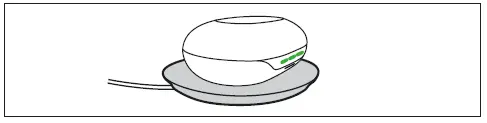
- Place the charging case onto a Qi-certified charging pad.
- The indicator light on the case will flash to indicate correct placement.
Wireless charging via Qi-pad may take longer than charging directly via USB-C cable.
Battery status indicators
As soon as the earbuds are in the case their battery state will be dis-played.
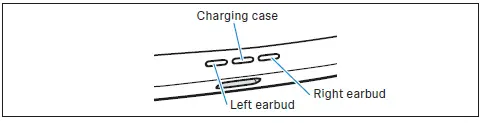
Indicator lights respond when:
- Placing the earbuds into the charging case.
- Opening or closing the lid of the charging case.
- Plugging the power cable into a power source.
- When placing on a wireless Qi-charging pad.
| Indicator light | Meaning | |
| Solid green | Battery fully charged | |
| Green blinking | Battery charging | |
| Red blink- ing | Battery <20% charging required | |
| – | No light | Batteries depleted, charging required |
| Blue blinking | Manual pairing in progress | |
| Orange blinking | Firmware update in progress | |
The indicator lights will dim after 10 seconds if the lid is closed.
Spoken voice messages will inform about the remaining battery when earbuds are being worn.
State of charge is also displayed in the Sennheiser TV Clear app.
Cleaning the ear adapter
Over time, earwax can accumulate in the earbud silicone adapter. Follow these steps to clean:
- Gently remove earbud from the adapter.
- Hand wash the adapter in warm water with a little soap. Never put water on the earbud itself!
- Make sure the adapter is completely dry! Then gently insert earbud again.
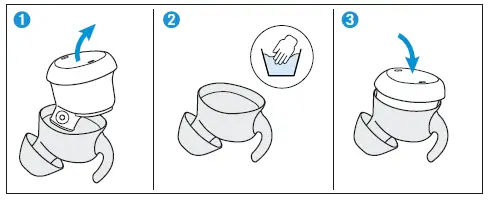
Firmware update
The TV Clear Earbuds can be updated to the newest firmware via the Sennheiser TV Clear app.
Updating firmware helps to keep the earbuds up to date. If you encounter functional issues with your earbuds, first ensure you are using the latest firmware version.
To download the app please refer to the links provided in “Using the Sennheiser TV Clear app” (> 26).
The app will automatically detect whether there is an new version available.
FAQ/If a problem occurs …
If a problem has occurred, proceed in the following order until the problem is solved and you can use the earbuds again:
- Perform a soft reset of the TV Clear earbuds (> 31).
- Connect the earbuds to the TV Clear app to install the latest firm-ware (> 26).
- Reset the earbuds to the factory default settings (> 31).
- Check the list of frequently asked questions to see if there is a solution to the problem (> 31).
For the transmitter TV Connector you will find a troubleshooting guide here (> 32).
List of frequently asked questions (FAQ)
Visit the TV Clear Set list of frequently asked questions (FAQ) and suggested solutions including instruction videos at:
www.sennheiser-hearing.com/tv-clear-faq
Soft reset of the TV Clear earbuds
Restarts the earbuds. Your settings are kept.
- Press and hold each earbud button for 15 seconds to manually switch them off.
- Place both earbuds back to the charging case (if you listen care-fully you can hear the “Power on” message inside the cradle). Now continue to use them normally.
Factory reset of the TV Clear earbuds
If you would like to revert the earbuds to factory defaults, you can do a factory reset. This will:
- Delete all paired devices information.
- Reset all configurations to factory default.
- Make sure both earbuds are placed in the case correctly.
- Press and hold the pairing button for 2 seconds, until you see a blue light. Wait until all 3 indicator lights blink blue.
- Press the pairing button two times.
The earbuds are reset to factory default settings, indicated b y orange blinking indicator lights.
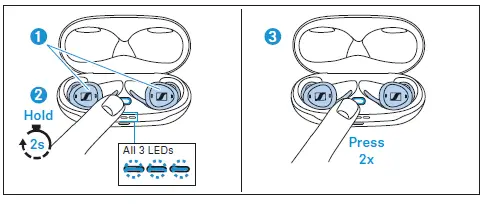
After factory reset you must perform the pairing process again as described in “Put the earbuds into pairing mode” (> 17).
Troubleshooting guide for the transmitter TV Connector
| Issue
Cannot hear sound from the audio source | Cause Audio source is turned off | Possible remedy Turn on the audio source |
| Cables are not inserted properly into the TV Connector and/or the audio source | Ensure that all cables are in the proper location and firmly inserted (> 15) | |
| Audio cable is plugged into the AUDIO IN of the audio source | Ensure that the audio cable is plugged into the AUDIO OUT of the audio source | |
| The wrong audio input format (Dolby Digital or DTS) is being used | Ensure that stereo (PCM) audio format is being used in the audio settings of your audio source. If this is not possible, use the analog 3.5 mm audio cable instead (> 16). | |
| The transmitter is not connected to the TV Clear earbuds | Connect your TV Clear earbuds to the transmitter (> 19). | |
| Audio source is on mute | Unmute the audio source, or turn up the volume | |
| After connecting the transmitter, there is no sound coming from the TV loud- speakers | The headset connection of the TV is selected | Check the audio settings of the TV to enable the loudspeakers and the headset connection to be used at the same time. Alternatively, use the optical (TOSLINK) cable instead of the analog 3.5 mm audio cable to connect the transmitter to the audio source (> 16). |
| The sound from the audio source speakers is delayed compared to the streamed audio in the TV Clear ear- buds | The delay setting of the audio source speakers is too high | Adjust the audio delay time (reduce the delay) in the audio settings menu of your audio source |
Specifications
TV Clear Earbuds
Model: TVCE1-EB, TVCE1
| Wearing style | True Wireless stereo earbuds |
| Ear coupling | ear-canal |
| Frequency response | 20 Hz to 20 kHz |
| Transducer principle | dynamic |
| Transducer size | 6 mm |
| Sound pressure level (SPL) | 100.5 dB (1 kHz/1 mW) |
| THD (1 kHz, 94 dB SPL) | ≤ 0.5 % (1 kHz, 94 dB) |
| Noise cancellation | passive |
| Microphone principle | Digital MEMS |
| Microphone frequency response | 100 Hz to 10 kHz |
| Microphone pick-up pattern (speech and Ambient Awareness) | 1 microphone per earbud for Ambient Awareness mode 2 microphones beamforming in primary earbud during call |
| Rechargeable batteries | built-in lithium rechargeable batteries, earbuds: 69 mAh charging case: 490 mAh |
| Charging method via charging case | USB charging via USB-C socket at charging case: 5 V , 600 mA Qi Wireless charging |
| Operating time | up to 15 hrs streaming with transmitter „TV Connector“; up to 12 hrs streaming with A2DP; 1.5 additional charges through charging case |
| Charging time of rechargeable batteries | approx. 2 hours for full charge USB-C source approx. 3 hours for full charge with Qi Wireless charging |
| Temperature range | operation: 5 to +40°C storage: -20 to +40°C |
| Relative humidity, non condensing | operation: < 85% torage: < 90% |
| Weight | earbuds: approx. 7 g each charging case: approx. 50 g both earbuds and charging case: 64 g |
Transmitter
Model: TV Connector
| Compatibility | Connect multiple Sennheiser TV Clear devices or other wireless Phonak / Unitron products Up to 15 meters (50 ft) transmission range |
| Streaming technology | AirStream™ technology |
| Audio quality | Stereo, 120 Hz to 7.3 kHz |
| Transmission frequency | 2.4 GHz ISM band |
| RF power | 100 mW (max) |
| Transmission range | up to 15 m (50 ft) |
| Max. paired devices | Unlimited |
| Power supply | USB power via USB-Micro-B socket: 5 V , min. 500 mA |
| Product dimension | 63 x 63 x 12 mm (2.5” x 2.5” x 0.46“) |
| Weight | approx. 30 g |
| Temperature range | operation: 0 to +40°C (+32°F to +104°F). torage: -20 to +60°C (-4°F to +140°F). |
| Relative humidity, non condensing | operation: < 90% torage: < 90% |
Manufacturer Declarations
Local warranty
Please ask the Sonova Communications AG partner, where you purchased your devices, about the terms of the local warranty.
International warranty
Sonova Communications AG offers a two year limited international warranty, valid as of the date of purchase. This limited warranty covers manufacturing and material defects. The warranty is valid only if proof of purchase is shown.
The international warranty does not affect any legal rights that you might have under applicable national legislation governing sale of consumer goods.
For AUSTRALIA and NEW ZEALAND ONLY
Sonova Hearing Australia Pty Ltd provides a warranty of 24 months on these products. For the current warranty conditions, visit the Sonova Consumer Hearing website: www.sennheiser-hearing.com/warranty
Sonova Consumer Hearing goods come with guarantees that cannot be excluded under Australian and New Zealand Consumer law. You are entitled to a replacement or refund for a major failure and compensation for any other reasonably foreseeable loss or damage. You are also entitled to have the goods repaired or replaced if the goods fail to be of acceptable quality and the failure does not amount to a major failure.
This warranty is in addition to other rights or remedies under law. Nothing in this warranty excludes, limits or modifies any remedy available to the consumer which is granted by law. To make a claim under this contract, raise a case via Sonova Consumer Hearing website: www.sennheiser-hearing.com/service-support
All expenses of claiming the warranty will be borne by the person making the claim.
Sonova Consumer Hearing international warranty is provided by: Sonova Hearing Australia Pty Ltd (ABN 82651492929) The Zenith, Level 14, Tower A, 821 Pacific Highway, Chatswood New South Wales 2067, Australia.
EU declaration of conformity
- RoHS Directive (2011/65/EU)
Hereby Sonova Communications AG declares that this product TV Clear Earbuds (Models: TVCE1-EB, TVCE1) and transmitter (Model: TV Connector) is in compliance with the essential requirements of the Radio Equipment Directive 2014/53/EU. To obtain a copy of the declaration of conformity please visit:
www.sennheiser-hearing.com/download
UK declaration of conformity
- RoHS Regulations (2012)
- Radio Equipment Regulations (2017)
Notes on disposal
- EU: WEEE Directive (2012/19/EU)
- EU: Battery Directive (2006/66/EC & 2013/56/EU)
- UK: WEEE Regulations (2013)
- UK: Battery Regulations (2015)
The symbol of the crossed-out wheeled bin on the product, the bat-tery/rechargeable battery (if applicable) and/or the packaging indi-cates that these products must not be disposed of with normal household waste, but must be disposed of separately at the end of their operational lifetime. For packaging disposal, observe the legal regulations on waste segregation applicable in your country. Improper disposal of packaging materials can harm your health and the environment.
The separate collection of waste electrical and electronic equip-ment, batteries/rechargeable batteries (if applicable) and packag-ings is used to promote the reuse and recycling and to prevent neg-ative effects on your health and the environment, e.g. caused by potentially hazardous substances contained in these products. Recycle electrical and electronic equipment and batteries/recharge-able batteries at the end of their operational lifetime in order to make contained recyclable materials usable and to avoid littering the envi-ronment.
If batteries/rechargeable batteries can be removed without damag-ing them, you are obliged to dispose of them separately (for the safe removal of batteries/rechargeable batteries, see the instruction manual of the product). Handle lithium-containing batteries/rechargeable batteries with special care, as they pose particular risks, such as the risk of fire and/or the risk of ingestion in the case of coin batteries. Reduce the generation of battery waste as much as possible by using longer-life batteries or rechargeable batteries.
Further information on the recycling of theses products can be obtained from your municipal administration, from the municipal col-lection points, or from your Sonova Consumer Hearing partner. You can also return electrical or electronic equipment to distributors who have a take-back obligation. Herewith you make an important contri-bution to the protection of the environment and public health.
Trademarks
Apple and the Apple logo are trademarks of Apple Inc., registered in the U.S. and other countries. App Store is a service mark of Apple Inc.
Android and Google play are registered trademarks of Google Inc.
The Bluetooth® word mark and logos are registered trademarks owned by Bluetooth SIG, Inc. and any use of such marks by Sonova AG is under license.
Other company and product names mentioned herein are trade-marks of their respective owners.