
NIT
USER MANUAL
NAR VERSION
AUTOMOTIVE MOTORSPORT
AEROSPACE & DEFENCE RAILWAYS
Step forward with us
INTRODUCTION
The NIT is a control unit designed to manage typical infotainment functions of a vehicle. It is designed to manage up to 3 output display and 3 input video sources, so it can concentrate even additional functions, like Park Assistance, Telemetry, Passenger display, HVAC, and other vehicle settings. The specific features of NIT are:
- Radio — Multi standard Radio receiver function.
- Navigation — Map navigation.
- Media — Multimedia player for audio and video contents.
- Phone — Management of a BT connected phone to make phone calls and access phone address book.
- Smartphone Projection — Management of Apple CarPlay and Android Auto functionality, for smartphone which support these types of connection the vehicle infotainment system.
- Comfort Settings — Management of HVAC and seat adjustment.
- Telemetry Interface — Management of an external ECU for Telemetry application.
- Park Assistance Interface — Management of an external ECU or Camera for Park assistance.
- Voice recognition — Management of main NIT controls via voice commands.
- Vehicle Setting — Management of Vehicle setup.
NOTE: To have a complete overview of the infotainment system, please refer to the Manual of the vehicle.
PRODUCT OVERVIEW
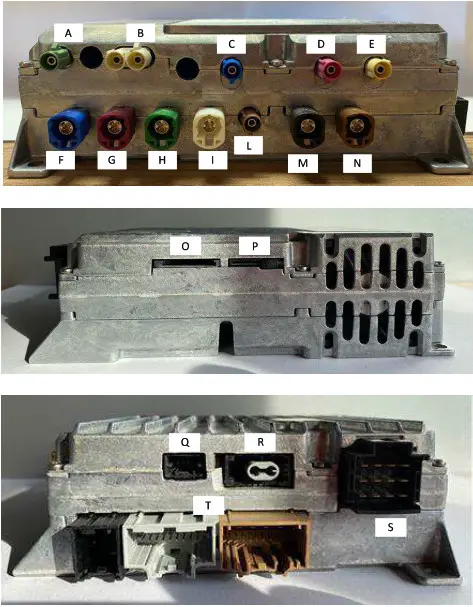
EXTERNAL CONNECTION
| ID | FUNCTIONALITY | COLOR |
| Connector A | SDARS antenna | GREEN |
| Connector B | AM/FM antenna | WHITE |
| Connector C | GPS antenna | BLUE |
| Connector D | Wi-Fi antenna | PINK |
| Connector E | BLUETOOTH antenna | BEIGE |
| Connector F | NDR DISPLAY video out | BLUE |
| Connector G | NDP DISPLAY video out | PINK |
| Connector H | NQS DISPLAY video out | GREEN |
| Connector I | TELEMETRY CAMERA-1 video in | WHITE |
| Connector L | RCAM video in | GREEN |
| Connector M | TELEMETRY CAMERA-2 video in | BLACK |
| Connector N | USB connector | BROWN |
| Connector O | SD_CARD slot | BLACK |
| Connector P | Not used | BLACK |
| Connector Q | ETHERNET connector | BLACK |
| Connector R | MOST connector | BLACK |
| Connector S | AUDIO connector * | BLACK |
| Connector t | MAIN connector | BLACK |
* Audio connector Pinout
| PIN NO | Function |
| 1 | Speaker: Front Left + |
| 2 | Speaker: Rear Left + |
| 3 | Speaker: Front Left – |
| 4 | Speaker: Rear Left – |
| 5 | Speaker: Front Right + |
| 6 | Speaker: Rear Right + |
| 7 | Speaker: Front Right – |
| 8 | Speaker: Rear Right – |
| 9 | Speaker: center left + |
| 10 | Speaker: center left – |
| 11 | Speaker: center right + |
| 12 | Speaker: center right – |
TECHNICAL INFORMATIONS
TECHNICAL FEATURES
| Perameter | Value |
| Supply Voltage [voc] | 12 |
| Maximum current drawn [A] | 9 |
| Operating range [°C] | -0.470588235 |
| Protection :rade [1S020653] | IPSKO |
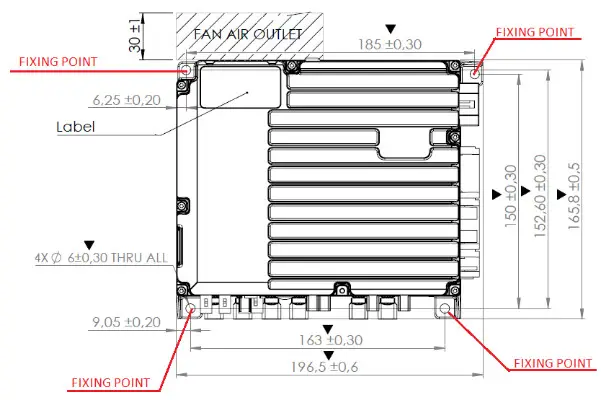
| Overall size [mm] | 196,5 x 165,8 x 58,87 |
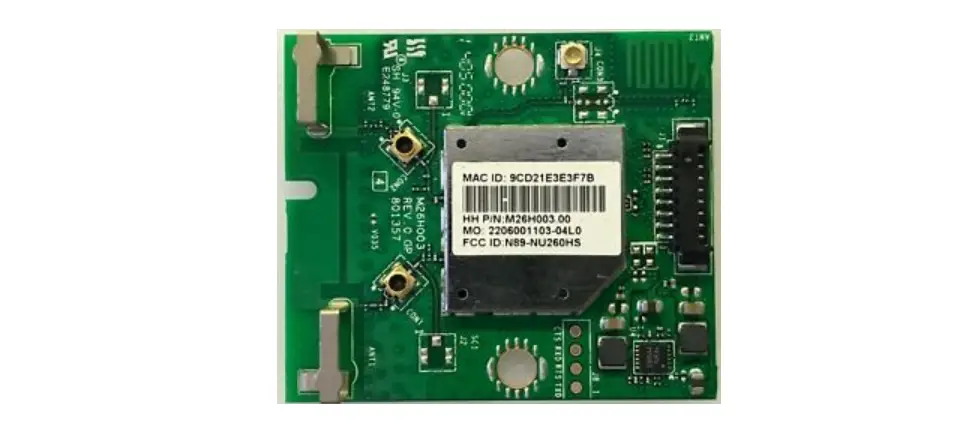
| Bluetooth: frequencies | 2,4-2,4835GHz |
| Bluetooth: Maximum output power | 0,01w |
| Bluetooth: Modulations | GFSK,DQPSK, 8PSK |
| GPS. Frequencies | 1575,42MHz,1602MHz,1561MHz |
| WLAN: Frequencies | 2,4 – 5GHz |
| WLAN: Maximum output power | 0,39W (2,412-2,472GHz) |
This device complies with part 15 of the FCC Rules. Operation is subject to the following two conditions:
- This device may not cause harmful interference, and
- this device must accept any interference received, including interference that may cause undesired operation.
This equipment has been tested and found to comply with the limits for a Class B digital device, pursuant to part 15 of the FCC Rules.
These limits are designed to provide reasonable protection against harmful interference in a residential installation. This equipment generates, uses and can radiate radio frequency energy and, if not installed and used in accordance with the instructions, may cause harmful interference to radio communications. However, there is no guarantee that interference will not occur in a particular installation. If this equipment does cause harmful interference to radio or television reception, which can be determined by turning the equipment off and on, the user is encouraged to try to correct the interference by one or more of the following measures:
- Reorient or relocate the receiving antenna.
- Increase the separation between the equipment and receiver.
- Connect the equipment into an outlet on a circuit different from that to which the receiver is connected.
- Consult the dealer or an experienced radio/TV technician for help.
PRODUCT INSTALLATION
NIT is mounted inside the vehicle cockpit; user have not access to the NIT mechanical box.
INSTALLATION SCREWS AND TIGHTENING TORQUE:
Use 4 Screws M5 Class 6.8 (Iso 898/I)And Washers. Installation Torque 4.5 Nm. Use Self-locking System. The fixing points are reported on the picture on the right.
ART SPA ITALY PERUGIA
Vocabolo pischiello, 20, Passignano sul Trasimeno- (PG)
Ph +39 075 8298501
fax +39 075 8298525
[email protected]
www.artgroup-spa.com