 Electronic Way Technology Co., Ltd
Tablet User manual
1. After power-on, the display picture is such as (Figure 1)
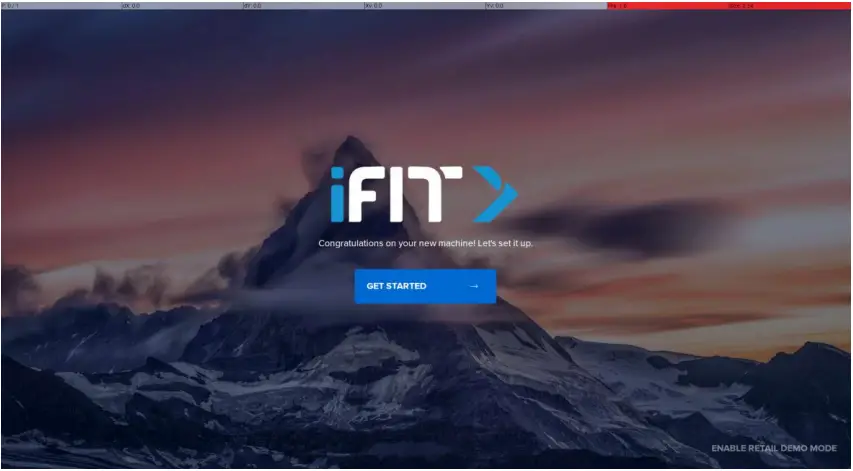
graph 1
2. Click ”  ” button to enter the next page and connect to WiFi network (Figure 2)
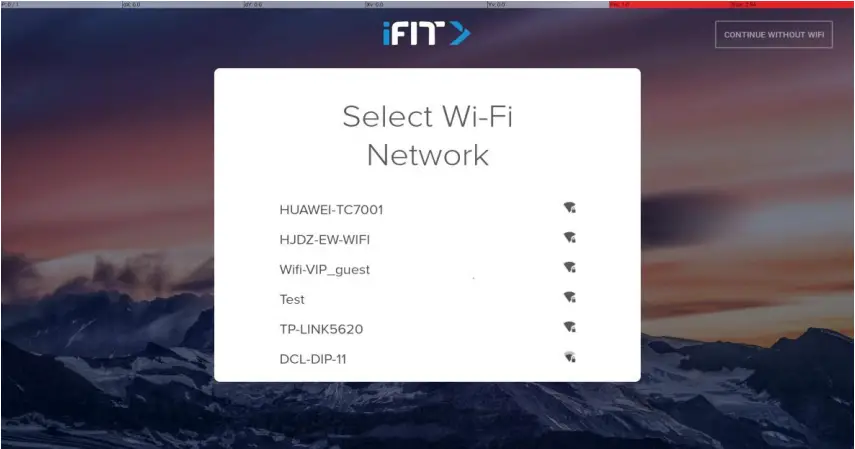
graph 2
3. After successful network connection: click the setting language, the default ”  ” language need not be modified (Figure 3), directly click “
 ” to enter the next page such as (Figure 4)

graph 3

graph 4
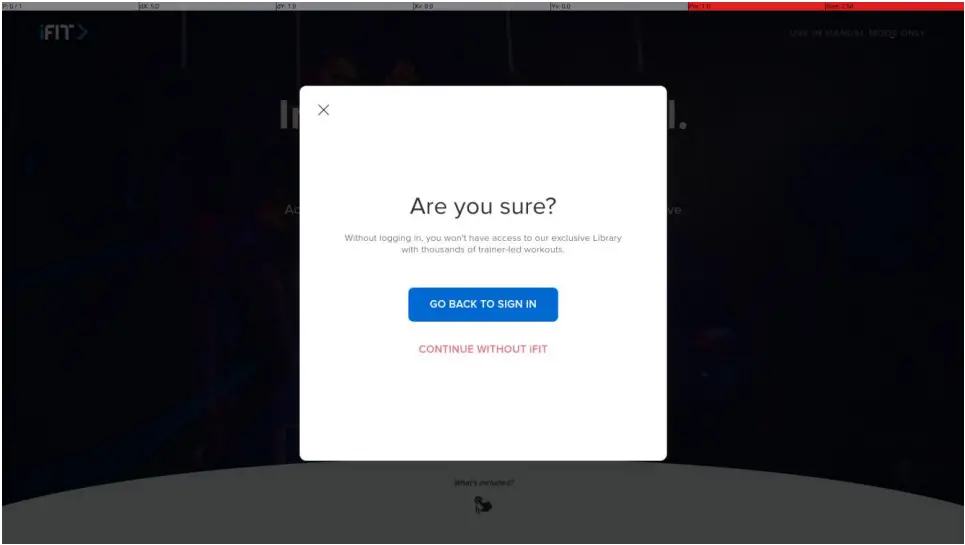
4. Click the “ ” button in the top right corner (Figure 4) to enter the following picture (Figure 5)
graph 5
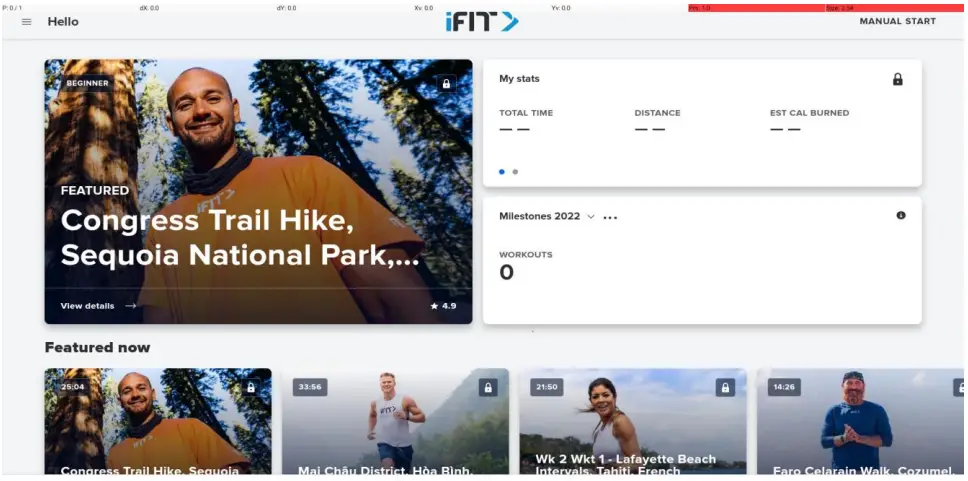
4. Click the “ ” button to enter the main interface page (Figure 6)
 graph 6
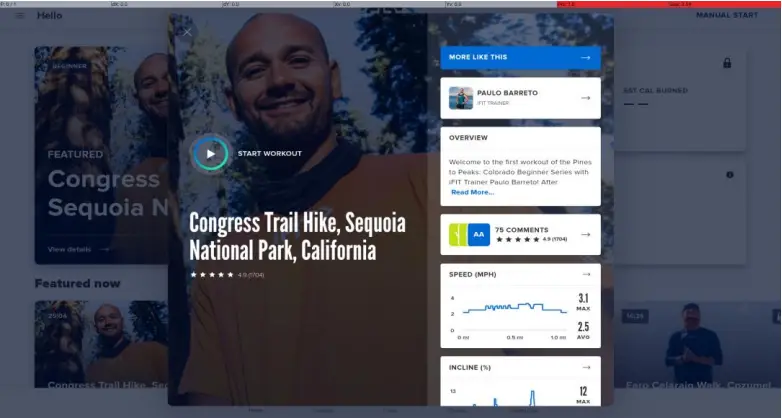
6. Click “ ” in the upper left corner of (Figure 6) to enter the (Figure 7) page;
graph 7
7. Click (Figure 7) after the button “ ” starts; the page display (Figure 8). Click “
 ” will enter the exercise warm-up page (Figure 9)
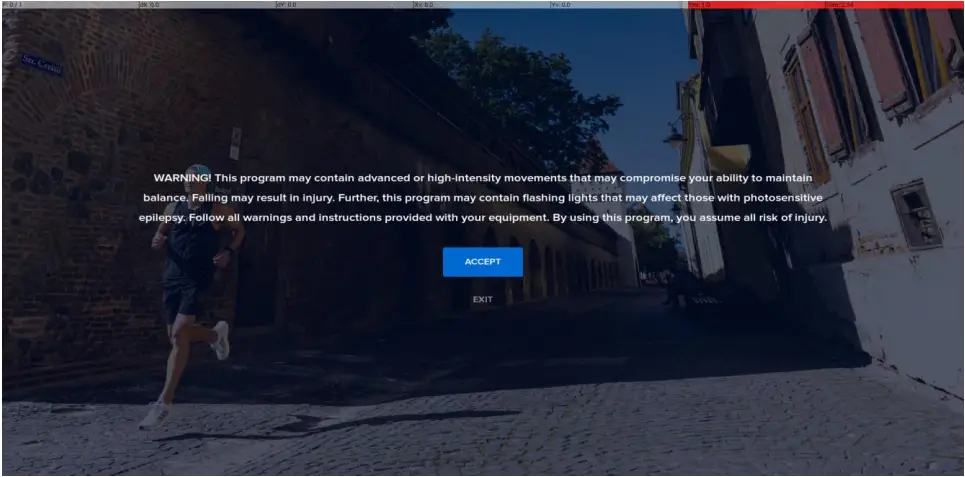
graph 8
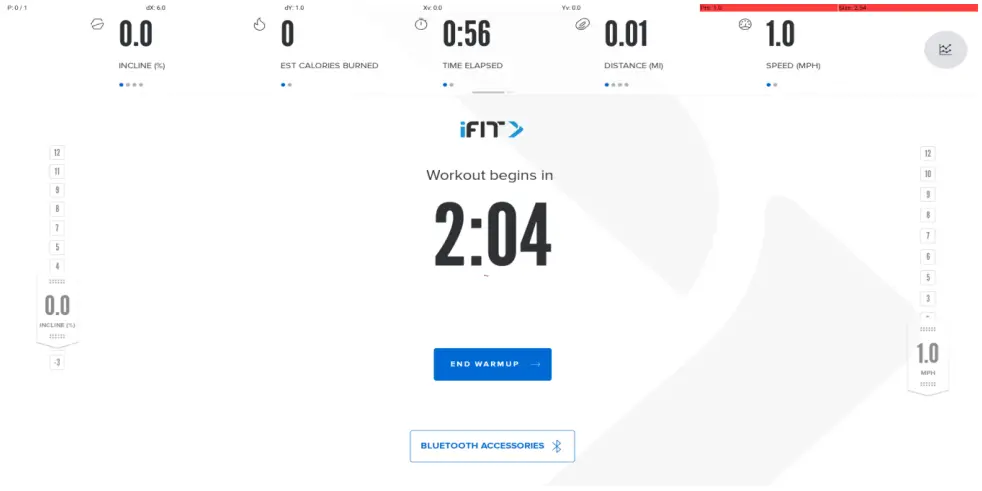 graph 9
8. Click (Figure 9) “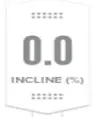 ” and “
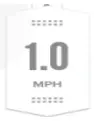 ” to adjust the speed and slope such as (Figure 10)
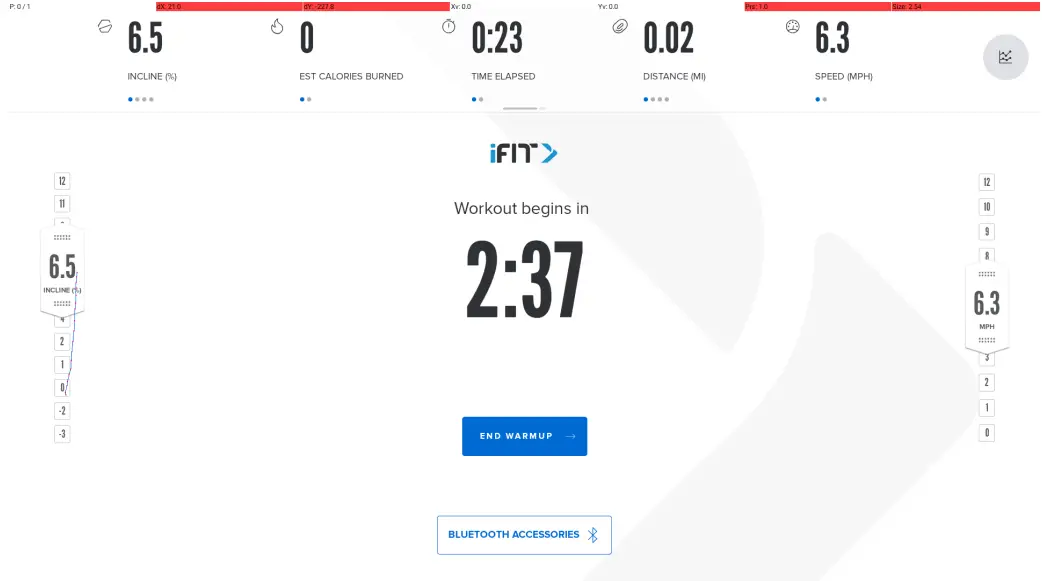
graph 10
9. Click “ ” to connect to the Bluetooth headset, heart rate device, click connect to connect to the searched device (Figure 11, Figure 12), click any page Bluetooth connection pop-up page will be hidden.
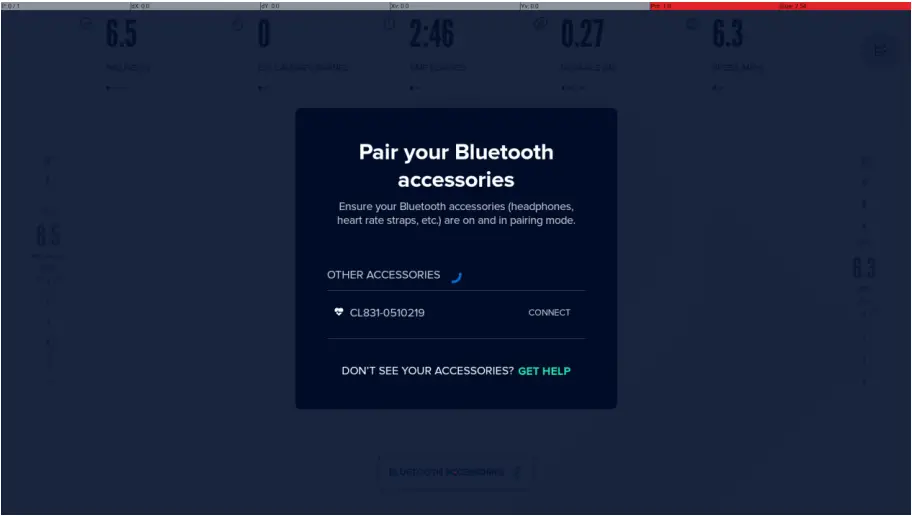
graph 11
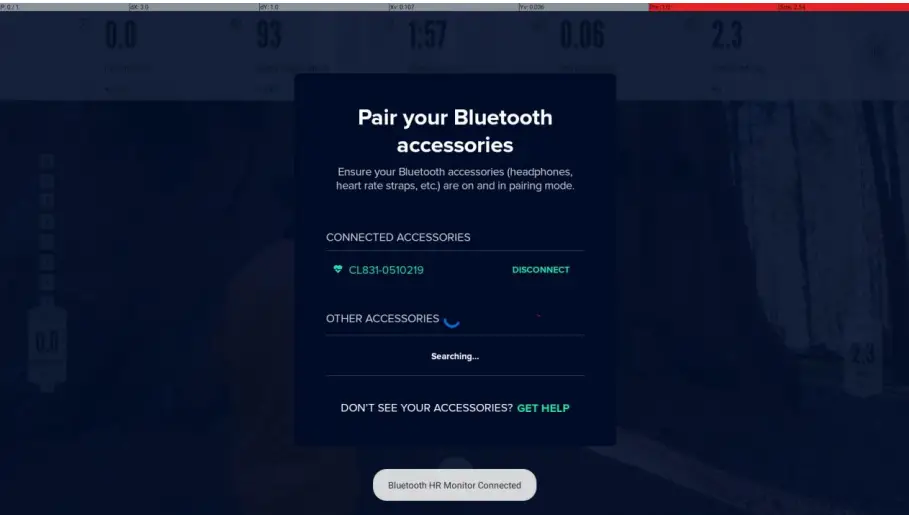
graph 12
10. After the warm-up, enter the video playback page (Figure 13), and the speed and slope adjustment are the same as the above
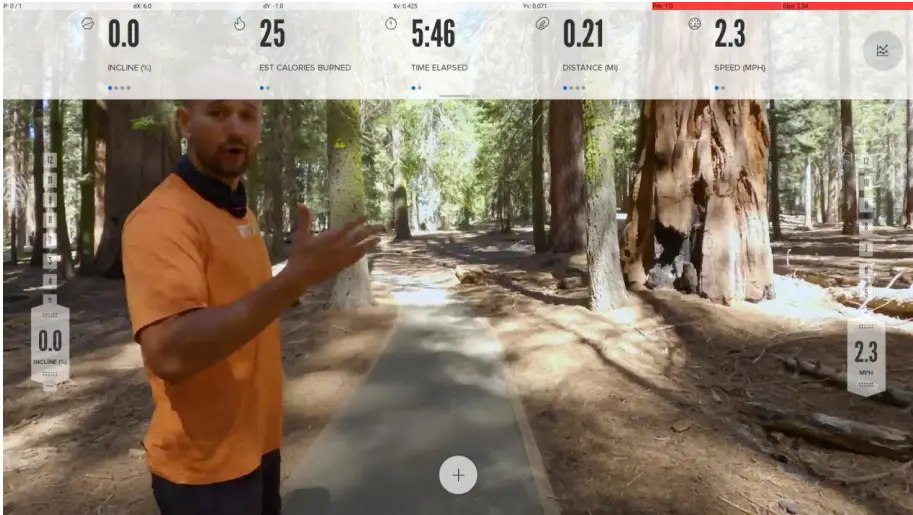
graph 13
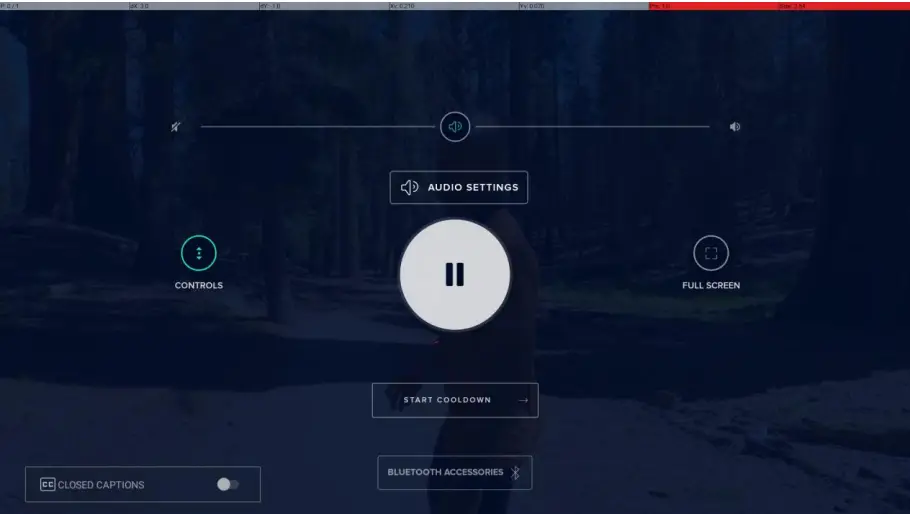
11. Click any page (Figure 13) screen to enter the setting page (Figure 14) to adjust the volume, open the subtitles, connect the Bluetooth device, and end the movement
graph 14
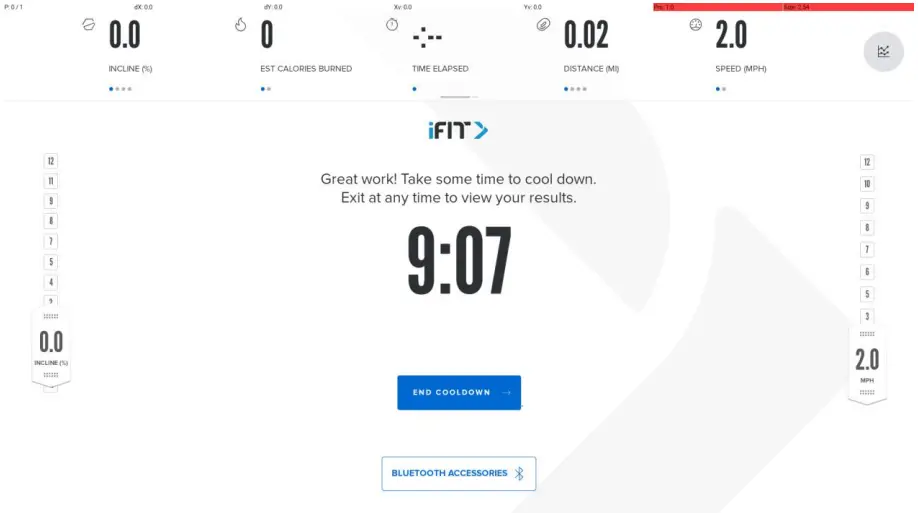
12. Click “ ” to end the movement to the relaxation page (Figure 15)
graph 15
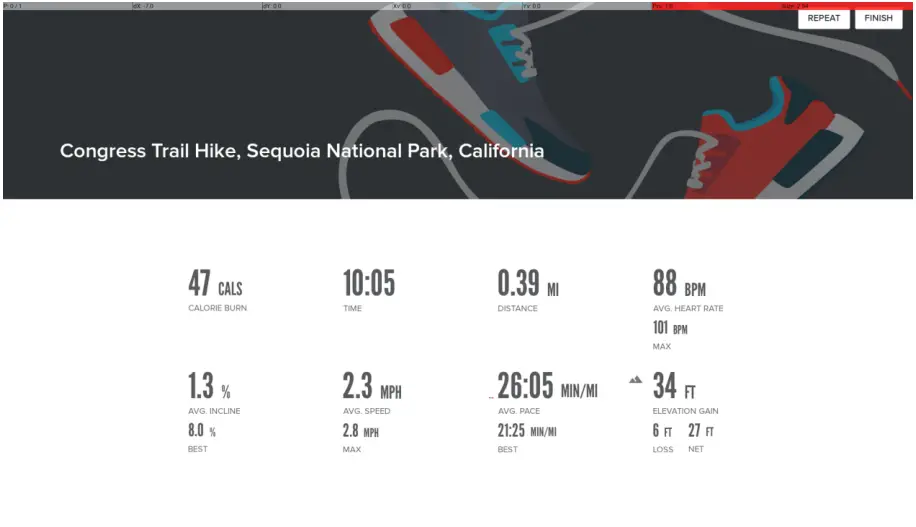
13. Click “ ” to end the movement to view the movement report (Figure 16)
graph 16
FCC WARNING
This device complies with part 15 of the FCC Rules. Operation is subject to the following two conditions: (1) this device may not cause harmful interference, and (2) this device must accept any interference received, including interference that may cause undesired operation.
Any changes or modifications not expressly approved by the party responsible for compliance could void the user’s authority to operate the equipment.
NOTE: This equipment has been tested and found to comply with the limits for a Class B digital device, pursuant to Part 15 of the FCC Rules. These limits are designed to provide reasonable protection against harmful interference in a residential installation. This equipment generates, uses and can radiate radio frequency energy and, if not installed and used in accordance with the instructions, may cause harmful interference to radio communications. However, there is no guarantee that interference will not occur in a particular installation. If this equipment does cause harmful interference to radio or television reception, which can be determined by turning the equipment off and on, the user is encouraged to try to correct the interference by one or more of the following measures:
— Reorient or relocate the receiving antenna.
— Increase the separation between the equipment and receiver.
— Connect the equipment into an outlet on a circuit different from that to which the receiver is connected.
— Consult the dealer or an experienced radio/TV technician for help.
To maintain compliance with FCC’s RF Exposure guidelines, This equipment should be installed and operated with minimum distance between 20cm the radiator your body: Use only the supplied antenna.
IC Caution:
This device contains licence-exempt transmitter(s)/receiver(s) that comply with Innovation, Science and Economic Development Canada’s licence-exempt RSS(s). Operation is subject to the following two conditions:
This device may not cause interference.
This device must accept any interference, including interference that may cause undesired operation of the device.
5.2GHz product for indoor use only
 Manufacturer’s Name: iFIT health & Fitness Inc.
Product Name: Tablet
Trade Mark: iFIT
Model number: MP22-Argon2-E,MP22-Argon2X-E,MP22-Argon-CHP-E,MP22-Argon-E,MP22Argon2-Alexa-E,MP22-Argon3-E,MP22-ARGON3-TV-OT-E,MP22-Argon3-TV-E
This device is in compliance with the essential requirements and other relevant provisions of Directive 2014/53/EU. All essential radio test suites have been carried out.
The device complies with RF specifications when the device used at 20cm from your body.
The product shall only be connected to a USB interface of version USB2.0
RF Secification:
| Function | Operation Frequency | Max RF outputpower: | Limit |
| BLE | 2402MHz–2480MHz | 8.05dBm | 20 dBm. |
| BT(BR+EDR) | 2402MHz–2480MHz | 8.54dBm | 20 dBm. |
| WIFI 802.11b/g/ n(HT20,HT40) | 802.11b/g/n(20MHz): 2412~2472MHz; 802.11n(40MHz):2422~2462M Hz | 16.5dBm | 20 dBm. |
| Wi-Fi 5.2G(802.11a/n2 0/n40) | 802.11a/ n20: 5180MHz 802.11 n40: 5190MHz | 9.43dBm | 23 dBm. |
| Wi-Fi 5.3G(802.11a/n2 0/n40) | 802.11a/ n20: 5320MHz~5825MHz 802.11 802.11n(40MHz):2422~2462M Hz | 9.7dBm | 23 dBm. |
| Wi-Fi 5.6G(802.11a/n2 0/n40) | 802.11a/ n20: 5500MHz~5700MHz 802.11 n40: 5510MHz~5670MHz | 9.79dBm | 23dBm. |
| Wi-Fi 5.8G(802.11a/n2 0/n40/ac20/ac40 /ac80) | 802.11a/ n20/ac20:5745MHz~5825MHz 802.11 n40/ac40:5755MHz~5795MHz 802.11ac80: 5775MHz | 9.85dBm | 13.98 dBm. |
This product can be used across EU member states.
DECLARATION OF CONFORMITY
I hereby declare that the product
Product Name: Tablet
Product Description: Tablet
Model: MP22-Argon2-E,MP22-Argon2X-E,MP22-Argon-CHP-E, MP22-Argon-E,MP22-Argon2-Alexa-E,MP22-Argon3-E,MP22-ARGON3-TV-OT-E,MP22Argon3-TV-E
Tradename or Brand(s): iFIT
(Name of product, type or model, batch or serial number)
Antenna :
FPC Antenna
1.5 dBi
Hard Ware Version: MT8163-21.5TG-A0
Soft Ware Version: Android 9
Satisfies all the technical regulations applicable to the product within the scope of Council Directives 2014/53/EU and declare that the same application has not been lodged with any other notified body.
ETSI EN 300 328 V2.2.2 (2019-07)
ETSI EN 301 893 V2.1.1 (2017-05)
ETSI EN 300 440 V2.2.1 (2018-07)
ETSI EN 301 489-1 V2.2.3 (2019-11)
ETSI EN 301 489-3 V2.1.1 (2019-03)
ETSI EN 301 489-17 V3.2.4 (2020-09)
EN 55032:2015+A11:2020
EN 55035:2017+A11:2020
EN IEC 61000-3-2:2019
EN 61000-3-3:2013+A1:2019
EN IEC 62311:2020
EN 62368-1:2014+A11:2017
(Title(s) of regulations, standards, etc.)
All essential radio test suites have been carried out.
NOTIFIED BODY: LGAI TECHNOLOGICAL CENTER, S.A. (APPLUS)
– Address:
Ronda de la Font del Carme, s/n
08193 Bellaterra Barcelona
(Spain)
Identification Number: 0370
MANUFACTURER or AUTHORISED REPRESENTATIVE:
– Address:
ELectronic Way Technology Co., Ltd
No.268, South Jiguang Rd ShiPu Town, KunShan, JiangSu china 215342
This declaration is issued under the sole responsibility of the manufacturer and, if applicable, his authorised representative.
 艺唯科技股份有限公司