 The serviced apartment company
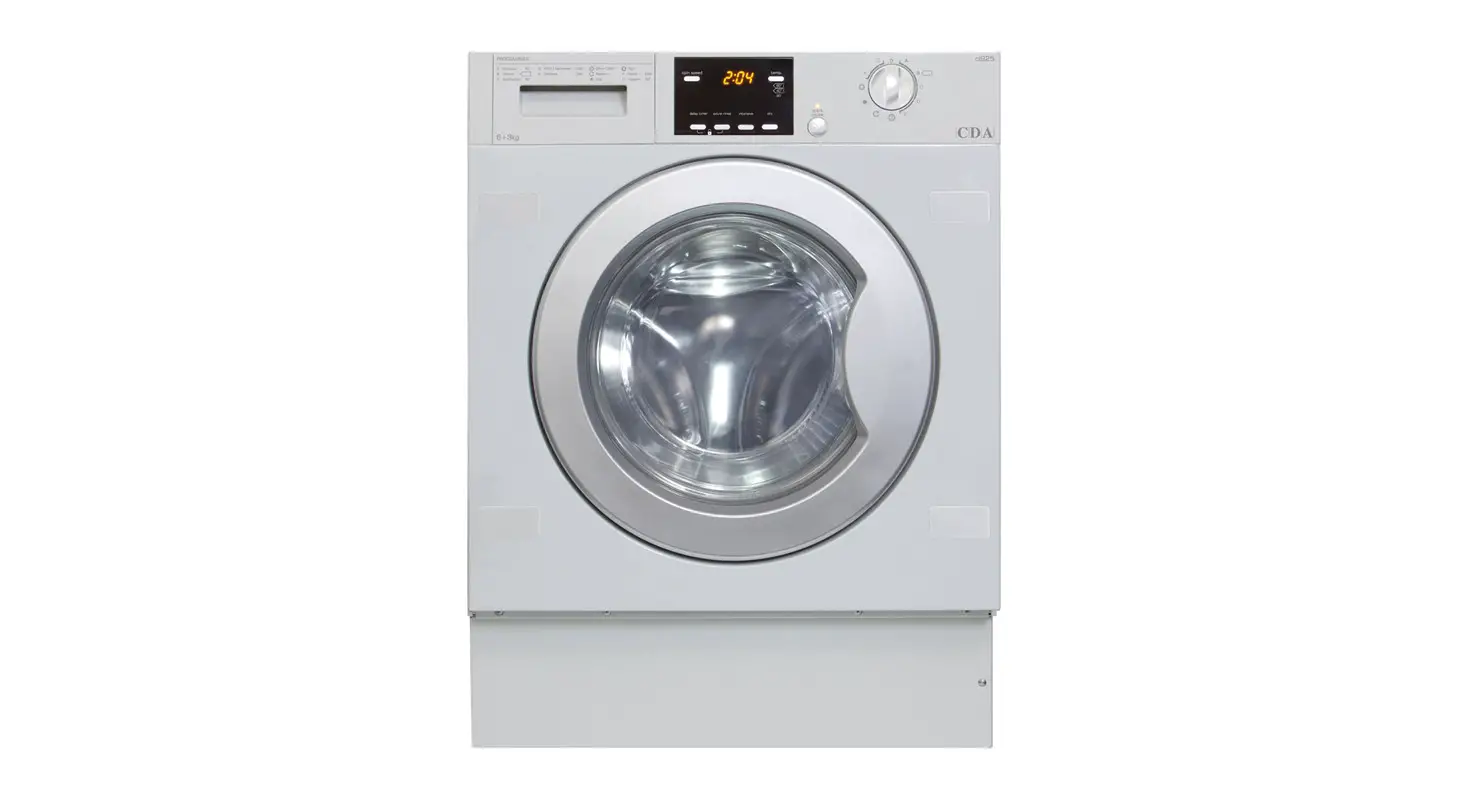
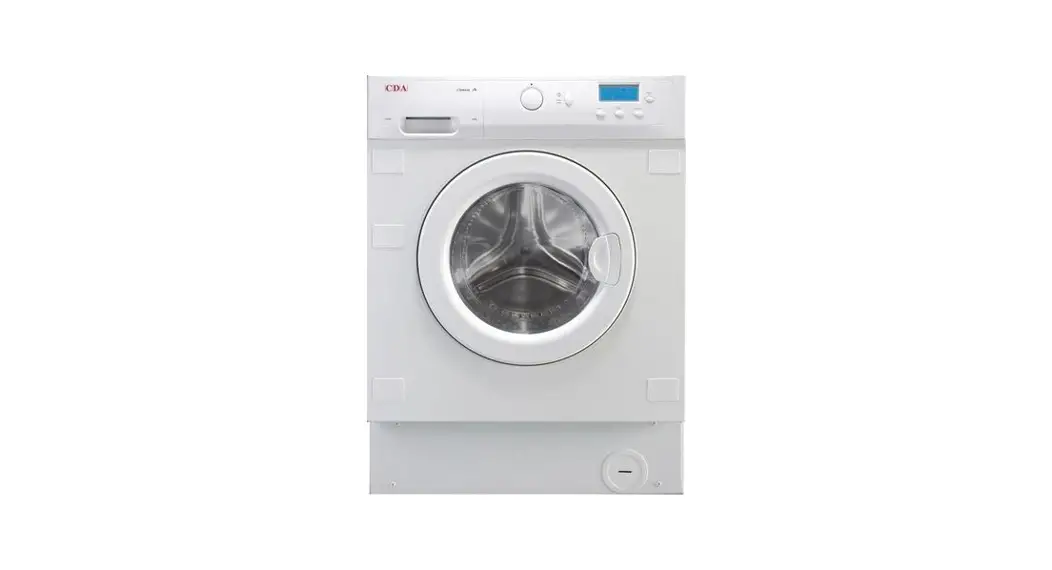
Operating Instructions – Washer Dryer CDA Ci930
Preparing garments for washing
- Before placing the clothes in the drum, make sure all pockets are empty.
- Sort the clothes according to fabric, we recommend using the delicate programmes for sensitive fabrics, there is a special wool programme for woollens.
- Sort clothes according to how dirty they are.
- Wash lightly soiled garments using a short programme.
- Use a programme without prewash for medium-soiled garments.
- Wash heavily-soiled garments using a long programme with prewash.
- Sort your clothes according to colour.
- Wash whites and coloured separately.
- We recommend loading the washing machine to its full capacity for best water and energy efficiency.
- Before using the drying programme, first, check the label on the garment to make sure it can be tumble dried.
Detergents
Your washing machine’s detergent dispenser has three compartments. Add the detergent to the detergent dispenser before starting the wash programme. Liquid detergents may also be used in this washing machine but the level of liquid must never be higher than the MAX mark printed on the dispenser wall. 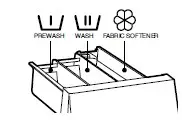
Selecting the wash programme
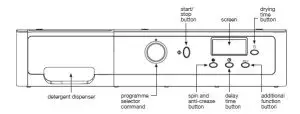
To select the dry programme
- Select the drying time in minutes using the drying time button.
- The drying time will show on the display and increase with each press of the drying time button.
- If you select the wash and dry programme, the load must not be over 4kg. You may need to remove some items to lighten the load.
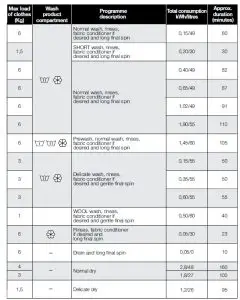
Washing machine programmes
There are five types of programme: Normal, delicate, wool, auxiliary and drying.
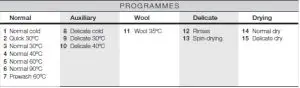
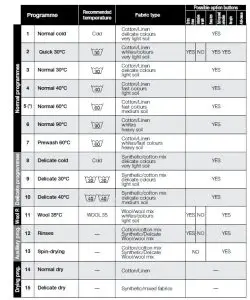
Spin speed selection and anti-crease
You should first select the wash programme and then select the wash options (Changing the programme cancels the preset selected options). Each selected programme has its own preset spin speed.
Spin speed
- You can reduce the spin speed or remove it completely by pressing the spin button.
- The spin speed will gradually reduce each time the spin button is pressed at 100r.p.m intervals to a minimum of 400 r.p.m
 No spin
- Press the spin button again to get to the no-spin option and the display will show “0”.
- A programme without a final spin is used to prevent creasing when washing special fabrics.
 Anti-Crease option
 Anti-Crease option
- Pressing the spin button again will select the anti-crease option.
- The wash programme stops on the last rinse, with the clothes left in water.
- When the option is deactivated, the washing machine continues the programme, draining and spin-drying.
- It is used for example when you are not at home and want to delay the spin-drying until you get in to prevent the clothes creasing after spin-drying and being left in the drum to be removed.
Delay timer
Delay timer selection button.
- A delay of up to 24 hours can be selected. The delay must be selected after choosing the wash programme.
- To set the required delay, press the clock button. Each time the button is pressed the delayed start of washing is increased by one hour.
Cancelling the delay
- To cancel the delay, press the clock button repeatedly to cycle through the full 24 hours and then press again.
- The delay will be cancelled when 24 hours have been reached and the button is pressed once more. If the
programme is changed the delay is also cancelled.
Additional functions
- Additional function selection button depending on programmes. There are 3 options: easy iron, extra rinse and intensive wash.
- Press the button and the desired option will be displayed.
- By pressing the button several times you can choose between several combinations of one, two and up to three additional functions at the same time depending on the programme selected.
Option 1: Easy iron This option prevents garments from creasing by means of carrying out a special programme with special turns to fluff out the garments after spin-drying to make them easier to iron.
Option 2: Extra rinse Increases the level of the final rinse obtained in the clothes; suitable for large loads and
garments belonging to people with sensitive skin. However, this option will increase your water consumption.
Option 3: Intensive wash This option especially recommended for heavily soiled or stained clothes, achieves better results by extending the normal wash cycle.
If during the additional function selection, the programme is changed or the On/Off button is pressed, all the
functions selected until then are cancelled.
Starting up
- To start up the washing machine you have to press the Start/Pause button. The time remaining in minutes until the end of the programme will appear on the display at all times.
- When the programme is running, the programme phase and the time remaining will appear on the display.
- The active phases will appear successively at the top of the display as the programme progresses. The time remaining until the end of the programme will also appear on the display. It updates at regular intervals, but not minute by minute.
- Any option button can be selected provided the wash phase in which it takes effect has not been passed and when the programme accepts the option.
- Pressing the Start/Stop button during the wash activates the Pause function.
- If the programme is changed on the selector dial during the washing and drying process, the washing machine will go onto Pause status and the programme will be cancelled.