motoMax Active and Passive Fitness Equipment for Wheelchair
Product Information: motoMax
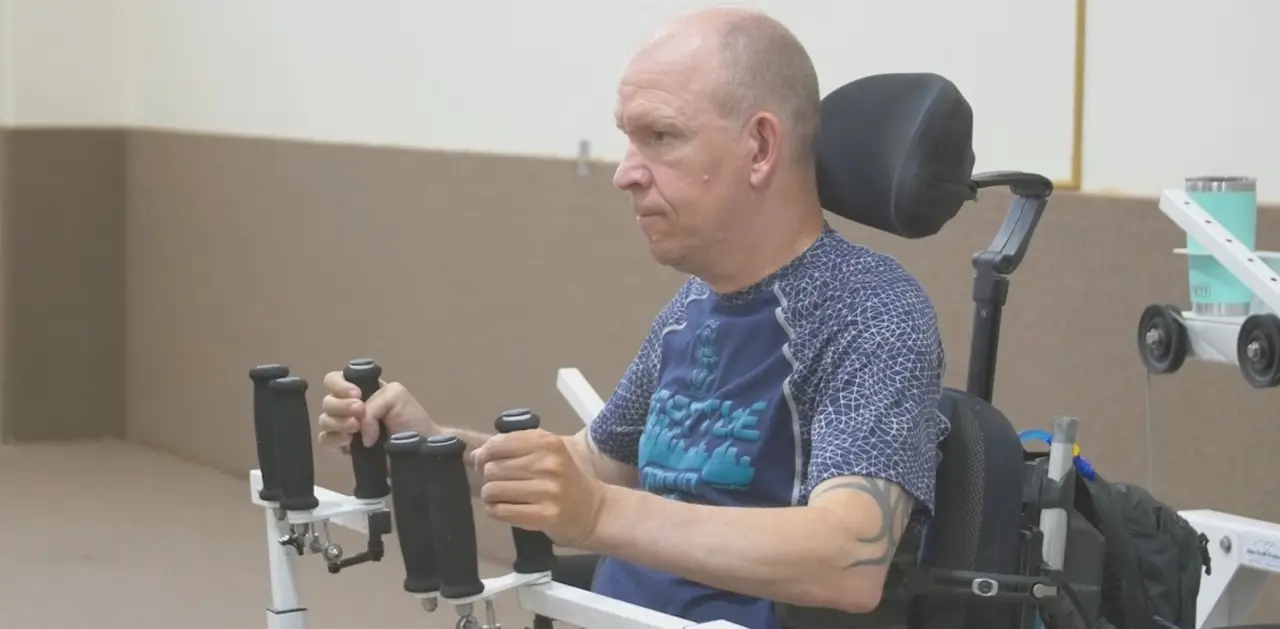
motoMax is a fitness equipment manufactured by HCI Fitness. It
is an active and passive trainer designed to help individuals reach
their health and fitness goals. The product comes with a 3-year
parts warranty, a one-year labor warranty, and a lifetime main
frame warranty. It is equipped with accessories such as wheelchair
straps, hand grip accessory, and leg stabilizer accessory. The
product can be adjusted for tilt and handle/pedal length to provide
a comfortable workout experience.
Product Usage Instructions:
- Safety Precautions: Before beginning any exercise
program, consult your physician. This is especially important for
individuals over the age of 35 or people with pre-existing health
problems. Read all instructions before using this fitness
equipment. We assume no responsibility for personal injury or
property damage sustained by or through the use of this
product. - Assembly Instructions: Follow the assembly instructions
provided in the manual to assemble the product. - Accessories: Use the wheelchair straps to attach the
wheelchair to the mounts on the stabilization platform. Use the
hand grip accessory to secure your hands to handles. Use the leg
stabilizer accessory to attach the leg stabilizers to each leg or
to the side of the wheelchair. - Tilt Adjustment: Press down on the tilt adjust lever and
change the angle of the motoMax as desired. Release the tilt adjust
lever to lock the motoMax in place. - Handle and Pedal Length Adjustment: Turn the locking
knob counterclockwise to loosen the handle or pedal. Adjust the
extension handle or pedal to the proper position. Secure the handle
or pedal in place by tightening down the locking knob. - Display: Press the Start/Stop button to begin your
workout. Press the same button to stop the workout.
motoMax
OWNER’S MANUAL
HealthCare International, Inc. PO Box 1509, Langley, WA 98260 www.HCIFitness.com [email protected] P: (206) 739-5400 or (800) 398-9121
Contents
Safety Precautions…………………………………………………………………………………………………4 Warranty Information ……………………………………………………………………………………………..5 Assembly Instructions …………………………………………………………………………………………….6 Accessories ………………………………………………………………………………………………………….9
Wheelchair Straps …………………………………………………………………………………….9 Hand Grip Accessory…………………………………………………………………………………9 Leg Stabilizer Accessory ………………………………………………………………………….10 Tilt Adjustment …………………………………………………………………………………………………….10 Handle & Pedal Length Adjustment ……………………………………………………………………….. 11 Display ……………………………………………………………………………………………………………….12 Key function ………………………………………………………………………………………………………..13 Quick Start Guide ………………………………………………………………………………………………..14 Passive Mode (AUTO)……………………………………………………………………………………14 Active Mode (MANU) ……………………………………………………………………………………..14
Safety Precautions
This exercise equipment was designed and built for optimum safety. However, certain precautions apply whenever you operate a piece of exercise equipment. Be sure to read the entire manual before assembly and operation of this machine. Also, please note the following safety precautions: 1. Read all instructions carefully before using the machine. 2. Consult your physician or other health care professional before beginning this or any type of exercise program. 3. Always wear proper exercise apparel when using the machine. 4. If at any time you feel faint, light-headed or dizzy while operating the machine, stop
exercise immediately. You should also stop exercising if you are experiencing pain or pressure. 5. Keep children and pets away from the machine while in use. 6. Only one person can use the machine at a time. 7. Make sure your machine is correctly assembled before you use it. Be sure all screws, nuts, and bolts are tightened prior to use and retighten periodically. 8. Do not operate this or any exercise equipment if it is damaged. 9. Keep hands and feet away from any moving parts. Do not insert any objects into any openings. 10. Keep clothes, jewelry and loose items away from moving parts.
WARNING: BEFORE BEGINNING ANY EXERCISE PROGRAM CONSULT YOUR PHYSICIAN. THIS IS ESPECIALLY IMPORTANT FOR INDIVIDUALS OVER THE AGE OF 35 OR PEOPLE WITH PRE-EXISTING HEALTH PROBLEMS. READ ALL INSTRUCTIONS BEFORE USING THIS FITNESS EQUIPMENT. WE ASSUME NO RESPONSIBILITY FOR PERSONAL INJURY OR PROPERTY DAMAGE SUSTAINED BY OR THROUGH THE USE OF THIS PRODUCT.
Dear Valued Customer, Thank you for your recent purchase of the motoMax from HCI Fitness. We believe that you have purchased one of the highest quality and affordable active and passive trainers on the market today. Prior to using your new motoMax please review the operator’s manual and product tips to maximize your workout experience. Wishing you the best of luck in reaching your health and fitness goals!
HealthCare International is a leading supplier and distributor of innovative products for Health, Wellness,
Fitness & Active Aging. Visit our website www.HCIFitness.com for information on all of our
products.
Warranty Information
(Your Serial Number is found on a white sticker at the rear base of the unit and on the box)
Serial #:_________________ Purchase Date:_______________ 3 Year Parts Warranty, One Year Labor, Lifetime Main Frame
Assembly Instructions
Assembly Parts List
ITEM
Description
Qty
A
Main frame set
1
B
Front stabilizer
1
C
Stabilization Platform
1
D
Handrail set (left)
1
E
Handrail set (right)
1
F
Pedal board (left)
1
G
Pedal board (right)
1
Tool Set
ITEM
Description
Qty
a
15mm Opening wrench
1
b
5mm x 30mm x 120mm L-shaped hex wrench
1
Step 1 Step 2
Unscrew the two screws from the front stabilizer (B). Then place the screws through the main frame (A) and tighten the screws into the front stabilizer (B).
Unscrew the 3 screws from the stabilization platform (C). Then place the screws through the main frame (A) and tighten the screws into the stabilization platform (C).
1.1.1. Step 3
Attach the handles and pedals to the motoMax. Please note that the pedals are labeled for the left and right sides. The left side handle and pedal have reverse threads so, turn counterclockwise to tighten the left side handle and pedal.
Accessories
Wheelchair Straps STEP 1
STEP 2
Bring the wheelchair into position to use the motoMax.
Attach to the wheelchair straps to the mounts on the stabilization platform, then secure the wheelchair with the straps.
Hand Grip Accessory
Universal hand grip allows users to secure their hands to handles.
, as shown below:
/
/
Leg Stabilizer Accessory
Option 1: Attach the leg stabilizers to each Option 2: Attach the leg stabilizers to each
leg, then to each other.
leg, then to the side of the wheelchair.
Tilt Adjustment
1. Press down on the tilt adjust lever. 2. While holding down the lever use your other hand to change the angle of the
motoMax. 3. Release the tilt adjust lever to lock the motoMax in place.
Handle & Pedal Length Adjustment
1. Turn the locking knob counterclockwise to loosen the handle or pedal. 2. Then adjust the extension handle or pedal to the proper position. 3. Secure the handle or pedal in place by tightening down the locking knob.
Display
Key function
Button instruction
Icon 1.
2.
Purpose
Operation
Start or Stop
Press the Start/Stop Button to begin your workout. Press
Button
the Start/Stop Button again to stop your workout.
The default setting is passive mode (AUTO) indicated by
Change between LED light on the display.
Active (MANUAL) During operation press the Start/Stop button then press the
and Passive
Auto/Manu button to change modes. Press Start/Stop to
(AUTO) Mode begin the workout in the alternate mode.
Press the Turn button to change the direction of the
handles and pedals.
3.
Change Direction The display will indicate direction.
Turn + = Clockwise
Turn – = Counterclockwise
4.
Decrease key Decrease speed adjustment or resistance.
5.
Increase key
Increase speed adjustment or resistance.
1. While setting up your workout, the workout time can be
Workout Time set by pressing the Time button then + or keys. The time
And Scan
range is 5 to 30 minutes in 5-minute increments.
6.
Through Workout 2. During operation, press the Scan button to cycle through
Feedback
speedcaloriesdistancetime. Press the Scan button
again to stop cycling on a particular feedback.
Quick Start Guide
1. Plug in the motoMax and turn the power switch to the on position. 2. You will hear a Beep sound and see CHECK on the screen.
3. The data on the screen will be 0 and
/
will have a constant light
on.
Passive Mode (AUTO)
Motorized Training Caution the Machine will start moving when you press Start In Passive Mode, the motor will stop for 3 seconds and restart in the reverse direction if a
spasm is detected.
1. Press Start – Starting Speed Level 1 (10RPM).
2. Use the
change the speed level, the range: Level 1-15(10-25RPM)
3. Press Stop to end your workout.
4. 2-1. During operation of AUTO mode, when the motor is blocked by the external
force for about 3 seconds, it will start the reversed rotation.
Active Mode (MANU)
User is pedaling on their own strength with resistance.
1. Press Start
2. Press MANU button to change to active mode
3. Use the
change the resistance level, the range: Level 1-15
4. Press Stop to end your workout.
 HealthCare International: HCI Fitness and Medical – Hci Fitness