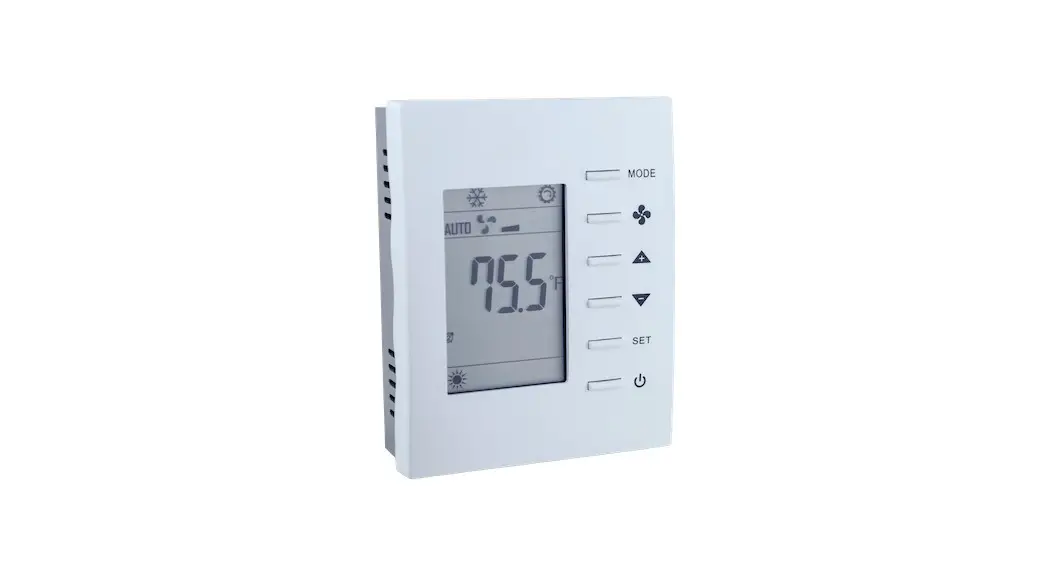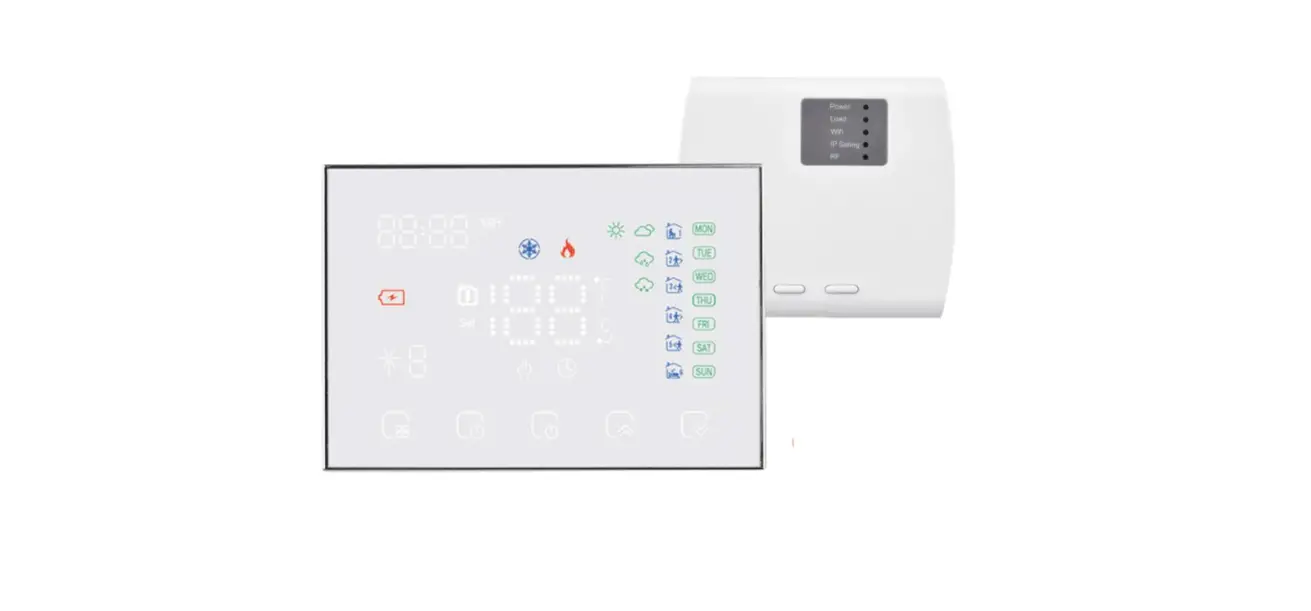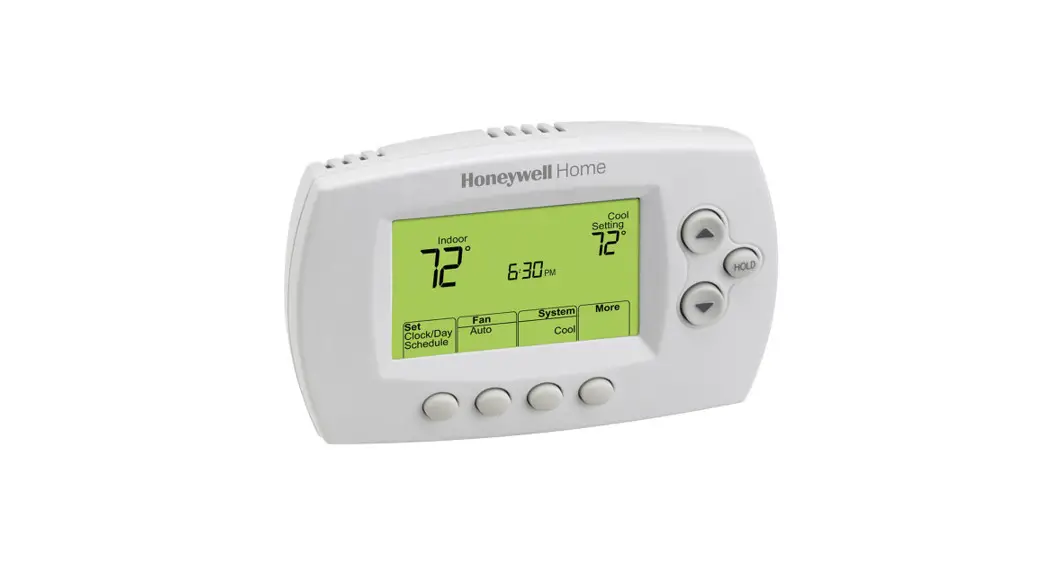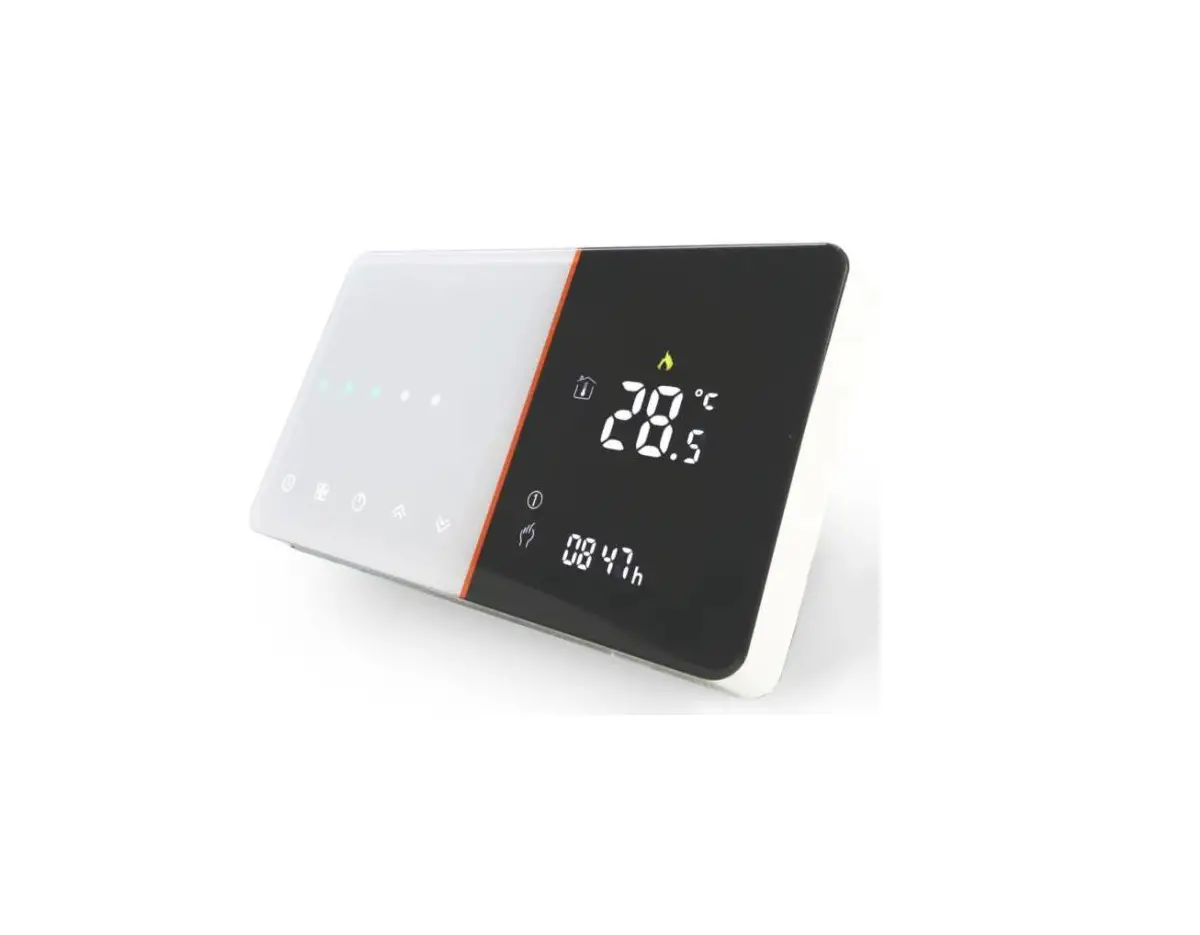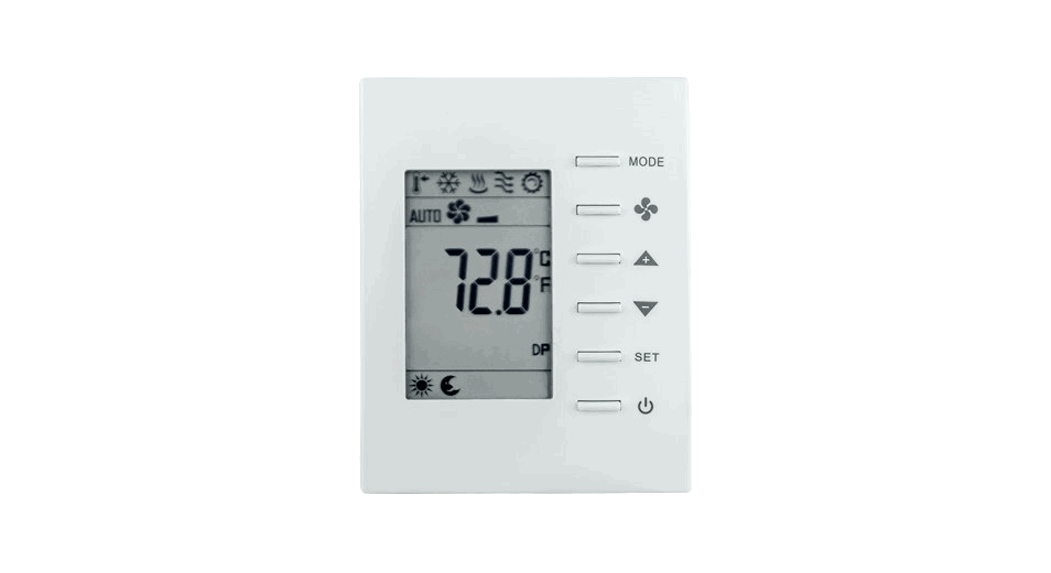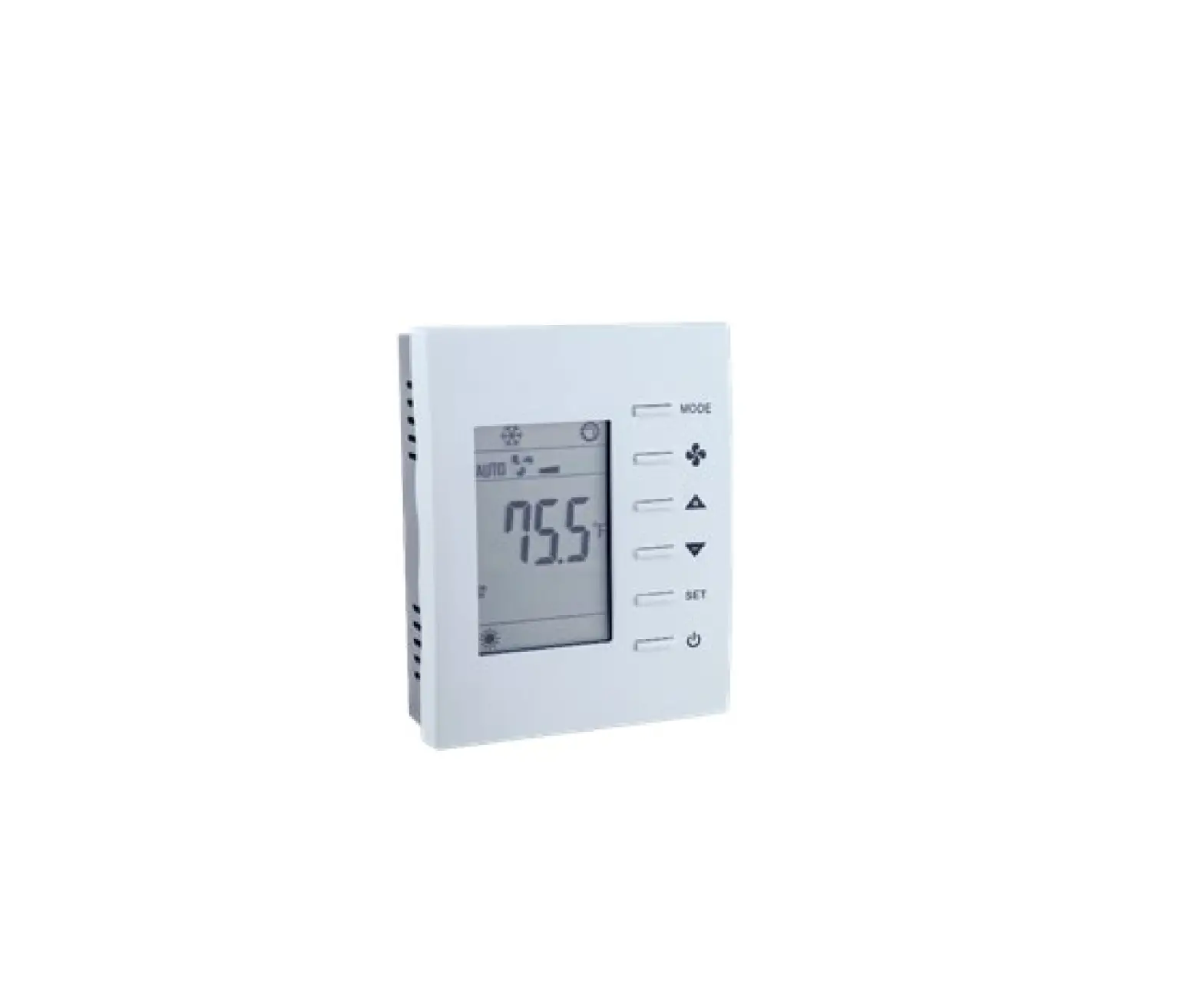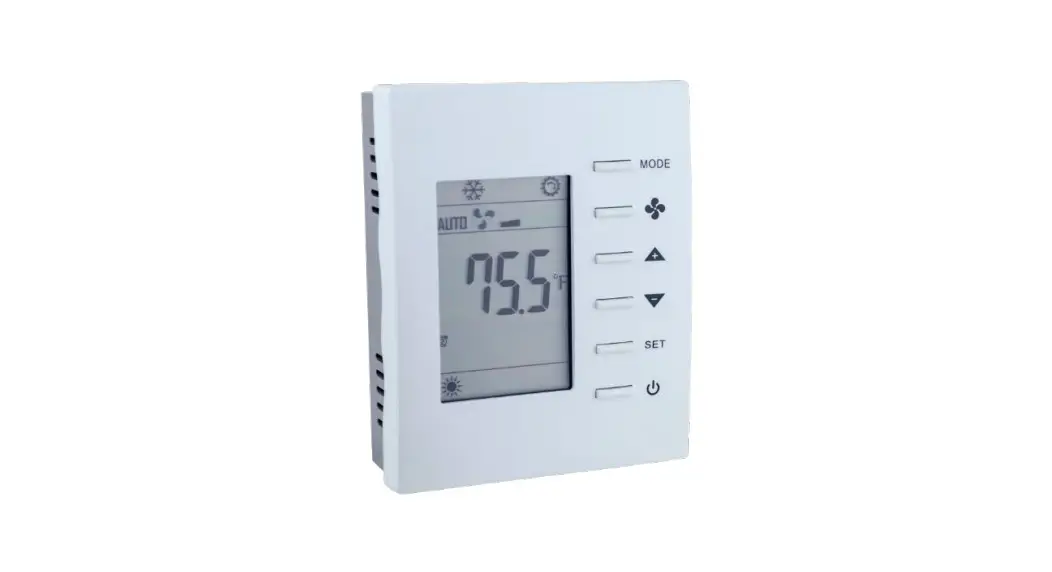
 BAST-321HP-BW2
Wireless BACnet Communicating
Thermostat for 2-stage Heat Pump Operation
BASstat Wireless Heat Pump Thermostat
User Manual 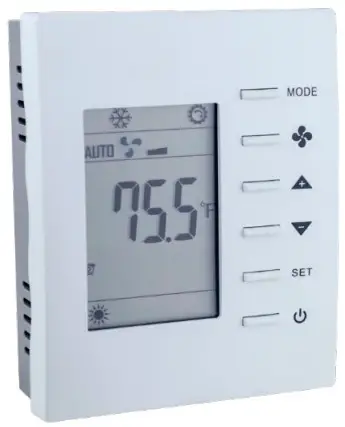 # UM-15094000-AA0
BAST-321HP-BW2 Wireless Heat Pump Thermostat
Trademarks
BASautomation, Contemporary Controls, and CTRLink are registered trademarks of Contemporary Control Systems, Inc. BACnet is a registered trademark of the American Society of Heating, Refrigerating and Air-Conditioning Engineers, Inc. Powered by Sedona Framework is a trademark of Tridium, Inc. Other product names may be trademarks or registered trademarks of their respective companies.
Copyright
© Copyright 2021, by Contemporary Control Systems, Inc. All rights reserved. No part of this publication may be reproduced, transmitted, transcribed, stored in a retrieval system, or translated into any language or computer language, in any form or by any means, electronic, mechanical, magnetic, optical, chemical, manual, or otherwise, without the prior written permission of:
| Contemporary Control Systems, Inc. | Tel: | +1-630-963-7070 |
| 2431 Curtiss Street | Fax: | +1-630-963-0109 |
| Downers Grove, Illinois 60515 USA | E-mail: | [email protected] |
Disclaimer
Contemporary Control Systems, Inc. reserves the right to make changes in the specifications of the product described within this manual at any time without notice and without obligation of Contemporary Control Systems, Inc. to notify any person of such revision or change.
Introduction
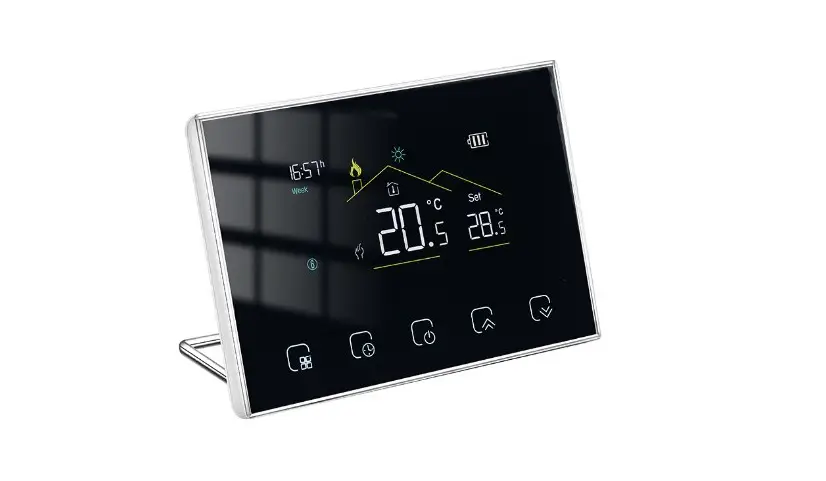
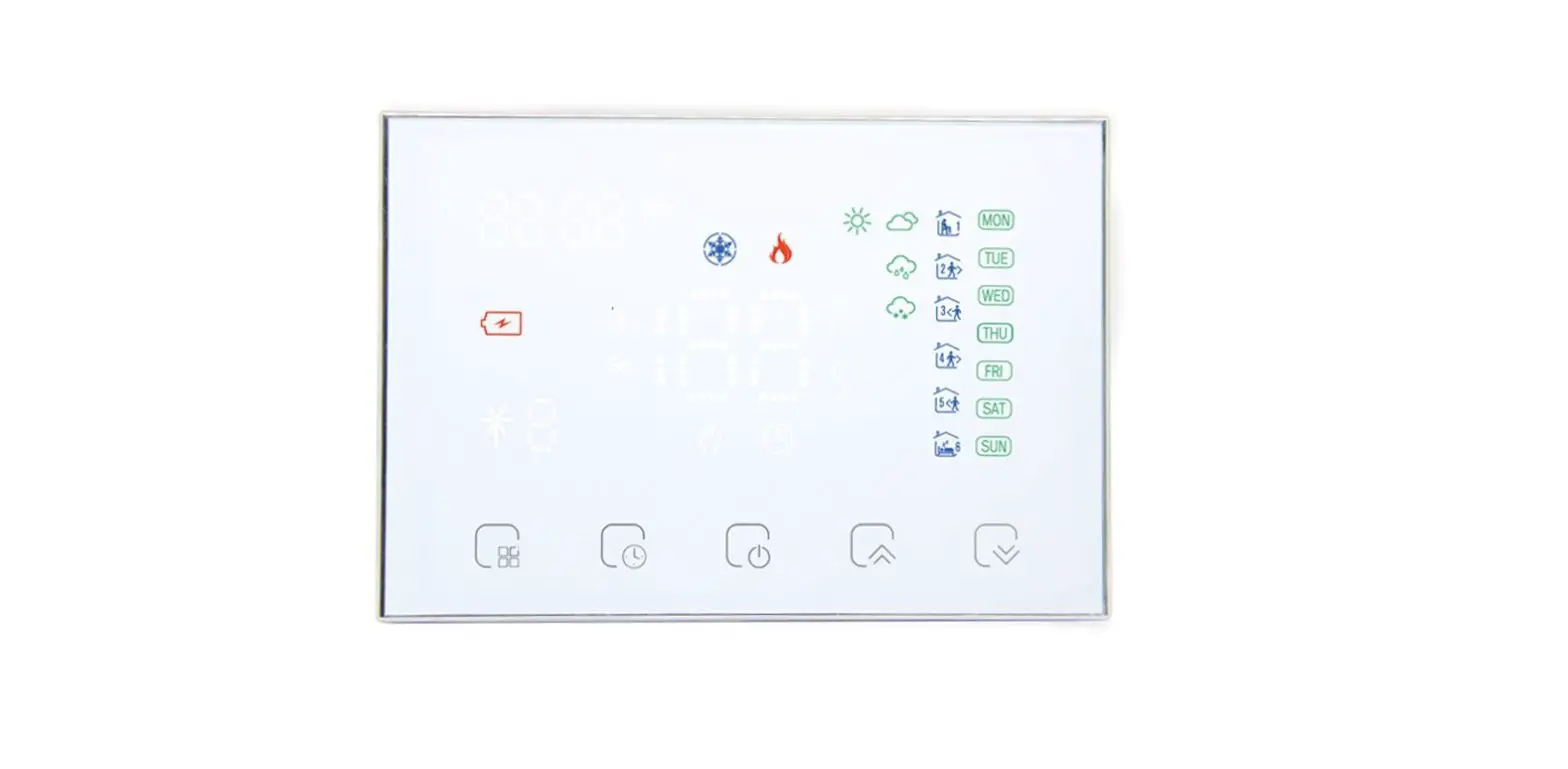
The BAST-321HP-BW2 is a member of the BASstat BACnet Communicating Thermostat series. It provides multi-staged heating and cooling control in an attractive wall-mounted enclosure with a large LCD display. Intended for use with single and multiple stage heat pump units, the thermostat can control 2 reversible DX heat pump compressors, one binary reversing valve, one binary supply fan relay, plus one binary stage of auxiliary heating (gas or electric). This BASstat is BACnet compliant and BTL listed to ensure seamless integration, using BACnet/IP over Wi-Fi and can be integrated into any 802.11 b/g/n Wi-Fi network. A large, easy to read LCD display indicates setpoint, space temperature and current mode of operation using graphical icons.
The BASstat has a built-in space temperature sensor with provision for remote wired 3kΩ NTC thermistor sensor or temperature value can be sent by another communicating device over the BACnet network. The BASstat is configurable locally using the Engineering Menu or via a network connection to a BACnet client. Contemporary Controls’ free BACnet Discovery Tool (BDT) (ccontrols.com) can be used for initial configuration of the thermostat over BACnet. Control algorithm parameters such as deadband, proportional gain, integral rate and trip points are all configurable. This BASstat also features configurable fan control and occupancy selection. Operating states are indicated on the thermostat display.
The numerous features available in the BASstat can be configured by the systems integrator to meet user requirements in two different ways. One way is using a button sequence on the thermostat in order to enter the Engineering Menu – which requires physical access to the thermostat. Optionally, the buttons could be locked to limit user access to Engineering Menu after installation is complete. The second method is configuring the thermostat over the BACnet network using a BACnet client device or software such as Contemporary Controls’ free BACnet Discovery Tool (BDT) (ccontrols.com) BACnet Discovery Tool (BDT) (ccontrols.com).
1.1 Features and Benefits
- Stand-alone thermostat algorithm or fully BACnet network-controllable
- BTL listed with B-ASC device profile for integration into BACnet networks
- 24VAC (+/-10%) power input
- BACnet communication – BACnet/IP over Wi-Fi and can be integrated into any 802.11 b/g/n Wi-Fi network
- Suitable for single or dual compressor heat pump control applications with manual or automatic changeover
- Adjustable algorithm applied to multiple stage control (2 cooling stages- 3 heating stages)
- Effective run time accumulation for energy consumption metering
- Configurable control parameters such as deadband, proportional gain, integral rate and cycle time
- Adjustable minimum/maximum set point ranges
- Three options for temperature sensing:
- Built-in temperature sensor, or
- Remote sensor (RS) input for wiring in a remote temperature sensor (NTC 3kΩ), or
- BACnet network temperature input
- Occupancy status can be switched (1) locally by the user, (2) by using a separate occupancy sensor, or (3) by using BACnet network command.
- Separate adjustable occupied and unoccupied set points for heating and cooling mode
- Fan can be set to run continuously or automatically
- Non-volatile memory retains user settings during power outage
- Thermostat buttons are lockable to prevent tampering
- °C or °F display
- Energy Savings Input for local occupancy control
- Control outputs disabled during “OFF” state for safety
1.2 Product Image and Main Features
BASstat 321C-BW2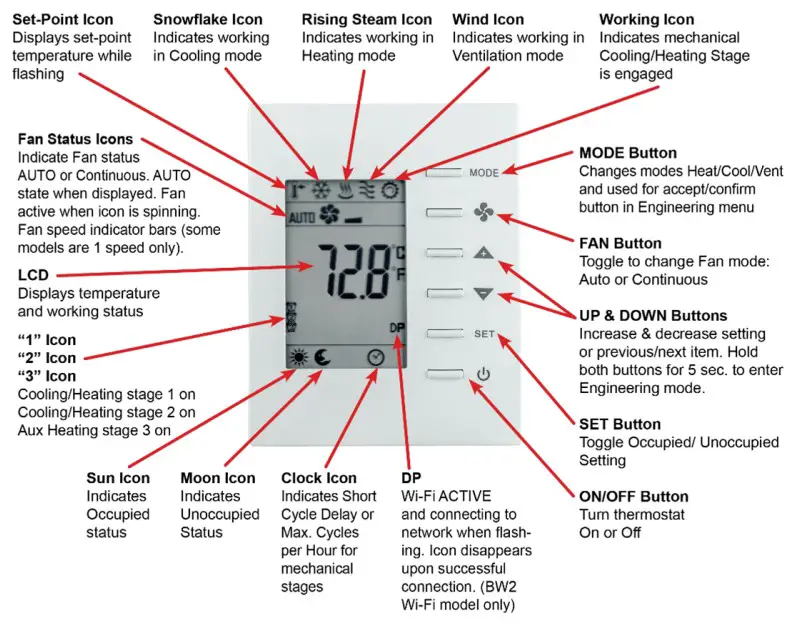
Specifications
2.1 Inputs
Item | Description |
| Temperature Display Range | 14 to 140°F (-10 to 60°C) |
| Temperature Display Resolution | 0.1°F (0.1°C) |
| Temperature Accuracy | ±1.8°F (±1.0°C) with all outputs off |
| Energy Savings Input | Provision for external occupancy sensor |
| Setpoint Range | 32-122°F (0-60°C) in 0.5° (°F or °C) increments |
| Remote Temperature Sensor | Provision for NTC Type 3kΩ thermistor |
2.2 Outputs
| Item | Description |
| Relay Output | Fan, Compressor 1, Compressor 2, O/B Reversing Valve, Auxiliary Heat (stage 3) |
| Contact Rating | SPST 2A at 30 VAC with inductive load |
| Minimum contact life | 100,000 cycles |
2.3 Communication
| Item | Description |
| Protocol Compliance | BACnet/IP with B-ASC, BTL Listed |
| Physical Layer | 802.11 b/g/n Wi-Fi network |
| Cabling | None |
2.4 Electrical
Item | Description |
| Supply Voltage and Current | 24 VAC (±10%) 5 VA |
| Power Source Class | NFPA 70 (NEC) Article 725 Part III Class 2 |
| Internal Power Supply | Half-wave rectified and filtered DC |
2.5 Environmental
Item | Description |
| Operating Temperature | 32°F to 122°F (0 to 50°C) |
| Storage Temperature | 14°F to +140°F (-10°C to 60°C) |
| Relative Humidity | 5 to 95% non-condensing |
2.6 Electromagnetic Compatibility
The BAST-321HP-BW2 complies with the following specifications and bears the CE mark in accordance with the provisions of the Electromagnetic Compatibility (EMC) Directive 2004/108/EC based on the following specifications:
Standard | Test Method | Description |
| EN 61000-6-2 | IEC 61000-4-2 | Electrostatic Discharge Immunity |
| EN 61000-6-2 | IEC 61000-4-3 | Radiated, Radio-Frequency, Electromagnetic Field Immunity |
| EN 61000-6-2 | IEC 61000-4-4 | Electrical Fast Transit/Burst Immunity |
| EN 61000-6-2 | IEC 61000-4-5 | Voltage Surge Immunity |
| EN 61000-6-2 | IEC 61000-4-6 | Immunity to Conducted Disturbances |
| EN 61000-6-2 | IEC 61000-4-8 | Power Frequency Magnetic Field Immunity |
| EN 61000-6-2 | IEC 61000-4-11 | Voltage Dips and Interruptions |
| EN 61000-6-3 | IEC 61000-3-2 | Limits for Harmonic Current Emissions |
| EN 61000-6-3 | IEC 61000-3-3 | Limitation of Voltage Fluctuations and Flicker in Low Voltage Supply Systems |
2.7 Mechanical (all dimensions are in mm)
Mounts directly onto wall, panel, standard 65×65mm junction box (hole pitch 60 mm) or standard 2×4-inch vertical junction box (hole pitch 83.5mm)
Width: 94mm
Height: 118mm
Depth: 34mm 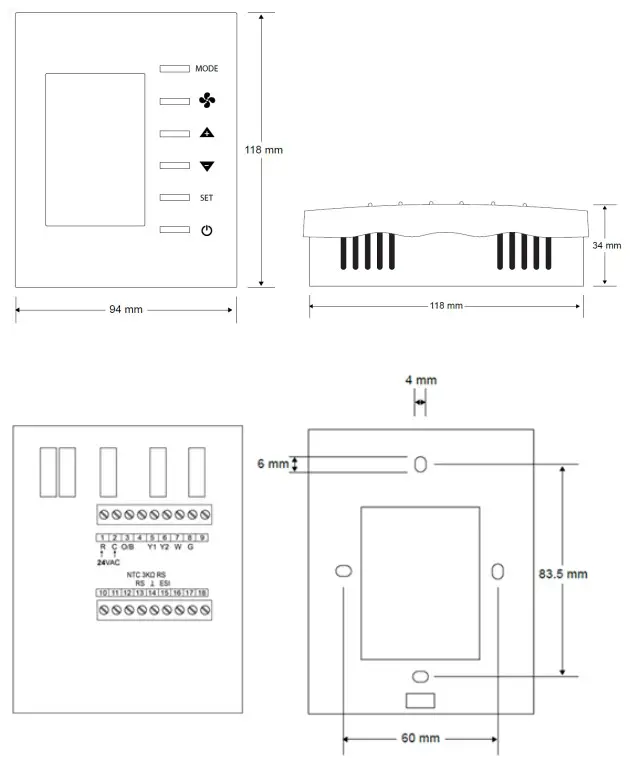
Installation
The BAST-321HP-BW2 is intended for surface-mount installation on an interior wall, away from direct sunlight or direct air movement. The display (top half) can be removed from its base by loosening the small Philips screw at the bottom of the display. Once the display is removed from the base, the base can be mounted onto the wall with appropriate fasteners. If a single-gang electrical junction box is to be used, the top and bottom mounting holes will align with the screw holes in the junction box.
3.1 Terminal Block Pin Assignments
Two terminal blocks are provided for all field connections. The remote sensor input (RS) is at terminals 13 and 14. The remote occupancy (ESI) input is a dry contact closure input located at terminals 14 and 15.
Number | Mark | Comment | Number | Mark | Comment |
| 1 | R | 24 VAC high-side | 10 | ||
| 2 | C | 24 VAC common | 11 | ||
| 3 | O/B | Reversing Valve | 12 | ||
| 4 | 13 | RS | Remote Sensor Input | ||
| 5 | Y1 | Compressor 1 | 14 | GND | Ground |
| 6 | Y2 | Compressor2 | 15 | ESI | Energy Saving Input |
| 7 | W | Stage 3 Heat | |||
| 8 | G | Fan | |||
| 9 |
3.2 Limited Power Source
The BASstat is intended to be powered by a Class 2 compliant power source and only accepts 24VAC with no more than 5VA of power consumption. It should be powered by a Class 2 power source complying with the requirements of the National Electric Code (NEC) article 725. The transformer or power supply complying with the Class 2 rating must carry a corresponding listing from a regulatory agency such as Underwriters Laboratories (UL).
3.3 Power Supply Precautions
Internally, the BASstat utilizes a half-wave rectifier and can share the same AC power source with other half-wave rectified devices. Sharing AC power with full-wave rectified devices is NOT recommended. AC power sources that power several half-wave devices have a common secondary connection called COMMON, LO, or GROUND. Connect the HOT side of the secondary to the 24 VAC high side input on the BASstat and the LO side to 24 VAC common.
WARNING: Devices powered from a common AC source could be damaged if a mix of half- wave and full-wave rectified devices are both present. If you are not sure of the type of rectifier used by another device, do not share the AC source with it.
3.4 Wiring Diagram 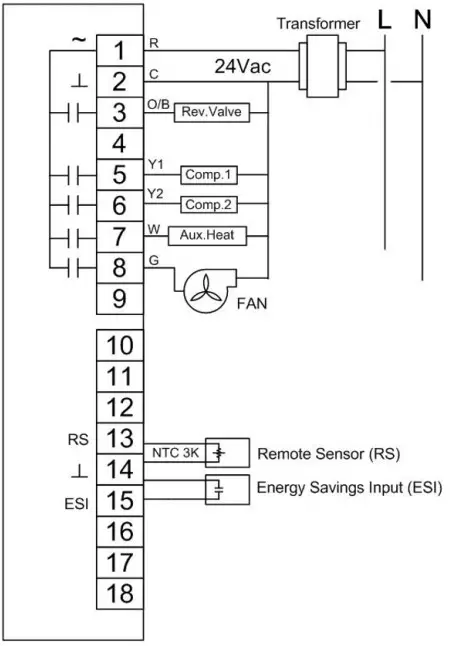
Operation
4.1 User Mode
User-side control is accomplished with six buttons – MODE (Heat, Cool, or Ventilate), FAN (Auto or On), UP, DOWN, SET, and POWER. There are options to lock the panel buttons to limit user access if so required. A large LCD display indicates setpoint, space temperature, occupancy status, and current mode of operation using graphical icons. System modes (Cool, Heat, Ventilate) available to the user are dependent on control type chosen from Engineering Menu (tyPE) or BACnet object [MSV7] Control Type. See section 4.2 Control Type of this manual).
System modes and button operation may be limited by installation engineer, especially if the thermostat is completely controlled over BACnet network.
The first tier of operation includes the following settings as shown below. To operate the thermostat:
- The POWER button
 toggles between ON or OFF states to start / stop the thermostat outputs. (ON/OFF control can be accomplished over BACnet as well).
 - At power ON, press any button to start the User Mode operation. Press the MODE button
 to toggle between different HVAC operating modes such as Cool, Heat, or Ventilate@Cool and Ventilate@Heat.
Press the UP/ DOWN buttons to adjust temperature setpoint or rotate the values of a menu setting. Press the FAN button
  to toggle fan modes of AUTO or CONTINUOUS On. If no AUTO icon is displayed, the fan will run continuously until commanded off using button on thermostat or BACnet command. If AUTO icon is flashing, the fan is operating under delay timer and will shut off automatically when the end of cycle delay timer expires.
Press the SET button and use UP/ DOWN buttons to toggle the unit between Occupied or Unoccupied states when outside of scheduled operation. Use SET or MODE to apply (SET button can be locked in applications forbidding occupancy state user control).
 - Thermostat will return to normal display with the last known setting if there’s no button pressed for 10 seconds.
 toggles between ON or OFF states to start / stop the thermostat outputs. (ON/OFF control can be accomplished over BACnet as well).
 to adjust temperature setpoint or rotate the values of a menu setting. Press the FAN button
 User Mode Thermostat Operation
| # | Item | Description | Remarks |
| 1 | Normal Display | Display current room or set-point temperature. | Use the (SP) parameter in the Engineering Menu or [MSV6] Display to choose Current room or Set- point temperature on display. |
| 2 | Temperature Setpoint Setting using Up/Down Arrows | Set the desired temperature. | The [AV0] / [AV3] Cool / Heat Occupied and [AV8] / [AV9] Unoccupied Cool / Heat temperature setpoints BACnet objects can be used to write or force the setpoint to a desired value from BACnet supervisor. |
| 3 | Mode Select | Select the working mode: Cooling ( | After pressing the MODE button, press the UP/ DOWN button to rotate the selections. Dependent on Control Type. |
| 4 | Fan Auto/ Continuous | Change the Fan mode between Auto or Continuous On. | When AUTO is displayed, the fan is handled automatically. When AUTO is flashing, the fan is working under a delay timer. When FAN icon is spinning but AUTO is not displayed, the fan will run continuously until commanded off. |
| 5 | Occupancy Setting | Press SET, Used UP and DOWN arrows to toggle between the Occupied and Unoccupied setting. Use MODE or SET buttons to apply. | The SET button could be locked for applications forbidding user occupancy state control. |
 ), Heating (
  ), or Ventilating (
  ).
).User Mode Flow Chart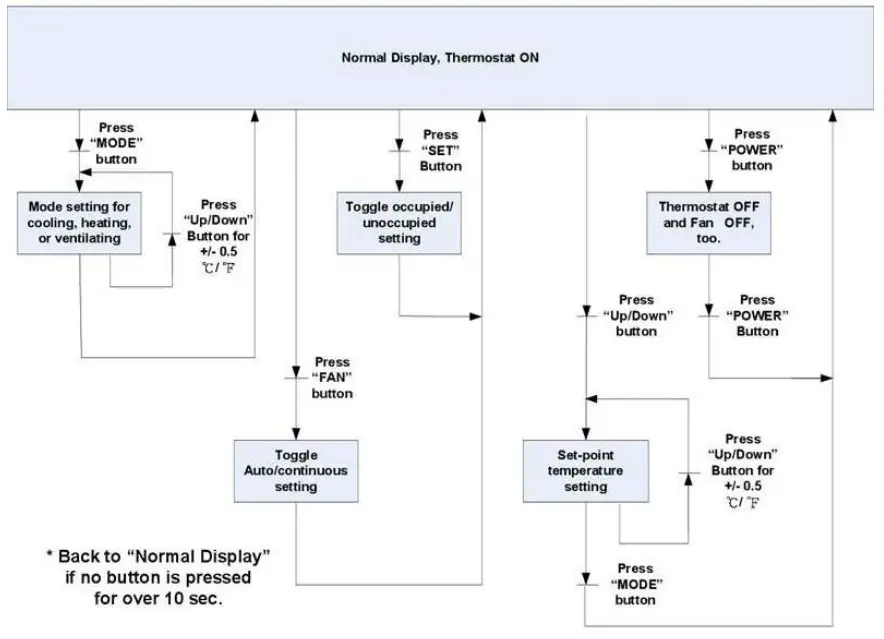
4.2 Control Type
Control Type, System Mode and Algorithm Configuration
System modes available to the user are dependent on control type.
Multi-stage Cooling or Heating with Auto Changeover – This the default control type in this thermostat. Mostly used for standalone operation. The thermostat will switch between Cool and Heat modes automatically. In this control type, the user will be presented with a choice of Heat or Ventilation@Heat when the thermostat is in Heat mode (automatic), and Cool or Ventilation@Cool when the thermostat is in Cool mode (automatic).
Multi-stage Cooling or Heating with Manual Changeover – In this control type the thermostat will wait for a command from user or BACnet supervisor to switch between Cool and Heat modes. The user will be presented with a choice of Heat or Ventilation@Heat when the thermostat is in Heat mode, and Cool or Ventilation@Cool when the thermostat is in Cool mode. The user can choose to switch between Cool and Heat modes using the MODE button.
BACnet controlled – In this control scheme, the built-in thermostat algorithm can be bypassed, and the thermostat can be controlled over the BACnet network with commands from the supervisor device. The logic executing in the supervisor (such as Niagara or Sedona logic) can control the thermostat over the BACnet network. To put the thermostat in BACnet network control mode, use the Lock [AV18] object bit 9: Control DOs by thermostat algorithm “0” (default) or BACnet supervisor “1” (add decimal=512).
Cool Only and Heat Only modes (nullified/disabled in firmware) are control types listed in the BACnet object and Engineering Menu object but are not available for use. Control type is only configurable by the installer using Engineering Mode Menu or BACnet supervisor. The installer must decide the control type suitable for the application, set it to a static value, or program the BACnet supervisor to change the control type automatically. The default control type is set to Cooling or heating with Auto Changeover. Manual Changeover can be used to prevent excessive automatic changeover between cooling and heating system modes.
Algorithm
- A PID adaptive control algorithm is applied to minimize overshoot, in addition to proportional band (Stage Width) and derivative (Differential) calculation.
- When the thermostat is active (either the heating or cooling stage is on), a “Working (
 )” icon will be shown on the LCD. Stage 1 will show icon (
  ).
).
Stage 2 will show icon ( ) 3rd stage heat will show icon (
  ).
).
 )” icon will be shown on the LCD. Stage 1 will show icon (
  ).
). ) 3rd stage heat will show icon (
  ).
).System Mode
- The default control type, multi-staged cooling and heating with automatic changeover, allows the thermostat to operate as stand-alone. Manual Changeover allows restriction of mode selection to Cool only or Heat only where necessary. Control Type can be selected in (tyPe) or [MSV7].
- For manual changeover control, cooling or heating system modes can be selected by pressing the MODE button or using a BACnet command to object [MSV1]. In application where user control needs to be limited, the lock button function can be used to disable MODE button.
- Occupied Cooling [AV0] and Heating [AV3] set points and Unoccupied Cooling [AV8] and Heating [AV9] setpoints can be set individually. Minimum deadband [AV7] can be programmed as well.
Short On/Off (Minimum On/Off time) and Maximum cycles per Hour
- There are short on/off (minimum off time and minimum on time of stage engagement) and maximum cycles per hour protection for cooling and heating mode(E29, E31, E54, E55; AV24, AV26, AV46, AV47).
- Short on/off time (in seconds) will check minimum on time and minimum off time of each stage before changing its state.
- Maximum cycles per hour will check cycle times in a particular hour. When the cycle times reach the setting maximum cycles in that hour, it won’t allow more cycles until next hour.
- When the stage state change is pending by Short Cycle Delay or Maximum Cycles, the Clock icon ( ) will appear on the LCD.
Next Stage Engagement Short Cycle Delay
There needs to be an automatic delay (Short Cycle, default 5 minutes, E28/ AV23 for cooling control, E30/AV25 for heating control) before starting the second stage to prevent possible damage to the DX equipment.
Reversing Valve Polarity
Reversing Valve N.O./N.C. for cooling and heating mode changeover is defined by
E53/BV3. The default setting at pin 3 (O/B) is open for cooling and closed for heating. 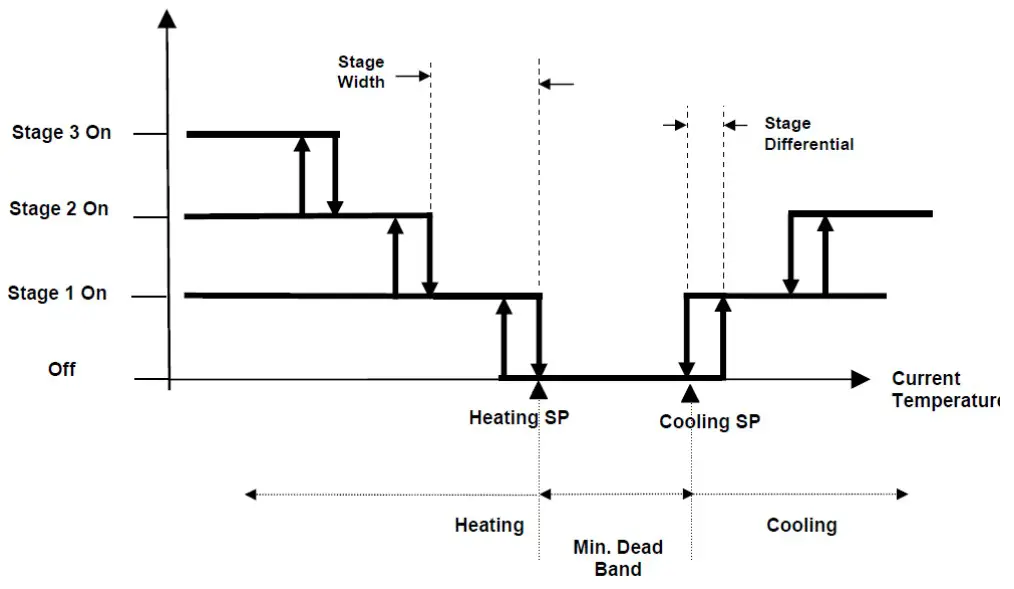
Floating Deadband
The Heat and Cool temperature setpoints could be “attached” together. This means that as one setpoint is adjusted and “hits” against the deadband region, it will “push” the deadband region and the other setpoint along the temperature setpoint axis to allow for adjustment while maintaining the configured deadband. If the setpoint is adjusted back the other way, it will “pull” the deadband region and the other setpoint along the temperature setpoint axis.
Minimum Cooling Setpoint and Maximum Heating Setpoint
- Minimum Cooling Setpoint will be confined by set point low limit plus dead band and Minimum cooling setpoint [AV-39] default: 18℃/ 65℉
- Maximum Heating Setpoint will be confined by set point high limit minus dead band and Maximum heating setpoint [AV-40] default: 25℃/ 77℉
Assigned Current Temperature
A current temperature value can be assigned thru BACnet AV-1 to take place of the onboard temperature sensor value. The assigned value is valid if BACnet communication is driving a flip-flop signal to (BV-16: heartbeat signal) within the (AV29: Heartbeat Rate time) period (in seconds). Otherwise, the assigned temperature will revert back to the onboard sensor reading.
Fan Control Output
- Lowest Fan Speed is the speed the fan will default to after a control action (Heating or Cooling) with fan in AUTO mode. If the lowest fan speed [MSV4] is set as “Stop (1)”, the fan will automatically shut off after the control action plus a 2-minute fan-off time delay. During this delay, the AUTO icon will flash. If lowest fan speed is set to “Low (2)” the fan will run continuously after a control action
- Fan Mode can be toggled between AUTO or ON by using the FAN button on the thermostat or BACnet object [MSV0] Fan Mode (BACnet supervisor). By default, this value is set to “Auto(1)”, the AUTO icon is displayed and fan operation will be controlled automatically. To put the fan in ON mode set [MSV0] to “Low(2)”. This will cause the fan to run continuously (no AUTO icon is displayed). Fan icon spins when fan is active. The FAN button can be locked to limit user access to this feature or the BACnet supervisor can be programmed to default the thermostat to certain state at the end of an occupancy cycle.
- During heating operations, the supply fan is controlled by the BASstat. This is enabled by default. (BV15 =1)
Occupancy Setting
There are several ways to define thermostat occupancy state.
Note: Occupancy will be detected by ESI contact by default.
- Energy Savings Input (ESI) This is a dry contact input meant for communication from a customer supplied occupancy sensor. (default)
- Occupancy status (occupied/unoccupied) can be set by a BACnet supervisor using writable object ESI Contact Definition [BV14]. “0” for occupied, and “1” for unoccupied. E12/AV18 must be set with a value of 64 (disabled) in advance (E12/AV18 is set as 0 by default)
- User control of occupancy state is allowed from the SET button if E12/ AV18 Lock has the ESI Contact disabled. Pressing the SET button and UP/DOWN buttons will toggle the occupancy state. Press SET button to confirm. The SET button can work in conjunction with BACnet occupancy Command [BV14] on last-write-wins basis. The SET button could be locked to limit user control (use Lock [AV18] BACnet object or (LOC) engineering menu item to lock SET button). In this case only the BACnet supervisor can set occupancy states.
- Occupancy Status [BI0] is a read-only BACnet object indicating current occupancy state -“0” for occupied, and “1” for unoccupied. (AV18 is set as 0 by default).
- When in unoccupied state, a Moon (
 ) icon will be displayed on the LCD and the thermostat will change the set-point temperatures to the Unoccupied Cool and Unoccupied Heat setpoints [AV8 – 9]. When the state changes back to occupied, the thermostat will return to the occupied set-point values for Cooling and Heating Temperature Setpoint [AV0, AV3] and a sunlight icon (
  ) will be displayed to indicate occupied state on LCD.
 ) icon will be displayed on the LCD and the thermostat will change the set-point temperatures to the Unoccupied Cool and Unoccupied Heat setpoints [AV8 – 9]. When the state changes back to occupied, the thermostat will return to the occupied set-point values for Cooling and Heating Temperature Setpoint [AV0, AV3] and a sunlight icon (
  ) will be displayed to indicate occupied state on LCD.
4.3 Engineering Mode Menu
Thermostat configuration can be performed using the engineering menu or by controlling BACnet objects using a BACnet client tool such as Contemporary Controls free BACnet Discovery Tool (BDT) (ccontrols.com). It is highly suggested that engineering mode be operated by trained installers only, because it is related to system parameters that will affect the control results.
Operation of Engineering Menu
- At power “ON”, press and hold both the UP and DOWN buttons simultaneously for 5 seconds to enter Engineering Mode menu.
- Press the UP or DOWN buttons to rotate through the menu items. The last item loops back to first item at the end of items in menu. Press the MODE button to enter a submenu item.
- Press the UP or DOWN button to change the setting in the submenu item. Press the MODE button to confirm the setting and return to menu item selection. If no button is pressed for 10 seconds, the display will return to the menu item selection. After another 10 seconds, the display will return back to User mode. Settings are not changed unless confirmed using the MODE button.
- To leave Engineering Mode, rotate till (End) menu item appears and press the MODE button. Alternately, pressing no buttons for 10 seconds will return the thermostat back to User mode.
Engineering Menu Flow Chart 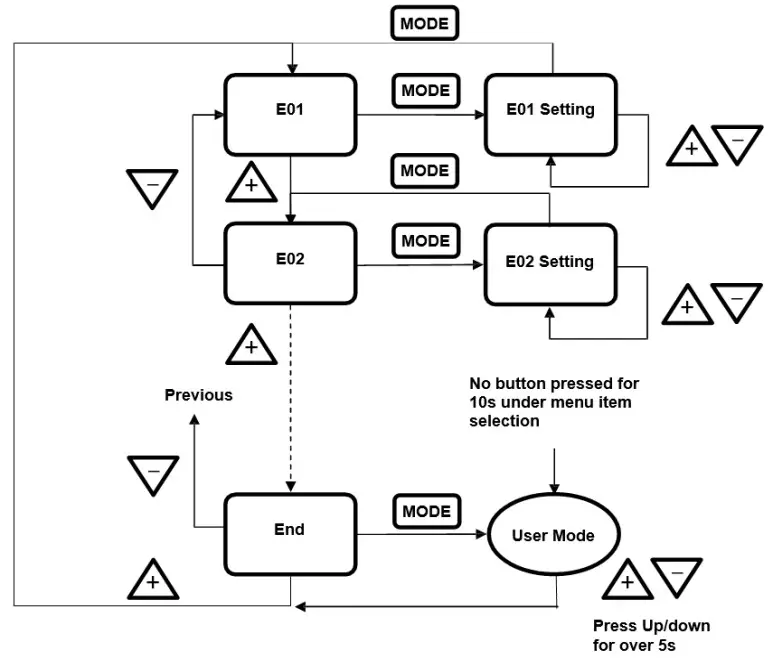 Engineering Menu Items Table – BAST-321HP-BW2
Item | Mnemonic | Description | °C Scale | °F Scale | Step | ||
Default | Range | Default | Range | ||||
| E1 | db | Deadband | 2.0 | 0~10 | 4.0 | 0~18 | 0.5 (°C/°F) |
| E2 | ESIC | Unoccupied(ESI) cooling set point | 28 | 25~35 | 82.5 | 65.0~95. 0 | 1.0 (°C/°F) |
| E3 | ESIH | Unoccupied(ESI) heating set point | 15 | 10.0~22. 0 | 59 | 50.0~77. 0 | 1.0 (°C/°F) |
| E4 | I-t | Integral Time and Output Cycle Time (seconds) | 60 | 0~500 | 60 | 0-500 | 10 (Sec.) |
| E5 | OPL1 | Not used | |||||
| E6 | SPA1 | Not used | |||||
| E7 | SP-L | Low limit for temperature set point | 10 | 0~50 | 50 | 32~122 | 1.0 (°C/°F) |
| E8 | SP-H | High limit for temperature set point | 30 | 0~50 | 95 | 32~122 | 1.0 (°C/°F) |
| E9 | OFSt | Current temperature offset | 0.0 | – | 0.0 | – | 0.1 (°C/°F) |
| E10 | Pb | Proportional band or stage width | 1.5 | 0~10.0 | 3.0 | 0~18.0 | 0.1 (°C/°F) |
| E11 | diFF | Stage differential | 0.5 | 0.1~1.0 | 1.0 | 0.1~1.8 | 0.1 (°C/°F) |
| E12 | LOC | Bit Definition: 0: MODE button (dec=1) 1: Down buttons (dec=2) 2: Up button (dec=4) 3: FAN SPEED button (dec=8) 4: Power On/Off button (dec=16) 5: SET (or ℃/℉) button (dec=32) 6: ESI contact detection (dec=64) 7: Door/Window contact detection (dec=128) 8: Modification for communication parameters (dec=256) i.e. baud rate, MAC addr, device inst. 9: Control DOs by thermostat algorithm (0) or BACnet sup. (1) (dec=512) 10~15: reserved/unused Bit Value 0: Unlock / enable 1: Lock / disable Examples (add dec values to lock multiples) Unlock/enable all (0) Lock MODE Button (1) Lock Down Button (2) Lock MODE & Down Buttons (3 = 1+2) Lock Power On/Off button (4) Lock MODE & Power & Down (7 = 1+2+4) Lock SET button (32) Lock MODE & Down & Power & SET (39 = 1+2+4+32) ESI contact disable (64) Lock the modification for communication parameters (256) DOs control commanded by BACnet (512) | 64 | 0-1023 | 64 | 0-1023 | 1 |
| E13 | ESI | ESI (DI1) digital sensor contact definition | 0 | 0~1 | 0 | 0~1 | 0: N.O. 1: N.C. |
| E14 | rE-C | Not used | |||||
| E15 | RE-h | Not used | |||||
| E16 | rS | Space Temperature Source | 0 | 0~2 | 0 | 0~2 | 0: built-in 1:2nd remote sense 2: assigned |
| E17 | -SP- | Display present temperature value of or current set-point for LCD | 0 | 0~1 | 0 | 0~1 | 0: display PV 1: display SP |
| E18 | door | Door or Windows contact definition (not applicable to all models) | 0 | 0~1 | 0 | 0~1 | 0: N.O. 1: N.C. |
| E19 | LFAn | Lowest Fan speed in Auto fan mode | 0 | 0~1 | 0 | 0~1 | 0: stop 1: low |
| E20 | Pct | Output Percentage (not used) | 0 | 0~100 | 0 | 0~100 | 1% |
| E21 | dEUH** | Device instance no. – Hi bytes | 600 | 0~4194 | 600 | 0~4194 | 1 |
| E22 | dEUL** | Device instance no. – Low bytes | 1 | 0~999 | 1 | 0~999 | 1 |
| (if ID-H <=4193) | (if ID-H <=4193) | ||||||
| 0~302 (if ID-H | 0~302 (if ID-H | ||||||
| = 4194) | = 4194) | ||||||
| E23 | UdP** | UDP Port Number. | 47808 (BAC0) | 0-65535 (0-FFFF) | 47808 (BAC0) | 0-65535 (0- FFFF) | 1 |
| E24 | rHSt | Relative Humidity Offset | 0 | 0 | -30.0~ 30.0 | 0.1%RH | |
| E25 | F-Ht | Fan Output for Heating | 1 | 0/1 | 1 | 0/1 | 0: Disable 1: Enable |
| E26 | dLyC | Cooling Stage Delay | 5 | 0~10 | 5 | 0~10 | (minutes) |
| E27 | cycC | Cooling Maximum Cycles per Hour | 4 | 2~6 | 4 | 2~6 | (cycles/hour) |
| E28 | dLyH | Heating Stage Delay | 5 | 0~10 | 5 | 0~10 | (minutes) |
| E29 | cycH | Heating Maximum Cycles per Hour | 4 | 2~255 | 4 | 2~255 | (cycles/hour) |
| E30 | tyPE | Control Type | 2 | 1~2 | 2 | 1~2 | 1: C&H Manual 2: C&H Auto NOTE: Cool only and Heat only |
| E31 | OPL2 | Minimum Output for AO2 (not used) | |||||
| E32 | SPA2 | Span Offset for AO2 (not used) | |||||
| E33 | Hrtr | Communication Heartbeat Minimum | 60 | 10~3600 | 60 | 10~3600 | 10s |
| E34 | rhPb | Humidity Control PB | |||||
| E35 | rhdF | Humidity Control Diff. | |||||
| E36 | Pb-2 | ||||||
| E37 | CO2F | CO2 Offset Value | |||||
| E38 | AFtH | After Hour Extension Time (not used) | |||||
| E39 | VALL | Not Used | |||||
| E40 | VALH | Not Used | |||||
| E41 | OPts | Options | |||||
| E42 | dlAb | DI contact Definition | |||||
| E43 | Hrt | Communication Heartbeat Flip-Flop | 0 | 0/1 | 0 | 0/1 | 0: Off 1: On |
| E44 | CSPL | Minimum Cooling Temperature Setpoint | 18.0 | 0.0-50.0 | 65.0 | 32.0- | 0.1 (°C/°F) |
| E45 | HSPH | Maximum Heating Temperature Setpoint | 25.0 | 0.0-50.0 | 77.0 | 32.0- | 0.1 (°C/°F) |
| E46 | nFAn | Minimum Fan Output (not used) | |||||
| E47 | hFAn | Maximum Fan Output (not used) | |||||
| E48 | FAnL | Low Fan Speed Setting (not used) | |||||
| E49 | FAn2 | Med. Fan Speed Setting (not used) | |||||
| E50 | FAnH | Hi Fan Speed Setting (not used) | |||||
| E51 | ObAb | Reversing Valve Polarity | 0 | 0/1 | 0 | 0/1 | Cooling/Heatin g 0: N.O./N.C. |
| E52 | OFFt | Minimum Off Time | 180 | 0~600 | 180 | 0~600 | 5 (seconds) |
| E53 | On-t | Minimum On Time | 0 | 0~600 | 0 | 0~600 | 5 (seconds) |
| E54 | It-2 | Integral Time and Output Cycle Time 2 | |||||
| E55 | Phy1 | MAC address 1st & 2nd bytes | hhhh | hhhh | h: 0~F in hex | ||
| E56 | Phy2 | MAC address 3rd & 4th bytes | hhhh | hhhh | h: 0~F in hex |
| E57 | Phy3 | MAC address 5th & 6th bytes | hhhh | hhhh | h: 0~F in hex | ||
| E58 | IP-1 | 1st byte of IPv4 address | 192 | 0~255 | 192 | 0~255 | 1 |
| E59 | IP-2 | 2nd byte of IPv4 address | 168 | 0~255 | 168 | 0~255 | 1 |
| E60 | IP-3 | 3rd byte of IPv4 address | 0 | 0~255 | 0 | 0~255 | 1 |
| E61 | IP-4 | 4th byte of IPv4 address | 1 | 0~255 | 1 | 0~255 | 1 |
| E62 | tESt | Self-Diagnostic – toggle all LCD features and all relays. Use only to test | Use Caution! | Press MODE to engage | |||
| E63 | boot | Reset Wi-Fi parameters to factory defaults | Press MODE to reset | ||||
| E64 | rSt | Reset all parameters including communication and control algorithm to | Use Caution! | Press MODE to reset | |||
| E65 | End | Exit Engineer Mode Menu | Press MODE to exit engineering |
** Note:
- Changing these values needs to unlock modification for communication parameters in advance.
Please refer to the parameter LOC(Lock, AV17) for details. - Device instance number = “devH” *1000 + “devL” = 0~4194302. ex. If “devH” is 100 and devL” is 001, then the Device instance number = 100001.
Lock Function Setup and Examples
The 16-bit binary encoded decimal register accessed through Lock [AV17] BACnet object and LOC engineering menu item is used to enable/disable features in the thermostat. The first 10 bits are used (bit 0 ~ bit 9), bits 10~15 are reserved/unused. Bits are represented by their decimal values and are added or subtracted to toggle from “0” to “1”. Add a bit’s decimal value to toggle to “1” or subtract a bit’s decimal value to toggle to “0”. See table below.
| Bit Definition: Decimal Value to Write: 0: MODE button……. (dec=1) 1: DOWN button………… (dec=2) 2: UP button…………… (dec=4) 3: FAN SPEED button………… (dec=8) 4: POWER On/Off button………… (dec=16) 5: SET (or ℃/℉) button………….. (dec=32) 6: ESI contact detection…………… (dec=64) 7: Door/Window contact detection (unused)………….. (unused) 8: Modification for communication parameters…….. (dec=256) i.e. baud rate, MAC addr, device inst. 9: Control DOs by thermostat algorithm (0) or BACnet sup. (1).. dec=512) 10~15: reserved/unused…… (unused) Bit Value: 0: Unlock / enable 1: Lock / disable | Add decimal values to lock multiples. Bold decimal number is the example value to write to Lock object. Examples: Unlock/enable all (0) – this will also enable ESI DI1 to control occupancy command by default. (add 64 to all values below to maintain default occupancy selection over BACnet). Lock MODE Button (1) Lock DOWN button (2) Lock MODE & DOWN (3 = 1+2) Lock UP button (4) Lock MODE & DOWN & UP (7 = 1+2+4) Lock FAN SPEED button (8) Lock MODE & DOWN & UP & FAN (15 = 1+2+4+8) Lock POWER button (16) Lock MODE & DOWN & UP & FAN & POWER (31 = 1+2+4+8+16) Lock SET button (32) Lock MODE & DOWN & UP & FAN & POWER & SET (63 = 1+2+4+8+16+32) ESI contact disable (64 – default). When the default value of 64 is maintained, occupancy is set over BACnet and SET user button. Lock MODE & DOWN & UP & FAN & POWER & SET & disable ESI DI1 (127 = 1+2+4+8+16+32+64) Door/Window contact detection (unused) Lock the modification for communication parameters such as baud rate and mac address (256) Lock MODE & DOWN & UP & FAN & POWER & SET & disable ESI DI1 & modification for communication parameters (383 = 1+2+4+8+16+32+64+256) DOs control commanded by BACnet (512) |
4.4 BACnet Objects and Network Configuration
Transmission types
• Physical layer: Wi-Fi 802.11 b/g/n
• Protocol: BACnet/IP
• UDP Port Number: BAC0 (47808)
• MAC address: Wi-Fi chip MAC address found written on the back side of thermostat or in Engineering Menu item (Phy3). This can assist when multiple Wi-Fi thermostats are installed.
• Device Instance: 600001
Initial Configuration
All configuration parameters are settable through use of the buttons on thermostat by entering the Engineer Menu, or once installed on the BACnet network, configuration can also be altered using BACnet commands. Network command-based configuration can also be accomplished using a Wi-Fi enabled laptop/computer/tablet/smart phone and Contemporary Controls’ free BACnet Discovery Tool.
Wi-Fi Communication Configuration
Overview
The BAST-321HP-BW2 Wi-Fi thermostat is preconfigured with a BACnet Device Instance of 600001 and a UDP Port Number of 47808 (decimal) equivalent to BAC0 (hexadecimal).
Addressing
A unique Device Instance Number throughout the entire BACnet internetwork is required to distinguish the device from all other BACnet devices. When more than one BASstat is installed at the same time, their Device Instance Number must be configured prior to connecting to the BACnet/IP network or BACnet communication will fail due to duplicate device instances.
Device instance can be modified in Engineering Menu items (dEVH) – high bytes and (dEVL) – low bytes. Device Instance = (dEVH)*1000+(dEVL). Device Instance example: if (dEVH) is set to 4194 and (dEVL) is set to 7, Device Instance Number = 4194007. Device Instance Number can also be changed by writing to BACnet object [AV21] Device Instance once the thermostat is online. The BACnet UDP Port Number can be configured in Engineering Menu item (UdP).
The BAST-321HP-BW2 will initially boot up as a Wi-Fi Access Point to allow for IP configuration. This requires connecting to the thermostat as an access point for initial configuration using a Wi-Fi enabled laptop/computer/tablet/smart phone. Look for the BAST-321HP-BW2 with its unique SSID of “WiFi-623B-xxxx” and no access point passphrase by default (simply click to connect to Access Point). The digits “xxxx” in “623Cxxxx” are the last 4 digits of the thermostat’s Wi-Fi chip MAC address found written on the back side of the Wi-Fi module.
This ensures a unique SSID for discovery and configuration and it can assist in identification of thermostats when multiple Wi-Fi stats are installed on the same site (unique identifier outlined in blue in the image below). This unique identifier can also be viewed in Engineering Menu item (Phy3).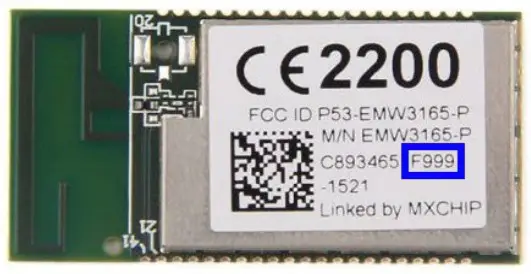 Once connected to the thermostat as an access point, open its web page by typing its default address of 192.168.0.1 with admin for username and no password. Web page pictured below will be presented for IP Network Configuration. The default IP configuration is shown below.
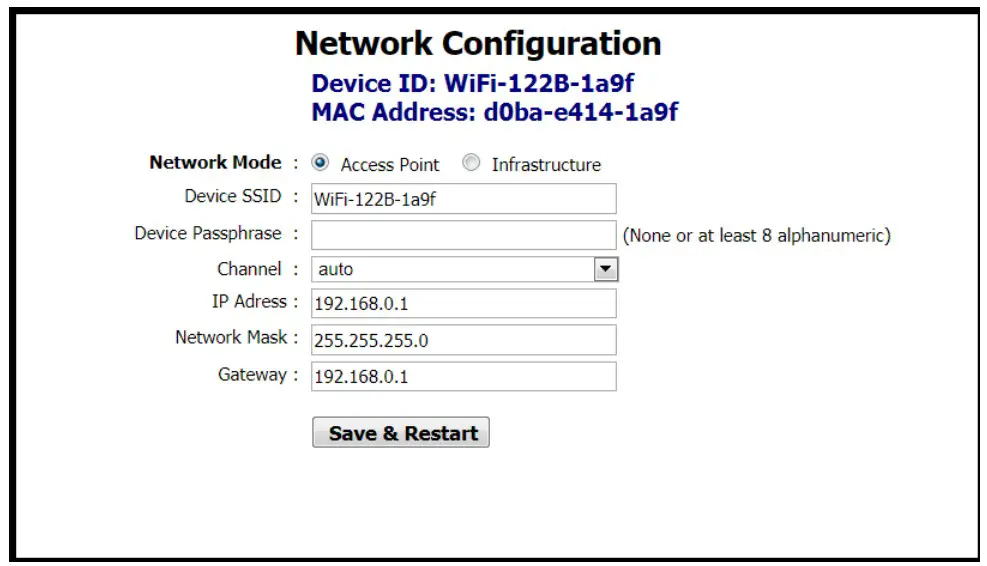 After initial connection using laptop or tablet or smart phone, the Wi-Fi mode in the thermostat can be changed to Infrastructure mode. The local Wi-Fi router/access point can be selected from the Available AP drop-down list, or an AP SSID can be entered manually. Enter the AP Passphrase to authenticate and connect to the AP. ATTENTION: Once connected to the Wi-Fi access point, the Wi-Fi thermostat will use the Wi-Fi access point credentials. To ensure a secure connection, when setting up the Wi-Fi router (Access Point) the thermostats will be connected to, make sure you set up a strong access point passphrase (password) and encryption method! This is required for Wi-Fi client devices to connect to the Wi-Fi router securely and it is essential to cyber security. Creating a good Wi-Fi password is the first step in creating a secure environment that is inaccessible to unauthorized parties. Use the following tips when creating a Wi-Fi access point passphrase:
- Passphrase should be a minimum of eight characters (maximum 15 characters), the more random the better. Use a mix of letters (uppercase and lowercase), numbers, and symbols.
- Do not reuse or repeat passwords across router installations or job sites.
- Change WiFi password regularly (not required but very secure). Provides guidelines for building maintenance personnel.
- Disable broadcast of SSID. This is a very simple setting which stops the broadcast of the access point SSID, and only authorized parties who know the SSID can connect to it. This is configured in the Wi-Fi router.
- Store passwords in a safe place, limit access to authorized parties only, and provide instructions for password reset and reconfiguring a strong password in cases of reconfiguring the network in the future.
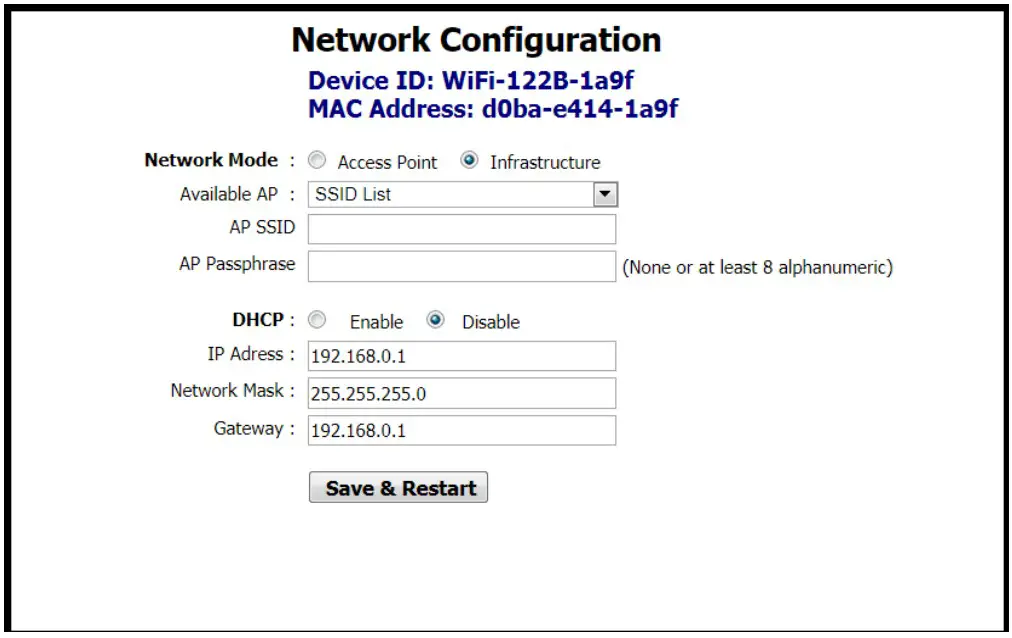
Choose an option for DHCP addressing using the radio buttons. 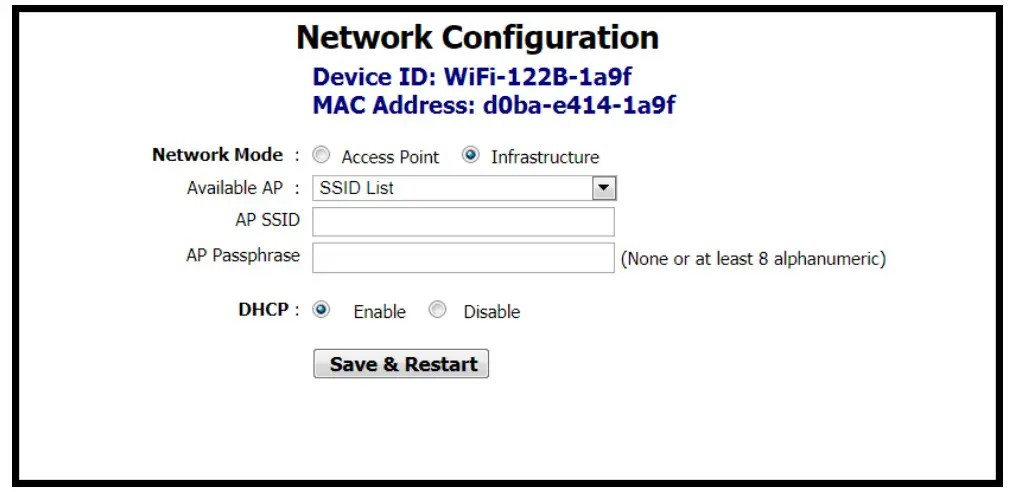 The thermostat supports DHCP addressing and will acquire an IP address from the router/access point automatically if you chose Enable next to DHCP. If you chose Disable, you must assign an IP Address, Network Mask, and Gateway Address within the Wi-Fi router IP subnet manually.
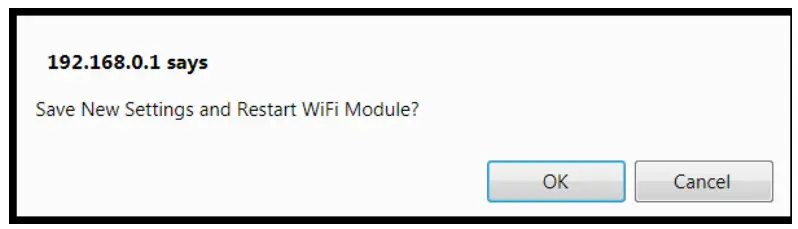
  A reboot of the thermostat is required for new IP configuration to take effect. Click the Save & Restart button to reboot the thermostat, and you will be prompted to confirm the restart. Click OK to Save New Settings and Restart or click Cancel to revisit IP configuration.
  When OK is clicked, a confirmation is displayed to indicate configuration is stored in the thermostat’s internal memory. After reboot, the new thermostat credentials will be admin for username and the newly configured Access Point’s password for password.
 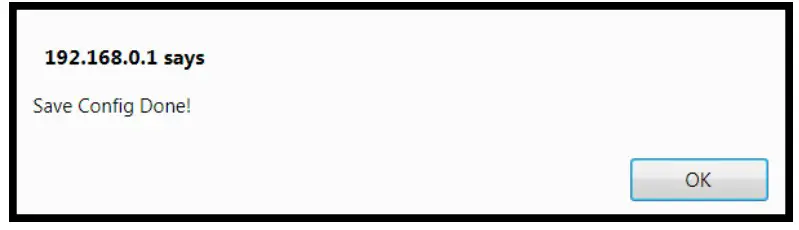 Click OK on the confirmation message and wait 20 seconds for the reboot process to complete.
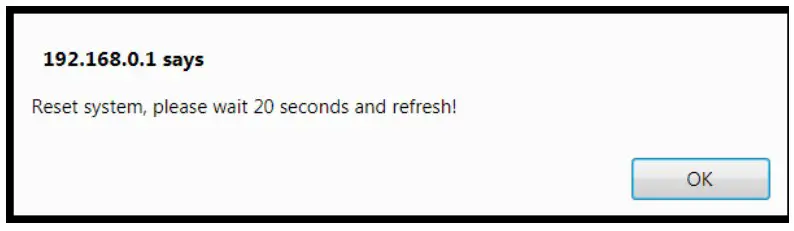 While rebooting, the thermostat will display “DP” icon in the lower right corner to indicate it is in the process of searching and connecting to the AP. Once the “DP” stops flashing, the thermostat has successfully connected to Wi-Fi access point. After reboot of the thermostat, the new Infrastructure mode with new IP settings will be used. The thermostat is now connected to the local Wi-Fi network AP selected in configuration screen and will not show up as an access point itself any longer. If you are unsure of the thermostat’s IP address, it could be viewed through the Engineering Menu in items (IP-1) for the first octet, (IP-2) for the second octet, (IP-3) for the third, and (IP-4) for the fourth octet of the IP address, or if you have access to the Wi-Fi access point, its “statistics” or “connected devices” web page will show the BASstat BW2’s IP address as well as MAC address (the same address in Engineering Menu items Phy1, Phy2, and Phy3 and the printed MAC on the back of the thermostat Wi-Fi module (outlined in blue above).
Reset Settings
The BASstat will store configuration in the event of power loss. If configuration fails or the thermostat needs to be configured to use a different Wi-Fi access point, the thermostat must be reset and reconfigured. There are 2 reset settings options for the Wi-Fi thermostat:
- Boot will restore Wi-Fi communication parameters to default, but it will maintain control algorithm settings. Select (boot) engineering menu item and press MODE to confirm.
- Reset will restore all values to default and can be selected from engineering menu (rSt).
Foreign Device Registration (FDR)
Communication across IP subnets requires a Broadcast Management Device (BBMD) device or support for Foreign Device Registration (FDR) feature. The BASstat supports the FDR feature to register with a remote BBMD which could be a BACnet client or a BMS headend. To communicate with BACnet clients across subnets, the BAST321HP-BW2 can do FDR registration with a remote BBMD. The BACnet BBMD feature requires a BACnet device with BBMD capability, such as a BACnet router or other, to be installed and configured on the network. BBMD allows discovery of all BACnet/IP devices in the IP subnet instead of just the FDR device.
- Select As Foreign Device.
- The BBMD IP is the address of the BBMD device on the remote network. Enter the address of the BBMD with which the BAST-321HP-BW2 will perform Foreign Device Registration (FDR) if there is no local BBMD device in the same subnet as the BAST321HP-BW2 providing communication to the remote subnet.
- Enter the UDP port for BBMD.
- Time to Live is the BBMD registration time. Specify the seconds between successive FDR registrations. Recommended value is 100.
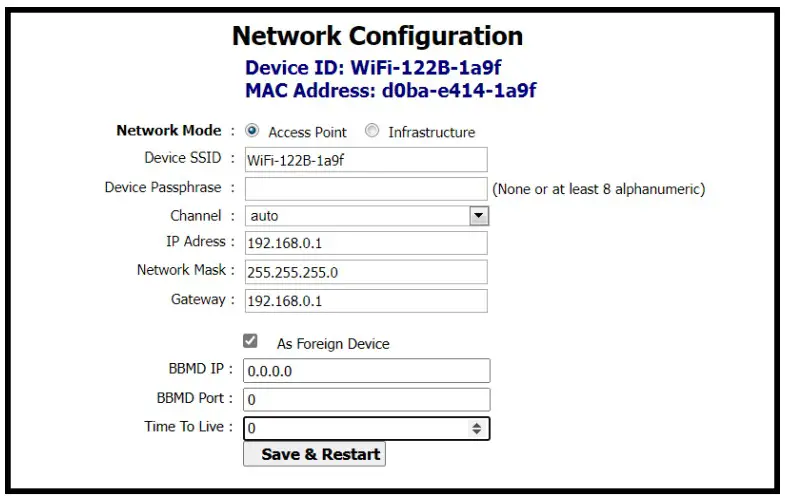 A reboot of the thermostat is required for new IP configuration to take effect. Click the Save & Restart button to reboot the thermostat, and you will be prompted to confirm the restart. Click OK to Save New Settings and Restart or click Cancel to revisit IP configuration.
 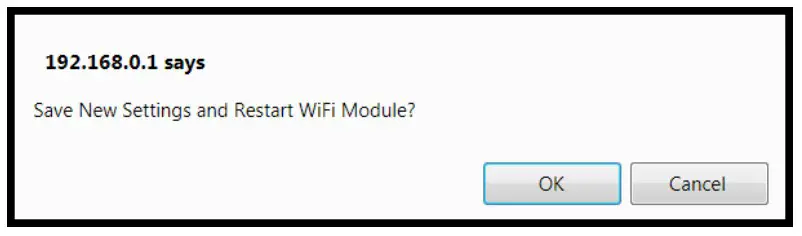 When OK is clicked, a confirmation is displayed to indicate configuration is stored in the thermostat’s EEPROM. After reboot, the new thermostat credentials will be admin for username and the newly configured Access Point’s password for password.
Click OK on the confirmation message and wait 20 seconds for the reboot process to complete.
BACnet Object Table – BW2 Wi-Fi Model (BACnet/IP)
| Object name | Type & Instance | Object Property (Readable/Writable) | Range |
| BACnet Thermostat | Device 600001 | Model Name (R) | 623C |
| Application Software Version (R) | Apr-13-2021 | ||
| Object Identifier (R) | |||
| Object Name (R/W) | 32 characters (max.) |
Object name | Type & Instance | Readable/ Writable | Description | Range and Definition |
| Current Temperature | AI 0 | R | Current Temperature | -999~9999: -99.9~999.9 ℃/°F |
| Active Temperature Setpoint | AI 1 | R | Active Temperature Set- Point | °C :0~500 (0.0~50.0℃) °F : 320~1220 (32.0~122.0°F) |
| Built-in Space Temperature Sensor | AI 2 | R | Built-in Temperature Sensor Reading | -999~9999:-99.9~999.9 ℃/°F |
| Remote Temperature Sensor | AI 3 | R | Remote Temperature Sensor Reading | -999~9999:-99.9~999.9 ℃/°F |
| Current Humidity | AI 4 | R | Current Humidity | 0~1000: 0.0~100.0%RH |
| Object name | Type & Instance | Readable/ Writable | Description | Range and Definition |
| Current Dew Point | AI 5 | R | Current Dew Point | -999~9999: -99.9~999.9 °C/°F |
| Current CO2 Reading | AI 6 | R | Current CO2 Reading | 0~3000: 0~3000 ppm |
| Control Valve Feedback | AI 7 | R | Control Valve Feedback | 0~1000 (0.0%~100.0%) |
| Modulating/ Floating Output 1 | AI 8 | R | Modulating/ Floating Output 1 | 0~100: 0~100 % |
| Modulating/ Floating Output 2 | AI 9 | R | Modulating/ Floating Output 2 | 0~100: 0~100 % |
| Modulating Fan Output | AI 10 | R | Modulating Fan Output | 0~100: 0~100 % |
| CO2 Control Output Percentage | AI 11 | R | CO2 Control Output Percentage | 0~100: 0~100 % |
| Current CO | AI 12 | R | Current CO Reading | 0~3000: 0~300.0 ppm |
| AI 1 Percentage | AI 13 | R | Analog Input 1 Percentage Value | 0~1000 (0.0%~100.0%) |
| 2nd Remote Temperature | AI 14 | R | 2nd remote temperature Value | -999~9999:-99.9~999.9℃ /°F |
| 3rd Remote Temperature | AI 15 | R | 3rd Remote Temperature Sensor Reading Value | -999~9999:-99.9~999.9℃ /°F |
| Cooling Temperature Setpoint | AV 0 | R/W | Cooling Temperature Set Point | °C :0~500 (0.0~50.0℃) °F: 320~1220 (32.0~122.0°F) |
| Space Temperature via Network | AV 1 | R/W | Space Temperature Via Network | -999~9999 (-99.9~999.9℃/°F) |
| Timer Off | AV 2 | R/W | Timer Off (Only for Models with Countdown Timer Function Available). | 0~24: 0~24 Hours Count Down 0: Disable |
| Heating Temperature Setpoint | AV 3 | R/W | Heating Temperature Set Point | -999~9999: -99.9~999.9 ℃/°F |
| Hr-Running Time | AV 4 | R/W | Running Time of Valve (Hr.) | 0~65535 (Hr.) For Reading But 0~30000 (Hr.) For Writing. |
| M-Running Time | AV 5 | R/W | Running Time of Valve (M.) | 0~59 (Minute) |
| Sec-Running Time | AV 6 | R/W | Running Time of Valve (Sec.) | 0~59 (Sec.) |
| Deadband | AV 7 | R/W | Deadband | 0-18° (default 4°) |
| Unoccupied Cool Setpoint | AV 8 | R/W | Unoccupied Cooling Setpoint | °C: 250~300 (25.0~30.0°C) °F: 770~860 (77.0~86.0°F) |
| Unoccupied Heat Setpoint | AV 9 | R/W | Unoccupied Heating Setpoint | °C: 100~220 (10.0~22.0°C) °F: 500~715(50.0~71.5°F) |
| Integral-Cycle Time | AV 10 | R/W | Integral Time and Output Cycle Time | 0~500 (Sec.) |
| Analog Minimum Output for AO1 | AV 11 | R/W | Minimum Output Voltage in Digital Value When Reach | 0~125 (LSB) |
| Span Offset for AO1 | AV 12 | R/W | Span Offset for AO1 | -55~0 (LSB) |
| Low Setpoint Limit | AV 13 | R/W | Low Limit for Set-Point Temperature | °C :0~500 (0.0~50.0℃) °F: 320~1220(32.0~122.0°F) |
| High Setpoint Limit | AV 14 | R/W | High Limit for Set- Point Temperature | °C :0~500 (0.0~50.0℃) °F: 320~1220(32.0~122.0°F) |
| Temperature Offset | AV 15 | R/W | Offset for Current Temperature | °C: -100~100 (- 10.0~10.0°C) °F: -180~180 (-18.0~18.0°F) |
| Proportional Band- Stage Width | AV 16 | R/W | Proportional Band or Stage Width | °C :0~100 (00~10.0 °C) °F: 0~180 (00~18.0 °F) |
| Stage Differential | AV 17 | R/W | Stage Differential | °C :1~10 (0.1~1.0 °C) °F: 1~18 (0.1~1.8 °F) |
| Lock | AV 18 | RW | LOCK | Bit Definition: 0: MODE button (dec=1) 1: Down button (dec=2) 2: Up button (dec=4) 3: FAN SPEED button (dec=8) 4: Power On/Off button (dec=16) 5: SET (or ℃/℉) button (dec=32) 6: ESI contact detection (dec=64) 7: Door/Window contact detection (dec=128) 8: Modification for communication parameters (dec=256) i.e. baud rate, MAC addr, device inst. 9: Control DOs by thermostat algorithm (0) or BACnet sup. (1) (dec=512) 10~15: reserved/unused Bit Value 0: Unlock / enable 1: Lock / disable Examples (add dec values to lock multiples) For more details see Lock Function Setup and Examples section of this manual |
| Modulating/floating Control Out Percentage | AV 19 | R/W | Percentage of Modulating/ Floating Control Output | 0~100 (0%~100%) |
| Device Instance | AV 20 | R/W | Device Instance | 0~4194302 (Note: Changing this value needs to unlock modification for communication parameters in advance. i.e. AV17=0~255 or 512~768. Please refer to LOCK(AV17) for details) |
| UDP Port No | AV 21 | R/W | UDP Port Number | 0~65535 |
| Humidity Offset | AV 22 | R/W | Humidity Offset Value (CH models only) | -300~300 (-30.0~30.0 %RH) |
| Cooling Short Cycle Delay | AV 23 | R/W | Cooling Short Cycle Delay | 1~3 Minutes |
| Cooling Maximum Cycles per Hour | AV 24 | R/W | Cooling Maximum Cycles per Hour | 2~6 Cycles |
| Heating Short Cycle | AV 25 | R/W | Heating Short Cycle Delay | 0~3 Minutes |
| Heating Maximum Cycles per Hour | AV 26 | R/W | Heating Maximum Cycles per Hour | 2~8 Cycles |
| Analog Minimum Output for AO2 | AV 27 | R/W | Minimum Output Voltage in Digital Value When Reach Low Limit for AO2 | 0~125 (LSB) |
| Span Offset for AO2 | AV 28 | R/W | Span Offset for AO2 | -55~0 (LSB) |
| Heartbeat Rate | AV 29 | R/W | Communication Heartbeat Minimum Rate | 10~3600 s |
| Humidity Proportional Band- Stage Width | AV 30 | R/W | Proportional Band or Stage Width for Humidity Control Output | 0~1000 (0.0~100.0) %RH |
| Humidity Stage Differential | AV 31 | R/W | Stage Differential for Humidity Control Output | 0~1000 (0.0~100.0) %RH |
| Proportional Band or stage width 2 | AV 32 | R/W | Stage Diff for humidity control | -100.0~100.0 ppm |
| CO2 Offset | AV 33 | R/W | CO2 Offset Value | -1000~2000 ppm |
| After Hour Extension Run Time | AV 34 | R/W | After Hour Extension Run Time | 5~20(0.5~2.0) Hour |
| Input Low Value of Valve Feedback | AV 35 | R/W | Input Low Value of Control Valve Feedback | -1000~1000 (-100.0~100.0 %) |
| Input High Value of Valve Feedback | AV 36 | R/W | Input High Value of Control Valve Feedback | -1000~1000 (-100.0~100.0 %) |
| Options | AV 37 | R/W | Options | Bit Definition — Bit 0: T or SP Bit 1~15: Reserved |
| DI Contact Definition | AV 38 | R/W | DI Contact Definition | Bit Definition — Bit 0: DI-1 1: DI-2 Bit 2~15: Reserved *Bit value:0-NO, 1-NC |
| Minimum Cooling Temperature Setpoint | AV 39 | R/W | Minimum Cooling Temperature Setpoint | °C:0.0 ~50.0 °F: 32.0~122.0 |
| Minimum Heating Temperature Setpoint | AV 40 | R/W | Minimum Heating Temperature Setpoint | °C:0.0 ~50.0 °F: 32.0~122.0) |
| Minimum Fan Output | AV 41 | R/W | Minimum Fan Output at Auto Fan Mode (for Modulating Fan Application) | 0%~Reg 51 |
| Maximum Fan Output | AV 42 | R/W | Maximum Fan Output at Auto Fan Mode (for Modulating Fan Application) | Reg 50~100% |
| Low Fan Speed Setting | AV 43 | R/W | Low Fan Speed Setting (for Modulating Fan Application) | 0%~Reg 53 |
| Med. Fan Speed Setting | AV 44 | R/W | Med. Fan Speed Setting (for Modulating Fan Application) | Reg 52~Reg54 |
| Hi Fan Speed Setting | AV 45 | R/W | Hi Fan Speed Setting(For Modulating Fan Application) | Reg 53~100% |
| Minimum Off Time | AV 46 | R/W | Minimum Off Time | 0~600 seconds |
| Minimum On Time | AV 47 | R/W | Minimum On Time | 0~600 seconds |
| Integral-cycle Time-2 | AV 48 | R/W | Integral Time and Output Cycle Time 2 | 10~500 sec. |
| Set Point for Humidity | AV 49 | R/W | Set Point for Humidity Control | 0~1000 (0.0~100.0 %RH) |
| Dew Point Set Point | AV 50 | R/W | Dew Point Temperature Set Point | -999~9999: -99.9~999.9 ℃/°F |
| Occupancy Status | BI 0 | R | Status of Occupancy | 0: Room Occupied 1: Room Unoccupied |
| Window-Door Status | BI 1 | R | Window/ Door Status | 0: Door/Window Closed 1: Door/Window Open |
| Cooling-heating Status | BI 2 | R | Status of Cooling/Heating Control Output | 0: Close & Off 1: Open & On |
| Relay 1 Status | BI 3 | R | Status of Relay 1 (O/B Valve) | 0: Off, 1: On |
| Relay 2 Status | BI 4 | R | Status of Relay 2 (Comp 1) | 0: Off, 1: On |
| Relay 3 Status | BI 5 | R | Status of Relay 3 (Comp 2) | 0: Off, 1: On |
| Relay 4 Status | BI 6 | R | Status of Relay 4 (Heating Stage 3) | 0: Off, 1: On |
| Relay 5 Status | BI 7 | R | Status of Relay 5 | 0: Off, 1: On |
| Relay 6 Status | BI 8 | R | Status of Relay 6 | 0: Off, 1: On |
| Relay 7 Status | BI 9 | R | Status of Relay 7 (Fan) | 0: Off, 1: On |
| Dl 1 Status | BI10 | R | Status of Digital Input 1 | 0: Off, 1: On |
| Dl 2 Status | BI11 | R | Status of Digital Input 2 | 0: Off, 1: On |
| Dl 3 Status | BI12 | R | Status of Digital Input 3 | 0: Off, 1: On |
| Dl 4 Status | BI13 | R | Status of Digital Input 4 | 0: Off, 1: On |
| Dl 5 Status | BI14 | R | Status of Digital Input 5 | 0: Off, 1: On |
| Dl 6 Status | BI15 | R | Status of Digital Input 6 | 0: Off, 1: On |
| Dl 7 Status | BI16 | R | Status of Digital Input 7 | 0: Off, 1: On |
| Fan Status | BI17 | R | Fan Status | 0: Off, 1: On |
| Flow Switch Status | BI18 | R | Differential Pressure (Air Flow) Switch Status | 0: Off, 1: On |
| Trip Status | BI19 | R | Trip Alarm Status | 0: Off, 1: On |
| Filter Status | BI20 | R | Filter Dirty Alarm Status | 0: Off, 1: On |
| Smoke/ Fire Alarm Status | BI21 | R | Smoke/ Fire Alarm Status | 0: Off, 1: On |
| Status | BI22 | R | Current Status | 0: Off, 1: On |
| Valve Status | BI23 | R | Valve Status | 0: Off, 1: On |
| Alarm | BI24 | R | Alarm Status | 0: Off, 1: On |
| Frozen Alarm Status | BI25 | R | Frozen Alarm Status | 0: Off, 1: On |
| After Hour Status | BI26 | R | After Hour Status | 0: Normal Hour 1: After Hour |
| Occupancy Contact Definition | BV 0 | R/W | Occupancy(DI1) Contact Definition (this feature is model specific) | 0: N.O.= Occupied 1: N.C. = Occupied |
| Cooling Direct- Reverse Acting | BV 1 | R/W | Modulating Cooling Direct/ Reverse Signal Output | 0: Direct (0 To10v) 1: Reverse (10 To 0V) |
| Heating Direct- Reverse Acting | BV 2 | R/W | Modulating Heating Direct/ Reverse Signal Output | 0: Direct (0 To10v) 1: Reverse (10 To 0V) |
| Reversing Valve Polarity | BV 3 | R/W | Reversing Valve Polarity | Cooling/Heating 0: N.O./ N.C. 1: N.C./ N.O. |
| Window-Door Contact Definition | BV 4 | R/W | Door or Windows(DI2) Contact Definition | 0: N.O. 1: N.C. |
| On-Off Control | BV 5 | R/W | On/Off Status of Thermostat | 0: Off, 1: On |
| Temperature Scale | BV 6 | R/W | °C/ °F | 0: °C 1: °F |
| Relay 1 Control | BV7 | R/W | On/Off Control of Relay 1 (O/B Valve) | 0: Off, 1: On |
| Relay 2 Control | BV8 | R/W | On/Off Control of Relay 2 (Comp 1) | 0: Off, 1: On |
| Relay 3 Control | BV9 | R/W | On/Off Control of Relay 3 (Comp 2) | 0: Off, 1: On |
| Relay 4 Control | BV10 | R/W | On/Off Control of Relay 4 (Heating Stage 3) | 0: Off, 1: On |
| Relay 5 Control | BV11 | R/W | On/Off Control of Relay 5 | 0: Off, 1: On |
| Relay 6 Control | BV12 | R/W | On/Off Control of Relay 6 | 0: Off, 1: On |
| Relay 7 Control | BV13 | R/W | On/Off Control of Relay 7 (Fan) | 0: Off, 1: On |
| Occupancy Command | BV 14 | R/W | Room Occupancy Setting | 0: Occupied, 1: Unoccupied |
| Fan Output for Heating | BV15 | R/W | Disable/ Enable Fan Output for Heating | 0: Disable 1: Enable |
| Heartbeat | BV16 | R/W | Communication Heartbeat Flip-Flop | 0: Disable 1: Enable |
| Fan Mode | MSV 0 | R/W | Fan Mode | 1: Auto 2: Low 3: Med. 4: Hi |
| System Mode | MSV 1 | R/W | Working Mode: Heat, Cool or Ventilation | 1: Cool Mode 2: Heat Mode 3: Ventilation @ Cool Mode 4: Ventilation @ Heat Mode |
| Sleep | MSV 2 | R/W | Sleep (Only for Models with Sleep Function Available). | 1: Disable, 2: 0 Hr. Sleep 3: 0.5 Hr. Sleep 4: 1 Hr. Sleep 5: 1.5 Hrs. Sleep, 6: 2 Hrs. Sleep |
| Temperature Source | MSV3 | R/W | Space Temperature Source | 1: Built-In Temp. Sensor 2: Remote Temp. Sensor 3: Assigned through BACnet |
| Lowest Fan Speed | MSV 4 | R/W | Lowest Fan speed in Auto Fan mode | 1: Stop 2: Low 3: Med. 4: Hi |
| Fan Speed Status | MSV 5 | R/W | Fan Speed Status | 1: Stop 2: Low 3: Med 4: Hi |
| Display Options | MSV 6 | R/W | LCD Display Options | 1: T & Time (if available) 2: SP & Time (if available) 3: T & CO2 (if available) 4: CO2 & Time (if available) 5: SP & CO2 (if available) 6: T & RH (if available) 7: T & Valve (if available) |
| Control Type | MSV 7 | R/W | Control Type Selection | 1: Cooling Only 2: Cooling or Heating Manual Changeover 3: Cooling and Heating Auto Changeover (default) 4: Heating Only NOTE: Cool only and Heat only types disabled |
Warranty
Contemporary Controls (CC) warrants this product to the original purchaser for two years from the product shipping date. Product returned to CC for repair is warranted for one year from the date the repaired product is shipped back to the purchaser or for the remainder of the original warranty period, whichever is longer.
If the product fails to operate in compliance with its specification during the warranty period, CC will, at its option, repair or replace the product at no charge. The customer is, however, responsible for shipping the product; CC assumes no responsibility for the product until it is received.
CC’s limited warranty covers products only as delivered and does not cover repair of products that have been damaged by abuse, accident, disaster, misuse, or incorrect installation. User modification may void the warranty if the product is damaged by the modification, in which case this warranty does not cover repair or replacement.
This warranty in no way warrants suitability of the product for any specific application. IN NO EVENT WILL CC BE LIABLE FOR ANY DAMAGES INCLUDING LOST PROFITS, LOST SAVINGS, OR OTHER INCIDENTAL OR CONSEQUENTIAL DAMAGES ARISING OUT OF THE USE OR INABILITY TO USE THE PRODUCT EVEN IF CC HAS BEEN ADVISED OF THE POSSIBILITY OF SUCH DAMAGES, OR FOR ANY CLAIM BY ANY PARTY OTHER THAN THE PURCHASER.
THE ABOVE WARRANTY IS IN LIEU OF ANY AND ALL OTHER WARRANTIES, EXPRESSED OR IMPLIED OR STATUTORY, INCLUDING THE WARRANTIES OF MERCHANTABILITY, FITNESS FOR PARTICULAR PURPOSE OR USE, TITLE AND NONINFRINGEMENT.
Returning Products for Repair
Return the product to the location where it was purchased or follow the instructions at the URL below: www.ccontrols.com/rma.htm
Declaration of Conformity
Additional compliance documentation can be found on our website. www.ccontrols.com
| United States Contemporary Control Systems, Inc. Tel: +1-630-963-7070 Fax: +1-630-963-0109 [email protected] | China Contemporary Controls (Suzhou) Co. Ltd Tel: +86 512 68095866 Fax: +86 512 68093760 [email protected] www.ccontrols.com | United Kingdom Contemporary Controls Ltd Tel: +44 (0)24 7641 3786 Fax:+44 (0)24 7641 3923 [email protected] | Germany Contemporary Controls GmbH Tel: +49 341 520359 0 Fax: +49 341 520359 16 [email protected] |
UM-15094500-AA0
 Contemporary Controls